Do-It-Yourself (DIY) Artificial Pancreas Systems for Type 1 Diabetes: Perspectives of Two Adult Users, Parent of a User and Healthcare Professionals (original) (raw)
Nicola’s Story
I am a 31-year veterinary surgeon living with type 1 diabetes since 2008. With a scientific background I have always strived for the “perfect” control of my condition, but this has always come with a huge and unrelenting mental daily burden. Around 18 months ago I stumbled across the concept of looping online and began to learn about this automated insulin delivery system. I was excited at the possibility of having some of my disease burden alleviated. Loop utilises inputted data and glucose readings to predict future blood glucose level and will adjust basal rates up or down accordingly. The algorithm alters this decision every 5 min and the predicted trend of your blood glucose is shown, alongside active insulin, insulin delivery and active carbohydrates. This information is presented on the Loop home screen (Fig. 1). It is recommended to set duration of insulin action (DIA) to 6 h with Loop, longer than that recommended for traditional pumping to prevent insulin stacking.
Fig. 1
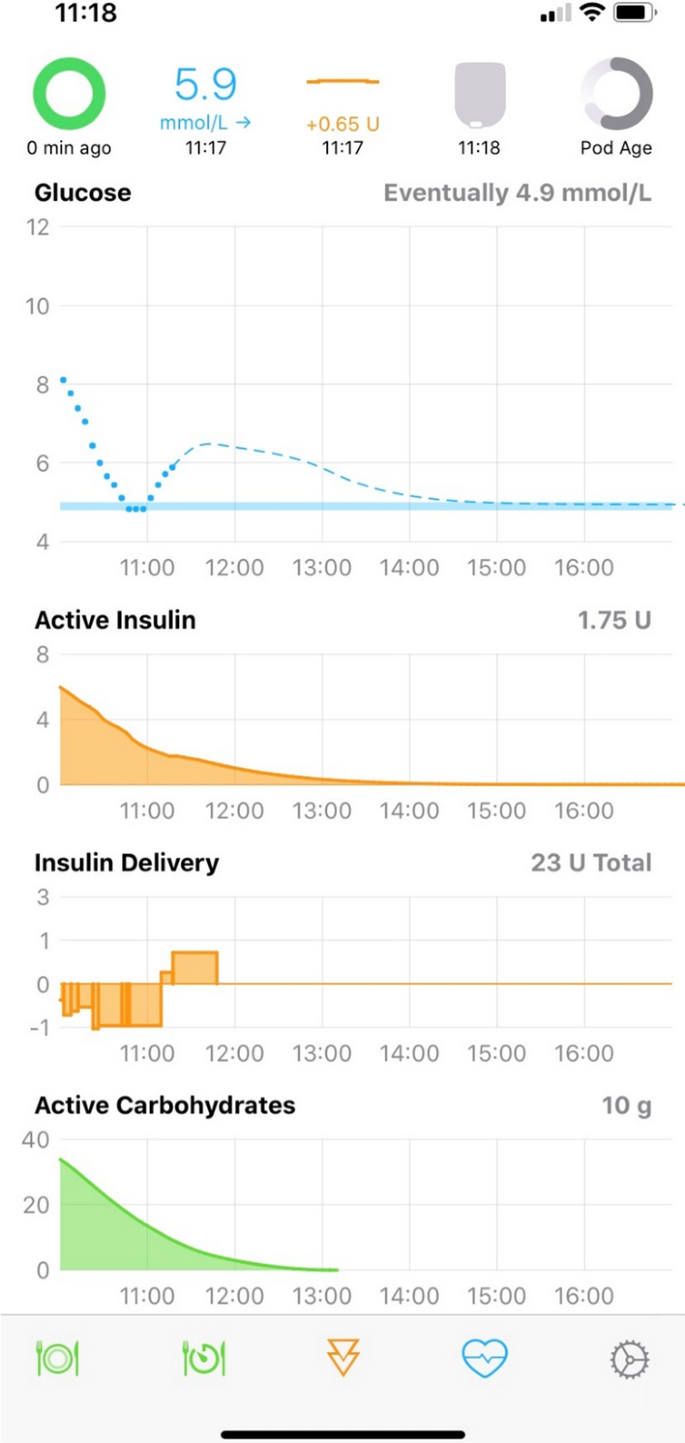
Loop app home screen on an iPhone showing active carbohydrates, insulin delivery, active insulin
During the transition to Loop one of the challenges was learning to understand and trust the different recommendations given for boluses which did not always correlate with what I would have calculated using traditional pump therapy. It took time to get used to the concept that bolus and basal are more interchangeable with Loop, so an increased basal after a meal needs to be considered as an extended bolus would on traditional pump therapy. Switching from using a Personal Diabetes Manager (PDM) to my phone and using my Apple watch allowed me to more discretely manage my condition but this came with the practical challenge of ensuring I always had enough phone battery power or a charger with me. I also had to ensure I always had my RileyLink with me, but soon got used to this. At home it can be in another room and still communicate effectively but I try to keep it with me as much as possible.
I set up a Nightscout profile which collates all of my continuous glucose monitor (CGM), insulin delivery and carbohydrate information to produce reports which can then be viewed by healthcare professionals.
Loop utilises “carbohydrate absorption time” rather than extended boluses. Carbohydrate absorption is tracked over time and basal rates are adjusted accordingly after the initial upfront bolus. A progress bar shows carbohydrate absorption, helping the user to learn different foods’ absorption profiles so more educated guesses can be made in future for the same meal, minimising the risk of hypoglycaemia. High fat meals such as pizza are handled better with Loop than I managed with conventional pumping and whilst I cannot say that Loop stops any blood glucose rises, it has reduced my time out of range and the height of any spikes, reducing the requirement for repeated correction doses. I still find that pre-bolusing is the most successful way of preventing glucose spikes after meals; there is also a user preset “pre-meal” setting which can be enacted for up to 1 h before eating, allowing more insulin on board when the meal is digested.
Exercise-induced hypos are less common for me on Loop, as the algorithm anticipates any impending low blood glucose and reduces the basal rate. Carbohydrate portions for correction of hypoglycaemia are lower, for example I now require 1–2 dextrose tablets instead of 3 to promptly correct hypoglycaemia and avoid post-correction hyperglycaemic excursions. Overrides and temporary targets are a valuable feature to deal with scenarios where insulin requirements differ from baseline. I use these settings commonly for work, exercise and post exercise to combat hypoglycaemia (Fig. 2).
Fig. 2
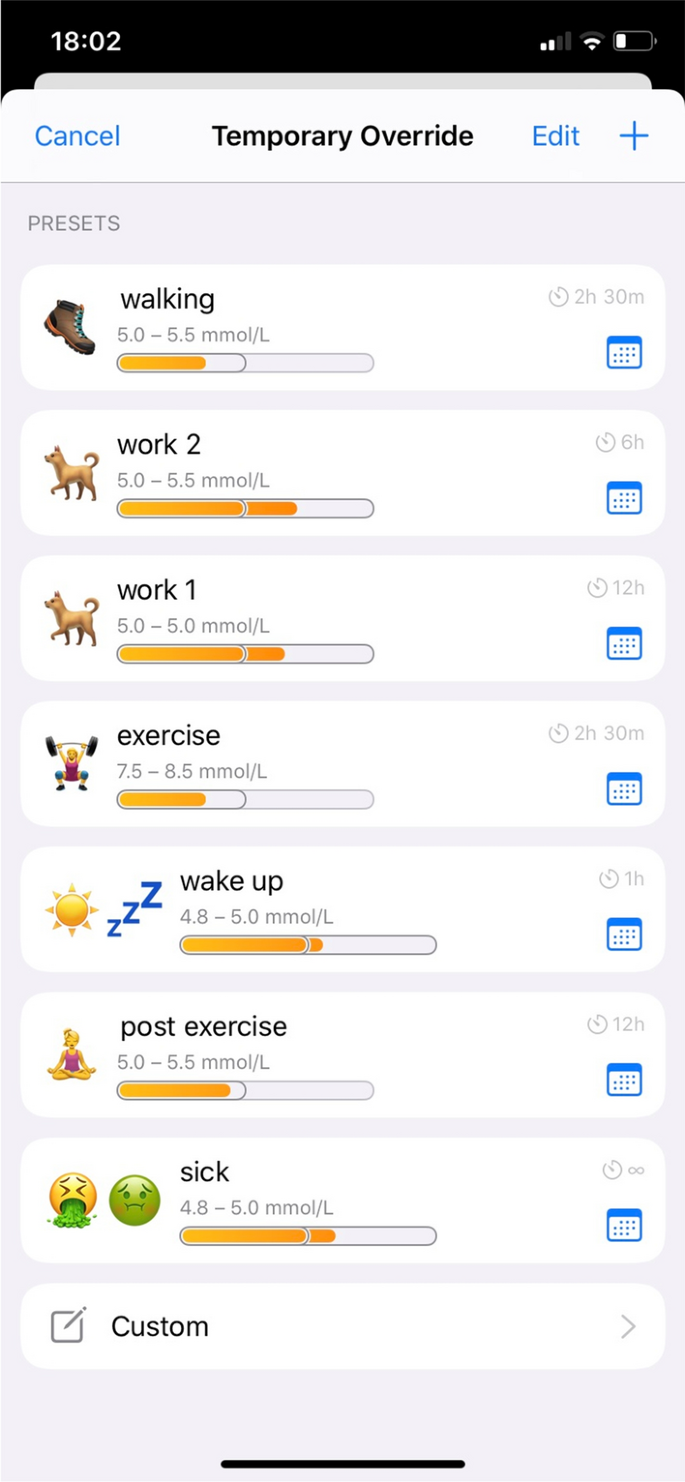
Temporary preset overrides for different situations
There are some downsides to the Loop system; although for me, these are far outweighed by the positives. It requires a significant ongoing financial input and a substantial time to read and understand the algorithm and to set up the system. Being somewhat technologically savvy is also a bonus, although the instructions for setting up the system are comprehensive and there is a community of people available online to help. However, new users should be under no illusion that you simply “plug in and go”—Loop needs accurate settings such as carbohydrate ratios, insulin sensitivity and target glucose ranges to work safely and effectively. More practical pitfalls with looping relate to the CGM used; I use the Dexcom G6 which I have found to be very reliable and accurate in its readings; however, on the infrequent occasion that there is a sensor error, the lack of CGM data means that Loop cannot function. Insulin delivery will continue as the OmniPod will revert back to its preset basal rate but if there are any carbohydrates on board then Loop cannot make its basal adjustments to compensate for this.
After just under 12 months of looping, I found that my initial monetary, effort and time investment paid off as improvement in my overall control and quality of life.
My HbA1c has reduced from 6.5% to 5.5% and my time-in-range (TIR) is 76% for my personalized target range of 3.9–7.8 mmol/l (90–95% for the standard target range of 3.9–10 mmol/l) with less post-meal hyperglycaemia (Fig. 3). Improvements in my quality of life include an undisturbed overnight sleep, less time spent making decisions regarding insulin management and improved confidence when exercising.
Fig. 3
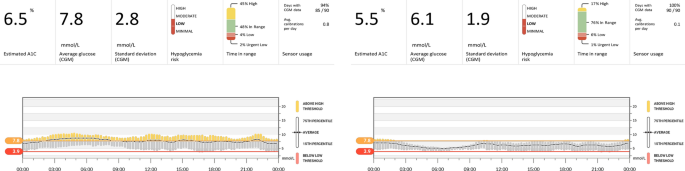
A 90-day average before (left) and after (right) Nicola started using looping shows improvements in time-in-range (TIR) from 48% to 76%, in the average glucose and standard deviation from 7.8 ± 2.8 to 6.1 ± 1.9 mmol/l
Loop technology is undergoing constant development, with input and suggestions from users, researchers and healthcare specialists. I am excited to see where this project goes next and cannot express my gratitude to those involved in its creation/maintenance and to my healthcare team for supporting me in my decision to use a combination of licensed and unlicensed products in an off-label manner.
Cormac’s Story
I was diagnosed with type 1 diabetes in January 2018, aged 16 and began treatment with a multiple injection regimen (MDI) and glucose monitoring with an Accu-Chek meter. After approximately 8 months of maintaining good control and an HbA1c of below 50 mmol/mol, I began to find it more difficult to keep within a healthy range. I left one clinic appointment in tears, feeling like I’d failed with an HbA1c result of above 70. Some days I didn’t want to see the blood glucose levels so I didn’t carry out many finger prick tests; other days I checked obsessively with over 20 checks being recorded on my meter. These feelings affected my dietary habits and, on some days, I refused to eat as I felt eating wasn’t worth the bother of doing the check or the injection. After sharing these thoughts with my diabetes specialist nurse (DSN), I was offered the FreeStyle Libre. This felt like a positive step in my management as it would alleviate some of my finger prick checks. However, decisions to scan, when to scan and then to decide on the correct bolus were ever-present. It was also frustrating not knowing what was happening between checks and not knowing what was going to happen to my glucose levels in the near future.
I have a general interest in technology and my research led me to an article which described the MiaoMiao, a device that was capable of transforming the FreeStyle Libre into a CGM. I was fortunate that my parents agreed to purchase a MiaoMiao for me in May 2019 which, for the first time, allowed constant monitoring of glucose levels. In addition, using Nightscout, I was able to see predicted glucose levels and share my data with my parents and my DSN. My parents are conscientious supporters in my management of diabetes and sharing the data with them meant that our conversations weren’t solely about blood glucose levels anymore! Nightscout also predicts HbA1c values, meaning that I could attend clinic appointments with some idea of how the conversation with the consultant was going to go.
My research also led me to discover DIY APS (looping) with the potential to connect my FreeStyle Libre/MiaoMiao combination to a suitable insulin pump via a device called a RileyLink. I was supported in my decision to move from MDI to the OmniPod in June 2019. I chose the OmniPod for its compatibility with the DIY APS system. I spoke at length to my DSN about my intention to try DIY APS; she was supportive of this patient-led management of my diabetes, whilst also ensuring that I was aware that looping is not currently regulated. After I had used the OmniPod for approximately 4 weeks with its PDM, my parents agreed to purchase a RileyLink in July 2019. Whilst waiting for its delivery from USA I thoroughly read through Loop docs online, joined looping, AndroidAPS and OpenAPS groups on social media and began to build the iOS Loop app. I found the creation of the app fairly straightforward, following the instructions in the Loop docs. The connection between the Riley Link and the OmniPod was almost identical to the process of connecting the OmniPod to the PDM. I initially used the Loop app in its open loop mode which requires user verification and confirmation of all decisions made by the app. I found that all the suggested decisions were sensible, much more frequently than I would have made independently (every 5 min) and put a greater weighting on the predicted glucose levels than I would have previously done. Figure 4 shows how I loop with the different components.
Fig. 4
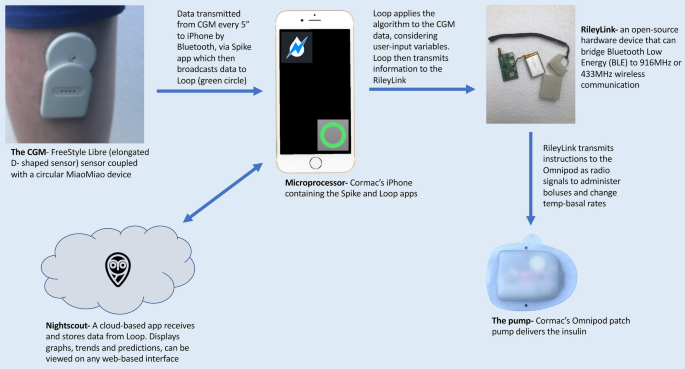
Diagram describing how different components of Cormac’s APS communicate to close the loop
I felt confident in the open loop and the decisions that were being suggested, so, on the second evening, I decided to close the loop to see what would happen. It was not uncommon for me to experience nocturnal hypos, but overnight the glucose levels remained stable. Since then I have been using the closed-loop configuration with consistently good results. I have seen my HbA1c level drop to 42 mmol/mol with a reduction in the number of hypo and hyper episodes and around 80% of my time in range (Fig. 5).
Fig. 5

Cormac’s 30-day glucose distribution data pre (left) and post (right) looping shows reduction in hypoglycaemia from 13.3% to 6.7%, increase in time-in-range (TIR) from 66.9% to 79.7%, improvement in glycaemic variability index (GVI) from 1.43 to 1.39 and in patient glycaemic status (PGS) from 62.01 to 35.27
In November 2019 I attended a looping conference in London where members of the looping community shared advice and experiences. I was advised to use the Loop with caution; if in doubt, to open the Loop and take back control. I have not experienced any software issues since looping but do experience occasional highs which are corrected by the Loop without subsequent overcorrection lows. My hypos are now less frequent and less severe. Looping has had a positive effect on my mental health. I am grateful that my medical team understand and support my decision to undertake this method of diabetes management. I now perceive diabetes to be less of a burden and less time consuming in my day to day life. The impact of having diabetes on my academic career is reduced as I now spend less time extracting myself from lessons and I am confident that my Loop is automating insulin delivery correctly.
Harry’s Story
My name is Claire, and my son Harry was diagnosed with type 1 diabetes in April 2013 just 2 weeks after his third birthday. Harry used MDI as a way of treatment until December 2015 when he switched to the Animas Vibe pump.
In November 2015 we were given the opportunity to trial the Dexcom G4 CGM. This was a game changer for us. It was as though the mask I had been wearing since Harry’s diagnosis had finally been lifted. I suddenly felt able to care for my child in a way I never thought I could. From this day forward, I made it my mission to understand and try to keep up with all the latest diabetes technology available. I needed my boy to live his best life.
I joined some new Facebook groups, which was the start of our next exciting diabetic journey. Reading what other parents do is a great way of learning new tricks and finding out about new technology that is available. I came across the word “Nightscout” over and over so decided to find out what exactly this was and how I could have it!
Nightscout, or CGM in the cloud, was developed by parents of children with type 1 diabetes and is an open-source DIY project that allows real-time access to CGM data via your own personal website and it completely changed our lives. It gave us freedom that we simply hadn’t had since before diagnosis, freedom to sleep easier, to relax when my boy was in another room or playing in the garden, to allow him to be a child and not have to be monitored so closely anymore; it gave me my first taste of remote monitoring, and I loved it!
Fast forward to late 2018, a close friend of mine (someone I met online whilst setting up Nightscout) had set up, and been using flawlessly, a system called Android APS with her daughter. Something I knew very little about, a system I believed would be too difficult for me to set up, so I put off reading too much about its brilliance, as to not get my hopes up. However, as always curiosity got the better of me, and I asked for help. I couldn’t let my fear of failure stop me trying.
February 2019, during the half-term school break, I finally set up my very own DIY APS for Harry. Over a year later and I am shocked how amazing and clever this system is.
Currently the system we use includes Dexcom G6 CGM and an Accu-Chek Spirit Combo insulin pump, which Android APS controls via Bluetooth (Fig. 6). To see it in action still has me amazed.
Fig. 6
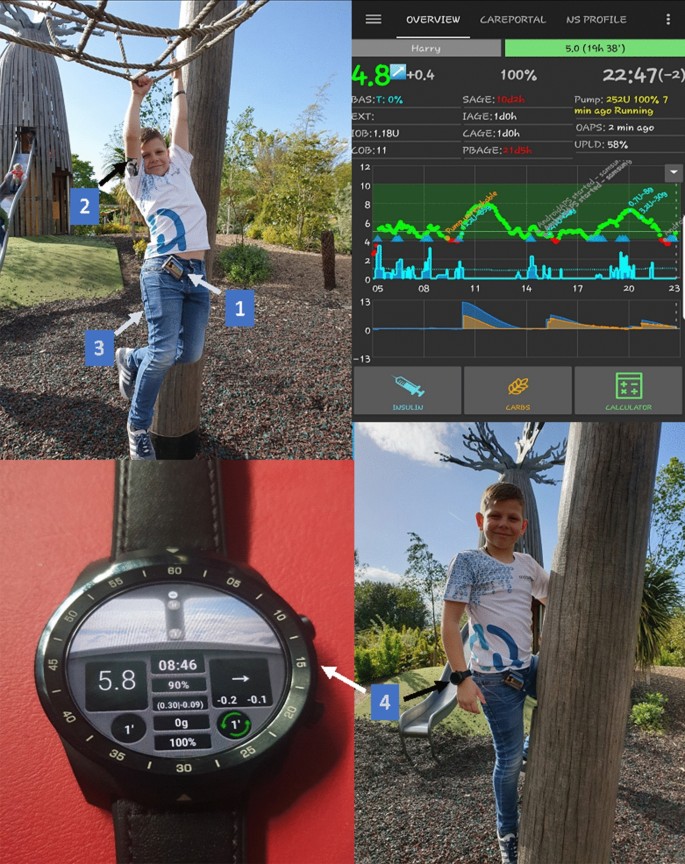
Top left, bottom left and right—Harry having fun camping. Top right—Harry’s AndroidAPS home screen; components of Harry’s APS system: 1, Accu-Chek Spirit Combo Insulin pump; 2, Dexcom G6; 3, Android smartphone Xiaomi Mi A2 lite; 4, TicWatch Pro Smartwatch
Originally, we set up using a Samsung J4+ which worked brilliantly until we switched from Dexcom G5 to G6 in December 2019, when it was then no longer compatible, so we purchased the Xiaomi Mi A2 Lite which has been working flawlessly since. Harry also wears a TicWatch Pro smartwatch, which he can also bolus by entering the carbs and it will calculate the insulin needed.
Harry is 10 years old now and becoming more independent so this is really what pushed me to get this set up, as I’m sure before long he will want to take the reins off me completely and I wanted him to be fully prepared and have the best system to work with, and you can’t get much better than this.
Before APS was in our lives, I struggled to sleep. I micromanaged Harry’s diabetes to the best of my ability 24/7 and was quite hard on myself when things didn’t quite go to plan; and let’s face it, diabetes often doesn’t play fair! Harry’s HbA1c has never been of concern and has always been in range. This was never my incentive; bringing back some normality into our lives is what I craved, what we dreamed of. Android APS has allowed me to take a step back; it has allowed me to take a deep breath and see that my son can survive, and survive well, without my constant and often annoying, interference.
The biggest change for me though is Harry’s confidence. He says he feels more like his friends now; he is happier, as though it has taken away some of the burden for him. In school he rarely has to give diabetes a second thought anymore. He knows the system he has is constantly working at keeping him safe and he has learned to trust it. He understands how to respond to the alarms, and knows that if he does this, he feels better and so there are less interruptions on his day. He isn’t able to give himself correction insulin yet, without supervision, but he knows I am always keeping an eye on his glucose readings from wherever I am, and he can see when I send a text to give him a bolus so he can relax again knowing that things are under control. The remote bolusing via text message is brilliant; it means I never have to interrupt his learning or, more importantly, his play time, just to give insulin. Which when you’re 10 is kind of a big deal.
Even though APS is taking the lead, I still feel completely in control; I am the one calling the shots. I can also turn it off via a press of a button, which I have only done when encountering faulty sensors, but it’s good to know the option is there should you need it. APS isn’t a quick fix; we still get highs and lows, but just not as severe or as often as we did without it. Our hypo treatment has halved since we have been looping which speaks volumes in itself, whilst still keeping an HbA1c anyone should be proud of. Diabetes is tough, but having an APS to help makes life that little bit easier to manage.