Resize Image After Upload (original) (raw)
A free, fast, easy to use, stable and frequently updated plugin to resize your images after upload. Supported by the friendly team that created ShortPixel 🙂
This plugin automatically resizes images (JPEG, GIF, and PNG) when they are uploaded to within a given maximum width and/or height to reduce server space usage, speed up your website, save you time and boost your site’s SEO.
Imagine that nowadays images can be over 4-5MB and using this plugin you can reduce them to 100-200KB with no extra effort on your side!
In addition, the plugin can force the re-compression of uploaded JPEG images and convert PNGs to JPEG (if they don’t have a transparency layer), regardless of whether they are resized or not.
Is that simple, just give it a try, it is safe and free! 🙂
Other plugins by ShortPixel:
- FastPixel Caching – WP Optimization made easy
- ShortPixel Image Optimizer – Image optimization & compression for all the images on your website, including WebP & AVIF delivery
- ShortPixel Adaptive Images – On-the-fly image optimization & CDN delivery
- Enable Media Replace – Easily replace images or files in Media Library
- reGenerate Thumbnails Advanced – Easily regenerate thumbnails
- WP SVG Images – Secure upload of SVG files to Media Library
Get in touch!
Twitter https://twitter.com/shortpixel
Facebook https://www.facebook.com/ShortPixel
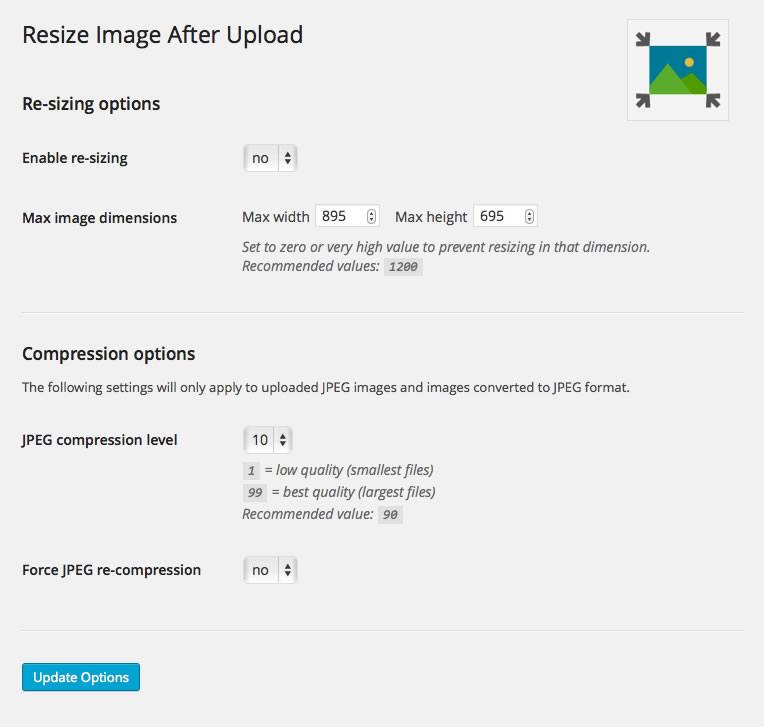
Full preview of the settings screen.

- Upload the plugin ‘resize-image-after-upload’ to the ‘/wp-content/plugins/’ directory.
- Activate the plugin through the ‘Plugins’ menu in WordPress.
- Edit the max-width/max-height settings under ‘Settings > Resize Image Upload’.
- Once active, just upload images as normal and it will just work!
Is this plugin compressing the images?
Yes, this plugin compresses the original images, you can select the JPEG quality for example. For a professional image optimization solution though we recommend you this image optimization plugin.
Is this plugin resizing also older images?
This plugin will not resize images that have already been uploaded. For this you can use ShortPixel, it can not only resize your images but it can compress them as well!
Is the original image and/or its EXIF data kept?
The resizing/recompression process will discard the original uploaded file including EXIF data.

It doesn’t support Avif and Webp format. An unsatisfactory plugin.

I had high hopes for this plugin, but it fell short in crucial areas. It does not support resizing of WebP and AVIF images, which are becoming increasingly common. This is a significant limitation in today’s web environment. To make matters worse, there’s an issue with the wrong orientation when images are resized using this plugin. I can see that someone has reached out to the developers about this, but they refused to fix it. Such a lack of responsiveness and unwillingness to address critical issues is unacceptable. Until these problems are resolved, I cannot recommend this plugin to anyone looking for a reliable image resizing tool. I’d stay away from this plugin!

This is an absolutely amazing plugin that does exactly what it says. Thank you ShortPixel for developing such a wonderful plugin and for offering it free of charge.

Unfortunately, Wordpress administrators do not deal with this at all, and all it takes is one careless editor and the administrator has a lot to do for many hours. With this plugin, servers are no longer filled with unnecessary giant images that are ultimately useless and just lie dead on the server and take up space. Lots of space.

There is no better image plugin than this one! Thank you very much to his team!

Works as advertised. Now posting using a mobile is a breeze. No longer need to worry about the hefty images that people may upload when posting with mobile, especially with mobile photos.
“Resize Image After Upload” is open source software. The following people have contributed to this plugin.
Contributors

1.8.6
Release date: 10th April 2019
- Improve security to the settings form by using nonce
1.8.5
Release date: 3rd August 2018
- Remove recommended plugins
1.8.4
Release date: 14th April 2018
- Add recommended plugins
1.8.3
Release date: 20th December 2017
- [Fix] Skip animated GIFs that GD can’t resize.
1.8.2
Release date: 21th August 2017
- [Fix] Better sanitize post data when saving settings.
1.8.1
Release date: 18th June 2017
- [Fix] Notice not dismissing
1.8.0
Release date: 18th June 2017
- [Update] Add convert PNG to JPG option
1.7.2
Release date: 18th September 2015
- [Fixed] Undefined option notices when running WordPress in debug mode.
1.7.1
Release date: 26th February 2015
- [Update] After reports of the plugin resizing PDF files, added check to ensure the plugin only attempts a resize on JPEG, GIF, and PNG file types other than relying on the response from WP_Image_Editor.
1.7
This is a major under-the-hood release to change core workings of the plugin. The plugin still functions as normal, but the way in which it resizes images has now changed to use standard WordPress libraries. This means that should your server have better image processing libraries than the GD default (e.g. ImageMagick), then the resizing method should make use of them. This should improve the output of your resized images!
- [Update] Plugin completely re-engineered to use WP_Image_Editor when resizing images.
1.6.2
Minor maintenance release:
- [Fix] Correcting an error in the documentation.
1.6.1
Fix a few edge case bugs, I go and break the main functionality – that’s life! This is a maintenance release to fix a bug.
- [Fix] Correct the logic behind which direction to perform resizing in.
1.6
This is a major maintenance release to squash a few long outstanding bugs.
- [Update] Tidied up the plugin settings page.
- [Fix] Significant number of bug fixes through extensive testing.
- [Fix] Resizing wasn’t running on square images.
- [FIX] Media upload was failing for BMP images.
- [Fix] Replaced use of deprecated PHP functions with correct ones.
1.5
- [Added] Ability to force re-compression even if resize is not required.
- [Fix] Compression quality value was not adhered to.
1.4.2
- [Update] Added ability to enter a resize value of zero (0) to prevent resizing in a particular dimension.
1.4.1
- [Fix] Reverting code back to how it was in v1.3.0 after previous premature deployment of v1.4.0. Please use this version.
1.4
- [Error] Code was deployed prematurely and should not have made its way to the live repository. Please do NOT use this version.
1.3
- [Update] Added ability to set the JPEG compression quality level when JPEGs are resized. Default is 90.
1.2
- [Update] Now only runs images through the resizer if required, i.e. the image is actually larger than the max height/width.
1.1.1
- [Fix] Corrected functionality that sets default plugin options if the plugin version number changes.
- [Fix] Adds default option for max-height value.
- [Update] Updated the screenshot to include new maximum height field.
- [Update] Increased the default maximum height and width to 1200px each.
1.1
- [Update] Added ability to set maximum height (thanks @Wonderm00n).
1.0.1
- [Update] Update to read me, no feature updates unfortunately.
1.0
- [Added] Initial release.