EPPlus 7 - EPPlus Software (original) (raw)
New major version was released October 26, 2023
EPPlus 7 introduces the following new features.
Array formulas
EPPlus 7 has a new calculation engine that support dynamic array formulas and legacy array formulas. This is a feature that has been in high-demand by EPPlus users over the last years.
We have also made many other improvements to the calculation engine, which includes improved precision and performance.
Dynamic array formulas
Dynamic array formulas is a powerful feature that was introduced in Excel in 2018.
More on dynamic array formulas (Microsoft)
EPPlus now supports dynamic array formulas in calculations. This includes support for so called spill over and many new Excel functions that depends upon this functionality. You can also use EPPlus 7 to add/calculate new dynamic array formulas to a workbook.
EPPlus wiki - dynamic array formulas
Legacy arrayformulas
EPPlus now supports legacy array formulas in calculations. Legacy array formulas has existed in Excel for a long time and requires that the size of the output range is known when you enter the formula.
EPPlus wiki - legacy array formulas
New functions supported by EPPlus 7
We continously add support for new functions, in EPPlus 7 we have added over 100 new functions.
See the full list of supported functions in our developer wiki .
Conditional formatting
Improved performance and better support for cross-worksheet references. Support for databars and iconsets has also been improved.
Conditional formatting improvements
For more details, see our developer wiki .
New Take and Skip methods for worksheet ranges
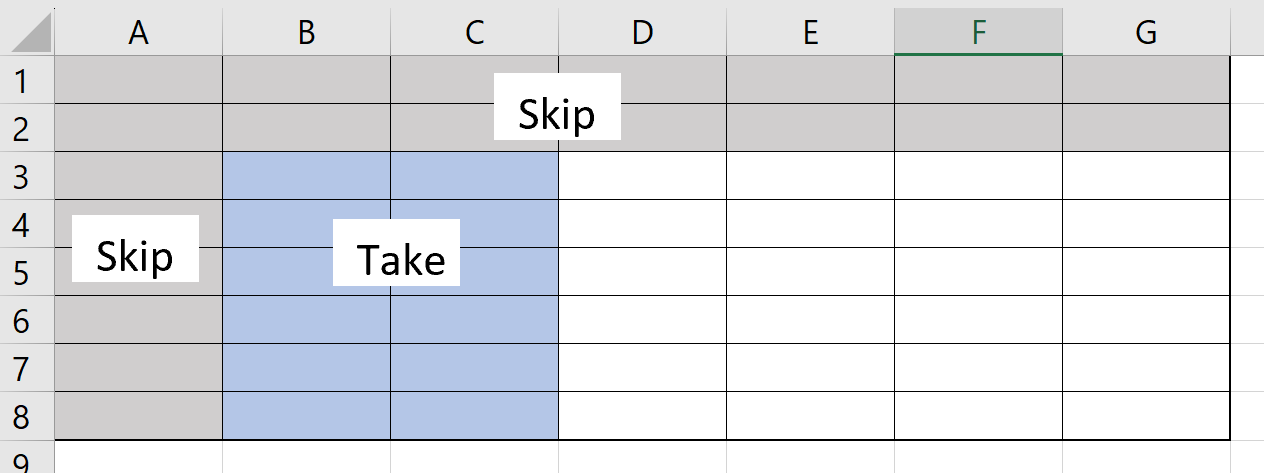
A new set of methods that makes it easier to access specific rows/columns in a range. These methods are, for example, useful when working with charts, tables and the output of dynamic array formulas.
`// newRange will be B3:C8 var newRange = worksheet.Cells["A1:G8"] .SkipRows(2) .SkipColumns(1) .TakeColumns(2); `
EPPlus wiki - Take and Skip methods
New sample projects
We have created new sample projects, added new samples and improved the folder structure. There is one project for C# and one for VB.NET
EPPlus.Samples.CSharp EPPlus.Samples.VB
Version 7.1
Version 7.1 was released on March 28, 2024.
- HtmlExport - EPPlus now includes conditional formats (not yet icon sets and databars).
- Performance improvements on Rich Text.
- LoadFromCollection - Add number formats to columns of the imported range in runtime. Improvements on column sort orders.
Version 7.2
Version 7.2 was released on June 18, 2024.
- Pivot table calculation - Includes support for the GETPIVOTDATA function in calculations.
- HTML Export - Full support for conditional formats in HTML-export, including icon-sets and databars.
- Added support for copying drawings
- Support for transposing ranges in import/export functions and when copying ranges.
- Added support for importing and exporting fixed width text files.
- New functions supported in formula calculations: GETPIVOTDATA, MMULT, MINVERSE, MDETERM, MUNIT, TEXTSPLIT, TEXTAFTER, TEXTBEFORE, LET
Version 7.3
Version 7.3 was released on August 20, 2024.
- Precision As Displayed - This means that decimal numbers in cells can be rounded according to the number format of the cell.
- New functions supported in formula calculations: LINEST, LOGEST, GROWTH, TREND, DPRODUCT, DSTDEV, DSTDEVP
Version 7.4
Version 7.4 was released on October 2, 2024.
- Conditional Formatting's in Pivot tables via Pivot Areas
- Linked pictures
- New functions supported in formula calculations: AREAS, TDIST
Version 7.5
Version 7.5 was released on November 15, 2024.
- EPPlus assemblies and NuGet package are signed with a GlobalSign certificate issued to EPPlus Software, ensuring integrity validation
Version 7.6
Version 7.6 was released on February 6, 2025.
- Added target framework .NET 9.
- Removed out-of-support frameworks .NET 6 and .NET 7
Q & A
When was this major version released?
EPPlus 7.0.0 was released on October 26, 2023. Version 7.1.0 was released on March 28, 2024. Version 7.2.0 was released on Jun 18, 2024. Version 7.3.0 was released on Aug 20, 2024. Version 7.4.0 was released on Oct 2, 2024. Version 7.5.0 was released on Nov 15, 2024. Version 7.6 was released on February 6, 2025.
If I have a commercial license for EPPlus 5/6, can I upgrade to EPPlus 7 under my existing license?
Yes, if your license still is active/valid.
Version 7.0
| ANCHORARRAY | ARABIC | BINOM.DIST |
|---|---|---|
| BINOM.DIST.RANGE | BINOM.INV | BINOMDIST |
| CHISQ.DIST | CHISQ.TEST | CHOOSECOLS |
| CHOOSEROWS | DROP | EXPAND |
| F.DIST | F.INV | F.INV.RT |
| F.TEST | FDIST | FILTER |
| FREQUENCY | FTEST | GAMMA.DIST |
| GAMMADIST | GESTEP | HSTACK |
| IMAGINARY | IMARGUMENT | IMCONJUGATE |
| IMCOS | IMCOSH | IMCOT |
| IMCSC | IMCSCH | IMDIV |
| IMLN | IMLOG10 | IMLOG2 |
| IMPOWER | IMPRODUCT | IMREAL |
| IMSEC | IMSECH | IMSIN |
| IMSINH | IMSQRT | IMSUB |
| IMSUM | IMTAN | LOGNORM.DIST |
| LOGNORM.INV | MODE.MULT | NEGBINOM.DIST |
| NEGBINOMDIST | ODDFPRICE | ODDFYIELD |
| ODDLPRICE | ODDLYIELD | POISSON |
| POISSON.DIST | PRICEDISC | PRICEMAT |
| PROB | RANDARRAY | RECEIVED |
| SEQUENCE | SINGLE | SLOPE |
| SORT | SORTBY | STEYX |
| T.DIST | T.DIST.2T | T.DIST.RT |
| T.INV | T.INV.2T | T.TEST |
| TAKE | TOCOL | TOROW |
| TRANSPOSE | TRIMMEAN | UNIQUE |
| VDB | VSTACK | WEIBULL |
| WEIBULL.DIST | XLOOKUP | XMATCH |
| Z.TEST | ZTEST | ISREF |
Version 7.2
| GETPIVOTDATA | LET | MDETERM |
|---|---|---|
| MINVERSE | MMULT | MUNIT |
| TEXTAFTER | TEXTBEFORE | TEXTSPLIT |
Version 7.3
| DPRODUCT | DSTDEV | DSTDEVP |
|---|---|---|
| GROWTH | LINEST | LOGEST |
| TREND |
Databars/colorscales
Illustrating the new possibilities of Databar in EPPlus 7
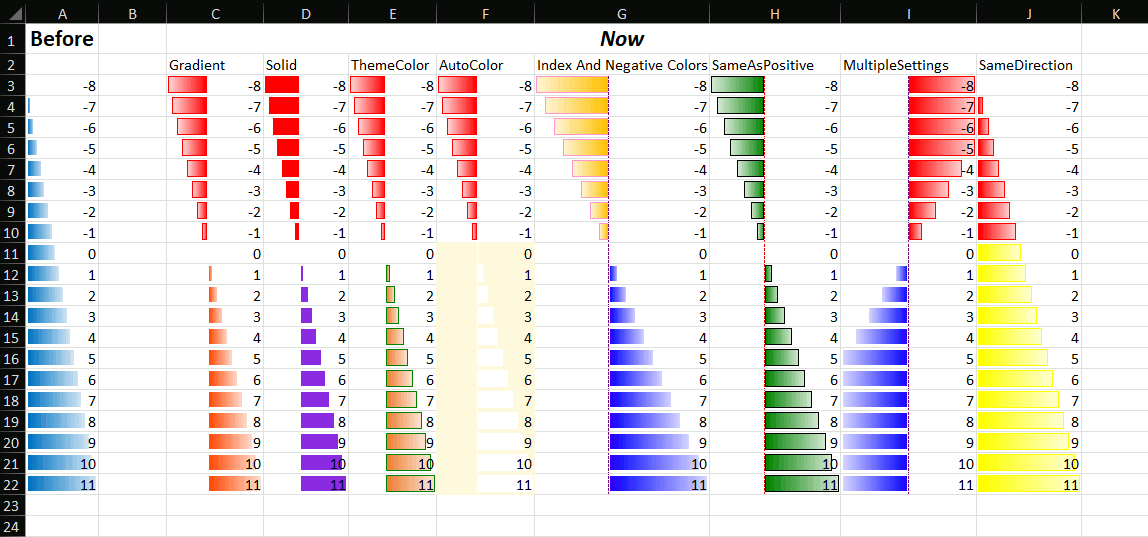
In terms of settings these are the options that weren't fully supported in databars but are now:
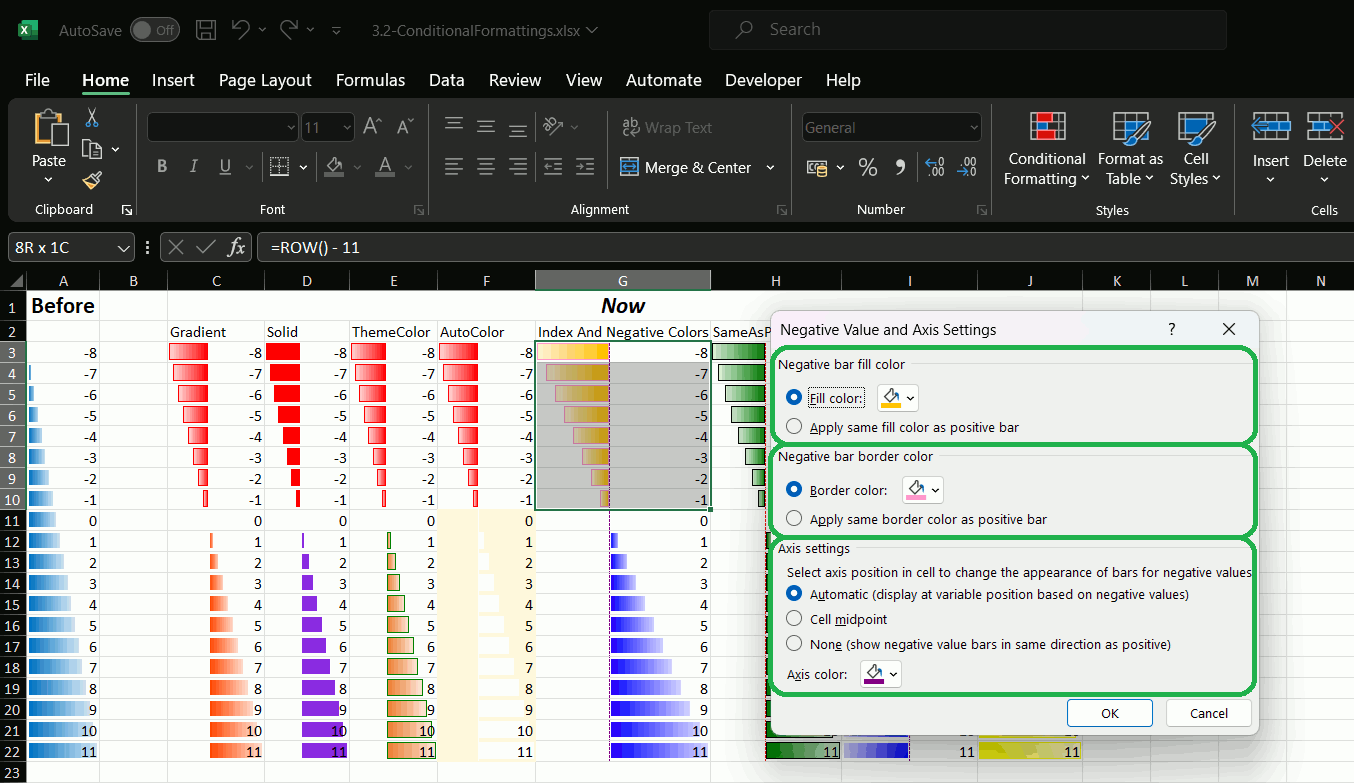
..and if you click Negative Value and Axis:
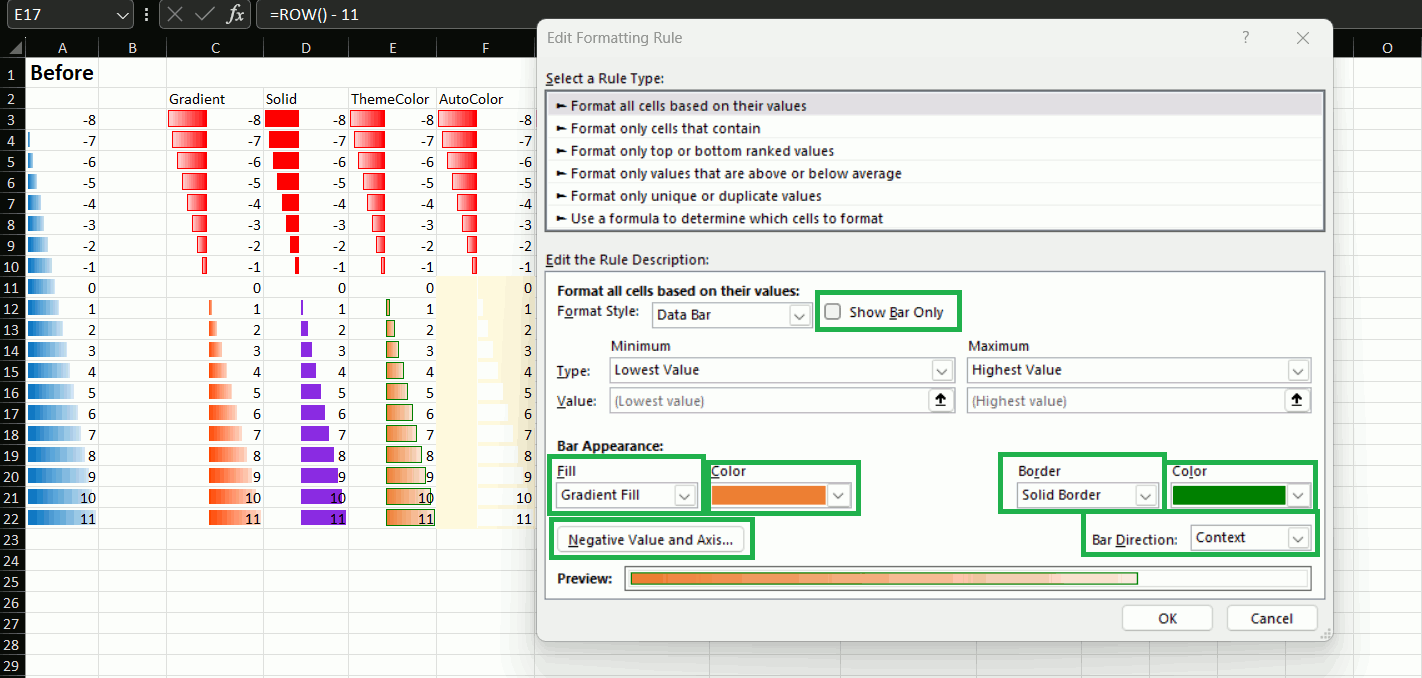
Also theme-colors are now supported on databars and colorscales as well as index and auto:
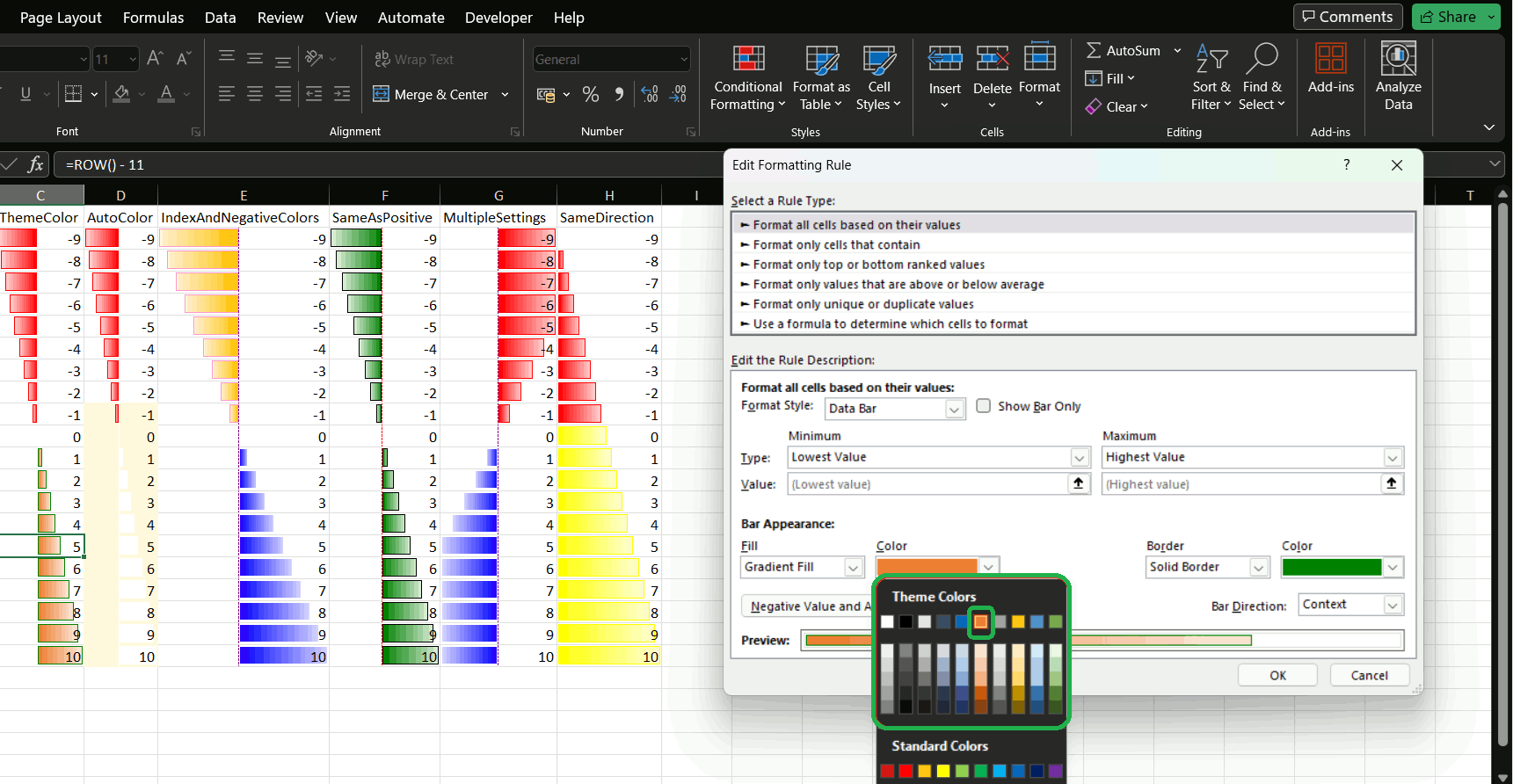
Those are now also supported on colorscales
Iconsets
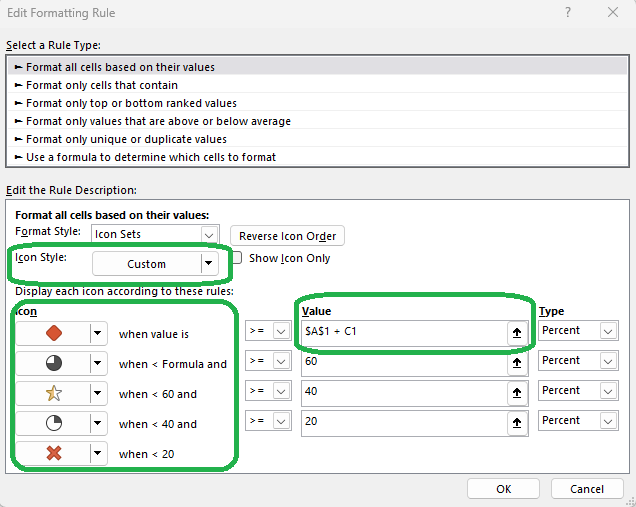
For iconsets you can now create the iconset on the right with customIconsets
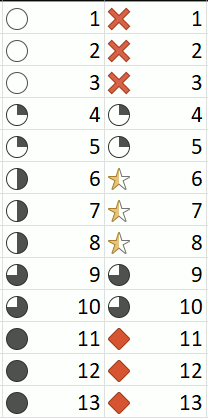
Represented in settings by this: