Understand Firebase projects (original) (raw)
This page offers brief overviews of several important concepts about Firebase projects. When available, follow the links to find more detailed information about features, services, tooling, and best practices.
Relationship between Firebase projects, apps, and products
A Firebase project is the top-level entity for Firebase. In a project, you can register your Apple, Android, or web apps. After you register your apps with Firebase, you can add the Firebase SDKs for any number ofFirebase products, like Analytics,Cloud Firestore, Performance Monitoring, or Remote Config.
Learn more detailed information about this process in the Getting Started guide for your platform:
iOS+ | Android |web | Unity | C++ |Flutter.
Understanding the hierarchy of Firebase projects
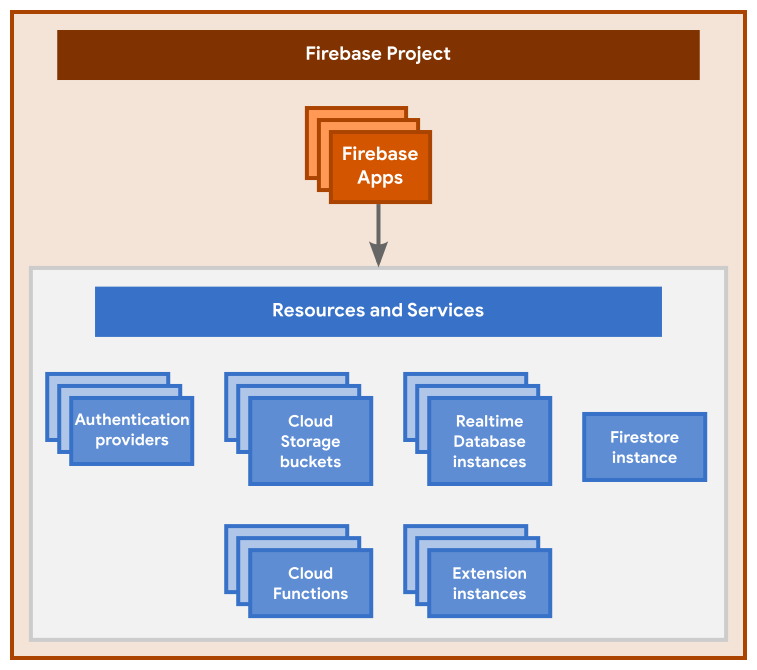 This diagram shows the basic hierarchy of a Firebase project. Here are the key relationships:
- A Firebase project is like a container for all your apps and any resources and services provisioned for the project.
- A Firebase project can have one or more Firebase Apps registered to it (for example, both the iOS and Android versions of an app, or both the free and paid versions of an app).
- All Firebase Apps registered to the same Firebase project share and have access to all the same resources and services provisioned for the project. Here are some examples:
- All the Firebase Apps registered to the same Firebase project share the same backends, like Firebase Hosting, Authentication, Realtime Database, Cloud Firestore,Cloud Storage, and Cloud Functions.
- All Firebase Apps registered to the same Firebase project are associated with the same Google Analytics property, where each Firebase App is a separate data stream in that property.
Relationship between Firebase projects and Google Cloud
When you create a new Firebase project, you're actually creating aGoogle Cloud projectbehind the scenes. You can even create a Google Cloud project first, then add Firebase to the project later. You can think of a Google Cloud project as a virtual container for data, code, configuration, and services.
Note that for all Firebase projects, Firebase automatically adds a label offirebase:enabled within theLabels pagefor your project in the Google Cloud console. Learn more about this label in our FAQ.
Since a Firebase project is a Google Cloud project:
- You can access and interact with the project in the Firebase consoleas well as in theGoogle Cloud consoleandGoogle APIs console.
- You can interact with the project using theFirebase CLI, thegcloud CLI, and any Terraform resource from Google.
- You can use products and APIs from both Firebase and Google Cloud in the project.
- IAM permissions and roles for the project are shared across Firebase and Google Cloud. Any access a project member (that is, a principal) has to your Google Cloud project will also apply to your Firebase project (and vice-versa).
- Billing for the project is shared across Firebase andGoogle Cloud. If billing is enabled on your Google Cloud project, then your Firebase project will be on Firebase's pay-as-you-go Blaze pricing plan.
- Unique identifiers for the project (likeproject number andproject ID) are shared across Firebase and Google Cloud.
- Anyresource hierarchyapplied to your Google Cloud project (for example, organization, folders, etc.) will also apply to your Firebase project.
- Deleting the project deletes it across Firebase and Google Cloud.
- Deleting or modifying a resource or data within the project applies across Firebase and Google Cloud.
Setting up a Firebase project and registering apps
You can set up a Firebase project and register apps in the Firebase console(or, for advanced use cases, using theFirebase Management REST API or theFirebase CLI). When you set up a project and register apps, you need to make some organizational decisions and add Firebase-specific configuration information to your local projects.
For production apps, you need to set up a clear development workflow, which usually involves using multiple environments. Review our documentation ondeveloper workflows, includinggeneral best practicesandgeneral security guidelinesfor setting up Firebase projects and registering apps to create your development workflow.
Interacting with a Firebase project
Besides the product SDKs, you can directly interact with a Firebase project using several different tools and interfaces.
Firebase console
The Firebase console offers the richest environment for managing Firebase products, apps, and project-level settings.
The left-side panel of the console lists the Firebase products, organized by top-level categories. At the top of the left-side panel, access a project's settings by clicking . A project's settings includeintegrations,access permissions, and billing.
The middle of the console displays buttons that launch setup workflows to register various types of apps. After you start using Firebase, the main area of the console changes into a dashboard that displays stats on the products you use.
Note that since a Firebase project is also a Google Cloud project, you might find that various tasks or products require you to use theGoogle Cloud console instead of the Firebase console.
Firebase CLI (a command line tool)
Firebase also offers the Firebase CLI for configuring and managing specific Firebase products, like Firebase Hosting,Cloud Functions for Firebase, and Firebase Extensions.
After installing the CLI, you have access to theglobal firebase command. Use the CLI tolink your local app directory to a Firebase project, thendeploy new versions of Firebase-hosted content or updates to functions.
Firebase Management REST API
Using theFirebase Management REST API, you can programmatically manage a Firebase project. For example, you can programmatically register an app with a project or list the apps that are already registered (iOS+|Android|web).
Firebase project identifiers
A Firebase project can be identified in the Firebase backend and in various developer interfaces using different identifiers, including the project name, the project number, and the project ID.
The project name
When you create a project, you provide a project name. This identifier is the internal-only name for a project in theFirebase console, theGoogle Cloud console, and the Firebase CLI. The project name is not exposed in any publicly visible Firebase or Google Cloud product, service, or resource; it simply serves to help you more easily distinguish among multiple projects.
You can edit a project name at any time in theProject settings of theFirebase console. The project name is displayed in the top pane.
The project number
A Firebase project (and itsassociated Google Cloud project) has aproject number. This is the Google-assigned globally unique canonical identifier for the project. Use this identifier when configuring integrations and/or making API calls to Firebase, Google, or third-party services.
You cannot edit a project number. If you delete a project, the project number is also deleted and can never be used again by any other project.
Find the project number
Find your Firebase project's project number using one of these options:
- Using the Firebase console: ClickProject settings. The project number is displayed in the top pane.
- Using the Firebase CLI: Run
firebase projects:list. The project number is displayed along with all the Firebase projects associated with your account. - Using the Firebase Management REST API: Callprojects.list. The response body contains the project number in theFirebaseProjectobject.
API calls and the project number
For many API calls, you need to include a unique identifier for a project. Although many APIs accept the project ID, it's recommended that you use the project number for making API calls to Firebase, Google, or third-party services.
Learn more about using project identifiers, especially the project number, in Google's AIP 2510 standard.
The project ID
A Firebase project (and itsassociated Google Cloud project) has aproject ID. This is a user-defined unique identifier for the project across all of Firebase and Google Cloud. When you create a Firebase project, Firebase automatically assigns a unique ID to the project, but you can edit it during project setup. This identifier should generally be treated as a convenience alias to reference the project.
Find the project ID
Find your Firebase project's project ID using one of these options:
- Using the Firebase console: ClickProject settings. The project ID is displayed in the top pane.
- Using the Firebase CLI: Run
firebase projects:list. The project ID is displayed along with all the Firebase projects associated with your account. - Using the Firebase Management REST API: Callprojects.list. The response body contains the project ID in theFirebaseProjectobject.
Firebase resources and the project ID
The project ID displays in publicly visible Firebase resources, for example:
- Default Hosting subdomain —
PROJECT_ID.web.appandPROJECT_ID.firebaseapp.com - Default Realtime Database URL —
PROJECT_ID-default-rtdb.firebaseio.comorPROJECT_ID-default-rtdb.REGION_CODE.firebasedatabase.app - Default Cloud Storage bucket name —
PROJECT_ID.appspot.com
For all of the aforementioned resources, you can create non-default instances. The publicly visible names of non-defaults are fully-customizable. You canconnect custom domains to a Firebase-hosted site,shard the Realtime Database, andcreate multiple Cloud Storage buckets (visit the platform-specific Get Started page).
The Firebase CLI and the project ID
For some use cases, you might have multiple Firebase projects associated with the same local app directory. In these situations, when you use theFirebase CLI, you need to pass the --project flag with thefirebase commands to communicate which Firebase project you want to interact with.
You can also set up a project alias for each Firebase project so that you don't have to remember project IDs.
API calls and the project ID
For many API calls, you need to include a unique identifier for a project. Although many APIs accept the project ID, it's recommended that you use theproject number for making API calls to Firebase, Google, or third-party services.
Learn more about using project identifiers, especially the project number, in Google's AIP 2510 standard.
Firebase config files and objects
When you register an app with a Firebase project, the Firebase console provides a Firebase configuration file (Apple/Android apps) or a configuration object (web apps) that you add directly to your local app directory.
- For Apple apps, you add a
GoogleService-Info.plistconfiguration file. - For Android apps, you add a
google-services.jsonconfiguration file. - For web apps, you add a Firebase configuration object.
At any time, you canobtain an app's Firebase config file or object.
A Firebase config file or object associates an app with a specific Firebase project and its resources (databases, storage buckets, etc.). The configuration includes "Firebase options", which are parameters required by Firebase and Google services to communicate with Firebase server APIs and to associate client data with the Firebase project and Firebase app. Here are the required, minimum "Firebase options":
- API key: a simple encrypted string used when calling certain APIs that don't need to access private user data (example value:
AIzaSyDOCAbC123dEf456GhI789jKl012-MnO) - Project ID: a user-defined unique identifier for the project across all of Firebase and Google Cloud. This identifier may appear in URLs or names for some Firebase resources, but it should generally be treated as a convenience alias to reference the project. (example value:
myapp-project-123) - Application ID ("AppID"): the unique identifier for the Firebase app across all of Firebase with a platform-specific format:
- Firebase Apple apps:
GOOGLE_APP_ID(example value:1:1234567890:ios:321abc456def7890)
This is not an Apple bundle ID. - Firebase Android apps:
mobilesdk_app_id(example value:1:1234567890:android:321abc456def7890)
This is not an Android package name or Android application ID. - Firebase Web apps:
appId(example value:1:65211879909:web:3ae38ef1cdcb2e01fe5f0c)
- Firebase Apple apps:
The content of the Firebase config file or object is considered public, including the app's platform-specific ID (Apple bundle ID or Android package name) and the Firebase project-specific values, like the API Key, project ID,Realtime Database URL, and Cloud Storage bucket name. Given this,use Firebase Security Rules to protect your data and files inRealtime Database,Cloud Firestore, and Cloud Storage.
For open source projects, we generally do not recommend including the app's Firebase config file or object in source control because, in most cases, your users should create their own Firebase projects and point their apps to their own Firebase resources (via their own Firebase config file or object).
General limits for Firebase projects, apps, and sites
Here are some general limits for Firebase projects, apps, and sites:
- Number of projects per Google Account (email address)
- Spark pricing plan: Project-creation quota is limited to a small number of projects (usually around 5-10).
- Blaze pricing plan: Project-creation quota is still limited, but it may increase with the linking of aCloud Billing account in good standing.
Note the following about the limit on project-creation quota: - This limit is not specific to Firebase. Firebase's limits on project quota are the same as those for Google Cloud.
- In the rare case that's it's needed, you canrequest an increase in project quota.
- The complete deletion of a project requires 30 days and counts toward project quota until the project is fully deleted.
Learn about Firebase's recommendedgeneral best practices for setting up Firebase projects.
- Number of apps per project
Firebase restricts the total number of Firebase Apps within a Firebase project to 30.
You should ensure that all Firebase Apps within a single Firebase project are platform variants of the same application from an end-user perspective. Read more aboutmulti-tenancyin our best practices docs.
Learn more about thelimit on apps per project in the FAQ. - Number of Hosting sites per project
The Firebase Hosting multisite featuresupports a maximum of 36 sites per project.
Launching your app
- Set up budget alertsfor your project in the Google Cloud console.
- Monitor the _Usage and billing_dashboardin the Firebase console to get an overall picture of your project's usage across multiple Firebase services.
- Review the Firebase launch checklist.