Choice Eliminator for Google Forms™ (original) (raw)
If you’re looking for a way to limit response counts for multiple choices, checkboxes, multiple choice grid, checkbox grid, and dropdowns in your Google Forms™, the Choice Eliminator add-on is the ideal solution. This tool lets you set response limits on specific choices, helping you manage sign-ups, registrations, and surveys with ease. From event registrations to limited-capacity classes, this add-on ensures your forms stay accurate and up-to-date without manual monitoring.
Popular Use Cases for Limiting Responses in Google Forms™
- Event Registration: Perfect for limiting attendance at events or workshops with specific capacity limits. Once a slot is filled, the option automatically crosses out, preventing overbooking.
- Class Sign-Ups and Assignments: Set limits for each section in class rosters or assignments to avoid overloading any one option and maintain balance.
- First-Come, First-Served Scenarios: Ideal for high-demand options, allowing users to sign up on a first-come, first-served basis and preventing excess responses once the limit is reached.
- Instruction: How to Install the Choice eliminator Add-On.
- Troubleshooting and Instructions for Properly Setting Up the Form Download here:

Why You Should Use Choice Eliminator to Limit Responses in Google Forms™
With Add-on, you control response limits fully, enhancing your form’s functionality for organized and reliable data collection. This add-on works with multiple-choice, dropdown, checkbox, and grid questions, keeping your forms adaptable without needing constant updates.
Key Features for Limiting Responses in Google Forms™
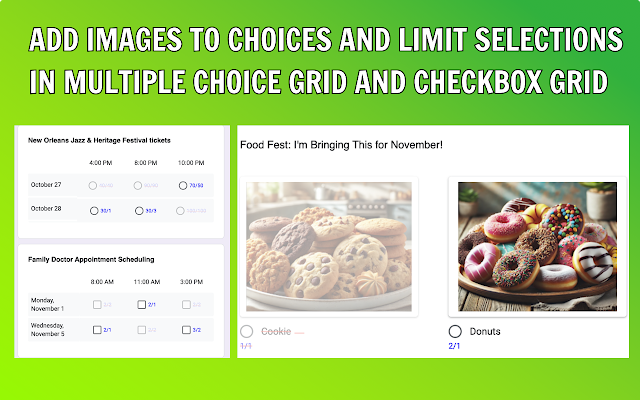
- Unique Feature – Limit Choices with Images : Apply response limits to choices that include images, enhancing visual form options and providing more interactive responses.
- Unique Feature – Add Limits to Multiple Choice and Checkbox Grid Sections : Set response limits to each section within multiple-choice grids or checkbox grids, allowing you to manage complex forms more effectively.
- Unique Feature Response Manager: You can control all responses; you can search, view, edit, and delete them. Additionally, you can obtain the edit response URL and send it to the user. YouTube Tutorial
- Crossed-Out Choices: When a response limit is met, options are automatically crossed out, visibly indicating they’re no longer available.
- Custom Notifications: Get email alerts as soon as response limits are reached, so you’re always in the loop.
- Schedule Form Resets: Set up automated form resets on an hourly, daily, weekly, or monthly basis, allowing choices to reopen as per your schedule.
How to Use Choice Eliminator for Google Forms™
Our other Google add-ons:
- Form Choice Limiter, Eliminator, Limit, Removal
- GPT plus Google Docs™, ChatGPT, OpenAI, Chat GPT
- Choice Eliminator for Google Forms™, Choice limit
- GPT Quiz Generator for Forms™, Chat GPT test
- Form Response Limit, FormLimiter, Form Start/Stop
- Form Field Limit
- Document File Generator
- Function By Color