Highlights from Git 2.52 (original) (raw)
The open source Git project just released Git 2.52 with features and bug fixes from over 94 contributors, 33 of them new. We last caught up with you on the latest in Git back when 2.51 was released.
To celebrate this most recent release, here is GitHub’s look at some of the most interesting features and changes introduced since last time.
Tree-level blame information
If you’re a seasoned Git user, then you are no doubt familiar with git blame, Git’s tool for figuring out which commit most recently modified each line at a given filepath. Git’s blame functionality is great for figuring out when a bug was introduced, or why some code was written the way it was.
If you want to know which commit last modified any portion of a given filepath, that’s easy enough to do with git log -1 -- path/to/my/file, since -1 will give us only the first commit which modifies that path. But what if instead you want to know which commit most recently modified every file in some directory? Answering that question may seem contrived, but it’s not. If you’ve ever looked at a repository’s file listing on GitHub, the middle column of information has a link to the commit which most recently modified that path, along with (part of) its commit message.
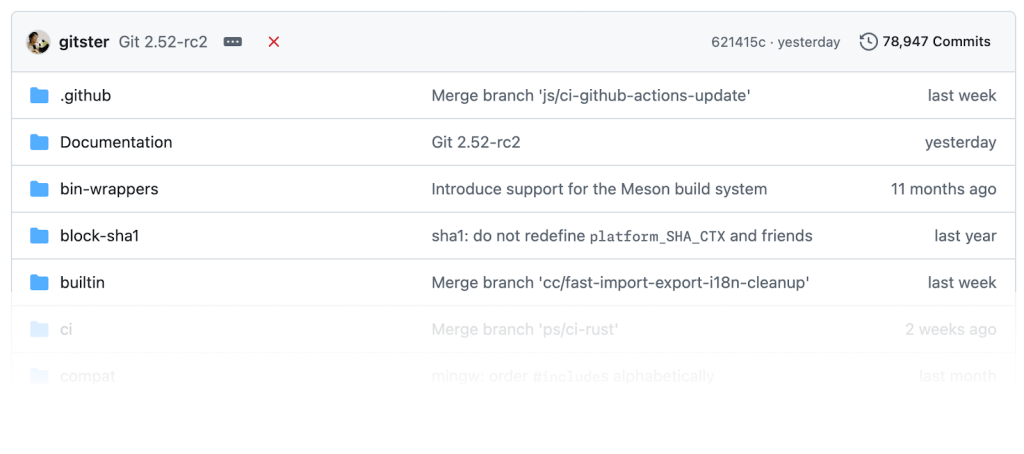
GitHub’s repository file listing, showing tree-level blame information.
The question remains: how do we efficiently determine which commit most recently modified each file in a given directory? You could imagine that you might enumerate each tree entry, feeding it to git log -1 and collecting the output there, like so:
$ git ls-tree -z --name-only HEAD^{tree} | xargs -0 -I{} sh -c '
    git log -1 --format="$1 %h %s" -- $1
  ' -- {}  | column -t -l3
.cirrus.yml     1e77de10810  ci: update FreeBSD image to 14.3
.clang-format   37215410730  clang-format: exclude control macros from SpaceBeforeParens
.editorconfig   c84209a0529  editorconfig: add .bash extension
.gitattributes  d3b58320923  merge-file doc: set conflict-marker-size attribute
.github         5db9d35a28f  Merge branch 'js/ci-github-actions-update'
[...]
That works, but not efficiently. To see why, consider a case with files A, B, and C introduced by commits C1, C2, and C3, respectively. To blame A, we walk from C3 back to C1 in order to determine that C1 was the most recent commit to modify A. That traversal passed through C2 and C3, but since we were only looking for modifications to A, we’ll end up revisiting those commits when trying to blame B and C. In this example, we visit those three commits six times in total, which is twice the necessary number of history traversals.
Git 2.52 introduces a new command which comes up with the same information in a fraction of the time: git last-modified. To get a sense for how much faster last-modified is than the example above, here are some hyperfine results:
Benchmark 1: git ls-tree + log
  Time (mean ± σ):      3.962 s ±  0.011 s    [User: 2.676 s, System: 1.330 s]
  Range (min … max):    3.940 s …  3.984 s    10 runs

Benchmark 2: git last-modified
  Time (mean ± σ):     722.7 ms ±   4.6 ms    [User: 682.4 ms, System: 40.1 ms]
  Range (min … max):   717.3 ms … 731.3 ms    10 runs

Summary
  git last-modified ran
    5.48 ± 0.04 times faster than git ls-tree + log
The core functionality behind git last-modified was written by GitHub over many years (originally called blame-tree in GitHub’s fork of Git), and is what has powered our tree-level blame since 2012. Earlier this year, we shared those patches with engineers at GitLab, who tidied up years of development into a reviewable series of patches which landed in this release.
There are still some features in GitHub’s version of this command that have yet to make their way into a Git release, including an on-disk format to cache the results of previous runs. In the meantime, check out git last-modified, available in Git 2.52.
Advanced repository maintenance strategies
Returning readers of this series may recall our coverage of the git maintenance command. If this is your first time reading along, or you could use a refresher, we’ve got you covered.
git maintenance is a Git command which can perform repository housekeeping tasks either on a scheduled or ad-hoc basis. The maintenance command can perform a variety of tasks, like repacking the contents of your repository, updating commit-graphs, expiring stale reflog entries, and much more. Put together, maintenance ensures that your repository continues to operate smoothly and efficiently.
By default (or when running the gc task), git maintenance relies on git gc internally to repack your repository, and remove any unreachable objects. This has a couple of drawbacks, namely that git gc performs “all-into-one” repacks to consolidate the contents of your repository, which can be sluggish for very large repositories. As an alternative, git maintenance has an incremental-repack strategy, but this never prunes out any unreachable objects.
Git 2.52 bridges this gap by introducing a new geometric task within git maintenance that avoids all-into-one repacks when possible, and prunes unreachable objects on a less frequent basis. This new task uses tools (like geometric repacking) that were designed at GitHub and have powered GitHub’s own repository maintenance for many years. Those tools have been in Git since 2.33, but were awkward to use or discover since their implementation was buried within git repack, not git gc.
The geometric task here works by inspecting the contents of your repository to determine if we can combine some number of packfiles to form a geometric progression by object count. If it can, it performs a geometric repack, condensing the contents of your repository without pruning any objects. Alternatively, if a geometric repack would pack the entirety of your repository into a single pack, then a full git gc is performed instead, which consolidates the contents of your repository and prunes out unreachable objects.
Git 2.52 makes it a breeze to keep even your largest repositories running smoothly. Check out the new geometric strategy, or any of the many other capabilities of git maintenance can do in 2.52.
[source]
The tip of the iceberg…
Now that we’ve covered some of the larger changes in more detail, let’s take a closer look at a selection of some other new features and updates in this release.
- This release saw a couple of new sub-commands be added to git refs, Git’s relatively new tool for providing low-level access to your repository’s references. Prior to this release,
git refswas capable of migrating between reference backends (e.g., to have your repository store reference data in the reftable format), along with verifying the internal representation of those references.git refsnow includes two new sub-commands:git refs listandgit refs exists. The former is an alias forgit for-each-refand supports the same set of options. The latter works likegit show-ref --exists, and can be used to quickly determine whether or not a given reference exists.
Neither of these new sub-commands introduce new functionality, but they do consolidate a couple of common reference-related operations into a single Git command rather than many individual ones.
[source] - If you’ve ever scripted around Git, you are likely familiar with Git’s
rev-parsecommand. If not, you’d be forgiven for thinking thatrev-parseis designed to just resolve the various ways to describe a commit into a full object ID. In reality,rev-parsecan perform functionality totally unrelated to resolving object IDs, including shell quoting, option parsing (as a replacement for getopt), printing localGIT_environment variables, resolving paths inside of$GIT_DIRand so much more.
Git 2.52 introduces the first step to giving some of this functionality a new home via its newgit repocommand. Thegit repocommand—currently designated as experimental—is designed to be a general-purpose tool for retrieving pieces of information about your repository. For example, you can check whether or not a repository is shallow or bare, along with what type of object and reference format it uses, like so:
$ keys='layout.bare layout.shallow object.format references.format'
$ git repo info $keys
layout.bare=false
layout.shallow=false
object.format=sha1
references.format=files
The new git repo command can also print out some general statistics about your repository’s structure and contents via its git repo structure sub-command:
$ git repo structure
Counting objects: 497533, done.
| Repository structure | Value  |
| -------------------- | ------ |
| * References         |        |
|   * Count            |   2871 |
|     * Branches       |     58 |
|     * Tags           |   1273 |
|     * Remotes        |   1534 |
|     * Others         |      6 |
|                      |        |
| * Reachable objects  |        |
|   * Count            | 497533 |
|     * Commits        |  91386 |
|     * Trees          | 208050 |
|     * Blobs          | 197103 |
| * Tags | 994 | - Back in 2.28, the Git project introduced the
init.defaultBranchconfiguration option to provide a default branch name for any repositories created withgit init. Since its introduction, the default value of that configuration option was “master”, though many setinit.defaultBranchto “main” instead.
Beginning in Git 3.0, the default value forinit.defaultBranchwill change to “main”. That means that any repositories created in Git 3.0 or newer usinggit initwill have their default branch named “main” without the need for any additional configuration.
If you want to get a sneak peak of that, or any other planned change for Git 3.0, you can build Git locally with theWITH_BREAKING_CHANGESbuild-flag to try out the new changes today.
[source, source] - By default, Git uses SHA-1 to provide a content-addressable hash of any object in your repository. In Git 3.0, Git will instead use SHA-256 which offers more appealing security properties. Back in our coverage of Git 2.45, we talked about some new changes which enable writing out separate copies of new objects using both SHA-1 and SHA-256 as a transitory step towards interoperability between the two.
In Git 2.52, the rest of that work towards interoperability begins. Though the changes that landed in this release are focused on laying the groundwork for future interoperability features, the hope is that eventually you can use a Git repository with one hash algorithm, while pushing and pulling from another repository using a different hash algorithm.
[source] - Speaking of other bleeding-edge changes in Git, this release is the first to (optionally) use Rust code for some internal functionality within Git. This mode is optional and guarded behind a new
WITH_RUSTbuild flag. When built with this mode enabled, Git will use a Rust implementation for encoding and decoding variable-width integers.
Though this release only introduces a Rust variant of some minor utility functionality, it sets up the infrastructure for much more interesting parts of Git to be rewritten in Rust.
Rust support is not yet mandatory, so Git 2.52 will continue to run just fine on platforms that don’t have a Rust compiler. However, Rust support will be required for Git 3.0, at which point many more components of Git will likely depend on Rust code.
[source, source, source] - Long-time readers may recall our coverage of changed-path Bloom filters within Git from back in 2.28. If not, a changed-path Bloom filter is a probabilistic data structure that can approximate which file path(s) were modified by a commit (relative to its first parent). Since Bloom filters never have false negatives (i.e. indicating a commit did not modify some path when it in fact did), they can be used to accelerate many path-scoped traversals throughout Git (including
last-modifiedabove!).
More recently, we covered new ways of using Bloom filters within Git, like providing multiple paths of interest at the same time (e.g.,git log /my/subdir /my/other/subdir) which previously were not supported with Bloom filters. At that time, we wrote that there were ongoing discussions about supporting Bloom filters in even more of Git’s expressive pathspec syntax.
This release delivers the result of those discussions, and now supports the performance benefits of using Bloom filters in even more scenarios. One example here is when a pathspec contains wildcards in some, but not all of its components, likefoo/bar/*/baz, where Git will now use its Bloom filter for the non-wildcard components of the path. To read about even more scenarios that can now leverage Bloom filters, check out the link below.
[source] - This release also saw a number of performance improvements across many areas of the project.
git describelearned how to use a priority queue to speed up performance by 30%.git remotepicked up a couple of new tricks to optimize renaming references with itsrenamesub-command.git ls-filescan keep the index sparse in cases where it couldn’t before.git log -Lbecame significantly faster by avoiding some unnecessary tree-level diffs when processing merge commits. Finally,xdiff(the library that powers Git’s file-level diff and merge engine) benefitted from a pair of optimizations (here, and here) in this release, and even more optimizations that will likely land in a future release.
[source, source, source, source] - Last but not least, some updates to Git’s
sparse-checkoutfeature, which learned a new “clean” sub-command.git sparse-checkout cleancan help you recover from tricky cases where some files are left outside of your sparse-checkout definition when changing which part(s) of the repository you have checked out.
The details of how one might get into this situation, and why recovering from it with pre-2.52 tools alone was so difficult, are surprisingly technical. If you’re interested in all of the gory details, this commit has all of the information about this change.
In the meantime, if you usesparse-checkoutand have ever had difficulty cleaning up when switching yoursparse-checkoutdefinition, givegit sparse-checkout cleana whirl with Git 2.52.
[source]
…the rest of the iceberg
That’s just a sample of changes from the latest release. For more, check out the release notes for 2.52, or any previous version in the Git repository.
Written by

Taylor Blau is a Principal Software Engineer at GitHub where he works on Git.