How to use HTTP Switchboard: Two opposing views (original) (raw)
There are two main ways to use HTTP Switchboard ("HTTPSB"), and then there is everything in between and beyond. Basically: your choice.
One important thing to remember though, regardless of the approach you choose, the preset lists of blocked hosts is useful to block the ad servers, trackers, malware, nuisance, etc. of the internet.
Quick notes for novice users
Novice users shouldn't bother trying to figure which cells in the middle of the matrix need to be whitelisted or blacklisted. These cells are really more suited to advanced users and even then, exceptionally: their original purpose was to be mostly informative ("how many requests for a given type of data from a given hostname?")
I advise new users to stick to whitelist/blacklist domain cells (the left-most column) to allow or block everything from a particular domain, or type of data cells (the top-most row).
The block-all/allow-exceptionally approach
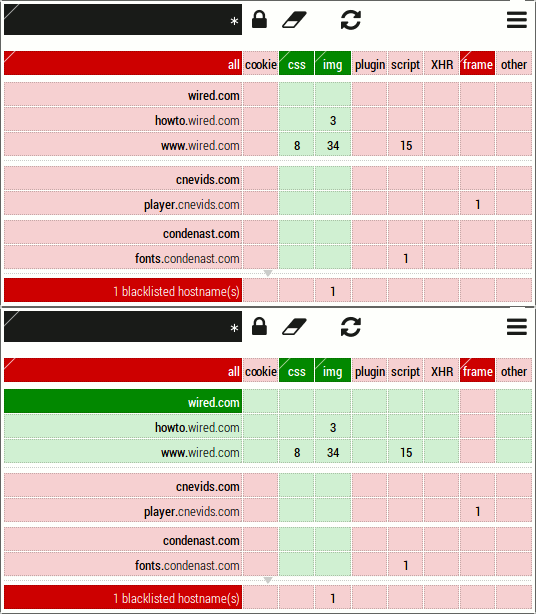
How to enable:
- Blacklist the
allandframecells. - Whitelist the
cssandimgcells. - Save by clicking on the padlock.
Behaviors:
- All is blocked by default (through the blacklisting of the
allcell). - CSS and images are whitelisted.
- Frames are blacklisted.
- Preset blocked hosts are blacklisted.
Advantages:
- Security is greatly enhanced.
- External and inline scripts won't execute (contrary to a commonly held belief, inline scripting can be disabled in Chromium).
- Privacy is greatly enhanced.
- Use less network bandwidth (web pages download faster)
Disadvantages:
- Web pages are less likely to render and/or behave as they were designed to.
- Sometimes it might be difficult, even a challenge, to find what needs to be whitelisted in order to make a web page render and/or behave properly.
Mitigation to disadvantages:
- Quite commonly, the content of the page can still be read properly.
- A site-level scope can be used to restrict an allow all/block exceptionally mode to a web site.
- Advanced users can help novice users through the easy exchange of recipes (see Rule manager).
- (
Future?Present) An easy accessible library of common useful recipes which can be applied with one click. - The preset recipe feature introduced in 0.7.8.0.
Useful Chromium settings with block-all/allow-exceptionally philosophy:
- Cookies set to "Keep local data only until I quit my browser"
- Plugins set to "Click to play"
- See further privacy enhancing settings in the Settings page.
The allow-all/block-exceptionally approach
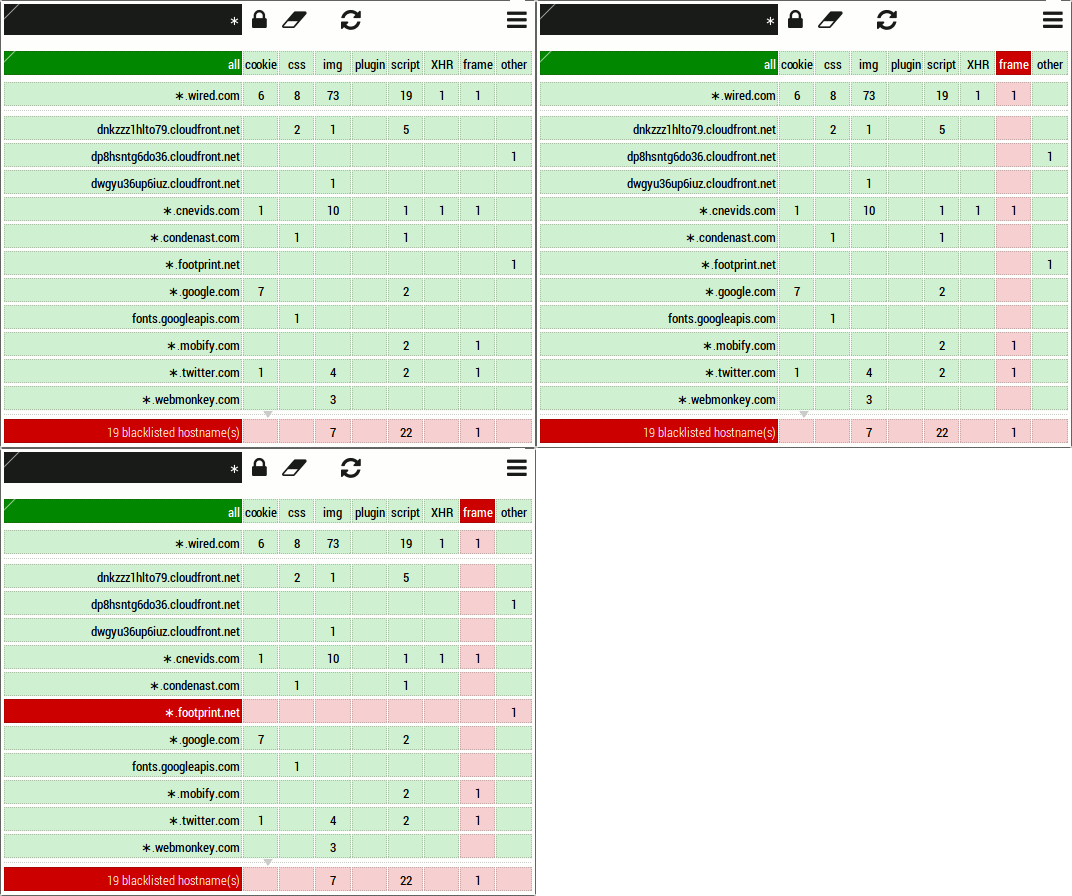
How to enable:
- Whitelist the
allcell. - Un-blacklist the
framecell. - Save by clicking on the padlock.
Behaviors:
- All is allowed by default.
- Preset blocked hosts are still blacklisted (because their own blacklist rule has precedence over the whitelist rule of the
allcell).
Advantages:
- Web pages are more likely to render and/or behave as they were designed to.
- An informed and more aware user:
- You see all the crap you are being served when not blocking (actually, it would be worst if it wasn't of the preset lists of blocked hosts which are preventing more bloat and nuisance from coming to life).
Disadvantages:
- Security is greatly diminished.
- Privacy is greatly diminished.
- Use more network bandwidth (web pages download slower)
Mitigation to disadvantages:
- The preset lists of blocked hosts, i.e. it could be worst (notice the 22 blocked scripts above).
- The support of Adblock Plus complex filters introduced in 0.8.4.0.