GitHub - json4s/json4s: JSON library (original) (raw)
JSON4S 
At this moment there are at least 6 json libraries for scala, not counting the java json libraries. All these libraries have a very similar AST. This project aims to provide a single AST to be used by other scala json libraries.
This library got it start as a fork of lift-json aiming to free it from Lift's slower release cycle. However, since then Lift itself has migrated to using json4s directly.
Lift JSON
So the native package in this library is in fact verbatim lift-json in a different package name; this means that your import statements will change if you use this library.
import org.json4s._ import org.json4s.native.JsonMethods._
After that everything works exactly the same as it would with lift-json
Jackson
In addition to the native parser there is also an implementation that uses jackson for parsing to the AST. The jackson module includes most of the jackson-module-scala functionality and the ability to use it with the lift-json AST.
To use jackson instead of the native parser:
import org.json4s._ import org.json4s.jackson.JsonMethods._
Be aware that the default behavior of the jackson integration is to close the stream when it's done. If you want to change that:
import com.fasterxml.jackson.databind.SerializationFeature org.json4s.jackson.JsonMethods.mapper.configure(SerializationFeature.CLOSE_CLOSEABLE, false)
Guide
Parsing and formatting utilities for JSON.
A central concept in lift-json library is Json AST which models the structure of a JSON document as a syntax tree.
sealed abstract class JValue case object JNothing extends JValue // 'zero' for JValue case object JNull extends JValue case class JString(s: String) extends JValue case class JDouble(num: Double) extends JValue case class JDecimal(num: BigDecimal) extends JValue case class JInt(num: BigInt) extends JValue case class JLong(num: Long) extends JValue case class JBool(value: Boolean) extends JValue case class JObject(obj: List[JField]) extends JValue case class JArray(arr: List[JValue]) extends JValue
type JField = (String, JValue)
All features are implemented in terms of the above AST. Functions are used to transform the AST itself, or to transform the AST between different formats. Common transformations are summarized in a following picture.
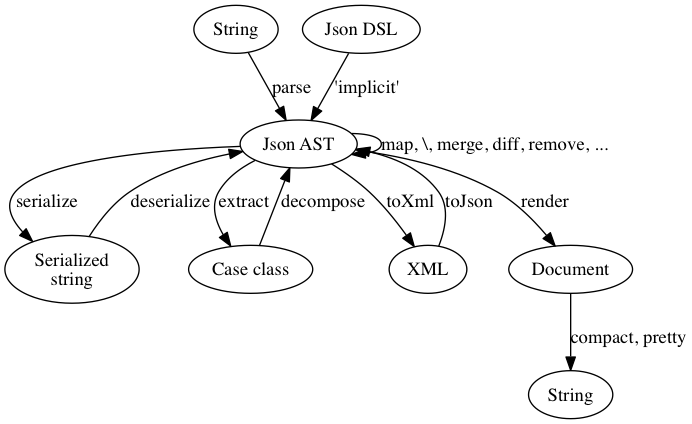
Summary of the features:
- Fast JSON parser
- LINQ-style queries
- Case classes can be used to extract values from parsed JSON
- Diff & merge
- DSL to produce valid JSON
- XPath-like expressions and HOFs to manipulate JSON
- Pretty and compact printing
- XML conversions
- Serialization
- Low-level pull parser API
Installation
You can add the json4s as a dependency in following ways. Note, replace {latestVersion} with correct Json4s version.
You can find available versions here:
https://central.sonatype.com/search?namespace=io.github.json4s
SBT users
For the native support add the following dependency to your project description:
val json4sNative = "io.github.json4s" %% "json4s-native" % "{latestVersion}"
For the Jackson support add the following dependency to your project description:
val json4sJackson = "io.github.json4s" %% "json4s-jackson" % "{latestVersion}"
Maven users
For the native support add the following dependency to your pom:
io.github.json4s json4s-native_${scala.version} {latestVersion}For the jackson support add the following dependency to your pom:
io.github.json4s json4s-jackson_${scala.version} {latestVersion}Extras
Support for Enum, Java 8 Date & Time
Support for Joda-Time
Applicative style parsing with Scalaz
Parsing JSON
Any valid json can be parsed into internal AST format. For native support:
scala> import org.json4s._ scala> import org.json4s.native.JsonMethods._
scala> parse(""" { "numbers" : [1, 2, 3, 4] } """) res0: org.json4s.JValue = JObject(List((numbers,JArray(List(JInt(1), JInt(2), JInt(3), JInt(4))))))
scala> parse("""{"name":"Toy","price":35.35}""", useBigDecimalForDouble = true) res1: org.json4s.JValue = JObject(List((name,JString(Toy)), (price,JDecimal(35.35))))
For jackson support:
scala> import org.json4s._ scala> import org.json4s.jackson.JsonMethods._
scala> parse(""" { "numbers" : [1, 2, 3, 4] } """) res0: org.json4s.JValue = JObject(List((numbers,JArray(List(JInt(1), JInt(2), JInt(3), JInt(4))))))
scala> parse("""{"name":"Toy","price":35.35}""", useBigDecimalForDouble = true) res1: org.json4s.JValue = JObject(List((name,JString(Toy)), (price,JDecimal(35.35))))
Producing JSON
You can generate json in 2 modes: either in DoubleMode or in BigDecimalMode; the former will map all decimal values into JDoubles, and the latter into JDecimals.
For the double mode dsl use:
import org.json4s.JsonDSL._ // or import org.json4s.JsonDSL.WithDouble._
For the big decimal mode dsl use:
import org.json4s.JsonDSL.WithBigDecimal._
DSL rules
- Primitive types map to JSON primitives.
- Any seq produces JSON array.
scala> val json = List(1, 2, 3)
scala> compact(render(json)) res0: String = [1,2,3]
- Tuple2[String, A] produces field.
scala> val json = ("name" -> "joe")
scala> compact(render(json)) res1: String = {"name":"joe"}
- ~ operator produces object by combining fields.
scala> val json = ("name" -> "joe") ~ ("age" -> 35)
scala> compact(render(json)) res2: String = {"name":"joe","age":35}
- ~~ operator works the same as ~ and is useful in situations where ~ is shadowed, eg. when using Spray or akka-http.
scala> val json = ("name" -> "joe") ~~ ("age" -> 35)
scala> compact(render(json)) res2: String = {"name":"joe","age":35}
- Any value can be optional. The field and value are completely removed when it doesn't have a value.
scala> val json = ("name" -> "joe") ~ ("age" -> Some(35))
scala> compact(render(json)) res3: String = {"name":"joe","age":35}
scala> val json = ("name" -> "joe") ~ ("age" -> (None: Option[Int]))
scala> compact(render(json)) res4: String = {"name":"joe"}
- Extending the dsl
To extend the dsl with your own classes you must have an implicit conversion in scope of signature:
type DslConversion = T => JValue
Example
import org.json4s._ import org.json4s.JsonDSL._ import org.json4s.jackson.JsonMethods._
case class Winner(id: Long, numbers: List[Int]) case class Lotto(id: Long, winningNumbers: List[Int], winners: List[Winner], drawDate: Option[java.util.Date])
object JsonExample {
val winners = List(Winner(23, List(2, 45, 34, 23, 3, 5)), Winner(54, List(52, 3, 12, 11, 18, 22))) val lotto = Lotto(5, List(2, 45, 34, 23, 7, 5, 3), winners, None)
val json = ("lotto" -> ("lotto-id" -> lotto.id) ~ ("winning-numbers" -> lotto.winningNumbers) ~ ("draw-date" -> lotto.drawDate.map(_.toString)) ~ ("winners" -> lotto.winners.map { w => (("winner-id" -> w.id) ~ ("numbers" -> w.numbers))}))
def main(args: Array[String]): Unit = { println(compact(render(json))) } }
scala> JsonExample.main(Array.empty[String]) {"lotto":{"lotto-id":5,"winning-numbers":[2,45,34,23,7,5,3],"winners": [{"winner-id":23,"numbers":[2,45,34,23,3,5]},{"winner-id":54,"numbers":[52,3,12,11,18,22]}]}}
The above example produces the following pretty-printed JSON. Notice that draw-date field is not rendered since its value is None:
scala> pretty(render(JsonExample.json))
{ "lotto":{ "lotto-id":5, "winning-numbers":[2,45,34,23,7,5,3], "winners":[{ "winner-id":23, "numbers":[2,45,34,23,3,5] },{ "winner-id":54, "numbers":[52,3,12,11,18,22] }] } }
Merging & Diffing
Two JSONs can be merged and diffed with each other. Please see more examples in MergeExamples.scala and DiffExamples.scala.
scala> import org.json4s._ scala> import org.json4s.jackson.JsonMethods._
scala> val lotto1 = parse("""{ "lotto":{ "lotto-id":5, "winning-numbers":[2,45,34,23,7,5,3], "winners":[{ "winner-id":23, "numbers":[2,45,34,23,3,5] }] } }""")
scala> val lotto2 = parse("""{ "lotto":{ "winners":[{ "winner-id":54, "numbers":[52,3,12,11,18,22] }] } }""")
scala> val mergedLotto = lotto1 merge lotto2
scala> pretty(render(mergedLotto)) res0: String = { "lotto":{ "lotto-id":5, "winning-numbers":[2,45,34,23,7,5,3], "winners":[{ "winner-id":23, "numbers":[2,45,34,23,3,5] },{ "winner-id":54, "numbers":[52,3,12,11,18,22] }] } }
scala> val Diff(changed, added, deleted) = mergedLotto diff lotto1 changed: org.json4s.JValue = JNothing added: org.json4s.JValue = JNothing deleted: org.json4s.JValue = JObject(List((lotto,JObject(List(JField(winners, JArray(List(JObject(List((winner-id,JInt(54)), (numbers,JArray( List(JInt(52), JInt(3), JInt(12), JInt(11), JInt(18), JInt(22))))))))))))))
Querying JSON
"LINQ" style
JSON values can be extracted using for-comprehensions. Please see more examples in JsonQueryExamples.scala.
scala> import org.json4s._ scala> import org.json4s.native.JsonMethods._
scala> val json = parse(""" { "name": "joe", "children": [ { "name": "Mary", "age": 5 }, { "name": "Mazy", "age": 3 } ] } """)
scala> for { JObject(child) <- json JField("age", JInt(age)) <- child } yield age res0: List[BigInt] = List(5, 3)
scala> for { JObject(child) <- json JField("name", JString(name)) <- child JField("age", JInt(age)) <- child if age > 4 } yield (name, age) res1: List[(String, BigInt)] = List((Mary,5))
XPath + HOFs
The json AST can be queried using XPath-like functions. The following REPL session shows the usage of '\', '\\', 'find', 'filter', 'transform', 'remove' and 'values' functions.
The example json is:
{ "person": { "name": "Joe", "age": 35, "spouse": { "person": { "name": "Marilyn", "age": 33 } } } }
Translated to DSL syntax:
scala> import org.json4s._ scala> import org.json4s.native.JsonMethods._
or
scala> import org.json4s.jackson.JsonMethods._ scala> import org.json4s.JsonDSL._
scala> val json: JObject = ("person" -> ("name" -> "Joe") ~ ("age" -> 35) ~ ("spouse" -> ("person" -> ("name" -> "Marilyn") ~ ("age" -> 33) ) ) )
scala> json \ "spouse" res0: org.json4s.JValue = JObject(List( (person,JObject(List((name,JString(Marilyn)), (age,JInt(33)))))))
scala> compact(render(res0)) res1: String = {"person":{"name":"Marilyn","age":33}}
scala> compact(render(json \ "name")) res2: String = {"name":"Joe","name":"Marilyn"}
scala> compact(render((json removeField { _ == JField("name", JString("Marilyn")) }) \ "name")) res3: String = "Joe"
scala> compact(render(json \ "person" \ "name")) res4: String = "Joe"
scala> compact(render(json \ "person" \ "spouse" \ "person" \ "name")) res5: String = "Marilyn"
scala> json findField { case JField("name", _) => true case _ => false } res6: Option[org.json4s.JValue] = Some((name,JString(Joe)))
scala> json filterField { case JField("name", _) => true case _ => false } res7: List[org.json4s.JField] = List(JField(name,JString(Joe)), JField(name,JString(Marilyn)))
scala> json transformField { case JField("name", JString(s)) => ("NAME", JString(s.toUpperCase)) } res8: org.json4s.JValue = JObject(List((person,JObject(List( (NAME,JString(JOE)), (age,JInt(35)), (spouse,JObject(List( (person,JObject(List((NAME,JString(MARILYN)), (age,JInt(33)))))))))))))
scala> json.values res8: scala.collection.immutable.Map[String,Any] = Map(person -> Map(name -> Joe, age -> 35, spouse -> Map(person -> Map(name -> Marilyn, age -> 33))))
Indexed path expressions work too and values can be unboxed using type expressions:
scala> val json = parse(""" { "name": "joe", "children": [ { "name": "Mary", "age": 5 }, { "name": "Mazy", "age": 3 } ] } """)
scala> (json \ "children")(0) res0: org.json4s.JValue = JObject(List((name,JString(Mary)), (age,JInt(5))))
scala> (json \ "children")(1) \ "name" res1: org.json4s.JValue = JString(Mazy)
scala> json \ classOf[JInt] res2: List[org.json4s.JInt#Values] = List(5, 3)
scala> json \ "children" \ classOf[JString] res3: List[org.json4s.JString#Values] = List(Mary, Mazy)
Extracting values
Case classes can be used to extract values from parsed JSON. Non-existent values can be extracted into scala.Option and strings can be automatically converted into java.util.Dates.
Please see more examples in ExtractionExampleSpec.scala.
scala> import org.json4s._ scala> import org.json4s.jackson.JsonMethods._
scala> implicit val formats: Formats = DefaultFormats // Brings in default date formats etc.
scala> case class Child(name: String, age: Int, birthdate: Option[java.util.Date]) scala> case class Address(street: String, city: String) scala> case class Person(name: String, address: Address, children: List[Child])
scala> val json = parse(""" { "name": "joe", "address": { "street": "Bulevard", "city": "Helsinki" }, "children": [ { "name": "Mary", "age": 5, "birthdate": "2004-09-04T18:06:22Z" }, { "name": "Mazy", "age": 3 } ] } """)
scala> json.extract[Person] res0: Person = Person(joe,Address(Bulevard,Helsinki),List(Child(Mary,5,Some(Sat Sep 04 18:06:22 EEST 2004)), Child(Mazy,3,None)))
scala> val addressJson = json \ "address" // Extract address object scala> addressJson.extract[Address] res1: Address = Address(Bulevard,Helsinki)
scala> (json \ "children").extract[List[Child]] // Extract list of objects res2: List[Child] = List(Child(Mary,5,Some(Sat Sep 04 23:36:22 IST 2004)), Child(Mazy,3,None))
By default the constructor parameter names must match json field names. However, sometimes json field names contain characters which are not allowed characters in Scala identifiers. There are two solutions for this. (See LottoExample.scala for a bigger example.)
Use back ticks:
scala> case class Person(first-name: String)
Use transform function to postprocess AST:
scala> case class Person(firstname: String) scala> json transformField { case ("first-name", x) => ("firstname", x) }
If the json field names are snake case (i.e., separated_by_underscores), but the case class uses camel case (i.e., firstLetterLowercaseAndNextWordsCapitalized), you can convert the keys during the extraction using camelizeKeys:
scala> import org.json4s._ scala> import org.json4s.native.JsonMethods._ scala> implicit val formats: Formats = DefaultFormats scala> val json = parse("""{"first_name":"Mary"}""") scala> case class Person(firstName: String)
scala> json.camelizeKeys.extract[Person] res0: Person = Person(Mary)
See the "Serialization" section below for details on converting a class with camel-case fields into json with snake case keys.
The extraction function tries to find the best-matching constructor when the case class has auxiliary constructors. For instance, extracting from JSON {"price":350} into the following case class will use the auxiliary constructor instead of the primary constructor:
scala> case class Bike(make: String, price: Int) { def this(price: Int) = this("Trek", price) } scala> parse(""" {"price":350} """).extract[Bike] res0: Bike = Bike(Trek,350)
Primitive values can be extracted from JSON primitives or fields:
scala> (json \ "name").extract[String] res0: String = "joe"
scala> ((json \ "children")(0) \ "birthdate").extract[Date] res1: java.util.Date = Sat Sep 04 21:06:22 EEST 2004
DateFormat can be changed by overriding 'DefaultFormats' (or by implementing trait 'Formats'):
scala> implicit val formats: Formats = new DefaultFormats { override def dateFormatter = new SimpleDateFormat("yyyy-MM-dd'T'HH:mm:ss.SSS'Z'") }
A JSON object can be extracted to Map[String, _] too. Each field becomes a key value pair in result Map:
scala> val json = parse(""" { "name": "joe", "addresses": { "address1": { "street": "Bulevard", "city": "Helsinki" }, "address2": { "street": "Soho", "city": "London" } } }""")
scala> case class PersonWithAddresses(name: String, addresses: Map[String, Address]) scala> json.extract[PersonWithAddresses] res0: PersonWithAddresses("joe", Map("address1" -> Address("Bulevard", "Helsinki"), "address2" -> Address("Soho", "London")))
Note that when the extraction of an Option[_] fails, the default behavior of extract is to return None. You can make it fail with a [MappingException] by using a custom Formats object:
val formats: Formats = DefaultFormats.withStrictOptionParsing
or
val formats: Formats = new DefaultFormats { override val strictOptionParsing: Boolean = true }
Same happens with collections(for example, List and Map...), the default behavior of extractis to return an empty instance of the collection. You can make it fail with a [MappingException] by using a custom Formats object:
val formats: Formats = DefaultFormats.withStrictArrayExtraction
or
val formats: Formats = new DefaultFormats { override val strictArrayExtraction: Boolean = true }
val formats: Formats = DefaultFormats.withStrictMapExtraction
or
val formats: Formats = new DefaultFormats { override val strictMapExtraction: Boolean = true }
These settings (strictOptionParsing, strictArrayExtraction and strictMapExtraction) can be enabled with
val formats: Formats = DefaultFormats.strict
With Json4s 3.6 and higher, apply functions in companion objects will be evaluated for use during extraction. If this behavior is not desired, you can disable it using the considerCompanionConstructors on a custom Formats object:
val formats: Formats = new DefaultFormats { override val considerCompanionConstructors = false }
When this option is disabled, only primary and secondary constructors will be evaluated for use during extraction.
Handling null
null values of Options are always extracted as None. For other types you can control the behaviour by setting the nullExtractionStrategy of the Formats used during extraction. There are three options:
Keep: Leaves null values as they are.Disallow: Fails extraction when anullvalue is encountered.TreatAsAbsent: Treatsnullvalues as if they were not present at all.
Serialization
Case classes can be serialized and deserialized. Please see other examples in SerializationExamples.scala.
scala> import org.json4s._ scala> import org.json4s.native.Serialization scala> import org.json4s.native.Serialization.{read, write}
scala> implicit val formats: Formats = Serialization.formats(NoTypeHints)
scala> val ser = write(Child("Mary", 5, None))
scala> readChild res1: Child = Child(Mary,5,None)
If you're using jackson instead of the native one:
scala> import org.json4s._ scala> import org.json4s.jackson.Serialization scala> import org.json4s.jackson.Serialization.{read, write}
scala> implicit val formats: Formats = Serialization.formats(NoTypeHints)
scala> val ser = write(Child("Mary", 5, None))
scala> readChild res1: Child = Child(Mary,5,None)
Serialization supports:
- Arbitrarily deep case-class graphs
- All primitive types, including BigInt and Symbol
- List, Seq, Array, Set and Map (note, keys of the Map must be strings: Map[String, _])
- scala.Option
- java.util.Date
- Polymorphic Lists (see below)
- Recursive types
- Serialization of fields of a class (see below)
- Custom serializer functions for types that are not supported (see below)
If the class contains camel-case fields (i.e: firstLetterLowercaseAndNextWordsCapitalized) but you want to produce a json string with snake casing (i.e., separated_by_underscores), you can use the snakizeKeys method:
scala> val ser = write(Person("Mary")) ser: String = {"firstName":"Mary"}
scala> compact(render(parse(ser).snakizeKeys)) res0: String = {"first_name":"Mary"}
Serializing polymorphic Lists
Type hints are required when serializing polymorphic (or heterogeneous) Lists. Serialized JSON objects will get an extra field named 'jsonClass' (the name can be changed by overriding 'typeHintFieldName' from Formats).
scala> trait Animal scala> case class Dog(name: String) extends Animal scala> case class Fish(weight: Double) extends Animal scala> case class Animals(animals: List[Animal])
scala> implicit val formats: Formats = Serialization.formats(ShortTypeHints(List(classOf[Dog], classOf[Fish])))
scala> val ser = write(Animals(Dog("pluto") :: Fish(1.2) :: Nil)) ser: String = {"animals":[{"jsonClass":"Dog","name":"pluto"},{"jsonClass":"Fish","weight":1.2}]}
scala> readAnimals res0: Animals = Animals(List(Dog(pluto), Fish(1.2)))
ShortTypeHints outputs the short classname for all instances of configured objects. FullTypeHints outputs the full classname. Other strategies can be implemented by extending the TypeHints trait.
Serializing fields of a class
To enable serialization of fields, a single FieldSerializer can be added for each type:
implicit val formats: Formats = DefaultFormats + FieldSerializerWildDog
Now the type WildDog (and all subtypes) gets serialized with all its fields (+ constructor parameters). FieldSerializer takes two optional parameters, which can be used to intercept the field serialization:
case class FieldSerializer[A: Manifest]( serializer: PartialFunction[(String, Any), Option[(String, Any)]] = Map(), deserializer: PartialFunction[JField, JField] = Map() )
Those PartialFunctions are called just before a field is serialized or deserialized. Some useful PFs to rename and ignore fields are provided:
val dogSerializer = FieldSerializerWildDog orElse ignore("owner"), renameFrom("animalname", "name"))
implicit val formats: Formats = DefaultFormats + dogSerializer
Support for renaming multiple fields is accomplished by chaining the PFs like so: (do not add more than one FieldSerializer per type)
{"id": "a244", "start-time": 12314545, "end-time": -1}
case class Log(id: String, startTime: Long, endTime: Long) val logSerializer = FieldSerializerLog orElse renameTo("endTime", "end-time"), renameFrom("start-time", "startTime") orElse renameFrom("end-time", "endTime"))
implicit val formats: Formats = DefaultFormats + logSerializer
Serializing classes defined in traits, classes or methods
We've added support for case classes defined in a trait. But they do need custom formats. I'll explain why and then how.
Why?
For classes defined in a trait it's a bit difficult to get to their companion object, which is needed to provide default values. We could punt on those but that brings us to the next problem, that the compiler generates an extra field in the constructor of such case classes. The first field in the constructor of those case classes is called $outer and is of type of the defining trait. So somehow we need to get an instance of that object, naively we could scan all classes and collect the ones that are implementing the trait, but when there are more than one: which one to take?
How?
I've chosen to extend the formats to include a list of companion mappings for those case classes. So you can have formats that belong to your modules and keep the mappings in there. That will then make default values work and provide the much needed $outer field.
trait SharedModule { case class SharedObj(name: String, visible: Boolean = false) }
object PingPongGame extends SharedModule implicit val formats: Formats = DefaultFormats.withCompanions(classOf[PingPongGame.SharedObj] -> PingPongGame)
val inst = PingPongGame.SharedObj("jeff", visible = true) val extr = Extraction.decompose(inst) extr must_== JObject("name" -> JString("jeff"), "visible" -> JBool(true)) extr.extract[PingPongGame.SharedObj] must_== inst
Serializing non-supported types
It is possible to plug in custom serializer + deserializer functions for any type. Now, if we have a non-case class Interval (thus, not supported by default), we can still serialize it by providing following serializer.
scala> class Interval(start: Long, end: Long) { val startTime = start val endTime = end }
scala> class IntervalSerializer extends CustomSerializer[Interval](format => ( { case JObject(JField("start", JInt(s)) :: JField("end", JInt(e)) :: Nil) => new Interval(s.longValue, e.longValue) }, { case x: Interval => JObject(JField("start", JInt(BigInt(x.startTime))) :: JField("end", JInt(BigInt(x.endTime))) :: Nil) } ))
scala> implicit val formats: Formats = Serialization.formats(NoTypeHints) + new IntervalSerializer
A custom serializer is created by providing two partial functions. The first evaluates to a value if it can unpack the data from JSON. The second creates the desired JSON if the type matches.
Extensions
Module json4s-ext contains extensions to extraction and serialization. The following types are supported.
// Scala enums implicit val formats: Formats = org.json4s.DefaultFormats + new org.json4s.ext.EnumSerializer(MyEnum) // or implicit val formats: Formats = org.json4s.DefaultFormats + new org.json4s.ext.EnumNameSerializer(MyEnum)
// Joda Time implicit val formats: Formats = org.json4s.DefaultFormats ++ org.json4s.ext.JodaTimeSerializers.all
// Java 8 Date & Time implicit val formats: Formats = org.json4s.DefaultFormats ++ org.json4s.ext.JavaTimeSerializers.all
XML support
JSON structure can be converted to XML nodes and vice versa. Please see more examples in XmlExamples.scala.
scala> import org.json4s.Xml.{toJson, toXml} scala> val xml = 1 Harry 2 David
scala> val json = toJson(xml) scala> pretty(render(json)) res3: String = { "users":{ "user":[{ "id":"1", "name":"Harry" },{ "id":"2", "name":"David" }] } }
Now, the above example has two problems. First, the ID is converted to String while we might want it as an Int. This is easy to fix by mapping JString(s) to JInt(s.toInt). The second problem is more subtle. The conversion function decides to use a JSON array because there's more than one user element in XML. Therefore a structurally equivalent XML document which happens to have just one user element will generate a JSON document without a JSON array. This is rarely a desired outcome. These both problems can be fixed by the following transformation function.
scala> json transformField { case ("id", JString(s)) => ("id", JInt(s.toInt)) case ("user", x: JObject) => ("user", JArray(x :: Nil)) }
Other direction is supported too. Converting JSON to XML:
scala> toXml(json) res5: scala.xml.NodeSeq = NodeSeq(1Harry2David)
Low-level pull parser API
The pull parser API is provided for cases requiring extreme performance. It improves parsing performance in two ways. First, no intermediate AST is generated. Second, you can stop parsing at any time, skipping the rest of the stream. Note: This parsing style is recommended only as an optimization. The above-mentioned functional APIs are easier to use.
Consider the following example, which shows how to parse one field value from a big JSON:
scala> val json = """ { ... "firstName": "John", "lastName": "Smith", "address": { "streetAddress": "21 2nd Street", "city": "New York", "state": "NY", "postalCode": 10021 }, "phoneNumbers": [ { "type": "home", "number": "212 555-1234" }, { "type": "fax", "number": "646 555-4567" } ], ... }"""
scala> val parser = (p: Parser) => { def parse: BigInt = p.nextToken match { case FieldStart("postalCode") => p.nextToken match { case IntVal(code) => code case _ => p.fail("expected int") } case End => p.fail("no field named 'postalCode'") case _ => parse }
     parse
   }
scala> val postalCode = parse(json, parser) postalCode: BigInt = 10021
The pull parser is a function Parser => A; in this example it is concretely Parser => BigInt. The constructed parser recursively reads tokens until it finds a FieldStart("postalCode") token. After that the next token must be IntVal; otherwise parsing fails. It returns the parsed integer value and stops parsing immediately.
Kudos
- The original idea for the DSL syntax was taken from the Lift mailing list (by Marius).
- The idea for the AST and rendering was taken from Real World Haskell book.