Nim for TypeScript Programmers (original) (raw)
Table of contents
DISCLAIMER!
Unofficial, work in progress! This is still a stub. Please help to extend it. There may be inaccuracies in this guide. The guide assumes some intermediate knowledge.
The official tutorials can be found here:
The official manual provides an overview of the language:
The official library docs document Nim's standard library:
Comparison
| Feature | TypeScript | Nim |
|---|---|---|
| Execution model | JavaScript code (Compiler) | JavaScript code (Compiler) |
| Written using | TypeScript | Nim |
| License | Apache | MIT |
| Version (Major) | 3.x | 1.x |
| Typing | Static, "provably correct" types | Static, Strong, Inferred |
| Meta-programming | ❎ #issue-13252, Decorators are limited | ✔️ template, macro |
| int8/16/32/64 types | ❎ | ✔️ |
| float32/float64 types | ❎ | ✔️ |
| Char types | ❎ | ✔️ |
| Subrange types | ❎ #issue-225324972 | ✔️ |
| JSON types | ❎ #issue-56296923 | ✔️ |
| Regex types | ❎ #issue-128264906 | ✔️ |
| Option types | ❎ | ✔️ |
| Operator overloading | ❎ | ✔️ |
| Custom operators | ❎ | ✔️ |
| Run-time checks | ❎ | ✔️ |
| Side effects tracking | ❎ | ✔️ |
| Enum types | ✔️ | ✔️ |
| Immutability | Limited, readonly keyword | ✔️ |
| Function arguments immutability | Mutable | Immutable |
| Full DOM API | ✔️ | ✔️ |
| console.log() anywhere | ❓ Compiler complains | ✔️ |
| console.assert() anywhere | ❓ Compiler complains | ✔️ |
| NodeJS integration | ✔️ | ✔️ |
| Generics | ✔️ | ✔️ |
| Type inference | ✔️ | ✔️ |
| Closures | ✔️ | ✔️ |
| Object-oriented | ✔️ | ✔️ |
| Methods | ✔️ | ✔️ |
| Exceptions | ✔️ | ✔️ |
| Anonymous functions | ✔️ | ✔️ |
| Arrow functions | ✔️ | ✔️ |
| Array comprehensions | ✔️ | ✔️ |
| Formatted string literals | ✔️ | ✔️ |
| FFI | ✔️ JS only | ✔️ C/C++/JS |
| Async | ✔️ | ✔️ |
| Regex | ✔️ | ✔️ |
| Self-documentation comments | ✔️ | ✔️ |
| Package publishing | ✔️ | ✔️ |
| Package manager | ✔️ | ✔️ |
| Code auto formatter | ✔️ via NPM | ✔️ Nimpretty |
| File extensions | .ts, .tsx | .nim, .nims |
Variables
Creating a new variable uses var, let or const. Nim has immutability and compile-time function execution. You can assign functions to variables.const is different from TypeScript by being truly immutable.
| Feature | const | let | var |
|---|---|---|---|
| Run-Time | NO | ✔️ YES | ✔️ YES |
| Compile-Time | ✔️ YES | NO | NO |
| Immutable | ✔️ YES | ✔️ YES | NO |
| AutoInitialized | ✔️ YES | ✔️ YES | ✔️ YES |
| Reassignable | NO | NO | ✔️ YES |
| Requires Assignment | ✔️ YES | ✔️ YES | NO |
| Can be Global | ✔️ YES | ✔️ YES | ✔️ YES |
If you are just starting from scratch, you can use var while learning, it will not produce an error for doing so, until you learn more.
Ternary operators
conditional ? "result0" : "result1"
⬆️ TypeScript ⬆️ ⬇️ Nim ⬇️
if conditional: "result0" else: "result1"
You probably notice that the Ternary Operator is just an if..else inline.
Anonymous functions
var myfunc = (argument1: number, argument2: number) => { return argument1 + argument2 };
console.log( myfunc(1, 2) )
⬆️ TypeScript ⬆️ ⬇️ Nim ⬇️
var myfunc = ( proc (argument1, argument2: int): int = argument1 + argument2 )
echo myfunc(1, 2)
In Nim an anonymous function is a function without a name and surrounded by brackets.
This
this in Nim does not have a fixed or hard coded naming, so you may see some code using self instead. Nim only cares about it being the first argument.this or self is immutable by default.
type Cat = object
proc purr(this: Cat) = echo "Purr Purr" # using 'this' proc dance(self: Cat) = echo "Tappity Tappity" # using 'self'
let garfield = Cat()
garfield.purr() # Purr Purr garfield.dance() # Tappity Tappity
yep, this/self is the instance
proc himself(self: Cat): Cat = return self echo garfield == garfield.himself() # true
Arrow functions
Nim has arrow functions, they are syntactic sugar for normal functions. Using arrow functions requires to import sugar.
Let's convert the above cat example to use arrow functions:
import sugar
type Cat = object
let purr = (this: Cat) => echo "Purr Purr" # using this
let dance = (self: Cat) => echo "Tappity Tappity" # using self
The call syntax is identical
If you do not need to pass any arguments, don't:
import sugar
let purr = () => echo "Purr Purr" # No arguments
purr() # Purr Purr
You can use pragmas on your arrow functions:
let functionName = () {.inline.} => 42 let another_name = () {.inline.} => 42
(See also inline pragma)
You can use function names and pragmas on your arrow functions:
function_name(argument0, argument1: int) {.noSideEffect.} => argument0 + argument1 let variab = (argument0, argument1: int) {.noSideEffect.} => argument0 + argument1
(See also noSideEffect pragma)
Compile-time function execution
Nim has compile-time function execution that allows you to run backend-like code at compile-time and use it on frontend at run-time. Compile-time FFI is also possible. Most code that works at compile-time and NimScript also tends to work for frontend.
Server-side rendering
With SCFs
Nim Source Code Filters (SCF) are a standard library templating mechanism to do server-side rendering of templates.
SCFs have the file extension *.nimf and start with the shebang #?stdtmpl. Inside, the logic is normal Nim code, but with the prefix #, while the template is written as-is (no #).
SCFs are usually functions that return a string. Those functions can use normal string operations and formatting. They get compiled into normal Nim code, providing excellent performance.
serverside.nimf
#?stdtmpl #func generateXML(name, age: string): string = $name $age
serverside_includer.nim
include "serverside.nimf"
echo generateXML("Nim", "16 (in 2021)")
prints:
Nim
16 (in 2021)
With Karax
The Karax framework also does server-side rendering (install with nimble install karax):
karax_helloworld_serverside.nim
import karax/[karaxdsl,vdom]
writeFile "app.html", $(block: buildHtml(tdiv): h1: text"Hello World" p: text"Compile: nim r file.nim ")
karax_helloworld_serverside_bulma.nim
include prelude import karax / [karaxdsl, vdom]
writeFile "example.html", $(block: buildHtml(tdiv):
link(href="https://cdn.jsdelivr.net/npm/bulma@0.9.1/css/bulma.min.css", rel="stylesheet")
section(class="section"): tdiv(class="container"): h1(class="title"): text"Welcome"
  button(class="button is-success"): text"Example"

  ol(class="ol"):
    li: text"Item 0"
    li: text"Item 1"

  code(class="code"): text"""echo "Hello World" """
)
Client-Side Rendering
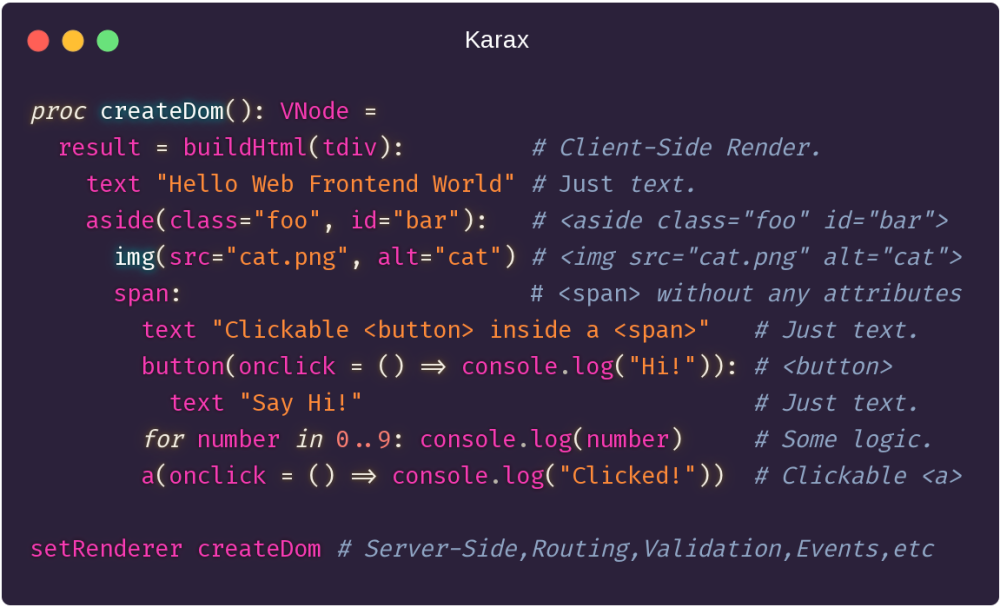
Karax can also do client-side rendering, it includes a local dev server among other really cool things.
You can compile and run this example in web browser using Karax karun tool.
karax_helloworld_clientside.nim
include karax/prelude setRenderer func: auto = buildHtml(h1): text"Hello World"
Svelte
nclearseam is a Nim frontend inspired by Svelte.
Parcel
parcel-plugin-nim is a Nim module for Parcel support.
CommonJS
jsExport.nim is a Nim module for CommonJS support.
WebGL GUI
nimx is a cross-platform GUI framework with WebGL target, compiles your GUI to WebGL.
Electron
You can run Nim inside Electron.
Webview
You can also use a cross-platform tiny (1 .h file) and fast (C code) webview:
WIISH also provides a similar cross-platform WebView, with other targets too.
React
React.nim provides ReactJS bindings for Nim.
More GUI frameworks
If it is not mandatory to be a JavaScript-only GUI, and you just need a GUI that works on Windows/Linux/Mac, then you have even more alternatives to try:
WebAssembly
You can compile your Nim code to WebAssembly using:
More about compiling your project to WebAssembly:
Build modes
When your code is ready for production you can create a release build by adding the compile commands -d:release and -d:danger.
| Feature | Release Build | Debug Build |
|---|---|---|
| Speed | Fast | Slow |
| File Size | Small | Big |
| Optimized | ✔️ | ❎ |
| Tracebacks | ❎ | ✔️ |
| Run-time checks | ✔️ | ✔️ |
| Compile-time checks | ✔️ | ✔️ |
| assert | ❎ | ✔️ |
| doAssert | ✔️ | ✔️ |
Minification
Nim does not minify the compiled JavaScript by default.
Nim typically compiles to very small file sizes when it builds for release. Thanks to dead code elimination only the used symbols get compiled, others are not present in the release build. E.g. if you import a module but do not use it, it will not exist in the release build (and a hint in the terminal will notify you about the unused import).
Nim uses spaces as indentation. Basically you are good to go with the JavaScript file that Nim compiles.
Alternatively you can use any other minifier software to do that kind of post-processing of JavaScript.
Obfuscation
Nim does not obfuscate the compiled JavaScript by default.
If you want to obfuscate the compiled JavaScript, you can control the name mangling, among other more useful features using {.exportc.} pragma, to use the mangling as obfuscator.
var variable {.exportc: "lkfnjmgkw3du4905r3q2ep8n4urfp34w2efltgvepotik132qm0".} = false proc funct() {.exportc: "kl34jgo9liw35e4atr8i30q2rk1fipkpfrsdofir93o2qujfoks".} = echo 42
Compiles to:
var lkfnjmgkw3du4905r3q2ep8n4urfp34w2efltgvepotik132qm0 = false;
function kl34jgo9liw35e4atr8i30q2rk1fipkpfrsdofir93o2qujfoks() { rawEcho("42"); }
You use the human friendly names variable and funct, while the code compiles to the obfuscated names.
Nim will not lose track of the names, you can generate the obfuscated names with any random algo of your own.
Alternatively you can use any other obfuscator software to do that kind of post-processing of JavaScript.
JavaScript interoperability
Nim can directly interoperate with JavaScript. Here is how you can create your own libs.
There is no additional performance cost, the compiler will just emit the code you want.
As minimal as possible example, not too useful, but explains it as simple as possible:
func log(arg, arg2: SomeNumber) {.importjs: """console.log(#, #)""".}
#is replaced by arguments by index, starting at index 0, if any.@is replaced by all remaining arguments, if any, separated by comma.$$to escape a single$on string or Regex.$1is replaced by the current function name.- Argument types and return types are Nim types, from std lib or your own custom.
importcppis sometimes used asimportjs.- You can use
openArrayas return type on functions, it will returnarrayinstead ofseq. - Print to console using vanilla JavaScript
console.log()and similar. - Ensure that DOM is ready using vanilla JavaScript
(function(){ ... })();. - Enforce Strict Mode using vanilla JavaScript
"use strict";. - ImportJs pragma
- If the function has no arguments, then
@generates nothing (empty). - If the function has no arguments, then
#produces an error. - Note that with
@commas are automatically inserted, with#you must add the commas. - You can use multi-line strings for the patterns.
- You can use
strformatfor the patterns, but you must importstrformat.
Let's compile this tiny example to JavaScript target:
lognumbers.nim
func log(arg, arg2: SomeNumber) {.importjs: """console.log(#, #)""".}
log(42, 9)
run in console
nim js -d:danger lognumbers.nim
generates lognumbers.js
If you need to use named arguments you can use the {.emit.} pragma:
func functionName(namedArgument: int) = {.emit: """console.log( namedArgument);""".}
`namedArgument`is replaced by arguments by name.- Argument types and return types are Nim types, from std lib or your own custom.
- Print to console using
console.log()and similar. - You can use
openArrayas return type on functions, it will returnarrayinstead ofseq. - Ensure that DOM is ready using vanilla JavaScript
(function(){ ... })();. - You can use
"use strict"if you want, but it may not have effect. - The rest is similar to
importjs, as explained above. - https://nim-lang.org/docs/manual.html#implementation-specific-pragmas-emit-pragma
Let's compile this tiny example to JavaScript target:
lognamed.nim
func log(mynum: int) = {.emit: """console.log(mynum);""".}
log(42)
lognamed.js
function log(mynum) { console.log(mynum); }
log(42);
More Examples:
func log(foo, bar, baz: SomeNumber) = {.emit:
"""
console.log('foo = ' + foo, 'bar = ' + bar, 'baz = ' + baz);
"""
.}
func encapsulated_log(foo, bar, baz: SomeNumber | string) {.importjs: """ (function () { "use strict"; console.log('foo = ' + #, 'bar = ' + #, 'baz = ' + #); })() """ .}
log(42, 19, 0) encapsulated_log(42, "hi", 19)
Useful pragmas for interoperability
- {.importjs.} import JavaScript.
- {.compiletime.} Force code to run at compile-time.
- {.exportc.} Escape Name Mangling (for Debug, Obfuscation, etc).
- {.emit.} Emit code directly with passed arguments.
- {.varargs.} Force a function to accept several arguments.
- {.hint.} Human-friendly colored messages at compile-time that generates no code.
- {.warning.} Human-friendly colored messages at compile-time that generates no code.
- {.codegendecl.} Emit code directly on code generator.
- {.noinit.} Escape implicit variable auto-initialization.
- {.discardable.} Allow to discard unused return values (for debug, quick prototyping, etc).
- {.noreturn.} Force a function to never return
- {.asmnostackframe.} Force a function to not have the result = auto-injected, useful with {.emit.}
- {.injectStmt.} Inject code before every other statement in the current module.
- Pragmas are just macro, so you can create your own.
See also:
- static: / static() Force a block of code to run at compile-time.
- when Compile-time if
- jsre module for an example of actual code.
- jsconsole module for an example of actual code.
Interoperability template
- Nim "code template" pseudocode that you can Edit to create your own JavaScript libs:
func functionName(argument: SomeNumber | string | bool): SomeNumber {.importjs: """ (function () { "use strict";
console.log("CODE HERE"); console.log(#); return 42;
})(); """, exportc: "functionName".} ## Documentation Comment.
func functionName2(namedArgument: SomeNumber | string | bool): SomeNumber = {.emit: """
console.log("CODE HERE");
console.log( namedArgument );
return 42;
""", exportc: "functionName2".} ## Documentation Comment.
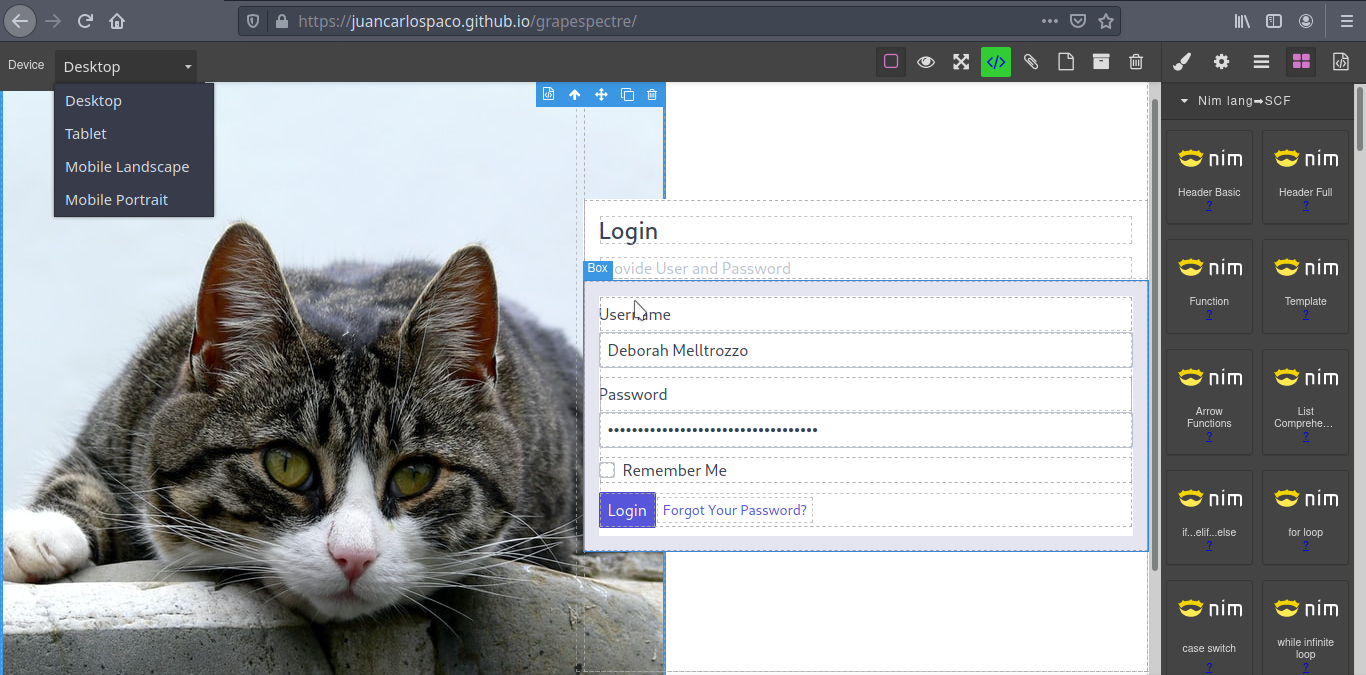
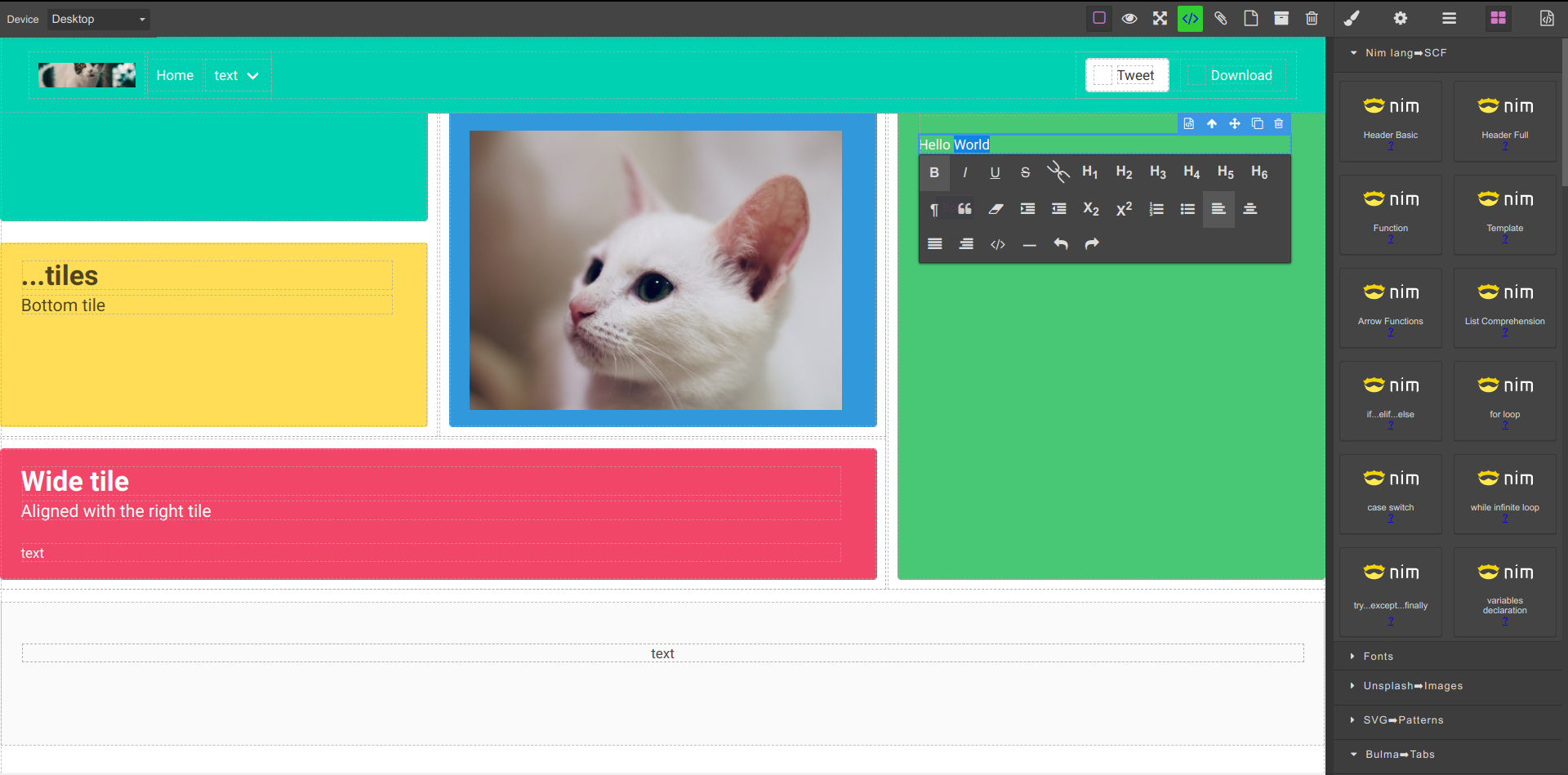
HTML/CSS WYSYWIG editor for Nim
This is a community maintained open source project thats a HTML/CSS WYSYWIG Editor with Nim Support without JavaScript required, for creating Source Code Filter starter templates (similar to Pug templating, etc), so you dont have to start by hand with an empty blank file, not meant to produce a "finished" page but a template to edit. Ideas to make it more useful welcome. Pull Requests welcome.
- Drag&drop your components in the page and press the "View Code" green button.
- Documentation of each component clicking on the "?" link.
- Ready-made full-page templates on the "Templates" category.
Spectre CSS
Bulma CSS
NodeJS compatibility
More
To not duplicate all documentation here, please continue reading:
It is Python-oriented, but the same concepts also work for Frontend too!.