Quantize ONNX Models (original) (raw)
Contents
- Quantization Overview
- ONNX quantization representation format
- Quantizing an ONNX model
- Transformer-based models
- Quantization on GPU
- FAQ
Quantization Overview
Quantization in ONNX Runtime refers to 8 bit linear quantization of an ONNX model.
During quantization the floating point real values are mapped to an 8 bit quantization space and it is of the form: VAL_fp32 = Scale * (VAL_quantized - Zero_point)
Scale is a positive real number used to map the floating point numbers to a quantization space. It is calculated as follows:
For unsigned 8 bit
scale = (data_range_max - data_range_min) / (quantization_range_max - quantization_range_min)
For signed 8 bit
scale = abs(data_range_max, data_range_min) * 2 / (quantization_range_max - quantization_range_min)
Zero point represents zero in the quantization space. It is important that the floating point zero value be exactly representable in quantization space. This is because zero padding is used in many CNNs. If it is not possible to represent 0 uniquely after quantization, it will result in accuracy errors.
ONNX quantization representation format
There are 2 ways to represent quantized ONNX models:
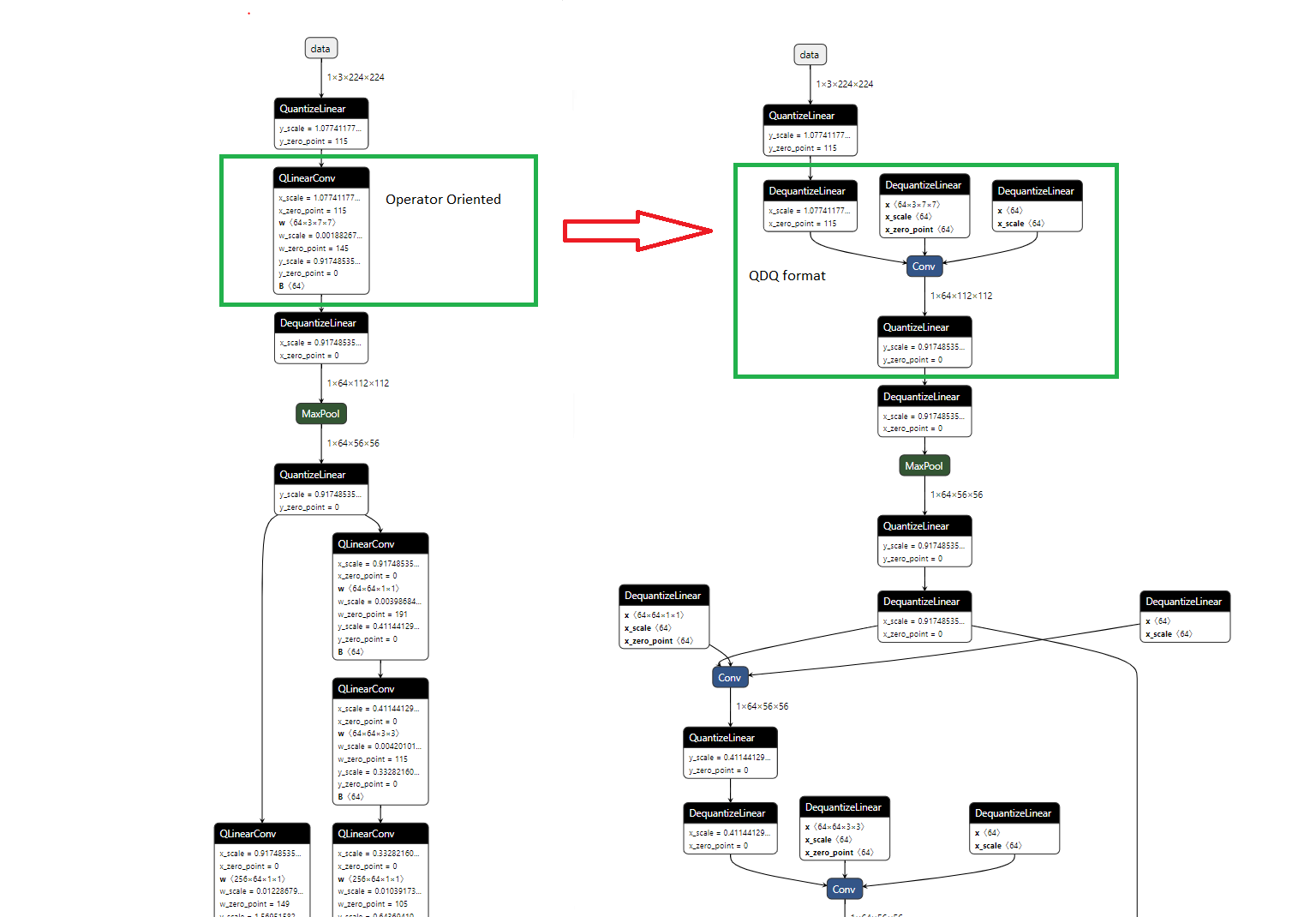
- Operator Oriented. All the quantized operators have their own ONNX definitions, like QLinearConv, MatMulInteger and etc.
- Tensor Oriented, aka Quantize and DeQuantize (QDQ). This format uses DQ(Q(tensor)) to simulate the quantize and dequantize process, and QuantizeLinear and DeQuantizeLinear operators also carry the quantization parameters. Models generated like below are in QDQ format:
- Models quantized by quantize_static API below with quant_format=QuantFormat.QDQ.
- Quantization-Aware training (QAT) models converted from Tensorflow or exported from PyTorch.
- Quantized models converted from tflite and other framework.
For the last 2 cases, you don’t need to quantize the model with quantization tool. OnnxRuntime CPU EP can run them directly as quantized model. TensorRT and NNAPI EP are adding support.
Picture below shows the equivalent representation with QDQ format and Operator oriented format for quantized Conv. This E2E example demonstrates QDQ and Operator Oriented format.
Quantizing an ONNX model
There are 3 ways of quantizing a model: dynamic, static and quantize-aware training quantization.
- Dynamic quantization: This method calculates the quantization parameter (scale and zero point) for activations dynamically.
- Static quantization: It leverages the calibration data to calculates the quantization parameter of activations.
- Quantize-Aware training quantization: The quantization parameter of activation are calculated while training, and the training process can control activation to a certain range.
Quantization API
Quantization has 3 main APIs, which corresponds to the 3 quantization methods:
- quantize_dynamic: dynamic quantization
- quantize_static: static quantization
- quantize_qat: quantize-aware training quantization
Please refer to quantize.py for quantization options for each method.
Example
- Dynamic quantization
import onnx
from onnxruntime.quantization import quantize_dynamic, QuantType

model_fp32 = 'path/to/the/model.onnx'
model_quant = 'path/to/the/model.quant.onnx'
quantized_model = quantize_dynamic(model_fp32, model_quant, weight_type=QuantType.QUInt8)
- QAT quantization
import onnx
from onnxruntime.quantization import quantize_qat, QuantType

model_fp32 = 'path/to/the/model.onnx'
model_quant = 'path/to/the/model.quant.onnx'
quantized_model = quantize_qat(model_fp32, model_quant)
- Static quantization
Please refer to E2E_example_model for an example of static quantization.
Method selection
The main difference between dynamic quantization and static quantization is how scale and zero point of activation is calculated. For static quantization, they are calculated offline with calibration data set. All the activations have same scale and zero point. While for dynamic quantization, they are calculated on flight and will be specific for each activation, thus they are more accurate but introduce extra computation overhead.
In general, it is recommended to use dynamic quantization for RNN and transformer-based models, and static quantization for CNN models.
If both post-training quantization can not meet your accuracy goal, you can try quantization-aware training (QAT) to retrain the model. ONNX Runtime does not provide retraining at this time, but you can retrain your model with the original framework and reconvert back to ONNX.
Data type selection
Quantization represents value with 8 bit, which can be either int8 and uint8. Combining with activation and weight, the data format can be (activation:uint8, weight:uint8), (activation:uint8, weight:int8), etc.
Let’s use U8U8 as as shorthand for (activation:uint8, weight:uint8), and U8S8 for (activation:uint8, weight:int8), and S8U8, S8S8 for other two formats.
Currently, OnnxRuntime CPU only supports activation with type uint8, i.e., U8X8 only.
x86-64
- AVX2: Try U8U8 first, and then U8S8.
- Performance U8S8 leverage VPMADDUBSW instruction but U8U8 kernel can process 6 rows at a time versus 4 rows for the U8S8 kernel, and U8U8 sequence is two instructions vs three instructions for U8S8. Thus, this balance ends up with u8u8 just in reach of U8S8 for older HW (Broadwell)
- Accuracy VPMADDUBSW has saturation issue, thus U8S8 needs to use reduce_range if accuracy is not good enough.
- AVX512: U8S8 is much faster, but may suffer saturation issue.
- Performance U8S8 can do twice as many mul/adds per instruction compared to U8U8 so can be twice as fast.
- Accuracy Same as the AVX2 because of VPMADDUBSW. Needs to use reduce_range if accuracy is not good enough.
- VNNI No difference.
ARM64
U8S8 can be faster than U8U8 for low end ARM64 and no difference on accuracy. There is no difference for high end ARM64.
List of Supported Quantized Ops
Please refer to registry for the list of supported Ops.
Quantization and model opset versions
Models must be opset10 or higher to be quantized. Models with opset < 10 must be reconverted to ONNX from its original framework using a later opset.
Transformer-based models
There are specific optimization for transformer-based models, like QAttention for quantization of attention layer. In order to leverage those specific optimization, you need to optimize your models with Transformer Model Optimization Tool before quantizing the model.
This notebook demonstrates the E2E process.
Quantization on GPU
Hardware support is required to achieve better performance with quantization on GPUs. You need a device that support Tensor Core int8 computation, like T4, A100. Older hardware won’t get benefit.
ORT leverage TRT EP for quantization on GPU now. Different with CPU EP, TRT takes in full precision model and calibration result for inputs. It decides how to quantize with their own logic. The overall procedure to leverage TRT EP quantization is:
- Implement a CalibrationDataReader.
- Compute quantization parameter with calibration data set. Our quantization tool supports 2 calibration methods: MinMax and Entropy. Note: In order to include all tensors from the model for better calibration, please run symbolic_shape_infer.py first. Please refer tohere for detail.
- Save quantization parameter into a flatbuffer file
- Load model and quantization parameter file and run with TRT EP.
We have 2 E2E examples Yolo V3 and resnet50 for your reference.
FAQ
Why am I not seeing performance improvements?
Performance improvement depends on your model and hardware. Quantization performance gain comes in 2 part: instruction and cache. Old hardware doesn’t have or has few instruction support for byte computation. And quantization has overhead (quantize and dequantize), so it is not rare to get worse performance on old devices.
x86-64 with VNNI, GPU with Tensor Core int8 support and ARM with dot-product instructions can get better performance in general.
Which method should I choose?
Please refer to here.
When to use per-channel and reduce-range?
Reduce-range will quantize the weight with 7-bits. It is designed for U8S8 format on AVX2 and AVX512 (non VNNI) machines to mitigate the saturation issue. Don’t need it on VNNI machine.
Per-channel quantization can improve the accuracy for models whose weight ranges are large. Try it firstly if the accuracy loss is large. And you need to enable reduce-range generally on AVX2 and AVX512 machines if per-channel is enabled.
Why operators like MaxPool is not quantized?
8-bit type support for some operators like MaxPool is added in ONNX opeset 12. Please check your model version and upgrade it to opset 12 and above if your model version is older.