6 Frontline Communication Mistakes and How to Avoid Them (original) (raw)
Frontline communication failing? Identify and fix 6 common mistakes, from one-way messaging to HQ-centric content, with practical solutions for each.
Published:
September 17, 2023
Last updated:
February 27, 2025

Internal communication mistakes are eye-wateringly expensive. According to estimates, they cost US companies up to $1.2 trillion every year. Mistakes lead to lost business, missed deadlines, and lower employee productivity.
In frontline organizations, communication mistakes are often more pronounced — because it’s notoriously hard to reach employees who are on-the-go, working away from the office in demanding, hands-on roles.
Here, we look at how to avoid six common frontline communication mistakes, improving frontline comms in the process.
This is what we’re going to cover:
- The frontline employee communication challenge
- The link between communication and retention
- How to avoid six common frontline communication mistakes
- Frontline employee communication: essential considerations
- Frontline employee communications FAQs
The frontline employee communication challenge
Reaching your frontline employees with internal communications has never been easy. Unlike desk-based workers, they often spend work days on their feet, away from a computer and sometimes their coworkers.
Communication over a traditional intranet or via email is, therefore, unlikely to be effective. Frontline workers don’t always have a good Wi-Fi connection or access to an appropriate device. So it can be hard for them to perform basic tasks — like finding and downloading a policy document or an email attachment.
Varying shift patterns make it hard for comms teams to reach employees with real-time updates. And — unless you’re tailoring your content to frontline worker needs — the volume of information can easily feel overwhelming. Employees then end up missing critical messages.
For too long, frontline employee communication has been an afterthought. Organizations haven’t always had the strategy or technology they need to make frontline comms effective.
But now, with a renewed focus on employee engagement and retention — and with more tech tools on offer than ever before — many organizations are rethinking how they communicate with their frontline staff.
The link between communication and retention
In frontline industries, there continue to be high levels of staff churn. In transportation, annual turnover stands at 56.7%. In hospitality, the figure stands at 73.8%. This compares to a national average of 13%.
One of the primary culprits behind these sky-high stats? Internal communication mistakes. 61% of employees considering switching jobs cite poor internal communication as a factor.
Good internal communication keeps employees in the loop. It helps them understand company values and goals. Effective communication channels support frontline employees to connect with coworkers and feel part of company culture.
Being empowered to do a good job. Strong workplace relationships. Feeling part of something bigger. These things boost frontline employee engagement and encourage loyalty.
But with just 40% of frontline employees saying they have a strong sense of connection to their direct leader and 43% saying they have a strong sense of connection to their organization, it’s clear that frontline companies have work to do.
How to avoid 6 common frontline communication mistakes
Good frontline communication can be transformative for your organization. Here are the mistakes you need to avoid to keep your frontline workers informed and engaged.
Mistake #1: Sticking to the same ineffective frontline communication channels
Many frontline organizations still use paper methods of communication. They send out a newsletter or put memos up on an already crowded noticeboard.
These messages are easy to miss. The information can be outdated by the time it’s distributed. And communication only goes one way — there are limited opportunities for employee interaction.
Email is equally ineffective for frontline workers who don’t always have a corporate email address. And word-of-mouth messaging and phone calls are time-consuming for frontline managers.
Many workers are turning to the tech tools they use in their personal lives to bridge the communication gap. 55% of workers say that WhatsApp is their primary workplace communication tool.
But shadow IT platforms, like WhatsApp, are flawed, too. There are huge compliance and data security issues associated with shadow IT. It also lies outside the control of your comms team so there’s zero oversight.
Making do with internal communication channels like these makes it hard for your comms team to communicate key messages. It also harms the frontline employee experience.
How to solve it:
Move beyond this patchwork approach to frontline communication. Unify your messaging with the help of internal communication channels that frontline workers can access easily.
A reliable way to reach employees is via an employee app, which employees can access on their smartphones. Here, you can bring together all strands of workplace communication and provide social-media-style tools that employees will enjoy using.
Common features include a dynamic company news feed, secure chat, and a content hub packed with essential policies and guides.
{{mobile-main="/image"}}
This app becomes a go-to hub of communication and a single source of truth. Employees know they can use the app to quickly and easily find the information they need.
Mistake #2: Your frontline communication tech isn’t mobile-first
A frontline connection gap exists in almost every frontline organization. And it can make frontline employees feel like second-class citizens.
49% of frontline workers say that there are two separate cultures at play within their company: “one for the frontline and one for everyone else.” This unfairness can lead to division and disengagement. And too often, internal communication mistakes — and poor tech choices — are to blame.
Not all employee apps are created equal. And unless you choose a mobile-first solution, designed around the needs of mobile users, you’re likely to run into one (or all) of the following problems:
- Your app offers an inferior user experience. It doesn’t support the features and functionality that your desk-based employees enjoy on the desktop version.
- Your app is difficult for employees to access, either because it uses long-winded login methods or because it requires a corporate email address.
- Employees don’t like using your app, either because it has a complicated interface or because it’s one of many digital tools they’re expected to use during the workday.
Problems like these create a two-tier system, with office-based employees getting better access to internal comms than their frontline coworkers. They also cause friction for employees, which means they’re much less likely to use the app.
How to solve it:
When choosing technology for frontline employees, get input from a wide range of stakeholders — including your frontline staff. They can tell you what features and functionality they’d like to see in an employee app.
Supplement this input with an understanding of best practice. The best apps for frontline workers provide the following as standard:
- A mobile-first solution. This ensures the platform experience is equitable, with the same features and functionality available on both mobile and desktop versions of the software.
- A user-friendly interface. To ensure high levels of app adoption, it should be easy for frontline employees to learn and use the platform.
- Strong integrations. So frontline workers can access all workplace tech — not just your communication channels — from one dashboard.
Single sign-on technology. So employees only have to remember one set of login details to access all the tech tools they need.
Mistake #3: An HQ-centric approach to comms content
With the right technology, you can finally reach the frontline employees in your organization. But you can’t simply serve up the same content you’ve always delivered.
Long-winded corporate content is a no-no for busy frontline teams. You’re unlikely to engage them if you ask them to download a PDF policy document or scroll through long paragraphs of text. Remember: they’re consuming content on a small smartphone screen.
Likewise, if most of the content they see is geared toward office-based employees, frontline workers are likely to lose interest. Scrolling through lots of irrelevant information to reach frontline-specific content is a headache your frontline really doesn’t need.
How to solve it:
Long-winded, text-based comms are out. Short, snappy, visual content is in.
Think of the kinds of messages that work well on social media platforms. Here, attention-grabbing headlines, multimedia posts, Stories, and straight-to-the-point text convey a lot of information very quickly and effectively.
{{mobile-stories="/image"}}
This is ideal for busy frontline workers who don’t have time to scroll through reams of text-heavy content. They get need-to-know information in bite-size form.
Personalization is also key. A home care worker doesn’t need to know about the faulty photocopier in the office. But elderly care updates? New incident reporting procedures? The latest shift availability? That’s all really useful and engaging stuff.
Segment your audience so frontline workers only see information that relates to them, their location, role, and team.
Mistake #4: Too many corporate updates, not enough community
Your office employees can congratulate their coworkers on a successful sales pitch face-to-face. They can share ideas with a teammate on the way to lunch. Or chat about the latest binge-worthy series with their buddies while brewing a coffee in the office kitchen.
But it’s different for the frontline. Frontline workers don’t get the same opportunity for coworker camaraderie as their desk-based peers. There are few options for collaboration and only 30% feel seen and valued by their organization.
Corporate updates are an essential part of employee communications. But you can’t stop there. Failing to focus on community across your communication channels leaves frontline workers feeling isolated from company culture — and each other.

How to solve it:
Becoming a connected organization is about more than passing news from HQ to the frontline. Effective communication goes both ways and — with the right tech tools — you can build a shared sense of culture and purpose.
To bring every member of staff into the conversation, ensure your platform supports employee interactions. Can they leave comments on news feed posts? React with emojis? Post their own content?
Also, look to launch the following:
- Fun, informal posts. Create polls, launch content challenges, and post event videos. This fun content encourages interaction and helps frontline employees to feel part of company culture.
- Shared interest groups.Communities are a great way to bring frontline employees together. They can find coworkers who share their interests and hobbies, and build meaningful workplace relationships.
- Regular recognition. Organizations that make recognition an everyday part of the employee experience improve retention, employee engagement, and a sense of belonging. So encourage managers and coworkers to regularly create employee recognition posts.
- Group chat. Create group chats for each frontline team and location. When employees can easily connect with their coworkers, collaboration and connection improve.
Mistake #5: Communication is one-way
Top-down communications are important. You need to keep employees in the loop about company updates, safety announcements, and schedules. But if communication only flows one way, engagement will suffer.
Two-way internal communication shows employees you value them and their input. It demonstrates trust, which then gets repaid. You also get insights that drive smarter business decisions.
Frontline workers interact with customers. They can spot supply chain bottlenecks and operational inefficiencies. They know which policies are causing frontline frustration — long before the C-suite does.
Without easy, two-way communication, leadership is left in the dark on issues that impact productivity, customer experience, and employee retention.
How to solve it:
Don’t settle for a digital bulletin board. Make your employee app a hive of interactivity by encouraging employees to join the conversation. Here’s how:
- Surveys. Launch regular employee surveys to gauge employee sentiment on everything from policy changes to break room design to internal communication strategy.
- Forms. Make it easy for employees to report safety concerns or suggest improvements using easy-access digital forms.
- Real-time chat. Give frontline workers a direct line to managers and coworkers with 1-to-1 chat functions.
- Interactive content. Craft content that encourages employee input: pose questions in news feed posts, create flash polls, or run a leadership Q&A.
By giving frontline employees a voice, you create a more engaged, informed, and empowered workforce — one that actively contributes to company success.
Mistake #6: You don’t act on insights from employees and app analytics
If you’ve already rectified the other mistakes on this list, you’re now actively listening to employees and gathering a ton of useful internal communication data through your employee app.
But collecting feedback and analytics is only half the battle — it’s what you do with that information that really counts.
Failing to act on employee insights weakens trust in the feedback process. When employees don’t see changes based on their input, they become disengaged and less likely to participate in future surveys or discussions.
Ignoring app analytics is equally costly. Unless you segment and analyze the data, you risk making internal comms decisions based on assumptions, not facts. This means missed opportunities to optimize content, improve reach, and create messages that resonate with employees.
The result? Internal communications stagnate, employee engagement declines, and your strategy fails to keep up with the evolving needs and expectations of your frontline employees.
How to solve it:
- Close the feedback loop. Every time you launch an employee survey or embark on a listening tour, tell employees about your findings and thank them for their contributions. Let them know what you plan to do next and keep them posted on any changes and improvements you make.
- Make proper use of analytics. Use app analytics to track internal communication KPIs. Look at metrics like platform adoption rate, leadership visibility, profile completion, and the number of responses, likes, and reactions your messages receive. Also, segment the data so you get a real sense of how frontline employees are using your internal communication tools. Then, make improvements based on your findings to make your internal communication platform work even better for frontline teams.
Frontline employee communication: essential considerations
Internal communication mistakes are costly. But can avoid them by remembering these guiding principles for frontline comms:
- Think mobile-first. Frontline workers spend all, or most, of their time away from a desk. They need communication systems that move with them.
- Provide short, engaging content. Busy frontline employees need information in an easy-to-digest format. So make like a social media marketer with succinct, visual, and highly engaging messages.
- Connection, not just communication. Build an online company community by encouraging employee interaction and coworker conversations.
- Commit to iteration. Continually evaluate your communication strategy and encourage regular feedback from your frontline employees. Then, make meaningful changes based on data, not instincts.
Is your frontline communication falling short?
You only avoid the communication mistakes we’ve looked at in this article if you have the right internal comms tech on your team. That’s where Blink comes in.
Blink is an employee app that offers the same great experience for frontline and desk-based employees.
With secure, single sign-on technology, a user-friendly interface, and deep integrations, it acts as a digital hub. It gives frontline employees access to the information, tools, and connection they need day to day — all via their smartphones.
Blink. And connect your frontline employees like never before.
Frequently asked questions
How do employers communicate with the frontline?
It’s not always easy for employers to communicate with hard-to-reach frontline employees. Paper memos and phone calls from managers are ineffective and unreliable methods of communication.
The best way for employers to communicate with today’s modern frontline workforce is via a mobile-first internal communications platform, available via smartphone.
With this type of tool, leaders and managers can share essential updates, seek employee feedback, and facilitate coworker connection.
How do you empower employees on the frontline?
Empowering frontline employees begins with providing them with the tools, resources, and information they need to do their jobs more effectively.
This can mean investing in a secure platform for communication and information sharing, treating them with respect and recognition for their work, or even just involving them in decision-making processes.
By empowering frontline employees, organizations ensure that their frontline teams remain productive, engaged, and loyal.
Why should one always communicate with the staff on the frontline?
Leaders must communicate with the frontline staff to ensure that everyone is on the same page, engaged, and clear on what needs to be done. Effective communication can help to make sure tasks are completed correctly and efficiently while providing a platform for feedback and discussion.
By taking steps to keep in touch with their frontline employees, leaders can improve morale, strengthen relationships with their workforce, and, ultimately, drive retention.
Internal communication mistakes are eye-wateringly expensive. According to estimates, they cost US companies up to $1.2 trillion every year. Mistakes lead to lost business, missed deadlines, and lower employee productivity.
In frontline organizations, communication mistakes are often more pronounced — because it’s notoriously hard to reach employees who are on-the-go, working away from the office in demanding, hands-on roles.
Here, we look at how to avoid six common frontline communication mistakes, improving frontline comms in the process.
This is what we’re going to cover:
- The frontline employee communication challenge
- The link between communication and retention
- How to avoid six common frontline communication mistakes
- Frontline employee communication: essential considerations
- Frontline employee communications FAQs
The frontline employee communication challenge
Reaching your frontline employees with internal communications has never been easy. Unlike desk-based workers, they often spend work days on their feet, away from a computer and sometimes their coworkers.
Communication over a traditional intranet or via email is, therefore, unlikely to be effective. Frontline workers don’t always have a good Wi-Fi connection or access to an appropriate device. So it can be hard for them to perform basic tasks — like finding and downloading a policy document or an email attachment.
Varying shift patterns make it hard for comms teams to reach employees with real-time updates. And — unless you’re tailoring your content to frontline worker needs — the volume of information can easily feel overwhelming. Employees then end up missing critical messages.
For too long, frontline employee communication has been an afterthought. Organizations haven’t always had the strategy or technology they need to make frontline comms effective.
But now, with a renewed focus on employee engagement and retention — and with more tech tools on offer than ever before — many organizations are rethinking how they communicate with their frontline staff.
The link between communication and retention
In frontline industries, there continue to be high levels of staff churn. In transportation, annual turnover stands at 56.7%. In hospitality, the figure stands at 73.8%. This compares to a national average of 13%.
One of the primary culprits behind these sky-high stats? Internal communication mistakes. 61% of employees considering switching jobs cite poor internal communication as a factor.
Good internal communication keeps employees in the loop. It helps them understand company values and goals. Effective communication channels support frontline employees to connect with coworkers and feel part of company culture.
Being empowered to do a good job. Strong workplace relationships. Feeling part of something bigger. These things boost frontline employee engagement and encourage loyalty.
But with just 40% of frontline employees saying they have a strong sense of connection to their direct leader and 43% saying they have a strong sense of connection to their organization, it’s clear that frontline companies have work to do.
How to avoid 6 common frontline communication mistakes
Good frontline communication can be transformative for your organization. Here are the mistakes you need to avoid to keep your frontline workers informed and engaged.
Mistake #1: Sticking to the same ineffective frontline communication channels
Many frontline organizations still use paper methods of communication. They send out a newsletter or put memos up on an already crowded noticeboard.
These messages are easy to miss. The information can be outdated by the time it’s distributed. And communication only goes one way — there are limited opportunities for employee interaction.
Email is equally ineffective for frontline workers who don’t always have a corporate email address. And word-of-mouth messaging and phone calls are time-consuming for frontline managers.
Many workers are turning to the tech tools they use in their personal lives to bridge the communication gap. 55% of workers say that WhatsApp is their primary workplace communication tool.
But shadow IT platforms, like WhatsApp, are flawed, too. There are huge compliance and data security issues associated with shadow IT. It also lies outside the control of your comms team so there’s zero oversight.
Making do with internal communication channels like these makes it hard for your comms team to communicate key messages. It also harms the frontline employee experience.
How to solve it:
Move beyond this patchwork approach to frontline communication. Unify your messaging with the help of internal communication channels that frontline workers can access easily.
A reliable way to reach employees is via an employee app, which employees can access on their smartphones. Here, you can bring together all strands of workplace communication and provide social-media-style tools that employees will enjoy using.
Common features include a dynamic company news feed, secure chat, and a content hub packed with essential policies and guides.
{{mobile-main="/image"}}
This app becomes a go-to hub of communication and a single source of truth. Employees know they can use the app to quickly and easily find the information they need.
Mistake #2: Your frontline communication tech isn’t mobile-first
A frontline connection gap exists in almost every frontline organization. And it can make frontline employees feel like second-class citizens.
49% of frontline workers say that there are two separate cultures at play within their company: “one for the frontline and one for everyone else.” This unfairness can lead to division and disengagement. And too often, internal communication mistakes — and poor tech choices — are to blame.
Not all employee apps are created equal. And unless you choose a mobile-first solution, designed around the needs of mobile users, you’re likely to run into one (or all) of the following problems:
- Your app offers an inferior user experience. It doesn’t support the features and functionality that your desk-based employees enjoy on the desktop version.
- Your app is difficult for employees to access, either because it uses long-winded login methods or because it requires a corporate email address.
- Employees don’t like using your app, either because it has a complicated interface or because it’s one of many digital tools they’re expected to use during the workday.
Problems like these create a two-tier system, with office-based employees getting better access to internal comms than their frontline coworkers. They also cause friction for employees, which means they’re much less likely to use the app.
How to solve it:
When choosing technology for frontline employees, get input from a wide range of stakeholders — including your frontline staff. They can tell you what features and functionality they’d like to see in an employee app.
Supplement this input with an understanding of best practice. The best apps for frontline workers provide the following as standard:
- A mobile-first solution. This ensures the platform experience is equitable, with the same features and functionality available on both mobile and desktop versions of the software.
- A user-friendly interface. To ensure high levels of app adoption, it should be easy for frontline employees to learn and use the platform.
- Strong integrations. So frontline workers can access all workplace tech — not just your communication channels — from one dashboard.
Single sign-on technology. So employees only have to remember one set of login details to access all the tech tools they need.
Mistake #3: An HQ-centric approach to comms content
With the right technology, you can finally reach the frontline employees in your organization. But you can’t simply serve up the same content you’ve always delivered.
Long-winded corporate content is a no-no for busy frontline teams. You’re unlikely to engage them if you ask them to download a PDF policy document or scroll through long paragraphs of text. Remember: they’re consuming content on a small smartphone screen.
Likewise, if most of the content they see is geared toward office-based employees, frontline workers are likely to lose interest. Scrolling through lots of irrelevant information to reach frontline-specific content is a headache your frontline really doesn’t need.
How to solve it:
Long-winded, text-based comms are out. Short, snappy, visual content is in.
Think of the kinds of messages that work well on social media platforms. Here, attention-grabbing headlines, multimedia posts, Stories, and straight-to-the-point text convey a lot of information very quickly and effectively.
{{mobile-stories="/image"}}
This is ideal for busy frontline workers who don’t have time to scroll through reams of text-heavy content. They get need-to-know information in bite-size form.
Personalization is also key. A home care worker doesn’t need to know about the faulty photocopier in the office. But elderly care updates? New incident reporting procedures? The latest shift availability? That’s all really useful and engaging stuff.
Segment your audience so frontline workers only see information that relates to them, their location, role, and team.
Mistake #4: Too many corporate updates, not enough community
Your office employees can congratulate their coworkers on a successful sales pitch face-to-face. They can share ideas with a teammate on the way to lunch. Or chat about the latest binge-worthy series with their buddies while brewing a coffee in the office kitchen.
But it’s different for the frontline. Frontline workers don’t get the same opportunity for coworker camaraderie as their desk-based peers. There are few options for collaboration and only 30% feel seen and valued by their organization.
Corporate updates are an essential part of employee communications. But you can’t stop there. Failing to focus on community across your communication channels leaves frontline workers feeling isolated from company culture — and each other.
How to solve it:
Becoming a connected organization is about more than passing news from HQ to the frontline. Effective communication goes both ways and — with the right tech tools — you can build a shared sense of culture and purpose.
To bring every member of staff into the conversation, ensure your platform supports employee interactions. Can they leave comments on news feed posts? React with emojis? Post their own content?
Also, look to launch the following:
- Fun, informal posts. Create polls, launch content challenges, and post event videos. This fun content encourages interaction and helps frontline employees to feel part of company culture.
- Shared interest groups.Communities are a great way to bring frontline employees together. They can find coworkers who share their interests and hobbies, and build meaningful workplace relationships.
- Regular recognition. Organizations that make recognition an everyday part of the employee experience improve retention, employee engagement, and a sense of belonging. So encourage managers and coworkers to regularly create employee recognition posts.
- Group chat. Create group chats for each frontline team and location. When employees can easily connect with their coworkers, collaboration and connection improve.
Mistake #5: Communication is one-way
Top-down communications are important. You need to keep employees in the loop about company updates, safety announcements, and schedules. But if communication only flows one way, engagement will suffer.
Two-way internal communication shows employees you value them and their input. It demonstrates trust, which then gets repaid. You also get insights that drive smarter business decisions.
Frontline workers interact with customers. They can spot supply chain bottlenecks and operational inefficiencies. They know which policies are causing frontline frustration — long before the C-suite does.
Without easy, two-way communication, leadership is left in the dark on issues that impact productivity, customer experience, and employee retention.
How to solve it:
Don’t settle for a digital bulletin board. Make your employee app a hive of interactivity by encouraging employees to join the conversation. Here’s how:
- Surveys. Launch regular employee surveys to gauge employee sentiment on everything from policy changes to break room design to internal communication strategy.
- Forms. Make it easy for employees to report safety concerns or suggest improvements using easy-access digital forms.
- Real-time chat. Give frontline workers a direct line to managers and coworkers with 1-to-1 chat functions.
- Interactive content. Craft content that encourages employee input: pose questions in news feed posts, create flash polls, or run a leadership Q&A.
By giving frontline employees a voice, you create a more engaged, informed, and empowered workforce — one that actively contributes to company success.
Mistake #6: You don’t act on insights from employees and app analytics
If you’ve already rectified the other mistakes on this list, you’re now actively listening to employees and gathering a ton of useful internal communication data through your employee app.
But collecting feedback and analytics is only half the battle — it’s what you do with that information that really counts.
Failing to act on employee insights weakens trust in the feedback process. When employees don’t see changes based on their input, they become disengaged and less likely to participate in future surveys or discussions.
Ignoring app analytics is equally costly. Unless you segment and analyze the data, you risk making internal comms decisions based on assumptions, not facts. This means missed opportunities to optimize content, improve reach, and create messages that resonate with employees.
The result? Internal communications stagnate, employee engagement declines, and your strategy fails to keep up with the evolving needs and expectations of your frontline employees.
How to solve it:
- Close the feedback loop. Every time you launch an employee survey or embark on a listening tour, tell employees about your findings and thank them for their contributions. Let them know what you plan to do next and keep them posted on any changes and improvements you make.
- Make proper use of analytics. Use app analytics to track internal communication KPIs. Look at metrics like platform adoption rate, leadership visibility, profile completion, and the number of responses, likes, and reactions your messages receive. Also, segment the data so you get a real sense of how frontline employees are using your internal communication tools. Then, make improvements based on your findings to make your internal communication platform work even better for frontline teams.
Frontline employee communication: essential considerations
Internal communication mistakes are costly. But can avoid them by remembering these guiding principles for frontline comms:
- Think mobile-first. Frontline workers spend all, or most, of their time away from a desk. They need communication systems that move with them.
- Provide short, engaging content. Busy frontline employees need information in an easy-to-digest format. So make like a social media marketer with succinct, visual, and highly engaging messages.
- Connection, not just communication. Build an online company community by encouraging employee interaction and coworker conversations.
- Commit to iteration. Continually evaluate your communication strategy and encourage regular feedback from your frontline employees. Then, make meaningful changes based on data, not instincts.
Is your frontline communication falling short?
You only avoid the communication mistakes we’ve looked at in this article if you have the right internal comms tech on your team. That’s where Blink comes in.
Blink is an employee app that offers the same great experience for frontline and desk-based employees.
With secure, single sign-on technology, a user-friendly interface, and deep integrations, it acts as a digital hub. It gives frontline employees access to the information, tools, and connection they need day to day — all via their smartphones.
Blink. And connect your frontline employees like never before.
Frequently asked questions
How do employers communicate with the frontline?
It’s not always easy for employers to communicate with hard-to-reach frontline employees. Paper memos and phone calls from managers are ineffective and unreliable methods of communication.
The best way for employers to communicate with today’s modern frontline workforce is via a mobile-first internal communications platform, available via smartphone.
With this type of tool, leaders and managers can share essential updates, seek employee feedback, and facilitate coworker connection.
How do you empower employees on the frontline?
Empowering frontline employees begins with providing them with the tools, resources, and information they need to do their jobs more effectively.
This can mean investing in a secure platform for communication and information sharing, treating them with respect and recognition for their work, or even just involving them in decision-making processes.
By empowering frontline employees, organizations ensure that their frontline teams remain productive, engaged, and loyal.
Why should one always communicate with the staff on the frontline?
Leaders must communicate with the frontline staff to ensure that everyone is on the same page, engaged, and clear on what needs to be done. Effective communication can help to make sure tasks are completed correctly and efficiently while providing a platform for feedback and discussion.
By taking steps to keep in touch with their frontline employees, leaders can improve morale, strengthen relationships with their workforce, and, ultimately, drive retention.
Start your free trial today
See how Blink helps frontline teams stay connected, informed, and engaged.
Related Blogs

Life at Blink | Amelia BurkeLife at Blink by Amelia Burke Jess DeVore10 mins
Meet our event marketing expert, Amelia!
Amelia has spent the last two years bringing energy, creativity, and a spark of marketing magic to Blink’s Boston office. As a Senior Marketing Associate, she’s helped shape our presence at events across the US, from high-profile conferences to intimate dinners — and even found time to turn our beloved mascot, Blinkie, into plush toys and Legos.
We sat down with Amelia to talk about what brought her to Blink, the milestones she’s proud of, and what makes the culture in Boston so special.
1. What is your role at Blink?
I am the Senior Marketing Associate at Blink and am based out of the Boston office. I have been here a little over two years.
2. What initially attracted you to join Blink?
I’ve always been drawn to the fast-paced, creative energy of tech startups, and when my former colleague Courtney Hayes joined Blink, she couldn’t stop talking about the mission, the buzz around the product, and how great the team was. That instantly piqued my interest.
At the time, I was still early in my career and looking for a place where I could grow — and Blink offered that in a really exciting way. It felt like a no-brainer. Once I learned more about the technology and how it was solving real problems for frontline teams, I knew I wanted to be part of it.
3. What's a project you are proud of during your time at Blink?
Because I run our events in the US, no two days ever look the same. Every event — whether it’s a major conference, a global webinar, or an intimate dinner — comes with its own unique set of challenges and rewards, so it’s hard to pick just one project. But I’m incredibly proud of how we’ve grown our event presence over the last couple of years. People now expect to see Blink at major industry shows, and they expect us to bring a level of excitement and creativity — and we’ve been delivering on that. From how we look to the quality of conversations we’re having, it’s been a huge leap forward.
On another note, I also somehow became a toy manufacturer on the side! Over the past year, I’ve worked with third-party partners to bring our mascot Blinkie to life as both plush toys and Legos. It’s been a long but fun process, from design to production, and now that they’re in our hands, it’s incredibly rewarding. They’re playful and memorable, and they bring so much joy to our customers, prospects, and the whole Blink team.
4. How would you describe the company culture at Blink in three words?
Supportive, upbeat, and collaborative.
The Boston office has such a special vibe. Everyone genuinely supports one another, no matter their title or role. We help each other grow, hold one another to high standards, and always find ways to bring energy and fun into the day. That kind of culture makes it easy to stay motivated and feel confident in the work you’re doing.
5. What's one thing you're excited about for the future of Blink?
Definitely our global growth. It’s exciting to see new customers coming on board — whether they’re small teams or massive enterprises. Even in just the few years we’ve been in the US market, we’ve seen incredible momentum. Every new logo is a reminder that there’s a real need for what we’re building.
I’m especially excited to see where we go in industries like EMS and retail. We’ve already made an impact, and I think there’s still so much opportunity. Some of the brands we’ve signed recently weren’t even on my radar when I first joined — and now they’re some of our biggest wins. It makes the next few years feel full of possibility.
6. Can you tell us about a recent initiative or program launched at Blink that you found particularly exciting?
I’m really excited about the new voice and video feature we launched. I’m someone who sends voice notes all the time and prefers face-to-face conversations, so this update felt like it was made for people like me. It’s not just convenient, it adds a whole new dimension to how people communicate on Blink. Sometimes a message just doesn’t capture tone or emotion the right way, and this makes interactions feel more human and real. I think it’s going to be a game-changer for our customers.
7. Why do you work for Blink?
The product, the mission, and the people. Blink is solving a real need connecting frontline workers who have been left out of digital transformation. That in itself is meaningful work. But what makes it special is the people behind it. Everyone here is passionate about the mission and genuinely wants to make a difference.
There was actually a moment early on in my first year, during an all-hands meeting. Sean gave a really inspiring update about our progress, and I remember looking around the Boston office and seeing how proud people were. That was when it really hit me that I was part of something important.
.jpeg)
12 ideas to increase employee engagement
We can boil employee engagement down to two key employee attributes.
Attitude – how an employee feels about the company, their co-workers, their managers, and their role. And behavior – the effort that an employee is willing to invest in their work.
These two attributes have a huge impact on your business.
When an employee has a positive attitude and is willing (on most days) to give their all, they’re more energized and productive. They’re keen to learn and find solutions for workplace problems.
Engaged employees are also more loyal to your organization. Teams with high engagement have turnover rates 18% to 43% lower than those with low engagement. They have lower rates of absenteeism, too.
It’s easy to see how employee engagement can help to build a more effective and efficient organization. You reduce costs linked to recruitment, sick leave, and low productivity. And you get the very best from your workforce.
Understanding the importance of employee engagement is the first step. However, finding ways to improve employee engagement within your organization, is another - And that’s what we’ll be focusing on here.
We’re going to explore a range of employee engagement ideas that you can put into practice at your business to increase engagement. But first, let’s take a look at how employee engagement applies to frontline organizations.
Employee engagement in frontline organizations
Employee engagement is so often focused on those working remote or behind a desk, rather than your frontline employees. Common activities or ideas to increase employee engagement actually actively exclude frontline workers, as well. Think in-office lunches, social happy hours, or team building activities during the standard workday.
But the truth is frontline employees want to feel engaged in the same way a desk-based team does. They benefit from a sense of belonging and connection. And your business benefits too.
Engaged employees working on the frontline provide a better service for customers or patients. Like their office-based co-workers, they take less time off sick and are less likely to look for another job.
All frontline organizations should be looking to improve employee engagement - and it’s easier than you might think. Below are our top ways to improve employee engagement across your entire organization - applicable to not only desk-based teams, but frontline organizations as well.
12 ideas to improve employee engagement quickly
Employee engagement goes way beyond team building activities and the standard annual employee review. The most engaged organizations weave employee engagement activities into the fabric of their workplace.
Our tips to improve employee engagement:
- Embrace technology
- Promote two-way communication
- Recognize and reward
- Offer growth opportunities
- Foster work-life balance
- Gather feedback from employees
- Set clear expectations
- Give regular feedback
- Promote team collaboration
- Celebrate milestones
- Lead by example
- Measure and act on feedback
1. Embrace technology
Today’s tech is intrinsically engaging, to the extent that people spend an average of 4.8 hours a day on mobile apps. That’s a third of their waking hours.
People leaders can take advantage of this fact by embracing mobile tools to increase employee engagement. Of course, embracing a clunky old intranet is going to do more harm than good. It won’t offer the user experience that employees now expect from their tech. But with cutting-edge software and apps, leaders make the cornerstones of engagement – communication, collaboration, and recognition – more appealing and accessible to employees.
For frontline organizations, this can revolutionize the way you work.
Employees no longer need a desktop or company email to access internal comms. With an employee engagement app like Blink, they can simply use the smartphone in their pocket, meaning everyone stays connected.
Teams can access chat functions, recognition features, and company tools and resources – all from the same interface.
Leaders can make the most of employee engagement surveys and analytics features. They can use data to understand employee engagement like never before, finding more effective ways to improve it.
When you put the very best tech tools at the heart of your employee engagement strategy, you connect your frontline to co-workers and management. You also make measuring and improving engagement a whole lot easier.
%2520(2).jpeg)
2. Promote two-way communication
Good communication is the key to employee engagement. It’s a way to share information and company values and to include every member of your organization in company culture. But 80% of professionals rate their organization’s communication as poor or average.
If your company comms aren’t hitting the mark, it may be because communication only moves top-down. Your leadership team speaks and everyone else listens.
You’re much more likely to motivate employees when you create channels for two-way communication. (Like they did at Domino’s). When you give them a voice, encourage them to speak up, and listen to what they have to say, employees are much more engaged.
In fact, employees who say their voice is heard at work are 4.6x more likely to give their all.
Creating two-way communication is harder in large, hybrid, and frontline organizations. How do you connect co-workers, managers, and leadership when they don’t physically cross paths? And what do you do when frontline employees don’t have a company email account?
Again, it comes down to having the right tech tools. You need communication channels that are easy to access – from the office, at home, on the shop floor, and on the road. So everyone stays connected and updated wherever they’re working.
3. Recognize and reward
When employees feel that hard work goes unnoticed, there’s less incentive for them to bring their A-game. So if you’re looking to improve your employee engagement strategy, recognition and rewards are another key focus area.
Some organizations go all out with a points and rewards system. Employees earn points for good work and can then spend points to get gift cards, company merchandise, or even make a charitable donation.
But there are lots of other ways to show your appreciation for employees. An employee of the month program or a simple thank you goes a long way. And – as we’ll see in a moment – rewarding high performers with training and career progression opportunities may prove more meaningful than small monetary prizes.
However you approach recognition and reward, the key is finding a strategy that works for all employees.
Perhaps a frontline employee stays late to get a job done. Or receives positive feedback from a customer. These employees should enjoy the same level of manager and peer-to-peer recognition as their office-based co-workers.
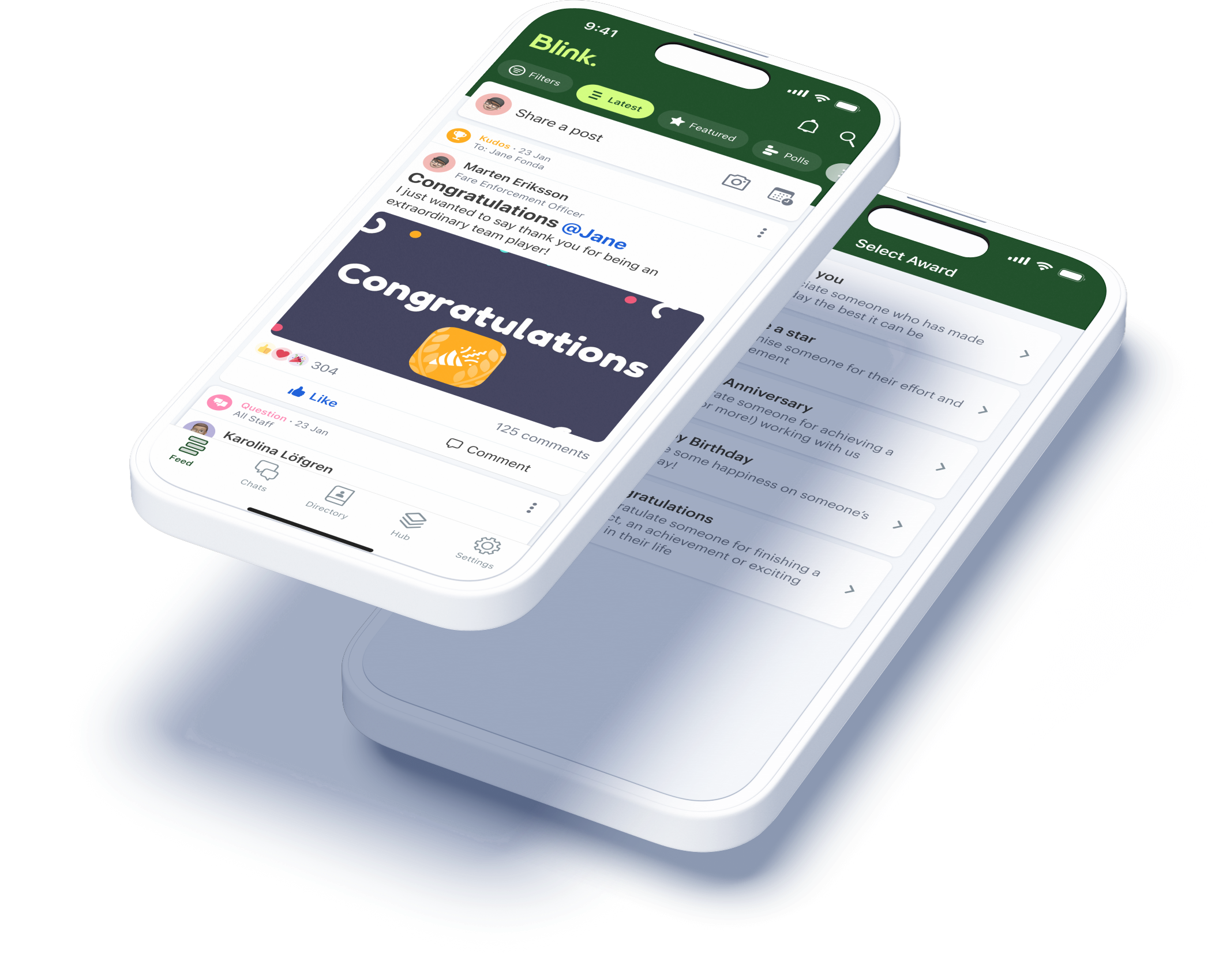
With Blink’s recognition tool, it’s easy to create a culture of appreciation. Anyone can send personalized messages of appreciation, sharing posts with individuals, teams, or the whole organization.
4. Offer growth opportunities
Employees who have a clear career path are more likely to stay working with your company. They’re also more engaged and productive in their work.
But too often, the focus is on the professional development of management and office-based employees. According to McKinsey research, many employers underestimate the value that frontline workers place on learning and career advancement opportunities.
Of the 2,100 frontline employees McKinsey surveyed, 70% said they had applied for a promotion or a job with more responsibility. But only 25% of those who applied were successful. And 65% said they were unsure how to achieve advancement.
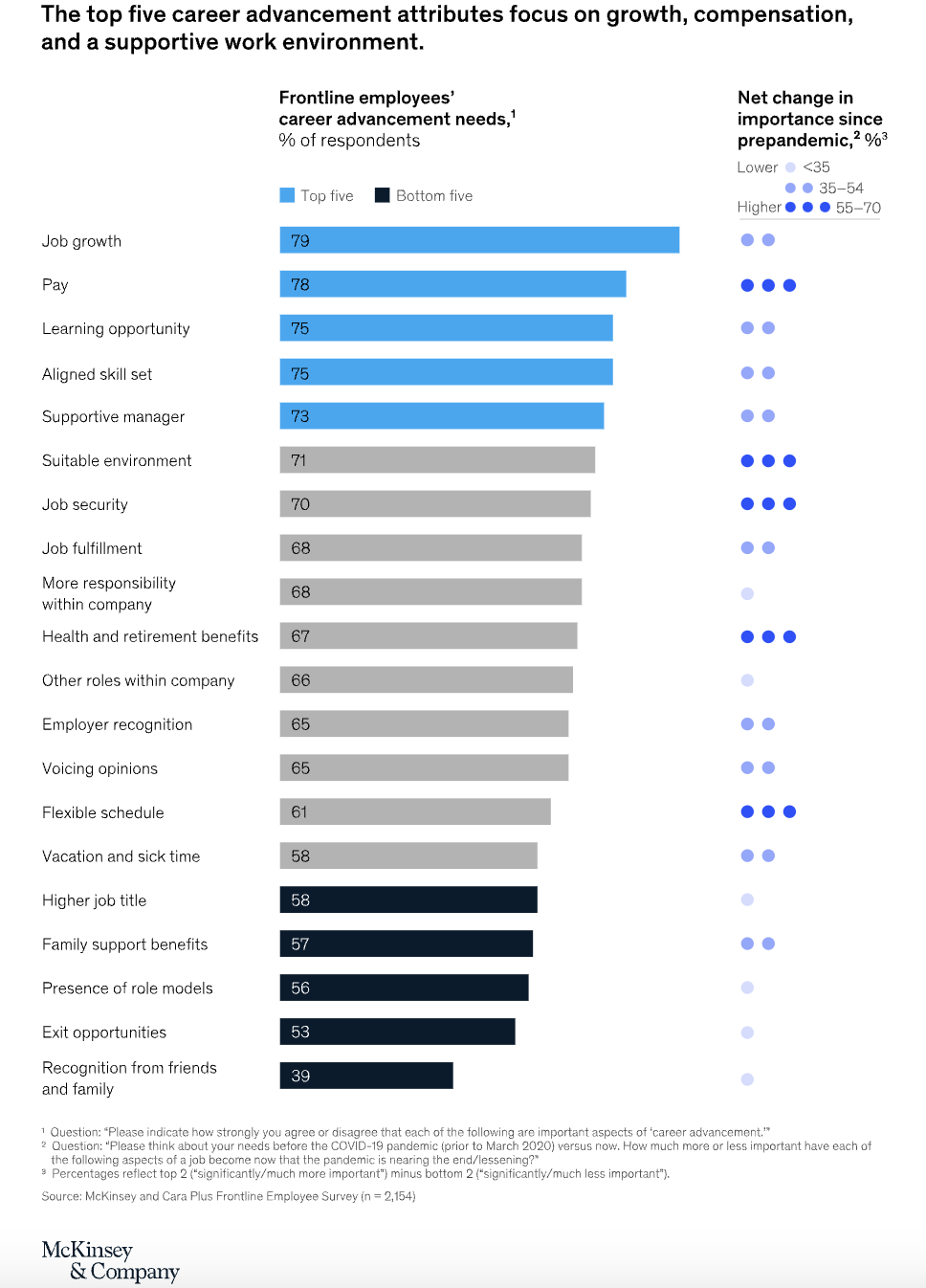
Source: McKinsey
As well as highlighting the lack of growth for frontline employees, McKinsey made several recommendations:
- Share professional development, mentorship, and promotion opportunities with every team member
- Give managers the training they need to help employees establish career growth goals – and support them to achieve them.
- Where a promotion isn’t possible, consider a lateral move or the assignment of new challenges within an employee’s current role to satisfy their hunger for growth
Ultimately, when employees are given the support they need to thrive in their careers, it’s a win-win. An organization retains employees and improves performance. Employees get to enjoy the challenge and satisfaction of expanding their talents.
5. Foster work-life balance
Achieving work-life balance as a frontline worker isn’t always easy. Shifts tend to be long and unpredictable. And when employees are supporting customers or patients, it can be hard to even take scheduled breaks.
This has long been accepted as “the way things are”. But with a third of workers saying that work-life balance is a top priority when looking for jobs, frontline organizations looking to increase employee engagement have a real opportunity – to outshine other employers and better support their staff.
You could offer predictable shifts and – where that isn’t possible – communicate shifts in advance. Consider flexible working and fair overtime policies. Encourage employees to get enough downtime by addressing an always-on culture.
Another key consideration? We know that 70% of frontline employees have suffered from burnout or felt at risk of burnout. This is something that the Starbucks team has taken on board.
Starbucks employees get access to a mental health care platform and free therapy sessions. They also get 10 days of backup care for the children or adults they care for, helping them balance the competing responsibilities of work and caregiving with less stress.
By helping employees to plan and enjoy their time away from work, organizations can count on improved productivity and engagement each time workers arrive for a shift.
6. Gather feedback from employees
Frontline employees are your eyes and ears on the ground. They can provide valuable perspective on what is and isn’t working operationally and how you can improve the customer experience.
But if your organization – like many frontline firms – is suffering from a frontline connection gap, you struggle to access that insight. More often than not, frontline employees don’t have the access they need to provide this valuable feedback.
This means you miss out on all kinds of frontline employee feedback – including their thoughts on employee engagement. You find it much harder to identify and address engagement issues before they affect morale and retention.
The first step to fixing this issue is developing feedback channels for all employees. Tech tools can help. An app like Blink allows you to send a feedback request to a frontline worker’s smartphone, meaning they’re much more likely to see it and respond.
Remember that different employees prefer different feedback methods so open up a variety of options.
Make pulse surveys, annual employee engagement surveys, and manager one-on-ones part of your feedback request schedule. And give employees the option to leave feedback anonymously so they feel comfortable being completely honest.
With up-to-date employee feedback, you can make your employee engagement strategy more relevant and effective. You get to the heart of how employees feel – and discover the areas where change is most needed.
7. Set clear expectations
Uncertainty and employee engagement don’t mix. Role ambiguity creates stress and it’s one of the leading causes of employee burnout.
Employees need to understand exactly what’s expected of them. They need to know what work to do, how to do it, and who to do it with. Even when a frontline role involves a lot of autonomy, employees need guidance on their remit to feel confident and motivated.
Managers are responsible for setting clear expectations. And it all comes down to good communication.
Frontline managers should clearly define the role and its responsibilities for new hires. They need to set key performance indicators (KPIs) so employees know what success looks like. And they need to give clear instructions when assigning new tasks.
Employees also need to know how their role fits into the bigger picture. How do their tasks relate to overarching company values and goals?
By giving employees clarity you improve employee engagement. But you also promote accountability and show employees that their work is valuable.
8. Give regular feedback
Picture an employee – let’s call him Jim – who hasn’t had any manager feedback in a while.
Jim keeps running into the same customer service problem. But he doesn’t feel comfortable approaching his manager about it. And he’s not due a one-to-one for months.
So Jim keeps at it, doubting that he’s doing a good enough job but unsure what to do about it. Without regular manager input Jim feels less confident in his abilities. His job satisfaction inevitably takes a hit.
Now let’s picture a different scene.
Jim’s manager – let’s call her Jane – understands how important feedback is to employee engagement. She sets up regular, informal one-to-ones, where both she and Jim can raise any issues.
Jim gets to hear that he’s doing a great job. And gets useful, actionable advice on what he could do better. He gets recognition where it’s due and a regular reminder of role expectations.
Feedback needs to move in both directions. And it’s as relevant to your longest-serving staff as it is to new hires. Feedback boosts the confidence of employees and increases their job satisfaction, which means better employee engagement.
Employees also stand to benefit most when feedback is constructive. This means managers focus on facts, not opinions. They talk about the actions of an employee, not their personality traits.
They also approach feedback as a two-way conversation, where employees get a chance to share their thoughts within an open and supportive environment.
9. Promote team collaboration
Two heads are always better than one. And employees who work well together are happier, more productive, and less stressed. Team collaboration can help to prevent loneliness, too.
Glassdoor research shows that 60% of employees with less than five years of work experience feel lonely all or most of the time. But 89% of all workers say that a sense of belonging within their company is essential for workplace happiness.
Bringing teams together, including frontline employees who tend to work alone, is therefore crucial to employee engagement. And it starts with company culture.
You need a psychologically safe environment where everyone feels comfortable contributing their thoughts and ideas. Like a calendar of team building activities. Special consideration for new hires and team members who work in isolation. And praise for team successes as well as individual wins.
The right communication and collaboration tools are another important part of the puzzle. Project management software helps people to collaborate when they’re not working in the same location. And chat tools allow workers to share problems, ideas, and solutions with ease.
Elara Caring is one of the largest care providers in the US, with around 32,000 carers working on their frontline. The company found it hard to connect its carers and was experiencing a collaboration problem.
By making Blink their communication hub, they improved team collaboration dramatically. Now 95% of employees say they feel more connected to the organization and their co-workers.
10. Celebrate milestones
Mavis Mills, an ASDA supermarket employee, recently celebrated her 80th birthday. And the whole team celebrated with her. They decorated her checkout with banners and balloons and gave her gifts, flowers, and a cake.
Celebrations like these bring teams together. They boost employee engagement for the person being celebrated and inspire other employees, too.
You can celebrate birthdays, work anniversaries, passing probation, or the successful conclusion of a company project. Anything that fits with your company values and culture.
Of course, it’s easier to plan a celebration for on-site teams. You can organize a gathering in the office or – as ASDA did – around the checkout where Mavis was working.
But that doesn’t mean hybrid and dispersed frontline teams have to forgo celebrations. You can still improve employee engagement by celebrating milestones via internal communication tools.
For example, with the Blink Feed, you can share meaningful milestones with a team or the whole organization – and encourage employees to join in the celebration. You can celebrate little and often to show appreciation for employees on a regular, informal basis.
11. Lead by example
The leaders of today do things differently. Good leaders understand that transparency, fairness, and emotional intelligence help to improve employee engagement.
Unlike workplace leaders of the past, they know that when everyone, at all levels of a company, sticks to the same rules and values people feel more invested in a company’s success.
As a leader, this means practicing what you preach.
You should demonstrate the same commitment to two-way communication, collaboration, and recognition that you want to see in employees. You should model work-life balance so workers find it easier to follow suit.
By living and breathing company values and culture, you inspire trust and respect in your workforce. And when you join them in using the same communication and employee engagement tools, you make it much more likely that people will follow your lead.
12. Measure and act on feedback
Gathering feedback is an essential part of any employee engagement strategy. But simply getting employees to leave feedback isn’t enough. You have to measure and act upon employee feedback, too.
Research shows that people who say their employer takes meaningful action based on their feedback are 37% less likely to look for another job. And they’re also much more likely to take part in future surveys.
So mine employee feedback for data. Then create employee engagement KPIs so you can measure progress. You can base targets around metrics like:
- Absenteeism rate
- Employee retention rate
- Employee net promoter score (eNPS)
It then all comes down to good internal communication. Share your feedback findings and engagement progress with employees. It shows that you take their views seriously and are committed to making improvements.
Employee engagement: the next step
In thriving organizations, the drive to improve employee engagement is more than just an HR team initiative. It’s something that the whole organization embraces as part of its ethos.
Communication, feedback, and recognition become part of everyone’s every day. And the organization benefits from better staff retention, productivity, and satisfaction.
Your organization may not be at this point yet. But wherever you are in your employee engagement journey, the 12 ideas listed above will help you move forward. Weave these activities into your employee engagement strategy and you’ll encourage the employee attitudes and behaviors you want to see.
When it comes to frontline organizations, the right tech tools are a priority because they make employee engagement so much easier. They provide the vital line of connection between every member of your workforce, from new hires to stalwart staff, and frontline workers to your office-based team.
Blink’s mobile-first super-app helps every frontline employee to feel valued and heard. And with a news feed, secure chat, recognition features, surveys, analytics, and more, you have everything you need to transform internal communication and employee engagement for the better.
Are you stuck between Speakap and Blink for your organization's employee communication solution?
Keep reading to find out the major similarities and differences and see which one is right for you.
Speakap vs. Blink — quick facts
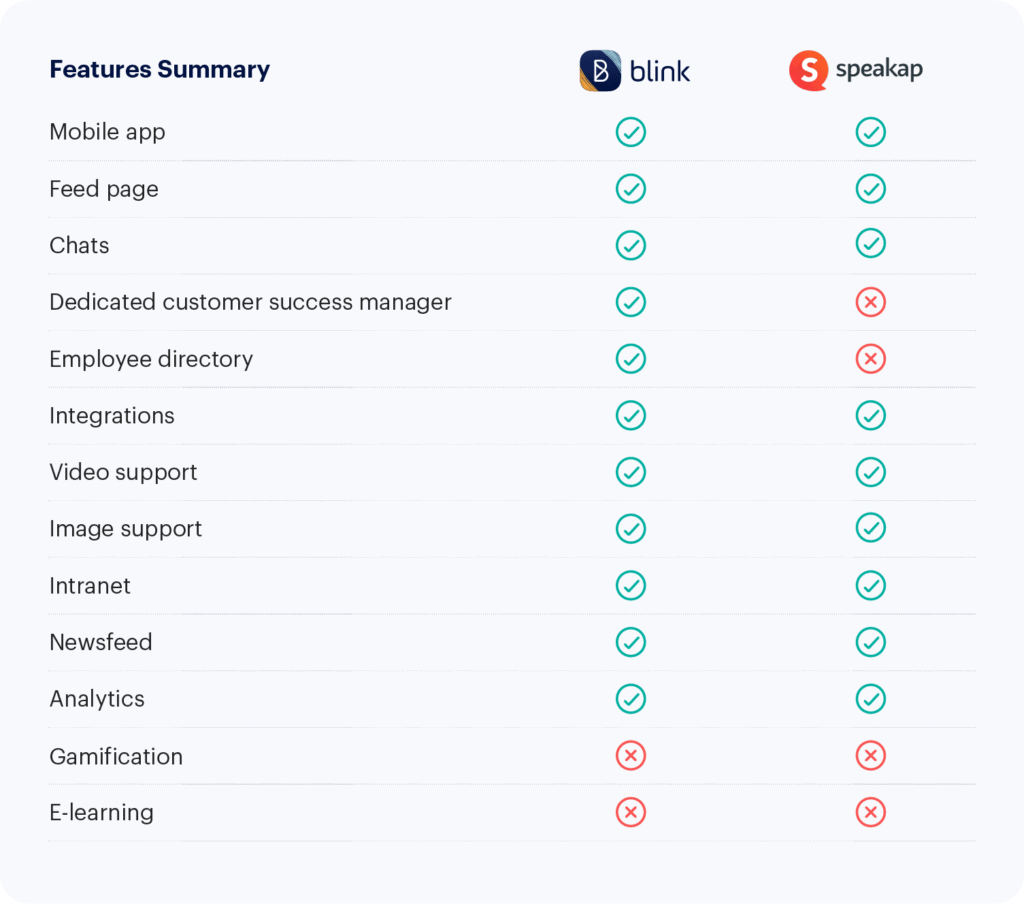
Speakap and Blink are both mobile-focused employee communication apps designed for organizations with many frontline workers.
The main difference is the number of features — and cost.
Speakap could be the perfect lightweight top-down communication software for you if you’re just looking for a way to keep employees up to date and enable chat features.
However, if you want more extensive interactions, a centralized hub, and in-depth customization that replaces all other employee intranets, Blink’s features are more than worth the price.
Speakap vs Blink: How they’re similar
Blink and Speakap have a few similarities:
Modern UI
Speakap nails its app by providing a straightforward user experience that is comparable to consumer-oriented apps your employees are already familiar with. With its timeline and one-on-one chats, it will fit right into your employees’ day.
The same can be said for Blink. The user interface is intuitive and modern, making it enjoyable to use for any employee. Users report that the platform “works equally well for desk and frontline workers.”
Timeline
Blink offers a versatile feed to share news, updates, and employee-generated content. You can send important notifications, share inspiring pictures and stories, and collect acknowledgements through actionable posts.
In Speakap, it’s straightforward to share news articles, publications, documents, and images. However, some features are slightly more limited. Some user reviews say “docs can't be opened directly within the app_” and that there is a “_Limited availability to insert images into posts.”
Custom branding
Blink’s theming options make it simple to add your own colors, images, logo, and even a fully white-labelled app with your company’s branding.
Speakap also offers excellent features to create a branded employee communications platform. You can create a branded app, add a custom logo, and play with menu themes.
Speakap vs. Blink: How they’re different
Analytics
Blink is a robust frontline communications platform that offers a lot of analytic capabilities and customizations to reach and engage every worker.
You can track your employees’ engagement with the content through data on every post’s reach, impressions, and interactions.
For uploaded documents, you can see the total number of views for each file and the change in views over time. You get an overall picture of your organization's engagement through a total user and active adoption count as well
Speakap has metrics that provide insight, including usage, adoption rate, read receipts, and user polls.
However, some users will find the analytics weak compared to other platforms. Besides tracking the employees who engage with your posts, data like reach and impressions are missing.
Omni-directional communication
Blink leans on user-generated content for their feed, making it ideal for organizations that want to open up lines of communication and encourage engagement.
In contrast, Speakap prioritizes a top-down style of communication. This could be a disadvantage for organizations looking for maximum engagement and collaboration between all levels of employees.
The communication style is less targeted to individual groups and teams, and some reviewers report that they “can’t target multiple recipients per post.”
Integrations
Along with a feed for daily updates, a hub for document sharing, pages for long-form content, and a multi-directional chat, Blink can be tailored to the needs of each organization.
You can customize the look of your app through personalized branding and many integrations. You can also add any essential software through Blink’s API.
Using Blink’s micro-app feature, you can add just about any functionality to your centralized app. Complete end-to-end customization can take some work through micro-apps and necessary integrations.
In Speakap, you do have a good range of integrations for HR and e-learning. But you only get read-only interfaces, links, and iframes rather than something more substantial.
Speakap is unlikely to be an overall internal communications solution as it lacks a native way to customize the functionalities within the app.
Besides linking integrations, users can’t add additional functions like payroll tracking into the app itself. Users say a con for their experience with Speakap is that there is “no ability for custom features.” and you “can't connect different apps easily.”
Customer service
Blink’s newness is a major plus for user experience and feature adoption, but this means some essential features are still being rolled out, and bugs do occur.
However, the customer service and development teams are quick to resolve any issues. Blink offers each client a dedicated support contact that oversees the transition and helps to optimize the platform for each business.
Blink also takes customer input and feedback heavily into consideration when developing new features.
Speakap’s users also frequently say they appreciate the company’s customer support, which also assigns a dedicated customer success manager to each account. Nonetheless, users report that “There are some features that would need better customer support.”
Speakap vs Blink: pricing
Blink offers four levels of paid service based on company size, while Speakap offers three pricing tiers based on features and customer service.
Blink levels:
- Essential: $3.40 per person, per month
- Business: Price on application
- Enterprise: Price on application
- Enterprise Plus: Price on application
Speakap levels:
- Basic: Price on application
- Premium: Price on application
- Additional features, customer support
- Premium+: Price on application
- Additional features, priority technical support
Speakap vs. Blink: final thoughts
Both Blink and Speakap are good employee communication tools for organizations with a number of frontline workers. If your goal is to encourage across-the-board engagement with a total communications solution, go with Blink.
If you’re looking for a more targeted top-down communication app that fits into your organization’s existing platforms, go with Speakap.
If you’re not sure, try Blink’s powerful frontline employee communications solution for free.

Effective workplace communication is clear, consistent, and engaging. It produces the desired result, and it helps you avoid misunderstandings.
Organizations with a successful internal communication style are happier and more productive. But effective employee communication isn’t always easy, especially if you manage a frontline workforce.
There are practical challenges to overcome. Frontline employees don’t have a computer. They don’t always have an employee email address. They have changing shift times and locations. And they often lack access to tools their office-based peers have as standard.
Nevertheless, overcoming these barriers to communication is important. Fail to reach everyone with effective workplace communication and:
- critical messages are missed
- you struggle to develop a strong company culture
- employees end up feeling disconnected, demotivated, and more likely to look for other jobs
Essentially, if communication doesn’t reach every member of your organization, we can’t call it effective.
So how do you close the gap between frontline and office-based staff? How do you improve workplace communication for every person in every team?
Here we explore the benefits of effective communication, and offer ideas on how to achieve it at your organization.
Benefits of effective workplace communication
93% of business leaders say that workplace communication is the backbone of business. But 3 in 4 say their company underestimates the cost of poor communication.
Here are the things companies miss out on when their communication isn’t up to scratch.
Team collaboration
Collaborative teams are more productive and successful. But you can’t have collaboration without good communication.
When teams interact openly and inclusively, they develop a shared understanding of goals and processes. This makes it much easier for them to harness team strengths and work together.
Enhanced employee engagement
Employee engagement is how connected and committed your workers feel to their workplace.
It’s something the majority of business leaders plan to focus on in 2024. That’s because high levels of employee engagement are linked to better productivity and staff retention.
There’s a direct link between workplace communication and employee engagement. Improve the former and you improve the latter.
Conflict resolution
Workplace conflicts are natural and inevitable. But you can’t allow mountains to become molehills. You need to get team members in a room to talk it out.
When teams communicate effectively, you resolve conflicts quickly, collaboratively, and conclusively. Good employee communication also prevents conflicts from developing in the first place.
Improved productivity
What could you do with an extra 7.47 hours per team, per week? That’s the time business leaders say they lose because of poor communication.
Employees rely on the right information to complete tasks. When that information is readily available and easy to find, workers get the job done quicker. And employee productivity sees a considerable uptick.
Improved employee morale
According to a Forbes study, nearly 50% of workers say that ineffective communication harms job satisfaction. And 42% say it makes them more stressed.
When communication is poor, workers also feel less confident professionally. And they’re more likely to look for other jobs.
Ineffective communication damages team morale. But when you adopt good communication practices, you find it easier to motivate and retain staff.
Increased innovation
For the best shot at developing innovative new ideas, you need to enlist the help of as many people in your organization as possible.
People have to bounce ideas off of one another. And you need a way to communicate your culture of innovation to the company at large.
Innovation relies on good communication. So with effective communication strategies, your company will come up with bigger and better ideas.

Better decision-making
When communication flows between all members of an organization, leaders make more effective decisions.
That’s because they don’t make decisions in a silo. They take into account the ideas, opinions, and perspectives of all employees. They base decisions on information, not instinct.
It’s the same for employees. An incredible 28% of workers say they don’t understand their company’s goals. So imagine how much more effective their day-to-day decision-making could be with clear communication from leadership.
Business results
According to Grammarly’s State of Business Communication report, US businesses are losing $1.2 trillion every year because of ineffective communication practices.
Poor communication can lead to increased costs, lower customer satisfaction, missed deadlines, and the erosion of brand credibility.
It’s clear. Effective employee communication isn’t just a nice-to-have. It’s a fundamental pillar, with the power to make or break your business.
Using technology for effective employee communication
Many organizations are having trouble hanging onto frontline staff. But we know that effective communication can make staff happier and encourage them to stay.
Traditionally, messages may have been passed to the frontline via word of mouth, a cluttered team noticeboard, or personal messaging apps.

These communication methods are inefficient and time-consuming. There’s also a big risk in terms of reliability. Employees may get the wrong message – or no message at all.
Technology offers an alternative solution. Today’s best communication tech is designed around the modern workplace. It offers:
- Top-down, bottom-up, and peer-to-peer communication: communication moves in all directions thanks to communication channels everyone can contribute to
- An intuitive user experience and integrations: it’s easy for employees to find information; tools work well with any other tech you use and don’t add to the noise
- Real-time communication:61% of workers prefer real-time communication; moving beyond email, employees get access to instant messaging and video conferencing
- Access for every employee – whether they work in the office, on the shop floor, or on the road, all employees get the same access to communications and communication tools
In today’s workplace, communication tech is essential. But the right tech solution looks different for every business.
For desk-based teams, modern company intranets are ticking most boxes. However, frontline teams need a tech tool that isn’t chained to a computer and doesn’t require a company email address for login.
Enter the employee app. For organizations with large frontline teams, an employee app like Blink has all the features and functions you need for effective employee communication.
It’s a mobile-first app so all employees can access Blink from their smartphone. All communication is available in the same place so employees know exactly where to find it.
Blink supports surveys, recognition, and – crucially – allows leadership to communicate with the frontline workforce they’re so often disconnected from.
88% of business leaders want tools that make communication easier and more effective. Frontline workers are calling out for effective tech, too, with 52% saying they would quit their jobs over poor tech tools.
With leaders and the frontline seeing the value of good tech, implementing this type of tool is one of the primary ways you can improve workplace communication.
7 ways to improve workplace communication
Getting the right tech on your team is central to improving workplace communication. But you can’t stop there. If communication at your workplace is subpar, there’s work to be done.
These tips provide the other pieces of the puzzle. Put them into place and you’ll develop a strong and successful internal communication strategy.
1. Lead by example
Leaders set the tone of your organization. So if you want employees to communicate regularly, openly, and clearly, your leaders have to, too.
Encourage leaders to be active and visible on employee communication channels. And to engage with employees at all levels of the business.
Training may be necessary. There’s a presumption that good communication comes naturally. The truth is it doesn’t. But it can be taught.
By gaining new skills, your leaders can become clear communicators and active listeners. They’ll also find it easier to establish a culture of positive communication.
2. Establish clear communication channels
Lots of noise? Not much being heard?
Channel overload makes it hard for employees to find information that’s relevant to them. This impacts their productivity. It can also lead them to disengage with internal communications.

So establish clear communication channels and consider streamlining, too. When there’s one source of knowledge and information, it’s easier for employees to use it.
Also, share guidelines on how you expect employees to use your chosen channels. Perhaps there’s one space for informal team chat and another for company-wide updates. Maybe some types of messages are only relevant to certain team members.
With clear guidance on where they can find information and how to contribute to the conversation, employees are more likely to get involved.
3. Prioritize two-way communication
Employee communication used to mean leadership speaking to the rest of the organization. But times have changed. And this type of one-way communication now feels outdated.
It’s also ineffective. Organizations with an open communication culture are more inclusive, productive, creative, and collaborative. That’s why the majority of today’s employers strive to give their employees a voice.
To develop a culture of two-way communication, you need:
- communication channels that everyone can use easily and intuitively
- a company culture where everyone feels able to speak out
When you develop a culture of psychological safety, everyone feels comfortable speaking out. Employees are happy to admit mistakes, ask silly questions, and voice criticism. People say more of what they feel, which aids meaningful communication.
4. Provide regular updates
While two-way communication is important, don’t neglect top-down communication. Regular updates from leadership are still important.
They help employees align their work with organizational goals. They support good decision-making. And they give employees the contextual info they need to do their best work.
In office-based organizations, leaders can share the latest company news in short, face-to-face standups.
But when you’re managing a frontline workforce, company standups aren’t always viable. When people are working different shifts in different locations, it’s nearly impossible to get everyone in the same place at the same time.
This is where your chosen communication tech tool can help. Via a company newsfeed post or a video upload, you can share up-to-the-minute info with your whole workforce and keep everyone on the same page.
5. Establish a feedback loop
According to the Harvard Business Review, around 72% of workers believe their performance would improve if they had open, honest feedback.
But effective employee communication isn’t just about giving feedback. It’s also about encouraging employees to give you theirs.
You can support employees to speak up and give their opinions – on processes, the employee experience, leadership, or anything else – in two key ways.
First, by promoting a culture of psychological safety. And second, by making it easy for employees to have their say.
You can use tech tools to launch surveys. Annual surveys that help you benchmark feedback year on year. And pulse surveys that give a real-time view of your company.
Regular one-to-one meetings also build supportive manager-employee relationships. They’re a safe space in which employees can share any concerns or questions.
However, to make this process truly effective, you need to establish a feedback loop that follows these four stages:
- Information gathering – asking your employees for feedback
- Analysis – making sense of the data you’ve collected
- Action – using the data to make a plan of action
- Notification – telling employees what their feedback revealed and what you now plan to do
By creating a feedback loop you keep employees invested in the process. You ensure their participation in future surveys and one-to-ones.
6. Celebrate success
90% of employees find recognition motivating. But celebrating employee success doesn’t just encourage better, harder working.
Peer-to-peer recognition strengthens co-worker relationships. 3 in 4 employees say that the act of giving recognition makes them want to stay at their current organization longer.
And according to Gallup research, employees who regularly get recognition are more engaged, more connected to their culture, and less likely to experience burnout than those who do not.
Gallup also handily outlines the five features of effective recognition. It is:
- Fulfilling – appropriate to the accomplishment
- Authentic – genuine rather than forced
- Personalized – adapted to the preferences of the person being recognized
- Equitable – all employees have the chance for recognition
- Embedded – it’s part of the value and practices of your organization
For frontline teams, recognition has to be intentional. You can’t always highlight employee work in a company standup or pop by a frontline team member’s desk.
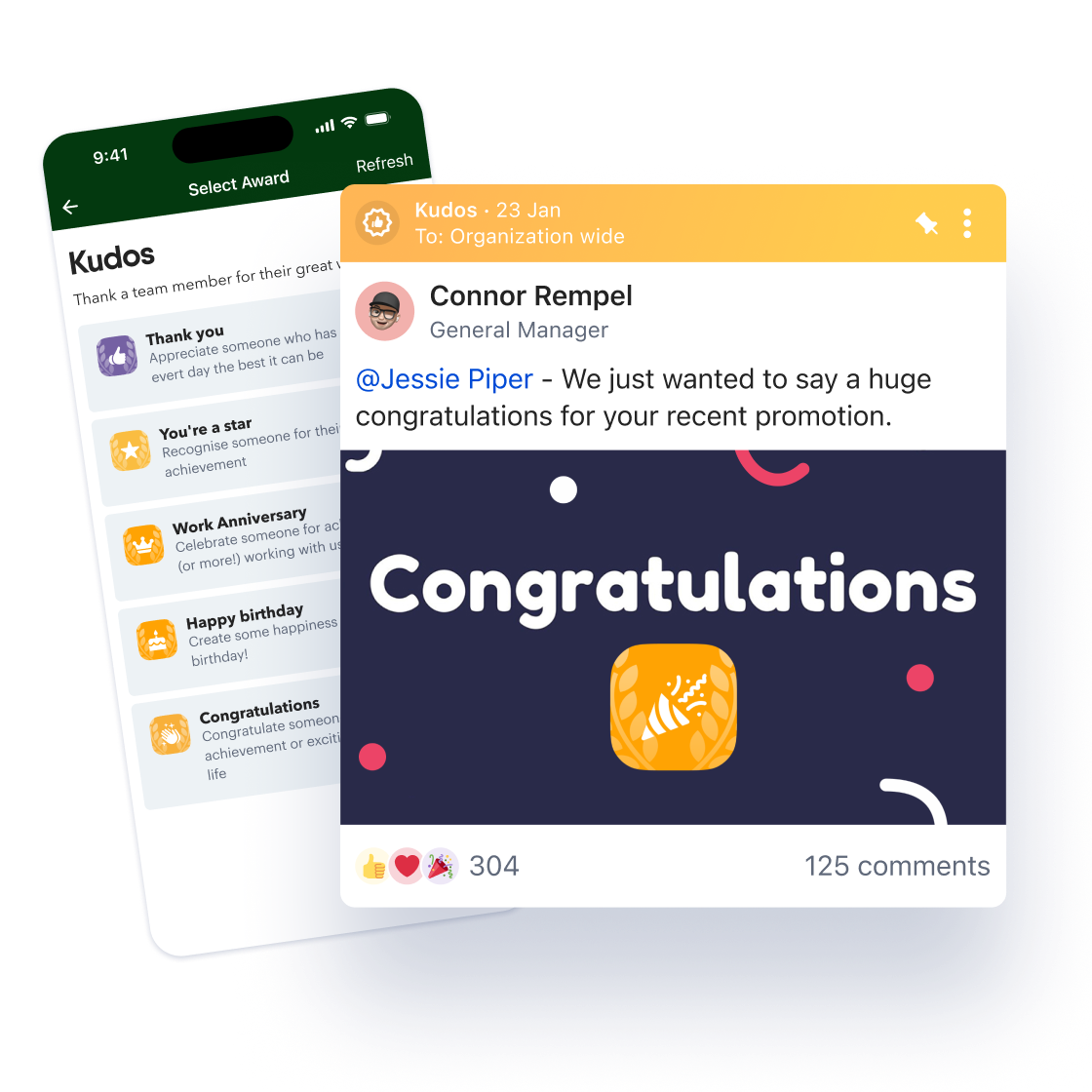
This is another way that a tech tool like Blink can help improve workplace communication. Blink’s recognition feature allows both managers and co-workers to celebrate fellow employees.
They can publish a recognition post in the company newsfeed or send a DM. And wherever an employee is working, they get recognition sent straight to their smartphone app.
7. Address conflict promptly
Workplace conflicts often arise because of miscommunication. So simply putting the other tips on this list into action should reduce the number of disagreements you have to deal with.
But some conflict is inevitable. And how you deal with it is crucial. Unresolved conflict can cause negative workplace relationships – and even a toxic workplace culture.
So it’s always best to recognize and tackle conflict promptly. When managers become aware that a conflict has arisen, they need to get both parties together and bring issues out into the open.
This is another area where tech can make a difference. When you conduct company communication over a tech tool, you get access to lots of data.
This data can help you to visualize workplace relationships. You see where positive and negative relationships lie, who likes to chat and who doesn’t. You can then intervene early to support strained relationships and help everyone feel more connected.
Measuring the effectiveness of workplace communication
As with any initiative, when you want to improve workplace communication, you need a clear way to measure progress.
Start by looking at the qualitative data you gather through employee one-to-ones and surveys. Find out what employees think of workplace communication – and what ideas they have for improving it.
You may also like to track a selection of the following key performance indicators (KPIs):
- Content engagement: message open rates; survey response rates; number of post comments and shares
- Content channel engagement: communication tool adoption rate; the number of tech tool logins; employee profile completion rate
- Employee engagement: absenteeism rates; employee turnover rates; employee net promoter score (eNPS); employee satisfaction rates
- Business impact: customer satisfaction rates; sales figures; the number of met and overdue milestones; costs saved
Viewed together, these KPIs will show whether new communication channels and strategies are working to improve workplace communication and overall business results. You can then use these findings to optimize your approach going forward.
How Blink can help your organization with effective employee communication
For frontline organizations, it can be hard to find communication tools and strategies that suit your version of the workforce.
That’s why we created Blink.
Blink is an employee super-app. It allows easy communication between frontline and office-based teams.
With real-time messaging, a company newsfeed, and seamless integrations, Blink is a streamlined communication solution.
Whether you want to ask for employee feedback, notify staff of available shifts, or simply recognize an employee’s hard work, you can do it all within the intuitive Blink interface.
Case study: Elara Caring
Let’s take a look at Elara Caring. They started using Blink because they had a huge communication problem. They were struggling to connect the 32,000 carers who worked for them.
Before Blink:
- morale was low
- there was no opportunity for peer-to-peer connection
- annual staff turnover stood at 65%
- managers had to call hundreds of personal phone numbers to book carers onto shifts
Now, 96% of employees say they would recommend Blink. Our app is Elara’s destination for everything – from paystubs to schedules, to the latest company news.
All employees can join the company conversation, receiving critical updates and shift information straight to their smartphones.
They also feel more included in company culture. Employees can connect, share their stories, and learn from each other. They also get regular recognition from peers and managers, plus in-app access to L&D resources.
At Blink, we help companies to improve employee communication. We’re closing the gap between frontline and office-based teams. So organizations can create richer cultures and reach their business goals.
Want to join Elara Caring and lots of frontline businesses like them? Book a personalized demo to see what Blink could do for you.

When everything pings, nothing lands
We’re living in the era of overload. Every app is buzzing, every chat is “urgent,” and every notification wants a piece of your day. It’s not that people don’t care — it’s that their attention is under siege.
At Blink, we believe attention isn’t something to be taken. It’s something to be guided.
Guided attention means helping every worker — from HQ to the frontline — focus on what actually matters. It’s about communication that feels calm, intentional, and personal. Because when people can focus, work stops feeling chaotic — and starts feeling human again.
Why attention needs a rethink
For years, internal communication has been a volume game. More channels. More updates. More “engagement.”
The result? More noise. When everything feels urgent, nothing feels important. When every message shouts, people stop listening. And when frontline teams feel buried under notifications, engagement doesn’t just dip — it disappears.
That’s why we’re on a mission to unlock the potential of every person, team, and organization starts with something simple: respect for attention.
Guided attention isn’t about saying less. It’s about saying it right — so what reaches people actually resonates.
Turning down the noise: Smarter notifications
We’ve completely re-engineered one of the loudest tools in digital work: the push notification.
With Blink’s new smarter notifications, organizations can reach everyone with precision — not pressure.
- For employees: Freedom to focus. Choose how and when you’re notified — by group, topic, or even Quiet Days when you don’t want to be disturbed.
- For admins: Confidence in control. Guardrails make sure only critical updates break through, building trust (and killing notification fatigue).
- For the organization: More visibility where it matters, fewer mute buttons hit in frustration, and a healthier digital rhythm.
Every ping now carries intent, not interruption.
{{mobile-notification="/image"}}
Guided attention in action
Guided attention doesn’t live in a single feature — it’s the thread that runs through Blink’s entire experience.
Journeys: Focus, sequenced
From onboarding to safety training, some moments deserve structure. Blink Journeys turn chaos into clarity — one step at a time.
No lost emails. No follow-up chases. Just progress that feels effortless.
Because attention thrives on clarity.
Feed: Relevance that earns trust
The Blink news feed isn’t another corporate firehose — it’s curated, contextual, and smart.
Local updates, leadership notes, and frontline ops all in one scrollable space — tailored by role and region.
The result? A feed that feels trusted, not tired, and comms that feel personal, not performative.
Internal comms: Structure over spam
With Blink, communication doesn’t just happen — it’s designed.
Admins can set who can “notify all,” tag posts as “Important,” and define critical groups. Built-in governance keeps communication consistent and credible, especially for safety, compliance, and leadership updates.
Because when governance is baked in, trust follows naturally.
Employee engagement: Insight that amplifies
Guided attention doesn’t stop at delivery. BlinkIQ analytics show which messages land, who’s reading, and where focus fades.
It’s feedback in real time — so you can adjust, refine, and keep comms human.
Modern comms isn’t about shouting louder. It’s about listening smarter.
The science (and soul) behind focus
Here’s the truth: attention is emotional before it’s functional.
People don’t focus because something flashes — they focus because it feels relevant, respectful, and worth their time.
That’s why Blink mirrors how humans actually think and process, not how software does. We balance precision (right message, right time), with autonomy (freedom to choose), and context (so every message feels meaningful).
It’s what we call precision reach — without the noise.
The impact of guided attention
When organizations embrace guided attention, communication stops being background chatter — and starts driving real outcomes.
- Faster operations. Teams act on updates they trust.
- Lower risk. Critical alerts cut through instantly.
- Higher engagement. Employees stay connected because comms respect their focus.
- Stronger culture. Clarity breeds confidence — and confidence builds belonging.
Guided attention isn’t about managing messages. It’s about empowering people.
How to get started
#1. Run a noise audit
Work with your Blink Customer Success Manager to map your notification landscape. What’s truly critical? What’s just clutter?
#2. Publish your notifications playbook
Set your communication standards: what’s “Important,” what’s “FYI,” and who gets to decide.
#3. Encourage personalization
Share Blink’s feature spotlight and comms templates to help employees set their own preferences — because ownership fuels engagement.
#4. Track, learn, and refine
Use BlinkIQ to see what lands. Adjust. Repeat. Build a rhythm that feels intentional — not intrusive.
Guided attention, unlocked
At Blink, we’re not just building tools — we’re reimagining how workplace communication feels.
Guided attention is how every organization can speak with purpose — and every worker can listen with trust.
Because when communication respects attention, people don’t just engage — they thrive.
Blink. And turn communication from a team distraction into a transformation driver.
FAQs
#1. What is the Notification Detox, and why does it matter?
The Notification Detox is Blink's approach to reducing noise, eliminating unnecessary alerts, and delivering only meaningful, high-value notifications. It helps employees stay focused while still recieving critical updates.
#2. How does Guided Attention improve employee productivity?
Guided Attention prioritizes messages based on role, urgency, and context. With Blink’s smart filtering, employees get fewer interruptions and only see notifications that truly matter to their workday.
#2. How can organizations implement a notification detox successfully?
Companies can start by centralizing communication in a single platform like Blink, customizing notification rules, and using Blink’s smart delivery settings to ensure the right message reaches the right person at the right time.

In a world where brand is everything — from how your customers experience your services to how your employees feel about the work they do — consistency matters.
Marketers obsess over customer touchpoints. Designers fine-tune fonts, colors, and microcopy to evoke emotion. Leaders talk about brand as a strategic asset. But there’s one place where branding often stops short: the tools we use to power our employee experience.
And that’s a missed opportunity.
Because here’s the truth: Your brand doesn’t just belong in your storefronts or on your website. It belongs in the everyday moments your employees experience at work — from clocking in to reading a company update to cheering on a teammate. That’s where white-labeling your employee experience platform comes in.
First, what is white-labeling?
At its core, white-labeling means taking a platform — in this case, your internal employee app or communications hub — and customizing it to reflect your brand, not the vendor’s.
That includes everything from in-app colors and logos to app store listings, custom app icons, and branded emails. Done well, white-labeling creates a seamless, fully immersive brand experience. Your employees don’t see a third-party vendor. They see you.
It’s not just a superficial coat of paint — it’s a strategic branding decision with real impact.
{{mobile-jd-feed="/image"}}
Why white-labeling matters more than ever
Most organizations have spent years investing in their external brand. But in today’s workplace — especially with large, distributed, or frontline-heavy teams — it’s your internal brand that drives connection, engagement, and pride.
Here’s why white-labeling your employee experience platform is one of the smartest moves you can make:
#1. Brand immersion builds belonging
Just like a great customer experience is infused with brand personality, a great employee experience should feel unmistakably you.
When your workforce opens an app that looks and feels like your brand — not a generic third-party solution — it sends a clear signal that this technology is ours. It fosters ownership, pride, and connection. Every login becomes a brand touchpoint that reinforces identity and culture.
This is especially powerful for employees who aren’t sitting in HQ. For frontline workers, contractors, and dispersed teams, a white-labeled experience is a powerful way to extend culture and community beyond the walls of the corporate office.
#2. It’s a trust signal — even internally
Brand consistency isn’t just about aesthetics. It’s about trust. Inconsistency — logos that don’t match, tools with unfamiliar names, generic notification emails — introduces friction. People start to question whether the tool is legit, secure, or if it’s even meant for them at all.
White-labeling brings everything under one visual and emotional umbrella. The result? Higher trust, smoother adoption, and fewer support tickets asking, “Is this app safe to use?”
#3. You control the narrative
White-labeling puts your brand front and center — not the vendor’s. That matters when your goal is to unify teams, promote new initiatives, or make a bold culture shift.
When your employee platform looks and sounds like your company, every message has more weight. Every announcement lands with more credibility. And every interaction contributes to a more cohesive, compelling internal brand story.
#4. It’s not just “nice to have” — it’s a competitive differentiator
In industries where employee experience drives performance — retail, hospitality, healthcare, logistics — standing out as an employer of choice is critical.
A beautifully branded, fully immersive app experience tells your workforce (and future talent): We care about experience. We invest in culture. We do things the right way.
It’s the kind of signal that separates good employers from great ones — especially in a competitive labor market.
Not all branding options are created equal
Here’s where things get tricky: Many platforms claim to support branding. But in reality, “customizable” often means swapping out a logo or changing a background color.
That’s like giving someone a sharpie and calling them a designer.
Truly impactful white-labeling goes deeper — into every surface your employees touch. Let’s break it down:
- Theming and in-app branding: Change colors, upload your logo, swap in branded images. These are table stakes — but still powerful when thoughtfully executed.
- Custom app icon: On your employees’ phones, your platform shouldn’t be buried behind a vendor logo. A branded app icon helps the platform feel like an extension of your company, right on the home screen.
- Fully white-labeled experience: This is the gold standard. The app isn’t just themed — it becomes yours entirely. Your name in the app stores. Your brand in the notifications. Your URL in the browser. Every single interaction, owned.
If you're going to invest in an employee experience platform, it should reflect your brand in full. Otherwise, you're building culture on someone else’s terms.
When brand is the experience
One of the biggest drivers of white-labeling demand we’ve seen? Brand-first organizations.
Take a global hospitality company known for high-design hotels and curated guest experiences. For a brand so intentional about every detail — from guestroom playlists to menu typography — it was only natural to carry that same intentionality into the employee experience.
With a fully white-labeled app, the company ensured their workforce — spread across properties worldwide — could access a platform that felt as personal and curated as the guest experience they’re known for.
Every interaction felt undeniably on brand. And that’s exactly the point.
{{mobile-ennismore-log-in="/image"}}
So, is it worth it?
If your brand matters — and let’s be real, it does — then white-labeling your employee platform is absolutely worth the investment.
Because employees aren’t just logging into an app. They’re joining your culture. They’re engaging with your values. They’re experiencing your brand — whether you’ve branded it or not.
White-labeling makes sure that experience is intentional. Aligned. Consistent. And completely yours.
TLDR: Don’t wait to white-label — your brand deserves center stage
White-labeling isn’t a vanity play — it’s a strategic move to elevate culture, trust, and employee connection. And if your employee experience platform doesn’t offer it (or offers a half-baked version), it’s time to rethink what great really looks like.
Brand your experience. Own the interaction. And give your employees a platform they’re proud to open — because it reflects the brand they proudly represent.
Blink. And make your brand the hero of the employee experience.