DigitalOcean Alternative: The Benefits of Choosing Kinsta (original) (raw)
If you’re looking for a DigitalOcean alternative for WordPress hosting, you’ve come to the right place! Our unique, powerful solution for managed WordPress hosting is optimized for speed and performance. It’s unlike anything else you’ll find. Let’s explore why!
Introduction
DigitalOcean specializes in cloud computing, not managed WordPress hosting. They offer a network of Virtual Machines (VMs) aimed at developers who want to deploy their own cloud servers.
The problem with this is that some people assume handling their own hosting can help them save a few bucks, only to realize they severely underestimated the amount of time, skill, and money needed to do so properly.
We know that everyday WordPress and website users are looking for an alternative hosting solution to DigitalOcean that combines better infrastructure and performance, along with faster and better support. Kinsta provides all these and much more!
We’ll discuss what distinguishes Kinsta from VPS providers such as DigitalOcean, and explore the benefits of using Kinsta as your managed WordPress host.
How Kinsta Compares to DigitalOcean in a Nutshell
Kinsta’s infrastructure is fully containerized, enabling us to provide you with a large selection of the fastest data servers, incredible performance, server-level caching, dedicated resources, and enhanced security. Gone are the days of worrying about sharing resources with other sites, including your own!
All sites on Kinsta are protected by our enterprise-level premium Cloudflare integration, free for all customers. It includes a secure firewall, HTTP/3 support, DDoS protection, free CDN, and other benefits. You also experience transparent resource consumption, costs, and pricing.
We are also proud to be the highest-rated managed WordPress host on G2, the world’s leading software review and comparison site.
Feature Comparison Overview
Now that we’ve made it this far, let’s take a look at some of the biggest differences between Kinsta and DigitalOcean:
| Kinsta | DigitalOcean | |
|---|---|---|
| Pricing | Plans start at 35/month∣Plansstartat35/month | Plans start at 35/month∣Plansstartat4/month |
| *First Month Free | Yes | No |
| Money-Back Guarantee | 30 days on all plans | X |
| Plan Tiers | 21 (not including custom) | 4 (based on CPU and storage needs) |
| Premium 24×7 Support | All plans | Paid add-on |
| Core Infrastructure | Same across all plans | Varies by plan |
| SSH Access | All plans | All plans |
| Global Data Centers | 27 locations | 12 |
| Bandwidth Limits | No limits (within AUP) | 1 TB – 12 TB (Shared),4 TB – 9 TB (Dedicated) |
| Container Technology | 100% resource isolation on all plans | Varies by plan |
| Free Migrations | All plans | No |
| Staging Environment | All plans | Machine cloning varies by plan, premium add-on |
| One-Click Backup and Restore | All plans | Manually, weekly server backups only for additional fee |
| PHP Versions | PHP 7.4, 8.0, 8.1, 8.2, 8.3, 8.4, 8.5 | Not specified |
| Switch PHP Engine | One-click change in dashboard | Manually |
| Free CDN | 300+ PoPs (All regions) | Cloudflare compatible, requires manual setup |
| Built-in Edge Caching | 300+ data centers | Not specified |
| Early Hints Modern Web Standard | ✓ | Not specified |
| Free SSL Certificates | All plans | Varies by plan |
| Premium DNS | Amazon Route 53 | X |
| Uptime Monitoring | All plans | Premium add-on |
| Free APM Tool | Kinsta APM | Not specified |
| Multisite Support | WP 2 plans and higher | Not specified |
| Weekly automatic MySQL database optimization | ✓ | X |
| IP Geolocation | ✓ | Not specified |
| Reverse Proxy Support | ✓ | Not specified |
| Redis Add-on | ✓ | Managed database plans |
| Cloudflare Firewall | ✓ | X |
| Free DDoS Protection | ✓ | X |
| New Relic (license required) | ✓ | Not specified |
| Multilingual Dashboard | English, Spanish, German, Dutch, Portuguese, Italian, French, Swedish, Danish, Japanese | Not specified |
*On select plans
Enjoy a 26% Faster Website Simply by Moving From DigitalOcean to Kinsta
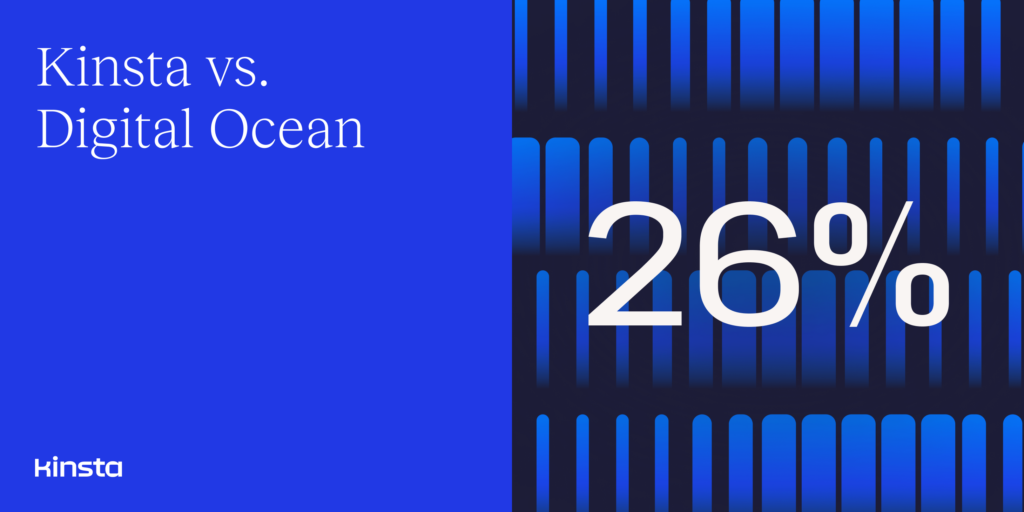
We measured 3,200+ migrations over the course of a three-month span. On average, client sites that came from DigitalOcean to Kinsta experienced 26% faster load times.
How is this possible? Our customers enjoy:
- The latest generation of virtual machines is available across all plans in supported regions.
- A stack that’s been fine-tuned for WordPress over the past 8 years.
- Free CDN powered by Cloudflare’s global network of 300+ locations.
- Built-in Edge Caching that cuts the time needed to serve cached WordPress HTML by an average of more than 50%!
- Containerized sites, meaning no more shared hosting/resources at any plan level.
- Early Hints feature, a modern web standard that can help immediately improve how quickly your pages load by providing additional information on what resources to preload, resulting in faster page rendering speed.
Migrate from DigitalOcean to Kinsta hassle free with our free expert migration service. With our 30-day money-back guarantee, you can test out the service and improved speeds completely risk-free. You only lose if you don’t give this a try!
Kinsta vs Digital Ocean
If you use a VPS provider such as DigitalOcean, you’ll be assuming the role of a systems administrator (sysadmin). This means handling all of the configuring, updating, and maintenance needed to keep your site and server running.
At Kinsta, we have sysadmins taking care of the servers behind the scenes, so we’re aware of the work that goes into this task. It’s not the easiest, most efficient, or most beginner-friendly option, which is why many people prefer to use managed WordPress hosting.
Let’s take a look at some of the major differences between Kinsta and Digital Ocean:
- Kinsta is a leading managed WordPress hosting provider that offers all-in-one solutions for managing your website and supports 27 data centers across a global network. DigitalOcean is a cloud infrastructure provider that offers Droplets or Linux-based VMs for deploying and scaling your own applications.
- Kinsta’s feature-packed, developer-friendly, ready-made platform is great for both beginners and advanced users. DigitalOcean is geared primarily towards sysadmins and experienced developers who have the time, patience, budget, and technical know-how to create, configure, and manage their own cloud servers.
- Kinsta includes everything you need to maximize site performance and security on each of our plans. With DigitalOcean, you’ll be responsible for collecting, purchasing, and piecing the tools together yourself.
- All of our plans include a free Content Delivery Network (CDN) and free premium DNS. DigitalOcean doesn’t offer any CDN on its own. It’s compatible with Cloudflare, but you have to set it up yourself.
- MyKinsta dashboard includes a variety of useful site management tools that are not available on DigitalOcean: database search and replace, free and built-in APM tool, free IP Geolocation manager, ionCube loader, PHP restart, one-click WordPress installation, staging features, and much more.
- Containerized Solution. Kinsta offers a unique infrastructure that containerizes site resources so they don’t have to share. This increases and levels your performance on a per-site basis. No more worrying about sites you don’t manage potentially stealing your resources. It also helps minimize your time spent troubleshooting performance issues as you no longer have to account for potential resource stealing.
- Because of Kinsta’s unique containerized hosting, you can also host multiple sites on multiple data centers, all within the same plan! No more having to pay for multiple servers just to host sites in different locations. Help your clients get an instant performance boost by simply hosting their site on a server that’s more appropriately located for their customer base.
- Kinsta is well-known for its world-class support, composed of WordPress experts and Linux engineers, available 24/7 for all our customers via live chat, with an average response time of under 2 minutes. We offer multilingual support across all of our plans, and our engineers are experienced and capable of solving any hosting issue on your WP site. DigitalOcean doesn’t have a chat support option, just the option to open a ticket or search their knowledgebase.
- Kinsta provides free, human-performed migrations with all of our plans. DigitalOcean doesn’t offer website migration services.
- For developers and agencies, Kinsta offers a powerful local development tool called DevKinsta. With DevKinsta, you can clone and develop your projects locally and push updates to Kinsta when ready. WordPress multisite is also supported.
- Kinsta offers free Cloudflare SSL certificates. DigitalOcean offers SSL certificates, but you’re responsible for manually installing and renewing them.
- Kinsta offers free DDoS protection powered by Cloudflare to all plans.
- Staging environments are available on all Kinsta plans, while at DigitalOcean, you need to take care of the staging creation on your own through the command-line interface.
- Kinsta offers simple, straightforward hosting plans and packages which can be easily integrated with add-on solutions. DigitalOcean plans can be complex and confusing.
- Kinsta offers a 100% Malware Security Pledge.
- Kinsta is SOC2 compliant, which provides independent proof that we have established security procedures and adhered to those procedures over time. DigitalOcean is also SOC2 compliant. See Kinsta’s Trust Report for additional information.
- Kinsta has a very attractive affiliate program with recurring commissions.
- Kinsta provides an SLA-backed 99.9% uptime guarantee on all plans.
- Kinsta has a 30-day money-back guarantee, while DigitalOcean doesn’t have a refund policy.
Kinsta Is Built for Performance and Scalability
Kinsta’s unique, powerful solution doesn’t fit into any of the categories of traditional hosting, such as shared, VPS, or dedicated plans. Our infrastructure is custom-built to deliver unparalleled performance and support.
The raw cost of most barebone and VPS hosting plans is relatively cheap. For example, at DigitalOcean, you can get a balanced VM with 1 GB for as low as $5 per month. However, you will be responsible for:
- Assigning IP addresses
- Setting up your DNS records
- Installing PHP
- Installing Nginx/Apache
- Setting up proper website caching
- You have to take care of backups
- Secure your server and WordPress sites
- Deal with DDoS attacks on your own
- Constantly check for vulnerabilities
- Set up a CDN
- Implement a firewall solution
- Come up with a staging solution
- Website monitoring
- Set up and renew the SSL certificates
- Troubleshoot on your own
- Keep all software on the server up to date
How much is your time worth? Managing your servers is a very time-consuming process and requires a lot of expertise. A 10VPSattheendofthemonthcancostyou10 VPS at the end of the month can cost you 10VPSattheendofthemonthcancostyou500 or $1000!
Are you really saving money if you go with a cheaper VPS solution?
Our powerful cloud infrastructure ensures that the traffic to and from our customers’ sites is routed around the world as quickly as possible. When it comes to page load times and site performance, every millisecond counts!
Kinsta has allowed us to offer a bulletproof service to our top tier clients and keep them happy. Especially those who have traffic spikes with sudden server demand.
High-performance virtual machines form the foundation of our hosting infrastructure. Beyond that, our high-performance hosting stack consists of orchestrated LXC containerized software containers and LXD managed hosts and highly tuned configurations for Nginx, PHP, and MariaDB. Our unique containerized infrastructure allows sites hosted on Kinsta to automatically scale CPU and RAM usage in response to traffic surges.
As part of our Cloudflare integration, Edge Caching saves your Kinsta site/page cache to any of Cloudflare’s global network of 300+ data centers.
Edge Caching is included free with all Kinsta plans, doesn’t require a separate plugin, and cuts the time needed to serve cached WordPress HTML by an average of more than 50%!
Bottom line: using Kinsta as your managed WordPress hosting provider can save you a lot of time and money (not to mention headaches and frustration).
Kinsta Is Safe and Secure
At Kinsta, we know that the security of your data is of the utmost importance, which is why we’re dedicated to providing the most secure hosting service by taking a variety of active and passive measures to safeguard your site.
All sites on Kinsta are protected by our free Cloudflare integration, which includes an enterprise-level firewall with a custom ruleset and DDoS protection. With our Cloudflare integration, you get the benefits of enhanced security and performance without having to manage your own Cloudflare account.
Some of Kinsta’s key security measures include:
- Monitoring sites every three minutes for uptime, 480 times a day.
- Rigid software-based restrictions to stop malicious code from entering your website.
- Real-time DDoS attack detection and mitigation.
- Two-Factor Authentication (2FA) support and automatic bans for IPs that have more than six failed login attempts in a minute.
- A dedicated Security Team to address malicious attackers, hacks, and exploits.
- Free Cloudflare integration with a secure firewall and built-in DDoS protection.
- Only support for encrypted SFTP and SSH connections (no FTP).
- Completely isolated containers (LXC), using LXD to orchestrate them so there’s no chance of cross-infection from other clients.
- Free Cloudflare SSL certificates with wildcard domain support.
- 100% Malware Security Pledge if your site is infected with malware while hosted on Kinsta.
- Automatic security checks for every plugin installed to discover vulnerabilities and/or security issues.
In the rare event that something were to happen to your site, our Malware Security Pledge means you will get hands-on assistance from our engineers free of charge. We’ll restore your site and make sure it’s free of backdoors that hackers can take advantage of.
When using DigitalOcean, hardening and securing your server is largely your own responsibility. This includes installing your own firewalls, malware scanning, Nginx/Apache patching, PHP updating, etc.
While DigitalOcean offers some monitoring services for your server, there’s no solution for monitoring your WordPress site. For that, you would need to pay for a separate service. This can be costly and annoying, even more so if you have multiple websites.
Kinsta Is Developer-Friendly
We create a WordPress hosting solution tailored for developers without sacrificing ease of use. Everything from our custom dashboard to our products and tools is built to help improve your productivity.
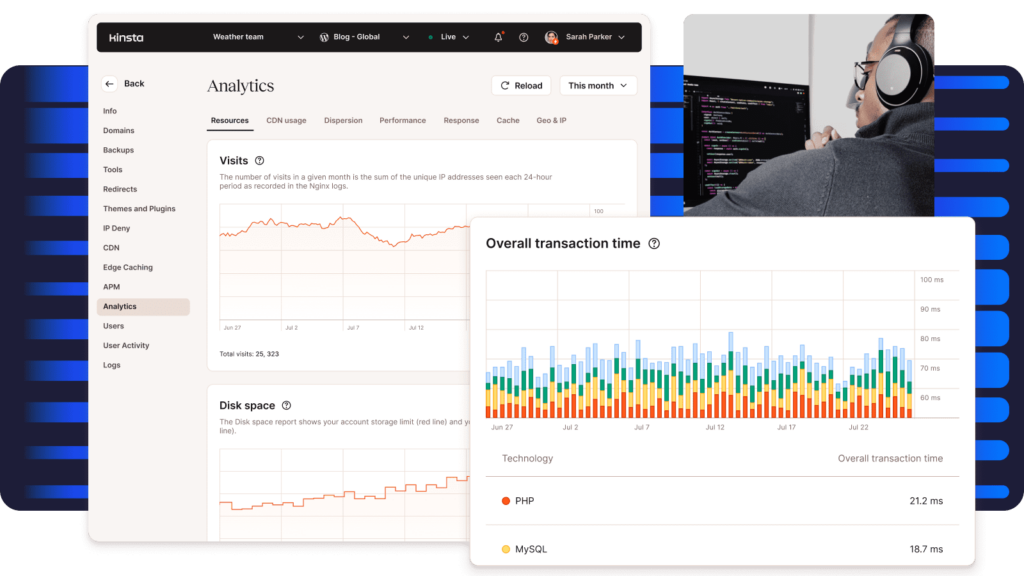
Some developer-friendly features and tools you’ll have access to as a Kinsta customer include:
- SSH, Git, and WP-CLI access on all plans.
- Custom setups like Bedrock and Trellis, as well as starter themes such as Sage.
- One-click WordPress staging environments that allow you to easily push changes from staging to production as well as conveniently clone your site.
- Run a different version of PHP for each live site and staging site, and switch between PHP engines takes just one click. We currently support 7.4, 8.0, 8.1, 8.2, 8.3, 8.4 and 8.5.
- Post and page revisions enabled by default. While we recommend limiting or disabling these, we believe this should be your choice.
- Load your site over a reverse proxy.
- Built-in free APM (Application Performance Monitoring) tool for troubleshooting WordPress performance issues.
- DevKinsta, a free local development tool.
- Restore backups to staging as well as production.
With Kinsta as your hosting provider, you have all the tools needed to manage your WordPress site, regardless of your technical knowledge.
DigitalOcean is geared primarily toward programmers and engineers. However, even if you’re capable of acting as your own sysadmin, that doesn’t mean you should. It’s smart to consider whether your time and attention would be better spent elsewhere, like on other critical aspects of your business.
With DigitalOcean, it’s possible to clone your machine. However, that isn’t exactly free or easy. It would require a premium add-on, which you would need to purchase, install, and configure yourself.
Kinsta also offers automatic Cloudflare SSLs with wildcard support on every plan, as well as the option to install your own.
This isn’t the case with DigitalOcean. You’d be required to put a system in place for SSL certificate installation, issuing, and automatic renewal. You could use a system such as ServerPilot or Certbot, but again, this isn’t free or easy.
Interested in moving to Kinsta? We’ll do it for you!
Let our migration team take care of everything for you. It’s free, fast, and easy.
MyKinsta: A Custom-Built Dashboard for Powerful Site Management
At Kinsta, we believe in empowering our customers with powerful features to make WordPress site management a breeze. MyKinsta dashboard is built with usability in mind.
With features like search and replace, force HTTPS, URL redirects with IP geolocation support, IP deny, Application Performance Monitoring, Edge Caching, Early Hints, Cron Jobs, PHP threads, and more, you have a wide array of powerful tools for managing your WordPress site. MyKinsta even includes a comprehensive analytics dashboard that provides insights into key site metrics.
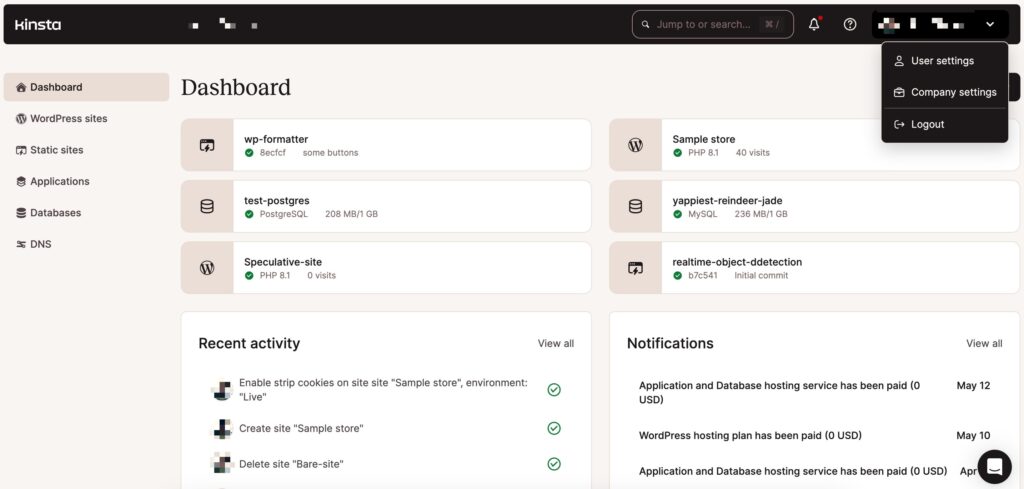
The MyKinsta dashboard.
Let’s look at some of the features that make our MyKinsta dashboard so powerful:
- Toggle between different PHP versions. Kinsta supports PHP 7.4, 8.0, 8.1, 8.2, 8.3, 8.4 and 8.5.
- Application Performance Monitoring tool that gives you all the necessary PHP and MySQL data to debug WordPress performance issues.
- Get detailed analytics on bandwidth and visitors, CDN usage, cache HIT & MISS rates, and more.
- Access to one-click staging environments and the option to restore backups to production or staging.
- Quick phpMyAdmin access.
- Automatic MySQL database optimizations.
- One-click ionCube enabler.
- Free Kinsta DNS (powered by Amazon Route53) to manage your DNS records directly in the dashboard.
- One-click CDN setup with Kinsta CDN.
- Purge the site cache directly from the dashboard.
- Redirect management with IP geolocation support.
- IP Deny tool that lets you quickly block IP addresses before they reach your site.
- Free automatic Cloudflare SSL certificates with wildcard domain support and the option to import your own.
- A toggle for enabling
WP_DEBUGmode. - Password protection for your environment and the ability to strengthen login security by adding your SSH keys to the dashboard.
- The dashboard is available in 10 languages: English, Spanish, German, French, Italian, Dutch, Portuguese, Japanese, Swedish, Danish.
There’s no need to simply take our word for it, though. Schedule a live demo today and explore the user-friendly interface and plethora of tools to see firsthand what makes MyKinsta different from the competition.
Kinsta is reliable and makes shipping changes easy. The support team was exceedingly helpful when we needed to migrate our blog. A+ on their support team.
DigitalOcean offers a basic dashboard where you can access your existing resources and view your account information. However, when it comes to leveraging advanced tools and features, you’re mostly on your own for setting everything up via SSH. For example, for automatic configurations and security updates, you’ll need a third-party cloud control panel such as ServerPilot.
Kinsta API
Say goodbye to the limitations of the past and enjoy a revolutionary era where machines can seamlessly interact with our services. Kinsta API (Application Programming Interface) allows you to perform tasks on your Kinsta site without logging in to the MyKinsta dashboard.
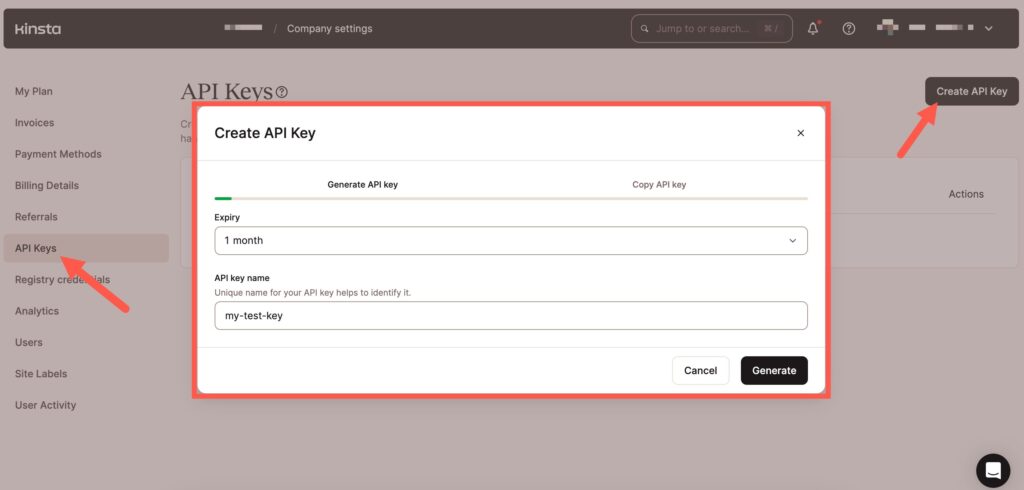
Create Kinsta API Key
What’s possible with Kinsta API?
- Reporting: seamlessly integrate Kinsta Services into your internal tracking systems and retrieve Kinsta analytics data effortlessly.
- Scheduled Tasks: create applications to schedule tasks, ensuring minimal disruption to your visitors.
- WordPress Site Creation: create a new WordPress site installation automatically and take control of your site’s functionality. You can also create WordPress Multisite installations.
Enjoy more automation than ever before on the Kinsta platform by taking advantage of Kinsta API.
Expert Support for WordPress
At Kinsta, we treat every customer as a mission-critical priority, whether you’re a solo entrepreneur, agency, or global enterprise. Our support team of WordPress experts is available 24 hours a day year-round, including holidays, weekends, and late nights (wherever you are).
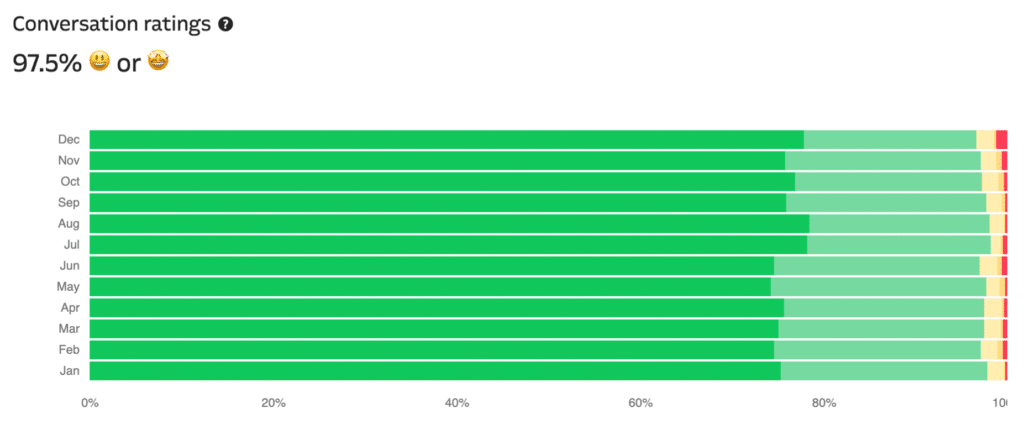
Kinsta’s WordPress hosting support conversation ratings chart.
We don’t rely on a tiered support system, which means we won’t waste your time with escalations and transfers. No matter the plan you are on, you have access to the same team of WordPress experts.
In addition to multilingual support and resources available in over 10 languages, we’re also proud to maintain an initial ticket response time average of under two minutes!
DigitalOcean claims to offer 24/7 support. However, this can be a bit misleading. They don’t offer live chat support, only a ticket-based system.
In addition, the support you get varies by tier. Premium support is only available as a paid option. Business support is available for users who “spend $500+ per month on [the] platform.”
All Kinsta plans come with a free custom-built APM tool that can be easily accessed in the MyKinsta dashboard. Kinsta APM provides you with key WordPress performance insights and metrics without the need to pay for third-party subscriptions to other APM services.
With the information you get from Kinsta APM, you can debug and troubleshoot performance bottlenecks, These include:
- Slow WordPress plugins and themes.
- Long calls to external APIs and domains.
- Unoptimized MySQL database queries.
- PHP execution time
With Kinsta APM, you can use full stack traces to debug WordPress performance issues down to a specific line of code.
Digital Ocean’s hosting plans do not come with a free APM tool, which makes it very difficult to quickly troubleshoot performance issues on your WordPress site.
Optimized for WooCommerce and Easy Digital Downloads
As a managed WordPress hosting company, we understand the importance of a platform capable of supporting high-traffic, resource-intensive ecommerce sites. We also recognize the unique and demanding challenges that come with powering online stores. This is why we optimized our platform for WooCommerce and Easy Digital Downloads.
WooCommerce and other WordPress ecommerce plugins rely heavily on CPU performance because they cannot be efficiently cached. This is where our next-generation hosting architecture really shines.
Our expert engineers are very familiar with WooCommerce and have developed a custom workflow that optimizes performance. Some of the ways we enhance the WordPress ecommerce experience include:
- Excluding ‘My Account,’ checkout, cart, and other pages that shouldn’t be cached.
- Ensuring a smooth checkout process by automatically bypassing the cache for users when
woocommerce_items_in_cartoredit_items_in_cartare detected. - Implementing specific rules to allow EDD and WooCommerce functionality during server-level page caching.
With DigitalOcean, you won’t find any ecommerce-specific solutions built into their plans and products. While it’s not impossible to set up your own online store, it can be a time-consuming and tedious process as compared to using our managed WordPress hosting.
Develop Locally With DevKinsta
With DevKinsta, you can launch WordPress sites with a full hosting stack and SSL support on your local computer (macOS, Windows, and Ubuntu) with just a few clicks.
DevKinsta is fully integrated with MyKinsta and Kinsta’s hosting platform, so you can join the 60,000+ community members using DevKinsta to develop locally and push updates directly to a staging environment on Kinsta!
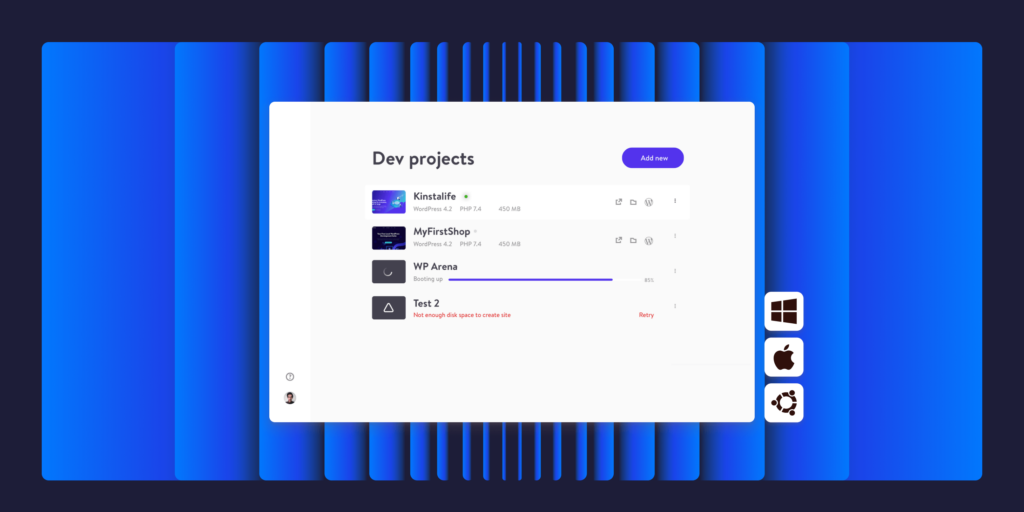
DevKinsta is fully integrated with MyKinsta and Kinsta’s hosting platform, which means you can develop locally and push updates directly to a staging environment on Kinsta! DigitalOcean doesn’t have an integration with a local WordPress development tool, which means there is no way to clone and push WordPress sites for DigitalOcean customers.
If you’re a busy freelance or agency developer, DevKinsta’s advanced features and MyKinsta integration can be a huge time saver, especially when compared with DigitalOcean, where you do everything through the command line.
Free Migrations From Real People
Whether you want to move one site or 100, Kinsta provides hassle-free migrations that are handled by our skilled WordPress experts. You won’t have to deal with complex technology or risk losing critical data.
If you’re interested in moving your site to managed WordPress hosting, we offer unlimited free migrations from DigitalOcean! Our migrations are performed by an expert migrations engineer.
If you have problematic high traffic sites like us, you’ll love their migration service — they took care of everything and even identified some problem plugins that had been installed by former members of our team. I would have spent hours on the migration due to the size without their help.
To get started, simply complete our site migration request form, and our experts will reach out to schedule a time. Then you can track the migration’s status directly from your MyKinsta dashboard.
DigitalOcean doesn’t offer migration services.
Turbocharging Your Content Delivery With Kinsta CDN
In addition to free bandwidth, all Kinsta plans include a free Content Delivery Network (CDN). This is a premium HTTP/3-enabled CDN to deliver your content lightning-fast across the globe.
As part of our Cloudflare integration, our built-in Edge Caching saves your Kinsta site/page cache to any of Cloudflare’s global network of 300+ data centers.
When site visitors load your website in their browser, cached responses will be delivered from the location closest to them. Edge Caching is free with all Kinsta plans and doesn’t require a separate plugin.
Our content delivery architecture was tailor-made for high throughput and low latency. You can enable the CDN directly from your MyKinsta dashboard.
Agency Partner Program
Kinsta has an Agency Partner Program specifically designed for agencies looking for a powerful and secure hosting platform with minimal overhead. After joining our Agency Partner Program, your agency will be able to focus on developing client projects and expanding your business while we handle the hosting side of things.
Our Agency Partner Program also comes with a number of perks:
- Free hosting for your agency site on a Kinsta WP 2 plan (a $70/month value).
- Unlimited free migrations for your client sites.
- White-label our cache-clearing plugin with your agency’s logo and branding.
As a member of our Agency Partner Program, all your client sites will receive the same level of support, features, and tooling offered on our normal plan tiers!
Affiliate Program With Recurring Commissions
Kinsta is constantly exceeding our client’s expectations. Our satisfied customers are eager to spread the word about our products and services, which has helped us become one of the fastest-growing hosts in the industry.
For every referral of Managed WordPress Hosting, you earn both:
- An initial one-time bonus, between 50and50 and 50and500, is calculated based on the plan of the customer.
- A 10% monthly recurring commission is paid every month for the lifetime of the customer. The 10% is calculated out of the plan’s monthly fee (discounts applied). Add-ons are not included.
This is a powerful opportunity to earn a passive income!
To make the Kinsta affiliate experience even more enjoyable, we custom-built our own easy-to-use affiliate dashboard. Therefore, you won’t have to deal with complicated or confusing third-party platforms.
DigitalOcean doesn’t have an affiliate program, only a referral program. If someone uses your referral link and spends $25, you get a DigitalOcean credit worth the same amount.
Join Others Making the Switch to Kinsta
At Kinsta, we offer the fastest, latest technology possible. We’re constantly evolving and adapting to leverage the most innovative solutions available. You can see for yourself simply by checking out our Changelog!
We are confident in our solutions and want you to be 100% satisfied with your hosting, which is why we offer a 30-day money-back guarantee and free migrations from DigitalOcean. It’s time to move away from DigitalOcean and switch to our managed WordPress hosting platform.