Getting started with KSP | Kotlin (original) (raw)
In this guide you will learn:
- How to add KSP-based annotation processors to your project.
- How to create your own annotation processor with the KSP API.
- Where to find the code generated by the processor.
Add a KSP-based processor to your project
To use an external processor in your project, add KSP to the plugins {} block in your build.gradle(.kts) file. If the processor is only needed in a specific module, add it to that module's build.gradle(.kts) file instead:
// build.gradle.kts plugins { kotlin("jvm") version "2.3.20" id("com.google.devtools.ksp") version "2.3.6" }
// build.gradle plugins { id 'org.jetbrains.kotlin.jvm' version '2.3.20' id 'com.google.devtools.ksp' version '2.3.6' }
In the top-level dependencies {} block, add the processor you want to use. This example uses Moshi, but the approach is the same for other processors:
// build.gradle.kts dependencies { ksp("com.squareup.moshi:moshi-kotlin-codegen:1.15.2") }
// build.gradle dependencies { ksp 'com.squareup.moshi:moshi-kotlin-codegen:1.15.2' }
Create your own processor
By following these steps you will create a simple annotation processor that will generate a helloWorld() function. While not very useful in practice, it demonstrates the basics of creating your own processors and annotations.
Add KSP to the project
Create a new Kotlin project and add the KSP plugin:
- In IntelliJ IDEA, select File | New | Project.
- In the list on the left, choose Kotlin.
- Choose Gradle as the build system and click Create.
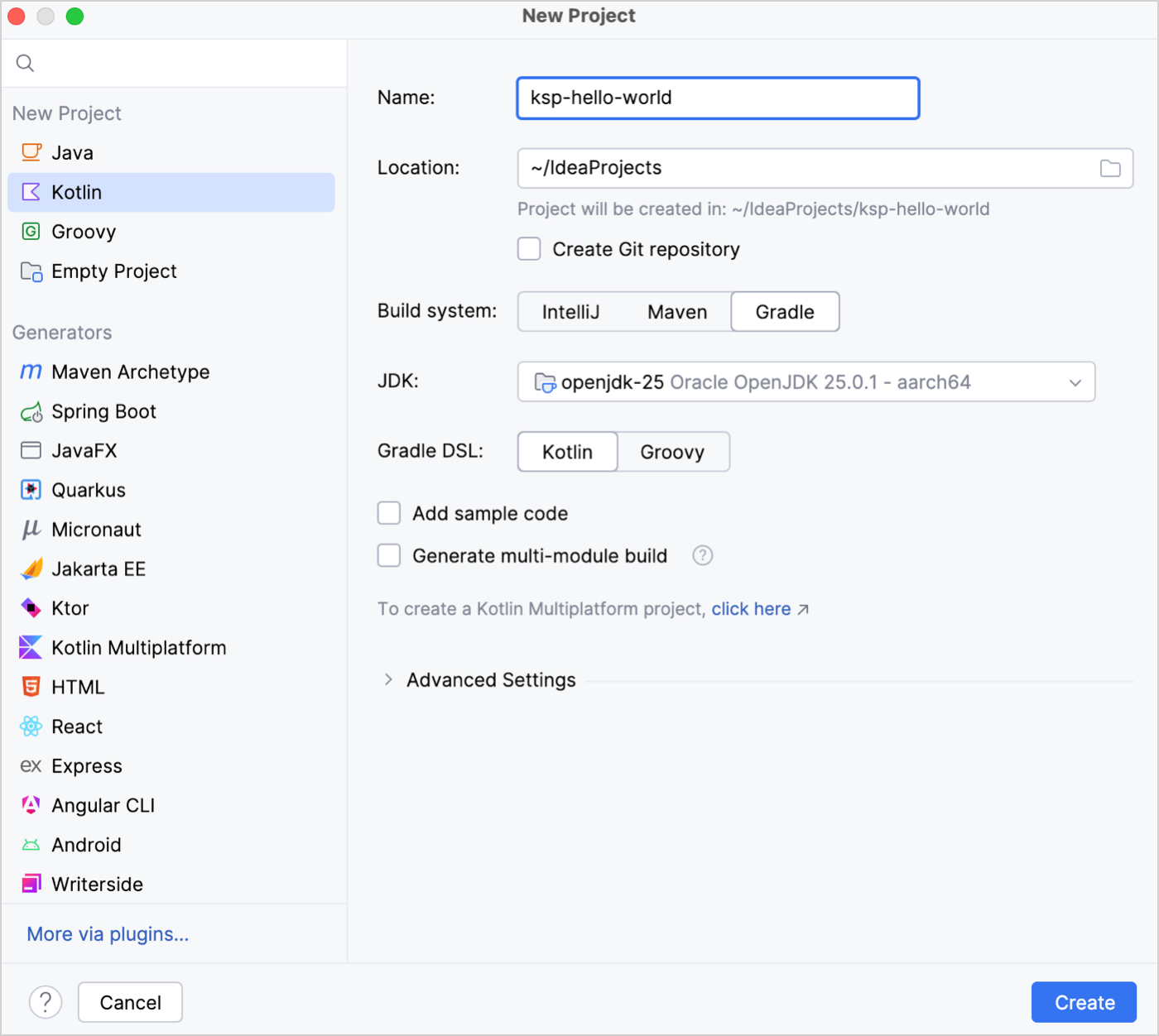
- Add the KSP plugin to the
build.gradle(.kts)file:
// build.gradle.kts plugins { kotlin("jvm") version "2.3.20" id("com.google.devtools.ksp") version "2.3.6" apply false }
// build.gradle plugins { id 'org.jetbrains.kotlin.jvm' version '2.3.20' id 'com.google.devtools.ksp' version '2.3.6' apply false }
Create an annotation
Create a new module at the root of the project and declare an annotation:
- Select File | New | Module.
- In the list on the left, select Kotlin.
- Specify the following fields and click create:
- Name: annotations
- Build system: Gradle
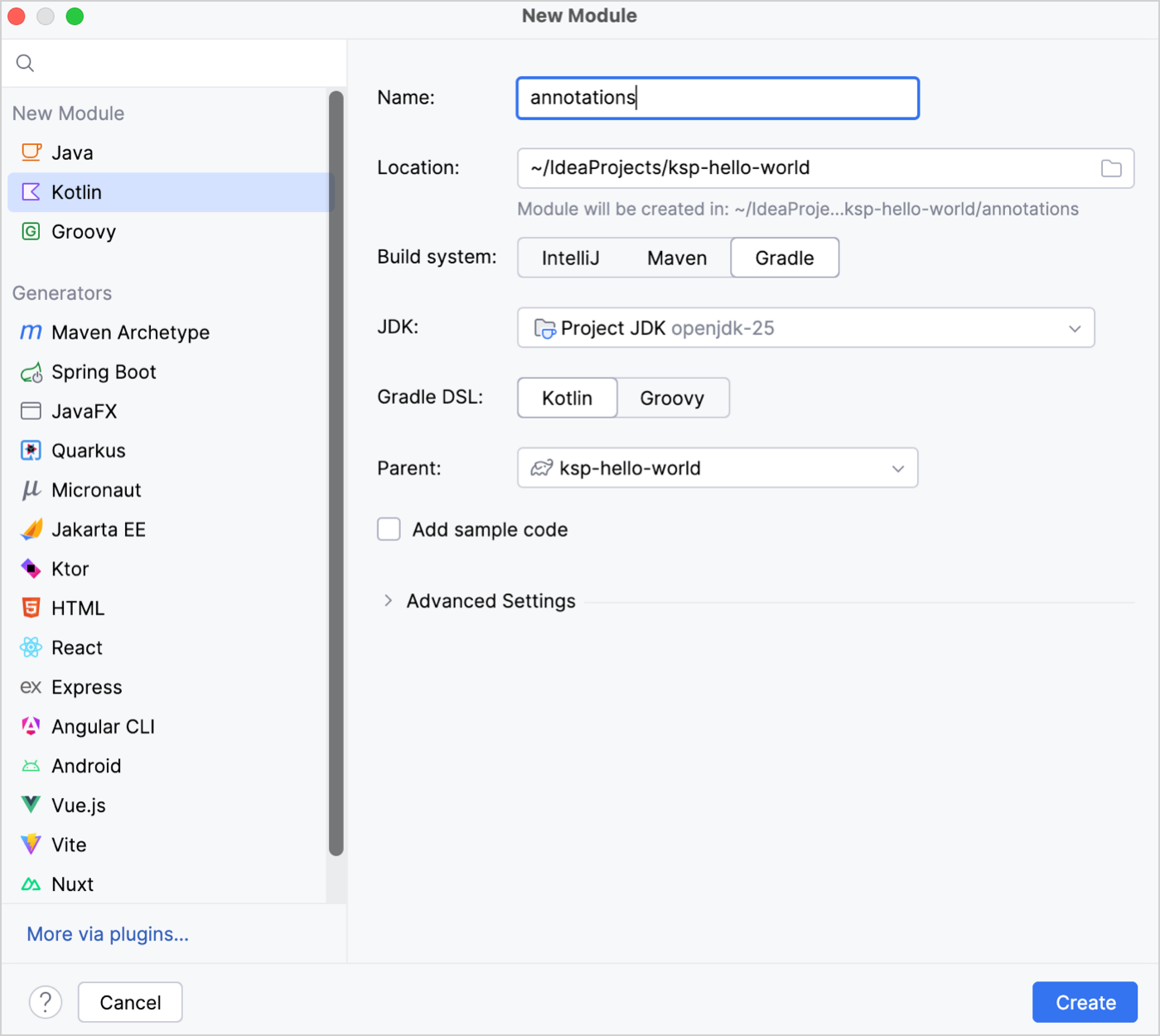
- In the module, create a
HelloWorldAnnotation.ktfile and declare an annotation calledHelloWorldAnnotation:
// annotations/src/main/kotlin/com/example/annotations/HelloWorldAnnotation.kt package com.example.annotations annotation class HelloWorldAnnotation
Create and register a processor
- Create another module at the root of the project called processor.
- Add the KSP API and the annotation you declared as dependencies in the module's
build.gradle(.kts)file:
// processor/build.gradle.kts plugins { kotlin("jvm") } dependencies { implementation(project(":annotations")) implementation("com.google.devtools.ksp:symbol-processing-api:2.3.6") }
// processor/build.gradle plugins { id 'org.jetbrains.kotlin.jvm' } dependencies { implementation project ':annotations' implementation 'com.google.devtools.ksp:symbol-processing-api:2.3.6' } - In the processor module, create a new
HelloWorldProcessor.ktfile and add the following code:
// processor/src/main/kotlin/HelloWorldProcessor.kt class HelloWorldProcessor(val codeGenerator: CodeGenerator) : SymbolProcessor { // 1️⃣ process() function override fun process(resolver: Resolver): List { resolver .getSymbolsWithAnnotation("com.example.annotations.HelloWorldAnnotation") .filter { it.validate() } .filterIsInstance() .forEach { it.accept(HelloWorldVisitor(), Unit) } return emptyList() } // 2️⃣ Visitor inner class HelloWorldVisitor : KSVisitorVoid() { override fun visitFunctionDeclaration(function: KSFunctionDeclaration, data: Unit) { createNewFileFrom(function).use { file -> file.write( """ fun helloWorld(): Unit { println("Hello world from function generated by KSP") } """.trimIndent() ) } } } // 3️⃣ createNewFileFrom() function private fun createNewFileFrom(function: KSFunctionDeclaration): OutputStream { return codeGenerator.createNewFile( dependencies = createDependencyOn(function), packageName = "", fileName = "GeneratedHelloWorld" ) } // 3️⃣ createDependencyOn() function private fun createDependencyOn(function: KSFunctionDeclaration): Dependencies { return Dependencies(aggregating = false, function.containingFile!!) } } // Utility function for writing string to OutputStream fun OutputStream.write(string: String): Unit { this.write(string.toByteArray()) }
Add the imports that are suggested by the IDE. Make sure to import theResolverandDependenciesclasses fromcom.google.devtools.ksp.processing. Alternatively, copy these lines at the top ofHelloWorldProcessor.kt:
// processor/src/main/kotlin/HelloWorldProcessor.kt import com.google.devtools.ksp.processing.CodeGenerator import com.google.devtools.ksp.processing.Dependencies import com.google.devtools.ksp.processing.Resolver import com.google.devtools.ksp.processing.SymbolProcessor import com.google.devtools.ksp.symbol.KSAnnotated import com.google.devtools.ksp.symbol.KSFunctionDeclaration import com.google.devtools.ksp.symbol.KSVisitorVoid import com.google.devtools.ksp.validate import java.io.OutputStream
Let's go through the code:- 1️⃣ The
process()function contains the main logic of the processor. It gets all symbols annotated withHelloWorldAnnotationand callsHelloWorldVisitorfor each one.
Theprocess()function returns a list of unprocessed symbols to process in a later round. In this example, it safely returnsemptyList(). For more information, see Multiple round processing. - 2️⃣ Processors traverse KSP's view of the Kotlin abstract syntax tree (AST) using visitors. Inside the
HelloWorldPocessorclass, theHelloWorldVisitorclass is the visitor. Since theHelloWorldAnnotationis only used on a function, onlyvisitFunctionDeclaration()is overridden. - 3️⃣
createNewFileFrom()creates the file where KSP generates code.createDependencyOn()makes the output file depend on the source file where the annotation is used.
- 1️⃣ The
- Create a
HelloWorldProcessorProvider.ktfile. In it, declare aHelloWorldProcessorProviderclass which inherits fromSymbolProcessorProvider:
// processor/src/main/kotlin/HelloWorldProcessorProvider.kt import com.google.devtools.ksp.processing.SymbolProcessor import com.google.devtools.ksp.processing.SymbolProcessorEnvironment import com.google.devtools.ksp.processing.SymbolProcessorProvider class HelloWorldProcessorProvider : SymbolProcessorProvider { override fun create(environment: SymbolProcessorEnvironment): SymbolProcessor { return HelloWorldProcessor(environment.codeGenerator) } } - Register the processor provider. In the
resources/META-INF/servicesdirectory, create acom.google.devtools.ksp.processing.SymbolProcessorProviderfile and add the provider's fully qualified name:
## processor/src/main/resources/META-INF/services/com.google.devtools.ksp.processing.SymbolProcessorProvider HelloWorldProcessorProvider
Use your processor
Now you are ready to test your processor. Follow these steps to create a client module and have your processor generate code based on an annotated element:
- Create a module called
appat the root of your project. - In the module's
build.gradle(.kts)file:- Add the KSP plugin to the
plugins {}block. - Add your processor and annotation to the
dependencies {}block.
For example:
// app/build.gradle.kts plugins { kotlin("jvm") id("com.google.devtools.ksp") } dependencies { implementation(project(":annotations")) ksp(project(":processor")) }
// app/build.gradle plugins { id 'com.google.devtools.ksp' } dependencies { implementation project (':annotations') ksp project (':processor') }
- Add the KSP plugin to the
- In the project-level
settings.gradle(.kts)file, ensure that all the submodules were automatically included:
// settings.gradle.kts include("annotations") include("app") include("processor")
// settings.gradle include 'processor' include 'annotations' include 'app' - In the
appmodule, create aMain.ktfile and add the following code:
// app/src/main/kotlin/Main.kt import com.example.annotations.HelloWorldAnnotation @HelloWorldAnnotation fun main() { helloWorld() } - Run the program. You see the output of the
helloWorld()function in your console:
Hello world from function generated by KSP
KSP generates code in theGeneratedHelloWorld.ktfile:
app/build/generated/ksp/main/kotlin/GeneratedHelloWorld.kt
Explore the project structure
Your project's final file structure should look like this:
. ├── app │ ├── build.gradle.kts │ └── src │ └── main │ └── kotlin │ └── Main.kt ├── annotations │ ├── build.gradle.kts │ └── src │ └── main │ └── kotlin | └── com | └── example | └── annotations | └── HelloWorldAnnotation.kt ├── processor │ ├── build.gradle.kts │ └── src │ └── main │ ├── kotlin │ │ ├── HelloWorldProcessor.kt │ │ └── HelloWorldProcessorProvider.kt │ └── resources/META-INF/services | └── com.google.devtools.ksp.processing.SymbolProcessorProvider ├── build.gradle.kts └── settings.gradle.kts
What's next?
- Explore the full code for this example in the KSP repository.
- Find more complex, real-world examples in the KSP repository.
- Browse the list of KSP supported libraries.
08 April 2026