Overview of Conditional Access Authentication Strengths - Microsoft Entra ID (original) (raw)
An authentication strength is a Microsoft Entra Conditional Access control that specifies which combinations of authentication methods users can use to access a resource. Users can satisfy the strength requirements by authenticating with any of the allowed combinations.
For example, an authentication strength can require users to use only phishing-resistant authentication methods to access a sensitive resource. To access a nonsensitive resource, administrators can create another authentication strength that allows less secure multifactor authentication (MFA) combinations, such as a password and a text message.
An authentication strength is based on the policy for authentication methods. That is, administrators can scope authentication methods for specific users and groups to be used across Microsoft Entra ID federated applications. An authentication strength allows further control over the usage of these methods, based on specific scenarios such as sensitive resource access, user risk, and location.
Prerequisites
- To use Conditional Access, your tenant needs to have Microsoft Entra ID P1 license. If you don't have this license, you can start a free trial.
Scenarios for authentication strengths
Authentication strengths can help customers address these scenarios:
- Require specific authentication methods to access a sensitive resource.
- Require a specific authentication method when a user takes a sensitive action within an application (in combination with Conditional Access authentication context).
- Require users to use a specific authentication method when they access sensitive applications outside the corporate network.
- Require more secure authentication methods for users at high risk.
- Require specific authentication methods from guest users who access a resource tenant (in combination with cross-tenant settings).
Built-in and custom authentication strengths
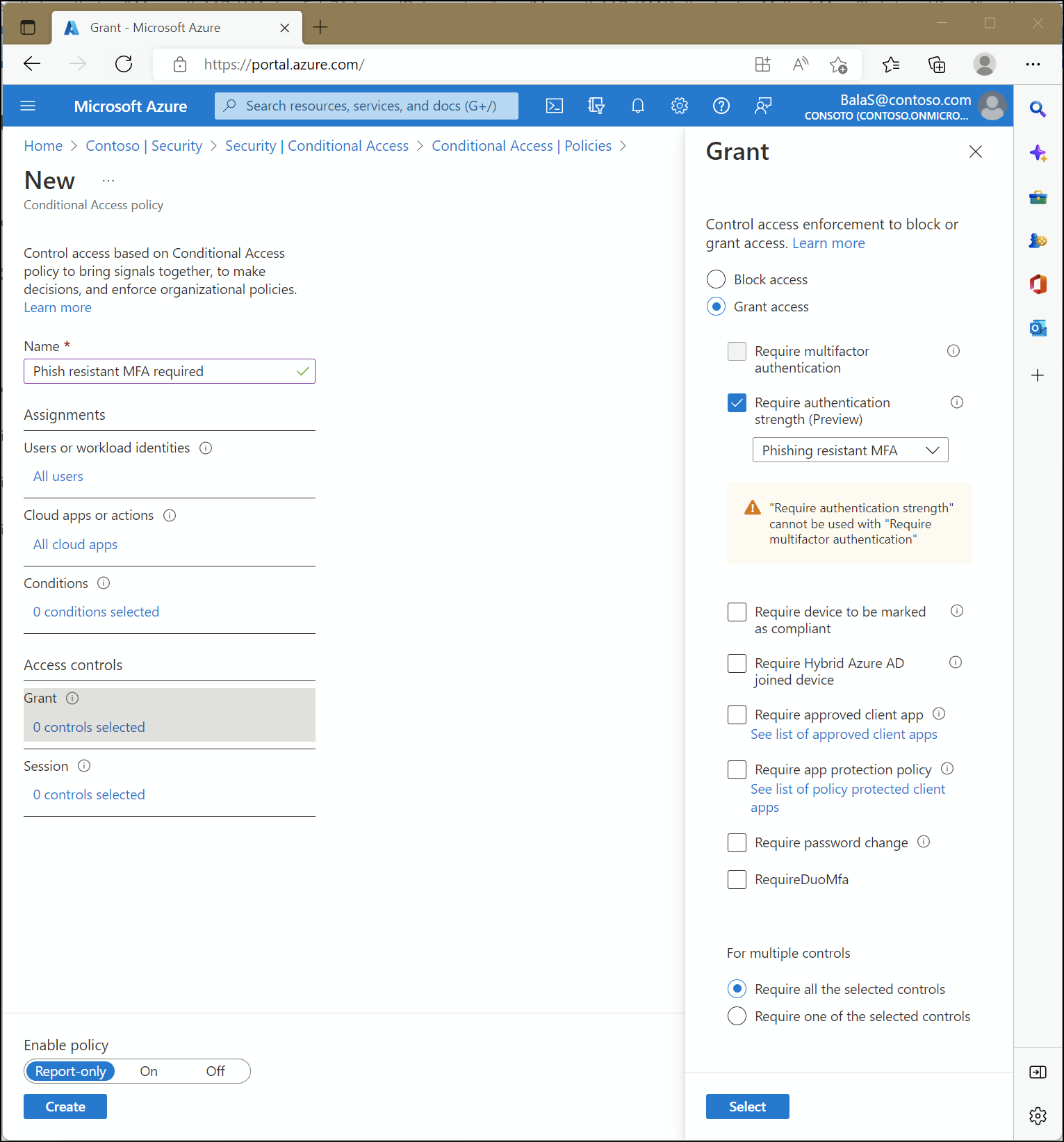
Administrators can specify an authentication strength to access a resource by creating a Conditional Access policy with the Require authentication strength control. They can choose from three built-in authentication strengths: Multifactor authentication strength, Passwordless MFA strength, and Phishing-resistant MFA strength. They can also create a custom authentication strength based on the authentication method combinations that they want to allow.
Built-in authentication strengths
Built-in authentication strengths are combinations of authentication methods that Microsoft predefines. Built-in authentication strengths are always available and can't be modified. Microsoft updates built-in authentication strengths when new methods become available.
For example, the built-in Phishing-resistant MFA strength authentication strength allows combinations of:
- Windows Hello for Business or platform credential
- FIDO2 security key
- Microsoft Entra certificate-based authentication (multifactor)

The following table lists combinations of authentication methods for each built-in authentication strength. These combinations include methods that users need to register and that admins need to enable in the policy for authentication methods or the policy for legacy MFA settings:
- MFA strength: The same set of combinations that can be used to satisfy the Require multifactor authentication setting.
- Passwordless MFA strength: Includes authentication methods that satisfy MFA but don't require a password.
- Phishing-resistant MFA strength: Includes methods that require an interaction between the authentication method and the sign-in surface.
| Authentication method combination | MFA strength | Passwordless MFA strength | Phishing-resistant MFA strength |
|---|---|---|---|
| FIDO2 security key | ✅ | ✅ | ✅ |
| Windows Hello for Business or platform credential | ✅ | ✅ | ✅ |
| Certificate-based authentication (multifactor) | ✅ | ✅ | ✅ |
| Microsoft Authenticator (phone sign-in) | ✅ | ✅ | |
| Temporary Access Pass (one-time use and multiple use) | ✅ | ||
| Password plus something the user has1 | ✅ | ||
| Federated single-factor plus something the user has1 | ✅ | ||
| Federated multifactor | ✅ | ||
| Certificate-based authentication (single-factor) | |||
| SMS sign-in | |||
| Password | |||
| Federated single-factor |
1 Something the user has refers to one of the following methods: text message, voice, push notification, software OATH token, or hardware OATH token.
You can use the following API call to list definitions of all the built-in authentication strengths:
GET https://graph.microsoft.com/beta/identity/conditionalAccess/authenticationStrength/policies?$filter=policyType eq 'builtIn'
Custom authentication strengths
Conditional Access administrators can also create custom authentication strengths to exactly suit their access requirements. For more information, see Create and manage custom Conditional Access authentication strengths.
Limitations
- Effect of an authentication strength on authentication: Conditional Access policies are evaluated only after the initial authentication. As a result, an authentication strength doesn't restrict a user's initial authentication.
Suppose you're using the built-in Phishing-resistant MFA strength authentication strength. A user can still enter a password but must sign in by using a phishing-resistant method, such as a FIDO2 security key, before they can continue. - Unsupported combination of grant controls: You can't use the Require multifactor authentication and Require authentication strength grant controls together in the same Conditional Access policy. The reason is that the built-in Multifactor authentication authentication strength is equivalent to the Require multifactor authentication grant control.
- Unsupported authentication method: The Email one-time pass (Guest) authentication method isn't currently supported in the available combinations.
- Windows Hello for Business: If the user signs in with Windows Hello for Business as the primary authentication method, it can be used to satisfy an authentication strength requirement that includes Windows Hello for Business. But if the user signs in with another method (like a password) as the primary authentication method, and the authentication strength requires Windows Hello for Business, the user isn't prompted to sign in with Windows Hello for Business. The user needs to restart the session, select Sign-in options, and select a method that the authentication strength requires.
Known issues
- Authentication strength and sign-in frequency: When a resource requires an authentication strength and a sign-in frequency, users can satisfy both requirements at two different times.
For example, let's say a resource requires a passkey (FIDO2) for the authentication strength, along with a 1-hour sign-in frequency. A user signed in with a passkey (FIDO2) to access the resource 24 hours ago.
When the user unlocks their Windows device by using Windows Hello for Business, they can access the resource again. Yesterday's sign-in satisfies the authentication strength requirement, and today's device unlock satisfies the sign-in frequency requirement.
FAQ
Should I use an authentication strength or the policy for authentication methods?
An authentication strength is based on the Authentication methods policy. The Authentication methods policy helps to scope and configure authentication methods that users and groups can use across Microsoft Entra ID. An authentication strength allows another restriction of methods for specific scenarios, such as sensitive resource access, user risk, and location.
For example, assume that the administrator of an organization named Contoso wants to allow users to use Microsoft Authenticator with either push notifications or passwordless authentication mode. The administrator goes to the Authenticator settings in the Authentication methods policy, scopes the policy for the relevant users, and sets Authentication mode to Any.
For Contoso's most sensitive resource, the administrator wants to restrict the access to only passwordless authentication methods. The administrator creates a new Conditional Access policy by using the built-in Passwordless MFA strength authentication strength.
As a result, users in Contoso can access most of the resources in the tenant by using a password and a push notification from Authenticator, or by using only Authenticator (phone sign-in). However, when the users in the tenant access the sensitive application, they must use Authenticator (phone sign-in).