Microsoft Entra Password Protection - Microsoft Entra ID (original) (raw)
Enforce on-premises Microsoft Entra Password Protection for Active Directory Domain Services
Microsoft Entra Password Protection detects and blocks known weak passwords and their variants, and can also block additional weak terms that are specific to your organization. On-premises deployment of Microsoft Entra Password Protection uses the same global and custom banned password lists that are stored in Microsoft Entra ID, and does the same checks for on-premises password changes as Microsoft Entra ID does for cloud-based changes. These checks are performed during password changes and password reset events against on-premises Active Directory Domain Services (AD DS) domain controllers.
Design principles
Microsoft Entra Password Protection is designed with the following principles in mind:
- Domain controllers (DCs) never have to communicate directly with the internet.
- No new network ports are opened on DCs.
- No AD DS schema changes are required. The software uses the existing AD DS container and serviceConnectionPoint schema objects.
- Any supported AD DS domain or forest functional level can be used.
- The software doesn't create or require accounts in the AD DS domains that it protects.
- User clear-text passwords never leave the domain controller, either during password validation operations or at any other time.
- The software isn't dependent on other Microsoft Entra features. For example, Microsoft Entra password hash sync (PHS) isn't related or required for Microsoft Entra Password Protection.
- Incremental deployment is supported, however the password policy is only enforced where the Domain Controller Agent (DC Agent) is installed.
Incremental deployment
Microsoft Entra Password Protection supports incremental deployment across DCs in an AD DS domain. It's important to understand what this really means and what the tradeoffs are.
The Microsoft Entra Password Protection DC agent software can only validate passwords when it's installed on a DC, and only for password changes that are sent to that DC. It's not possible to control which DCs are chosen by Windows client machines for processing user password changes. To guarantee consistent behavior and universal Microsoft Entra Password Protection security enforcement, the DC agent software must be installed on all DCs in a domain.
Many organizations want to carefully test Microsoft Entra Password Protection on a subset of their DCs prior to a full deployment. To support this scenario, Microsoft Entra Password Protection supports partial deployment. The DC agent software on a given DC actively validates passwords even when other DCs in the domain don't have the DC agent software installed. Partial deployments of this type aren't secure and aren't recommended other than for testing purposes.
Architectural diagram
It's important to understand the underlying design and function concepts before you deploy Microsoft Entra Password Protection in an on-premises AD DS environment. The following diagram shows how the components of Microsoft Entra Password Protection work together:
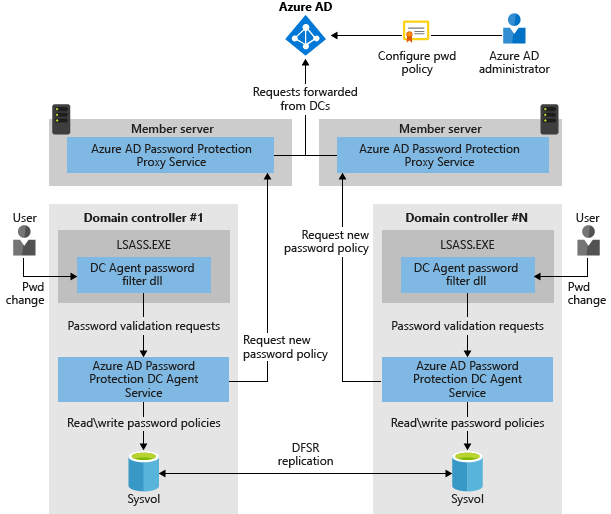
- The Microsoft Entra Password Protection Proxy service runs on any domain-joined machine in the current AD DS forest. The service's primary purpose is to forward password policy download requests from DCs to Microsoft Entra ID and then return the responses from Microsoft Entra ID to the DC.
- The password filter DLL of the DC Agent receives user password-validation requests from the operating system. The filter forwards them to the DC Agent service that's running locally on the DC.
- The DC Agent service of Microsoft Entra Password Protection receives password-validation requests from the password filter DLL of the DC Agent. The DC Agent service processes them by using the current (locally available) password policy and returns the result of pass or fail.
The on-premises Microsoft Entra Password Protection components work as follows:
- Each Microsoft Entra Password Protection Proxy service instance advertises itself to the DCs in the forest by creating a serviceConnectionPoint object in Active Directory.
Each DC Agent service for Microsoft Entra Password Protection also creates a serviceConnectionPoint object in Active Directory. This object is used primarily for reporting and diagnostics. - The DC Agent service is responsible for initiating the download of a new password policy from Microsoft Entra ID. The first step is to locate a Microsoft Entra Password Protection Proxy service by querying the forest for proxy serviceConnectionPoint objects.
- When an available proxy service is found, the DC Agent sends a password policy download request to the proxy service. The proxy service in turn sends the request to Microsoft Entra ID, then returns the response to the DC Agent service.
- After the DC Agent service receives a new password policy from Microsoft Entra ID, the service stores the policy in a dedicated folder at the root of its domain sysvol folder share. The DC Agent service also monitors this folder in case newer policies replicate in from other DC Agent services in the domain.
- The DC Agent service always requests a new policy at service startup. After the DC Agent service is started, it checks the age of the current locally available policy hourly. If the policy is older than one hour, the DC Agent requests a new policy from Microsoft Entra ID via the proxy service, as described previously. If the current policy isn't older than one hour, the DC Agent continues to use that policy.
- When password change events are received by a DC, the cached policy is used to determine if the new password is accepted or rejected.
Key considerations and features
- Whenever a Microsoft Entra Password Protection password policy is downloaded, that policy is specific to a tenant. In other words, password policies are always a combination of the Microsoft global banned-password list and the per-tenant custom banned-password list.
- The DC Agent communicates with the proxy service via RPC over TCP. The proxy service listens for these calls on a dynamic or static RPC port, depending on the configuration.
- The DC Agent never listens on a network-available port.
- The proxy service never calls the DC Agent service.
- The proxy service is stateless. It never caches policies or any other state downloaded from Azure.
- Proxy registration works by adding credentials to the AADPasswordProtectionProxy Service Principal. Don't be alarmed by any events in the audit logs when this occurs.
- The DC Agent service always uses the most recent locally available password policy to evaluate a user's password. If no password policy is available on the local DC, the password is automatically accepted. When that happens, an event message is logged to warn the administrator.
- Microsoft Entra Password Protection isn't a real-time policy application engine. There can be a delay between when a password policy configuration change is made in Microsoft Entra ID and when that change reaches and is enforced on all DCs.
- Microsoft Entra Password Protection acts as a supplement to the existing AD DS password policies, not a replacement. This includes any other 3rd-party password filter dlls that may be installed. AD DS always requires that all password validation components agree before accepting a password.
Forest / tenant binding for Microsoft Entra Password Protection
Deployment of Microsoft Entra Password Protection in an AD DS forest requires registration of that forest with Microsoft Entra ID. Each proxy service that's deployed must also be registered with Microsoft Entra ID. These forest and proxy registrations are associated with a specific Microsoft Entra tenant, which is identified implicitly by the credentials that are used during registration.
The AD DS forest and all deployed proxy services within a forest must be registered with the same tenant. It's not supported to have an AD DS forest or any proxy services in that forest being registered to different Microsoft Entra tenants. Symptoms of such a mis-configured deployment include the inability to download password policies.
Note
Customers that have multiple Microsoft Entra tenants must therefore choose one distinguished tenant to register each forest for Microsoft Entra Password Protection purposes.
Download
The two required agent installers for Microsoft Entra Password Protection are available from the Microsoft Download Center.
Next steps
To get started with using on-premises Microsoft Entra Password Protection, complete the following how-to: