Microsoft Defender for Cloud DevOps security benefits - Microsoft Defender for Cloud (original) (raw)
Microsoft Defender for Cloud enables comprehensive visibility, posture management, and threat protection across multicloud environments, including Azure, Amazon Web Services (AWS), Google Cloud Platform (GCP), and on-premises resources.
DevOps security in Defender for Cloud uses a central console to help security teams protect applications and resources from code to cloud across multi-pipeline environments, including Azure DevOps, GitHub, and GitLab. DevOps security recommendations can be correlated with other contextual cloud security insights to prioritize remediation in code. Key DevOps security capabilities include:
- Unified visibility into DevOps security posture: Security administrators have full visibility into DevOps inventory and the security posture of preproduction application code across multi-pipeline and multicloud environments. They can see findings from code, secrets, and open-source dependency vulnerability scans. They can also assess the security configurations of their DevOps environment.
- Strengthen cloud resource configurations throughout the development lifecycle: You can secure Infrastructure as Code (IaC) templates and container images to minimize cloud misconfigurations reaching production environments, allowing security administrators to focus on critical evolving threats.
- Prioritize remediation of critical issues in code: Apply comprehensive code-to-cloud contextual insights within Defender for Cloud. Security admins help developers prioritize critical code fixes with pull request annotations and assign developer ownership by triggering custom workflows that feed directly into the tools developers use.
These features help unify, strengthen, and manage multi-pipeline DevOps resources.
Manage your DevOps environments in Defender for Cloud
DevOps security in Defender for Cloud lets you manage your connected environments. It provides your security teams with a high-level overview of issues discovered in those environments through the DevOps security console.

Here, you can add Azure DevOps, GitHub, and GitLab environments, customize the DevOps workbook to show your desired metrics, configure pull request annotations, view our guides, and give feedback.
Understand your DevOps security
| Page section | Description |
|---|---|
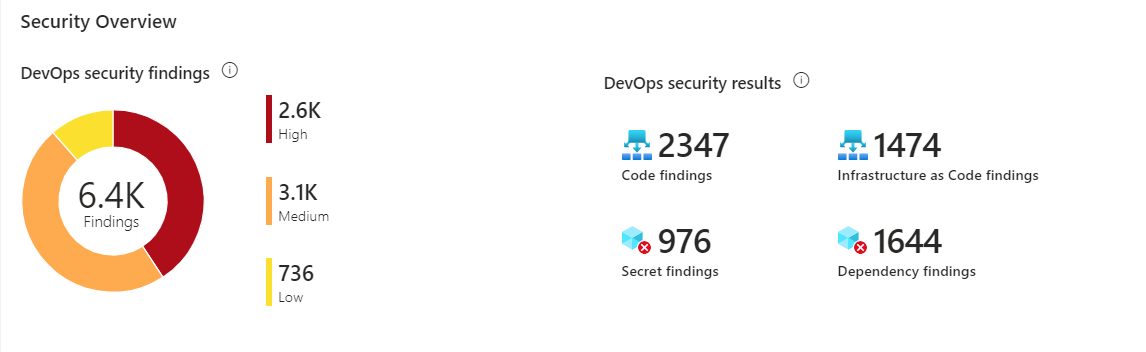 |
Total number of DevOps security scan findings (code, secrets, dependency, infrastructure-as-code) grouped by severity level and by finding type. |
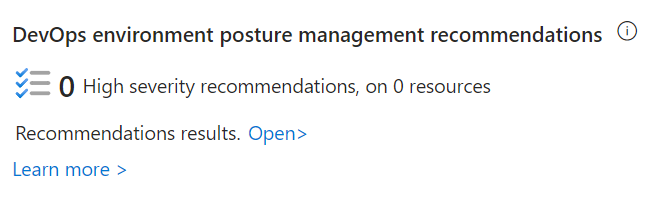 |
Provides visibility into the number of DevOps environment posture management recommendations highlighting high severity findings and number of affected resources. |
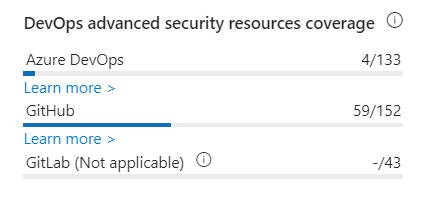 |
Provides visibility into the number of DevOps resources with advanced security capabilities out of the total number of resources onboarded by environment. |
Review your findings
The DevOps inventory table lets you review onboarded DevOps resources and their related security information.

In this section, you see:
- Name - Lists onboarded DevOps resources from Azure DevOps, GitHub, and GitLab. Select a resource to view its health page.
- DevOps environment - Describes the DevOps environment for the resource (Azure DevOps, GitHub, GitLab). Use this column to sort by environment if multiple environments are onboarded.
- Advanced security status - Indicates whether advanced security features are enabled for the DevOps resource.
On- Advanced security is enabled.Off- Advanced security isn't enabled.Partially enabled- Certain advanced security features aren't enabled (for example, code scanning is off)N/A- Defender for Cloud doesn't have information about enablement.
Note
This information is currently available only for Azure DevOps and GitHub repositories.
- Pull request annotation status - Indicates whether PR annotations are enabled for the repository.
On- PR annotations are enabled.Off- PR annotations aren't enabled.N/A- Defender for Cloud doesn't have information about enablement.
Note
This information is currently available only for Azure DevOps repositories.
- Findings - Indicates the total number of codes, secrets, dependency, and infrastructure-as-code findings identified in the DevOps resource.
You can view this table as a flat view at the DevOps resource level (repositories for Azure DevOps and GitHub, projects for GitLab) or in a grouping view showing organizations, projects, and groups hierarchy. You can also filter the table by subscription, resource type, finding type, or severity.
Learn more
- You can learn more about DevOps from our DevOps resource center.
- Learn about security in DevOps.
- You can learn about securing Azure Pipelines.
- Learn about security hardening practices for GitHub actions.