Transparency Note for Foundry Agent Service - Microsoft Foundry (original) (raw)
What is a Transparency Note?
An AI system includes not only the technology, but also the people who will use it, the people who will be affected by it, and the environment in which it is deployed. Creating a system that is fit for its intended purpose requires an understanding of how the technology works, what its capabilities and limitations are, and how to achieve the best performance. Microsoft’s Transparency Notes are intended to help you understand how our AI technology works, the choices system owners can make that influence system performance and behavior, and the importance of thinking about the whole system, including the technology, the people, and the environment. You can use Transparency Notes when developing or deploying your own system or share them with the people who will use or be affected by your system.
Microsoft’s Transparency Notes are part of a broader effort at Microsoft to put our AI Principles into practice. To find out more, see the Microsoft AI principles.
The basics of Foundry Agent Service
Introduction
Foundry Agent Service is a fully managed service designed to empower developers to securely build, deploy, and scale high-quality and extensible AI agents without needing to manage the underlying compute and storage resources. Agent Service provides integrated access to models, tools, and technology and enables you to extend the functionality of agents with knowledge from connected sources (such as Bing Search, SharePoint, Fabric, Azure Blob storage, and licensed data) and with actions using tools such as Azure Logic Apps, Azure Functions, OpenAPI 3.0 specified tools, and Code Interpreter. Learn more.
General Disclaimer about Agents
Agentic AI systems are designed to use agentic capabilities to achieve a high-level goal specified by a user. Systems should be designed to allow users to incorporate human oversight as appropriate to ensure the system is performing the actions and tasks as intended. Should an Agent exhibit unintended or undesirable behaviors, users should have the ability to intervene and take appropriate measures to mitigate potential risks.
Disclaimer about Agents in sensitive domains
Users should exercise caution when designing and deploying agentic AI systems in sensitive domains where Agent actions are irreversible or highly consequential. Such domains include, but are not limited to, finance and insurance, healthcare, legal, and housing. Additional precautions should also be taken when creating autonomous agentic AI as described further in our Code of Conduct. You are responsible for complying with all applicable laws and safety standards relevant to the Agents you create using any Foundry Tools and solutions, including Agents Catalog, underlying Code Samples, and similar resources and information (see below Considerations when choosing a use case).
Key terms
The following are key components of the Agent Service SDK (and the Microsoft Foundry portal experience powered by it):
| Term | Definition |
|---|---|
| Developer | A customer of Agent Service who builds an Agent. |
| User | A person who uses and/or operates an Agent that is created by a developer. |
| Agent | An application or a system that uses generative AI models with tools to access and interact with real-world data sources, APIs, and systems to achieve user-specified goals such as answer questions, perform actions, or completely automate workflows, with or without human supervision. |
| Tool | A built-in or custom-defined functionality that enables an Agent to perform simple or complex tasks or interact with information sources, applications, and/or services via the Agent Service SDK or Foundry portal. |
| Knowledge Tool | A tool that enables an Agent to access and process data from internal and external sources, including information beyond its model training cut-off date, to improve the accuracy and relevance of responses to user queries. |
| Action Tool | A tool that enables an Agent to perform tasks and take actions on behalf of users by integrating with external systems, APIs, and services. |
| Thread | A conversation session between an Agent and a user. Threads store Messages and automatically handle truncation to fit content into a model’s context. |
| Message | A message created by an Agent or a user. Messages can include text, images, and other files. Messages are stored as a list on the Thread. |
| Run | The activation of an Agent to begin running based on the contents of the Thread. The Agent uses its configuration and the Thread’s Messages to perform tasks by calling models and tools. As part of a Run, the Agent appends Messages to the Thread. |
| Run Steps | A detailed list of steps the Agent took as part of a Run. An Agent can call tools or create Messages during its Run. Examining Run Steps allows you to understand how the Agent is getting to its final results. |
| Workflow | A declarative sequence of actions that orchestrates agents to automate complex processes. Workflows in Foundry can be designed, executed and published using a graphical UI. |
| Sample | A template, manifest, code sample, workflow sample, or other example that demonstrates how you can build Agents, applications, or solutions and leverage the benefits of Microsoft Foundry Agent Service. |
Relevant capability concepts
| Term | Definition |
|---|---|
| Agentic AI system | An umbrella term that includes the following common capabilities that developers may enable in their Agents when they use Agent Service. |
| Autonomy | The ability to independently execute actions and exercise control over system behavior with varying degrees of human supervision. |
| Reasoning | The ability to process information while understanding context and outcomes of various potential courses of actions, tasks, or engagements with third-party users. |
| Planning | The ability to break down complex, user-specified goals and actions into tasks and subtasks for execution. Planned tasks are created by one or more agents. |
| Memory | The ability to store or retain information or context from previous observations, interactions, or system behaviors. |
| Adaptability | The ability to change or adjust behavior and improve performance based on information gathered from the environment or prior experience. |
| Extensibility | The ability to call resources (for example, such as external knowledge sources) and execute functions (for example, sending an email) from connected systems, software, or platforms, including using tools. |
Capabilities
System behavior
Agent Service provides integration with securely managed data, out-of-the-box tools and automatic tool calling that enable developers to build Agents that can have the ability to reason, plan, and execute tasks from a high-level goal specified by a user. Agent Service enables rapid Agent development with built-in memory management and a sophisticated interface to seamlessly integrate with popular compute platforms, bridging LLM capabilities with general purpose, programmatic actions.
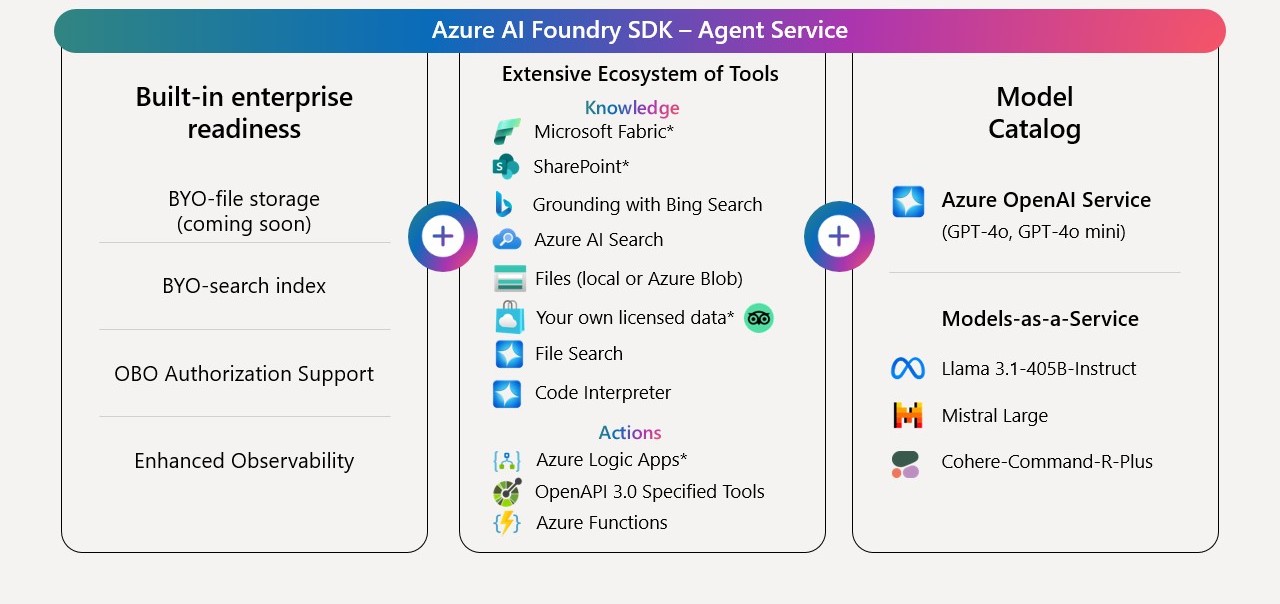
Key features of Agent Service include:
- Rapidly develop and automate processes: Agents need to seamlessly integrate with the right tools, systems, and APIs to perform deterministic or non-deterministic actions.
- Integrate with extensive memory and knowledge connectors: Agents need to manage conversation state and connect with internal and external knowledge sources to have the right context to complete a process.
- Flexible model choice: Agents built with the appropriate model for their tasks can enable better integration of information from multiple data types, yield better results for task-specific scenarios, and improve cost efficiencies in scaled deployments.
- Built-in enterprise readiness: Agents need to be able to support an organization's unique data privacy and compliance needs, scale with an organization's needs, and complete tasks reliably and with high quality.
Extensibility capabilities
Extensibility capabilities of Agent Service enable Agents to interact with knowledge sources, systems, and platforms to ground and enhance Agent functionality. Specifically:
Secure grounding of Agent outputs with a rich ecosystem of knowledge sources
Developers can configure a rich ecosystem of knowledge sources to enable an Agent to access and process data from multiple sources, improving accuracy of responses and outputs. Connectors to these data sources operate within your designated network parameters. Knowledge Tools built into Agent Service include:
- File Search (a built-in retrieval-augmented generation (RAG) tool to process and search through private data in Azure AI Search, Azure Blob Storage, and local files)
- Grounding with Bing Search (a web search tool that uses Bing Search to extract information from the web)
- SharePoint (built-in tools that connect an organization’s internal documents in SharePoint for grounded responses)
- Fabric Data Agent (a built-in tool to chat with structured data on Microsoft Fabric using generative AI)
- Bring your licensed data (a tool that enables grounding using proprietary data accessed using a licensed API key obtained by the developer from the data provider, for example, TripAdvisor)
Agents simplify secure data access to SharePoint and Fabric AI Skills through on-behalf-of (OBO) authentication, allowing the Agent to access only the SharePoint or Fabric files for which the user has permissions.
Enabling autonomous actions with or without human input through Action Tools
Developers can connect an Agent to external systems, APIs, and services through Action Tools, enabling the Agent to perform tasks and take actions on behalf of users. Action Tools built into Agent Service include:
- Code Interpreter (a tool that can write and run Python code in a secure environment, handle diverse data formats and generate files with data and visuals)
- Azure Logic Apps (a cloud-based PaaS tool that enables automated workflows using 1,400+ built-in connectors)
- Azure Functions (a tool that enables an Agent to execute serverless code for synchronous, asynchronous, long-running, and event-driven actions)
- OpenAPI 3.0 specified tools (a custom function defined with OpenAPI 3.0 specification to connect an Agent to external OpenAPI-based APIs securely)
- Model Context Protocol tools (a custom service connected via Model Context Protocol through an existing remote MCP server to an Agent).
- Deep Research tool: (a tool that enables multi-step web-based research with the o3-deep-research model and Grounding with Bing Search.).
- Computer Use: (a tool to perform tasks by interacting with computer systems and applications through their UIs)
- Browser Automation Tool (a tool that can perform real-world browser tasks through natural language prompts, enabling automated browsing activities without human intervention in the middle)
- Image Generation (a tool to generate and edit images)
- Agent2Agent (a custom service connected using the agent-to-agent protocol through an existing agent endpoint to a Foundry agent).
Orchestrating multi-agent systems
Multi-agent systems using Agent Service can be designed to achieve performant autonomous workflows for specific scenarios. In multi-agent systems, multiple context-aware autonomous agents, whether humans or AI systems, interact or work together to achieve individual or collective goals specified by the user. Agent Service works out-of-the-box with multi-agent orchestration frameworks that are wireline compatible1 with the Responses API, such as Microsoft Agent Framework, an open-source SDK and runtime designed to let developers build, deploy, and manage sophisticated multi-agent systems with ease.
When building a new multi-agent solution, start with building singleton agents with Agent Service to get the most reliable, scalable, and secure agents. You can then orchestrate these agents together, using supported orchestration frameworks. Microsoft Agent Framework is constantly evolving to find the best collaboration patterns for agents (and humans) to work together. Features that show production value with Microsoft Agent Framework can then be moved into Microsoft Foundry Agent Service if you're looking for production support and non-breaking changes.
See the Agent Framework transparency FAQ to learn about additional considerations and risks when creating multi-agent orchestrations using Microsoft Agent Framework.
Foundry workflows extend multi-agent orchestration by providing a visual designer and YAML-based configuration for building, testing, and deploying agentic processes. Each workflow can coordinate multiple agents, enabling modular automation andtracability. The workflow designer supports versioning, change logs, and visual monitoring, making it easier to manage complex logic and ensure transparency.
1_Wireline compatible_ means that an API can communicate and exchange data in a way that is fully compatible with an existing protocol, existing data formats and communication standards, in this case the Responses API protocol. It means that two systems can work together seamlessly without needing changes to their core implementation.
Use cases
Intended uses
Agent Service is flexible and use-case agnostic. This presents multiple possibilities to automate routine tasks and unlock new possibilities for knowledge work - whether it is personal productivity agents that send emails and schedule meetings, research agents that continuously monitor market trends and automate report creation, sales agents that can research leads and automatically qualify them, customer service agents that proactively follow up with personalized messages, or developer agents that can upgrade your code base or evolve a code repository interactively. Here are examples of intended uses of agents developed using Agent Service:
- Healthcare: Streamlined Staff Orientation and Basic Administrative Support: A hospital’s administrative assistant deploys an agent to collate standard operational procedures, staff directories, and shift policies into concise orientations for new nurses; final materials are reviewed and approved by HR, reducing repetitive work without compromising content quality.
- Retail: Personalized Shopping Guidance: A local boutique owner can deploy an agent that recommends gift options based on a customer’s stated needs and past purchases, guiding shoppers responsibly through complex product catalogs without pushing biased or misleading information.
- Government: Citizen Request Triage and Community Event Coordination: A city clerk uses an agent to categorize incoming service requests (for example, pothole repairs), assign them to the right departments, and compile simple status updates; officials review and finalize communications to maintain transparency and accuracy.
- Education: Assisting with Research and Reference Gathering: A teacher relies on an agent to gather age-appropriate articles and resources from reputable sources for a planetary science lesson; the teacher verifies the materials for factual accuracy and adjusts them to fit the curriculum, ensuring students receive trustworthy content.
- Manufacturing: Inventory Oversight and Task Scheduling: A factory supervisor deploys an agent to monitor inventory levels, schedule restocking when supplies run low, and optimize shift rosters; management confirms the agent’s suggestions and retains final decision-making authority.
- Deep Research Tool: Learn more about intended uses, capabilities, limitations, risks, and considerations when choosing a use case model with deep research technology in the Azure OpenAI transparency note.
- Computer Use: The Computer Use tool comes with additional significant security and privacy risks, including prompt injection attacks. Learn more about intended uses, capabilities, limitations, risks, and considerations when choosing a use case in the Azure OpenAI transparency note.
- Image Generation Tool: The Image Generation tool is empowered by the gpt-image-1 model. Learn more about intended uses, capabilities, limitations, risks, and considerations when choosing a use case model in the Azure OpenAI transparency note.
Considerations when choosing a use case
We encourage customers to use Agent Service in their innovative solutions or applications. However, here are some things to consider when choosing a use case:
- Avoid scenarios where use or misuse of the system could result in significant physical or psychological injury to an individual. For example, scenarios that diagnose patients or prescribe medications have the potential to cause significant harm.
- Avoid scenarios where use or misuse of the system could have a consequential impact on life opportunities or legal status. Examples include scenarios where the AI system or agent could affect an individual's legal status, legal rights, or their access to credit, education, employment, healthcare, housing, insurance, social welfare benefits, services, opportunities, or the terms on which they're provided.
- Avoid high-stakes scenarios that could lead to harm. The model used in an agent may reflect certain societal views, biases, and other undesirable content present in the training data or the examples provided in the prompt. As a result, we caution against using agents in high-stakes scenarios where unfair, unreliable, or offensive behavior might be extremely costly or lead to harm.
- Carefully consider use cases in high stakes domains or industry where Agent actions are irreversible or highly consequential. Such industries include but are not limited to healthcare, medicine, finance, or legal domains. For example: the ability to make financial transactions or give financial advice, the ability to directly interact with outside services, the ability to administer medicine or give health-related advice, the ability to share sensitive information publicly, or the ability to grant access to critical systems.
- Legal and regulatory considerations. Microsoft takes safety and compliance with legal and regulatory obligations seriously. We always strive to abide by applicable laws, regulations, and standards in developing and deploying AI technologies, including the Microsoft Responsible AI Standard. It is your organization’s responsibility to evaluate safety implications and potential specific legal and regulatory obligations when using any Foundry Tools and solutions, including agents, and underlying Agent samples. AI responses may be inaccurate, and AI actions should be monitored appropriately with human oversight. Certain uses and offerings may be subject to legal and regulatory requirements, may require licenses, or may not be suitable for all industries, scenarios, or use cases. Additionally, agents, and underlying Agent samples may not be used in ways prohibited by applicable laws, regulations, terms of service, or relevant codes of conduct.
- Microsoft did not create, test, or verify any third-party systems, APIs, servers, agents and services you may decide to connect to. When you connect to a third-party (non-Microsoft) system, API, server, agent, or service, some data will be shared with that service, and your application or agent may receive data in return. We recommend reviewing what data will be shared and being cognizant of third-party practices for retention and location of data. Consider and manage carefully whether your data will flow outside of your organization’s compliance and geographic boundaries and any related implications. Microsoft has no responsibility to you or others in relation to your use of any remote systems, APIs, servers, tools, agents or services. Your use of these services is governed by your agreement with the provider. You are responsible for any usage and associated costs.
- Browser Automation Tool carries substantial security risks and user responsibility. Browser Automation Tool comes with significant security risks. Both errors in judgment by the AI and the presence of malicious or confusing instructions on web pages which the AI encounters may cause it to execute commands you or others do not intend, which could compromise the security of your or other users’ browsers, computers, and any accounts to which the browser or AI has access, including personal, financial, or enterprise systems. By using the Browser Automation Tool, you are acknowledging that you bear responsibility and liability for any use of it and of any resulting agents you create with it, including with respect to any other users to whom you make Browser Automation Tool functionality available, including through resulting agents.
Limitations
Technical limitations, operational factors, and ranges
- Generative AI model limitations: Because Agent Service works with a variety of models, the overall system inherits the limitations specific to those models. Before selecting a model to incorporate into your agent, carefully evaluate the model to understand its limitations. Consider reviewing the Azure OpenAI Transparency Note for additional information about generative AI limitations that are also likely to be relevant to the system and review other best practices for incorporating generative AI into your agent application.
- Tool orchestration complexities: AI Agents depend on multiple integrated tools and data connectors (such as Bing Search, SharePoint, and Azure Logic Apps). If any of these tools are misconfigured, unavailable, or return inconsistent results, or a high number of tools are configured on a single agent, the agent’s guidance may become fragmented, outdated, or misleading.
- Unequal representation and support: When serving diverse user groups, AI Agents can show uneven performance if language varieties, regional data, or specialized knowledge domains are underrepresented. A retail agent, for example, might offer less reliable product recommendations to customers who speak under-represented languages.
- Opaque decision-making processes: As agents combine large language models with external systems, tracing the “why” behind their decisions can become challenging. A user using such an agent may find it difficult to understand why certain tools or combination of tools were chosen to answer a query, complicating trust and verification of the agent’s outputs or actions.
- Evolving best practices and standards: Agents are an emerging technology, and guidance on safe integration, transparent tool usage, and responsible deployment continues to evolve. Keeping up with the latest best practices and auditing procedures is crucial, as even well-intentioned uses can become risky without ongoing review and refinement.
System performance
Best practices for improving system performance
- Evaluate agent performance: Evaluate agents for how well they reliably identify user requests, select appropriate tools and processes, and adhere to assigned tasks. Use the following Microsoft Azure AI Evaluation SDK evaluators:
- Intent resolution: Measures how well the agent identifies the user’s request, including how well it scopes the user intent, asks clarifying questions, and reminds end users of its scope of capabilities.
- Tool call accuracy: Evaluates the agent’s ability to select the appropriate tools, and process correct parameters from previous steps.
- Task adherence: Measures how well the agent’s final response adheres to its assigned tasks, according to its system message and prior steps.
- Provide trusted data: Retrieving or uploading untrusted data into your systems could compromise the security of your systems or applications. To mitigate these risks in your applications using Agent Service, we recommend logging and monitoring LLM interactions (inputs/outputs) to detect and analyze potential prompt injections, clearly delineating user input to minimize risk of prompt injection, restricting the LLM’s access to sensitive resources, limiting its capabilities to the minimum required, and isolating it from critical systems and resources. Learn about additional mitigation approaches in Security guidance for Large Language Models.
- Choose and integrate tools thoughtfully: Select tools that are stable, well-documented, and suited to the agent’s intended uses and objectives. For instance, use a reliable database connector for factual lookups or a well-tested API for executing specific actions. Limit the number of tools to those that genuinely enhance functionality and specify how and when the agent should use them.
- Provide user proactive controls for system boundaries: Consider creating user controls to give users operating the AI agent the ability to proactively set boundaries on what actions or tools are permitted, and what domains the agent can operate in.
- Establish real-time oversight and human-in-the-loop processes: Consider providing users with adequate real-time controls to authorize, verify, review, and approve agentic system behavior, including actions, planned tasks, operating environments or domain boundaries, and knowledge or action tool access. Particularly for critical or high-stakes tasks, consider incorporating mandatory human review and approval steps by the user. Ensure that a user or human operator can easily intervene, correct, or override the agent’s decisions, especially when those decisions have safety or legal implications. For more information, see Overreliance on AI.
- Ensure intelligibility and traceability for human decision-making: Provide users with information before, during, and after actions are taken to help them understand justifications for decisions, identify where to intervene, and troubleshoot issues. Incorporate instrumentation or logging within the system, such as OpenTelemetry traces from Agent Service, to trace outputs, including prompts, model steps, and tool calls. This enables reconstruction of the agent’s reasoning process, isolation of issues, tuning of prompts, refinement of tool integration, and verification of guideline adherence. For more information, see Tracing using Application Insights.
- Layer agent instructions and guidance: Break down complex tasks into steps or sub-instructions within the system prompt. This can help the agent tackle multi-step reasoning more effectively, reducing errors and improving the clarity of the final output.
- Recognize complexity thresholds for scaling: When a single agent’s system message consistently struggles to handle the complexity, breadth, or depth of a task—such as frequently producing incomplete results, hitting reasoning bottlenecks, or requiring extensive domain-specific knowledge—the system may benefit from transitioning to a multi-agent architecture. As a best practice, monitor performance indicators like response accuracy, latency, and error frequency. If refinements to the single agent’s prompt no longer yield improved outcomes, consider decomposing the workload into specialized subtasks, each governed by its own agent. By segmenting complex tasks (for example, splitting policy research and policy interpretation into separate agents), you can maintain modularity, use specialized domain knowledge more effectively, and reduce cognitive overload on any single agent.
Evaluating and integrating Agent Service for your use
- Map Agent risks and impacts. Before developing or deploying your agentic application, carefully consider the impact of the intended actions and the consequences of actions or tool use not working as intended – such as generating or taking action on inaccurate information or causing biased or unfair outcomes – at different stages.
- Ensure adequate human oversight and control. Consider including controls to help users verify, review and/or approve actions in a timely manner, which may include reviewing planned tasks or calls to external data sources, for example, as appropriate for your system. Consider including controls for adequate user remediation of system failures, particularly in high-risk scenarios and use cases. As an example, the MCP tool allows you to pass custom headers such as authentication keys or schema as may be needed by a remote MCP server. In cases such as this, we recommend you review all data being shared with remote servers and optionally logging it for auditing purposes. Be cognizant of third party practices for retention and location of data.
- Clearly define actions and associated requirements. Clearly defining which actions are allowed (action boundaries), prohibited, or need explicit authorization may help your agentic system operate as expected and with the appropriate level of human oversight.
- Clearly define intended operating environments. Clearly define the intended operating environments (domain boundaries) where your agent is designed to perform effectively.
- Ensure appropriate intelligibility in decision making. Providing information to users before, during, and after actions are taken and/or tools are called may help them understand action justification or why certain actions were taken or the application is behaving a certain way, where to intervene, and how to troubleshoot issues.
- Follow additional generative AI best practices as appropriate for your system, including recommendations in the Azure OpenAI Transparency Note.
Learn more about responsible AI
- Microsoft AI principles
- Microsoft responsible AI resources
- Microsoft Azure Learning courses on responsible AI