What is the Azure SQL Database service? - Azure SQL Database (original) (raw)
Applies to:  Azure SQL Database
This article provides an overview of Azure SQL Database, a fully managed platform as a service (PaaS) database engine that handles most of the database management functions such as upgrading, patching, backups, and monitoring without user involvement.
With Azure SQL Database, you can create a highly available and high-performance data storage layer for the applications and solutions in Azure.
- Azure SQL Database always runs on the latest stable version of the SQL Database Engine and patched OS.
- Azure SQL Database offers an enterprise-class availability SLA, which is higher when zone redundancy is implemented.
- Azure SQL Database is a multi-model database, where you can store and work with data in multiple formats, including both relational and non-relational data such as vector, graph, JSON, XML, spatial data, and key-value pairs. You can avoid complexity of multiple platforms and languages with modern cloud applications.
- The Azure SQL Database Hyperscale service tier (recommended) offers the best combination of price and performance, with no SQL license fee, and scalability up to 128 TB, including a serverless compute option.
In Azure SQL Database, you can use advanced query processing features, such as high-performance in-memory technologies and intelligent query processing. In fact, the newest capabilities of SQL Server are often released first to Azure SQL Database, and later to SQL Server versions.
You get the newest SQL Server capabilities with no overhead for patching or upgrading, proven across millions of databases in Azure. Azure SQL Database is a fully managed service that has built-in high availability, backups, and other common maintenance operations. Microsoft handles all patching and updating of the SQL and operating system code. You don't have to manage the underlying infrastructure. Platform as a service (PaaS) capabilities built into Azure SQL Database enable you to focus on the domain-specific database administration and optimization activities that are critical for your business.
Purchasing models
SQL Database offers the following purchasing models:
- The vCore-based purchasing model lets you choose the number of vCores, the amount of memory, and the amount and speed of storage. The vCore-based purchasing model also allows you to use Azure Hybrid Benefit for SQL Server to get a discount on the allocation of SQL Server licenses for non-Hyperscale databases. Hyperscale databases don't benefit from Azure Hybrid Benefit because Hyperscale has no separate SQL Database Engine licensing cost.
- The DTU-based purchasing model offers a blend of compute, memory, and I/O resources in three service tiers, to support light to heavy database workloads. Compute sizes within each tier provide a different mix of these resources, to which you can add additional storage resources.
Service tiers
The vCore-based purchasing model offers three service tiers:
- The Hyperscale service tier (recommended) is designed for most business workloads. Hyperscale provides great flexibility and high performance with independently scalable compute and storage resources. It offers the highest resilience to failures through high availability replicas. Hyperscale also offers read-only geo-replicas in any Azure data center, and up to 30 read-only named replicas for offloading heavy read-only analytical workloads, including read-heavy agentic workloads.
- The Business Critical service tier is designed for OLTP applications with high transaction rates and low latency I/O requirements. It offers high resilience to failures by using several isolated replicas.
- The General Purpose service tier is designed for less demanding workloads. It offers budget-oriented balanced compute and storage options.
The DTU-based purchasing model offers three service tiers:
- The Premium service tier is designed for OLTP applications with high transaction rates and low latency I/O requirements. It offers the highest resilience to failures by using several isolated replicas.
- The Standard service tier is designed for less demanding workloads. It offers budget-oriented balanced compute and storage options.
- The Basic service tier is designed for the least demanding workloads. It offers cost-effective solutions for small applications with minimal performance requirements.
Compute tiers
The vCore-based purchasing model provides two different compute tiers for Azure SQL Database - the provisioned compute tier, and the serverless compute tier. The DTU-based purchasing model provides just the provisioned compute tier.
- Provisioned compute tier: provides a specific amount of compute that is continuously provisioned independent of workload activity, and bills for the amount of compute provisioned at a fixed price per hour.
- Serverless compute tier: automatically scales compute resources based on workload activity and bills for the amount of compute used, per second.
- The serverless compute tier is available in the vCore purchasing model, in the General Purpose and Hyperscale service tiers.
Deployment models
Azure SQL Database provides the following deployment options for a database:
- Single database represents a fully managed, isolated database. You might use this option if you have modern cloud applications and microservices that need a single reliable data source. A single database is similar to a contained database in the SQL Database Engine.
- Elastic pool is a collection of single databases with a shared set of resources, such as CPU or memory. Single databases can be moved into and out of an elastic pool.
Scalable performance and pools
You can define the amount of resources assigned.
- With single databases, each database is isolated from others and is portable. Each database has its own guaranteed amount of compute, memory, and storage resources. The resources you assign to the database are dedicated to that database and aren't shared with other databases in Azure. You can dynamically scale single database resources up and down. The single database option provides different compute, memory, and storage resources for different needs. For example, you can get 1 to 128 vCores, or 32 GB to 4 TB. The Hyperscale service tier enables you to scale up to 128 TB, with fast backup and restore capabilities.
- With elastic pools, you assign resources that all databases in the pool share. To maximize the use of resources and save money, you can create a new database or move existing single databases into a resource pool. This option also gives you the ability to dynamically scale elastic pool resources up and down.
You can build your first app on a small single database at a low cost per month in the General Purpose service tier. You can then change its service tier manually or programmatically at any time to the Business Critical or Hyperscale service tier, to meet the needs of your solution. You can adjust performance without downtime to your app or to your customers. Dynamic scaling enables your database to transparently respond to rapidly changing resource requirements. You pay for only the resources that you need when you need them.
Dynamic scaling is different from autoscaling. Autoscaling is when a service scales automatically based on criteria, whereas dynamic scaling allows for manual scaling without downtime. The single database option supports manual dynamic scaling, but not autoscale. For a more automatic experience, consider these alternatives:
- Use the serverless tier, which provides autoscaling.
- Use scripts to schedule or automate scalability for a single database. For an example, see Use PowerShell to monitor and scale a single database.
- Use elastic pools, which allow databases to share resources in a pool based on individual database needs. Elastic pools can also be scaled with custom scripts, allowing you to schedule or automate scalability.
Watch this video in the Azure SQL Database essentials series for a brief overview of scaling your database:
Elastic pools to maximize resource utilization
For many businesses and applications, creating single databases and dialing performance up or down on demand is enough, especially if usage patterns are relatively predictable. Unpredictable usage patterns can make it hard to manage costs and your business model. Elastic pools solve this problem. You allocate performance resources to a pool rather than an individual database. You pay for the collective performance resources of the pool rather than for single database performance.
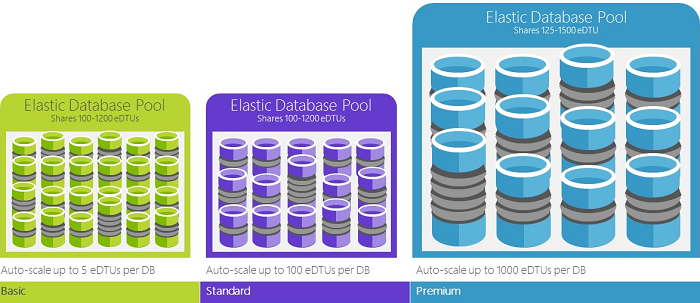
With elastic pools, you don't need to focus on dialing database performance up and down as demand for resources fluctuates. The pooled databases consume the performance resources of the elastic pool as needed. Pooled databases consume but don't exceed the limits of the pool, so your cost remains predictable even if individual database usage doesn't.
You can add and remove databases to the pool, scaling your app from a handful of databases to thousands, all within a budget that you control. You can also control the minimum and maximum resources available to databases in the pool, to ensure that no database in the pool uses all the pool resources, and that every pooled database has a guaranteed minimum amount of resources. To learn more about design patterns for software as a service (SaaS) applications that use elastic pools, see Design patterns for multitenant SaaS applications with SQL Database.
Scripts can help with monitoring and scaling elastic pools. For an example, see Use PowerShell to monitor and scale an elastic pool in Azure SQL Database.
Blend single databases with pooled databases
You can blend single databases with elastic pools, and change the service tiers of single databases and elastic pools to adapt to your situation. You can also mix and match other Azure services with SQL Database to meet your unique app design needs, drive cost and resource efficiencies, and unlock new business opportunities.
Extensive monitoring and alerting capabilities
Azure SQL Database provides advanced monitoring and troubleshooting features that help you get deeper insights into workload characteristics. These features and tools include:
- The built-in monitoring capabilities provided by the latest version of the SQL Database Engine. They enable you to find real-time performance insights.
- PaaS monitoring capabilities provided by Azure that enable you to monitor and troubleshoot a large number of database instances.
- Database watcher (preview) enables in-depth, low-latency current and historical monitoring and provides a single-pane-of-glass view of your Azure SQL estate.
Query Store, a built-in SQL Server monitoring feature, records the performance of your queries in real time, and enables you to identify the potential performance issues and the top resource consumers. Automatic tuning and recommendations provide advice regarding the queries with the regressed performance and missing or duplicated indexes. Automatic tuning in SQL Database enables you to either manually apply the scripts that can fix the issues, or let SQL Database apply the fix. SQL Database can also test and verify that the fix provides some benefit, and retain or revert the change depending on the outcome. In addition to Query Store and automatic tuning capabilities, you can use standard DMVs and XEvents to monitor the workload performance.
You can efficiently monitor the status of thousands of databases by using the built-in performance monitoring and alerting features of SQL Database. By using these tools, you can quickly assess the impact of scaling up or down, based on your current or projected performance needs. Additionally, SQL Database can emit metrics and resource logs for easier monitoring. You can configure SQL Database to store resource usage, workers and sessions, and connectivity into one of these Azure resources:
- Azure Storage: For archiving vast amounts of telemetry for a small price.
- Azure Event Hubs: For integrating SQL Database telemetry with your custom monitoring solution or hot pipelines.
- Azure Monitor logs: For a built-in monitoring solution with reporting, alerting, and mitigating capabilities.

Availability capabilities
Azure SQL Database helps your business keep running during disruptions. In a traditional, on-premises SQL Server environment, you usually set up at least two machines locally. These machines have exact, synchronously maintained copies of the data to protect against a failure of a single machine or component. This environment provides high availability, but it doesn't protect against a natural disaster that affects your datacenter.
Disaster recovery requires that a catastrophic event is geographically localized enough that another machine or set of machines with a copy of your data is unaffected. In SQL Server, you can use Always On Availability Groups running in async mode to replicate data to geographically separated SQL Server instances.
Databases in the Premium and Business Critical service tiers already do something similar to the synchronization of an availability group. Databases in lower service tiers provide redundancy through storage by using a different but equivalent mechanism. Built-in logic helps protect against a single machine failure. The active geo-replication feature protects your databases against broad region-wide outages.
Azure Availability Zones tries to protect against the outage of a single datacenter building within a single region. It helps you protect against the loss of power or network to a building. In SQL Database, you place the different replicas in different availability zones (different buildings, effectively).
In fact, the service level agreement (SLA) of Azure, powered by a global network of Microsoft-managed datacenters, helps keep your app running 24/7. The Azure platform fully manages every database, and it guarantees no data loss and a high percentage of data availability. Azure automatically handles patching, backups, replication, failure detection, underlying potential hardware, software or network failures, deploying bug fixes, failovers, database upgrades, and other maintenance tasks. Standard availability is achieved by a separation of compute and storage layers. Premium availability is achieved by integrating compute and storage on a single node for performance, and then implementing technology similar to Always On Availability Groups. For a full discussion of the high availability capabilities of Azure SQL Database, see SQL Database availability.
Important
To understand the feature differences between Azure SQL Database, SQL Server, and Azure SQL Managed Instance, as well as the differences among different Azure SQL Database options, see SQL Database features.
In addition, SQL Database provides built-in business continuity and global scalability features. These features include:
- Automatic backups:
SQL Database automatically performs full, differential, and transaction log backups of databases to enable you to restore to any point in time. For single databases and pooled databases, you can configure SQL Database to store full database backups to Azure Storage for long-term backup retention. For managed instances, you can also perform copy-only backups for long-term backup retention. - Point-in-time restores:
All SQL Database deployment options support recovery to any point in time within the automatic backup retention period for any database. - Active geo-replication:
The single database and pooled databases options allow you to configure up to four readable secondary databases in either the same or globally distributed Azure datacenters. For example, if you have a SaaS application with a catalog database that has a high volume of concurrent read-only transactions, use active geo-replication to enable global read scale and remove bottlenecks on the primary that are due to read workloads. - Failover groups:
All SQL Database deployment options allow you to use failover groups to enable high availability and load balancing at global scale. Failover groups allow for transparent geo-replication and failover of large sets of databases, and elastic pools. Failover groups enable the creation of globally distributed SaaS applications, with minimal administration overhead. This leaves all the complex monitoring, routing, and failover orchestration to SQL Database. - Zone-redundant databases:
SQL Database allows you to provision Premium or Business Critical databases or elastic pools across multiple availability zones. Because these databases and elastic pools have multiple redundant replicas for high availability, placing these replicas into multiple availability zones provides higher resilience. You can use these replicas to recover automatically from the datacenter scale failures, without data loss.
Built-in intelligence
When you use SQL Database, you get built-in intelligence that helps you dramatically reduce the costs of running and managing databases. It maximizes both performance and security of your application. The SQL Database platform collects and processes a massive amount of telemetry data while fully respecting customer privacy. Various algorithms continuously evaluate the telemetry data so that the service can learn and adapt with your application.
Automatic performance monitoring and tuning
SQL Database provides detailed insight into the queries that you need to monitor. SQL Database learns about your database patterns, and enables you to adapt your database schema to your workload. SQL Database provides performance tuning recommendations, where you can review tuning actions and apply them.
Managing a huge number of databases might be impossible to do efficiently even with all available tools and reports that SQL Database and Azure provide. Instead of monitoring and tuning your database manually, consider delegating some of the monitoring and tuning actions to SQL Database by using automatic tuning. SQL Database automatically applies recommendations, tests, and verifies each of its tuning actions to ensure the performance keeps improving. This way, SQL Database automatically adapts to your workload in a controlled and safe way. Automatic tuning means that the performance of your database is carefully monitored and compared before and after every tuning action. If the performance doesn't improve, the tuning action is reverted.
Many of our partners that run SaaS multitenant apps on top of SQL Database rely on automatic performance tuning to make sure their applications always have stable and predictable performance. For them, this feature tremendously reduces the risk of having a performance incident in the middle of the night. In addition, because part of their customer base also uses SQL Server, they're using the same indexing recommendations provided by SQL Database to help their SQL Server customers.
Two automatic tuning aspects are available in SQL Database:
- Automatic index management: Identifies indexes that you should add in your database, and indexes that you should remove.
- Automatic plan correction: Identifies problematic plans and fixes SQL plan performance problems.
Adaptive query processing
You can use adaptive query processing, including interleaved execution for multi-statement table-valued functions, batch mode memory grant feedback, and batch mode adaptive joins. Each of these adaptive query processing features applies similar "learn and adapt" techniques, helping further address performance issues related to historically intractable query optimization problems.
Advanced security and compliance
SQL Database provides a range of built-in security and compliance features to help your application meet various security and compliance requirements.
Important
Microsoft has certified Azure SQL Database (all deployment options) against a number of compliance standards. For more information, see the Microsoft Azure Trust Center, where you can find the most current list of SQL Database compliance certifications.
Advanced threat protection
Microsoft Defender for SQL is a unified package for advanced SQL security capabilities. It includes functionality for managing your database vulnerabilities and detecting anomalous activities that might indicate a threat to your database. It provides a single location for enabling and managing these capabilities.
- Vulnerability assessment:
This service can discover, track, and help you remediate potential database vulnerabilities. It provides visibility into your security state, and includes actionable steps to resolve security issues and enhance your database fortifications. - Threat detection:
This feature detects anomalous activities that indicate unusual and potentially harmful attempts to access or exploit your database. It continuously monitors your database for suspicious activities, and provides immediate security alerts on potential vulnerabilities, SQL injection attacks, and anomalous database access patterns. Threat detection alerts provide details of the suspicious activity, and recommend action on how to investigate and mitigate the threat.
Auditing for compliance and security
Auditing tracks database events and writes them to an audit log in your Azure storage account. Auditing can help you maintain regulatory compliance, understand database activity, and gain insight into discrepancies and anomalies that might indicate business concerns or suspected security violations.
Data encryption
SQL Database helps secure your data by providing encryption. For data in motion, it uses transport layer security. For data at rest, it uses transparent data encryption. For data in use, it uses Always Encrypted.
Data discovery and classification
Data discovery and classification provides capabilities built into Azure SQL Database for discovering, classifying, labeling, and protecting the sensitive data in your databases. It provides visibility into your database classification state, and tracks the access to sensitive data within the database and beyond its borders.
Microsoft Entra integration and multifactor authentication
SQL Database enables you to centrally manage identities of database users and other Microsoft services with Microsoft Entra integration. This capability simplifies permission management and enhances security. Microsoft Entra ID (formerly Azure Active Directory) supports multifactor authentication to increase data and application security, while supporting a single sign-in process.
SQL Database makes building and maintaining applications easier and more productive. SQL Database allows you to focus on what you do best: building great apps. You can manage and develop in SQL Database by using tools and skills you already have.
| Tool | Description |
|---|---|
| The Azure portal | A web-based application for managing all Azure services. |
| SQL Server Management Studio | A free, downloadable client application for managing any SQL infrastructure, from SQL Server to SQL Database. |
| SQL Server Data Tools in Visual Studio | A development tool for SQL databases, Integration Services packages, Analysis Services data models, and Reporting Services reports. |
| Visual Studio Code | A free, downloadable, open-source code editor for Windows, macOS, and Linux. It supports extensions, including the MSSQL extension for querying Microsoft SQL Server, Azure SQL Database, and Azure Synapse Analytics. |
SQL Database supports building applications with Python, Java, Node.js, PHP, Ruby, and .NET on macOS, Linux, and Windows. SQL Database supports the same connection libraries as SQL Server.
Create Azure SQL resources with the Azure portal
The Azure portal provides a single page to create Azure SQL resources. Get started at aka.ms/azuresqlhub:
- The Azure SQL hub is the launching point for Azure SQL Database, Azure SQL Database Hyperscale, Azure SQL Managed Instance, and SQL Server on Azure Virtual Machines.
- The Azure SQL hub includes Which database is best for you? and Compare databases side by side informative helpers.
- The Get recommendation wizard asks you some questions about key decision points and helps you identify the best new resource to create.

- The Product comparison provides key product features per area and Create buttons to get you started.

- The Get recommendation wizard asks you some questions about key decision points and helps you identify the best new resource to create.


Manage Azure SQL resources with the Azure portal
To access the Azure SQL page, from the Azure portal menu, select Azure SQL or search for and select Azure SQL in any page.
The Azure portal provides a single page where you can manage all of your Azure SQL resources including your SQL Server on Azure virtual machines (VMs). To manage existing resources, select the desired item in the list.
Note
Azure SQL provides a quick and easy way to access all of your SQL resources in the Azure portal, including single and pooled databases in Azure SQL Database as well as the logical server hosting them, Azure SQL Managed Instances, and SQL Server on Azure VMs. Azure SQL isn't a service or resource, but rather a family of SQL-related services.
SQL Database frequently asked questions
Can I control when patching downtime occurs?
The maintenance window feature allows you to configure predictable maintenance window schedules for eligible databases in Azure SQL Database. Maintenance window advance notifications are available for databases configured to use a nondefault maintenance window.
How do I plan for maintenance events?
Patching is generally not noticeable if you employ retry logic in your app. For more information, see Planning for Azure maintenance events in Azure SQL Database.
Can I access my backups?
Azure SQL Database backups are managed automatically. No one has direct access to the backups. The backups are deleted once the configured retention period expires. For more information, see Automated backups in Azure SQL Database and Long-term retention.
Engage with the SQL Server engineering team
- DBA Stack Exchange: Ask database administration questions.
- Stack Overflow: Ask development questions.
- Microsoft Q&A question page: Ask technical questions.
- Feedback: Report bugs and request features.
- Reddit: Discuss SQL Server.
Related content
- See the pricing page for cost comparisons and calculators regarding single databases and elastic pools.
- See these quickstarts to get started:
- For a set of Azure CLI and PowerShell samples, see:
- For information about new capabilities as they're announced, see What's new in Azure SQL Database?
- See the Azure SQL Database blog, where SQL Server product team members blog about SQL Database news and features.