Adaptive Card response templates for API plugins for Microsoft 365 Copilot (original) (raw)
Important
Plugins are only supported as actions within declarative agents. They are not enabled in Microsoft 365 Copilot.
API plugins can use Adaptive Card response templates to enhance the response that Microsoft 365 Copilot generates based on the response received from the API. The Adaptive Card renders citations within the generated response.
API plugins can define an Adaptive Card response template in two ways: as a static template defined in the plugin manifest, or as a dynamic template returned as part of the API response. Plugin developers defined templates using the Adaptive Card schema in combination with the Adaptive Cards template language.
Static response templates
Static response templates are a good choice if your API always returns items of the same type, and the format of the Adaptive Card doesn't need to change often. A static template is defined in the static_template property of the response_semantics object in the plugin manifest, as shown in the following example.
"functions": [
  {
    "name": "GetBudgets",
    "description": "Returns details including name and available funds of budgets, optionally filtered by budget name",
    "capabilities": {
      "response_semantics": {
        "data_path": "$",
        "properties": {
          "title": "$.name",
          "subtitle": "$.availableFunds"
        },
        "static_template": {
          "type": "AdaptiveCard",
          "$schema": "http://adaptivecards.io/schemas/adaptive-card.json",
          "version": "1.5",
          "body": [
            {
              "type": "Container",
              "$data": "${$root}",
              "items": [
                {
                  "type": "TextBlock",
                  "text": "Name: ${if(name, name, 'N/A')}",
                  "wrap": true
                },
                {
                  "type": "TextBlock",
                  "text": "Available funds: ${if(availableFunds, formatNumber(availableFunds, 2), 'N/A')}",
                  "wrap": true
                }
              ]
            }
          ]
        }
      }
    }
  },
]
- The
response_semantics.data_pathproperty is set to$. This value is a JSONPath query that indicates that the root of the JSON response contains the relevant data. - The
static_template.body["$data"]property is set to${$root}, which is Adaptive Card template language syntax to override any prior data scoping and break back to the root. Setting this value here isn't strictly needed, since thedata_pathis already set to the root. - The
textproperty of the firstTextBlockuses the Adaptive Card template syntax${if(name, name, 'N/A')}. This references thenameproperty in the API response. Theiffunction specifies that ifnamehas a value, use that value, otherwise, useN/A. - The
textproperty of the secondTextBlockuses the Adaptive Card template syntax${if(availableFunds, formatNumber(availableFunds, 2), 'N/A')}. This references theavailableFundsproperty in the API response. TheformatNumberfunction renders the number to a string with two decimal places.
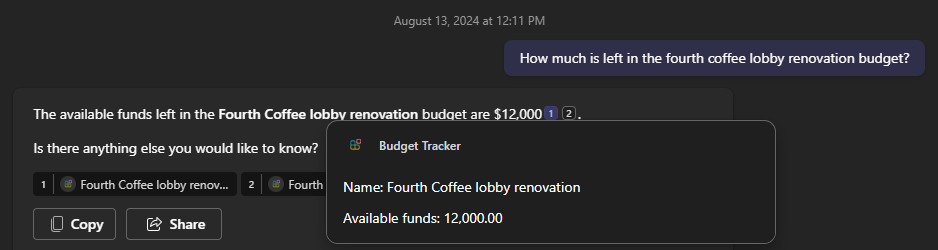
Consider this static template and the following API response.
[
    {
        "name": "Fourth Coffee lobby renovation",
        "availableFunds": 12000
    }
]
This combination results in the following Adaptive Card.
Dynamic response templates
Dynamic response templates are a good choice if your API returns multiple types. With dynamic templates, you can assign a response template to each item returned. One or more dynamic templates are returned as part of the API response, and the data items in the response indicate which template to use.
To use dynamic templates, indicate which property on the data items specifies the template in the response_semantics.properties.template_selector property in the API plugin manifest, as shown in this example.
{
  "name": "GetTransactions",
  "description": "Returns details of transactions identified from filters like budget name or category. Multiple filters can be used in combination to refine the list of transactions returned",
  "capabilities": {
    "response_semantics": {
      "data_path": "$.transactions",
      "properties": {
        "template_selector": "$.displayTemplate"
      }
    }
  }
}
In this example, the data_path property is set to $.transactions, indicating that the data for the cards is found in the transactions property at the root of the API response. The template_selector property is set to $.displayTemplate, indicating that the property on each item in the transactions array that specifies the template to use is the displayTemplate property.
The property indicated by the template_selector property contains a JSONPath query to locate the template for the item within the response.
Consider this template and the following API response.
{
  "transactions": [
    {
      "budgetName": "Fourth Coffee lobby renovation",
      "amount": -2000,
      "description": "Property survey for permit application",
      "expenseCategory": "permits",
      "displayTemplate": "$.templates.debit"
    },
    {
      "budgetName": "Fourth Coffee lobby renovation",
      "amount": -7200,
      "description": "Lumber and drywall for lobby",
      "expenseCategory": "materials",
      "displayTemplate": "$.templates.debit"
    },
    {
      "budgetName": "Fourth Coffee lobby renovation",
      "amount": 5000,
      "description": "Additional funds to cover cost overruns",
      "expenseCategory": null,
      "displayTemplate": "$.templates.credit"
    }
  ],
  "templates": {
    "debit": {
      "type": "AdaptiveCard",
      "version": "1.5",
      "body": [
        {
          "type": "TextBlock",
          "size": "medium",
          "weight": "bolder",
          "color": "attention",
          "text": "Debit"
        },
        {
          "type": "FactSet",
          "facts": [
            {
              "title": "Budget",
              "value": "${budgetName}"
            },
            {
              "title": "Amount",
              "value": "${formatNumber(amount, 2)}"
            },
            {
              "title": "Category",
              "value": "${if(expenseCategory, expenseCategory, 'N/A')}"
            },
            {
              "title": "Description",
              "value": "${if(description, description, 'N/A')}"
            }
          ]
        }
      ],
      "$schema": "http://adaptivecards.io/schemas/adaptive-card.json"
    },
    "credit": {
      "type": "AdaptiveCard",
      "version": "1.5",
      "body": [
        {
          "type": "TextBlock",
          "size": "medium",
          "weight": "bolder",
          "color": "good",
          "text": "Credit"
        },
        {
          "type": "FactSet",
          "facts": [
            {
              "title": "Budget",
              "value": "${budgetName}"
            },
            {
              "title": "Amount",
              "value": "${formatNumber(amount, 2)}"
            },
            {
              "title": "Description",
              "value": "${if(description, description, 'N/A')}"
            }
          ]
        }
      ],
      "$schema": "http://adaptivecards.io/schemas/adaptive-card.json"
    }
  }
}
- The
transactionsproperty in the response contains an array of items. - The
templatesproperty is an object, with each property in that object containing an Adaptive Card template. - The
displayTemplateon each object in thetransactionsarray is set to either$.templates.debitor$.templates.credit.
The combination of this plugin manifest and API response results in the following Adaptive Cards.


Using static and dynamic templates together
Plugins can combine the use of both static and dynamic templates. In this scenario, the static template acts as a default template that is used if the item doesn't have the template_selector property present, or if its value doesn't resolve to a template in the API response.
Note
When you use Action.OpenUrl, make sure to include the domain of the target URL in the validDomains section of your app manifest. If the domain isn't listed, Teams displays the message URL may lead to untrusted content.
Ensure responsive Adaptive Cards across Microsoft 365 Copilot hubs
Adaptive cards must be designed to be responsive across various surface sizes. This ensures a seamless user experience, regardless of the device or platform being used. To achieve this, make sure to validate the Adaptive Cards on different Microsoft 365 Copilot hubs, including Teams, Word, and PowerPoint, and to validate various viewport widths by contracting and expanding the Copilot UI. This ensures that Adaptive Cards function optimally and provide a consistent experience across all platforms. Apply the following best practices:
- Avoid using multi-column layouts whenever possible. Single-column layouts tend to render well even at the narrowest viewport widths.
- Refrain from placing text and image elements in the same row unless the image is a small icon or avatar.
- Avoid assigning a fixed width to elements within the Adaptive Card; instead, allow them to resize according to the viewport width. You can, however, assign a fixed width to small images such as icons and avatars.
Related content
- Adaptive Card designer to design and test Adaptive Cards in a visual tool.
- Adaptive Card documentation
- Plugin manifest reference