Configure AD FS Extranet Soft Lockout Protection (original) (raw)
In AD FS on Windows Server 2012 R2, we introduced a security feature called Extranet Lockout. With this feature, AD FS will "stop" authenticating the "malicious" user account from outside for a period of time. This prevents your user accounts from being locked out in Active Directory. In addition to protecting your users from an AD account lockout, AD FS extranet lockout also protects against brute force password guessing attacks.
Note
This feature only works for the extranet scenario where the authentication requests come through the Web Application Proxy and only applies to username and password authentication.
Extranet lockout provides the following key advantages:
- It protects your user accounts from brute force attacks where an attacker tries to guess a user's password by continuously sending authentication requests. In this case, AD FS will lock out the malicious user account for extranet access
- It protects your user accounts from malicious account lockout where an attacker wants to lock out a user account by sending authentication requests with wrong passwords. In this case, although the user account will be locked out by AD FS for extranet access, the actual user account in AD isn't locked out and the user can still access corporate resources within the organization. This is known as a soft lockout.
How it works
There are three settings in AD FS that you need to configure to enable this feature:
- EnableExtranetLockout set this Boolean value to be True if you want to enable Extranet Lockout.
- ExtranetLockoutThreshold this defines the maximum number of bad password attempts. Once the threshold is reached, AD FS will immediately rejects the requests from extranet without attempting to contact the domain controller for authentication, no matter whether password is good or bad, until the extranet observation window is passed. This means the value of badPwdCount attribute of an AD account won't increase while the account is soft-locked out.
- ExtranetObservationWindow this determines for how long the user account will be soft-locked out. AD FS will start to perform username and password authentication again when the window is passed. AD FS uses the AD attribute badPasswordTime as the reference for determining whether the extranet observation window has passed or not. The window has passed if current time > badPasswordTime + ExtranetObservationWindow.
Note
AD FS extranet lockout functions independently from the AD lockout policies. However, we strongly recommend that you set the ExtranetLockoutThreshold parameter value to a value that's less than the AD account lockout threshold. Failing to do so would result in AD FS being unable to protect accounts from being locked out in Active Directory.
An example of enabling Extranet Lockout feature with maximum of 15 number of bad password attempts and 30 mins soft-lockout duration is as follows:
Set-AdfsProperties -EnableExtranetLockout $true -ExtranetLockoutThreshold 15 -ExtranetObservationWindow (new-timespan -Minutes 30)
These settings will apply to all domains that the AD FS service can authenticate. The way that it works is that when AD FS receives an authentication request, it'll access the Primary Domain Controller (PDC) through an LDAP call and perform a lookup for the badPwdCount attribute for the user on the PDC. If AD FS finds the value of badPwdCount >= ExtranetLockoutThreshold setting and the time defined in the Extranet Observation Window has not passed yet, AD FS will reject the request immediately, which means no matter whether the user enters a good or bad password from extranet, the logon will fail because AD FS doesn't send the credentials to AD. AD FS doesn't maintain any state with regard to badPwdCount or locked out user accounts. AD FS uses AD for all state tracking.
Warning
When AD FS Extranet lockout on Server 2012 R2 is enabled all authentication requests through the WAP are validated by AD FS on the PDC. When the PDC is unavailable, users will be unable to authenticate from the extranet.
Server 2016 offers an additional parameter that allows AD FS to fallback to another domain controller when the PDC is unavailable:
- ExtranetLockoutRequirePDC - When enabled: extranet lockout requires a primary domain controller (PDC). When disabled: extranet lockout will fallback to another domain controller in case the PDC is unavailable.
You can use the following Windows PowerShell command to configure the AD FS extranet lockout on Server 2016:
Set-AdfsProperties -EnableExtranetLockout <span class="katex"><span class="katex-mathml"><math xmlns="http://www.w3.org/1998/Math/MathML"><semantics><mrow><mi>t</mi><mi>r</mi><mi>u</mi><mi>e</mi><mo>−</mo><mi>E</mi><mi>x</mi><mi>t</mi><mi>r</mi><mi>a</mi><mi>n</mi><mi>e</mi><mi>t</mi><mi>L</mi><mi>o</mi><mi>c</mi><mi>k</mi><mi>o</mi><mi>u</mi><mi>t</mi><mi>T</mi><mi>h</mi><mi>r</mi><mi>e</mi><mi>s</mi><mi>h</mi><mi>o</mi><mi>l</mi><mi>d</mi><mn>15</mn><mo>−</mo><mi>E</mi><mi>x</mi><mi>t</mi><mi>r</mi><mi>a</mi><mi>n</mi><mi>e</mi><mi>t</mi><mi>O</mi><mi>b</mi><mi>s</mi><mi>e</mi><mi>r</mi><mi>v</mi><mi>a</mi><mi>t</mi><mi>i</mi><mi>o</mi><mi>n</mi><mi>W</mi><mi>i</mi><mi>n</mi><mi>d</mi><mi>o</mi><mi>w</mi><mo stretchy="false">(</mo><mi>n</mi><mi>e</mi><mi>w</mi><mo>−</mo><mi>t</mi><mi>i</mi><mi>m</mi><mi>e</mi><mi>s</mi><mi>p</mi><mi>a</mi><mi>n</mi><mo>−</mo><mi>M</mi><mi>i</mi><mi>n</mi><mi>u</mi><mi>t</mi><mi>e</mi><mi>s</mi><mn>30</mn><mo stretchy="false">)</mo><mo>−</mo><mi>E</mi><mi>x</mi><mi>t</mi><mi>r</mi><mi>a</mi><mi>n</mi><mi>e</mi><mi>t</mi><mi>L</mi><mi>o</mi><mi>c</mi><mi>k</mi><mi>o</mi><mi>u</mi><mi>t</mi><mi>R</mi><mi>e</mi><mi>q</mi><mi>u</mi><mi>i</mi><mi>r</mi><mi>e</mi><mi>P</mi><mi>D</mi><mi>C</mi></mrow><annotation encoding="application/x-tex">true -ExtranetLockoutThreshold 15 -ExtranetObservationWindow (new-timespan -Minutes 30) -ExtranetLockoutRequirePDC </annotation></semantics></math></span><span class="katex-html" aria-hidden="true"><span class="base"><span class="strut" style="height:0.6984em;vertical-align:-0.0833em;"></span><span class="mord mathnormal">t</span><span class="mord mathnormal" style="margin-right:0.02778em;">r</span><span class="mord mathnormal">u</span><span class="mord mathnormal">e</span><span class="mspace" style="margin-right:0.2222em;"></span><span class="mbin">−</span><span class="mspace" style="margin-right:0.2222em;"></span></span><span class="base"><span class="strut" style="height:0.7778em;vertical-align:-0.0833em;"></span><span class="mord mathnormal" style="margin-right:0.05764em;">E</span><span class="mord mathnormal">x</span><span class="mord mathnormal">t</span><span class="mord mathnormal" style="margin-right:0.02778em;">r</span><span class="mord mathnormal">an</span><span class="mord mathnormal">e</span><span class="mord mathnormal">t</span><span class="mord mathnormal">L</span><span class="mord mathnormal">oc</span><span class="mord mathnormal" style="margin-right:0.03148em;">k</span><span class="mord mathnormal">o</span><span class="mord mathnormal">u</span><span class="mord mathnormal" style="margin-right:0.13889em;">tT</span><span class="mord mathnormal">h</span><span class="mord mathnormal">res</span><span class="mord mathnormal">h</span><span class="mord mathnormal">o</span><span class="mord mathnormal" style="margin-right:0.01968em;">l</span><span class="mord mathnormal">d</span><span class="mord">15</span><span class="mspace" style="margin-right:0.2222em;"></span><span class="mbin">−</span><span class="mspace" style="margin-right:0.2222em;"></span></span><span class="base"><span class="strut" style="height:1em;vertical-align:-0.25em;"></span><span class="mord mathnormal" style="margin-right:0.05764em;">E</span><span class="mord mathnormal">x</span><span class="mord mathnormal">t</span><span class="mord mathnormal" style="margin-right:0.02778em;">r</span><span class="mord mathnormal">an</span><span class="mord mathnormal">e</span><span class="mord mathnormal" style="margin-right:0.02778em;">tO</span><span class="mord mathnormal">b</span><span class="mord mathnormal" style="margin-right:0.02778em;">ser</span><span class="mord mathnormal" style="margin-right:0.03588em;">v</span><span class="mord mathnormal">a</span><span class="mord mathnormal">t</span><span class="mord mathnormal">i</span><span class="mord mathnormal">o</span><span class="mord mathnormal">nWin</span><span class="mord mathnormal">d</span><span class="mord mathnormal">o</span><span class="mord mathnormal" style="margin-right:0.02691em;">w</span><span class="mopen">(</span><span class="mord mathnormal">n</span><span class="mord mathnormal">e</span><span class="mord mathnormal" style="margin-right:0.02691em;">w</span><span class="mspace" style="margin-right:0.2222em;"></span><span class="mbin">−</span><span class="mspace" style="margin-right:0.2222em;"></span></span><span class="base"><span class="strut" style="height:0.854em;vertical-align:-0.1944em;"></span><span class="mord mathnormal">t</span><span class="mord mathnormal">im</span><span class="mord mathnormal">es</span><span class="mord mathnormal">p</span><span class="mord mathnormal">an</span><span class="mspace" style="margin-right:0.2222em;"></span><span class="mbin">−</span><span class="mspace" style="margin-right:0.2222em;"></span></span><span class="base"><span class="strut" style="height:1em;vertical-align:-0.25em;"></span><span class="mord mathnormal" style="margin-right:0.10903em;">M</span><span class="mord mathnormal">in</span><span class="mord mathnormal">u</span><span class="mord mathnormal">t</span><span class="mord mathnormal">es</span><span class="mord">30</span><span class="mclose">)</span><span class="mspace" style="margin-right:0.2222em;"></span><span class="mbin">−</span><span class="mspace" style="margin-right:0.2222em;"></span></span><span class="base"><span class="strut" style="height:0.8889em;vertical-align:-0.1944em;"></span><span class="mord mathnormal" style="margin-right:0.05764em;">E</span><span class="mord mathnormal">x</span><span class="mord mathnormal">t</span><span class="mord mathnormal" style="margin-right:0.02778em;">r</span><span class="mord mathnormal">an</span><span class="mord mathnormal">e</span><span class="mord mathnormal">t</span><span class="mord mathnormal">L</span><span class="mord mathnormal">oc</span><span class="mord mathnormal" style="margin-right:0.03148em;">k</span><span class="mord mathnormal">o</span><span class="mord mathnormal">u</span><span class="mord mathnormal" style="margin-right:0.00773em;">tR</span><span class="mord mathnormal">e</span><span class="mord mathnormal" style="margin-right:0.03588em;">q</span><span class="mord mathnormal">u</span><span class="mord mathnormal">i</span><span class="mord mathnormal">re</span><span class="mord mathnormal" style="margin-right:0.13889em;">P</span><span class="mord mathnormal" style="margin-right:0.02778em;">D</span><span class="mord mathnormal" style="margin-right:0.07153em;">C</span></span></span></span>false
Working with the Active Directory lockout policy
The Extranet Lockout feature in AD FS works independently from the AD lockout policy. However, you do need to make sure the settings for the Extranet Lockout is properly configured so that it can serve its security purpose with the AD lockout policy.
Let's take a look at AD lockout policy first. There are three settings regarding lockout policy in AD:
- Account Lockout Threshold: this setting is similar to the ExtranetLockoutThreshold setting in AD FS. It determines the number of failed logon attempts that will cause a user account to be locked out. In order to protect your user accounts from a malicious account lockout attack, you want to set the value of ExtranetLockoutThreshold in AD FS < the Account Lockout Threshold value in AD
- Account Lockout Duration: this setting determines for how long a user account is locked out. This setting doesn't matter much in this conversation as Extranet Lockout should always happen before AD lockout happens if configured properly
- Reset Account Lockout Counter After: this setting determines how much time must elapse from user's last logon failure before badPwdCount is reset to 0. In order for Extranet Lockout feature in AD FS to work well with AD lockout policy, you want to make sure the value of ExtranetObservationWindow in AD FS > the Reset Account Lockout Counter After value in AD. The examples below will explain why.
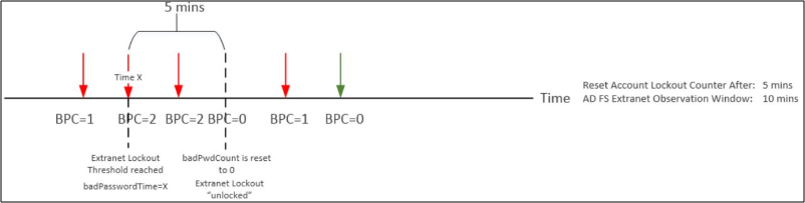
Let's take a look at two examples and see how badPwdCount changes over time based on different settings and states. Let's assume in both examples Account Lockout Threshold = 4 and ExtranetLockoutThreshold = 2. The red arrow represents bad password attempt, the green arrow represents a good password attempt. In example #1, ExtranetObservationWindow > Reset Account Lockout Counter After. In example #2, ExtranetObservationWindow < Reset Account Lockout Counter After.
Example 1
Example 2
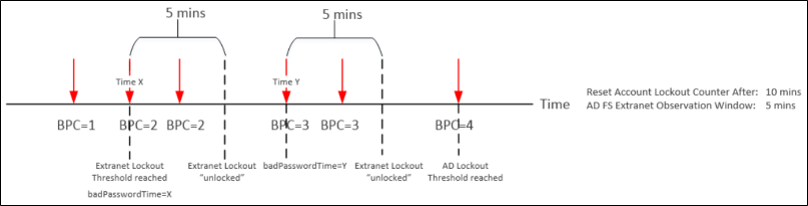
As you can see from the above, there are two conditions when badPwdCount will be reset to 0. One is when there's a successful logon. The other is when it's time to reset this counter as defined in Reset Account Lockout Counter After setting. When Reset Account Lockout Counter After < **ExtranetObservationWindow**, an account doesn't have any risk of being locked out by AD. However, if **Reset Account Lockout Counter After** > ExtranetObservationWindow, there's a chance that an account may be locked out by AD but in a "delayed fashion". It may take a while to get an account locked out by AD depending on your configuration as AD FS will only allow one bad password attempt during its observation window until badPwdCount reaches Account Lockout Threshold.
For more information, see Configuring Account Lockout.
Known issues
There's a known issue where the AD user account can't authenticate with AD FS because the badPwdCount attribute isn't replicated to the domain controller that ADFS is querying. See 2971171 for more details. You can find all AD FS QFEs that have been released so far here.
Key points to remember
- The Extranet Lockout feature only works for the extranet scenario where the authentication requests come through the Web Application Proxy
- The Extranet Lockout feature only applies to username & password authentication
- AD FS doesn't keep any track of badPwdCount or users that are soft-locked out. AD FS uses AD for all state tracking
- AD FS performs a lookup for the badPwdCount attribute through LDAP call for the user on the PDC for every authentication attempt
- AD FS older than 2016 will fail if it can't access the PDC. AD FS 2016 introduced improvements that will allow AD FS to fall back to other domain controllers in case of the PDC isn't available.
- AD FS will allow authentication requests from extranet if badPwdCount < ExtranetLockoutThreshold
- If badPwdCount >= ExtranetLockoutThreshold AND badPasswordTime + ExtranetObservationWindow < Current time, AD FS will reject authentication requests from extranet
- To avoid malicious account lockout, you should make sure ExtranetLockoutThreshold < **Account Lockout Threshold** AND **ExtranetObservationWindow** > Reset Account Lockout Counter
- Best practices for securing Active Directory Federation Services
- Delegate AD FS Powershell Commandlet Access to Non-Admin Users
- Set-AdfsProperties
- AD FS Operations