Migration from v3 to v4 - Material UI (original) (raw)
Yeah, v4 has been released!
Looking for the v3 docs? You can find the latest version here.
Introduction
This is a reference for upgrading your site from Material UI v3 to v4. While there's a lot covered here, you probably won't need to do everything for your site. We'll do our best to keep things easy to follow, and as sequential as possible so you can quickly get rocking on v4!
Why you should migrate
This documentation page covers the how of migrating from v3 to v4. The why is covered in the release blog post on Medium.
Updating your dependencies
The very first thing you will need to do is to update your dependencies.
Update Material UI version
You need to update your package.json to use the latest version of Material UI.
"dependencies": {
  "@material-ui/core": "^4.0.0"
}
Or run
npm install @material-ui/core

or

yarn add @material-ui/core
Update React version
The minimum required version of React was increased from react@^16.3.0 to react@^16.8.0. This allows us to rely on Hooks (we no longer use the class API).
Update Material UI Styles version
If you were previously using @material-ui/styles with v3 you need to update your package.json to use the latest version of Material UI Styles.
"dependencies": {
  "@material-ui/styles": "^4.0.0"
}
Or run
npm install @material-ui/styles

or

yarn add @material-ui/styles
Handling breaking changes
Core
- Every component forward their ref. This is implemented by using
React.forwardRef(). This affects the internal component tree and display name and therefore might break shallow or snapshot tests.innerRefwill no longer return a ref to the instance (or nothing if the inner component is a function component) but a ref to its root component. The corresponding API docs list the root component.
Styles
- ⚠️ Material UI depends on JSS v10. JSS v10 is not backward compatible with v9. Make sure JSS v9 is not installed in your environment. (Removing
react-jssfrom yourpackage.jsoncan help). The StylesProvider component replaces the JssProvider one. - Remove the first option argument of
withTheme(). (The first argument was a placeholder for a potential future option that never arose.)
It matches the emotion API and the styled-components API.
-const DeepChild = withTheme()(DeepChildRaw);
+const DeepChild = withTheme(DeepChildRaw); - Rename
convertHexToRGBtohexToRgb.
-import { convertHexToRgb } from '@material-ui/core/styles/colorManipulator';
+import { hexToRgb } from '@material-ui/core/styles'; - Scope the keyframes API. You should apply the following changes in your codebase. It helps isolating the animation logic:
  rippleVisible: {
    opacity: 0.3,
-   animation: 'mui-ripple-enter 100ms cubic-bezier(0.4, 0, 0.2, 1)',
+   animation: '$mui-ripple-enter 100ms cubic-bezier(0.4, 0, 0.2, 1)',
  },
  '@keyframes mui-ripple-enter': {
    '0%': {
      opacity: 0.1,
    },
    '100%': {
      opacity: 0.3,
    },
  },
Theme
- The
theme.palette.augmentColor()method no longer performs a side effect on its input color. To use it correctly, you have to use the returned value.
-const background = { main: color };
-theme.palette.augmentColor(background);
+const background = theme.palette.augmentColor({ main: color });
console.log({ background }); - You can safely remove the next variant from the theme creation:
 typography: {
-  useNextVariants: true,
}, theme.spacing.unitusage is deprecated, you can use the new API:
 label: {
   [theme.breakpoints.up('sm')]: {
-    paddingTop: theme.spacing.unit * 12,
+    paddingTop: theme.spacing(12),
   },
 }
Tip: you can provide more than 1 argument: theme.spacing(1, 2) // = '8px 16px'.
You can use the migration helper on your project to make this smoother.
Layout
- [Grid] In order to support arbitrary spacing values and to remove the need to mentally count by 8, we are changing the spacing API:
  /**
   * Defines the space between the type `item` component.
   * It can only be used on a type `container` component.
   */
-  spacing: PropTypes.oneOf([0, 8, 16, 24, 32, 40]),
+  spacing: PropTypes.oneOf([0, 1, 2, 3, 4, 5, 6, 7, 8, 9, 10]),
Going forward, you can use the theme to implement a custom Grid spacing transformation function.
- [Container] Moved from
@material-ui/labto@material-ui/core.
-import Container from '@material-ui/lab/Container';
+import Container from '@material-ui/core/Container';
TypeScript
value type
Normalized value prop type for input components to use unknown. This affectsInputBase, NativeSelect, OutlinedInput, Radio, RadioGroup, Select, SelectInput, Switch, TextArea, and TextField.
 function MySelect({ children }) {
-  const handleChange = (event: any, value: string) => {
+  const handleChange = (event: any, value: unknown) => {
     // handle value
   };

   return <Select onChange={handleChange}>{children}</Select>
 }
This change is explained in more detail in the TypeScript guide
Button
- [Button] Remove the deprecated button variants (flat, raised and fab):
-<Button variant="raised" />
+<Button variant="contained" />
-<Button variant="flat" />
+<Button variant="text" /> -import Button from '@material-ui/core/Button';
-<Button variant="fab" />
+import Fab from '@material-ui/core/Fab';
+<Fab /> -import Button from '@material-ui/core/Button';
-<Button variant="extendedFab" />
+import Fab from '@material-ui/core/Fab';
+<Fab variant="extended" /> - [ButtonBase] The component passed to the
componentprop needs to be able to hold a ref. The composition guide explains the migration strategy.
This also applies toBottomNavigationAction,Button,CardActionArea,Checkbox,ExpansionPanelSummary,Fab,IconButton,MenuItem,Radio,StepButton,Tab,TableSortLabelas well asListItemif thebuttonprop is true.
Card
- [CardActions] Rename the
disableActionSpacingprop todisableSpacing. - [CardActions] Remove the
disableActionSpacingCSS class. - [CardActions] Rename the
actionCSS class tospacing.
ClickAwayListener
- [ClickAwayListener] Hide react-event-listener props.
Dialog
- [DialogActions] Rename the
disableActionSpacingprop todisableSpacing. - [DialogActions] Rename the
actionCSS class tospacing. - [DialogContentText] Use typography variant
body1instead ofsubtitle1. - [Dialog] The child needs to be able to hold a ref. The composition guideexplains the migration strategy.
Divider
- [Divider] Remove the deprecated
insetprop.
-<Divider inset />
+<Divider variant="inset" />
ExpansionPanel
- [ExpansionPanelActions] Rename the
actionCSS class tospacing. - [ExpansionPanel] Increase the CSS specificity of the
disabledandexpandedstyle rules. - [ExpansionPanel] Rename the
CollapsePropsprop toTransitionProps.
List
- [List] Rework the list components to match the specification:
- The
ListItemAvatarcomponent is required when using an avatar. - The
ListItemIconcomponent is required when using a left checkbox. - The
edgeproperty should be set on the icon buttons.
- The
- [List]
denseno longer reduces the top and bottom padding of theListelement. - [ListItem] Increase the CSS specificity of the
disabledandfocusVisiblestyle rules. - [MenuItem] Remove the fixed height of the MenuItem. The padding and line-height are used by the browser to compute the height.
Modal
- [Modal] The child needs to be able to hold a ref. The composition guide explains the migration strategy.
This also applies toDialogandPopover. - [Modal] Remove the classes customization API for the Modal component (-74% bundle size reduction when used standalone).
- [Modal] event.defaultPrevented is now ignored. The new logic closes the Modal even if
event.preventDefault()is called on the key down escape event.event.preventDefault()is meant to stop default behaviors like clicking a checkbox to check it, hitting a button to submit a form, and hitting left arrow to move the cursor in a text input etc. Only special HTML elements have these default behaviors. You should useevent.stopPropagation()if you don't want to trigger anonCloseevent on the modal.
Paper
- [Paper] Reduce the default elevation. Change the default Paper elevation to match the Card and the Expansion Panel:
-<Paper />
+<Paper elevation={2} />
This affects the ExpansionPanel as well.
Portal
- [Portal] The child needs to be able to hold a ref when
disablePortalis used. The composition guide explains the migration strategy.
Slide
- [Slide] The child needs to be able to hold a ref. The composition guide explains the migration strategy.
Slider
- [Slider] Move from
@material-ui/labto@material-ui/core.
-import Slider from '@material-ui/lab/Slider'
+import Slider from '@material-ui/core/Slider'
Switch
- [Switch] Refactor the implementation to make it easier to override the styles. Rename the class names to match the specification wording:
Snackbar
- [Snackbar] Match the new specification.
- Change the dimensions
- Change the default transition from
SlidetoGrow.
SvgIcon
- [SvgIcon] Rename nativeColor -> htmlColor. React solved the same problem with the
forHTML attribute, they have decided to call the prophtmlFor. This change follows the same reasoning.
-<AddIcon nativeColor="#fff" />
+<AddIcon htmlColor="#fff" />
Tabs
- [Tab] Remove the
labelContainer,labelandlabelWrappedclass keys for simplicity. This has allowed us to remove 2 intermediary DOM elements. You should be able to move the custom styles to therootclass key.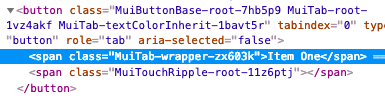
- [Tabs] Remove deprecated fullWidth and scrollable props:
-<Tabs fullWidth scrollable />
+<Tabs variant="scrollable" />
Table
- [TableCell] Remove the deprecated
numericproperty:
-<TableCell numeric>{row.calories}</TableCell>
+<TableCell align="right">{row.calories}</TableCell> - [TableRow] Remove the fixed height CSS property. The cell height is computed by the browser using the padding and line-height.
- [TableCell] Move the
densemode to a different property:
-<TableCell padding="dense" />
+<TableCell size="small" /> - [TablePagination] The component no longer tries to fix invalid (
page,count,rowsPerPage) property combinations. It raises a warning instead.
TextField
- [InputLabel] You should be able to override all the styles of the FormLabel component using the CSS API of the InputLabel component. The
FormLabelClassesproperty has been removed.
 <InputLabel
-  FormLabelClasses={{ asterisk: 'bar' }}
+  classes={{ asterisk: 'bar' }}
 >
   Foo
</InputLabel> - [InputBase] Change the default box sizing model. It uses the following CSS now:
This solves issues with thefullWidthprop. - [InputBase] Remove the
inputTypeclass fromInputBase.
Tooltip
- [Tooltip] The child needs to be able to hold a ref. The composition guide explains the migration strategy.
- [Tooltip] Appears only after focus-visible focus instead of any focus.
Typography
- [Typography] Remove the deprecated typography variants. You can upgrade by performing the following replacements:
- display4 => h1
- display3 => h2
- display2 => h3
- display1 => h4
- headline => h5
- title => h6
- subheading => subtitle1
- body2 => body1
- body1 (default) => body2 (default)
- [Typography] Remove the opinionated
display: blockdefault typography style. You can use the newdisplay?: 'initial' | 'inline' | 'block';property. - [Typography] Rename the
headlineMappingproperty tovariantMappingto better align with its purpose.
-<Typography headlineMapping={headlineMapping}>
+<Typography variantMapping={variantMapping}> - [Typography] Change the default variant from
body2tobody1. A font size of 16px is a better default than 14px. Bootstrap, material.io, and even the documentation use 16px as a default font size. 14px like Ant Design uses is understandable, as Chinese users have a different alphabet. 12px is recommended as the default font size for Japanese. - [Typography] Remove the default color from the typography variants. The color should inherit most of the time. It's the default behavior of the web.
- [Typography] Rename
color="default"tocolor="initial"following the logic of this thread. The usage of default should be avoided, it lacks semantic.
Node
- Drop node 6 support, you should upgrade to node 8.
UMD
- This change eases the use of Material UI with a CDN:
 const {
   Button,
   TextField,
-} = window['material-ui'];
+} = MaterialUI;
It's consistent with other React projects:
- material-ui => MaterialUI
- react-dom => ReactDOM
- prop-types => PropTypes