Myrtille (original) (raw)
What is it?
Myrtille is an Open Source solution that provides a web access to servers, desktops and applications.
To achieve this, it relies on the SSH and RDP protocols to send the user's actions from the browser to the remote side, through a web gateway, and stream back the display and audio with a constant focus on performance.
It is widely used by individuals and businesses wishing to access their resources outside their home or business network, or give access to a third party (an employee, a customer, a tech support, etc.) without compromising on security.
Full web
Access your servers, desktops and applications from any web browser, without any plugin or extension
Cross-Platform
Compatible with all devices and operating systems with a web browser
Console Access
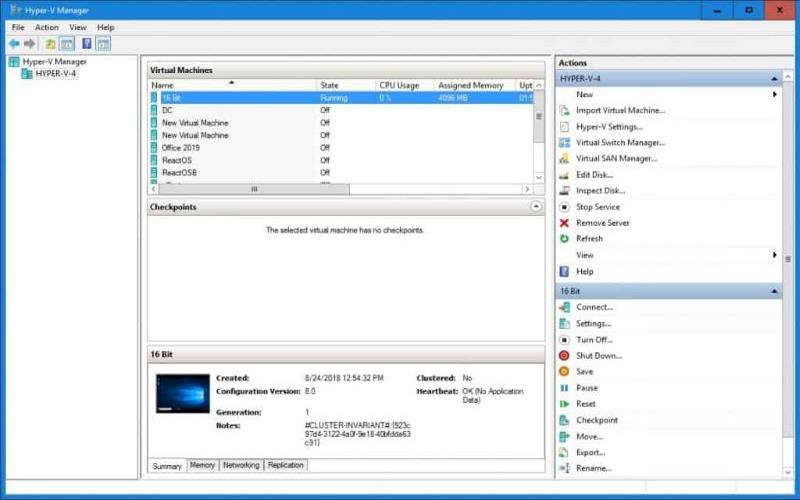
Direct connection to Hyper-V, console session, ability to monitor the startup / shutdown sequences of a VM
Security
SSL/TLS, Multi-Factor Authentication, Active Directory integration, etc. Security is at the heart of Myrtille
Extensibility
Myrtille comes with several REST APIs and can use external APIs. Hosting can be cloud-based, on-premise, or both
Support
Myrtille has a growing community, a discussion group and an issue tracker.
- Browser based (HTML4 / HTML5, zero plugin and fully responsive)
- Works from any device and Operating System (cross platform)
- Webify legacy applications, without changing a single line of code (start application from URL)
- Collaborative support (session sharing, whatever the protocol: SSH, RDP, etc.)
- SaaS support, with access control / usage monitoring (cloud ready)
- Clipboard, audio, printing and file transfer
- Hyper-V VM bus direct connection
- Multi-factor authentication
- Active Directory integration
- Hosts management
- REST APIs
- Fully parameterizable
- Realtime on-screen information
- And more!
27
Years of experience in IT
1826
Github stars (and up!)
10
milliseconds of average roundtrip
Learn more
You have questions or want more information?

Remote everything
Myrtille's main goal is to provide access to remote servers, desktops and applications in the simplest possible way: using a web browser.
Myrtille is a remote access gateway. It's installed once and gives access to all machines (where remote access is enabled) on the network. Users don't need to install anything on their workstations (no agent, browser plugin or extension), neither at work nor at home.
In addition to HTTPS, Myrtille can be moved into a DMZ, or behind a reverse proxy, a firewall, while streaming pure HTML content and therefore not blocked at any time. The end user benefits from browser isolation and the remote server is behind a gateway.
App webification
Myrtille makes your legacy application available from an URL, effectively turning it into a web application, which can be hosted on a cloud platform (Azure, AWS, Google, etc.), on-premise or both.
The time savings are considerable because you don't have to rewrite a single line of code and you don't lose any functionality in the process.
Your application becomes cross-platform because it works on any device and operating system into a web browser. Resource requirements for the end user are also no longer relevant as your application is running on the server side.

Session sharing
With Myrtille, you can share a remote session with as many people as you want, granting them access control or not, even if the underlying protocol doesn't support it.
This allows for collaborative work, and you can therefore imagine new uses for your application (interactive demo, group work, etc.).

SaaS model
Thanks to Myrtille, your application can now be served in SaaS mode. You can control its access and monitor its usage.
This opens up new business models for your application, as you can charge it based on pay-per-use, rental, or subscription.

Training and workshops
Myrtille can be used to validate degrees or pass certifications, and is particulary adapted for complex software which requires "hands on". This is what is done, for example, by Practice Labs, a Myrtille early adopter and sponsor.
Using the collaborative mode, a trainer can share a remote desktop or application with the learners and make them interact with each others, or provide them with links for individual practice.
Among the development roadmap, connectors with LMS like Moodle (Open Source) are planned. This will allow to embed Myrtille into training courses, driven by the LMS portal and using the Myrtille APIs.
- All
- Connect
- Webify
- Learn
Remote Desktop (Windows)

Your browser doesn't support HTML5 video tag.
Remote Desktop (Linux)
Your browser doesn't support HTML5 video tag.
Hyper-V VM (Windows)
Your browser doesn't support HTML5 video tag.
Hyper-V VM (Linux)
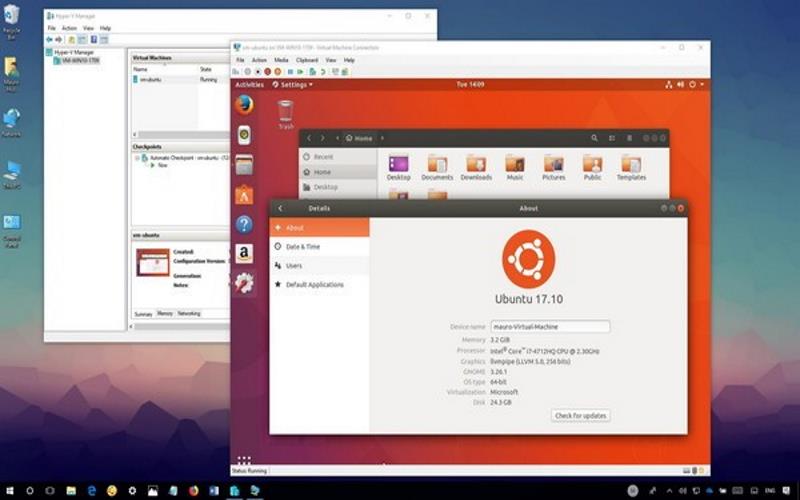
Your browser doesn't support HTML5 video tag.
SSH Terminal
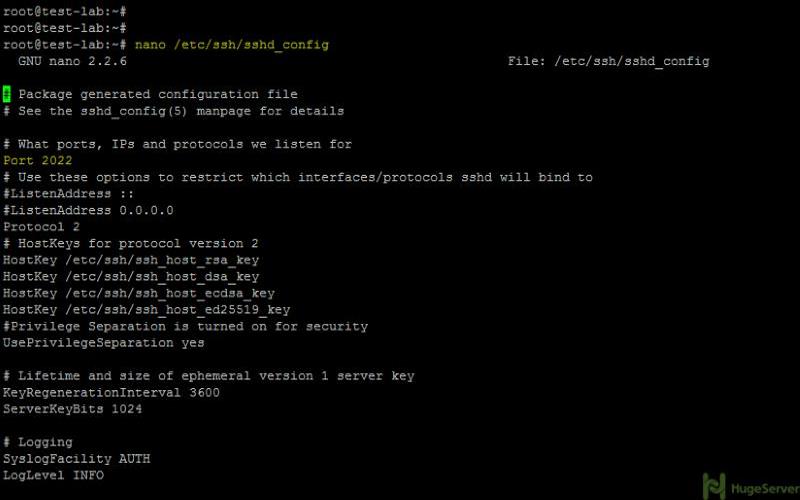
Your browser doesn't support HTML5 video tag.
Connect from URL

Your browser doesn't support HTML5 video tag.
Connect from API
Your browser doesn't support HTML5 video tag.
Hosted Application (URL)
Your browser doesn't support HTML5 video tag.
Hosted Application (API)
Your browser doesn't support HTML5 video tag.
Training & Practice

Your browser doesn't support HTML5 video tag.
Learn more
You have questions or want more information?

Tom Salmon
Director of IT | Tantalus Labs Ltd.
My users are all on Chromebook or macOS and there are a few users who need access to some legacy Windows apps. One of these apps also has to be on a layer 2 network as a controller it connects to. In total I have 5 users using Myrtille.
Thanks for all the good work!

Philippe Millette
Myrtille user
Before the end of the year, we will implant Myrtille for all our users (~100) so it is easier for them to access our Windows application. We have mac, chrome os, linux and windows users. It will unify the way the people connect to our application. (Easier too for our support team to setup, because there is no setup on client' side!)
Also, with your new implementation of the PDF printer, we won't need to install anymore printer drivers on our servers! So way less printing problems (bad printer drivers) in our case!
Thank you for all your great work and support!

Xavier Panisello Tortajada
SISTEMES D'INFORMACIÓ
We are using last open source version of Inuvika (an Ulteo fork), about 50 users. But last two years Inuvika has become private software and Ulteo has disappeared. That's why I have been looking for a new solution, and Myrtille is a very good solution.

Paul Oliver
Olive Innovations, CEO
I installed myrtille in a company I do some work for. Due to the snow there was a large number of users using it for remote access. At one point over the last few days there were approximately 78 user at one time using the platform.
4 core, average CPU utilisation 58% 4gb ram. Utilisation 98%, on average 70mb per user for freerdp. Bandwidth. Average over 1 hour period 24Mb
To put this in perspective, after upgrading ram to 8gb there were no issues at all. Performance wise it worked really well. Microsoft remote Access gateway preciously had started to fall over at 50 users. This is a testimant to the project developers.
- What are the requirements for the end user?
A browser (HTML4 or HTML5 compatible). no plugin or extension is needed.
Chrome, Firefox, Opera, Safari: all versions are supported. IE/Edge: supported from IE6 (!)
The device can be of any type and Operating System. - What are the requirements for the gateway (Myrtille)?
Windows 8.1 or Windows Server 2012 R2 or greater (IIS 8.0+, .NET 4.5+ and WCF/HTTP activation enabled).
Myrtille comes with a Windows MSI installer, for x86 and x64 platforms. - What are the requirements for the remote server?
SSH or RDP enabled (but the protocol-independent design of Myrtille is extensible to virtually any protocol).
Myrtille also supports the Hyper-V VM bus direct connection. A guest VM doesn't need SSH or RDP to be enabled, it can be connected directly via the Hyper-V host and can be of any OS type (Linux, Mac, Android, etc.). The console session is connected and the startup/shutdown sequences of the VM can be monitored while the VM is powered on/off (not possible with a normal UDP/TCP session). - What are the overall system requirements?
Myrtille is very lightweight on the end user side. It was reported successful uses with a Raspberry Pi and even a Tesla car built-in browser!
The gateway is also quite reasonable in terms of resources usage, a simple 2 cores with 4GB RAM can handle up to 50 concurrent connections.
Most of the load will be supported by the remote server, which runs the desktops and applications. - What are the hosting types supported by Myrtille?
Cloud (Azure, EC2, Google, etc.), on premise or hybrid. - Does Myrtille have a load-balancing and fail-safe mechanisms?
Myrtille is able to connect RD connection brokers, which will handle the load-balancing and fail-safe of the remote servers.
Myrtille has some unique features (i.e.: draining disconnected sessions) but is best used with a cloud in terms of scalability.
By itself, Myrtille can be load-balanced behind a reverse-proxy (Nginx, ARR ,etc) and you can have as many gateways as you want. - How is Myrtille secure?
The browser is secured through an SSL connection. The end user doesn't have a direct connection to the remote server, everything goes through the gateway (Myrtille).
Myrtille doesn't store any credentials; these are passed to FreeRDP (the RDP client used by Myrtille) which in turn authenticates the user against the remote server. The only exceptions are if using the enterprise mode (credentials are encrypted and saved into a database) and if using a custom connection API.
The connection to the remote server is secured by the RDP protocol, which enforces a secure authentication (NLA) and communication (SSL/TLS). - Do you ensure backward compatibility?
Yes, the Myrtille APIs are guaranteed to stay compatible between releases, so that you can consume them without changing anything when a new version is released. - How long does it take to webify an application?
It usually takes a few days, mainly focused on system administration: provisioning resources (cloud services, VMs, OSes, SSL certificates, etc.), securing your network (DMZ, load-balancers, reverse proxies, firewalls, etc.), configuring your domain (machines, users, group policies, etc.), installing roles and features: RDS (RD Session Hosts, RD Connection Brokers, RD Session Collections, etc.), IIS, .NET 4.5+, etc.
Your application can be installed on an application server (accessible through an UNC path) or directly on the RD Session Hosts. - Can you develop custom features for us?
Yes, we can help you to define your needs and prepare technical studies with time estimates for the work to be done.
If these are accepted, a software development agreement is established, with a schedule and the details of the tasks (including test plans, etc.).
Custom developments are done in a private repository (forked from the public one) and invoiced according to the terms of the agreement. - Can I redistribute Myrtille with my application?
Yes. Myrtille supports custom branding and CSS templating so that you can distribute it, possibly with your application, under your name and logo.