Optimage - Automatically compress images without losing quality (original) (raw)
What is Optimage?
Optimage is a simple yet powerful image optimization tool that provides the highest compression ratio at consistent visual quality, implementing many best practices for using images on web and mobile.
It is the first tool to achieve visually lossless compression in a comprehensive set of third-party tests and the new state of the art in image compression.
It can resize and convert common image and video formats, and keep best quality required for professional photography.
It is designed to make automatic image optimization accessible and inclusive to everyone. Thousands of people have been successfully using Optimage to optimize their images.
Visually lossless compression
Optimage uses novel perceptual metrics and improved encoders to reduce image size by up to 90% without losing visual quality.
| Optimage | ImageOptim | Guetzli | JPEGmini | TinyPNG | Squash | Google Photos | |
|---|---|---|---|---|---|---|---|
| PNG | 616 KB | 578 KB | – | – | 415 KB | – | – |
| JPEG | 3.68 MB | 2.08 MB | 4.21 MB | 3.74 MB | 3.58 MB | 3.63 MB | 2.68 MB |
| Score* | 100% | 44% | 81% | 58% | 48% | 29% | 13% |
*Score shows how many images are visually indistinguishable from originals. Additional tests revealed other issues.
Nearly optimal compression
Optimage provides the highest compression ratio by using advanced image reduction and data compression algorithms.
| Original | Optimage | ImageOptim | ZopfliPNG | Squash | PNGOUT | Pngcrush | |
|---|---|---|---|---|---|---|---|
| PNG | 599 KB | 274 KB | 296 KB | 297 KB | 304 KB | 323 KB | 350 KB |
| JPEG | 17.9 MB | 16.9 MB | 16.9 MB | – | – | – | – |
Clean and simple interface
Optimage offers a full range of professional features to optimize your images for today’s web, all packed into a remarkably clean and simple interface.
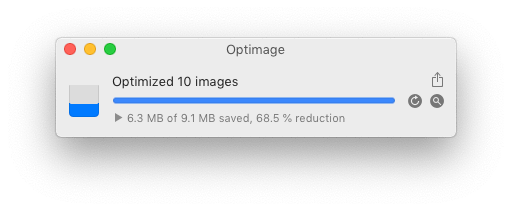
Batch image processing
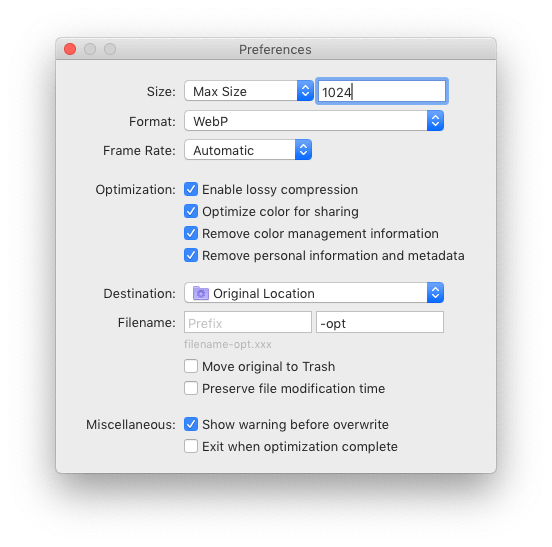
Optimage lets you quickly resize images and videos using a high-quality resampling algorithm and convert between a broad range of industry standard formats, making it easy to create optimized assets for your target screen sizes and resolutions.
Why use Optimage?
Improve your website performance
If you build websites, it is important to make all image assets, photographs and other media as small as possible because most users, especially on mobile, will leave a page that takes longer than three seconds to load or contains low-quality images, and because page speed improves SEO ranking for both mobile and desktop searches.
Reduce app size
Following Apple’s HIG guidelines and Google’s Android guides, automatically optimize image assets including app icons and iMessage stickers to save storage space, reduce mobile data usage and improve app performance for your users.
Compress PDF documents
Reduce the size of your scanned PDF documents with max resolution 150dpi which is perfect for sharing on the web and via email.
Optimize vector graphics
Minimize bloated SVG or PDF images produced in tools like Illustrator, Photoshop or Sketch for your website or app.
Efficient sharing
Optimize your images for social media like Twitter, Facebook or Instagram to prevent personal data collection, upload faster and preserve image quality.
Reduce file attachments
Reduce the size of your images and documents because there are often strict file size limits for email and form attachments, and nobody wants to receive huge files.
Protect your privacy
Securely remove any hidden sensitive information from photographs and documents without relying on third-party services that may collect your data.
Features
Automatic image compression
- Intelligent lossy and lossless image compression
- Achieve consistent good quality with custom perceptual image quality metrics and improved encoders
- Nearly optimal image compression, the highest lossless compression density among known compressors
- Avoid double compression with smart no-reference image quality assessment
- Intelligently convert 24-bit PNG images to much smaller 8-bit indexed color images with full alpha transparency using perceptual color quantization and adaptive dithering
- Greatly reduce the size of full-color images using alternative near-lossless compression
- Full color management with ICC profile support
- Convert to sRGB for consistent color on the web and mobile
- Automatic chroma subsampling and grayscale conversion
- Securely remove personal information and hidden metadata (Exif, XMP, IPTC, GPS geotags, comments, thumbnails, etc) while preserving some useful metadata (Android 9-patches, aPNG, etc)
- Automatically and losslessly rotate photographs based on Exif Orientation tag
- Scale a video or animation and adjust the frame rate for optimal file size
Powerful image workflow
- Set up batch processing to streamline the optimization of large numbers of images
- Fast and autoscalable parallel processing on modern multicore systems
- Full control over optimization process with pausing and automatic termination
- Resize, convert and rename images in batch mode
- High-quality image scaling in 128 bits-per-pixel linear light using Lanczos resampling
- Configurable file renaming and destination folder, absolute or relative
- Export optimized files to a chosen folder preserving subfolder structure
- Copy or move files using drag-and-drop or clipboard
- Overwrite or move originals to Trash to restore any time
- Preserve file timestamps to keep your library in order
- Fully native app available for Mac, Windows (coming later) and Linux (coming later)
- Simple command line tool to integrate into your image workflow
- Seamless integration with Finder and Sketch
- Quickly share optimized images using extensions in the Share menu
Support for industry standards
- Optimize all common image formats including JPEG, PNG, APNG, GIF, SVG, WebP, HEIC and PDF
- Optimize most common video formats including MPEG-4, H.264, WebM, Ogg and AV1
- Minify ICO Windows icons, or favicons, and ICNS Apple icons
High-quality format conversion
- Convert all common image formats supported by your system including HEIC, JPEG2000, TIFF and RAW
- Convert between animation and video formats including GIF, APNG, WebP, MP4, WebM, Ogg Theora, HEVC, AV1 and ProRes
- Convert Apple’s new high efficiency image format HEIC to optimized JPEG, PNG or WebP for sharing
- Convert a camera raw image to JPEG or WebP image optimized for sharing
- Convert an animated GIF to efficient MP4, WebM or AV1 video using accurate dithering removal and color depth restoration
- Create a high-quality animated GIF from MOV, MP4, WebM, Ogg or ProRes video using improved color quantization and error diffusion dithering
- Avoid the color shift when converting an animated GIF, APNG or WebP to MP4 video
- Easily create responsive images and thumbnails using high-quality scaling
- Generate high-quality previews for PDF, PSD and AI documents
 After (100 779 bytes)
  Before (214 481 bytes)
macOS Catalina wallpaper by Apple
Original – 214 481 bytes, optimized – 100 779 bytes, saved – 113 702 bytes (53.01 %)
 After (113 082 bytes)
  Before (280 233 bytes)
Apple event photo
Original – 280 233 bytes, optimized – 113 082 bytes, saved – 167 151 bytes (59.65 %)
 After (91 488 bytes)
  Before (371 791 bytes)
Tesla Model S product image
Original – 371 791 bytes, optimized – 91 488 bytes, saved – 280 303 bytes (75.39 %)
 After (154 909 bytes)
  Before (342 322 bytes)
CRS-4 Mission Launch by SpaceX
Original (Adobe RGB) – 342 322 bytes, optimized (sRGB) – 154 909 bytes, saved – 187 413 bytes (54.75 %)
 After (153 686 bytes)
  Before (444 641 bytes)
WWDC19 promo image
Original – 444 641 bytes, optimized – 153 686 bytes, saved – 290 955 bytes (65.44 %)


 After (6 450 bytes)
  Before (13 504 bytes)
Google logotype
Original – 13 504 bytes, optimized – 6 450 bytes, saved – 7 054 bytes (52.24 %)


 After (89 491 bytes)
  Before (203 237 bytes)
Firefox Quantum icon
Original – 203 237 bytes, optimized – 89 491 bytes, saved – 113 746 bytes (55.97 %)
 After (19 181 bytes)
  Before (45 807 bytes)
Wikipedia logotype
Original – 45 807 bytes, optimized – 19 181 bytes, saved – 26 626 bytes (58.13 %)
 After (68 193 bytes)
  Before (152 764 bytes)
Jony Ive, former Apple’s chief design officer
Original – 152 764 bytes, optimized – 68 193 bytes, saved – 84 571 bytes (55.36 %)
One more consideration
“It takes the energy in one lump of coal to move 1 MB of information across the net.”