Sane C++ Libraries: Process (original) (raw)
🟩 Create child processes and chain them (also usable with Async library)
SaneCppProcess.h is a library that allows launching, chaining input and output, setting working directory and environment variables of child processes.
Quick Sheet
Process().exec({"where-exe", "winver"}, output);
process.launch({"ls", "-l"});
process5.launch({"executable.exe", "—argument1", "-argument2"}, outputPipe);
String output5 = StringEncoding::Ascii;
process5.waitForExitSync();
chain.pipe(p1, {"echo", "Salve\nDoctori"});
chain.pipe(p2, {"grep", "Doc"});
chain.exec(output6);
Dependencies
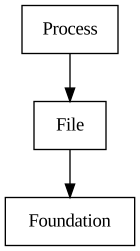
- Dependencies: File
- All dependencies: File, Foundation
Features
| Class | Description |
|---|---|
| SC::Process | Execute a child process with standard file descriptors redirection. |
| SC::ProcessChain | Execute multiple child processes chaining input / output between them. |
| SC::ProcessEnvironment | Reads current process environment variables. |
| SC::ProcessFork | Forks current process exiting child at end of process A fork duplicates a parent process execution state, os handles and private memory. |
Status
🟩 Usable
Library is being used in SC::Plugin and in SC::Tools.
Description
The SC::Process class is used when handling a process in isolation, while the SC::ProcessChain is used when there is need to chain inputs and outputs of multiple processes together.
Videos
This is the list of videos that have been recorded showing some of the internal thoughts that have been going into this library:
Blog
Some relevant blog posts are:
Execute a child process with standard file descriptors redirection.
Features:
- Redirect standard in/out/err of a child process to a Pipe
- Inherit child process file descriptors from parent process
- Ignore (silence) child process standard file descriptor
- Wait for the child process exit code
Example: execute child process (launch and wait for it to fully execute)
Example: execute child process, redirecting stdout to a string
Example: launch a child process and wait for it to finish execution
Process process(commandArena.toSpan(), environmentArena.toSpan());
Example: execute child process, filling its stdin with a StringSpan
Example: read process output using a pipe, using launch + waitForExitSync
SC_TRY(process.launch({"executable.exe", "--argument1", "--argument2"}, outputPipe));
String output = StringEncoding::Ascii;
Example: Add an environment variable
Process process(commandArena.toSpan(), environmentArena.toSpan());
SC_TEST_EXPECT(spawnChildAndPrintEnvironmentVars(process, output));
Example: Redefine an environment variable
Process process(commandArena.toSpan(), environmentArena.toSpan());
SC_TEST_EXPECT(spawnChildAndPrintEnvironmentVars(process, output));
Example: Disable environment variable inheritance
Process process(commandArena.toSpan(), environmentArena.toSpan());
SC_TEST_EXPECT(spawnChildAndPrintEnvironmentVars(process, output));
ProcessChain
Execute multiple child processes chaining input / output between them.
Chains multiple child processes together, so that the output of a process becomes input of another (similar to what happens wit the pipe (|) operator on Posix shells).
SC::PipeDescriptor from File library is used to chain read / write endpoints of different processes together.
Example: Inherit stdout file descriptor
switch (HostPlatform)
{
case Platform::Windows: {
expectedOutput = "Doctori\r\n";
SC_TEST_EXPECT(chain.pipe(p1, {"cmd", "/C", "echo", "Salve", "&", "echo", "Doctori"}));
}
break;
default: {
expectedOutput = "Doctori\n";
}
break;
}
Example: Read stderr and stdout into a string
switch (HostPlatform)
{
case Platform::Windows: {
expectedOutput = "C:\\Windows\\System32\\where.exe\r\n";
}
break;
default: {
expectedOutput = "DOCTORI\n";
}
break;
}
String stdOut(StringEncoding::Ascii);
String stdErr(StringEncoding::Ascii);
Example: Read standard output into a string using a Pipe
String output(StringEncoding::Ascii);
switch (HostPlatform)
{
case Platform::Windows: {
expectedOutput = "WHERE [/R dir] [/Q] [/F] [/T] pattern...\r\n";
}
break;
default: {
expectedOutput = "sbin\n";
}
break;
}
pipeOptions.writeInheritable = true;
ProcessEnvironment
Reads current process environment variables.
Example: Print all environment variables to stdout
for (size_t idx = 0; idx < environment.size(); ++idx)
{
(void)environment.get(idx, name, value);
{
report.console.printLine(name);
}
else
{
report.console.print(name);
report.console.print("=");
report.console.printLine(value);
}
}
ProcessFork
Forks current process exiting child at end of process A fork duplicates a parent process execution state, os handles and private memory.
Its semantics are quite different from platform to platform but on its most common denominator it can be used to carry on "background" operations on snapshots of current program memory. One relevant use case is serializing to disk or network a live, complex and large data structure. Without the fork the program should either:
- Duplicate all the data, to snapshot it in a given instant, and keep it around for Async IO
- Block program execution and write the live data-structure until all IO is finished
Fork avoids memory duplication because it will be shared through Copy On Write (COW) mechanisms. COW ensures that un-modified duplicated memory pages will not occupy additional Physical RAM.
A pair of pipes makes it easy to do some coordination between parent and forked process.
Warning
There are really MANY caveats when forking that one should be aware of:
- Many API will just not work as expected on the forked process, especially on Windows
- Limit API calls in forked process to console IO, network and file I/O (avoid GUI / Graphics)
- All threads other than the current one will be suspended in child process (beware of deadlocks)
- Create Sockets and FileDescriptors with Inheritable flags if you need them in fork process
- Process deadlocks under Windows ARM64 / x86 emulation (use Process::IsWindowsEmulatedProcess)
Example: Fork current process modifying memory in forked process leaving parent's one unmodified.
StringView saveFile = "ForkSaveFile.txt";
String shared = sharedTag;
{
case ProcessFork::ForkChild: {
report.console.printLine("FORKED process");
report.console.print("FORKED Shared={0}\n", shared.view());
}
break;
case ProcessFork::ForkParent: {
report.console.printLine("PARENT process");
report.console.print("PARENT Shared={0}\n", shared.view());
shared = parentTag;
char string[255] = {0};
StringView stringFromFork(received, true, StringEncoding::Ascii);
report.console.print("PARENT received={0}\n", stringFromFork);
String savedData = StringEncoding::Ascii;
}
break;
}
Roadmap
🟦 Complete Features:
- To be defined
💡 Unplanned Features:
- None so far
Statistics
| Type | Lines Of Code | Comments | Sum |
|---|---|---|---|
| Headers | 250 | 244 | 494 |
| Sources | 1088 | 298 | 1386 |
| Sum | 1338 | 542 | 1880 |