Passport Photo Maker – 100% Compliant Passport Size Photo (original) (raw)
Passport Photo Maker — Get a Compliant ID Picture in 30 Seconds
Snap – Upload – Done. PhotoGov is a passport photo tool that instantly creates official photos meeting international government standards.
Upload your selfie → Get a compliant passport-size photo
Government Photo Compliance Guaranteed
Passport Photo Maker: From Selfie to an ID Photo
Create ID or visa photos with our online service. All you need is a smartphone or a laptop — PhotoGov takes care of the rest. Follow these simple steps:
Select Country and Document Type:
Step 1/4
Popular:
IndiaTurkeyUnited States
2. Select document type:
US Passport 2x2 inch (51x51 mm)
Popular:
PassportVisaDriving Licence
Check this box if health issues affect your photo — a medical certificate is required
Government Photo Compliance Guaranteed
PhotoGov is an independent service. We are not affiliated with any government, embassy, or consulate. All information on this website is based on official government requirements and verified primary sources. Final acceptance is determined solely by the issuing authority.
How Our Passport Photo Maker Works
PhotoGov makes photos for 900+ types of ID documents across 200 countries.
The uploaded portrait doesn't have to be perfect — our software automatically adjusts
it to official requirements, delivering a ready-to-download ID picture.
1. Photo Upload
Take a selfie and upload it to our online tool.
2. Processing
In 30 seconds, your portrait is transformed into an ID photo.
3. Сheckout
Select options or add expert verification

4. Download
Get high-quality photos in digital or printable format.
For users in the United States: The U.S. Department of State prohibits digital alterations of ID photographs. Our platform provides sizing and cropping services only and does not modify or enhance images.
Popular Documents: Photo Guidelines
While international ID photo standards share a common foundation, the details — such as head proportions, or the policies on prescription eyewear — vary across countries. Below are the official photo sizes and key parameters for popular documents. Click yours to find out more.
Quick Links to Create Passport, Visa & Other ID Photos
Why you can trust PhotoGov?
Guaranteed Compliance
Your photos will pass government inspection after being checked by our experts.
#1 ID Photo Service
“PhotoGov is still the most secure and compliant U.S. Passport Photo Product as we enter 2025”
By Apollo Technical, 2025
Expert verification
Real experts with 10+ years of experience will check your photo
99.2% approval rate
185 K+ photos created
for passport, visa, ID in just 3 years
in 150+ countries worldwide
Passport Photo Online — Preview & Examples
Preview how your selfie is adjusted to official passport and ID requirements — choose a document, then click on a sample face or upload your portrait.
Choose a document:
Click on any face:
Your personal data is processed in accordance with security and privacy standards and used solely for identification document photo processing.
Final photo:
- Photo size:2x2 inch
- Background color:
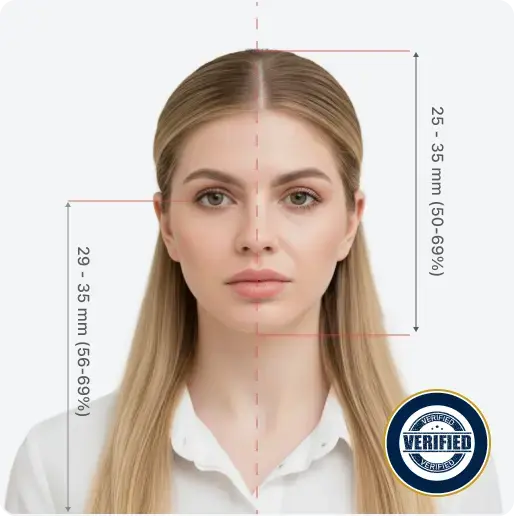
- Head height, inch:1.29 inch
- Eyes level, inch:1.18 inch
- File format:JPEG / JPG
- Resolution:300 dpi
Your personal data is processed in accordance with security and privacy standards and used solely for identification document photo processing.
How to Take a Passport Photo at Home
Use these handy tips and take a perfect ID or visa photo with your iPhone or digital camera, without leaving your home or office.
1
Take a good quality selfie
Choose a well-lit room. Stand near a window.
2
Make sure that the photo meets the basic requirements
Choose simple clothing, keep your face clear, and maintain a neutral expression.
3
Upload Your Selfie
Take or upload a photo in good lighting. Pro equipment is not necessary.
4
Сhoose an outfit
All 4 photos will be 100% compliant with US passport photo requirements.
5
Add Human Photo Verification
Our compliance expert will review your photo and provide a report on its compliance. 99.2% approval rate.
Human Verification
recommended
Add expert eligibility check with 100% refund guarantee. Change your photo for free if it doesn’t pass.
Sarah Mitchell
Senior Compliance Expert
6
Download Your Application-Ready Photo
You can select a digital file for online applications, or a printable PDF file for paper submissions.
Taking Baby Passport Photos
Taking a baby passport photo can be challenging, especially in a studio setting. It’s often easier and more comfortable to do it at home:
Photos that will be accepted
Correct size and framing
Face centered
Plain, light-colored background
Proper lighting, no shadows, natural skin tones
High-resolution, sharp image in the photo printer format, JPG or PDF
Photos that will not be accepted
There are other people in the photo
Non-neutral facial expression, eyes not visible, mouth open
There are extraneous objects on the photo (nipples, toys)
Compliance and Independence
All photos created with PhotoGov are formatted according to official government specifications for ID and visa applications, reflecting the size, background, and framing standards of regulatory sources. Final approval of every image is always determined by the issuing authority — such as the U.S. Department of State, HM Passport Office, or equivalent national agencies. PhotoGov operates as an independent private service and is not affiliated with any government or consular institution.
What Our Users Have to Say About Us
Frequently Asked Questions
What is a Passport Photo Maker?
How to Get a Digital Passport Photo?
Can You Take Your Own Passport Photo?
What Size is a Passport Photo?
What is the Accepted Passport Photo Background?
What is the Best Place to Make a Passport Photo?
Can You Smile in a Passport Photo?
What to Wear for Passport Photo?
Can I wear glasses in a passport photo?
How Can I Print My Passport Photo?
What is the Best Free Online Passport Photo Maker?
How does PhotoGov Ensure Compliance with Official Standards?
Is Your Passport-Size Photo Maker Free?
What do PhotoGov Premium Features Include?
Is PhotoGov Affiliated With Any Government Agency?
Do You Guarantee That My Passport Photo Will Be Accepted?
At PhotoGov, safeguarding user data is a top priority. The platform utilizes HTTPS encryption and other industry-standard security protocols to protect all personal information and maintain the confidentiality of uploaded images.