Engage SDK | Google Play Console (original) (raw)
Your App, Everywhere.
Maximize re-engagement with Engage SDK. It's a powerful way to bring your personalized content to where your users are —and seamlessly guiding them into the relevant in-app experiences.
Expand your content’s reach with Engage SDK
Your browser does not support the video tag.
Re-engage users across surfaces & devices
Collections on users' home screens
Apps Home & You tab on the Play Store
Entertainment space on Android tablets
Seamless integration
A lightweight SDK designed for speed, simplicity, and scale.
Designed with you in mind
Enables reuse of existing content from your app's home screen.
Allows users to effortlessly pick up where they left off within your app.
Maintains the relationship between your users and your installed app data.
Presents your iconography and content as intended for strong brand recognition.
Takes on average a week to implement.
Adds approximately less than 50KB to the average APK size.
Supports 7x content categories
If your app offers content in one of the categories below and meets our eligibility requirements, you to express interest in our developer preview. Explore our integration guides to learn more:
Spotlight on Play’s Collections
A full-screen immersive surface that brings your content directly to Android home screens.
Surfaces the best & most relevant content from user's favorite apps
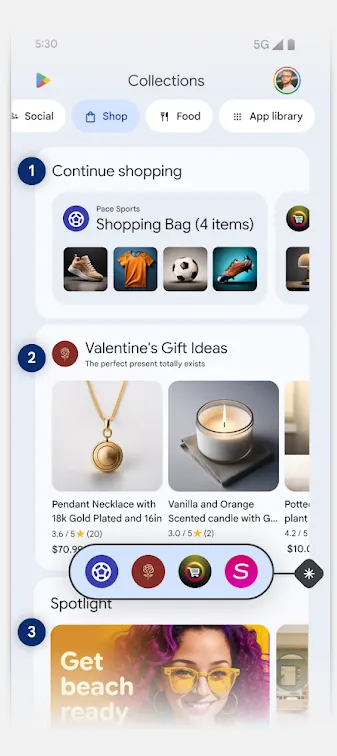
Top 3 user journeys to engage your users on Collections
1. Continue journeys
allow users to easily pick up where they left off within your app, whether that's resuming a playlist or completing a purchase.
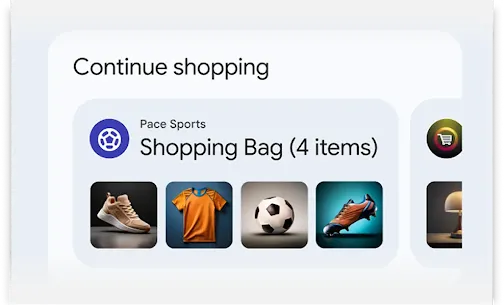
2. Recommendation clusters
let you organize fresh, timely, and personalized content into themes - like user's favorite topics or upcoming sales - based on your user's behavior in your app.
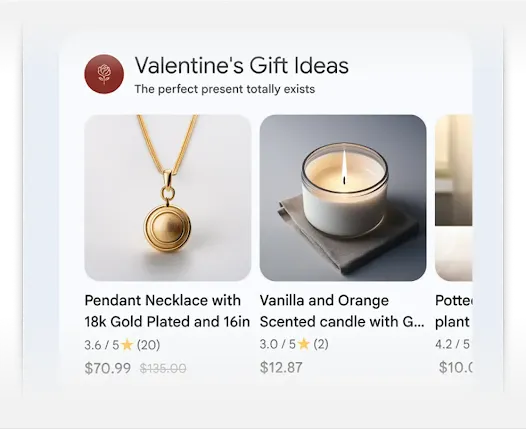
3. Featured cluster
spotlights your hero content in a larger, more premium UI placement.
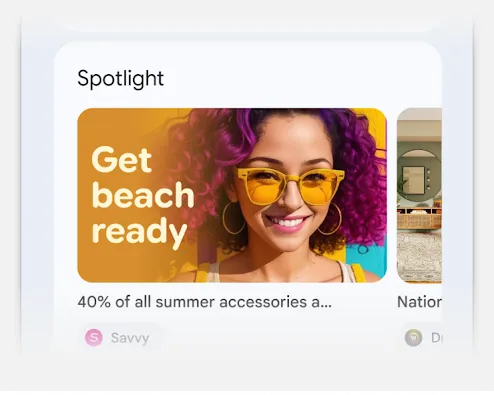
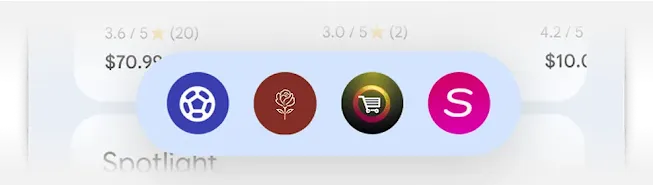
*Category Apps
User's installed apps

Continue journeys allow users to easily pick up where they left off within your app, whether that's resuming a playlist or completing a purchase.

Recommendation clusters let you organize fresh, timely, and personalized content into themes - like user's favorite topics or upcoming sales - based on your user's behavior in your app.

Featured cluster spotlights your hero content in a larger, more premium UI placement.

Category Apps - User's installed apps
More resources
- Watch the latest Engage SDK updates from I/O’25
- See how Spotify is leverage Engage SDK
- Learn more about Collections
Frequently asked questions
Getting started & integration
If your app offers content in one of the content categories supported by Engage SDK, we invite you to express interest here.
Yes. You can learn more about the eligibility requirements and ongoing requirements by visiting our developer pages.
You’ll need to integrate Engage SDK into your app and implement the necessary APIs to publish your content clusters. You can learn more about the technical details, step-by-step guidance, and best practices here.
Integrating your app with Engage SDK adds approximately less than 50KB to the average compressed APK size.
Yes, our primary goal is to help developers re-engage with their existing users. A user must have the app installed on the device to receive your content. If your app is integrated with Engage SDK but not yet installed by the user, select surfaces, like Collections, will recommend the user install it. If the user installs your app, Collections will update immediately to incorporate your content.
Supported surfaces & markets
Our goal is to continue to expand your reach with Engage SDK by bringing your content to more surfaces across markets. Today, Engage SDK delivers content to the following surfaces, which vary by supported content categories and market availability.
| Active surface | Supported content category | Market availability |
|---|---|---|
| Collections | Watch, Listen, Read Social Shop, Food Travel | AU, BR, CA, DE, ES, FR, ID, IN, IT, JP, MX, UK, US AU, BR, CA, DE, ES, FR, IT, MX, UK, US US AU, CA, DE, ES, FR, IT, UK, US |
| Apps Home on Play Store | Watch, Listen, Social, Read, Food, Shop | US, AU, BR, CA, ID, IN, JP, MX, UK Rolling out Q1 2026: DE, ES, FR, IT |
| You tab on Play Store | Watch, Listen, Social, Read, Food, Shop | AU, BR, CA, DE, ES, FR, ID, IN, IT, JP, MX, UK, US |
| Entertainment Space on select Android tablets | Watch, Listen, Read | All Google Play markets |
| Google TV | Watch | All Google TV markets |
Best practices for content publishing
Several types of content clusters can be published:
Recommendations: Allows you to provide personalized and timely suggestions for users (e.g., "Top 10 for you").
Continuation journeys: Enables users to pick up where they left off in your app (e.g., "Continue watching," "Continue listening").
Featured: Spotlights your hero content in a larger, more premium UI placement (Collections only).
Publishing fresh, timely, and personalized recommendations can help improve discovery. Based on early learnings, we recommend thinking about publishing content in two key ways:
Push content on a regular cadence—like refreshing it daily—so it always stays fresh for your users. You can also publish more or less frequently depending on your users' usage patterns.
Publish immediately after a user finishes a session in your app. This ensures the content displayed is the most up-to-date and reflects their latest activity. This also powers continuation journeys, enabling a user to easily pick up right where they left off and seamlessly guide them into the relevant in-app experiences.
Engage SDK already supports Watch, Listen, Social, Read, Food, Shop, and Travel. We expect to expand support for additional content categories - like Health & Fitness - in the coming year.