Teacher Approved | Google Play Console (original) (raw)
Build Teacher Approved apps
Parents look for apps and games that are both enriching and entertaining for their kids. In the Teacher Approved program, teachers and children’s education and media specialists recommend high-quality apps for kids on Google Play.
About the program
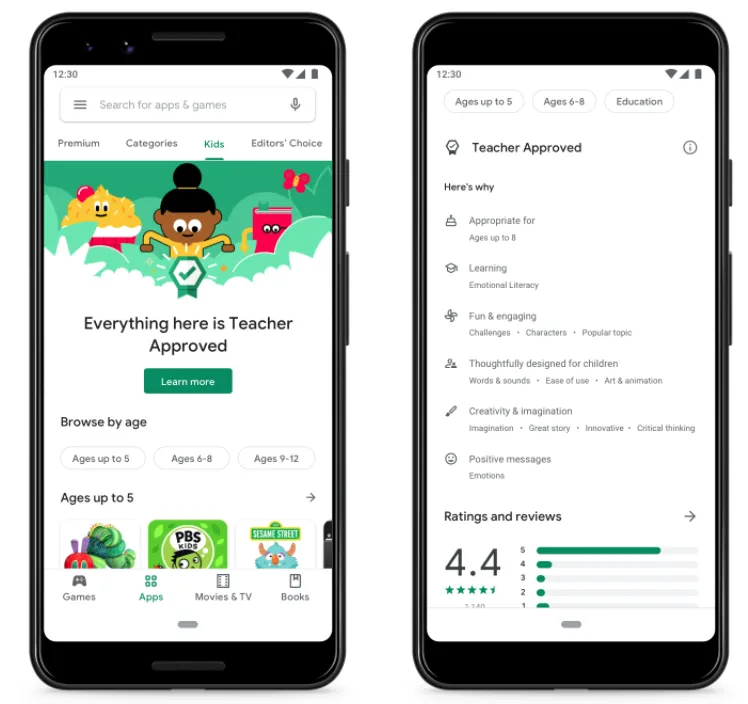
We consulted with experts to develop a framework for rating apps for kids. Teachers and specialists rate apps based on design, appeal, enrichment, age appropriateness, appropriateness of ads, in-app purchases, and cross-promotion.
- Are eligible to appear and be featured on the Kids tab on Google Play
- Display the Teacher Approved badge
- Include a section on the app’s Google Play details page that shows what makes the app stand out
About the ratings
Teachers and specialists evaluate your app using criteria that includes, but is not limited to, the details listed below. To learn more about the ratings, visit Google Play Academy.
- Language, vocabulary, and audio design are high quality and appropriate for the app’s target age group(s), including character dialogue, music, sound effects, voiceover, and written text
- The user interface design is easy for children in the target age group(s) to use and understand, including buttons, menu, navigation, and required gestures
- Visuals are high quality, appropriate, and attractive for children in the target age group(s), including animation and art
- Appeal to children by engaging and delighting your audience within the app’s target age group(s)
- Support healthy development, with or without a focus on education, including creativity and imagination, learning impact, and positive messages
- All app content must meet appropriateness standards for your app’s youngest target age group. Avoid inappropriate crude language or humor, sexual or provocative content, violent or scary content, or unhealthy, illegal, or dangerous content
- Ads, in-app purchases, and cross-promotion, if present, must be appropriate and compliant with the Families ads and monetization policies. Teachers and specialists look at how ads, in-app purchases, and cross-promotion affect the overall quality of the experience for a child under 13
Resources to get started
Get tips for building engaging and safer experiences for children
- Tips for building engaging and safer experiences for children
- Best practices for making high quality kids apps
- Understand content appropriateness standards for Teacher-Approved apps
- Understand ad & in-app purchase standards for Teacher-Approved apps
Continue learning
- Google Play Points Discover the program that rewards users for engaging with the Play ecosystem.
- Google Play Pass Learn about our subscription service that offers access to hundreds of apps and games without ads or in-app purchases.
- Indie games Create games and grow on Google Play with tools designed specifically for indie game developers.

Essentials
Find the tools and guidance you need to accomplish your goals with Google Play.
Find the tools and guidance you need to accomplish your goals with Google Play.
Topics
Resources
Topics
Resources
Learning
Learn the skills and best practices to help every part of your business thrive.
Learn the skills and best practices to help every part of your business thrive.
Guides for every topic
Find the right tools and resources for your goals.
Play Academy
Get online training, targeted for every stage of your business growth.
Insights
Find the most impactful reports and insights to drive your app growth.
Case studies
See real-world stories and businesses thriving on Google Play.
#WeArePlay
Learn about the global community building amazing apps on Google Play.