Roland Pro A/V - SR-20HD | Direct Streaming AV Mixer (original) (raw)
Livestream Directly to Multiple Platforms—No Computer Required
The compact SR-20HD Direct Streaming AV Mixer makes it easy to produce content and encode livestreams for your business or organization—without the need for a computer. Just connect your AV devices and securely stream directly to multiple platforms over LAN. You can also record directly to SDXC media for archiving and later distribution. Everything you need is integrated into a single portable unit that anyone can use with minimal training. When consistency, dependability, and network security are top priorities, the SR-20HD delivers professional results every time.
- Enterprise streaming solution for direct livestreaming without a PC
- Built-in encoders for transmitting two simultaneous livestreams up to 1080p/60 FPS
- Adaptive Bitrate function reduces freezing and dropouts due to bandwidth issues
- Safety Delay function to keep accidental moments from being broadcast
- Scene function for executing multiple tasks with a single touch
- Record streams directly to an SDXC card for archiving, editing, and distribution
- Ease your workflow with Video Auto Switching and Auto Mixing functions
- Play sound effects, still images, and video sources from an SDXC card to enhance your livestreams
- LCD monitor for checking video I/O and delivery status in real time
- Three video inputs: two HDMI and one USB video class
- Two HDMI outputs: Main and Preview
- High-quality audio mixer with eight input channels for mics and line-level devices
Version 2.0 New Features
- _SRT Input and Output_—Enables secure video and audio transmission over LAN/internet connections.
Built for Success
The SR-20HD is designed to make everyone successful with livestream operation and management, regardless of experience. It combines dual streaming encoders, simple video switching, audio mixing, and recording support in one unit, simplifying production tasks and reducing points of failure.

Plug In and Stream
Using the two HDMI inputs, you can connect common video sources such as cameras, smartphones, tablets, and computers running presentation software. In addition, a wide range of audio inputs are available for mics, music players, electronic musical instruments, and more.
Once everything is plugged in, simply connect to your network router and begin livestreaming with team members, clients, or students on Facebook, YouTube Live, Twitch, or by RTMP to your CDN.

Secure and Reliable Operation
Packed with advanced Roland A/V technologies, the SR-20HD reduces the need for technical support and experienced staff members. Automatic functions run in the background to eliminate dropped streams and help protect your organization from broadcasting inappropriate content. And since all streaming tasks are handled within the SR-20HD, there’s no risk of malware and other issues that come with computer-based streaming on your enterprise network.

Adaptive Bitrate
The SR-20HD’s unique Adaptive Bitrate function monitors the quality of the network connection and automatically adjusts the streaming rate to reduce interruptions due to bandwidth issues.

Mobile Phone Tethering
A mobile phone with a 4G or 5G data plan can be used as the primary streaming connection or a redundant backup. Should anything happen to your main hardwired network connection, the SR-20HD will automatically switch to the tethered mobile phone over USB.

SRT Support
The SR-20HD supports SRT (Secure Reliable Transport), an open-source standard for AVoIP that provides secure encrypted audio and video transmission over IP networks. It also offers future-proof connectivity within installed system configurations. SRT allows you to seamlessly extend your SR-20HD production capabilities via LAN or an internet connection. Access camera images from remote locations and switch them along with local HDMI sources. And send a dedicated SRT video output to an external destination, such as another building at the production location.
SRT (Secure Reliable Transport) is an open-source video transport protocol and technology stack developed by Haivision.

Safety Delay
With the SR-20HD, you can confidently stream unscripted events and prevent offensive content from being broadcast to your audience. The Safety Delay function buffers up to 60 seconds of video and audio, allowing you to switch to a still image or mute the sound if anything goes wrong.

Dual Streaming Destinations
Encode and broadcast livestreams to two independent channels on the same platform to reach a wider audience or create a backup for archiving or later distribution.
Panel Lock
Panel Lock prevents users from accidentally changing settings that could disrupt a broadcast. You can disable access to a wide range of hardware controls and menu parameters on an individual basis, leaving only the essential functions needed for the livestream.
Simplified Recording and Playback
The SR-20HD’s onboard recorder lets you capture H.264 MP4 video* to an SDXC card for later editing or uploading to YouTube or enterprise intranets. In addition, stereo WAV audio can be captured independently for podcasts and other audio-driven media. It’s also possible to access media stored on the SDXC card to bring higher production values to your presentations.**
*The recording bitrate is the same as the livestream encoding bitrate.
**SDXC video playback is only available when streaming in Standard mode.

Advanced Audio Control
The SR-20HD covers the divergent audio needs of single presenters, conference panels, and even music performances. Inputs for up to four professional XLR microphones, line-level signals, and a headset mic provide multiple ways to connect all common analog sources. You can also mix in digital audio from HDMI and USB sources, plus audio from videos and music files stored on an SDXC card.
Make quick volume adjustments for individual sources using the dedicated faders and knobs. And go deeper with EQ and dynamics processing via the preview display and F1–F4 encoders. You also have five user-assignable function buttons to speed up your workflow, providing quick access to Auto Mixing, audio/video playback, F1–F4 functions, and more.

Automated Switching and Mixing
With a variety of powerful tools, you can automate video switching and audio mixing tasks to ease your workload. This is particularly helpful when you’re also a presenter, allowing you to stay focused on delivering your message to the audience.

Video Auto Switching
Change video input sources at predetermined time intervals to make your presentation more dynamic.

Auto Mixing
The Auto Mixing function ensures that the mix between your connected microphones remains balanced. You can set specific inputs to take priority when someone starts to speak, and other audio levels are automatically reduced as needed.

Follow the Source
The SR-20HD makes it simple to broadcast with multiple presenters. With the Audio Follows Video function, the corresponding audio automatically follows when you switch to a different video source. Conversely, the Video Follows Audio function switches video based on who’s currently speaking.
Scenes
With Scenes in the SR-20HD, it’s easy to bring pro production values to your livestreams by executing complex switching functions all at once. Set up and store five preset arrangements of layered sources and display them in customizable inset windows. Then use the dedicated Scene buttons to switch between them and keep the audience engaged during the broadcast.

Hi-Res Streaming for Live Action
The SR-20HD’s Standard mode supports 1080p resolution at 30 FPS, which provides excellent quality for most livestreaming applications. If you’re broadcasting live sports or other events with quick movement, you can select High Quality mode to increase the frame rate to 60 FPS and reduce motion blur. It’s also possible to extend your livestreaming capabilities with the SR-20HD’s SRT support. Please refer to the SR-20HD Reference Manual for details.
Note: The SR-20HD’s USB video input and SDXC card functions are disabled in High Quality mode.

Input Expansion
If you ever need to connect more sources, you can expand your possibilities with a VR-4HD, or UVC-01. These Roland A/V products allow you to send high-quality, uncompressed video or audio to the SR-20HD’s USB video input.*
*USB video input is only available when streaming in Standard mode.

Panel Design
Front

Rear

Company names and product names appearing in this document are registered trademarks or trademarks of their respective owners.
Video
Video Processing
4:2:2 (Y/Pb/Pr), 8-bit
Number of video channels
2 channels
Input Formats
HDMI IN 1--2 connectors:
720/59.94p, 720/50p, 1080/59.94i, 1080/50i, 1080/59.94p, 1080/50p
SVGA (800 x 600/60Hz), XGA (1024 x 768/60Hz),
WXGA (1280 x 800/60Hz), FWXGA (1366 x 768/60Hz),
SXGA (1280 x 1024/60Hz), SXGA+ (1400 x 1050/60Hz),
UXGA (1600 x 1200/60Hz), Full HD (1920 x 1080/60Hz),
WUXGA (1920 x 1200/60Hz)
* The refresh rate is the maximum value of each resolution.
* Conforms to CEA-861-E, VESA DMT Version 1.0 Revision 11.
* 1920 x 1200/60 Hz: Reduced blanking
* The input interlaced video signal is converted to progressive video signal by internal processing.
* HDCP is not supported.
Output Formats
HDMI OUT MAIN, PVW connectors:
1080/59.94p, 1080/50p
* The video signal frame rate can be selected at the SYSTEM menu (59.94 Hz or 50 Hz).
* HDCP is not supported.
Stream and Video Recorder
Protocols: RTMP, RTMPS, SRT (Caller, Listener)
Container: FLV (RTMP, RTMPS), MPEG2-TS (SRT)
Recording File Format: MP4
Codec:
H.264, Profile High/Main/Baseline
720/59.94p, 720/50p, 1080/59.94p, 1080/50p
Target bitrate up to 20,000 kbps
AAC-LC, 16 bits, 48 kHz, stereo, target bitrate up to 384 kbps
* Stream and Video Recorder functions are not available in "SRT In only" mode.
Audio Recorder
File Format: WAV
Codec: Linear PCM, 16 bits, 48 kHz, stereo
* Audio Recorder function is not available in "SRT In only" mode.
Video Player
File Format: MP4
Codec:
H.264
Maximum 1080/29.97p, Progressive
Average bit rate of 10,000 kbps or less
AAC LC, 16 bits, 48kHz, Stereo
* Video Player function is not available in "High Quality" mode or "SRT In only" mode.
SRT In
Protocols: SRT (Caller, Listener)
Container: MPEG2-TS
Codec:
H.264
Maximum 1080/60p, Progressive
Average bit rate of 20,000 kbps or less
AAC LC, 16 bits, 48 kHz, Stereo
* SRT In function is not available in "High Quality" mode.
* In "Standard" mode, the SRT In is limited to maximum 1080/30p, average bit rate of 10,000 kbps or less.
USB Video or Audio
USB Video: Maximum 720p29.97, Uncompressed (YUY2)
USB Audio: Linear PCM, 16 bit, 48 kHz, stereo
* You can use either USB video or USB audio.
* The USB VIDEO IN Mode can be selected at the SYSTEM menu (Video Only or Audio Only).
* The USB STREAM output of the following Roland products can be used with the SR-20HD:
VR-4HD, UVC-01
* USB Video and Audio functions are not available in "High Quality" mode or "SRT In only" mode.
Import Still Image
PNG File (.png), Maximum 1920 x 1080 pixels, 24-bit color (alpha channel not supported)
JPEG File (.jpg .jpeg), Maximum 1920 x 1080 pixels, 24-bit color
Save Still Image
JPEG File (.jpg), 1920 x 1080 pixels, 24-bit color
Video Effects
Scene: Picture in Picture, Split, Picture by Picture
Transition: Black fade, Mix fade
Key Composition: Luminance key, Chroma key
Other: Output fade, Test pattern output, Stream Delay
Audio
Audio Processing
24 bits, 48 kHz
Number of audio channels
15 channels
Audio Formats
HDMI IN/OUT connectors: Linear PCM, 24 bit, 48 kHz, stereo
Audio Effects
Delay, High Pass Filter, Gate, Compressor, Equalizer, Limiter, Test tone output
Audio Player
File format: WAV (Linear PCM, 16 bits, 48 kHz/44.1 kHz, stereo)
Common Section
Recording Media
SDXC/SDHC card (sold separately)
* SDXC card is required for video recording. When using the SR-20HD, you must always install an SD card.
Other Functions
Panel lock function
EDID emulator
Connectors
Input Connectors
HDMI IN 1--2 connectors: HDMI type A (Multi-format supported)
AUDIO IN 1--4 jacks: Combo type
XLR type: balanced, phantom power (DC 48 V, 10 mA), (1 GND, 2 HOT, 3 COLD)
1/4-inch TRS phone: balanced
Output Connectors
HDMI OUT MAIN, PVW connectors: HDMI type A
LINE OUT jack: RCA phono type
PHONES jack: Stereo miniature phone type
Input/Output Connector
HEADSET jack: Stereo miniature phone type (3.5 mm, 1/8-inch, TRRS 4-pole, CTIA)
Other Connectors
USB VIDEO IN port: USB A (USB 3.0)
USB CONTOL port: USB A (USB 2.0)
LAN (DIRECT STREAM) port: RJ-45, 1000BASE-T (for Live Streaming and SRT In/Out)
DC IN jack
Audio Input/Output Characteristics
Nominal Input Level
AUDIO IN 1--4 jacks: -52 to +4 dBu (Maximum Input level: +24 dBu)
LINE IN jack: -10 dBu (Maximum Input level: +10 dBu)
Input Impedance
AUDIO IN 1--4 jacks (XLR type, with phantom power): 5 k ohms
AUDIO IN 1--4 jacks (XLR type, without phantom power): 7 k ohms
AUDIO IN 1--4 jacks (TRS 1/4-inch phono type): 7 k ohms
LINE IN jack: 18 k ohms
Nominal Output Level
AUDIO OUT jack: -10 dBu (Maximum Output level: +10 dBu)
PHONES jack: 72 mW + 72 mW (32 ohms)
Output Impedance
AUDIO OUT jack: 1 k ohm
Others
Display
4.3 inches TFT color LCD: 480 x 272 dots
Power Supply
AC adaptor
Current Draw
3.5 A
Power Consumption
42 W
Operation Temperature
+0 to +40 degrees Celsius
+32 to +104 degrees Fahrenheit
Dimensions
300 (W) x 215 (D) x 86 (H) mm
11-13/16 (W) x 8-1/2 (D) x 3-7/16 (H) inches
Weight (excluding AC adaptor)
2.4 kg
5 lbs 5 oz
Accessories
Startup Guide
Leaflet "USING THE UNIT SAFELY"
AC adaptor
Power cord

•
•
•
•
•
•
•
<
>

VR-Series Streaming Switcher Comparison
V-Series Video Switcher Comparison ChartRead more…
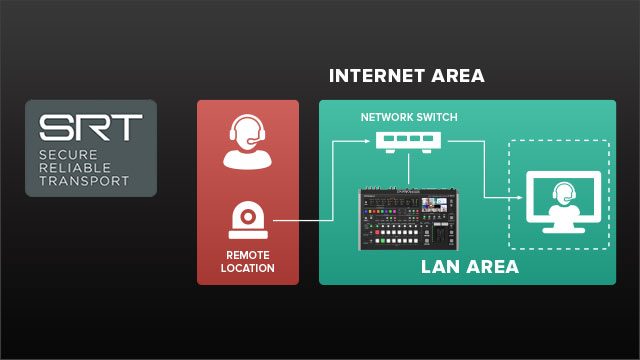
SRT Setup Guide
This guide provides information about using the SRT feature in select Roland video products.Read more…
The Wow Factor: Broadcast Studios in Schools
All kids are creators. Broadcast studios present many learning opportunities, preparing students for the future.Read more…