Retcon (original) (raw)

Drag, drop, done.
Rewrite Git history with a single drag-and-drop. Undo anything with ⌘Z. All speed, no bumps.
14-day trial • Requires macOS 14.3+
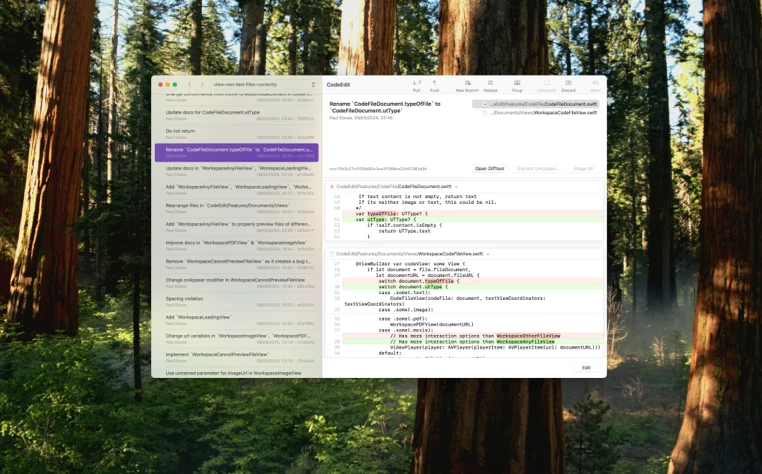
To reword in Retcon:
- Select the commit to reword. Its details are displayed.
- Enter the new message.
All done. Your files and stage have been left intact.
To reword in a conventional GUI:
- If there are uncommitted changes, click Stash.
A window opens. Choose OK. - Right-click the commit to reword, and choose Reword.
- A window opens with the commit’s current message. Enter the new message, and confirm.
- If you stashed changes in step 1, click Restore Apply to restore them.
A window opens. Choose OK.
All done. Your uncommitted changes are restored, but the stage may have been reset.
To reword through the Git CLI:
- If there are uncommitted changes, run
git reset, thengit stash.
This unstages all changes, and sets them aside. - Run
git log. The current branch's history is displayed. - Find the commit to reword in the list. Copy its hash, and exit.
- Run
git rebase -i COPIED_HASH^to start an interactive rebase. - An editor opens with a commit list. Change the first commit’s action to
r. Save and exit. - A new editor opens with the commit’s current message. Enter the new message. Save and exit.
- If you stashed changes in step 1, run
git stash popto restore them.
All done. Your uncommitted changes are restored, but the stage has been reset.
| How to undo in Retcon | How to undo through the Git CLI | |
|---|---|---|
| Undo creating a commit | ||
| Created a commit | Press ⌘Z. | Run git reset --soft HEAD~. |
| Undo deleting a commit | ||
| Deleted a commit | Press ⌘Z. | Run git reflog to display the list of recent head commits. Copy the first one’s hash. Run git reset, then git stash to set changes aside. Run git reset --hard COPIED_HASH to revert to the previous head commit. Run git stash pop to restore stashed changes. |
| Undo rebasing a branch (reword, move, delete, fixup) | ||
| Rebased a branch (reword, move, delete, fixup) | Press ⌘Z. | See above. |
| Undo pulling from a remote | ||
| Pulled from a remote | Press ⌘Z. | See above. |
| Undo pushing to a remote | ||
| Pushed to a remote | Press ⌘Z. | Find the output of the git push command to undo. On the last line of the output, copy the first commit hash. Run git push --force-with-lease COPIED_HASH. If the remote branch was changed since your push, the new changes might be silently overwritten. |
| Undo creating a branch | ||
| Created a branch | Press ⌘Z. | Run git branch -d BRANCH_NAME. |
| Undo deleting a branch | ||
| Deleted a branch | Press ⌘Z. | Find the output of the git branch -d command to undo. Copy the commit hash. Run git branch BRANCH_NAME COPIED_HASH. |
| Undo staging a file | ||
| Staged a file | Press ⌘Z. | To unstage the whole file, run git restore --staged FILE_PATH. To unstage specific hunks, instead run git reset -p FILE_PATH, and manually select the hunks. |
| Undo unstaging a file | ||
| Unstaged a file | Press ⌘Z. | To stage the whole file, run git add FILE_PATH. To stage specific hunks, instead run git add -p FILE_PATH, and manually select the hunks. If some of the staged changes were not in the working directory, they cannot be recovered. |
| Undo confirming a conflict resolution | ||
| Confirmed a conflict resolution | Press ⌘Z. | Abort the current rebase by running git rebase --abort. Restart the rebase from scratch. Recreate the same rebase list, perform the same message edits, and redo every conflict resolution yourself. |
Retcon doesn’t stop at telling you that a file has conflicts: it actually shows its detailed diff.
Get full context around the pausing commit: see the successfully applied parents, and what commits will be inserted next, including any mutations.
Don’t wait to find out whether your changes cause conflicts. Each manipulation is applied instantly, giving you full visibility at every step.
Made a mistake during a rebase? Just undo one operation at a time—no need to start over from scratch. Go back just enough, fix the mistake, and resume from there.
When in doubt, glance at the contextual guide: a concise, context-aware summary of your next steps to resolution.
You can manipulate the history at any time; even when there’s a conflict waiting. And sometimes, just reordering commits is enough to resolve a conflict.
Browser-like head history.
Use familiar shortcuts to quickly check out recent branches.
Pause badge in Dock.
Stay focused on the current rebase even through distractions.
Built-in test sandbox.
Freely experiment with Git in a dedicated repository that resets automatically.
Parent pull+rebase.
In a single click, update the parent branch, and rebase on it.
- Welcome window with recent repositories
- View formatted global Git config values
- Inline behind/ahead count
- Instantly checkout main branch with keyboard shortcut
- Clutter-free commit metadata
- Unified interface for both creating and reading commits
- Multi-select commits or files for group manipulation
- Multiple custom-designed animation speeds
- Reveal pausing commit
- Monitor async operations
- Split commits in two
- Automatic grouping of central branches
- See missing parent branch commits
- Preview rebases before applying
- See change recap before applying an edit
- Cherry pick commits with copy-and-paste
- Move commits across branches with cut-and-paste
- Paste or drag hashes directly into the commit list
- Create WIP commits with no message
- Switch branches or rewrite history without first stashing
- Combined workdir + stage
- Continuous scrolling view of all changed files
- Decluttered hunk presentation
- Minimized large/generated files
- Actual line number in stage diffs
- Smart inline change highlights
- Stage specific lines
- Distinguish between file moves and file renames
- See moves and renames before staging
- Precise descriptions for delete conflicts
- macOS-native
- Customizable toolbar
- Customizable shortcuts
- Light and dark themes
- Respects system accent color
- Reveal repository in Finder/Terminal
- Select favorite terminal app
- Drop file on Dock icon to reveal in workdir
- “Open in Retcon” system service
- Invoke file services
- CLI helper tool
- Initialize new repositories
- Pull/push branches
- Rebase/merge branches
- Create/delete branches
- Instantly create tracking branches
- Open external difftool
- Copy commit hash or commit preview
- SSH/HTTPS remote authentication + keychain support
- Full OpenSSH config support
- Automatic background fetch
- Remember ignored files when rewinding time
- Automatic crash and error recovery
- Safely force push with lease
- Safely undo pushes with custom lease variant
- All telemetry is opt-in and anonymized
- And many smaller touches
Ready to see for yourself?
Jump into the built-in test sandbox, and see what makes Retcon unique.