Indexability: Make sure search engines can actually find and rank you (original) (raw)
You’ve spent hours crafting your content. The headlines are sharp, the right keywords are in place, the structure makes sense—and yet, your content still doesn’t appear in Google search results. You open Google Search Console, and there it is: “Crawled – currently not indexed.”
It feels like the internet is ignoring you.
At some point, almost every SEO has stared at that same message and wondered what they’re missing. Your content exists, but Google can’t find it properly. And without that, everything else—rankings, traffic, visibility—stays locked away.
That’s where indexability comes in.
Indexability is the invisible foundation of SEO. It’s what allows your pages to be stored, understood, and shown in search results. Without it, your content is invisible to everyone who might need it.
But here’s the thing: Getting indexed isn’t automatic anymore. Google’s indexing process has become more selective, shaped by quality thresholds, crawl efficiency, and even how well your pages are rendered by JavaScript.
AI-driven search has changed what gets surfaced and how. That means even technically sound content can be left out if the signals aren’t right.

This guide is your calm corner in the chaos. We’re going to break everything down: how indexability works, why pages get skipped, and how to fix it. You’ll learn what’s happening, why it matters, and how to take control.
By the end, you’ll stop feeling like you’re guessing when it comes to indexability. You’ll know exactly what to check and how to make your most important content visible in search.
What indexability really means
Indexability is really just about whether Google can successfully analyze, store, and show your page in relevant search results.
Crawlability vs. indexability
It’s easy to mix up these terms, but they’re not the same:
- Crawlability: This is about discovery—how Googlebot finds your page. It answers the question: Can search engines access this page through links, sitemaps, or external references? If a page isn’t crawlable, it’s not eligible for indexing in the first place.
- Indexability: This is about inclusion—whether a crawled page can be stored and shown in search results. It depends on both technical factors (like meta tags, canonicals, or robots rules) and how valuable or relevant the page’s content is.
Both are essential because they form the foundation of visibility. Crawlability opens the door, while indexability makes sure what’s inside is remembered and retrievable.

How search engines parse and assess pages for inclusion
At a high level, search engines move through three main stages to decide if that page deserves a place in the index:
- Crawling:Googlebot discovers your URLs across your site or external links. Without crawling, a page can’t enter the index.
- Indexing:Google evaluates whether a page should be stored. It looks at technical signals, content quality, uniqueness, and usefulness.
- Ranking:Once indexed, Google decides which pages to show first for relevant searches, based on relevance, authority, and user signals
This framework gives the big picture of how pages move from being “just a URL” to appearing in search results.
How search engines decide what to index
By now, you understand that indexability determines whether Google can store and display your page. But how does this process work in practice? Learning the steps involved helps clarify why some pages are indexed quickly while others are delayed or excluded.
Overview of the crawl-to-index pipeline
Indexing is a multi-step process. Google doesn’t blindly surface pages—it discovers, evaluates, and decides which pages deserve a place in its index. Here’s how it works:
Discovery
This is the “finding” stage. Googlebot identifies that a page exists—often via links from other pages, your sitemap, or external backlinks. Without discovery, the page never enters the indexing process.
Tip: Make sure every important page (like product pages, articles, or service pages) is linked internally and listed in your sitemap so Google can locate it.
Rendering
This is the “reading” stage. Googlebot then processes the page to understand its content and structure, including any JavaScript or dynamic elements. If a page doesn’t render correctly, Google may struggle to see its main content, which can prevent it from being indexed.
Tip: Use server-side rendering (SSR) or pre-render key content so Google sees the full page as intended. SSR means your server generates the complete HTML for a page before it’s sent to the browser, so search engines can read all the content without relying on JavaScript to load it. Pre-rendering creates a static snapshot of dynamic pages ahead of time, achieving a similar effect for important content.
Canonicalization
If several URLs contain similar or duplicate content, Google decides on a master version to index. Adding a canonical tag is your way of saying, “This is the page I want you to remember.”
Tip: Double-check canonicals. Errors here can prevent the right page from being indexed.
Indexing
Finally, Google evaluates whether the page should be stored. The search engine assesses technical signals (like canonical tags, meta robots directives, HTTP status codes, and structured data) and content quality, relevance, and uniqueness before deciding if a page earns a place in the index. Pages that don’t meet standards may not be indexed.

Factors that influence inclusion
Even after discovery, rendering, and canonicalization, Google doesn’t index every page automatically. Here are the technical factors it considers when deciding whether to index a page:
- Canonical tags: Ensure your page points to the correct canonical URL. Mistakes can lead Google to index the wrong page—or skip yours entirely.
- Meta robots: These are small pieces of code you add to a page’s HTML to guide search engines on how to handle the page. They don’t change what website visitors see—they’re instructions for crawlers. For example, a noindex meta tag prevents indexing, and a nofollow meta tag influences link value but doesn’t block indexing directly.
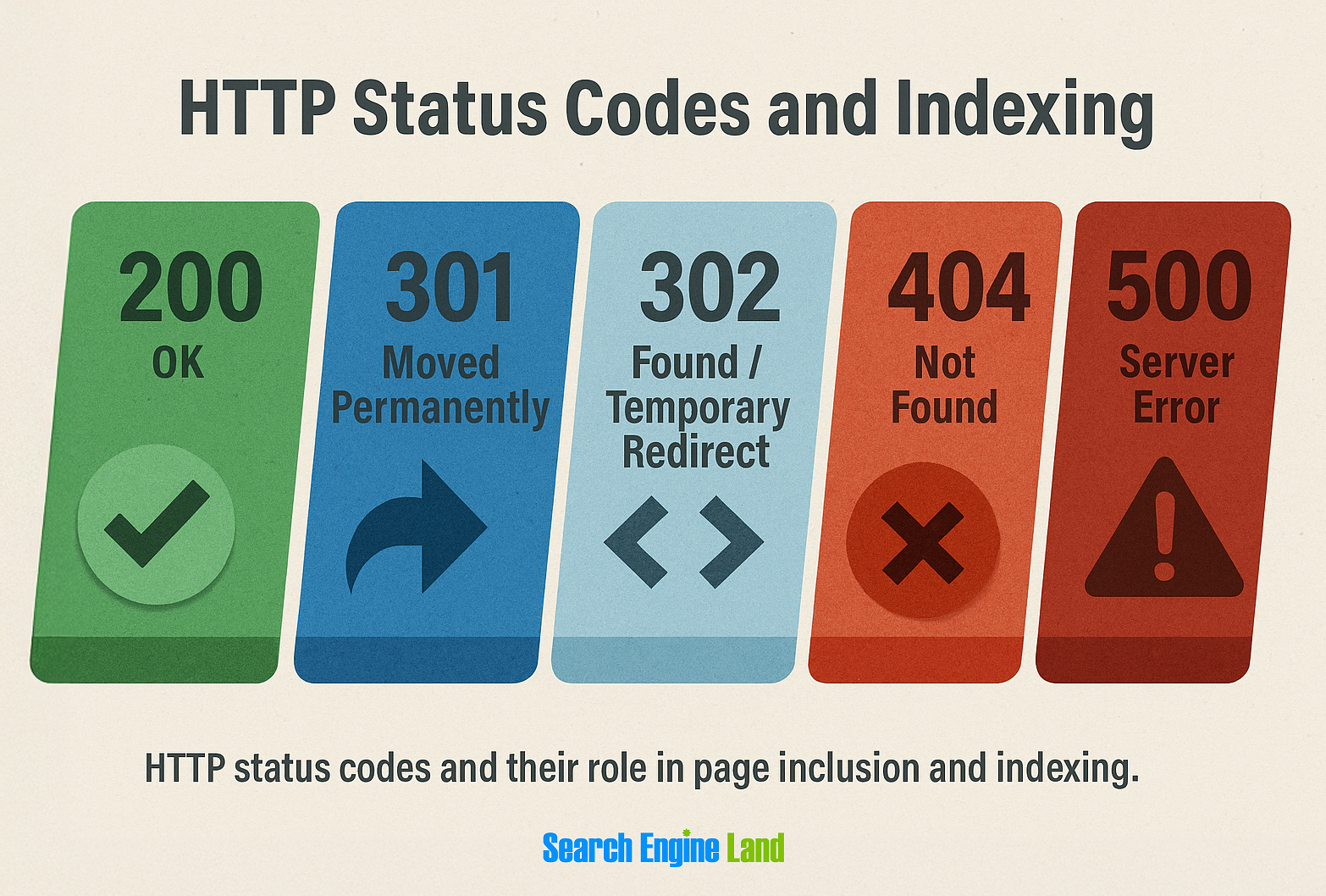
- HTTP status codes: Pages must return the correct response:
- 200 OK: page loads and can be indexed
- 301: permanent redirect
- 302: temporary redirect (usually not intended for indexing)
- 404: page not found
- 500: server error
- Content duplication:When the same or very similar content appears on multiple URLs, Google tries to identify one authoritative version to index. It may ignore the others or mark them as duplicates.
- Thin content: Pages with little original information or limited usefulness offer less value to users and search engines. Examples include placeholder pages, automatically generated content, or very short posts with no clear purpose. These pages are often crawled but not indexed.
- Internal linking: Pages that are several clicks away from your homepage or that have few internal links pointing to them are harder for Google to reach. As a result, they may not be prioritized for indexing.
Role of semantic signals and content quality
Technical signals are essential—but they aren’t the whole story. Google also evaluates content quality by looking for relevance, depth, and usefulness. This is where semantic signals and quality thresholds come in:
- Semantic relevance: Google checks whether the content truly answers the user’s query. Pages that are off-topic or confusing may not be indexed.
- Content quality: Even well-linked, technically perfect pages can be skipped if they have thin, repetitive, or low-value content
- Modern indexing thresholds: Google increasingly favors pages that provide clarity, structure, and trust signals. Good headings, logical flow, and original content all contribute to a page’s likelihood of indexing.
Indexing isn’t random. By ensuring both your technical setup and your content quality are solid, you can guide Google confidently to store your pages and surface them to users.
How to diagnose indexability issues
Google Search Console offers a fast and easy way to diagnose indexability issues. It shows which URLs Google has stored and excluded along with the specific reasons why.
In this section, we’ll walk through the key reports and logs to identify root causes and prioritize fixes. If you want a refresher on setup, follow this beginner-friendly guide before you start. Otherwise carry on—everything here will stay tightly focused on indexability signals.
Use Google Search Console’s index coverage and pages report
Start with Google Search Console—it’s the clearest window into how Google sees your site.
Select “Pages” to open the “Page indexing” report (previously known as “Index coverage”) to see how many pages on your site are indexed versus excluded and why.

You’ll see categories such as:
- Crawled – currently not indexed: Google has found and rendered your page but hasn’t added it to the index yet
- Discovered – currently not indexed: Google knows the page exists but hasn’t crawled or rendered it yet
- Excluded by ‘noindex’ tag: The page is intentionally blocked from indexing by a meta robots tag or HTTP header

Each status tells a story. If you see exclusions, it doesn’t always mean something’s broken. Sometimes it’s a configuration choice—a deliberate setting in your CMS or site code that controls what should or shouldn’t appear in search.
If a page is “Crawled – currently not indexed_,_” it often means Google doesn’t think it adds enough unique value or that it’s too similar to other content.
“Discovered – currently not indexed” usually points to crawl budget, internal linking, or rendering constraints.
And if it’s “Excluded by ‘noindex’ tag_,_” that’s likely a configuration choice—though one worth double-checking for accuracy.
Next, use the URL search bar at the top of the “Page indexing” report (or use the URL Inspection Tool) to check specific URLs. You’ll see whether the page is indexed, whether it can be crawled, and which canonical version Google has selected.

To find patterns, use the “Export External Links“option in the “Page indexing”report (not available in the URL Inspection Tool). This lets you group pages by issue type, helping you focus on what matters most instead of reacting to every individual warning.

Review crawl stats, sitemaps, and server logs
Once you understand what’s being indexed, the next step is to understand why.
Open the “Crawl stats” report in Search Console, which you can find under “**Settings.**” It often shows how often Googlebot visits your site, the types of responses it receives (like 200, 301, or 404), and whether crawl activity is increasing or dropping. A sudden drop often hints at accessibility issues or internal linking problems.

Then, click to open “Sitemaps.”

Your sitemap is a roadmap for Google, so accuracy matters. Make sure it only includes canonical, indexable URLs—no redirects, 404s, or duplicates. To compare your sitemap against indexed pages, automate the process with tools like Screaming Frog or Sitebulb.
Finally, check your server logs (or use a log analysis tool).This is one of the most powerful yet underused diagnostic methods. Logs reveal which pages Googlebot is actually requesting, how often, and what response it receives.

If your most important URLs—meaning those that drive traffic, conversions, or represent key site sections—rarely appear in the logs, Google isn’t crawling them frequently enough to consider indexing. This step confirms what’s happening behind the scenes—not what your CMS assumes, not what your crawler estimates, but what Googlebot actually does.
Address common blockers
Once you’ve gathered your data, it’s time to look for the blockers that keep perfectly good content out of Google’s index.
noindex Tags
A noindex directive in the meta robots tag tells search engines to skip the page entirely. Sometimes this is intentional (like for login pages or thank-you screens). However, during site launches or redesigns, it’s not uncommon for a noindex tag to remain on templates that should be indexable.
Always double-check high-value templates like blog posts or product pages to make sure they haven’t inherited a global noindex.
Blocked by robots.txt
Your robots.txt file controls what Google can crawl. But blocking crawl access doesn’t stop a URL from being discovered. If another page links to it, Google might still know it exists—the search engine simply can’t read the content.
Review your robots.txt using the tester in Search Console to ensure you’re not unknowingly blocking important directories like /blog/ or /products/.
Canonical pointing elsewhere
Canonical tags signal which version of a page Google should treat as the main one. If your canonical intentionally or mistakenly points to another URL, Google may decide to index that other version instead. This can happen when parameters, filters, or CMS settings automatically assign the wrong canonical link.
To fix this, inspect the canonical tag in your page source or use a crawler like Semrush’s Site Audit tool. Make sure key pages use self-referencing canonicals (where the canonical matches the page’s own URL) unless you want to consolidate similar pages.
Thin or duplicate content
Even a perfectly structured page won’t be indexed if it doesn’t offer enough unique value. Pages with minimal text, repeated descriptions, or templated layouts often fall below Google’s quality threshold.
You can decide whether to merge, improve, or intentionally noindex these pages. What matters is that every indexed page deserves its place.
Redirect loops or broken links
Redirect chains and loops make it difficult for crawlers to reach your content. Similarly, broken internal links send Googlebot down dead ends.You can fix these by reviewing internal links using a crawler like Site Audit and ensuring redirects go directly to the final destination.
Know that partial indexing isn’t always a problem
Don’t assume every unindexed page is an error. Sometimes Google deliberately skips near-duplicate pages or low-demand URLs to save crawl resources. Other times, the content simply needs more internal signals—stronger linking, updated sitemaps, or improved context—before it’s included.
The goal isn’t to have everything indexed. It’s to have the right things indexed. When you focus on that, every fix you make contributes directly to visibility and performance, not noise.
Dig deeper: Crawl budget basics: Why Google isn’t indexing your pages—and what to do about it
How to fix indexability problems
Now that you know why some pages aren’t being indexed, it’s time to start fixing them. Think of this as a structured walk through your site’s foundations. The goal is to help search engines understand what truly matters on your site.
By tackling these issues in order—from prioritization to linking—you’re not only helping Google crawl smarter, but you’re also shaping the way your content is understood.
Prioritize pages that should be indexed
Not every page deserves a spot in Google’s index—and that’s okay. Start by identifying the URLs that actually contribute to your business goals. These usually include:
- Revenue or lead-generating pages, such as your main product or service URLs
- Evergreen educational content that builds authority over time
- High-traffic landing pages that shape how new visitors discover your brand
For instance, if you run a travel site, your “Pennsylvania travel guide” page deserves indexing before a temporary “Winter Deals” page.
Once you’ve identified priority pages, map them against your “Page indexing” report in Google Search Console. Focus your fixes where visibility matters most.
Ensure proper canonicalization
Canonical tags tell Google which version of a page to treat as the original when there are duplicates.
If you have multiple product variations (like example.com/blue-dress and example.com/blue-dress?size=8) make sure both point to a single canonical URL.
Keep an eye out for:
- Conflicting canonicals, where pages point to each other instead of one clear source
- Cross-domain canonicals, which might accidentally send authority to another site
- Incorrect self-referencing, where a canonical doesn’t match the live URL
Use robots.txt and meta robots correctly
Think of robots.txt as a map—it shows crawlers which areas of your site they are allowed to explore and which to skip. Use it to block technical folders (like /wp-admin/) but not important content.
The meta robots tag, on the other hand, controls indexing on a page level. Use noindex for pages that serve a purpose for users but don’t need to appear in search results—like thank-you pages.
Be careful not to confuse the two:
- robots.txt tells search engines where they can and cannot crawl
- meta robots noindex allows crawling but prevents indexing

If you accidentally block something valuable in robots.txt, Google won’t even see the noindex tag. That’s why robots.txt should never block pages you intend to index.
Manage parameter URLs and faceted navigation
Ecommerce and filter-heavy sites often generate hundreds of near-identical URLs—one for each color, size, or style. These can eat up crawl budget and dilute indexing signals.
Ask yourself:
- Do all these variations serve unique intent?
- Is there a single default version that could represent the set?
For example, you might noindex ?sort=price-asc or ?filter=red while keeping the main product category indexed. Clear rules help crawlers focus on what actually matters.
Consolidate duplicates via redirects or canonical tags
Duplicate or thin pages make it hard for Google to decide which one to show. Whenever possible, redirect duplicates to the stronger version (via a 301 redirect).
When you can’t merge them—like two near-identical blog posts on a similar topic—use canonical tags instead. This tells Google which one is the main page, without losing any accumulated signals.
Example: If you’ve got /blog/seo-basics and /blog/seo-for-beginners, decide which is more valuable long-term and canonicalize the other to it.
Improve internal linking and crawl paths
Your internal links act like signposts for crawlers. Pages buried four or five clicks away from the homepage are harder for Google to find and often get crawled less frequently.
Make sure key pages are linked from your:
- Main navigation
- High-traffic blog posts
- Footer or contextual anchor text
For instance, if your pricing page is only linked in one obscure dropdown, add a link in your homepage and top-level menu.
The stronger your internal linking, the more confidently Google understands your site’s structure—and the faster important pages get indexed.
How to test and monitor indexability at scale
Once you’ve handled immediate fixes, the real work begins—keeping your site healthy. This stage is about setting up systems that catch issues early before they ever reach users or rankings.
Regularly audit with the right tools
Manual checks are useful for one-off issues. But for long-term health, you need reliable tools that can automatically spot issues across hundreds or even thousands of URLs.
Here’s how to use each one effectively:
1. Screaming Frog
Screaming Frog is a powerful desktop crawler that scans every URL on your site to uncover indexation blockers, broken links, and metadata issues. It’s ideal if you prefer detailed control, raw data exports, and fast visibility into your site’s technical health.

Here’s how to use it:
Step 1: Run a full crawl by entering your domain (enter the homepage and press “Start”in Spider mode). This maps all accessible URLs.
Step 2: Review the crawl results under “Directives” (for noindex, canonicals) and “Response Codes”(for 4xx and 5xx errors).
Step 3: Filter for ”Blocked by robots.txt”or “noindex” to see which pages are excluded from Google’s index.
Step 4: Export data (via “Bulk Exports or Reports” and then “Crawl Overview”) and compare it against your XML sitemap to find missing or disconnected pages.
Step 5: Schedule future crawls (using the paid version) to monitor changes after site updates or migrations.
2. Sitebulb
Sitebulb performs the same kind of crawl but presents the results in a more visual way. It’s ideal if you want to see your site’s architecture rather than comb through spreadsheets. The platform is best for teams who want presentation-ready insights and easier pattern recognition across large sites.

Here’s how to use it:
Step 1: Set up a new project by entering your domain. You can choose what to include (sitemaps, subdomains, etc.).
Step 2: Run the crawl with Sitebulb to generate visual “Crawl Maps” that show how pages connect.
Step 3: Review issues under sections like “Indexability”and “Internal Links”to find pages blocked by noindex, robots.txt, or broken paths.
Step 4: Use the visual crawl map to spot orphaned or low-linked pages that may be hard for Google to reach.
Step 5: Export reports or share dashboard to collaborate with your developer or content team.
3. Semrush Site Audit
Semrush’s Site Audit is your wide-angle lens—it helps you see the full health of your website, not just one issue at a time. This is especially useful for larger sites, or when you want to identify patterns rather than individual errors.
Site audits uncover technical barriers that could affect how search engines crawl, render, and index your pages.
To get started, enter your website URL and click “Start Audit_._”

Configure your audit settings. Choose how deep you want the crawl to go and which sections of your site to include.
When you’re ready, click “Start Site Audit_._”

Once the crawl is complete, it’ll show an overview of your site’s technical health—including an overall “Site Health”score from 0 to 100.

To focus on crawlability and indexability, go to the “Crawlability” section and click “View details_._”

This opens a detailed report showing the issues that prevent your pages from being discovered or indexed. Next, click on the horizontal bar graph beside any issue type.

You’ll see a list of all affected pages, making it easier to prioritize fixes.

If you’re unsure how to resolve something, click the “Why and how to fix it” link.

This gives you a short, practical explanation of what’s happening and what to do about it. By addressing each issue methodically and maintaining a technically sound site, you’ll improve crawlability, support accurate indexation, and strengthen your site’s visibility.
Use log file analysis to confirm crawler access
Your server logs are like the black box of your site—they record every request made by search engine bots. By analyzing them, you can see exactly where Googlebot has been and which pages it’s ignoring.
Here’s how to approach it:
- Use a log analysis tool to pull your log files for the last 30–60 days
- Filter by user agent (for example, Googlebot) to isolate crawler activity
- Identify pages that haven’t been visited at all—these may be too deep in your architecture or blocked unintentionally
- Watch for repeated 404 or 500 status codes, which can waste crawl budget and slow down discovery

If your core pages (your homepage, services, or main categories) don’t appear often in logs, your crawl paths may need strengthening.
Track indexed pages and coverage trends
Indexability is dynamic—it changes as your site evolves. To keep tabs on it, make Google Search Console’s “Page indexing” report part of your SEO routine.
Here’s what to monitor:
- Indexed vs. submitted URLs: This ratio tells you how efficiently Google is storing your intended content
- Trends over time: Sudden drops may indicate sitewide noindex tags, template issues, or broken redirects
- Content-specific patterns: Notice how quickly new content gets indexed faster than older pages? Faster indexing for recent posts can indicate improved crawl efficiency, stronger internal linking, or better site structure over time. Observing these patterns helps you identify which changes are positively affecting indexability.
Set up automated indexability alerts
Even the most attentive teams can’t monitor indexability manually every day. Automation makes this process sustainable. Simple scripts or API connections can alert you the moment something goes wrong—long before it affects traffic.
You can use the Google Search Console API to track index coverage daily and trigger notifications if your indexed pages drop below a certain threshold. For content-heavy or frequently updated sites, you can also use the Indexing API to monitor priority URLs, especially for news, job listings, or real-time content.
These alerts don’t need to be complicated. Even a basic script that checks sitemap URLs against indexed URLs and sends you an email or Slack message can save hours of guesswork later.
Advanced indexability insights
By now, you’ve got the fundamentals down—you can diagnose issues, fix pages, and keep tabs on your indexing health.
But the landscape is shifting. Indexability is no longer about crawling and tags alone. It’s evolving in line with AI-driven search, multi-surface visibility, and smarter evaluation models.
Let’s walk through what’s new and what you need to understand.
How AI overviews and LLMs use index data differently from Googlebot
You already know the traditional pattern: Googlebot crawls, renders, and stores pages in the index. That foundation still matters. But with the rise of AI Overviews and search engines powered by large language models (LLMs), the way indexed content is interpreted is shifting.
AI systems no longer rely on ranking alone. According to Botify and Google Search Central, they use indexed data as input. Then, they apply extra layers of semantic relevance, trust, and intent matching before showing answers.
Even if a page is technically indexed, it might not appear in AI Overviews unless its semantic signals are strong enough to help the model form a meaningful answer, as Backlinko notes. Pages cited in AI Overviews tend to come from this indexed content, but the model selectively references them based on depth, clarity, and topical authority, according to Conductor.
Tip:Make sure your core pages are not only indexable but also helpful, complete, and semantically rich. Being indexed is necessary—but no longer sufficient for visibility.
The rise of rendered content indexing and JavaScript SEO best practices
If your site relies on JavaScript, dynamic rendering, or single-page applications, this is your moment to pay close attention. Googlebot now renders most pages before indexing, but rendering adds a layer of complexity.
As Google Developers explains, if the initial HTML contains a noindex meta tag, the page won’t even reach the rendering stage—even if JavaScript later removes it.
This means timing and structure really matter.
Keep these best practices in mind:
Use SSR or static pre-rendering for core content. If your site relies on JavaScript, Googlebot now renders pages before deciding what to index.
This is great for dynamic content, but it adds complexity. If critical content or meta tags are only loaded client-side, Google might miss them or index them incorrectly.
SSR or static pre-rendering ensures that all essential information is included in the HTML from the start, so Google can read it immediately without waiting for scripts to execute. This reduces delays in indexing and avoids confusion about what’s important on your page.
Avoid relying entirely on client-side rendering (CSR) for key content or metadata. While CSR can make your site feel fast and interactive for users, Googlebot might not always wait for every script to finish.
Critical elements like headings, canonical tags, meta descriptions, or structured data should be visible in the initial HTML whenever possible. Otherwise, Google could miss them, which can lead to partial indexing or ranking inconsistencies.

Test how Googlebot sees your page. Use Google Search Console’s URL Inspection Tool or rendered snapshot feature to check exactly what Googlebot sees. This reveals if key content is visible, meta tags are correct, and whether any JavaScript-dependent content is being missed.
Indexing in a multi-surface world
Search no longer lives in one place. Your content can appear via:
- Traditional Google search
- Google Discover or AI Overviews
- Bing Copilot
- Perplexity or ChatGPT
Each surface interprets and displays indexed data differently, so indexability now needs a multi-surface mindset—not a single-engine strategy.
Use this step-by-step approach for indexing across surfaces:
- Confirm key pages are indexed and crawlable in Google. Start with your most important pages—core product pages, flagship posts, and landing pages. Check their indexing status in Search Console and confirm Googlebot can crawl them without errors. This ensures they’re ready to be surfaced across all platforms.
- Ensure structured data, metadata, and canonical tags are consistent. These signals help search engines and AI surfaces understand your pages. Structured data enables rich results, metadata clarifies descriptions, and canonicals indicate the authoritative version, as noted by Google Search Central. Consistency makes your content appear accurately across all surfaces.
- Observe content performance across different surfaces. Track how your pages perform in Discover feeds, AI Overviews, or other AI-driven environments. White Peak points out that differences in visibility or ranking can reveal gaps in how your content is interpreted. Use these insights to prioritize the most impactful fixes.
- Refine content for broad user intent categories. Generative AI favors pages that are clear, useful, and complete. Make sure your content addresses likely user questions and provides enough context. Helpful, well-structured pages are indexed and surfaced more reliably across all platforms.
Remember, the technical foundation you build for Google—crawlable URLs, structured markup, and clear canonical signals—also feeds every other discovery surface that relies on properly indexed data.
Factoring in index efficiency ratio
Monitoring which pages are indexed is a critical SEO KPI since unindexed pages represent missing opportunities for visibility, according to SEO Clarity. One way to quantify this is with the index efficiency ratio (IER) which helps you see how efficiently your site’s content is being stored and surfaced.
IER = Indexed Pages ÷ Intended Indexable Pages
Say 10,000 pages should be indexable and 6,000 are indexed. Your IER is 0.6—meaning 40% of your intended content isn’t visible yet.
Why this matters:
- It benchmarks how effectively your content is being included in Google’s traditional search index, showing which pages are actually available to appear in search results
- It highlights the gap between potential visibility and actual visibility
- Tracking IER over time helps you measure the impact of fixes to canonical issues, thin content, or crawl depth
Tip:Add IER to your monitoring dashboard. Treat it as a visibility health check that keeps your indexing strategy measurable and future-ready.
One truth hasn’t changed: Even the most technically flawless site can fail to index low-value content. Google Developers confirms that indexing decisions also depend on content purpose, usefulness, and overall quality.
Make sure your indexed pages:
- Offer genuine value and original insights
- Demonstrate topical relevance through internal links and clear structure
- Support user intent with clarity, depth, and precision
Because in the end, indexability isn’t the finish line—it’s the foundation.
Make indexability a habit, not a one-time audit
A well-maintained site stays healthy through consistent care, not one-off fixes. Indexability checks should be part of your regular workflow, not something you revisit only when problems appear.
Set a schedule that suits your site’s size—monthly for smaller sites, quarterly for larger ones. After each audit, note what improved, what changed, and what still needs attention.
Over time, you’ll start seeing patterns, such as pages that take longer to index or recurring redirect errors. Use these findings to guide your next steps: strengthen internal links, update older content, and fix any structures that make crawling harder.
The goal is to make indexability maintenance a routine part of SEO. When your site stays accessible and consistent, search engines can crawl it efficiently—and your content has a better chance of being found.
Want to take this further? We’ve got you covered.
Dig deeper into how crawl budget affects visibility and how inefficiencies there could be costing you revenue by exploring our guide on smarter crawl strategies. It’s the natural next step for turning a well-indexed site into a high-performing one.
Search Engine Land is owned by Semrush. We remain committed to providing high-quality coverage of marketing topics. Unless otherwise noted, this page’s content was written by either an employee or a paid contractor of Semrush Inc.