Backlink Checker (original) (raw)
This free backlink checker tool provides valuable backlink data about websites and pages that link to pages on your website. Here we will explain the features of the link data tool, and introduce the insights and applications you can apply to your SEO growth strategies.
Summary: This free backlink checker tool provides valuable backlink data about websites and pages that link to pages on your website. Here we will explain the features of the link data tool, and introduce the insights and applications you can apply to your SEO growth strategies.
Understanding backlinks and their importance for SEO
A backlink is a link from a website that links back to your website. It’s a simple concept that plays a huge role in your SEO success.
Search engines consider backlinks and data about them as an essential ranking factor. It’s their way of evaluating how others perceive your website. If you are an authority on a topic or have a product or brand you will naturally accrue backlinks about those topics, products and brand messages that point to your corresponding pages.
If other digital creators know who you are, backlinks occur naturally through reviews, references and social media posts for example. If you are a new and growing organization creating a marketing strategy that prioritizes online presence, authority on your subject matter, and social media awareness will in turn grow the number and quality of those backlinks.
A backlink checker tool streamlines your strategy by instantly delivering key insights into your backlink profile.
The benefits of using a backlink checking tool include:
- A deep-dive overview of your current backlink footprint
- A holistic view of the anchor text that links back to your site: is it diverse and relevant?
- The ability to quickly assess the quality of your inbound links
- Helps identify gaps where your competitors may be outperforming you
- Reveals new opportunities for potential backlinking
Without a backlink checker tool, you’d have to hunt down all your backlinks manually and research each site to figure out their value. That’s a lot of manual work. So why not let a backlink checker do the heavy lifting, freeing you up to spend more time analyzing and coming up with a winning strategy?
Features of our Backlink Checker Tool
Our free Backlink Checker Tool is packed with features to make your SEO efforts more efficient and effective.
Here’s what you can expect when using it:
Domain analysis options
Type your domain into the search box and then choose how you want to analyze your site’s backlinks:
- The *.domain.com/* option shows you backlinks from all of your site’s pages and subdomains (this is the default option since it includes all backlink results)
- The domain.com/* option shows you backlinks from your domain but not from any subdomains it may have
- The URL option shows you backlinks from only that specific URL
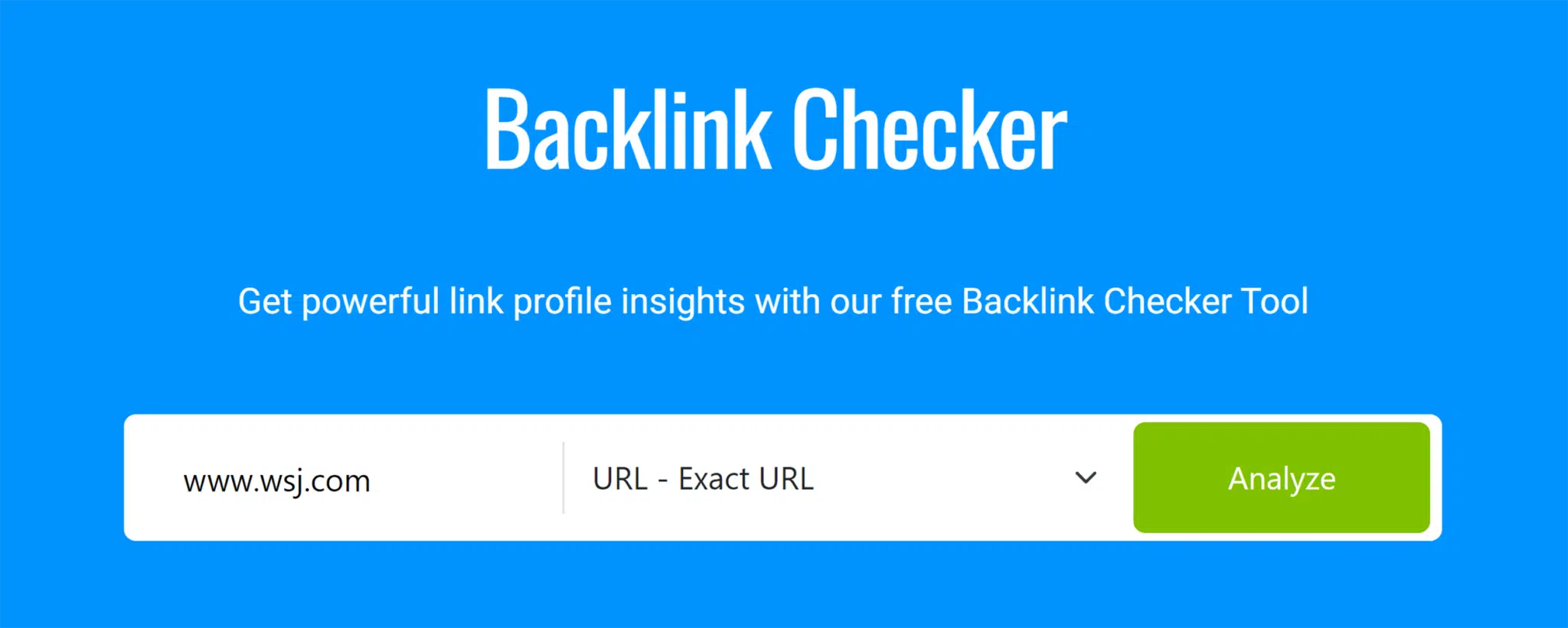
These options are useful for analyzing your site’s performance or specific sections. For instance, you can compare the backlink profiles of your blog subdomain and main domain to see how each supports your SEO.
Key backlink metrics
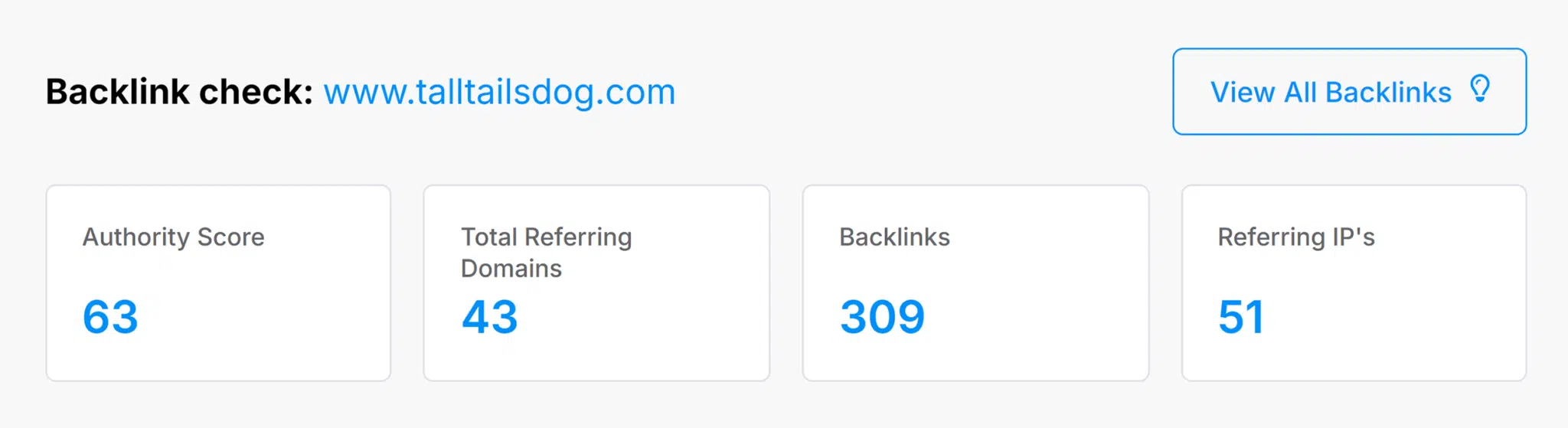
After you click the “Analyze” button, the results at the top of the page will share some essential backlink metrics for your site. These include:
- Authority score: A score between 0-100 that estimates the authority of your website. The higher the score, the more authoritative your site is considered to be. Take note that different SEO tools use different algorithms to measure authority score, so it may vary.
- Total referring domains: The total number of unique domains linking back to your website
- Backlinks: The total number of backlinks to your site, including ones that may come from the same domain
- Referring IP’s: The total number of unique IP addresses that host websites linking back to your site. Typically, this number will be similar to the total referring domains in a healthy backlink profile. It helps eliminate the possibility of shady SEO tactics, such as one IP address hosting lots of websites that exist only to build backlinks.
Backlink data
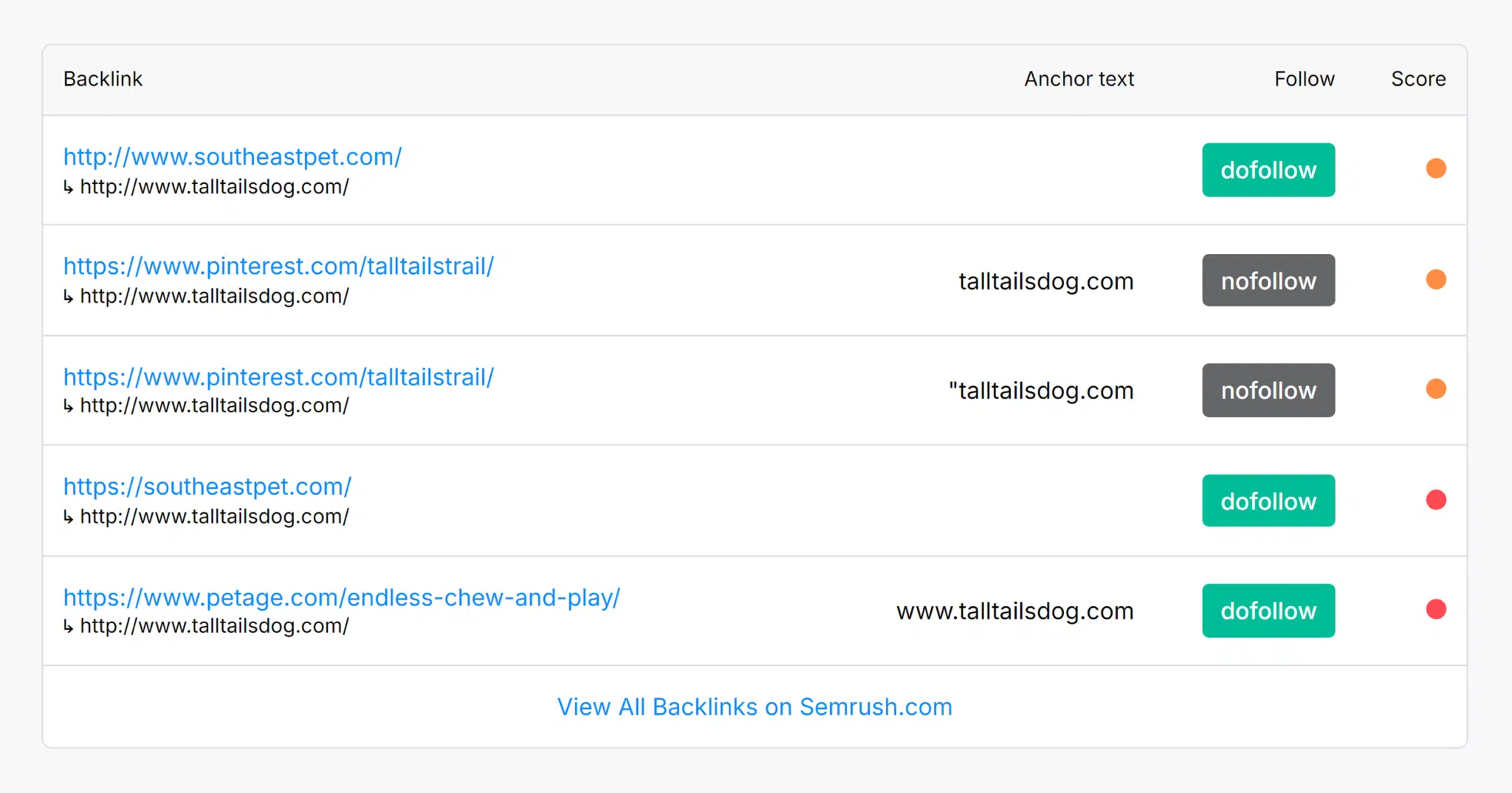
Your backlink profile is located just below the metrics. It shows you:
- The backlink: The top blue link represents the backlink, while the smaller link below it shows the page on your site it’s pointing to
- Anchor text: The clickable, hyperlinked text on the linking website that directs users to your site
- Follow: Indicates whether the backlink is “dofollow” or “nofollow.” “Dofollow” links pass the linking site’s authority to your site, while “nofollow” links do not.
- Score: An estimated measurement of the quality of the backlink, with green representing the highest score and red indicating the lowest score
We have only just scratched the surface of the range of backlink data available with Semrush Backlink Analysis Tools, as well as the multiple applications for your business marketing plan and growth strategies. Check out the range of other deep analytical backlink tools available.
Search Engine Land is owned by Semrush. We remain committed to providing high-quality coverage of marketing topics. Unless otherwise noted, this page’s content was written by either an employee or a paid contractor of Semrush Inc.
About the Author

Insight Engine is an ongoing AI experiment designed to help us expand and maintain the foundational “101” section of our site — including our Guides and Tools. This area runs in parallel to the news and opinion coverage you already know and love from Search Engine Land.
By using Insight Engine to compile research from across the industry — which then goes through multiple rounds of review by editors and subject-matter experts — we’re building a reliable, continuously updated SEO knowledge library that keeps pace with Google’s latest changes. Meanwhile, our news and editorial teams continue to focus on timely updates, industry analysis, and the nuanced, strategic questions that demand human insight.
Insight Engine doesn’t replace Search Engine Land's contributors. It simply helps us provide more resources you can trust.