GimpLensfun (original) (raw)
About
GimpLensfun is a Gimp plugin to correct lens distortion using the lensfun library and database.
Move mouse over the example image to see the effect after lens correction.
This image has been taken using a Fuji F200EXR compact camera in wide angle position and the distortion is clearly visible at the curved horizon in the original shoot.

Screenshot from GIMP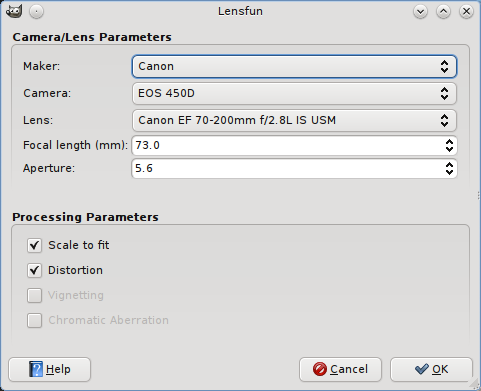
You find the plugin under “Filters > Enhance > GimpLensfun”.
It autodetects your camera, lens type and corresponding parameters from the EXIF information embedded in the image file. Please check if it matches the equipment you took the photo with. Otherwise distortion correction would not work as expected.
Latest news
2015-11-15 GimpLensfun v0.2.4
Final version 0.2.4 of GimpLensfun is now available.
Changes:
- basic support for non interactive mode
- avoid crash when camera or lens is not found in the database
- support for makers which are not in the pre-defined list
**Please note that windows package is experimental and we cannot give any support on that platform!**If there is anybody out there who is willing to take over maintenance of an official windows installer please contact us.
EDIT 2015/12/20 The windows installer has been updated. The previous version did not properly load the database.
2015-08-30 GimpLensfun v0.2.4 development preview
2014-02-10 Updated windows installer for v0.2.3
The install package of GimpLensfun v0.2.3 for windows has been updated for better compatibility with 64bit GIMP versions. At the same time we updated the included lensfun database to version 0.2.8.
2013-05-04 GimpLensfun v0.2.3
A new release with mostly small bugfixes and cleanups. TCA correction should work again.
There finally also is an installer for GIMP 2.8.4 on windows platform. However, this is still rated experimental.
Installation
Linux
Most distributions already include a package, check your package manager.
Windows
Finally there is an installer for windows again. Although it worked for me I would rate it as experimental. It directly writes into the GIMP install directory. There is no separate uninstaller, instead GIMP-Lensfun is removed when you uninstall GIMP. It is compatible with the offical GIMP 2.8 build from http://www.gimp.org/downloads/ but may work with other builds, too.
gimplensfun-0.2.4-2-setup.exe (1.8 MB)
From Sources
Sources are available from github:https://github.com/seebk/GIMP-Lensfun
Dependencies: libgimp2.0, libexiv2, liblensfun
On (K)Ubuntu you can easily install the required libs by
>$ sudo apt-get install build-essential libgimp2.0-dev libexiv2-dev liblensfun-dev
On Fedora 15 (and probably other versions, too) you need to install these packages
gcc, gcc-c++, gimp-devel-tools, lensfun-devel, exiv2-devel
Afterwards get the sources from github:
>$ git clone git://github.com/seebk/GIMP-Lensfun.git
Enter the directory and compile with “make”:
>$ cd GIMP-Lensfun
>$ make
If all went fine copy the newly created binary file “gimplensfun” to your GIMP plugins folder. Normally you find this at “/home/USER/.gimp-2.8/plug-ins/”.
You need to restart GIMP to detect the new plugin.
Supported Cameras/Lenses
Wether your camera/lens combination is supported depends on the database that comes with the lensfun library installed on your computer. Lensfun usually reads the distortion parameters from xml files located under /usr/share/lensfun.
If your lens/camera combination is not part of the database that’s no problem: Measuring the correction parameters is easy and can be done by yourself. Just follow
this tutorialon the lensfun homepage.
Afterwards please email the lens profile to mail(at)sebastiankraft.net and I will add it to the database.
Contact
For contact please send an email to
mail (at) sebastiankraft.net