Free Online Retaining Wall Calculator | SkyCiv Engineering (original) (raw)
Free Retaining Wall Calculator
Preliminary concrete retaining wall calculator for cantilever and gravity retaining walls
About the Free Retaining Wall Calculator
The Retaining Wall Calculator helps engineers design Cantilever and Gravity retaining walls and is suitable for calculation of block or concrete walls. Various components of the retaining system can be calculated including the retaining wall stem, the concrete retaining wall footing and the soil layers on both sides of the wall.
This free tool includes calculations for overturning, sliding and, bearing utilization ratios as part of your retaining wall design. With the full retaining wall design software, a PDF design report can be generated to show the detailed calculations steps and references followed to achieve the results.
Starting SkyCiv Retaining Wall...
Need More Functionality for the Retaining Wall Calculator?
Upgrade to a paid plan to unlock full features
Full Retaining Wall Software
Allowing you to solve more complex retaining wall scenarios with rich detail and without limitations.
Custom Wall Builder
Define custom shapes, assign custom materials and perform complex analysis calculations in a matter of seconds.
Design Report
Export an analysis and design report in an easy and professional format to pass on to your client or fellow engineer.
The Retaining Wall Calculator Can Be Used For:
Cantilever Wall Calculator
This easy-to-use Retaining Wall Calculator also allows engineers calculate a number of important design results for Cantilever Retaining Walls. These results include calculations for sliding, bearing and overturning and the factory of safety for each result. Each of these stability calculations are for concrete retaining walls and are a critical part of any retaining wall design.
Gravity Wall Calculator
Thanks to the flexible inputs and easy user interface of, the same properties can be calculated for a model that represents a gravity retaining wall. Let us know if you'd like to receive updates as we add support for more wall types. The retaining wall base provides vertical pressure (in addition to the soil weight) provides the gravity force to resists the overturning moments and sliding forces of the retaining wall.
Stability Calculations
The Retaining Wall Calculator provides detailed calculation and reporting for sliding, bearing and overturning failure required for any retaining wall design. These capacities are calculated in accordance with The Reinforced Concrete Design Handbook, ACI SP-17(14), Vol. 2. The retaining wall Sliding calculations are performed to check that the concrete retaining wall has enough capacity from any lateral force that may cause sliding. Similarly, any forces at the top of the stem would create a moment force, the overturning calculations ensure that the structure is safe against such actions. Finally, the retaining wall bearing calculations are to ensure the soil has enough bearing capacity to withstand the forces from the retaining wall.
All calculations come with a PDF detailed design report which lets engineers review the step by step calculations made.
About SkyCiv
SkyCiv offers a wide range of Cloud Structural Analysis and Design Software for engineers. As a constantly evolving tech company, we're committed to innovating and challenging existing workflows to save engineers time in their work processes and designs.
How to Use SkyCiv Retaining Wall Calculator
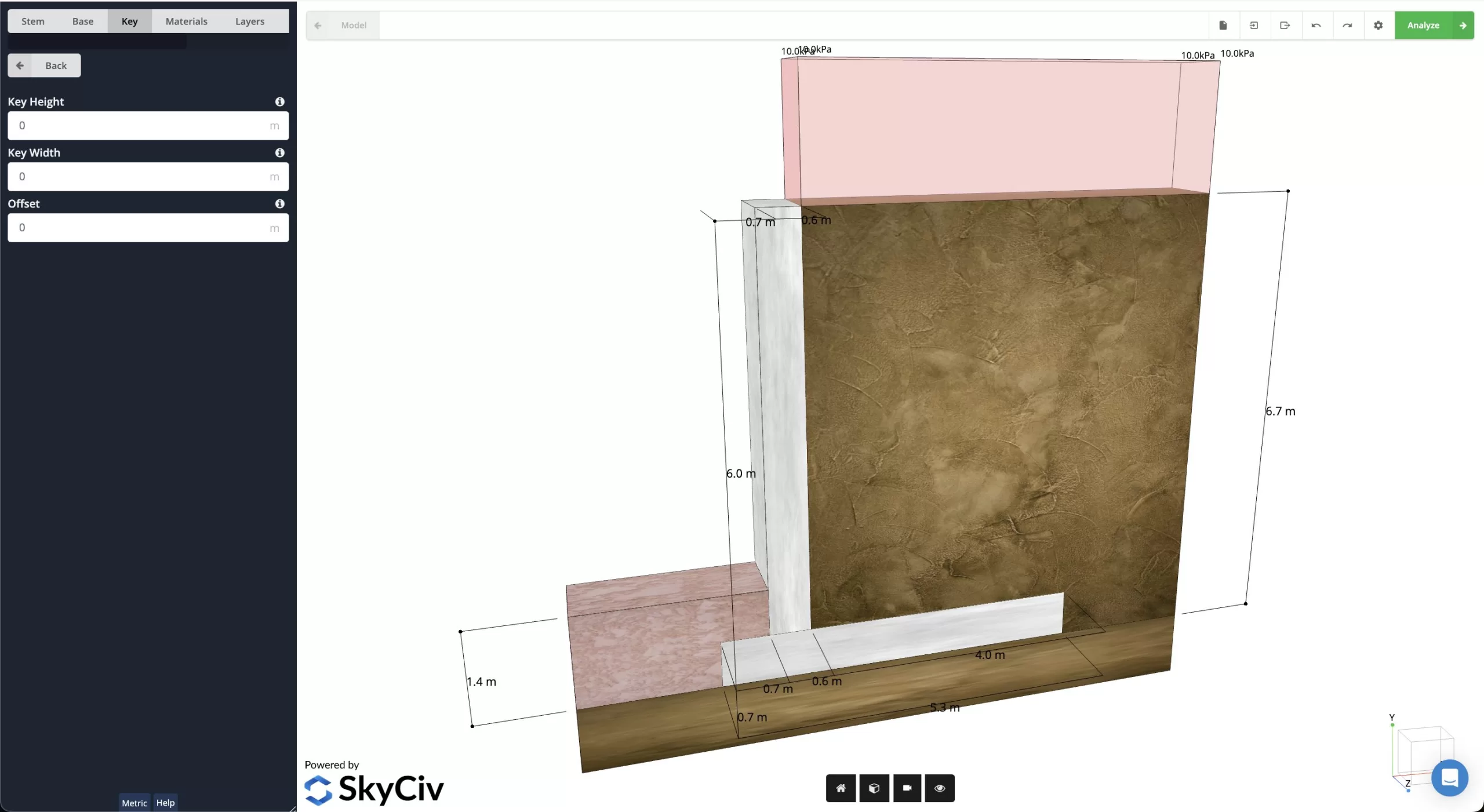
Step 1: Design Initial Wall Geometry
First layout an initial height for the stem walls, key, any offsets, as well as a base width and thickness for the footing.
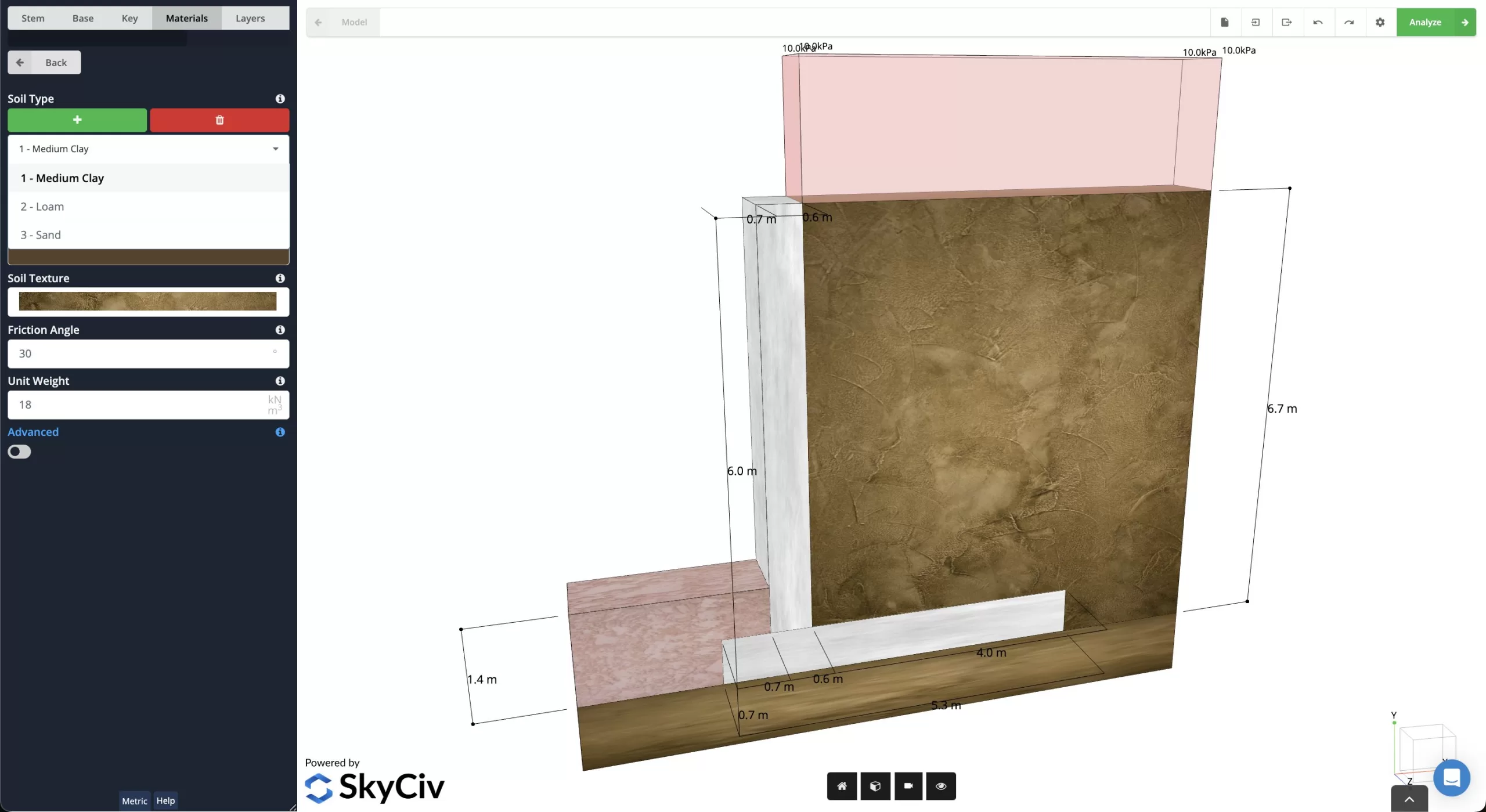
Step 2: Assign Data to Materials and Soil Zones
Next, define the properties for Soil Type, Name, Color, Texture, Friction Angle, and Unit Weight of you chosen materials. After these have been defined, you can set the material for the Active, Passive, and Substructure zones.
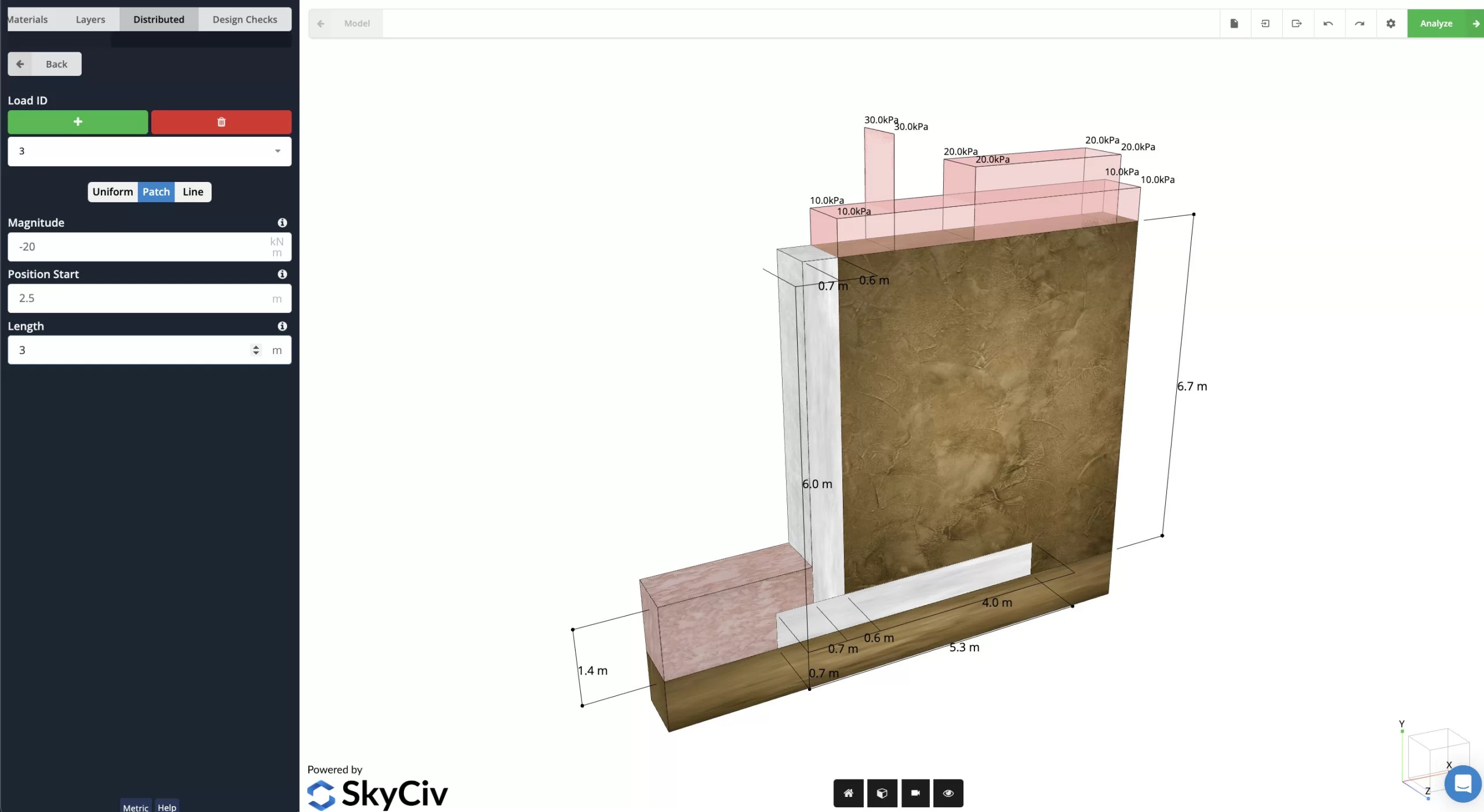
Step 3: Add Loading to Analyze
The next step is to add the distributed loading to the calculator. A "Uniform" load is used to cover the entire length of the Active Zone, a "Patch" load will run from a starting to stopping location in the zone, and a "Linear" load will be defined at a specific point along the zone. After the loading has been added, it is time to move onto the final step!
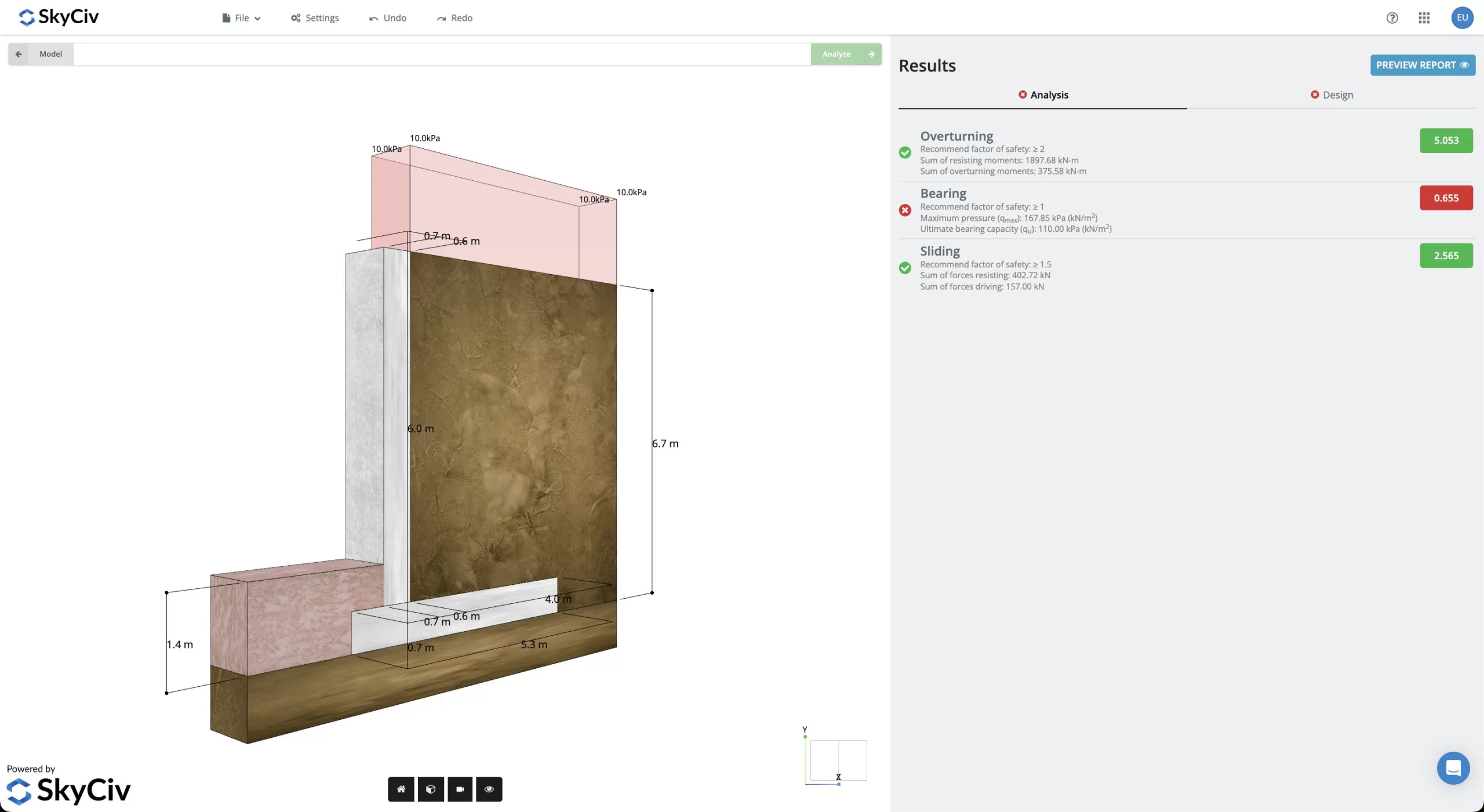
Step 4: Analyzing & Final Report
Once all the inputs have successfully added to the calculator, the calculator will analyze the results and return results to the inputs. Should the design be failing for any parameters, the user can go back and update their design and reanalyze. The full version of SkyCiv Retaining Wall also allows users to print a final detailed report of all their calculations to accompany their results.
What are the different types of retaining walls?
There are four main types of retaining walls: Gravity, Cantilever, Anchored, and Sheet Pile retaining walls. For more information on their differences and uses, check out this page in our documentation.
What is the design process for designing a structural retaining wall?
When designing a retaining wall, it is important to follow a structured design process to ensure your design meets your design goal. Starting with determining site conditions, laying out initial dimensions, and then performing stability and design checks, having a structured procedure can help make the overall process much easier! Our review of the Retaining Wall Design Process in our documentation covers some best practices when undertaking the design of retaining walls. Check it out to learn more!
How does loading from lateral forces impact the overall design of retaining walls?
Lateral earth pressure includes one of. the main loads that retaining walls deal with and must account for. These loads are produced from the pressure of soil above forcing soil below out from under it (much the same way liquids can create hydrostatic pressure). To learn more about the impact of lateral earth pressure on retaining wall design, check out this article in our documentation that gives some insight into this insight.
More Free Tools Available
Beam Caculator
Truss Calculator
Frame Calculator
Moment of Inertia
Engineering Professional?
If you are an engineering professional, you might benefit more by using our cloud based 3D Structural Analysis Software beyond this calculator.
Software
SkyCiv Software
- SkyCiv Beam
- SkyCiv Structural 3D
- SkyCiv Section Builder
- SkyCiv Beam Shell FEA
- SkyCiv Connection Design
- SkyCiv Foundation Design
- SkyCiv RC Design
- SkyCiv Wind Load Design
- SkyCiv Base Plate Design
- SkyCiv Mobile
- SkyCiv API
Industries
- Mechanical Engineering
- Marine Engineering
- Offshore Oil & Gas
- Event Rigging
- Scaffolding
- Residential
- Steel Design
- Concrete Design
- Timber Design
- Cold Formed Steel
- Shed Design
Free Tools
- Beam Calculator
- Truss Calculator
- Frame Calculator
- Shaft Calculator
- MoI Calculator
- Wind Load Calculator
- Foundation Calculator
- Base Plate Calculator
- Retaining Wall Calculator
- Connection Design Calculator
- I Beam Load Capacity Calculator
About
About


To provide the best experiences, we use technologies like cookies to store and/or access device information. Consenting to these technologies will allow us to process data such as browsing behavior or unique IDs on this site. Not consenting or withdrawing consent, may adversely affect certain features and functions.
Functional Functional Always active
The technical storage or access is strictly necessary for the legitimate purpose of enabling the use of a specific service explicitly requested by the subscriber or user, or for the sole purpose of carrying out the transmission of a communication over an electronic communications network.
Preferences Preferences
The technical storage or access is necessary for the legitimate purpose of storing preferences that are not requested by the subscriber or user.
Statistics Statistics
The technical storage or access that is used exclusively for statistical purposes. The technical storage or access that is used exclusively for anonymous statistical purposes. Without a subpoena, voluntary compliance on the part of your Internet Service Provider, or additional records from a third party, information stored or retrieved for this purpose alone cannot usually be used to identify you.
Marketing Marketing
The technical storage or access is required to create user profiles to send advertising, or to track the user on a website or across several websites for similar marketing purposes.
To provide the best experiences, we use technologies like cookies to store and/or access device information. Consenting to these technologies will allow us to process data such as browsing behavior or unique IDs on this site. Not consenting or withdrawing consent, may adversely affect certain features and functions.
Functional Functional Always active
The technical storage or access is strictly necessary for the legitimate purpose of enabling the use of a specific service explicitly requested by the subscriber or user, or for the sole purpose of carrying out the transmission of a communication over an electronic communications network.
Preferences Preferences
The technical storage or access is necessary for the legitimate purpose of storing preferences that are not requested by the subscriber or user.
Statistics Statistics
The technical storage or access that is used exclusively for statistical purposes. The technical storage or access that is used exclusively for anonymous statistical purposes. Without a subpoena, voluntary compliance on the part of your Internet Service Provider, or additional records from a third party, information stored or retrieved for this purpose alone cannot usually be used to identify you.
Marketing Marketing
The technical storage or access is required to create user profiles to send advertising, or to track the user on a website or across several websites for similar marketing purposes.
© Copyright 2015-2026. SkyCiv Engineering. ABN: 73 605 703 071
Language
by 