Summary of features supported for Workspace integration (original) (raw)
The following sections summarize the features supported with Workspace integrations, including:
Summary of features supported for Google Forms integration
The following table summarizes the supported form input types and how Google Forms data types are converted to AppSheet data types.
| Google Forms input type | AppSheet data type |
|---|---|
| Multiple choice or drop-down (including grids) | Enum |
| Checkboxes | EnumList |
| Date (including year and time) | DateTime |
| Date (including year no time) | Date |
| Date (no year or time) | Text |
| File upload | File |
| File upload (restricted to images) | Image |
| File upload (restricted to video) | Video |
| Time (Duration) | Duration |
| Time (Time) | Time |
| Linear scale | Enum |
| Short answer | Text |
| Paragraph | LongText |
The following table summarizes how common form response fields are converted to AppSheet columns.
| Google Forms Response Field | AppSheet column |
|---|---|
| Response ID | Type=Text, Key=true |
| Respondent Email (if collected) | Type=Email |
| LastSubmittedTime Note: CreatedTime is not currently supported. | Type=DateTime |
Summary of features supported for Chat and Docs integration
The following sections summarize the AppSheet app features that are supported with Google Chat and Google Docs Workspace integration:
- View types and settings
- Column types and settings
- Actions and settings
- AppSheet functions
- Format rules
- Theme and brand settings
If your app uses a feature that’s not currently supported by one of AppSheet’s Workspace integration surfaces (that is, Chat apps or smart chips), app users who try to interact with that feature will be prompted to open the web version of the app to view or edit it.
For example, to edit a Color type field in a Chat app, app users need to open the web version of the app:

In addition, a warning message similar to the following displays:
This view contains certain column types which cannot be edited in Google Chat
View types and settings
The supported and unsupported view types and settings for Workspace integration with AppSheet are summarized in the following sections:
Supported view types and settings
The following table summarizes the view types and settings that are supported for Workspace integration with AppSheet.
| Workspace integration | View type | Description |
|---|---|---|
| Chat apps | Deck | Chat cards are used to display deck views. All deck view options are supported. The Position view option, used to define where the button used to access the view is located, is not supported at this time. Example integration: 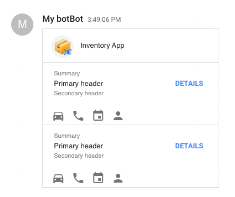 |
| Detail | Chat dialogs are used in to display detail views if opened from a card. Chat cards are used to display detail views if opened from an automation. A detail view of a record can show a list of other records that are referencing that row. The following detail view options are supported: Main image Column order Display name Icon All other detail view options, such as Quick edit columns or Desktop layout, are not supported at this time. In addition, the Position view option, used to define where the button used to access the view is located, is not supported at this time. Example integration: 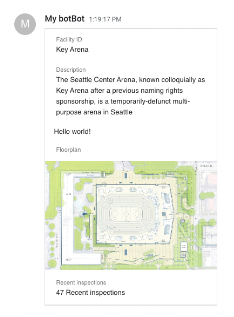 |
|
| Form | Chat dialogs are used to display form views. The following form view options are supported: Column order Display name Icon Row key All other form view options are not supported at this time. In addition, the Position view option, used to define where the button used to access the view is located, is not supported at this time. Example integration: 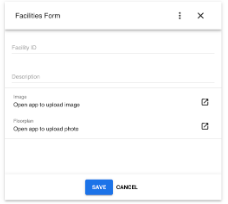 Note: For unsupported fields, users are prompted to open the app to edit the information. Note: For unsupported fields, users are prompted to open the app to edit the information. |
|
| Smart chips in Docs | Deck | Chat cards are used to display deck views. All deck view options are supported. Action buttons are rendered as icon-only due to space constraints. The Position view option, used to define where the button used to access the view is located, is not supported at this time. Example integration: |
| Detail | Chat dialogs are used to display detail views if opened from a card. Chat cards are used to display detail views if opened from an automation. A detail view of a record can show a list of other records that are referencing that row. The following detail view options are supported: Main image Column order Display name Icon All other detail view options, such as Quick edit columns or Desktop layout, are not supported at this time. Example integration: |
|
| Form | Note: Supported when using the smart chips @ menu only. Chat dialogs are used to display form views. The following form view options are supported: Column order Display name Icon Row key All other form view options are not supported at this time. In addition, the Position view option, used to define where the button used to access the view is located, is not supported at this time. Example integration: |
Unsupported view types and settings
The following view types are not supported for Workspace integration with AppSheet: calendar, card, chart, dashboard, gallery, map, onboarding, and table.
The global General, View type, and Location settings, described in View settings: The Essentials, are not supported for Workspace integration with AppSheet.
Column types and settings
The supported and unsupported column types and settings for Workspace integration with AppSheet are summarized in the following sections:
Supported column types
The following table summarizes the column types that are supported for Workspace integration with AppSheet and the data types used for corresponding read-only and editable fields.
Note: Currently, editing of column data is only available with Chat apps.
Supported column type settings
The following column type settings are supported for Chat app integration with AppSheet:
- Label?
- Editable?
- Require?
- Show?
- Valid if
Unsupported column type settings
The following column type settings are not supported for Workspace integration with AppSheet:
- Type Details (such as maximum and minimum length for text values)
- Suggested values under Auto Compute
- Description
- Valid if values that return a
Listtype, such as dependent drop-downs
Supported actions and settings
The supported and unsupported actions and settings that are supported for Workspace integration with AppSheet are summarized in the following sections:
Supported actions
The following table summarizes the actions that are supported for Workspace integration with AppSheet and their behavior.
| Action type | Behavior |
|---|---|
| App: copy this row and edit the copy | Navigates to new form view with row copied Note: This action type is not supported at this time. |
| App: go to another AppSheet app | Opens new tab |
| App: go to another view within this app | Navigates to view |
| App: open a form to add a new row to this table (not a row-level action) | Navigates to form view for table |
| App: open a form to edit this row | Navigates to form view with row context |
| Data: add a new row to another table by using values from this row | Creates a new row in another table |
| Data: delete this row | Deletes row |
| Data: execute an action on a set of rows | Executes the action on specified rows |
| Data: set the values of some columns in this row | Updates row |
| External: go to a website | Opens URL in a new tab |
| External: open a file | Opens new tab |
| External: start an email | Opens new tab with mailto:email |
| External: start a phone call | Opens new tab with tel:phone_number |
| External: start a text message | Opens new tab with sms:phone_number |
Unsupported actions
The following table summarizes the unsupported actions for Workspace integration with AppSheet.
| Workspace integration | Unsupported actions |
|---|---|
| Chat app | The following actions are not supported for Chat app integration with AppSheet: App: export this view as a CSV file (not a row-level action) App: import a CSV file for this view (not a row-level action) Grouped: execute a sequence of actions |
| Smart chip in Docs | The following actions are not supported for smart chip integration with AppSheet: App: export this view as a CSV file (not a row-level action) App: import a CSV file for this view (not a row-level action) Grouped: execute a sequence of actions The following actions are not supported for smart chip integration in web browsers (desktop): External: start a phone call External: start a text message |
Supported action settings
The following table summarizes the supported action settings for Workspace integration with AppSheet.
| Workspace integration | Supported action settings |
|---|---|
| Chat app | The following action settings are supported with Chat integration with AppSheet: Action icon Display name Only if this condition is true |
| Smart chip in Docs | The following action settings are supported with smart chip integration with AppSheet: Action icon Display name (on hover) Only if this condition is true |
Unsupported action settings
The following action settings are not supported for Workspace integration with AppSheet at this time:
| Workspace integration | Unsupported action settings |
|---|---|
| Chat | The following action settings are not supported in Chat integration with AppSheet at this time: Prominence Action confirmation settings, including: Needs confirmation? Confirmation Message |
| Smart chip in Docs | The following action settings are not supported in smart chip integration with AppSheet at this time: Prominence Action confirmation settings, including: Needs confirmation? Confirmation Message |
AppSheet functions
The following AppSheet functions are not supported for use in any Workspace integration:
CONTEXT("`View")`andCONTEXT("`ViewType")`- The Chat app view currently visible to the user is not available to AppSheet.HERE()- The Chat app user's location information is not available to AppSheet.
The following AppSheet functions are not supported at this time for use in Chat apps:
INPUT()USERLOCALE()- Set to the default table or app locale.
Format rules
The format rules are not supported for Workspace integration with AppSheet at this time.
Theme and brand settings
The theme and brand settings for Chat Apps with AppSheet are not supported at this time.
Was this helpful?
How can we improve it?