Understanding location in the background permissions (original) (raw)
This article guides you through key considerations and requirements to submit your app for access to location in the background permissions.
- [Does your app need access to the location in the background?](#Does your app need access to location in the background?)
- [Accessing location in the foreground](#Accessing location in the foreground)
- [Best practices for accessing location in the background](#Best practices for accessing location in the background)
- [Considerations in the approval process](#Considerations in the approval process)
- [Documentation required for location in the background permissions](#Documentation required for location in the background permissions)
- [Permissions Declaration Form](#Permissions declaration form)
- [Video demonstration](#Video demonstration)
- [Prominent in-app disclosure](#Prominent in-app disclosure)
- [Privacy policy both in your app and on its store listing page](#Privacy policy both in your app and on its store listing page)
- [Common violations and steps to resolve them](#Common violations and steps to resolve them)
- [How to remove location in the background](#How to remove location in the background)
- [When to update your app’s location permissions approval](#When to update your app’s location permissions approval)
- [Issues with old APKs that use location permissions](#Issues with old APKs that use location permissions)
For a good overview of what to consider when submitting an app that uses location in the background watch, Google Play Policy - Declared permissions and in-app disclosures
Does your app need access to the location in the background?
Your app should only request access to the location in the background if it’s required for the core functionality of the app. Think of core functionality as the main purpose of your app. This may involve a set of important features without which your app is broken or rendered unusable. The core feature(s) must all be prominently documented and promoted in the app’s description.
In addition, your app must meet the following requirements along with others detailed in this article:
- Background location may only be used when it provides a significant benefit to users and is relevant to the core functionality of the app.
- You should never request location permissions from users for the sole purpose of advertising or analytics.
- Apps designed specifically for children must comply with Google Play Families policy.
- Tip: Visit the Understanding Google Play Families policies section of Google Play Academy to learn more.
If your app requests access to the location in the background but it’s not important to the app’s core functionality, you must remove it from your app and/or implement location access in the foreground, when your app’s activity is visible to users. Device location is personal, and sensitive user data may never be sold nor shared for a purpose facilitating sale (for example, for noncompliant SDK use). That’s why apps that access location in the background must be approved. Without that approval, app updates may be blocked and your app may be removed from Google Play.
To learn more about when and how to use background location information, check out the Declare your use of device location data training on Google Play Academy. It includes examples of features that provide a significant benefit to users and are relevant to an app’s core functionality. It also provides a guide to completing the Permissions Declaration Form.
Accessing location in the foreground
Whenever possible, aim to access the location in the foreground rather than the background. What’s the difference? Access to the location in the foreground happens while an app is open and visible to the user. If the access happens after a user closes the app or uses the home button to return to their main screen, then the app’s access to the location is in the background.
What does this mean in terms of our Location Permissions policy? Foreground location access is the most transparent to users, which promotes trust, and that makes it our preferred approach for apps on Google Play.
There can be some cases where we approve an app’s use of foreground service, a separate API that lets an app access location information even when the app is minimized and not visible to the user. But these are subject to review and must meet key requirements, including the following:
- The use of foreground service must be initiated as a continuation of an in-app, user-initiated action.
- The use of foreground service must be terminated immediately after the application completes the intended use case of the user-initiated action.
Apps should request the minimum scope necessary (that is, using foreground instead of background device location permissions) to provide the feature or service that requires location. And users should reasonably expect that an app’s feature or service needs the level of location requested.
If an app’s use of device location via foreground service is equivalent to ACCESS_BACKGROUND_LOCATION (or otherwise "location in the background"), the app will be subject to location in the background permissions requirements.
Examples of access to location in the foreground
Here’s a list of features that could potentially be used with foreground instead of background location access. Having these features doesn’t mean that your app will be automatically rejected for access to a location in the background. We evaluate each app based on its declared core functionality. But if features like these are the only reason your app requires access to location in the background, then the chances of rejection are higher because these features can be conducted through foreground location access.
- Feature that suggests nearby friends/players/connections to add only when the user is in the app (excludes suggesting nearby friends/players/connections when the app is closed)
- One that personalizes in-app content like local news, music playlists for home, and so on based on user location (without any notification/alert/feature to the user when the app is closed)
- Feature that restricts content to enforce region-based digital rights management
- Delivery/service tracking (for things like food, packages, or a ride) for users (not drivers)
- Turn-by-turn navigation (not applicable if any functionality is conducted while the user is outside the app, such as passive tracking of routes/steps, monitoring when a user starts or stops driving, and so on)
- Feature that aggregates user location data to show traffic patterns/high congestion points or map nearby internet speeds
This isn’t an exhaustive list. However, if your app only has functionalities such as those above that require the use of location in the background, consider using access to location in the foreground instead.
Best practices for accessing location in the background
Be sure to review the following best practices for accessing location data in your app:
- Minimize your use of location by using the minimum scope necessary to provide a feature (such as coarse instead of fine, foreground instead of background).
- Consider whether app users should reasonably expect that your app’s feature or service needs the level of location requested. We may reject apps that request or access background location without adequate justification.
- Review the background location access checklist to identify any potential access in your code.
- Review privacy best practices and make sure you have the proper disclosure and privacy policies in place.
- Confirm that any third-party SDKs or libraries that you use comply with our policies, including the use of location permissions.
- Note that app bundles or APKs across all active release tracks (including closed and open tracks) are subject to review.
Considerations in the approval process
When we review an app that requests access to location in the background, we consider questions like these:
- Is the location in the background important to the app’s core functionality?
- Does location in the background deliver clear value to the user?
- Significant user benefits include physical safety, perceived safety, and health/fitness.
- Minimal user benefits may include ads or offerings, analytics, personalization, entertainment, and convenience.
- Would users expect the app to access their location in the background?
- Could the app deliver the same experience without accessing the location in the background?
- Is the privacy policy posted in Play Console and within the app itself?
This isn’t an exhaustive list, but it gives you an idea of how we may review and interpret an app’s use of location permissions.
Documentation required for location in the background permissions
If you use location in the background of your app, you must communicate this clearly to users both in your app and on its store listing page. You can do this in your app description, screenshots, and (if applicable) title or icon.
Here are some suggestions on how to highlight your app’s use of location in the background:
- Provide a short description to signal always-on location (for example, always know where).
- Include an in-app screenshot that shows a map/user location or geotagged images.
- If applicable, include wording or imagery in your app’s title or icon to also signal the location feature of your app.
When submitting your app for approval, you must provide the following specific documentation for location in the background permission:
- Permissions declaration form
- Video demonstration
- Prominent in-app disclosure
- Privacy policy both in your app and on its store listing page
Permissions declaration form
The Permissions Declaration Form is available in your Google Play Console account. You can find the form by:
- Going to the "App content" page
- Click Start in the "Sensitive app permissions" section,
- Then click Start within "Location permissions."
If you see prompts for other forms such as App Access Rights or Authority Declaration Form, complete those forms first. They’re required steps in preparing your app for review in Google Play Console. For detailed instructions, see the Prepare your app for review page.
If you don’t see the declaration prompt in Google Play Console, confirm that you’re using one of the sensitive location permissions according to the target SDK level of your app:
- If your app bundle or APK targets Android 10 or newer (SDK level 29 or higher) and contains ACCESS_BACKGROUND_LOCATION permission in the manifest, you’ll be directed to complete details on location usage.
- If your app bundle or APK targets Android 9 or older (SDK level 28 or lower) and contains either ACCESS_COARSE_LOCATION or ACCESS_FINE_LOCATION, you will need to indicate your intention to access location in the background and then you’ll be directed to complete details on location usage.
Inputs for the declaration form
When completing the declaration form regarding Permissions and APIs that Access Sensitive Information, answer the following questions so that Google can evaluate your app’s access to location in the background.
The Permissions Declaration Form focuses on this: What is the main purpose of your app?
- Location access: Why does your app need access to the location in the background?
- Tell us about _one location-based feature only_in your app that requires access to location in the background and explain why it can’t be implemented without this access. The feature should be related to the main purpose of your app. Approval will be granted for your entire app, not just for this single feature.
- We can only evaluate one feature at a time. The inclusion of multiple features will result in an app’s rejection.
- Video instructions: Provide a link to a short videothat clearly demonstrates the location-based feature being used in your app, the feature you declared in your form. Be sure to include in your video the prominent disclosure dialog that gets shown to users. Recommended video length: 30 seconds or shorter.
Video demonstration
The preceding section introduced the short video you need to provide as part of your declaration. Here’s an example video demonstration, followed by some requirements for your video.
Video requirements
Your video must demonstrate the declared feature in your app that requires access to location in the background (while the app is not in use). It also needs to show the steps necessary to encounter and enable this feature in-app.
Include the following elements in your video:
- The feature being activated from the background
- The prominent in-app disclosure dialog displayed to users
- Runtime prompt
Aim for a video duration of 30 seconds or less. The preferred format is a YouTube link, but Google Drive storage links to an MP4 or other common video file formats are also supported.
Important considerations:
- If the feature doesn’t have a user-facing interface when the location in the background is active, note this in your declaration and demonstrate the feature or its impacts as much as possible in your video.
- Be sure your video reflects your app’s behavior on an Android device. For example, don’t submit a video of your iOS app.
Prominent in-app disclosure
If your app requests access to the location in the background, you must provide an in-app disclosure of how the user’s data is accessed, collected, used, and/or shared.
Here are some examples of prominent in-app disclosures.
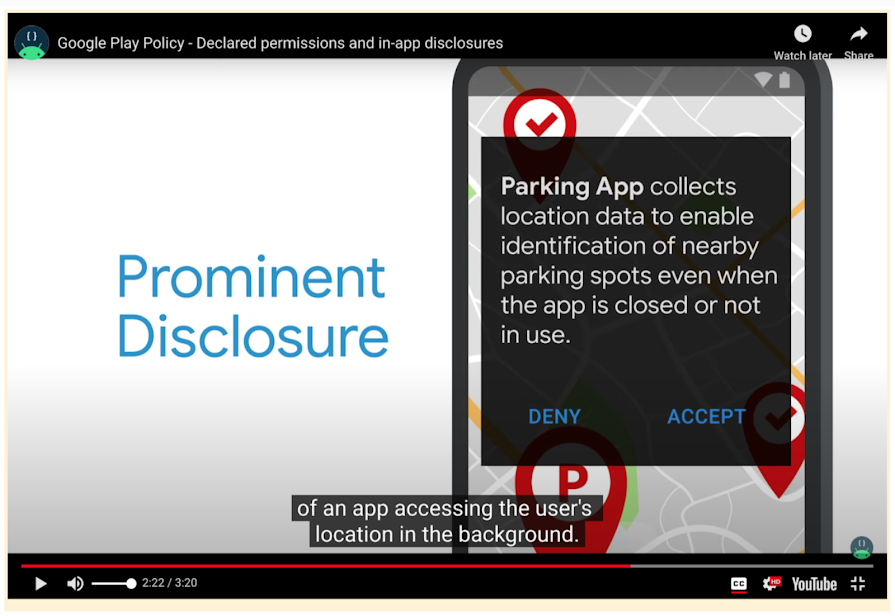
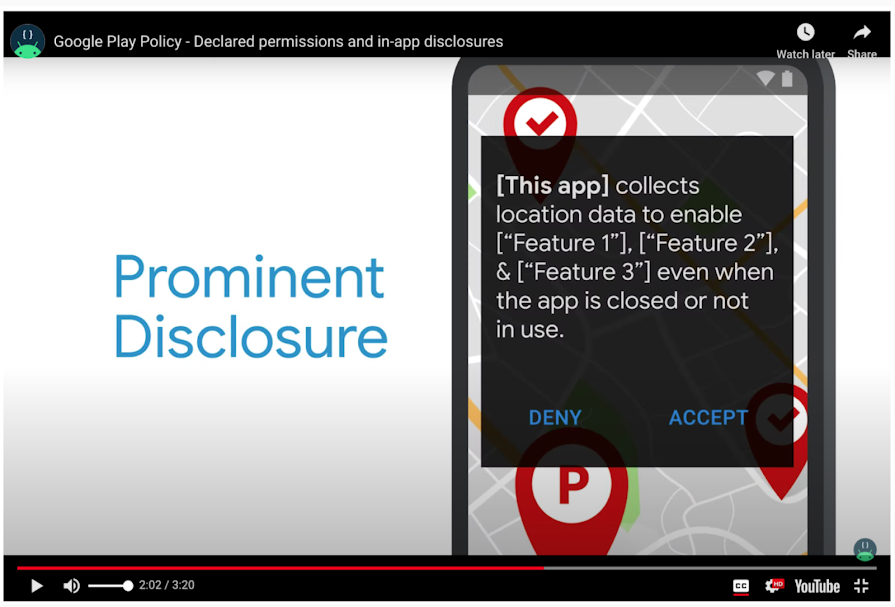
Disclosure statement requirements
Your in-app disclosure:
- Must be within the app itself as well as in the app description and website
- Must be displayed in the normal usage of the app and not require the user to navigate into a menu or settings
- Must describe the data being accessed or collected
- Must explain how the data will be used and/or shared
- Cannot only be placed in a privacy policy or terms of service
- Cannot be included with other Disclosures unrelated to personal or sensitive data collection
- Doesn’t need explicit user consent such as an "accept" or "I understand." This is done in the runtime prompt that immediately follows. You can also enable users to close or swipe away to migrate out of the disclosure.
Language in your disclosure must**:**
- Include the term "location"
- Indicate the nature of your app’s use of location in the background by using one of the following phrases: "background"/"when the app is closed"/"always in use"/"when the app is not in use"
- List all of the app features that use location in the background
- Include the following phrase if you extend permitted usage to ads: "used to provide ads/support advertising/support ads." (Choose the most accurate phrasing.)
Recommended disclosure format
To meet the policy requirements, we recommend using the following wording. Notice that the second example includes the use of location for ads. Using location data for ads must comply with our Use of Location Data for Ads policies.
Choose the most relevant phrasing:
- "[This app] collects location data to enable ["feature"], ["feature"], and ["feature"] even when the app is closed or not in use."
- "[This app] collects location data to enable ["feature"], ["feature"], and ["feature"] even when the app is closed or not in use, and it is also used to support advertising."
Examples:
"Fitness Funds collects location data to enable fitness tracking even when the app is closed or not in use."
"This app collects location data to enable tracking and delivery of local weather alerts even when the app is closed or not in use."
The prominent disclosure may include other information to ensure compliance with policyrequirements and clarity for users, but it must at least include the above, where relevant.
Note: If the feature does not have a user-facing interface when the location in the background is active, please show the prominent disclosure notification when the app is opened for the first time instead.
Privacy policy both in your app and on its store listing page
Your app’s privacy policy must, together with any in-app disclosures, comprehensively disclose how your app collects, uses, and/or shares user data, including the types of parties with whom it’s shared. Make sure your privacy policy:
- Is available on an active URL (no PDFs).
- Is non-editable.
- Is linked on your app's store listing page and within your app.
- Is clearly labeled as your app’s privacy policy in the title or URL and within the body of the page.
- Refers to the entity (developer or company) used in the Google Play listing or to the exact name of the app.
- Specifically describes user privacy.
- Contains appropriate related disclosures and reference location data and provides information about the app’s usage of location data.
You must also add your privacy policy to your app’s store listing page. This promotes transparency with users and shows how you handle sensitive user and device data. Consider consulting your own legal representative to advise you of other requirements.
Common violations and steps to resolve them
Unclear feature description
If we can’t identify the feature that requires access to location in the background based on your declaration, then we need you to provide a clear description or additional information about the feature. When your app has multiple features that require access to location in the background, you must choose just one feature to declare.
To resolve this issue, take one of these two steps:
- Resubmit a declaration form that clarifies and/or adds information to your description about one feature that requires access to location in the background.
- Remove the permission from the app manifest as well as the related source code for all APKs across all tracks (including closed and open tracks).
If your app has multiple features that require access to location in the background, use the following criteria to choose just one feature to declare. Then resubmit your declaration form via your Google Play Console account.
- The feature you choose must be important to your app’s core functionality — its main purpose. Without this core feature, your app is broken or rendered unusable.
- Consider whether users would expect your app to access their location in the background and whether you can deliver the same experience without accessing their location in the background.
- The feature must provide significant benefits to users. For example, a family companion app uses location in the background both to trigger an alert if a child leaves a geo-fenced region and to notify users of nearby offers. The child safety geo-fencing feature should be used on your permissions declaration because it delivers a more valuable user benefit (perceived safety) than the location-contextual ads’ benefits (convenience/personalization).
- Access to the location in the background solely for the purpose of ads will be denied.
Multiple features declared
A developer may only declare one location-based feature that requires access to a location in the background, not multiple. The feature you choose must be important to your app’s core functionality — its main purpose.
When your app has several features that require access to location in the background, select just one feature to declare and resubmit your declaration form via your Google Play Console account. When choosing the feature, consider these questions:
- Is this feature necessary to the core functionality, or main purpose, of your app? Without this feature, would your app be broken or rendered unusable?
- Would users expect your app to access their location in the background? If not, then it may not be a good candidate for background location access.
- Could your app deliver the same experience without accessing the location in the background? If so, then that’s a better route to take for approval.
- If you decide that your app isn’t a good candidate for background location access and/or that you can offer the same user experience without it, be sure to remove the background location access permission from the app manifest as well as the related source code for all APKs across all tracks (including closed and open tracks).
- Does this feature provide a significant benefit to users? For example, say a family companion app uses location in the background both to trigger an alert if a child leaves a geo-fenced region and to notify users of nearby offers. The child safety geo-fencing feature should be used on the permissions declaration because it delivers a more valuable user benefit (perceived safety) than the location-contextual ads’ benefits (convenience/personalization).
- Are ads the only reason for requesting access to the location in the background? Requests solely for the purpose of ads will be denied.
Unable to verify background feature in the app
Our review team must be able to verify that an app offers the declared feature that requires access to a location in the background and verifies the feature’s functionality in the app. If a feature isn’t visible to the user, then the video submitted needs to demonstrate that feature’s functionality.
To resolve this issue, modify your video to demonstrate the declared feature for which you’re requesting background location access and resubmit your declaration form via your Google Play Console account.
- Show in your video the in-app feature functionality that uses location in the background, including how a user would trigger the prominent disclosure and runtime permission (with user consent).
- If your declared feature’s functionality isn’t directly visible to the user, demonstrate the in-app experience. For example, show how it notifies the user of a fraud alert.
Feature doesn’t meet requirements to access location in the background
Our review team may find that a declared feature doesn’t meet our Location Permissions policy requirements. To resolve this, remove the request to access the location in the background and submit an update to your app. Follow this guide if you want to declare a different feature for access to location in the background:
- Only choose a feature if it delivers clear value to your users and is important to your app’s core functionality — its main purpose. Without this core feature, your app is broken or rendered unusable.
- Consider whether users would expect your app to access their location in the background. If not, then it may not be a good candidate for background location access.
- If you can deliver the same experience for users without accessing location in the background, then do that instead.
- Remember to remove the background location access permission from the app manifest as well as related source code for all APKs across all tracks (including closed and open test tracks) if you decide that your app isn’t a good candidate for background location access and/or that you can offer the same user experience without it.
Issues with submitted video
Sometimes we’re unable to view a video provided in a declaration or the video doesn’t accurately reflect the in-app experience. The video must show the declared in-app feature’s functionality in action and how that feature uses location in the background. Demonstrate how a user would trigger the prominent disclosure and the device-based runtime permission (with user consent).
Check that your video is accessible and/or modify your video to clearly show the declared feature that requires access to the location in the background. Then resubmit your declaration form via your Google Play Console account.
Invalid privacy policy
Our review may find that a privacy policy doesn’t comply with our policy requirements. To resolve this, review the Personal and Sensitive User Data policy, then add or update your privacy policy as needed for compliance, following these guidelines:
- Your privacy policy must be available on an active URL (no PDFs).
- Make sure it’s non-editable.
- Make sure it refers to your app.
- It must specifically cover user privacy.
- Make sure it’s linked on your app's store listing page and within your app.
- It must hold a reference to the same entity (for example, developer or company) used in the Google Play listing or to the exact name of the app.
Privacy policy link invalid or missing
Sometimes a URL for an app’s privacy policy page doesn’t load or it opens an invalid privacy policy page. To resolve this, review the privacy policy requirements in the Developer Policy Center. If the URL you provided links to multiple privacy policies, make the changes necessary (within the app, your website, and/or your app’s store listing page) to point to one governing privacy policy.
- It must be available on an active URL (no PDFs).
- Make sure it’s non-editable.
- Make sure it refers to your app.
- It must specifically cover user privacy.
- Make sure it’s linked on your app's store listing page and within your app.
- It must hold a reference to the same entity (for example, developer or company) used in the Google Play listing or to the exact name of the app.
Missing information in disclosure
Prominent disclosures must appear before an app’s location runtime permission, and they must tell users which feature(s) will use location in the background. Review the prominent disclosure and consent requirements and update your prominent disclosure:
- Make sure your prominent disclosure includes the term "location."
- Indicate how location is used in the background by including one of these phrases: "background"/"when the app is closed"/"always in use"/"when the app is not in use."
- Include a list of all the features that use location in the background.
- If you extend permitted usage to ads, include: "used to provide ads/support advertising/support ads." (Choose the most accurate phrasing.)
Prominent disclosure not found
An app must display a prominent disclosure in a dialog that pops up before the app’s location runtime permission. If your app doesn’t have one, review the prominent disclosure and consent requirements and add a prominent disclosure.
- Your prominent disclosure must appear before your app’s location runtime permission.
- Include at least the following sentence, which you adapt to include all the relevant features requesting access to location in the background in your app that are readily visible to the user: "This app collects location data to enable ["feature"], ["feature"], and ["feature"] even when the app is closed or not in use." If you extend permitted usage to ads, also include: "This data is also used to provide ads/support advertising/support ads."
- Include any other details necessary to make it clear to the user how and why you’re using location in the background. While additional content is permitted, it should not cause the required content to not be immediately visible.
Prominent disclosure needed before location runtime permission
An app must display a prominent disclosure in a dialog that appears beforethe app’s location runtime permission_._ Make sure your prominent disclosure appears at the right time and meets the prominent disclosure and consent requirements:
- Display your app’s prominent disclosure in a dialog that appears before the app’s location runtime permission.
- Include at least the following sentence, which you adapt to include all the relevant features requesting access to location in the background in your app that are readily visible to the user: "This app collects location data to enable ["feature"], ["feature"], and ["feature"] even when the app is closed or not in use.”
- Include any other details necessary to make it clear to the user how and why you are using location in the background. While additional content is permitted, it should not cause the required content to not be immediately visible.
- Include the following sentence, if you extend permitted usage to ads: "This data is also used to provide ads."
Feature is ineligible to access location in the background
Our review team may find that a declaration’s selected feature doesn’t require access to location in the background to function. Or the feature could use foreground location access instead of access to location in the background. These make it ineligible for approval for background location access.
In cases like these, you can either remove access to location in the background from your app and/or use foreground location access instead. Then submit an update to your app.
Missing or invalid testing credentials
Sometimes we’re unable to review an app because the developer didn’t provide testing credentials or the testing credentials provided in the declaration are invalid.To resolve this, we need testing credentials so that we can review and verify your in-app experience. Submit an updated declaration form with the testing credentials via your Google Play Console account. If you previously supplied credentials, please make sure that they haven’t expired.
In-app feature doesn’t match the declaration
If your in-app feature experience doesn’t match your declaration’s description of the feature, update your description in your declaration form. Try to reflect the experience as closely as possible as you describe the declared feature so that we can verify that it functions the way it’s described. Then resubmit the form via your Google Play Console account.
How to remove location in the background
If you’ve determined that your app doesn’t require location in the background, complete the steps in this section to remove background usage and reach compliance. You’ll also need to submit your app for review if location permissions are used in any app bundles or APKs, including non-production tracks. For a listing of affected app bundles or APKs, go to App content (Policy > App content > Sensitive app permissions > Show summary) in your Google Play Console account.
If you previously had any noncompliant app bundles or APKs accessing background location, make sure the noncompliant versions are not in any of your current releases, even if you don’t use certain tracks.
- Open App bundle explorer (Test and release > App bundle explorer) to check whether a certain version is active.
- When submitting a new app bundle APK to supersede the previous, noncompliant app bundle or APK, make sure the noncompliant app bundle or APK is under the "Not included" section before rolling out the new release.
- For further guidance, see the "Not included" section in the Prepare and roll out a release article.
- Make sure that any new, compliant release is rolled out to 100% and completely deactivates noncompliant app bundles or APKs.
If you’re still facing issues after examining your code paths and restricting usage to foreground purposes only, review any third-party SDKs used in your app that may be accessing the locations in the background.
When to update your app’s location permissions approval
It’s your responsibility to make sure that your app is approved for background location usage and remains compliant in all future submissions. App updates will be reviewed in accordance with Google Play policies. Material changes to your app may affect your app’s approval for background location access and cause additional reviews.
If there’s a change in an app feature that uses location in the background, please submit a new declaration form and we’ll review your app accordingly.
Issues with old APKs that use location permissions
If you have an old APK(s) with location permissions and you’re no longer able to make code changes to it (them), you may apply for a policy exception.
To qualify for the exception, you must meet all of the following requirements:
- You must declare the specific APK(s) for which you would like an exception.
- The APKs that you’re requesting an exception for must have been published before January 1, 2019.
- You must have alternative APKs served to users on Android Oreo (API Level 26) or higher, and these must be compliant with the Location Permissions policy.
- The APKs requesting an exception must represent a very small percentage (no more than a low single-digit %) of your total install base.
Google Play will review the request and grant exceptions on a case-by-case basis. Alternatively, you may choose to unpublish the violating APKs to be compliant with the Location Permissions policy.
Related content
- Learn more about declaring permissions in Google Play Console.
- Learn more about building location-aware apps on the Android Developers site.
- Learn more about permissions and the workflow for using permissions on the Android Developers site.
- Learn more about privacy best practices on the Android Developers site.
- Read our User Data policy.
- Learn more about how to stay compliant with Google Play device location policies in the Academy for App Success.
Was this helpful?
How can we improve it?