计算图和 tf.function 简介 (original) (raw)
概述
本指南深入探究 TensorFlow 和 Keras 以演示 TensorFlow 的工作原理。如果您想立即开始使用 Keras,请查看 Keras 指南合集。
在本指南中,您将了解 TensorFlow 如何让您对代码进行简单的更改来获取计算图、计算图的存储和表示方式以及如何使用它们来加速您的模型。
注:对于那些只熟悉 TensorFlow 1.x 的用户来说,本指南演示了迥然不同的计算图视图。
这是一个整体概述,涵盖了 tf.function 如何让您从 Eager Execution 切换到计算图执行。有关 tf.function 的更完整规范,请转到使用 tf.function 提高性能指南。
什么是计算图?
在前三篇指南中,您以 Eager 模式运行了 TensorFlow。这意味着 TensorFlow 运算由 Python 逐个执行,然后将结果返回给 Python。
虽然 Eager Execution 具有多个独特的优势,但计算图执行在 Python 外部实现了可移植性,并且往往提供更出色的性能。计算图执行意味着张量计算作为 _TensorFlow 计算图_执行,后者有时被称为 tf.Graph 或简称为“计算图”。
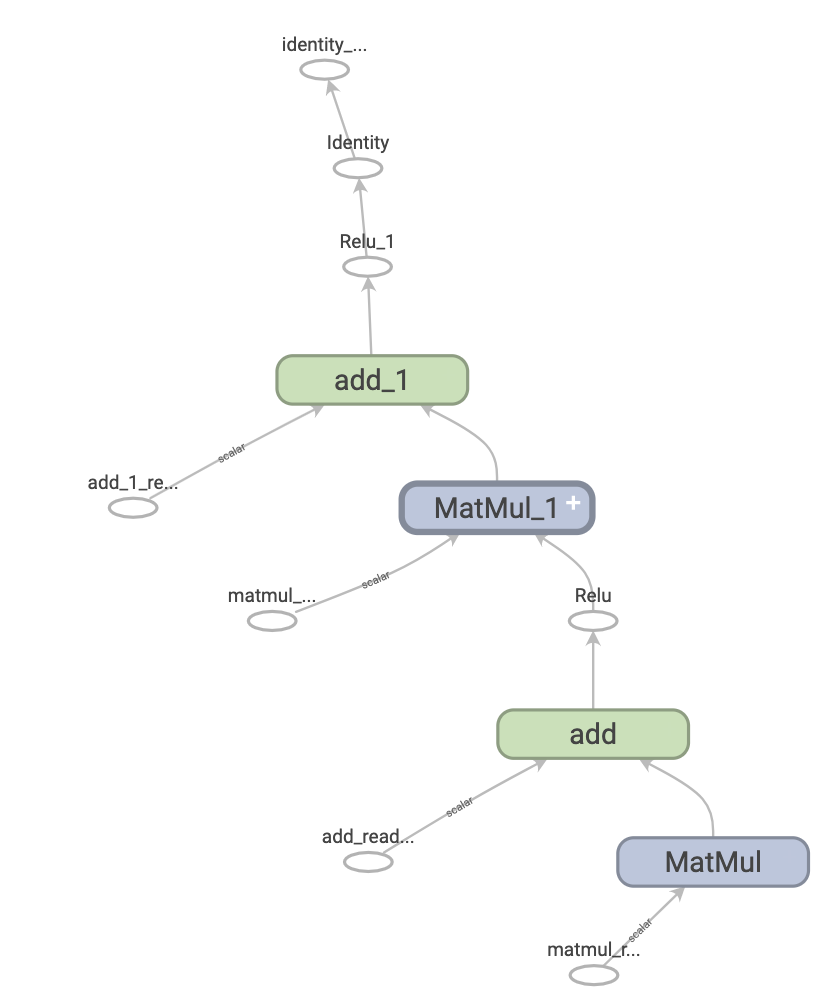
计算图是包含一组 tf.Operation 对象(表示计算单元)和 tf.Tensor 对象(表示在运算之间流动的数据单元)的数据结构。计算图在 tf.Graph 上下文中定义。由于这些计算图是数据结构,无需原始 Python 代码即可保存、运行和恢复它们。
下面是一个表示两层神经网络的 TensorFlow 计算图在 TensorBoard 中呈现后的样子:
计算图的优点
使用计算图,您将拥有极大的灵活性。您可以在移动应用、嵌入式设备和后端服务器等没有 Python 解释器的环境中使用 TensorFlow 计算图。当 TensorFlow 从 Python 导出计算图时,它会将这些计算图用作已保存模型的格式。
计算图的优化也十分轻松,允许编译器进行如下转换:
- 通过在计算中折叠常量节点来静态推断张量的值_(“常量折叠”)_。
- 分离独立的计算子部分,并在线程或设备之间进行拆分。
- 通过消除通用子表达式来简化算术运算。
有一个完整的优化系统 Grappler 来执行这种加速和其他加速。
简而言之,计算图极为有用,它可以使 TensorFlow 快速运行、并行运行以及在多个设备上高效运行。
但是,为了方便起见,您仍然需要在 Python 中定义我们的机器学习模型(或其他计算),然后在需要时自动构造计算图。
安装
导入一些所需的库:
import tensorflow as tf
import timeit
from datetime import datetime
2023-11-07 17:38:22.381032: E external/local_xla/xla/stream_executor/cuda/cuda_dnn.cc:9261] Unable to register cuDNN factory: Attempting to register factory for plugin cuDNN when one has already been registered 2023-11-07 17:38:22.381078: E external/local_xla/xla/stream_executor/cuda/cuda_fft.cc:607] Unable to register cuFFT factory: Attempting to register factory for plugin cuFFT when one has already been registered 2023-11-07 17:38:22.382629: E external/local_xla/xla/stream_executor/cuda/cuda_blas.cc:1515] Unable to register cuBLAS factory: Attempting to register factory for plugin cuBLAS when one has already been registered
利用计算图
您可以使用 tf.function 在 TensorFlow 中创建和运行计算图,要么作为直接调用,要么作为装饰器。tf.function 将一个常规函数作为输入并返回一个 Function。**Function 是一个 Python 可调用对象,它通过 Python 函数构建 TensorFlow 计算图。您可以按照与其 Python 等价函数相同的方式使用 Function。**
# Define a Python function.
def a_regular_function(x, y, b):
  x = tf.matmul(x, y)
  x = x + b
  return x

# `a_function_that_uses_a_graph` is a TensorFlow `Function`.
a_function_that_uses_a_graph = tf.function(a_regular_function)

# Make some tensors.
x1 = tf.constant([[1.0, 2.0]])
y1 = tf.constant([[2.0], [3.0]])
b1 = tf.constant(4.0)

orig_value = a_regular_function(x1, y1, b1).numpy()
# Call a `Function` like a Python function.
tf_function_value = a_function_that_uses_a_graph(x1, y1, b1).numpy()
assert(orig_value == tf_function_value)
在外部,一个 Function 看起来就像您使用 TensorFlow 运算编写的常规函数。然而,在底层,它_迥然不同_。一个 Function **在一个 API 后面封装了多个 tf.Graph**(在_多态性_部分了解详情)。这就是 Function 能够为您提供计算图执行的好处(例如速度和可部署性,请参阅上面的_计算图的优点_)。
tf.function 适用于一个函数_及其调用的所有其他函数_:
def inner_function(x, y, b):
  x = tf.matmul(x, y)
  x = x + b
  return x

# Use the decorator to make `outer_function` a `Function`.
@tf.function
def outer_function(x):
  y = tf.constant([[2.0], [3.0]])
  b = tf.constant(4.0)

  return inner_function(x, y, b)

# Note that the callable will create a graph that
# includes `inner_function` as well as `outer_function`.
outer_function(tf.constant([[1.0, 2.0]])).numpy()
array([[12.]], dtype=float32)
如果您使用过 TensorFlow 1.x,会发现根本不需要定义 Placeholder 或 tf.Sesssion。
将 Python 函数转换为计算图
您使用 TensorFlow 编写的任何函数都将包含内置 TF 运算和 Python 逻辑的混合,例如 if-then 子句、循环、break、return、continue 等。虽然 TensorFlow 运算很容易被 tf.Graph 捕获,但特定于 Python 的逻辑需要经过额外的步骤才能成为计算图的一部分。tf.function 使用称为 AutoGraph (tf.autograph) 的库将 Python 代码转换为计算图生成代码。
def simple_relu(x):
  if tf.greater(x, 0):
    return x
  else:
    return 0

# `tf_simple_relu` is a TensorFlow `Function` that wraps `simple_relu`.
tf_simple_relu = tf.function(simple_relu)

print("First branch, with graph:", tf_simple_relu(tf.constant(1)).numpy())
print("Second branch, with graph:", tf_simple_relu(tf.constant(-1)).numpy())
First branch, with graph: 1 Second branch, with graph: 0
虽然您不太可能需要直接查看计算图,但您可以检查输出以验证确切的结果。这些结果都不太容易阅读,因此不需要看得太仔细!
# This is the graph-generating output of AutoGraph.
print(tf.autograph.to_code(simple_relu))
def tf__simple_relu(x): with ag__.FunctionScope('simple_relu', 'fscope', ag__.ConversionOptions(recursive=True, user_requested=True, optional_features=(), internal_convert_user_code=True)) as fscope: do_return = False retval_ = ag__.UndefinedReturnValue()
    def get_state():
        return (do_return, retval_)

    def set_state(vars_):
        nonlocal retval_, do_return
        (do_return, retval_) = vars_

    def if_body():
        nonlocal retval_, do_return
        try:
            do_return = True
            retval_ = ag__.ld(x)
        except:
            do_return = False
            raise

    def else_body():
        nonlocal retval_, do_return
        try:
            do_return = True
            retval_ = 0
        except:
            do_return = False
            raise
    ag__.if_stmt(ag__.converted_call(ag__.ld(tf).greater, (ag__.ld(x), 0), None, fscope), if_body, else_body, get_state, set_state, ('do_return', 'retval_'), 2)
    return fscope.ret(retval_, do_return)
# This is the graph itself.
print(tf_simple_relu.get_concrete_function(tf.constant(1)).graph.as_graph_def())
node { name: "x" op: "Placeholder" attr { key: "_user_specified_name" value { s: "x" } } attr { key: "dtype" value { type: DT_INT32 } } attr { key: "shape" value { shape { } } } } node { name: "Greater/y" op: "Const" attr { key: "dtype" value { type: DT_INT32 } } attr { key: "value" value { tensor { dtype: DT_INT32 tensor_shape { } int_val: 0 } } } } node { name: "Greater" op: "Greater" input: "x" input: "Greater/y" attr { key: "T" value { type: DT_INT32 } } } node { name: "cond" op: "StatelessIf" input: "Greater" input: "x" attr { key: "Tcond" value { type: DT_BOOL } } attr { key: "Tin" value { list { type: DT_INT32 } } } attr { key: "Tout" value { list { type: DT_BOOL type: DT_INT32 } } } attr { key: "_lower_using_switch_merge" value { b: true } } attr { key: "_read_only_resource_inputs" value { list { } } } attr { key: "else_branch" value { func { name: "cond_false_31" } } } attr { key: "output_shapes" value { list { shape { } shape { } } } } attr { key: "then_branch" value { func { name: "cond_true_30" } } } } node { name: "cond/Identity" op: "Identity" input: "cond" attr { key: "T" value { type: DT_BOOL } } } node { name: "cond/Identity_1" op: "Identity" input: "cond:1" attr { key: "T" value { type: DT_INT32 } } } node { name: "Identity" op: "Identity" input: "cond/Identity_1" attr { key: "T" value { type: DT_INT32 } } } library { function { signature { name: "cond_false_31" input_arg { name: "cond_placeholder" type: DT_INT32 } output_arg { name: "cond_identity" type: DT_BOOL } output_arg { name: "cond_identity_1" type: DT_INT32 } } node_def { name: "cond/Const" op: "Const" attr { key: "dtype" value { type: DT_BOOL } } attr { key: "value" value { tensor { dtype: DT_BOOL tensor_shape { } bool_val: true } } } } node_def { name: "cond/Const_1" op: "Const" attr { key: "dtype" value { type: DT_BOOL } } attr { key: "value" value { tensor { dtype: DT_BOOL tensor_shape { } bool_val: true } } } } node_def { name: "cond/Const_2" op: "Const" attr { key: "dtype" value { type: DT_INT32 } } attr { key: "value" value { tensor { dtype: DT_INT32 tensor_shape { } int_val: 0 } } } } node_def { name: "cond/Const_3" op: "Const" attr { key: "dtype" value { type: DT_BOOL } } attr { key: "value" value { tensor { dtype: DT_BOOL tensor_shape { } bool_val: true } } } } node_def { name: "cond/Identity" op: "Identity" input: "cond/Const_3:output:0" attr { key: "T" value { type: DT_BOOL } } } node_def { name: "cond/Const_4" op: "Const" attr { key: "dtype" value { type: DT_INT32 } } attr { key: "value" value { tensor { dtype: DT_INT32 tensor_shape { } int_val: 0 } } } } node_def { name: "cond/Identity_1" op: "Identity" input: "cond/Const_4:output:0" attr { key: "T" value { type: DT_INT32 } } } ret { key: "cond_identity" value: "cond/Identity:output:0" } ret { key: "cond_identity_1" value: "cond/Identity_1:output:0" } attr { key: "_construction_context" value { s: "kEagerRuntime" } } arg_attr { key: 0 value { attr { key: "_output_shapes" value { list { shape { } } } } } } } function { signature { name: "cond_true_30" input_arg { name: "cond_identity_1_x" type: DT_INT32 } output_arg { name: "cond_identity" type: DT_BOOL } output_arg { name: "cond_identity_1" type: DT_INT32 } } node_def { name: "cond/Const" op: "Const" attr { key: "dtype" value { type: DT_BOOL } } attr { key: "value" value { tensor { dtype: DT_BOOL tensor_shape { } bool_val: true } } } } node_def { name: "cond/Identity" op: "Identity" input: "cond/Const:output:0" attr { key: "T" value { type: DT_BOOL } } } node_def { name: "cond/Identity_1" op: "Identity" input: "cond_identity_1_x" attr { key: "T" value { type: DT_INT32 } } } ret { key: "cond_identity" value: "cond/Identity:output:0" } ret { key: "cond_identity_1" value: "cond/Identity_1:output:0" } attr { key: "_construction_context" value { s: "kEagerRuntime" } } arg_attr { key: 0 value { attr { key: "_output_shapes" value { list { shape { } } } } attr { key: "_user_specified_name" value { s: "x" } } } } } } versions { producer: 1645 min_consumer: 12 }
大多数情况下,tf.function 无需特殊考虑即可工作。但是,有一些注意事项,tf.function 指南以及完整的 AutoGraph 参考可以提供帮助。
多态性:一个 Function,多个计算图
tf.Graph 专门用于特定类型的输入(例如,具有特定 dtype 的张量或具有相同 id() 的对象)。
每次使用一组无法由现有的任何计算图处理的参数(例如具有新 dtypes 或不兼容形状的参数)调用 Function 时,Function 都会创建一个专门用于这些新参数的新 tf.Graph。tf.Graph 输入的类型规范被称为它的输入签名或签名。如需详细了解何时生成新的 tf.Graph 以及如何控制它,请转到使用 tf.function 提高性能指南的_回溯规则_部分。
Function 在 ConcreteFunction 中存储与该签名对应的 tf.Graph。**ConcreteFunction 是围绕 tf.Graph 的封装容器**。
@tf.function
def my_relu(x):
  return tf.maximum(0., x)

# `my_relu` creates new graphs as it observes more signatures.
print(my_relu(tf.constant(5.5)))
print(my_relu([1, -1]))
print(my_relu(tf.constant([3., -3.])))
tf.Tensor(5.5, shape=(), dtype=float32) tf.Tensor([1. 0.], shape=(2,), dtype=float32) tf.Tensor([3. 0.], shape=(2,), dtype=float32)
如果已经使用该签名调用了 Function,则该 Function 不会创建新的 tf.Graph。
# These two calls do *not* create new graphs.
print(my_relu(tf.constant(-2.5))) # Signature matches `tf.constant(5.5)`.
print(my_relu(tf.constant([-1., 1.]))) # Signature matches `tf.constant([3., -3.])`.
tf.Tensor(0.0, shape=(), dtype=float32) tf.Tensor([0. 1.], shape=(2,), dtype=float32)
由于它由多个计算图提供支持,因此 Function 是多态的。这样,它便能够支持比单个 tf.Graph 可以表示的更多的输入类型,并优化每个 tf.Graph 来获得更出色的性能。
# There are three `ConcreteFunction`s (one for each graph) in `my_relu`.
# The `ConcreteFunction` also knows the return type and shape!
print(my_relu.pretty_printed_concrete_signatures())
Input Parameters: x (POSITIONAL_OR_KEYWORD): TensorSpec(shape=(), dtype=tf.float32, name=None) Output Type: TensorSpec(shape=(), dtype=tf.float32, name=None) Captures: None
Input Parameters: x (POSITIONAL_OR_KEYWORD): List[Literal[1], Literal[-1]] Output Type: TensorSpec(shape=(2,), dtype=tf.float32, name=None) Captures: None
Input Parameters: x (POSITIONAL_OR_KEYWORD): TensorSpec(shape=(2,), dtype=tf.float32, name=None) Output Type: TensorSpec(shape=(2,), dtype=tf.float32, name=None) Captures: None
使用 tf.function
到目前为止,您已经学习了如何使用 tf.function 作为装饰器或包装容器将 Python 函数简单地转换为计算图。但在实践中,让 tf.function 正常工作可能相当棘手!在下面的部分中,您将了解如何使用 tf.function 使代码按预期工作。
计算图执行与 Eager Execution
Function 函数中的代码既能以 Eager 模式执行,也可以作为计算图执行。默认情况下,Function 将其代码作为计算图执行:
@tf.function
def get_MSE(y_true, y_pred):
  sq_diff = tf.pow(y_true - y_pred, 2)
  return tf.reduce_mean(sq_diff)
y_true = tf.random.uniform([5], maxval=10, dtype=tf.int32)
y_pred = tf.random.uniform([5], maxval=10, dtype=tf.int32)
print(y_true)
print(y_pred)
tf.Tensor([2 5 4 5 3], shape=(5,), dtype=int32) tf.Tensor([2 4 9 9 4], shape=(5,), dtype=int32)
get_MSE(y_true, y_pred)
<tf.Tensor: shape=(), dtype=int32, numpy=8>
要验证 Function 计算图是否与其等效 Python 函数执行相同的计算,您可以使用 tf.config.run_functions_eagerly(True) 使其以 Eager 模式执行。这是一个开关,用于关闭 Function 创建和运行计算图的能力,无需正常执行代码。
tf.config.run_functions_eagerly(True)
get_MSE(y_true, y_pred)
<tf.Tensor: shape=(), dtype=int32, numpy=8>
# Don't forget to set it back when you are done.
tf.config.run_functions_eagerly(False)
但是,Function 在计算图执行和 Eager Execution 下的行为可能有所不同。Python print 函数是这两种模式不同之处的一个示例。我们看看当您将 print 语句插入到您的函数并重复调用它时会发生什么。
@tf.function
def get_MSE(y_true, y_pred):
  print("Calculating MSE!")
  sq_diff = tf.pow(y_true - y_pred, 2)
  return tf.reduce_mean(sq_diff)
观察打印的内容:
error = get_MSE(y_true, y_pred)
error = get_MSE(y_true, y_pred)
error = get_MSE(y_true, y_pred)
Calculating MSE!
输出很令人惊讶?尽管 get_MSE 被调用了 3 次,但它只打印了一次。
解释一下,print 语句在 Function 运行原始代码时执行,以便在称为“跟踪”(请参阅 tf.function 指南的_跟踪_部分)的过程中创建计算图。跟踪将 TensorFlow 运算捕获到计算图中,而计算图中未捕获 print。随后对全部三个调用执行该计算图,而没有再次运行 Python 代码。
作为健全性检查,我们关闭计算图执行来比较:
# Now, globally set everything to run eagerly to force eager execution.
tf.config.run_functions_eagerly(True)
# Observe what is printed below.
error = get_MSE(y_true, y_pred)
error = get_MSE(y_true, y_pred)
error = get_MSE(y_true, y_pred)
Calculating MSE! Calculating MSE! Calculating MSE!
tf.config.run_functions_eagerly(False)
print 是 _Python 的副作用_,在将函数转换为 Function 时,您还应注意其他差异。请在使用 tf.function 提升性能指南中的_限制_部分中了解详情。
注:如果您想同时在 Eager Execution 和计算图执行中打印值,请改用 tf.print。
非严格执行
计算图执行仅执行产生可观察效果所需的运算,这包括:
- 函数的返回值
- 已记录的著名副作用,例如:
- 输入/输出运算,如 tf.print
- 调试运算,如 tf.debugging 中的断言函数
- tf.Variable 的突变
这种行为通常称为“非严格执行”,与 Eager Execution 不同,后者会分步执行所有程序运算,无论是否需要。
特别是,运行时错误检查不计为可观察效果。如果一个运算因为不必要而被跳过,它不会引发任何运行时错误。
在下面的示例中,计算图执行期间跳过了“不必要的”运算 tf.gather,因此不会像在 Eager Execution 中那样引发运行时错误 InvalidArgumentError。切勿依赖执行计算图时引发的错误。
def unused_return_eager(x):
  # Get index 1 will fail when `len(x) == 1`
  tf.gather(x, [1]) # unused
  return x

try:
  print(unused_return_eager(tf.constant([0.0])))
except tf.errors.InvalidArgumentError as e:
  # All operations are run during eager execution so an error is raised.
  print(f'{type(e).__name__}: {e}')
tf.Tensor([0.], shape=(1,), dtype=float32)
@tf.function
def unused_return_graph(x):
  tf.gather(x, [1]) # unused
  return x

# Only needed operations are run during graph execution. The error is not raised.
print(unused_return_graph(tf.constant([0.0])))
tf.Tensor([0.], shape=(1,), dtype=float32)
tf.function 最佳做法
可能需要花一些时间来习惯 Function 的行为。为了快速上手,初次使用的用户应当使用 @tf.function 来装饰简单函数,以获得从 Eager Execution 转换到计算图执行的经验。
_为 tf.function 设计_可能是您编写与计算图兼容的 TensorFlow 程序的最佳选择。以下是一些提示:
- 尽早并经常使用 tf.config.run_functions_eagerly 在 Eager Execution 和计算图执行之间切换,以查明两种模式是否/何时出现分歧。
- 在 Python 函数外部创建 tf.Variable 并在内部修改它们。对使用 tf.Variable 的对象也如此操作,例如 tf.keras.layers、tf.keras.Model 和 tf.keras.optimizers。
- 避免编写依赖于外部 Python 变量的函数,不包括 tf.Variable 和 Keras 对象。请在 tf.function 指南的_依赖于 Python 全局变量和自由变量_中了解详情。
- 尽可能编写以张量和其他 TensorFlow 类型作为输入的函数。您可以传入其他对象类型,但务必小心!请在 tf.function 指南的_依赖于 Python 对象_中了解详情。
- 在 tf.function 下包含尽可能多的计算以最大程度提高性能收益。例如,装饰整个训练步骤或整个训练循环。
见证加速
tf.function 通常可以提高代码的性能,但加速的程度取决于您运行的计算种类。小型计算可能以调用计算图的开销为主。您可以按如下方式衡量性能上的差异:
x = tf.random.uniform(shape=[10, 10], minval=-1, maxval=2, dtype=tf.dtypes.int32)

def power(x, y):
  result = tf.eye(10, dtype=tf.dtypes.int32)
  for _ in range(y):
    result = tf.matmul(x, result)
  return result
print("Eager execution:", timeit.timeit(lambda: power(x, 100), number=1000), "seconds")
Eager execution: 4.110958347000178 seconds
power_as_graph = tf.function(power)
print("Graph execution:", timeit.timeit(lambda: power_as_graph(x, 100), number=1000), "seconds")
Graph execution: 0.8174858239999594 seconds
tf.function 通常用于加速训练循环,您可以在使用 Keras 从头开始编写训练循环指南的_使用 tf.function 加速训练步骤_部分中了解详情。
注:您也可以尝试 tf.function(jit_compile=True) 以获得更显著的性能提升,特别是当您的代码非常依赖于 TF 控制流并且使用许多小张量时。请在 XLA 概述的_使用 tf.function(jitcompile=True) 显式编译_部分中了解详情。
性能和权衡
计算图可以加速您的代码,但创建它们的过程有一些开销。对于某些函数,计算图的创建比计算图的执行花费更长的时间。这种投资通常会随着后续执行的性能提升而迅速得到回报,但重要的是要注意,由于跟踪的原因,任何大型模型训练的前几步可能会较慢。
无论您的模型有多大,您都应该避免频繁跟踪。tf.function 指南在_控制重新跟踪_部分探讨了如何设置输入规范并使用张量参数来避免重新跟踪。如果您发现自己的性能异常糟糕,最好检查一下是否发生了意外重新跟踪。
Function 何时进行跟踪?
要确定您的 Function 何时进行跟踪,请在其代码中添加一条 print 语句。根据经验,Function 将在每次跟踪时执行该 print 语句。
@tf.function
def a_function_with_python_side_effect(x):
  print("Tracing!") # An eager-only side effect.
  return x * x + tf.constant(2)

# This is traced the first time.
print(a_function_with_python_side_effect(tf.constant(2)))
# The second time through, you won't see the side effect.
print(a_function_with_python_side_effect(tf.constant(3)))
Tracing! tf.Tensor(6, shape=(), dtype=int32) tf.Tensor(11, shape=(), dtype=int32)
# This retraces each time the Python argument changes,
# as a Python argument could be an epoch count or other
# hyperparameter.
print(a_function_with_python_side_effect(2))
print(a_function_with_python_side_effect(3))
Tracing! tf.Tensor(6, shape=(), dtype=int32) Tracing! tf.Tensor(11, shape=(), dtype=int32)
新的 Python 参数总是会触发新计算图的创建,因此需要额外的跟踪。
后续步骤
您可以在 API 参考页面上详细了解 tf.function,并遵循使用 tf.function 提升性能指南。