Train vast neural networks together (original) (raw)
Our aim is to train a large model in a decentralized fashion on consumer hardware or low-end cloud instances. This means we need to make the model, dataset, and other memory buffers fit onto a few GB of disk, 12-16 GB of CPU RAM, and 8-12 GB of GPU memory. Unfortunately, this rules out many popular techniques such asZeRO-Offload: there is simply not enough RAM for that. Instead, we must make better use of what limited memory we have. To do this, we use two techniques: 8-bit Optimizers for GPU memory and dataset streaming for RAM & HDD.
8-bit optimizers: Using optimizers such as LAMB or Adam requires four times as much GPU memory as simply storing model parameters (8 bytes vs 2 bytes) because of additional gradient statistics. As such, for training large models with many parameters, the optimizer state takes the largest amount of memory. With 8-bit optimizers, this amount is reduced by 75% (2 bytes), making it much easier to fit large models onto consumer GPUs.
Naturally, we can combine this technique with offloading and store 8-bit optimizer states in the CPU memory rather than in the GPU memory (0 bytes GPU, 2 bytes CPU). To perform an optimizer update, we transfer the GPU gradients to the CPU, update the model parameters, and then copy the new weights to the GPU. We can do this for each weight one-by-one so that the additional CPU memory required for the optimizer update is minimal. This combination of offloading and 8-bit optimizers means that we conserve GPU memory (0 bytes per parameter) and also use only a limited amount of CPU memory (2 bytes per parameter).
We've created an interactive "calculator" to help you get a better "feel" of which techniques to use and how they fit together. It covers 8-bit optimizers, offloading, as well as other popular tricks that emphasize memory efficiency. For each model configuration, it computes GPU and RAM usage based on the shapes of tensors that will be allocated. Of course, the real-world memory usage depends on the implementation details and technical inefficiencies. A good rule of thumb for PyTorch is to increase both CPU and GPU memory by 20-30%.
Dataset streaming: Usually data is stored on disk and needs to be fully or partially loaded into RAM for training. Large datasets used for pretraining measure in hundreds of gigabytes or even terabytes. This can pose a significant problem, as most desktop and cheap cloud instances simply do not have that much free space. Furthermore, downloading the data over the Internet would take up hours before one can even begin training.
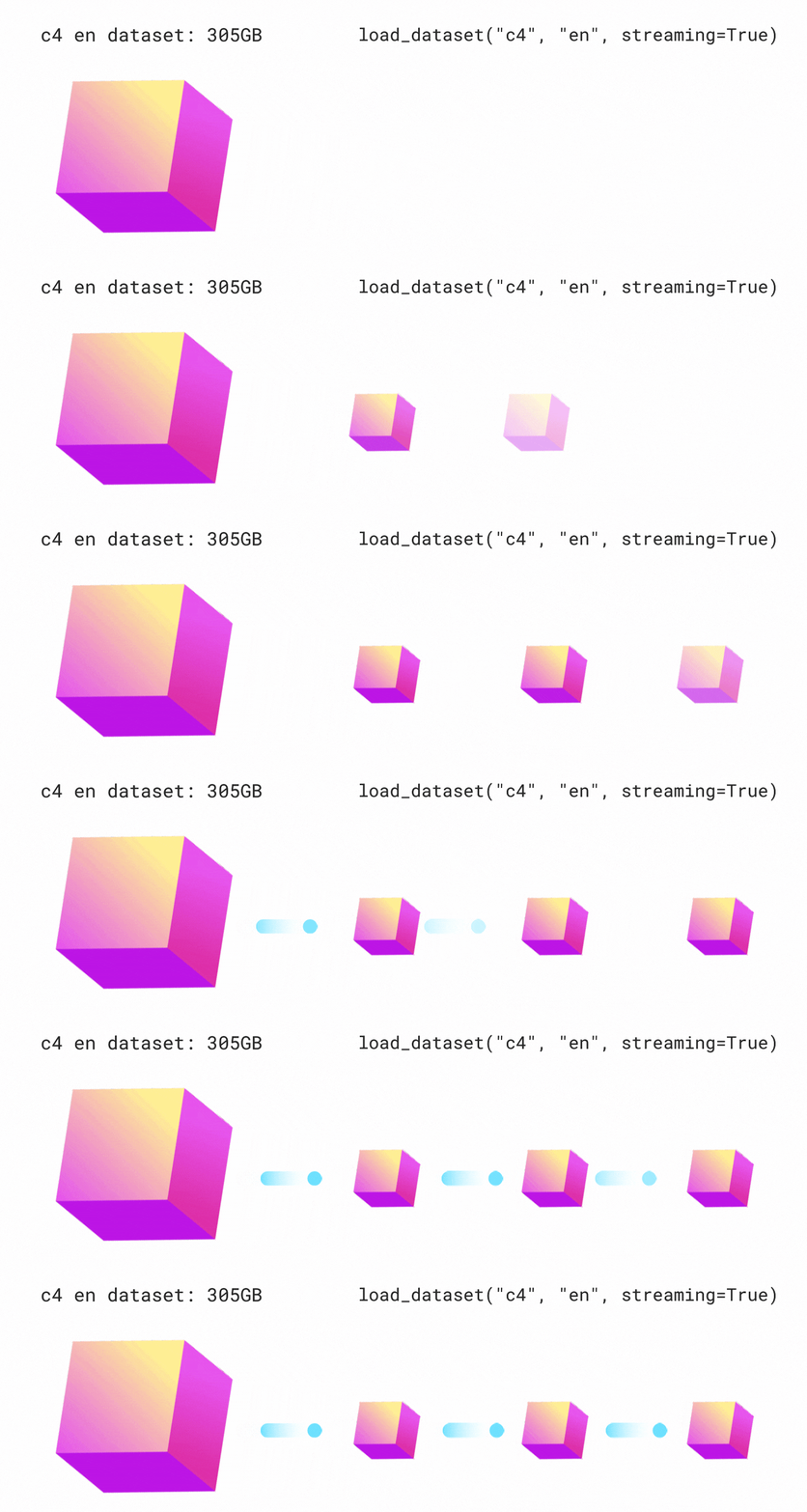
To circumvent these problems, it is possible to stream the data in the same way as you stream online videos. Participants download a small random portion of the training dataset and immediately begin training on it, while additional data is loaded in the background. As such, we can train a model with virtually no storage overhead from the dataset, and switching to a new dataset is as simple as changing an argument of the dataset class.
Here's our tutorial covering these methods: 
In this section, we discuss common concerns related to security of collaborative training:
Q: If I join a collaborative experiment, do I allow other people to execute code on my computer?
A: During the training, participants only exchange data (gradients, statistics, model weights) and never send code to each other. No other peer can execute arbitrary code on your computer.
To join the experiment, you typically need to run the code (implementing the model, data streaming, training loop, etc.) from a repository or a Colab notebook provided by the authors of the experiment. This is no different from running any other open source project/Colab notebook.
Q: Can a malicious participant influence the training outcome?
A: It is indeed possible unless we use some defense mechanisms. For instance, a malicious participant can damage model weights by sending large numbers instead of correct gradients. The same can happen due to broken hardware or misconfiguration.
- One possible defense is using authentication combined with model checkpointing. In this case, participants should log in (e.g. with their Hugging Face account) to interact with the rest of the collaboration. In turn, moderators can screen potential participants and add them to an allowlist. If something goes wrong (e.g. a participant sends invalid gradients and the model diverges), the moderators remove them from the list and revert the model to the latest checkpoint unaffected by the attack.
Nice bonus: using this data, the moderators can acknowledge the personal contribution of each participant. - Another defense is replacing the naive averaging of the peers' gradients with an aggregation technique that is robust to outliers.Karimireddy et al. (2020) suggested such a technique (named CenteredClip) and proved that it does not significantly affect the model's convergence.
In our case, CenteredClip is useful but not enough to protect from malicious participants, since it implies that the CenteredClip procedure itself is performed by a trusted server. By contrast, in our decentralized system, all participants can aggregate a part of the gradients, and we cannot assume any of them to be trusted.
Recently, Gorbunov et al. (2021) proposed a robust aggregation protocol for decentralized systems that does not require this assumption. This protocol uses CenteredClip as a subroutine but is able to detect and ban participants who performed it incorrectly.
In this section, we provide a recipe for you to run a collaborative training experiment yourself.
Got confused? Feel free to ask any questions in our Discord!
- Set up dataset streaming:
- Write the code of training peers (example):
- Implement your model, set up dataset streaming, and write the training loop.
- Get familiar with the hivemind library (quickstart).
- In the training loop, wrap up your PyTorch optimizer withhivemind.Optimizer (example).
- (optional) Write the code of auxiliary peers (example):
- Auxiliary peers are a special kind of peers responsible for logging experiment progress (e.g., to Weights & Biases) and uploading model checkpoints (e.g., to Hugging Face Hub).
- Such peers don't need to calculate gradients and may be launched on cheap machines without GPUs.
- They can serve as a convenient entry point tohivemind.DHT (i.e., their address can be specified as
initial_peers). - It is useful to fix their address by providing
host_maddrsandidentity_patharguments tohivemind.DHT(these are forwarded to the underlying libp2p daemon).
- (optional) Make it easier for other people to join:
- Create notebooks for free GPU providers (Google Colab, Kaggle, AWS SageMaker, etc.). People may run them online and/or download and run them on their own hardware.
- Create a Hugging Face organization with all resources related to the training (dataset, model, inference demo, how-to-join walkthrough, links to a dashboard with loss and other metrics, etc.). Look at ours for an example.
- Set up an authentication system (see the "Security" section). For example, you can ask people to join your organization with their Hugging Face accounts (the website allows either sharing a link for joining or manually approving new participants). This allows you to screen the peers, acknowledge their contributions (e.g., make a leaderboard), and ban accounts who behave maliciously. You can use our authentication system or deploy your own (our server implementation might be a good start).
- Set up an inference demo for your model (e.g., using Spaces) or a script that periodically uploads the inference results to show the training progress.