The Best Software for Customer Feedback to Suit Every Use Case (original) (raw)
What makes a great customer feedback tool?
You might be wondering, what separates the best customer feedback tools from the rest?
Well, below are the criteria I followed when selecting the right customer feedback tool for any use case:
- Robust functionality: It shouldn’t just offer feedback collection methods like surveys, forms, or usability tests. I also looked for advanced features like NPS tracking, sentiment analysis, and integrations that make it extra valuable.
- Flexibility and customization: The ability to customize surveys, forms, and workflows gives extra brownie points to a customer feedback tool.
- Short learning curve: Drag-and-drop editors, easy setup guides, and straightforward navigation are great for companies that lack technical budgets.
- Strong integrations: Seamless integrations with CRMs, analytics platforms, or project management software make a tool easier to include in your tech stack.
- Real-time analytics: To monitor trends, track NPS scores, and identify problems as they happen.
- Scalable pricing: Fair prices ensure you’re not overpaying or under-supported according to your company’s stage.
What is your biggest hurdle with software for customer feedback?
Collecting feedback is only half the battle. Making that feedback actionable is where most product teams struggle.
How do you currently act on the customer feedback you receive?
The best software for customer feedback allows you to trigger real-time responses based on user sentiment.
What is your primary goal for improving user sentiment?
Targeted feedback loops can significantly impact your core product metrics.
Turn Feedback into Growth with Userpilot.
Don’t just collect data—act on it. Userpilot provides the ultimate software for customer feedback, allowing you to run micro-surveys, analyze sentiment in real-time, and trigger personalized in-app experiences to improve adoption instantly. See how we help teams close the loop.
Request a Feedback Strategy Demo
The best customer feedback software for different use cases
Now, as I mentioned, I’m going to review the best software for each possible use case for customer feedback.
But before you scroll through a large page with tons of information, here’s a summary table with the key information for each tool:
| Tool | Use case | Key features | Pricing | G2 Rating |
|---|---|---|---|---|
| Typeform | Triggering email and web surveys | Form builder, survey maker, quizzes | Starts at $25/month (free plan available) | 4.5 |
| Canny | Managing customer feedback | AI-automated feedback management, public roadmaps, data collection and analytics | Freemium plan with paid plans starting at $79/month | 4.6 |
| Lookback | Conducting user tests | Usability testing, customer interviews, AI research assistant | Starts at $25/month (offers 5 sessions for free and a 60-day free trial) | 4.3 |
| Qualtrics | Analyzing the voice of the customer | Custom omnichannel surveys, advanced targeting and personalization, benchmarking | Custom pricing only | 4.4 |
| G2 | Tracking online reviews | Review platform, review invitations, analytics dashboards | Free (+ custom plans with variable pricing) | 4.7 |
| Mention | Carrying out social listening | AI-assisted social listening platform, analytics and reports, social content scheduling | Starts at $41/month with a free trial included | 4.3 |
| Brandwatch | Analyzing customer sentiment | Social monitoring and listening, cross-channel inbox, customer profiles | Custom pricing after a free demo | 4.1 |
| Discourse | Managing and monitoring community feedback | Open-source platform for creating community forums, real-time chat with community members, robust moderation features | Free if used as open source. Hosted plans start at $20/month (with free trial available) | 4.0 |
Best survey software – Typeform
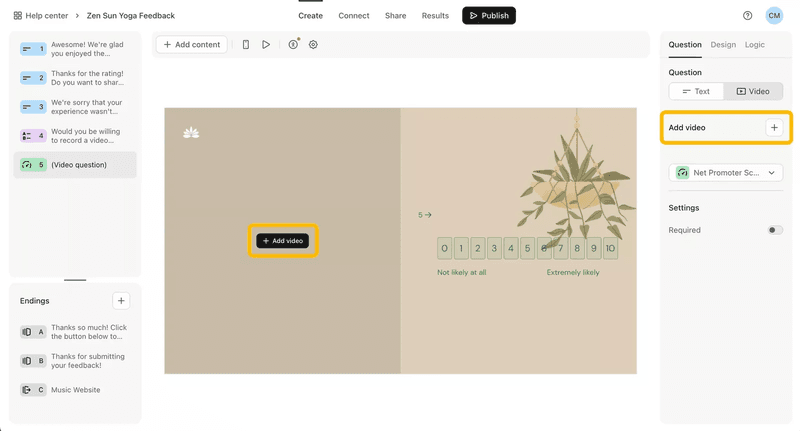
Creating surveys with Typeform.
Typeform is an interactive survey platform that focuses on creating user-friendly and visually engaging forms, customer surveys, and quizzes. It works best for businesses with fewer customers and channels (high-ticket services, consultants, local businesses, etc.).
Here’s what it offers:
- No-code survey builder: Beautifully designed, interactive surveys using a simple drag-and-drop builder.
- Multiple channel surveys: Embed customer surveys into websites, or share via email or direct links.
- Branching: Add logic jumps to surveys, dynamically adjusting questions based on previous responses.
- Branding: Customize surveys with your branding to maintain a consistent customer experience.
- Analytics: Analyze responses with built-in reporting tools that make data visualization and trend tracking easy.
Pros and cons of Typeform
✅ Intuitive and user-friendly interface for non-technical users.
✅ Customization options for branding and survey logic.
❌ Costs increase significantly for higher response volumes.
❌ Does not support in-app surveys.
❌ Most businesses will eventually outgrow it and need advanced feedback analytics.
How much does Typeform cost?
Typeform offers a range of plans to accommodate various needs:
- Basic plan ($25/month): Includes unlimited surveys and forms, limited to 100 responses per month.
- Plus plan ($50/month): Increases the response cap to 1,000 per month and adds advanced logic options.
- Business plan ($83/month): Designed for larger teams, with up to 10,000 responses per month, priority support, and advanced customization options.
There’s also a free plan with basic features and 50 responses.
Best feedback management software – Canny
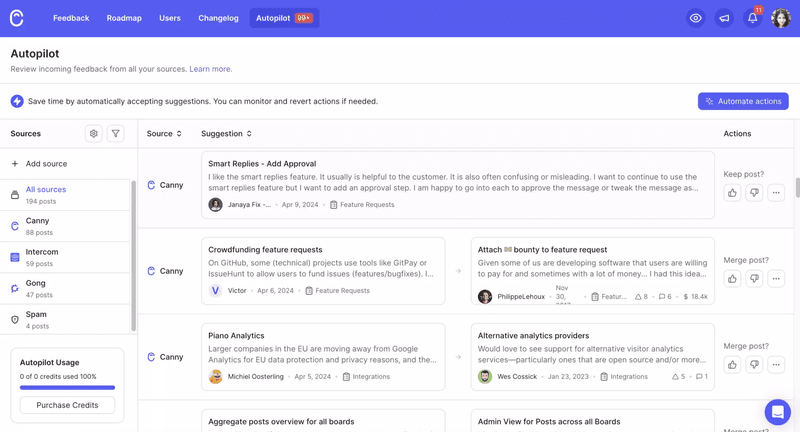
Using AI to analyze feedback with Canny.
Canny is a feedback management platform designed to centralize customer feedback and streamline product development processes. It’s ideal for teams that want to manage feature requests, bug tracking, and roadmap feedback—all in one place.
This is what you can do with its core features:
- Centralize customer feedback: Collect and organize feedback in a single platform, enabling easy prioritization of requests.
- Public roadmap: Create public feedback boards where users can submit ideas and vote on features.
- Direct communication with customers: Use the roadmap feature to communicate feature priorities and progress with your customers.
- AI-powered analytics: Leverage AI to analyze feedback trends and categorize responses for better decision-making.
Pros and cons of Canny
✅ Centralizes all customer feedback, reducing fragmentation.
✅ Can create multiple feedback boards for different categories or products.
✅ With the roadmap feature, you can communicate with customers more directly and prioritize features based on their feedback.
❌ Forms are filled on a separate platform instead of being integrated into your app or website. This could represent more friction for website visitors and reduce response rates.
❌ Limited reporting features or advanced analytics.
❌ It becomes hard to manage large volumes of feedback, with limited ways to filter them.
How much does Canny cost?
Canny offers the following pricing plans:
- Free plan: Supports up to 10 tracked users, ideal for very small teams.
- Startup plan ($79/month): Supports up to 1,000 tracked users and includes custom branding, integrations, and roadmap features.
- Growth plan ($299/month): Designed for larger teams with up to 10,000 tracked users and advanced customization options.
- Business plan (Custom pricing): Tailored for enterprise needs, offering unlimited tracked users, premium support, and enhanced security features.
Best user testing software – Lookback
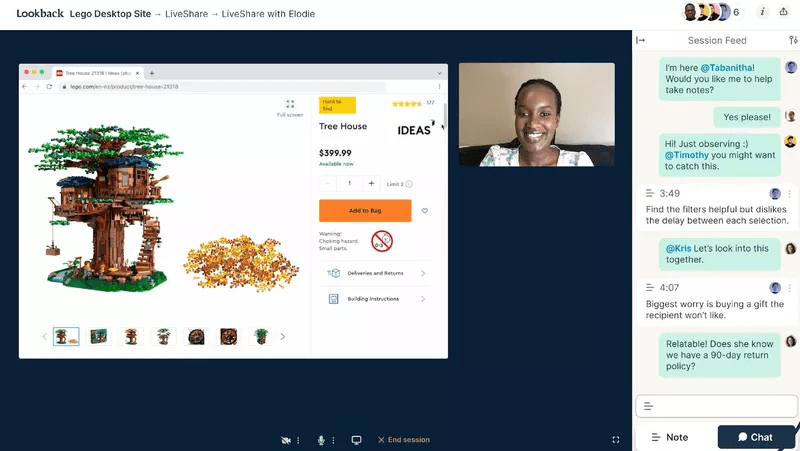
Group usability test on Lookback.
Lookback is a user testing platform for managing customer interviews and usability tests. It’s perfect for teams conducting in-depth research with B2B customers or seeking qualitative insights about their products.
Here are the main perks of this product:
- Usability tests and customer interviews: Conduct usability tests and customer interviews with a dedicated platform designed for research.
- AI interview assistance: Use the AI assistant to take notes and highlight key insights during interviews.
- Easy session storage: Record and store all sessions in one place for easy reference and collaboration.
- Collaboration: Share testing sessions with stakeholders to improve decision-making and alignment.
Pros and cons of Lookback
✅ Enables seamless collaboration between teams and users during testing sessions.
✅ Provides a dedicated platform for customer interviews with an AI assistant that can help you take notes.
✅ Stores everything in one centralized place where you can easily browse for qualitative feedback.
❌ Limited to interviews and usability tests, with no support for surveys or forms.
❌ Inviting external users can create friction if they are unfamiliar with the platform.
❌ Lacks robust analytics for advanced feedback analysis.
How much does Lookback cost?
Lookback’s pricing is as follows:
- Starter plan ($25/month): Includes 5 free sessions, making it ideal for small teams or occasional testers.
- Pro plan ($99/month): Adds unlimited sessions and expanded collaboration features for growing teams.
- Team plan ($249/month): Designed for larger teams, offering enhanced features like team collaboration and advanced sharing options.
- Enterprise plan (Custom pricing): Offers tailored solutions for organizations with extensive research needs, including additional security and priority support.
Note: A 60-day free trial is available on all plans.
Best voice of customer feedback software – Qualtrics
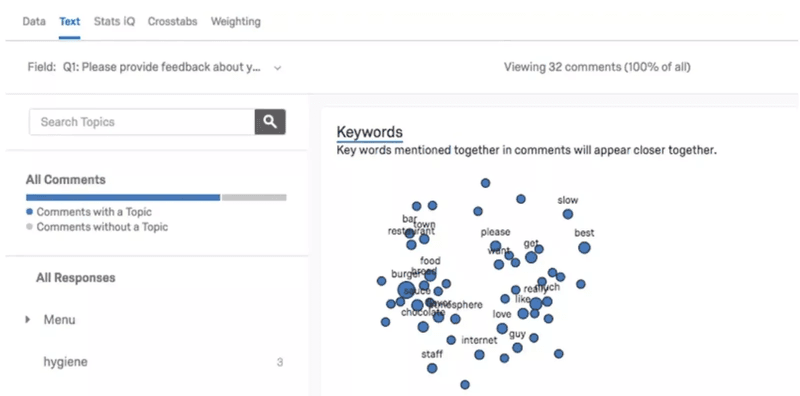
Analyzing feedback with Qualtrics.
Qualtrics is perfect for B2B enterprises that require advanced analytics features to analyze customer feedback from B2B markets (and from multiple channels).
What makes it special are features like predictive analytics to analyze your NPS data, omnichannel support, and deep integrations that fit the most random tech stacks.
This is what you get with Qualtrics:
- Multi-channel feedback: Create omnichannel surveys with advanced targeting to collect user feedback via email, web, mobile, or offline channels.
- AI-powered analytics: Use predictive analytics powered by AI to forecast customer behaviors based on survey results.
- Deep segmentation: Segment respondents by demographics or behavior to gain actionable insights for specific customer groups.
- Custom dashboards: Visualize and analyze customer feedback data with advanced dashboards and customizable reports.
Pros and cons of Qualtrics
✅ Excellent for collecting and analyzing feedback from multiple channels.
✅ Highly customizable surveys and advanced targeting features.
✅ Predictive analytics provide insights into future customer behaviors.
❌ Custom pricing makes it less accessible for smaller businesses.
❌ The learning curve can be steep for non-technical users (made worse with an outdated UI).
❌ Customer support has a reputation for being slow to resolve technical issues.
How much does Qualtrics cost?
Qualtrics offers customized pricing depending on the features required. It also provides personalized demos and offers a limited free version for smaller businesses if it suits your fancy.
Best online review software – G2
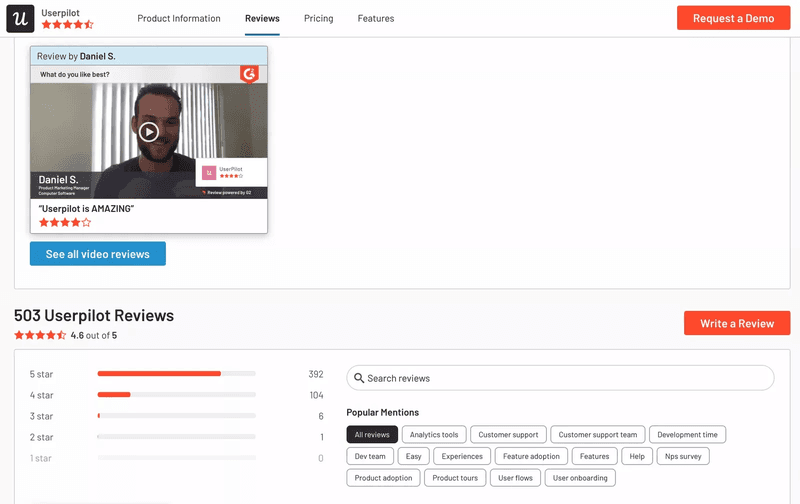
Browsing customer reviews on G2.
G2 is the public pub of SaaS where everyone is competing to impress potential companies. It helps businesses collect, manage, and showcase customer reviews.
Its main value is to leverage social proof to attract new customers and improve credibility in your market.
Here’s what you can do with G2:
- Collect product reviews: Build a profile on G2’s platform to collect customer reviews and brag about your brand
- Review invitations: Send review invitations to customers, making it easy to gather valuable feedback.
- Analytics: Access analytics dashboards to track review trends and identify areas for improvement.
Pros and cons of G2
✅ Reviews help with customer acquisition by building trust and social proof.
✅ G2’s platform is globally trusted, enhancing the value of customer feedback.
✅ You can create an account and start gathering reviews for free.
❌ It can be hard to find insights by navigating through random customer reviews.
❌ Although it helps gather customer reviews, it won’t replace a proper customer feedback tool.
❌ Public reviews can vary in quality, with some being biased or unhelpful.
How much does G2 cost?
G2 offers a free account for businesses to start collecting reviews. For advanced features, such as enhanced analytics and profile optimization, G2 provides custom pricing (they call it the “core plan”) based on your needs.
Best social listening software – Mention
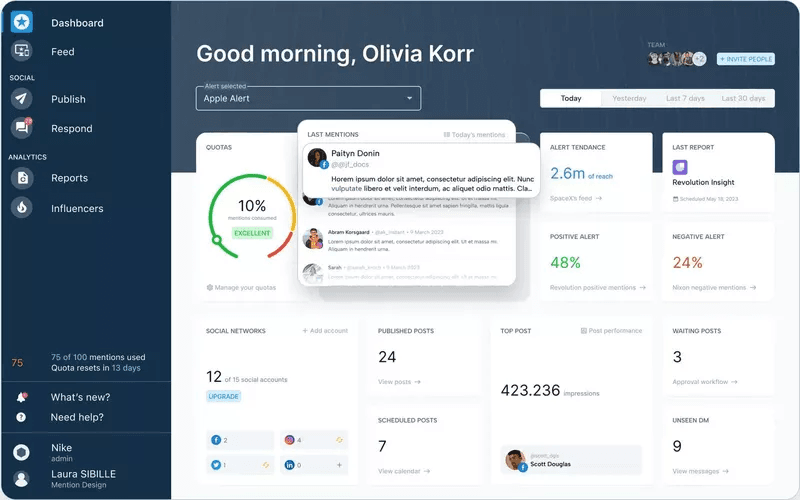
How Mention’s dashboard looks like.
Mention is a social listening platform designed to stalk your audience monitor social media conversations. It’s pretty useful for tracking brand mentions, analyzing customer sentiment, and scheduling social content.
Here are the tasks you can do with it:
- Social listening: Monitor what people are saying about your brand across social media, blogs, and other web sources.
- AI-based analytics: Use AI-assisted tools to stalk your audience for you and identify trends in customer conversations.
- Content scheduler: Schedule social media content and responses directly from the platform.
- Benchmarking: Generate competitor comparison reports to benchmark your brand’s performance.
Pros and cons of Mention
✅ Comprehensive monitoring across the whole internet.
✅ Lets you schedule social content and replies in one platform without having to open too many tabs.
✅ Generates detailed reports for competitor benchmarking (and lets you see who has the best reputation).
❌ If your brand name is generic and not unique, then there’s no way to filter mentions that are not relevant to your business.
❌ May miss mentions on niche websites.
❌ Pricing can be high for small businesses considering its features.
How much does Mention cost?
Mention offers flexible pricing plans to suit different needs:
- Solo plan ($41/month): Includes basic monitoring tools with up to 5,000 mentions.
- Pro plan ($83/month): Adds more advanced analytics and collaboration features – up to 10,000 mentions and 10 social accounts.
- ProPlus plan ($149/month): Higher capacity with up to 20,000 mentions and 15 social accounts.
A free trial is available to test the platform’s features before committing.
Best customer sentiment analysis software – Brandwatch
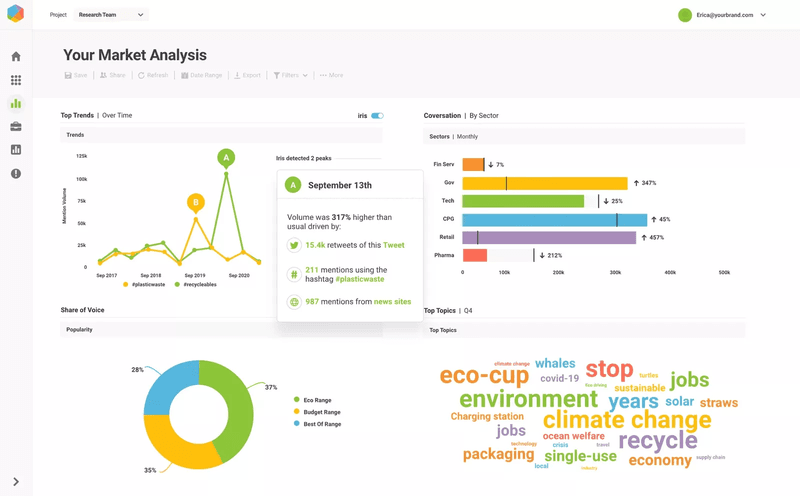
Market analysis with Brandwatch.
Brandwatch is a sentiment analysis tool whose whole deal is to analyze customer emotions and behaviors across digital channels.
This makes it particularly effective for companies that need better social media management and competitive benchmarking.
Here are its key features:
- Social listening: Monitor social media channels and online sources to gather customer feedback.
- AI-powered analytics: Use AI-driven analytics to segment audiences, track trends, and benchmark against competitors.
- Social engagement management: Manage social interactions with a cross-channel inbox, enabling centralized communication.
- Customer profiles: Create detailed customer profiles to better understand audience preferences and behaviors.
Pros and cons of Brandwatch
✅ Great for not only gathering feedback from social platforms but also as an all-around tool for social media management.
✅ Deep integrations with platforms like HubSpot, Salesforce, Zendesk, and Shopify.
✅ Deep AI analytics tools with competitor’s benchmarks, audience segmentation, customizable dashboards, and much more.
❌ Scheduling multiple posts can be time-consuming due to limited bulk posting features.
❌ Although it doesn’t require any coding skills to use, it has a lot of tools you need to learn one by one – making its learning curve quite steep.
❌ It’s limited to social media management. If you need to measure customer satisfaction from product users, then you’ll need another tool.
How much does Brandwatch cost?
Brandwatch offers custom pricing based on your organization’s specific features and scale requirements.
The platform also provides a free demo to help you explore its capabilities.
Best customer behavior software – Userpilot
I know I already mentioned Userpilot for in-app feedback. But when it comes to analyzing user behavior, Userpilot can combine it with user feedback like bread and butter.
Since it’s an all-in-one product growth platform, you can pair customer feedback with in-app behavior to get objective insights. So if you gathered feedback from NPS surveys, you can figure out the in-app behavior of promoters to understand what features provide the most value.
As for the customer behavior features, Userpilot offers:
- Autocapture: Lets you perform retroactive analysis because it collects all the in-app events from the moment you installed it. All you need to do is label it.
- Session replays: Witness how users interact with your product by watching their sessions.
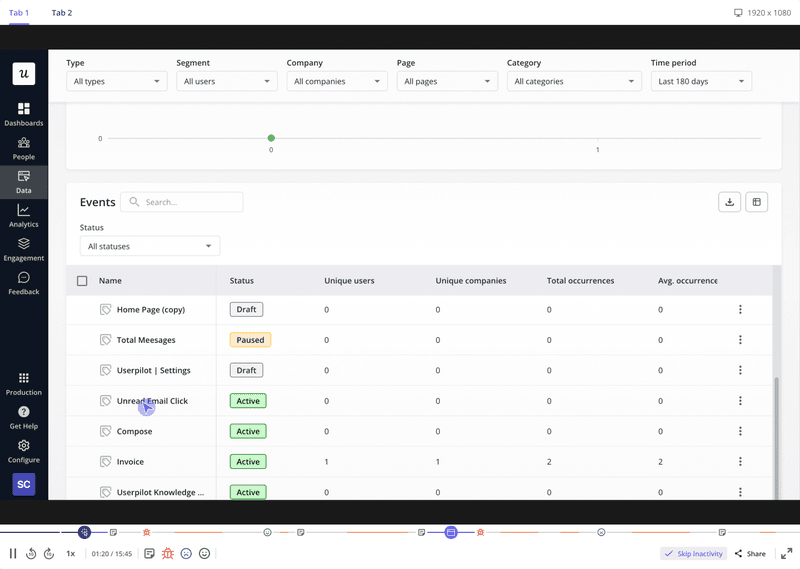
Userpilot’s session replays.
- Reports: Such as funnel analysis, paths, retention cohorts, and trends.
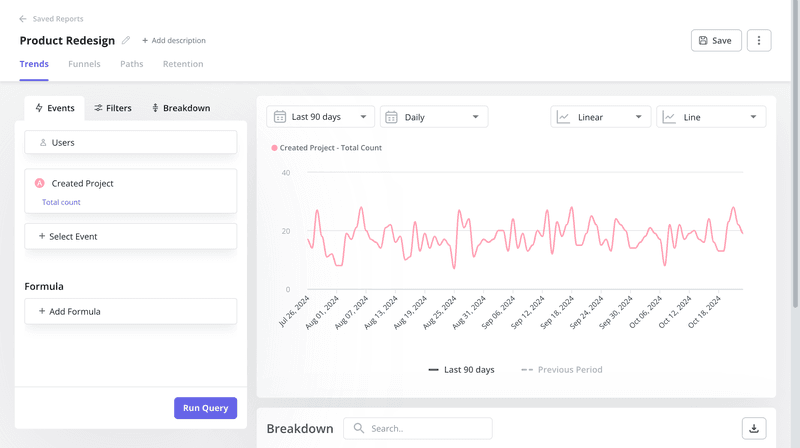
Userpilot’s trend analysis.
- Custom dashboards: Customize your analytics dashboards to include the behavioral metrics that matter the most to your business.
Pros and cons of Userpilot
✅ Event autocapture and session replay allow for deep and objective user behavior analysis.
✅ Combines in-app behavior and qualitative feedback for deeper, more actionable data points.
✅ Customizable dashboards and the different types of reports (funnels, cohorts, trends, and paths) open the door to more actionable insights.
❌ Although it’s the most cost-effective solution in the market, it’s still pricey for small companies.
❌ Since it’s an all-in-one solution, it might be unnecessary if you only need to measure customer behavior.
How much does Userpilot cost?
Userpilot offers the same three pricing plans for its customer behavior analysis features (including the free trial and demo too):
- Starter plan ($299/month): Supports up to 2,000 Monthly Active Users (MAUs). Includes in-app engagement tools, NPS surveys, and usage tracking.
- Growth plan (Custom pricing): Ideal for scaling businesses with customizable MAUs. Adds advanced analytics and retroactive event autocapture.
- Enterprise plan (Custom pricing): Tailored for large organizations. Includes premium integrations, advanced security features, and priority support.
Best community feedback software – Discourse
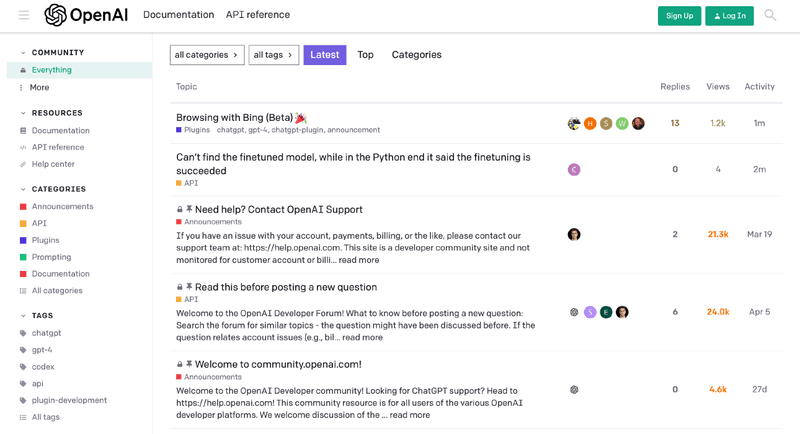
Managing a forum with Discourse.
Discourse is an open-source platform for building online forums. It’s the best tool for creating communities where users can discuss ideas, share experiences, and provide product feedback.
If you want to gather feedback directly from engaged users, here’s what you can do with Discourse:
- Forum building: Set up community forums with real-time chat and robust moderation features.
- Moderation features: Use tagging, categorization, and search functionality to organize discussions efficiently.
- Customizable: Customize the platform using its open-source flexibility to fit your specific needs.
- Gamification elements: Encourage engagement with gamification tools, badges, and community leaderboards.
Pros and cons of Discourse
✅ Open-source nature allows for total customization (provided you have technical resources).
✅ Builds a loyal customer community while providing valuable feedback.
✅ Well-organized chat rooms and comprehensive privacy settings.
❌ Tagging and organizing discussions can be complex for new users.
❌ Let’s be honest, it requires dedicated effort to build and maintain an active (and healthy) community.
❌ Hosted plans can be expensive for larger businesses.
How much does Discourse cost?
Discourse offers both free and paid options:
- Open-source option (Free): Ideal for businesses with the technical capacity to self-host and customize the platform.
- Standard hosted plan ($100/month): Includes managed hosting, updates, and customer support for small to mid-sized businesses.
- Business hosted plan ($300/month): Designed for larger businesses needing higher bandwidth, enhanced support, and advanced features.
- Enterprise-hosted plan (Custom pricing): Tailored for organizations with extensive requirements, including enhanced security and priority support.
Discourse also offers a free trial for its hosted plans.
Conclusion
Choosing the right software for customer feedback doesn’t have to be hard if you’re clear on your use case.
Whether you need in-app surveys, sentiment analysis, or social listening, this guide has showcased tools for every use case.
If you not only need to gather in-app feedback but also analyze your performance then book a Userpilot demo to see how you can unlock product growth!