What is a Product Roadmap? Types + How to Build One + Real Examples (original) (raw)
What is a product roadmap?
A product roadmap is a living, high-level document that communicates your product’s vision, priorities, and progress. It’s not the same as a detailed product plan. The latter explains the what and how of the product, while the former highlights the what and why behind your product strategy.

Roadmap example providing strategic direction, Source.

Think of it like this:
A product roadmap is the country map that shows the big picture of where you’re going, while a product plan is the city blueprint.
💡 What a product roadmap isn’t: A static document that is just a list of features. It lives, adapts to market changes, evolving priorities, and customer feedback, and connects your vision with execution.
Why do SaaS product teams need product roadmaps?
Three reasons: alignment, prioritization, and trust.
1. Align your product team around a shared direction
A product roadmap clarifies what’s coming and why. This way, everyone in the team, from development and design to customer success and marketing, knows what’s expected and sees how their work contributes to objectives.
In short, alignment replaces confusion, leading to faster execution.
This is exactly what happened at a PE-backed SaaS company. With the team on the same page, execution took just six weeks instead of six months, and EBITDA quadrupled from $40M to $160M.
2. Prioritize what matters to business outcomes
ProductPlan’s State of Product Management Report revealed that 54% of product managers primarily track features and releases rather than outcomes. The number climbs to 70% under executive pressure.
That’s feature factory, not an outcome-driven roadmap.
A focused roadmap, on the other hand, acts as the north star for product management. It forces teams to weigh ideas against agreed goals.
- What high-level, strategic objectives does this work support?
- Are we chasing isolated requests, or building priorities rooted in user needs?
The result: clarity and better trade-offs. This way, limited resources flow toward the features that actually drive outcomes, especially in early MVP components.
3. Build trust with customers and stakeholders
Product roadmaps provide visibility into timelines and dependencies. And with that, you build confidence on both sides:
- Customers: They see their feedback reflected in roadmap themes, which shows their concerns matter.
- Stakeholders: You can respond to feature requests with context—“here’s where this fits” or “why it doesn’t”—grounded in outcomes and user needs.
Even if priorities shift, a roadmap provides transparency, earns credibility, and keeps buy-in intact.
5 Types of product roadmaps (+ when to use each)
Here are the five widely used roadmap types, when each works best, and quick examples for context:
| Roadmap type | Good for | When to use | Example use case |
|---|---|---|---|
| 1. Timeline-based | Launch planning | Fixed dates and deadlines matter | Release plan for a new payment gateway |
| 2. Kanban-style | Agile teams | Priorities shift frequently | Visualizing backlog → in progress → done |
| 3. Goal / OKR-linked | Execs, quarterly planning | Tying features to business outcomes | Feature tied to “+10% retention” goal |
| 4. Feature-based | Customers, sales enablement | Communicating “what’s coming” | Showcasing integrations/features in development |
| 5. Now / Next / Later | PLG teams, simplicity | Flexible, low-maintenance view | Showing today’s live features vs. future |
How do I create a product roadmap?
In four steps:
- Start with a strategic product vision
- Segment by user persona or lifecycle stage
- Validate with in-app feedback and real usage data
- Communicate changes clearly to key stakeholders
Let’s break it down.
1. Start with a strategic vision, not features
Your strategic vision is the long-term impact your product aims to create. And it should guide every roadmap decision.
Take Slack as an example. Their vision wasn’t “launch chat features” but to remove the friction of scattered workplace communication. That vision shaped features like channels and integrations, which solved real collaboration pain points.
Now imagine a SaaS startup building a project management tool. Instead of adding “Dark Mode” to keep up with competitors, they can define their vision as: “Reduce project delays by 30% for small agencies.”
That north star will help them prioritize “deadline alerts” and “dependency tracking” over cosmetic updates.
With Userpilot, you can close the loop between vision and execution. One way to do this is to collect customer feedback in-app with NPS or other in-app micro-surveys. Then, validate roadmap priorities using real adoption data to focus on what actually drives retention.

NPS for product managers in Userpilot.
2. Segment by user persona or lifecycle stage
Not all users want the same things, and a roadmap that treats them equally risks missing critical needs. For example, new users may need onboarding tooltips and walkthroughs, power users may value advanced workflow customization, and managers may prioritize analytics dashboards for visibility. User segmentation helps you address these differences effectively.
With segmentation, you can group users based on different criteria, like:
- Roles: Admin vs. end user
- Lifecycle stage: New vs. power users
In a CRM, for example, sales reps might prioritize lead tracking, while managers focus more on pipeline analytics. And for lifecycle stage, new users may want smooth onboarding flows, while power users push for workflow automation.
Roadmaps that recognize these differences boost product adoption more effectively.
With Userpilot, you can take this further. Our segmentation lets you personalize in-app feedback. For example, you can ask new users about onboarding friction, and advanced users about productivity features. Then, use that data to decide which major initiatives to prioritize next.

Userpilot power users segmentation.
3. Validate with in-app feedback and real usage data
Even with users’ feedback, don’t assume your roadmap is ready. Validate every item on it with both what users say and what they do.
For example, imagine a SaaS analytics platform rolling out dashboards. Users may request more visualization options, but session data shows that most abandon the feature at the data import step.
That signals a setup problem, not a charting gap.
The solution? Layer micro-surveys (e.g., “Was this helpful?”) with behavior analytics. This way, feedback reveals perceived needs, while usage data exposes adoption patterns. Together, they create a feedback loop: listen, watch, adjust.
With Userpilot, this process is seamless. You can run in-app surveys and then use session replay to confirm real-time behavior, like hesitation before a click, repeated attempts, or sudden drop-offs. That evidence makes it clear which user problems to prioritize.

User session replay in Userpilot.
4. Communicate changes clearly—and often
As I said earlier, a roadmap is a living document. It adjusts as priorities shift, features die, and timelines change.
But communication is as important as planning. And if you don’t explain the “why” behind these changes, you risk losing the trust of customers and stakeholders.
For example, imagine a SaaS project management tool delaying a planned GANTT chart update. By clearly explaining that customer demand for offline mobile access is higher, the company prevents frustration and keeps users aligned with the new direction.
Silence, on the other hand, creates doubt.
Userpilot helps you share these changes directly in your product. You can use modals, banners, or slideouts to announce roadmap updates at a set time, to defined users. For instance, when launching a mobile app, you could notify only users who frequently log in on mobile devices while leaving desktop-only users undisturbed. This keeps the message relevant and reinforces transparency without overwhelming your audience.

Mobile app announcement in Userpilot.
What to include in a product roadmap?
Six key elements: Your objectives, key initiatives, timelines, ownership, success metrics, and risk flags.
1. Objectives or goals
Objectives are the “why” behind every feature. In other words, they’re the outcomes you want to achieve, like entering a new market, reducing churn, or improving adoption.
For example, a SaaS HR platform might set an objective to reduce employee turnover by 15%. Then, that will direct the roadmap like this:
- Problem area: Employees leave within the first 90 days.
- Roadmap response: Build smoother onboarding flows and manager dashboards to track engagement early.
2. Key initiatives or themes
Initiatives provide context so everyone sees how individual tasks ladder up to larger goals. And your roadmap works best when these initiatives house features.
Here is how that works:
Say a SaaS billing platform is struggling with high churn after trials. Then, the team identifies the root issue as low activation. This insight will shape an initiative: “Strengthen activation.”
Under this theme, the roadmap might include features for faster payment integrations and contextual tooltips.
3. Rough development timelines
Your initiatives need timelines. That’s how you give stakeholders and customers a realistic sense of priorities.
And it’s okay if you can’t commit to exact dates when designing the roadmap. Use broad categories like Now/Next/Later.
In practice, the rough timeline will look like this:
A SaaS project management tool might mark “improving task dependencies” as “Now,” “mobile offline support” as “Next,” and “advanced reporting” as “Later” based on users’ feedback.
4. Ownership
A roadmap should clearly state who is responsible for each initiative so accountability is never in doubt. Otherwise, priorities drift and deadlines slip.
For example:
- “Analytics dashboard – TBD” leaves teams confused on who is responsible for what and when.
- “Analytics dashboard – owned by Product, shipping Q2” makes the work actionable and time-bound.
That level of clarity turns a roadmap into both a planning tool and an internal alignment document.
Besides, roles and responsibilities often shift across teams. Design may not always own onboarding, and engineering may not always own performance. This is why every initiative should explicitly list its owner from the start.
5. Success metrics
“Feature shipped” is not a success metric.
The right metrics measure business outcomes, not output.
For example, instead of judging an onboarding redesign by its release date, you can track activation rates or time-to-value. In this case, a SaaS collaboration tool might set a clear metric: “increase active teams by 20% in six months.”
With Userpilot, you can monitor such outcomes directly. Custom dashboards pull in adoption, retention, and feedback data so you can see at a glance if you’re aligned with your business outcomes.
6. Risk flags
These risks can include technical constraints, cross-team dependencies, or market uncertainties. Highlighting them early notifies stakeholders and team members of potential blockers.
For example, a SaaS billing platform planning multi-currency support may depend on third-party payment providers, making timelines vulnerable to delays. Such risk flags should be in your roadmap.
3 Product roadmap examples you can learn from
After scouring the internet for publicly available roadmaps, I found 3 different types you can model.
1. Buffer
Buffer’s roadmap is Kanban-styled with eight columns: New, Blocked by API limitation, Exploring, On hold, Planned, In Progress, Beta, and Released.
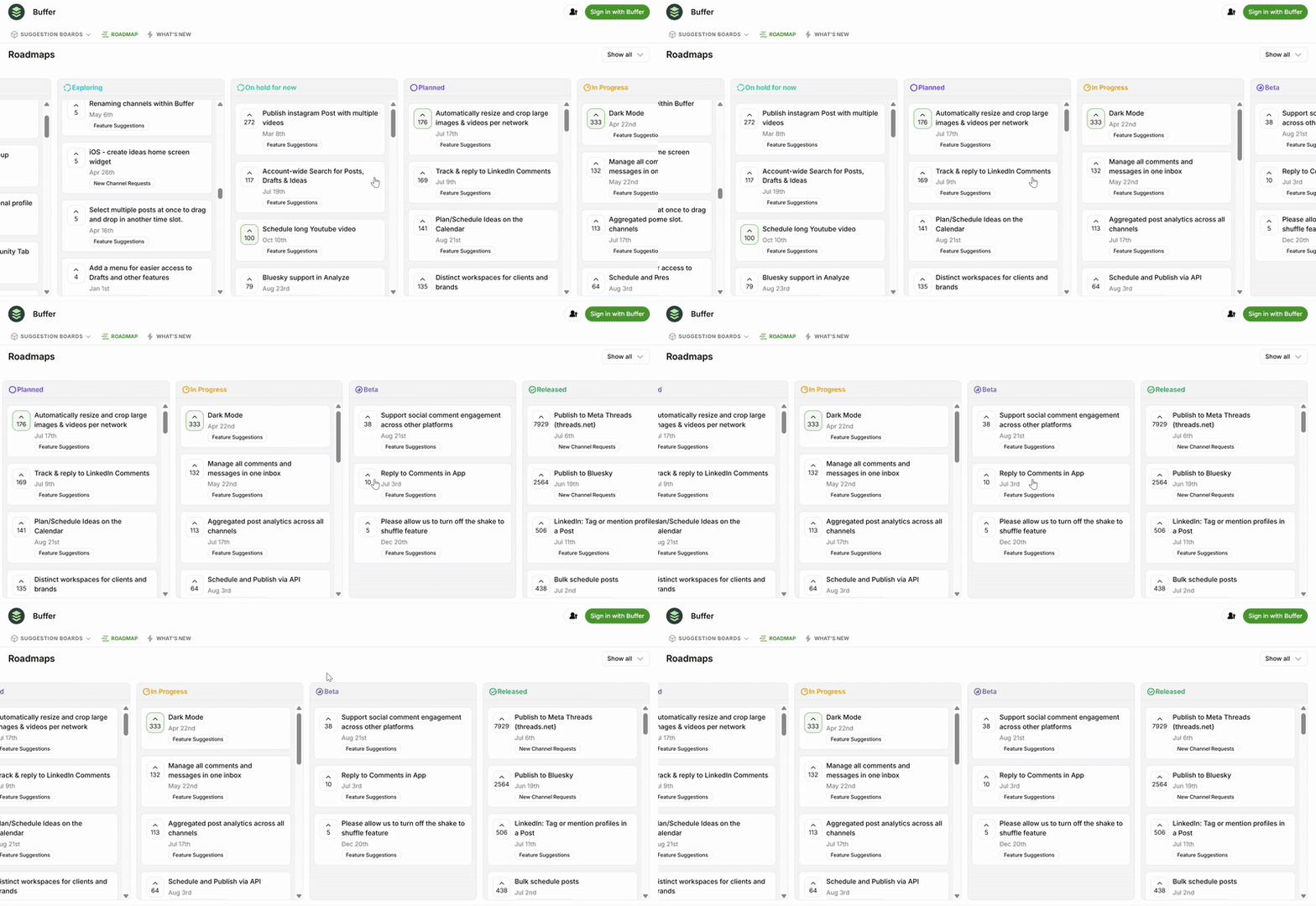
Buffer roadmap showing its 8 columns.
Making the roadmap public means stakeholders and users can instantly see what’s being worked on, what’s paused, and how priorities evolve.
I love how customers shape the roadmap: they can submit feature or channel requests, upvote the ones that matter most, and even filter by category to spot trends.

Submit, upvote, and filter requests in Buffer roadmap.
The comments section creates an open forum where users discuss needs and pain points directly.

User feedback in the comments to prioritize features.
This transparency, combined with community-driven validation, is worth copying. The mix will turn your roadmap into both a planning tool and a live feedback loop.
2. ClickUp
ClickUp’s roadmap blends feature-based and goal-based formats.

ClickUp roadmap.
It begins with yearly priorities, then organizes upcoming features into themes like admin capabilities or visibility & reporting. This structure gives both customers and internal teams clarity on how individual tasks map to bigger goals.

Detailed release notes for development process.
I love that users can drill down further through detailed quarterly release notes, which make it easy to track progress over time. The roadmap also connects to “ClickUp Feature Requests,” where users can propose and upvote new ideas.
Plus, the entire roadmap is available as a downloadable PDF, with a dedicated Mobile Roadmap page for those tracking app-specific updates.

Request download and mobile roadmap.
ClickUp combines thematic organization with transparent progress tracking for both customers and sales enablement. That’s something you can add to your roadmap.
3. Loom
Loom’s roadmap follows a simple variation of the Now/Next/Later format with three categories: Launched, Coming Soon, and Under Consideration.

Loom roadmap showing future initiatives.
Each item appears in a clean box with feature tags, upvotes, and clear grouping by themes like sharing & collaboration or recording & editing. This design keeps the roadmap accessible to both customers and internal teams while still providing enough detail to show priorities.
I love that users can also contribute by submitting ideas directly and browsing through requests, which makes feedback continuous and transparent.

Submit an idea to the development teams.
A clear, theme-based roadmap with only three buckets is easy to maintain and communicates priorities without overwhelming the implementation team and stakeholders. Such simplicity will fit if you seek a low-maintenance roadmap.
Make your roadmap a living document
Whether Kanban-styled like Buffer’s or Now/Next/Later like Loom’s, keep your roadmap updated with clear goals, success metrics, and risk flags. You can even mix formats to fit your team’s workflow.
The key is validation: pair stakeholder feedback with usage data so you prioritize what matters most in your product strategy.
With Userpilot, you can track adoption to see which features are worth the development efforts, run in-app surveys to capture user needs, and segment responses for deeper insights.
Book your free Userpilot demo today to turn your roadmap into a driver of agile development growth, not just a slide deck.