How to Track User Sentiment in SaaS: Steps and Tools (original) (raw)
Summary of how to track user sentiment
- User sentiment is the feeling a person has about your brand, product, or service quality.
- User sentiment analysis is the process of collecting user feedback data and analyzing the sentiment and intent behind it using tools like natural language processing.
- Tracking customer sentiments provides insights that help you make product improvements, enhance the customer experience, and boost customer satisfaction.
There are five steps to tracking and measuring user sentiments:
- Invest in the right sentiment analysis tools.
- Gather user sentiment data from multiple sources.
- Visualize the collected data to spot patterns more easily.
- Analyze the data to determine negative sentiment drivers.
- Act on insights to drive positive sentiment.
Some of the best tools for collecting and analyzing sentiment data include:
- Userpilot – best customer feedback analysis tool.
- Talkwalker- best natural language processing sentiment analysis tool.
- Hootsuite Insights – best social media sentiment analysis tool.
- Brand24 – best for brand sentiment analysis.
- Lexalytics – best sentiment analysis with Excel integration.
- Repustate – best multilingual sentiment analysis tool.
- Book a demo now to learn how Userpilot helps you collect feedback data and analyze the sentiments behind it.
What is user sentiment?
User sentiment, also known as customer sentiment, refers to how users feel about a product, service, brand, or even an industry.
It encompasses the opinions and feelings of customers, which can be positive, negative, or neutral.
What is customer sentiment analysis and how does it work
Customer sentiment analysis refers to the process of examination of a user’s thoughts and feelings about their interactions with your brand.
Customer sentiment analysis tools depend on computational linguistics, such as Natural Language Processing (NLP), to evaluate the tone, intent, and emotion behind a text.
To analyze customer sentiment accurately, these tools dig into a text (social media posts, user reviews, messages, etc.) to identify positive or negative words and phrases and issue a sentiment score.
As a rule of thumb, a text with an overall score above 80% is said to have a positive sentiment, less than 50% has a negative sentiment, and between 50% and 80% has a neutral sentiment.
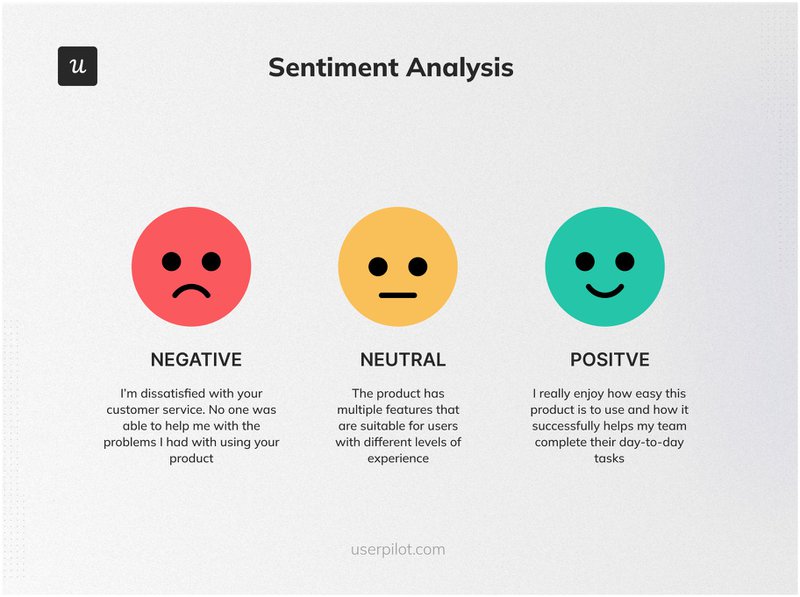
Sentiment Analysis Examples.
Benefits of tracking customer sentiment
Your brand’s reputation must be top-notch, with customers who feel emotionally connected to you.
Tracking customer sentiment comes with many advantages in that regard, as it helps you to:
- Make product improvements: The valuable insights derived from customer sentiments enable you to adjust your product to better meet customer expectations.
- Improve customer experience: Automatically analyzing customer feedback (via social media posts, your website, etc.) enables you to respond more effectively to customer concerns. This allows you to proactively address issues as they arise.
- Boost customer satisfaction: Sentiment analysis tools enable you to easily comb through trends and patterns in your customer response. It, thus, provides insights that enable you to make informed business decisions and boost customer satisfaction.
- Drive customer loyalty: Ultimately, as you create impressive experiences for your customers and transform neutral or negative sentiments into positive ones, they’re more likely to become loyal customers.
How to measure and track user sentiment in 5 steps
Although there are a few different approaches to sentiment analysis, they all follow a similar blueprint. Here’s a 5-step blueprint for tracking and analyzing customer sentiments:
1. Invest in the right sentiment analysis tools
To accurately track user sentiment, you must invest in the right tools. Some factors to consider when selecting a tool include:
- Functionalities: How well do the tool’s features align with your needs? If you’re interested in viewing trends and patterns, for instance, you’ll need a tool with support for data visualization.
- Ease of Use: Is the tool intuitive and easy to use or does it require a level of technical expertise? Can your team handle the expertise required?
- Privacy: Does the tool comply with data privacy regulations within your region? Is it secure enough to protect sensitive customer data?
- Budget: You also need to consider if it offers good value for money within your budget.
- Integrations: What kind of data sources does the tool integrate with? For instance, if you’re interested in social media sentiment analysis, you’ll need a tool that integrates with and monitors social media comments for sentiment data.
2. Gather user sentiment data from multiple sources
Accurate sentiment analysis depends heavily on getting the right data. There are many different ways to get this data, including:
Collect direct customer feedback with in-app surveys
One way to determine what customers feel about your brand is to ask them directly. You can do this by launching in-app surveys that measure customer satisfaction with smiley faces.
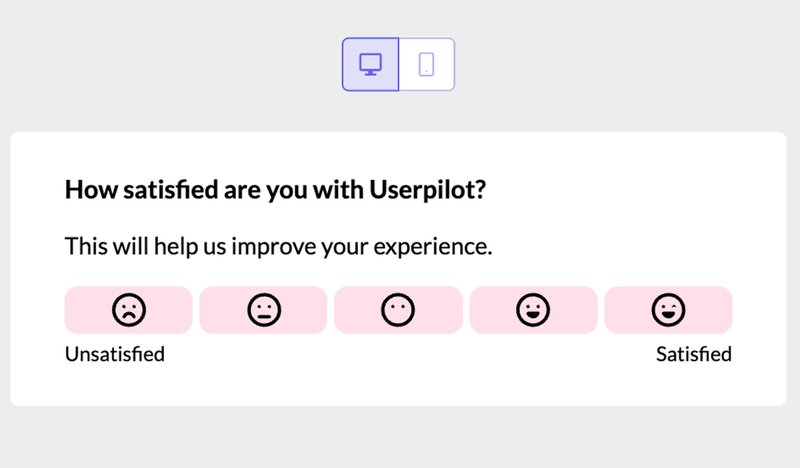
Use customer satisfaction surveys to collect sentiment data. Create surveys code-free with Userpilot!
In addition to a rating, allowing customers to express themselves in an open-ended question will provide you with their raw, unfiltered feedback.
Get more in-depth insights into user sentiment with interviews
You can also collect data using customer interviews. This is your chance to dig deeper, speaking directly with the customer to determine their specific concerns and delights.
For example, after a customer completes a feedback form, you can invite them to an interview by triggering an in-app modal, giving them a chance to elaborate more on their experience.
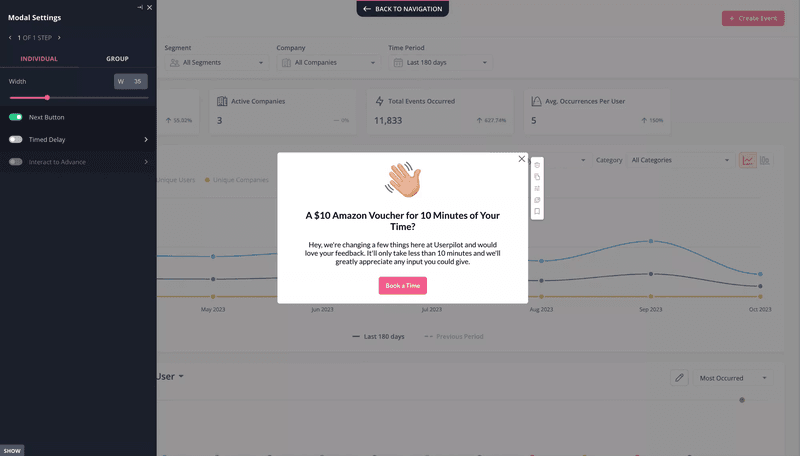
Use in-app modals to invite users to interviews.
Monitor reviews on 3-rd party websites
Another way to get sentiment data is by monitoring third-party websites. These could be posts on social media channels or third-party review websites.
These reviews are independent of your company’s direct influence, making them unbiased, and can serve as a great source for valuable insights.
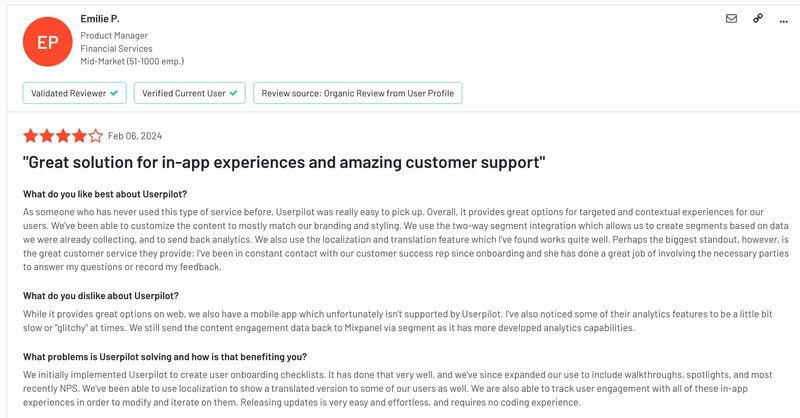
Third-party channels provide in-depth sentiment data.
Get insights from your customer service team
The customer service team is at the forefront of customer interactions. Their chats, emails, and calls with customers are a great source of sentiment data.
You can also extract sentiment data using surveys after customer service interactions.
Collect customer sentiment data with NPS surveys
Finally, you can implement NPS surveys, asking customers how likely they are to recommend your brand.
The metric provides a feel of your brand’s reputation before customers.
The willingness to recommend your brand signals positive sentiment, while refraining from recommending it points to negative sentiment.
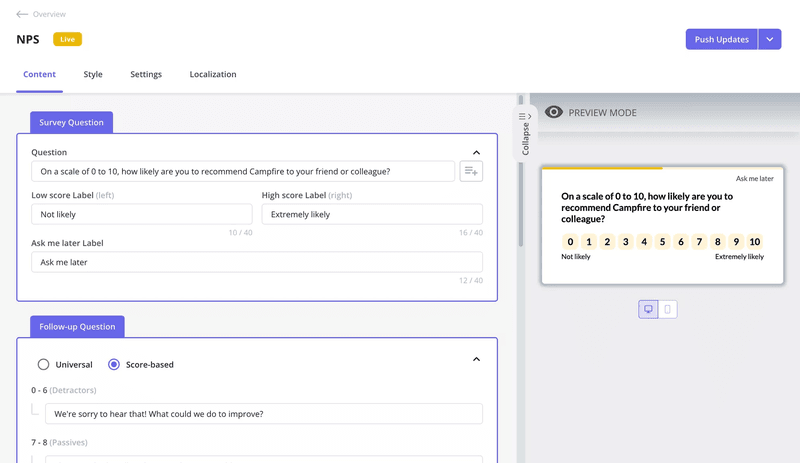
NPS survey created with Userpilot.
3. Visualize the collected data to spot patterns more easily
Once you’ve collected the data you need, you’ll need to visualize it to easily identify patterns and trends in the data.
For example, an NPS dashboard helps you to easily visualize the number of promoters, passives, and detractors you have. You can also see how these numbers have changed over time.
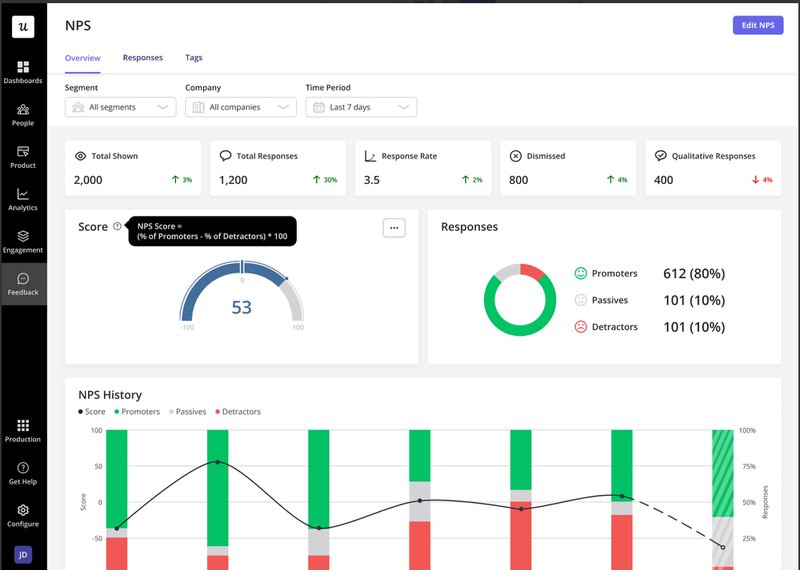
Userpilot’s NPS dashboard.
As you examine these trends, you can even begin making predictions. For example, if customer sentiments dip whenever a new feature is released, you can explore ways to handle new feature releases better.
4. Analyze the data to determine negative sentiment drivers
Now, it’s time to dig into the data and make sense of it. This is the time to dig deeper using a text analysis tool to identify the recurring issues causing customer dissatisfaction.
Likewise, you may want to know how neutral sentiment can be transformed into positive sentiment.
A sentiment analysis tool will help you identify the most common topic clusters and how negative or positive they are.
For example, many feedback tools will allow you to tag qualitative NPS responses and color-code them to reflect user sentiment.
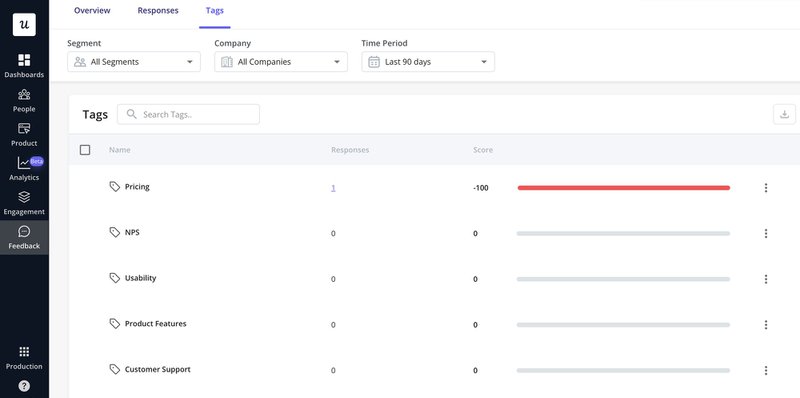
Identify the most common NPS survey topics and their sentiments with Userpilot.
5. Act on insights to drive positive sentiment
Finally, once you’ve understood how customers feel about your product, their primary pain points, and areas of friction, you need to take action to improve user sentiment.
For example, if you notice several users struggling to use a feature effectively, you can trigger a tooltip to guide them to use it successfully. You can also work to improve the feature and make it more intuitive.
Your goal here is simple – address problem areas in the product so you can cultivate positive sentiment.
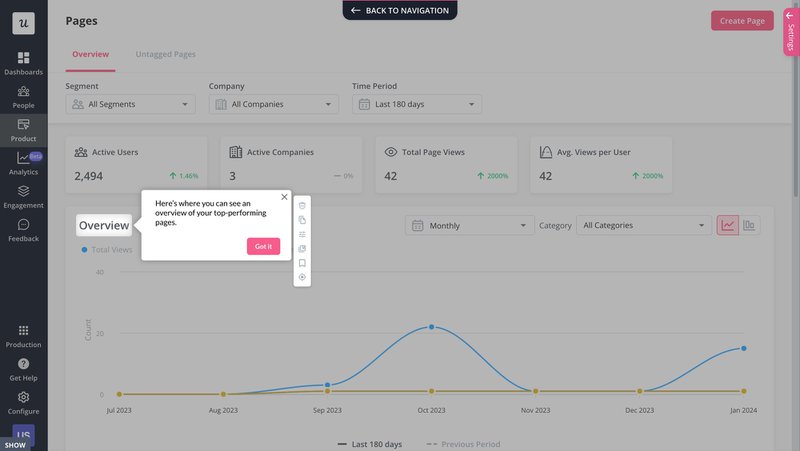
Create and trigger tooltips with Userpilot.
6 Best sentiment analysis tools for tracking the positive and negative sentiment
As we noted before, there are many features to watch out for when selecting a customer sentiment analysis tool. Consider some of them:
1. Userpilot – best customer feedback analysis tool
Userpilot is a no-code product growth platform designed to help you activate more users and increase user engagement. For customer sentiment analysis, it focuses on customer feedback collection and analysis. It does this by helping you in three key ways:
- Measure user sentiment with in-app surveys: Customize different survey templates, trigger them according to user behavior, and ask follow-up questions to learn the reasons behind emotions.
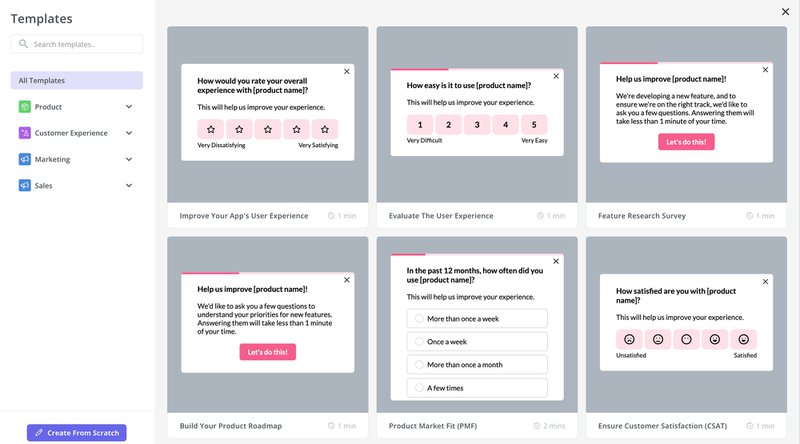
Userpilot survey templates.
- Survey Analytics: Analyze survey responses to identify the trends and patterns in them. Userpilot provides a dashboard to help you easily analyze and visualize your survey responses.
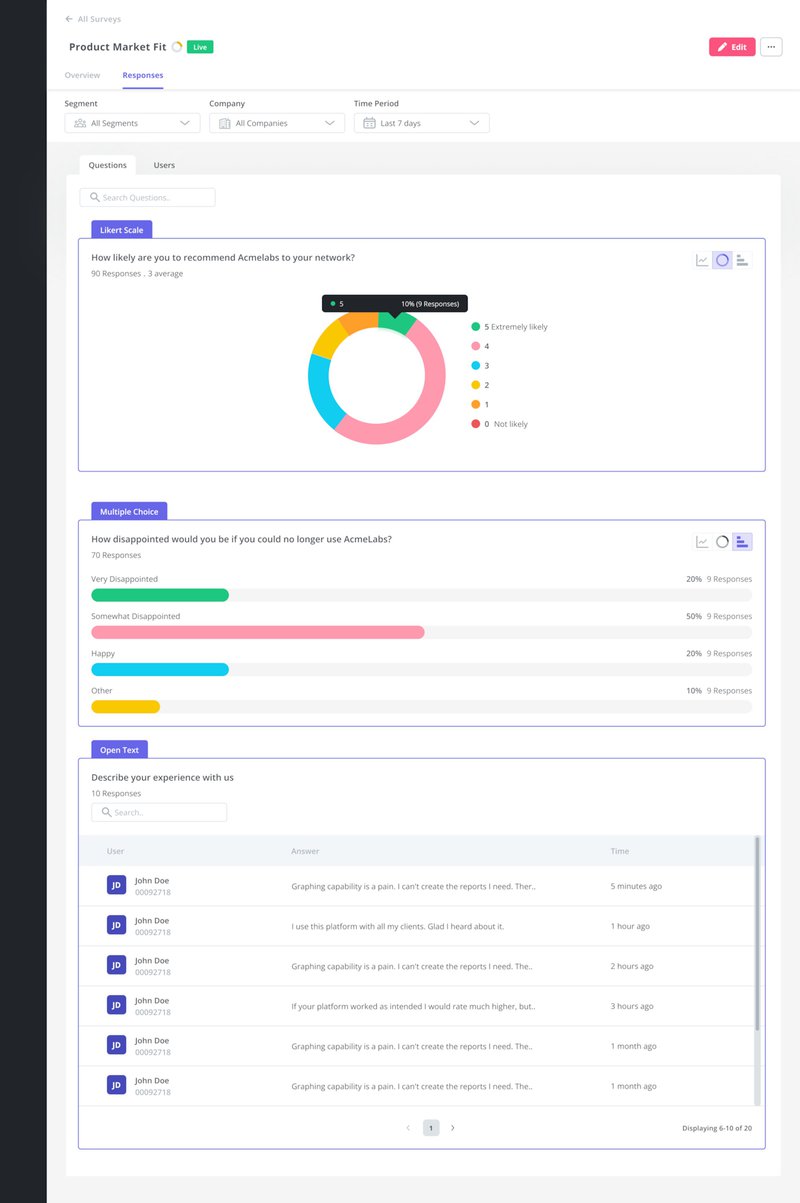
Userpilot survey analytics dashboard.
- Individual user sentiment analysis: Zoom into a user for micro sentiment analysis. Check their sentiment history, responses to surveys, demographics, in-app actions, and other details.
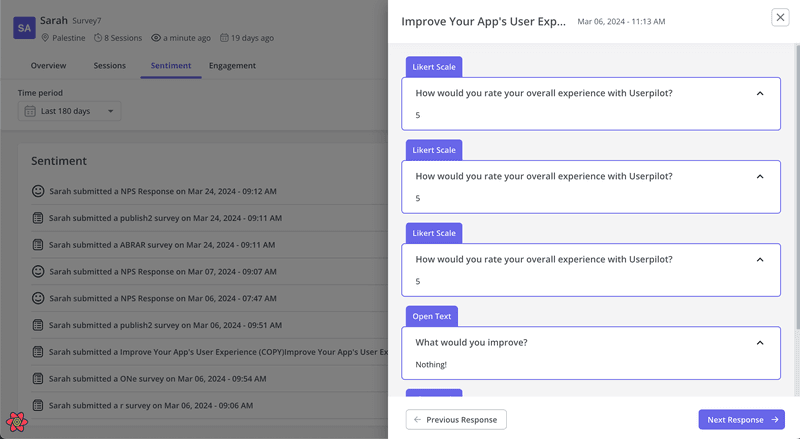
Analyze sentiment data on the individual level with Userpilot.
Starting at $299/month (billed annually), Userpilot offers real value for money, with features spanning from feedback analytics to user behavior tracking and more. It offers three pricing tiers according to your needs.
2. Talkwalker– best natural language processing sentiment analysis tool
Talkwalker is a leading provider of social data sentiment analysis. It monitors social media platforms, news sites, online forums, and blogs, using natural language processing to track user sentiment on these platforms.
Talkwalker boasts many exciting features, including:
- A Quick Search feature that integrates nicely with social media to tell you how customers feel about your brand. It examines your mentions, comments, and engagements to collate and analyze social data.
- A powerful NLP-powered sentiment analysis tool that provides granular insights into customer feedback and identifies specific elements influencing opinions.
- Analysis of support tickets and emails to help you identify common customer issues and concerns.
- Helpful social data graphs for visualizing brand mentions and breaking them down by sentiment, user occupation, etc.
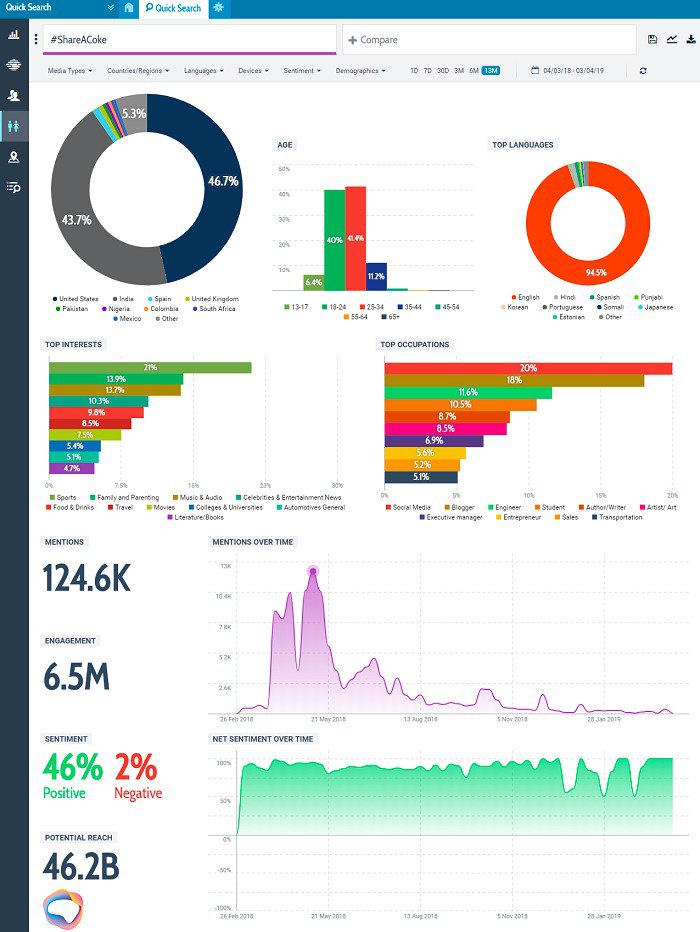
Talkwalker dashboard
3. Hootsuite Insights – best social media sentiment analysis tool
Hootsuite Insights is an advanced tool for monitoring sentiment trends on social media. It tracks conversations across multiple platforms and languages, providing insight into your brand’s public reputation.
Its features include:
- Customizable dashboards and reports showing key insights from user sentiment analysis over time.
- Track the success of your social media posts, keywords, and marketing campaigns with real-time data.
- Identify the leading causes of negative sentiment and address them quickly to protect your brand’s reputation.
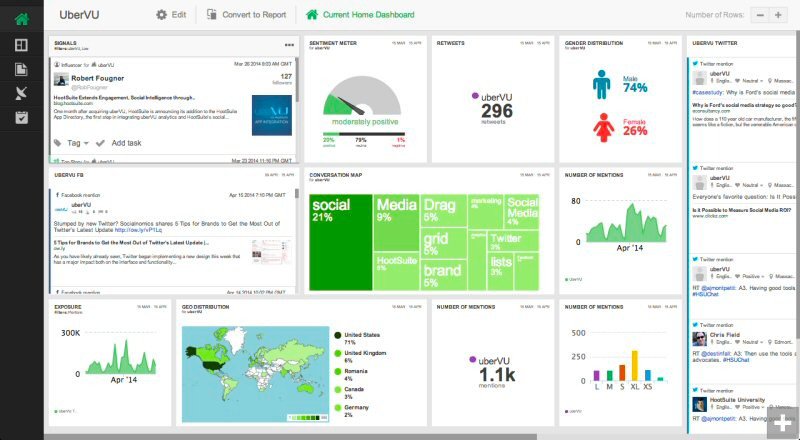
Hootsuite dashboard.
4. Brand24 – best for brand sentiment analysis
Brand24 is a media monitoring solution for mid to large-sized companies. It automatically performs sentiment analysis around your brand and any brand-related topics.
Key features include:
- Collection of data from all parts of the internet, including social media, blogs, customer reviews, news sites, videos, podcasts, etc.
- Adoption of advanced machine learning algorithms to analyze text in real-time and assign the appropriate sentiment.
- Crises prediction and alerts for major and important sentiment changes.
- Track how often people talk about your brand and its competitors and examine the reach of your brand and its top influencers.
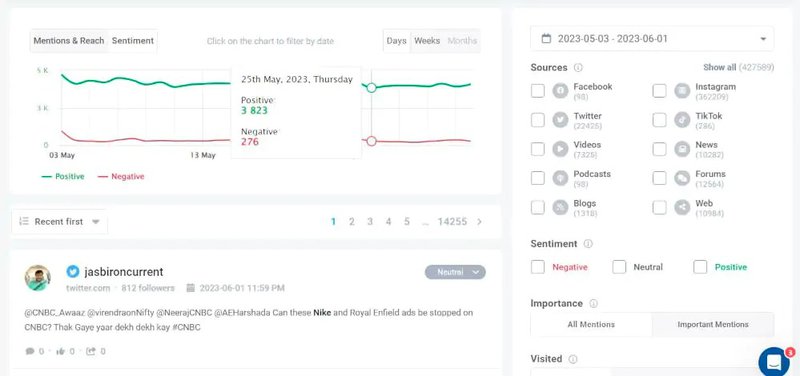
Brand24 dashboard.
5. Lexalytics – best sentiment analysis with Excel integration
Lexalytics is a machine learning tool that reliably understands and evaluates complex sentences in various media. It parses texts through a sentiment analysis model to determine the intent behind them.
Its key features include:
- Cloud-based API Symantria for detecting intentions in text, such as the intent to recommend, purchase, or abandon a product.
- Salience – an on-premise NLP tool that integrates with user’s applications. It provides entity and theme extraction, intent analysis, summarization, etc.
- A storage and visualization feature for managing and analyzing unstructured text and identifying the patterns within them.
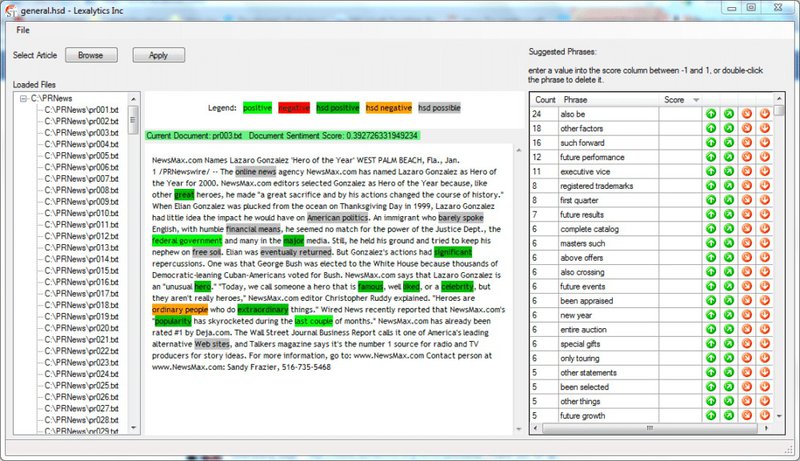
User sentiment analysis in Lexalytics.
6. Repustate – best multilingual sentiment analysis tool
Repustate is a sophisticated text analysis tool that analyzes customer responses for sentiments. It picks up on emojis, slang, and short-form text like ‘smh,’ ‘lol,’ etc, and supports multiple languages.
Key features include:
- Support for over 20 languages, enabling you to break down language barriers and get actionable insights from a diverse customer base.
- Customer feedback classification to help you know what is working well and what isn’t.
- Rule-based customization to make the sentiment analysis algorithm sensitive to industry-specific terms and language.
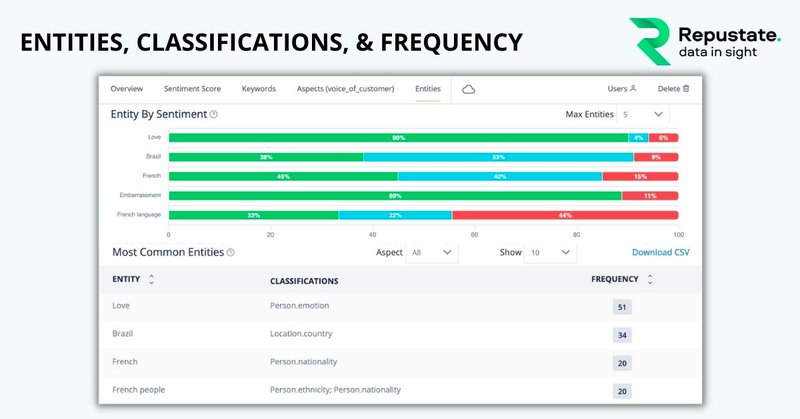
Repustate’s main dashboard.
Conclusion
The impact of customer’s online interactions cannot be overstated. Sentiment analysis tools are, thus, a must-have for tracking customer sentiment and understanding the tone and intent behind their messages.
If you’re interested in getting feedback directly from customers and analyzing their sentiments, Userpilot is the tool for you. Book a demo today to learn how it works.