Userpilot for Product Analytics: A Detailed Review for Making Buying Decisions (original) (raw)
Why should you consider Userpilot for product analytics?
A good product analytics tool doesn’t just offer features; it also offers solutions. Here’s why Userpilot is worth your decision:
- No-code solution: With Userpilot’s no-code solutions, product analytics become accessible to everyone on your team. You don’t need engineers or developers to set up tracking or analyze user behavior; literally anyone can do it. So your product, marketing, or customer success teams can quickly gather insights and take action without waiting for technical support.
- Simplify your tech stack: No more switching platforms or juggling multiple tools. Userpilot simplifies your tech stack by combining analytics and engagement features in a single tool. It lets you analyze user behavior and then immediately apply those insights, such as when you’re personalizing onboarding experiences.
- Cost-effective choice: Userpilot gives you the features of standalone analytics tools like Mixpanel or similar tools to us like Pendo, but at a much lower price. Plus, you get more than just analytics—you also get user engagement features. You get more for your money without the expense and hassle of extra tools or features you might not use.
- Security compliance: Security is critical for companies, especially enterprises, to protect sensitive data and meet regulations. Userpilot keeps your data safe with robust data security measures, encryption, and adherence to GDPR compliance. So you can confidently use Userpilot knowing your user data is protected and compliant with the industry’s best standards.
Is Your Product Analytics Stack Slowing You Down?
Many tools show you the data, but few help you fix the problems you find without engineering help. See if Userpilot for product analytics is the missing piece in your growth stack.
How much engineering time does it take to track a new feature in your current setup?
You spot a high drop-off rate in your onboarding funnel. What is your immediate next step?
How do you currently validate why users are ignoring a specific feature?
Stop Just Tracking, Start Improving
You need more than just charts. Userpilot for product analytics combines deep insights with the engagement tools you need to fix friction, onboard users, and drive growth—all without code.
What features does Userpilot offer for collecting product insights?
Userpilot offers a suite of powerful features designed to help you gather valuable product insights and understand your users better. Here’s a quick overview:
- Autocapture: First, let’s talk about autocapture. Userpilot automatically records key user actions, like feature clicks and page visits—with absolutely no extra setup. This means you get meaningful, ready-to-analyze data right away without waiting around or manually tagging.
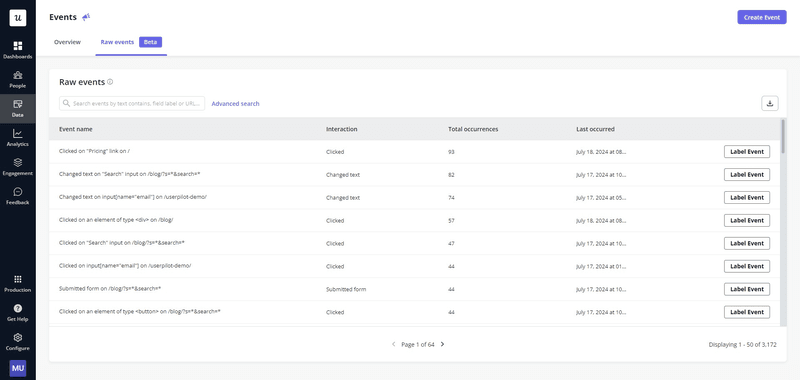
Autocapture key user action events with Userpilot.
- User and company profile: With user and company profiles in Userpilot, you get a clear picture of who your users are and how they interact with your product. You can see key details like their name, role, and actions they’ve taken, plus company info like size and subscription status. Also, Userpilot helps you segment users based on their behavior or attributes, allowing you to better understand different groups and build personalized experiences for them.
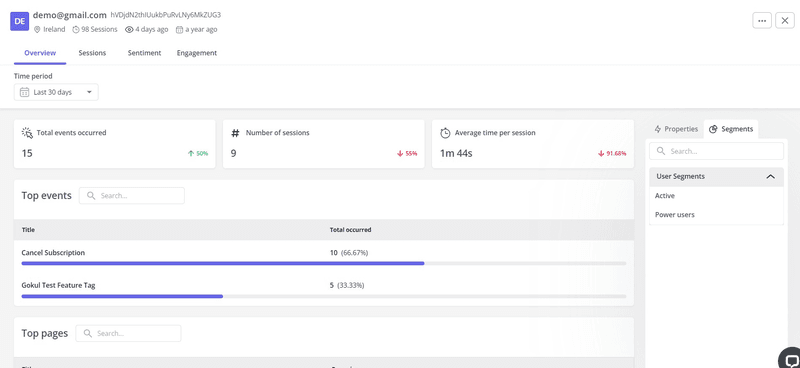
See detailed user and company data on Userpilot.
- User surveys: User surveys in Userpilot are great for collecting direct feedback from your users. You can create quick, customizable surveys like CES, NPS, or CSAT to measure user satisfaction and understand their experience. The best part: you can launch these surveys right inside your app, which means higher response rates and real-time feedback. For example, you can use surveys to learn which features users find most valuable or why they are struggling with parts of your product.
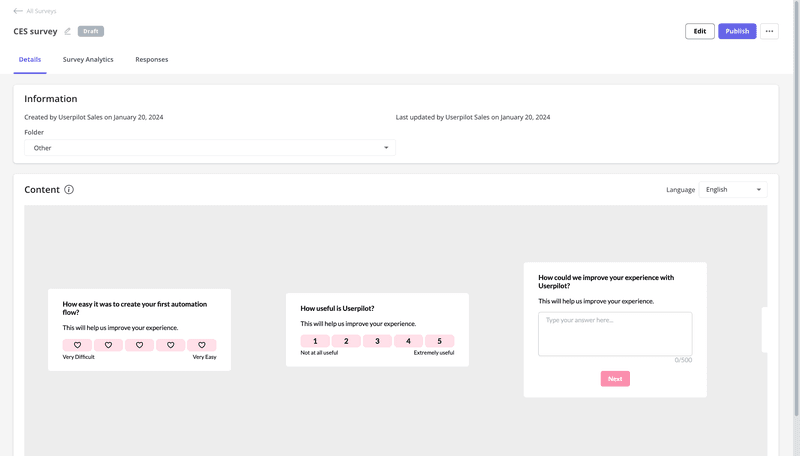
Collect in-app feedback with CES Surveys on Userpilot.
- Product analytics dashboards: Userpilot’s product analytics dashboards give you a clear view of user behavior and feature performance. The dashboards are fully customizable, with built-in templates to help you get started quickly. To better understand your users and spot trends, you can also segment data by user actions, attributes, or journey stages.
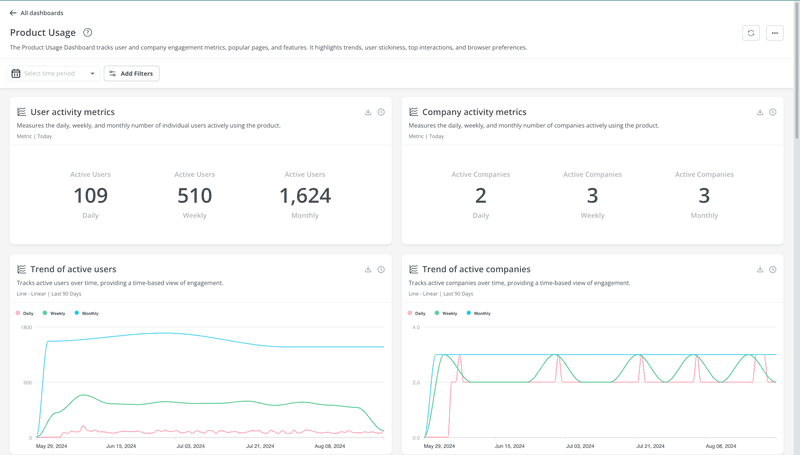
Track product usage metrics with Userpilot.
- Analytics reports: Userpilot’s analytics reports help you understand user behavior across your product. You can track paths users take, spot where they drop off, and measure things like retention and feature adoption. These reports make it simple to figure out what’s working and what’s not, so you can tweak your product for better results.
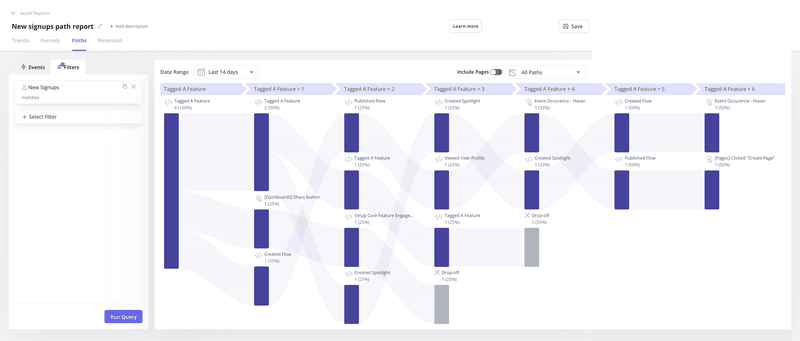
Understanding user paths on Userpilot.
- Session replay: With Userpilot’s session replay, you can watch real user interactions with your product—as if you were right there with them. You can see where they click, how they navigate, and what slows them down. This is especially useful for identifying usability issues or understanding why users get stuck. For example, if a feature isn’t being used as intended, session replays let you see exactly what’s causing confusion.
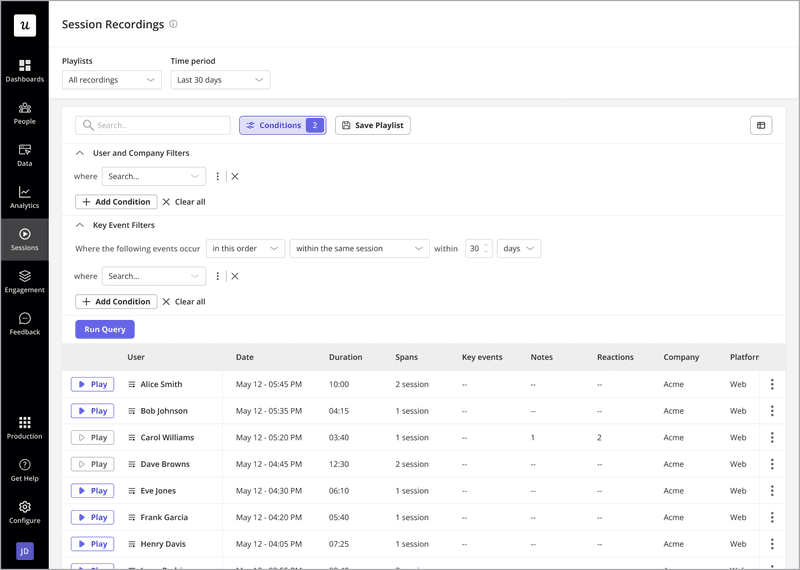
Watch real user sessions with Userpilot.
What are some use cases for Userpilot product analytics?
Here are some practical ways teams use Userpilot for product analytics:
Enhance user experience with engagement data
Userpilot’s analytics help you see exactly how users interact with your product in the form of feature usage data. You learn what features they prefer, what they ignore, and where they get stuck.
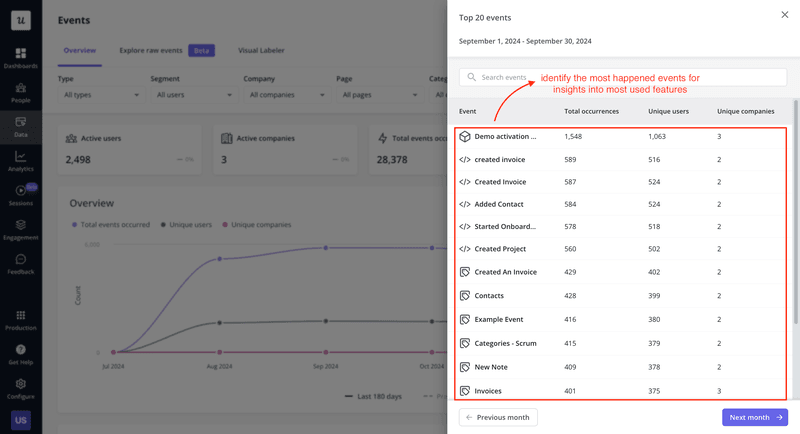
Get insights into feature usage with Userpilot.
You can then act on these product analytics and combine them with user engagement features to dig deeper. For example, pairing feature usage with Userpilot’s user surveys can help shed light on why some features aren’t working as expected. Are users skipping a feature because it’s hard to find? Or is the design too complex?
With this insight, you can make targeted changes. If users find a feature confusing, you can add in-app guidance, like tooltips, to guide them. If they’re not completing onboarding, you can refine the flow to make it clearer and faster. These are called actionable insights—data you can use to address specific pain points.
Instead of guessing, Userpilot helps you know exactly how to improve your user experience—the result: a product that feels more intuitive and user-friendly, based precisely on what your users want.
Measure impact for product launches and updates
The success of your product launches and updates isn’t just about delivering new features. Rather, it’s about how users respond to them. Userpilot gives you the data to measure this effectively.
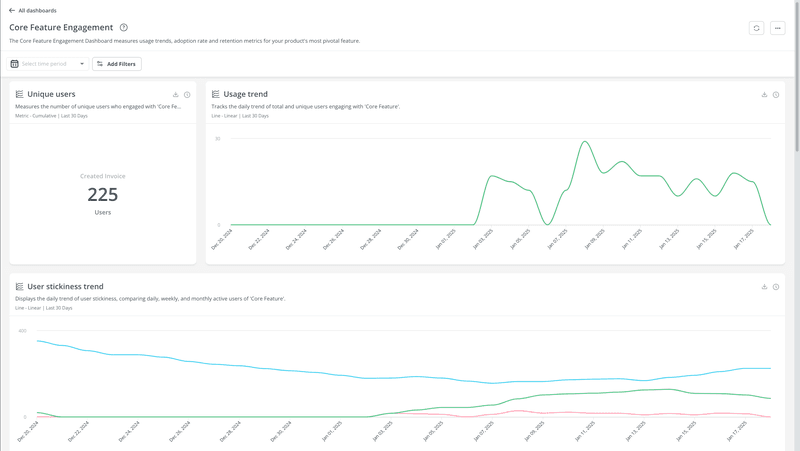
Track core metrics for new features with Userpilot.
You can track key engagement metrics like user adoption, retention, and feature usage to understand how your updates perform.
For example, say you roll out a new dashboard. Userpilot shows you how many users interact with it, how frequently, and whether it is now part of their workflow. Also: adoption rates tell you how quickly users accept new features, and retention metrics tell you if the update delivers long-term value.
All this data helps you see what’s resonating with users, what’s not, and what to improve. It also helps you prioritize future improvements based on user behavior so that your product updates can become even more impactful.
This is exactly what Cyberbiz has done when revamping their admin panel.
I will select different pages to see the average session duration because for some features, like the order manager, we want to reduce the session duration. We want to know if the redesign will help the users achieve their jobs or have the jobs done more quickly.
– Wei-Di Huang, Senior Product Manager at CYBERBIZ
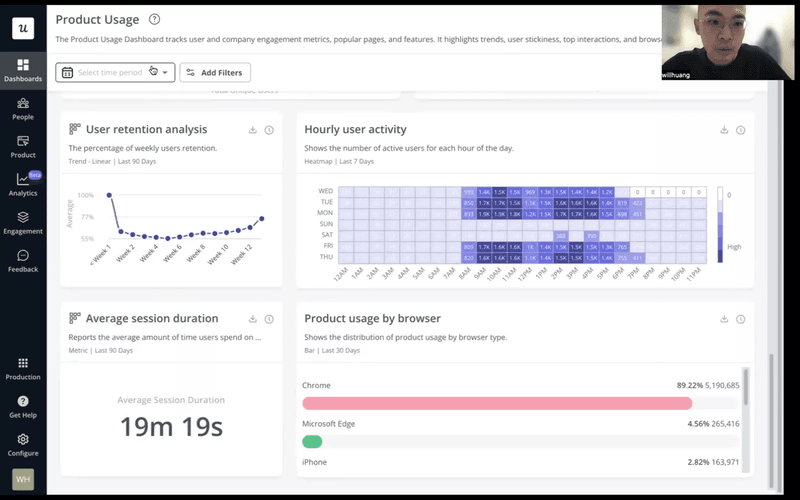
Cyberbiz case study with Userpilot.
How CYBERBIZ Revamped Their Admin Panel With Userpilot
Learn how CYBERBIZ used Userpilot analytics, feedback, and engagement features to redesign their key functionality and improve its adoption.

Identify opportunities for upsells and cross-sells
Userpilot helps you spot users who are ready to upgrade by analyzing key usage patterns.
First, start by looking for patterns in user behavior that show an upsell opportunity.
Look for signals like consistent feature engagement, users frequently hitting usage limits, or repeated attempts to access locked or premium features. For example, if a user regularly tries to use a feature that’s only available in a higher-tier plan, it’s a clear sign they’re ready to upgrade.
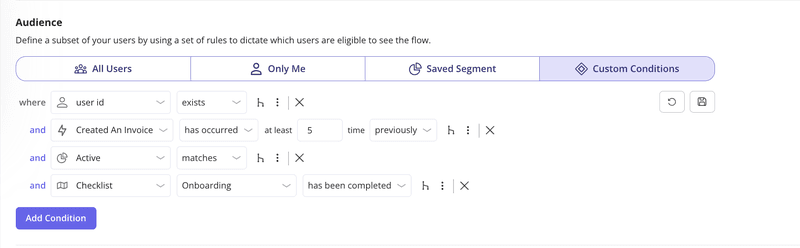
Identify and target users ready to upgrade using Userpilot analytics.
Once you’ve segmented these users, you can create targeted upsell flows to guide them toward upgrading. For example, trigger a contextual message or tooltip that mentions the benefits of upgrading like this:
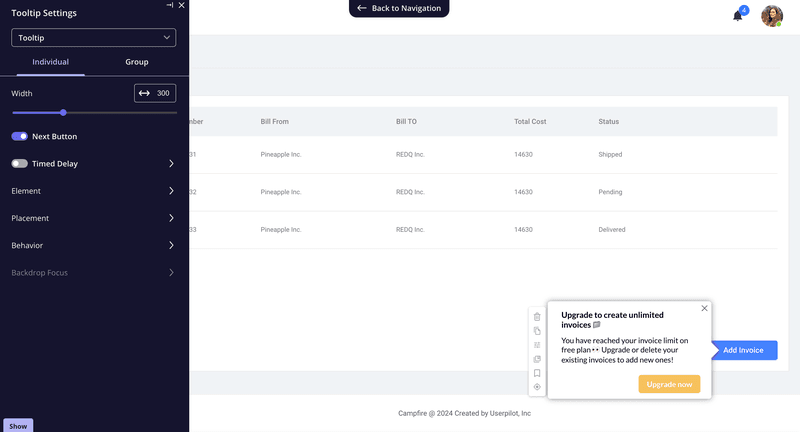
Create targeted upsell flows with Userpilot.
With a targeted approach like this, Userpilot helps make sure your upsell messages reach users when they’re most engaged and motivated to take action.
Understand where and why users drop off
Userpilot’s path analysis and funnel analysis help you identify exactly where users abandon a process (like onboarding or checkout).
It lets you see all the steps users take and highlights where most of them disengage. For example, you might notice a large drop-off at the final stage of onboarding or halfway through a form.
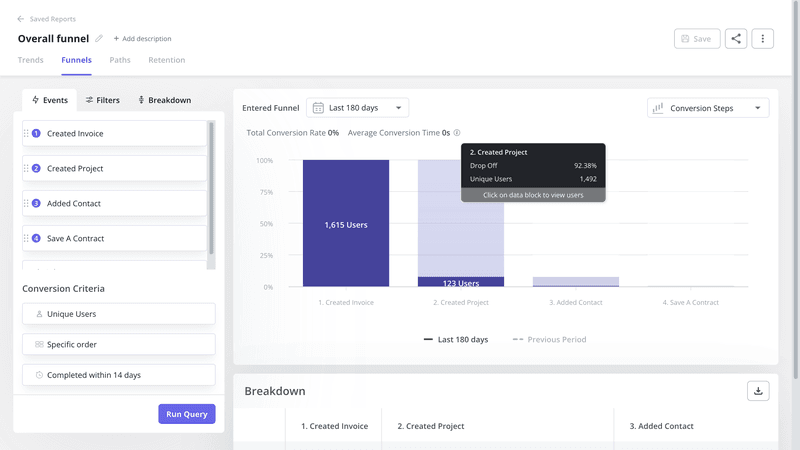
Funnel analysis with Userpilot.
Once you analyze where users drop off, you can dig deeper into the why. Segment these users and use session replays to see their interactions before they leave.
Were they confused by unclear instructions? Did they encounter a technical issue? Or did a missing call-to-action cause hesitation?
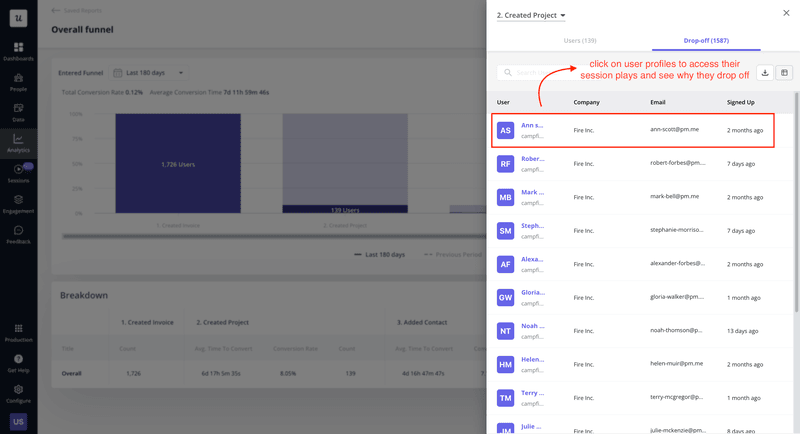
Userpilot’s session replays reveal why users drop off.
With these insights, you can pinpoint problem areas and take action. You can make changes such as simplifying steps, fixing bugs, or designing tooltips for better guidance.
How much does Userpilot cost?
Userpilot offers flexible pricing based on your monthly active users (MAUs). Plans start at $299 per month for smaller teams and scale as your user base grows.
Userpilot has three pricing plans you can choose from: Starter, Growth, and Enterprise
- Starter: Costs $299 per month, billed annually, and includes up to 2,000 MAUs. This plan is ideal for smaller companies or startups that need basic engagement and analytics features.
- Growth: This is a quote-based plan and includes features like resource centers, unlimited feature tagging, and a dedicated customer success manager. This plan is great for growing businesses that want more advanced features and deeper analytics.
- Enterprise: This is a quote-based plan for larger enterprises that need custom solutions, premium integrations, advanced security, and priority support.

Userpilot pricing plans breakdown.
All plans include core features like product analytics and user engagement tools, with advanced features available with higher tiers. Compared to standalone tools, Userpilot is a cost-effective option and lets you adjust the plan as your product scales.
Is there any downside to using Userpilot?
Higher upfront cost for early-stage teams: The starter plan costs $299/month billed annually with no free tier. Small teams with tight budgets might need to justify this investment before seeing user activation improvements.
Primarily customer-focused: While the technology could work for employee onboarding, Userpilot lacks HR-specific features like compliance tracking and internal training workflows that dedicated employee onboarding elements provide.
What do our customers say?
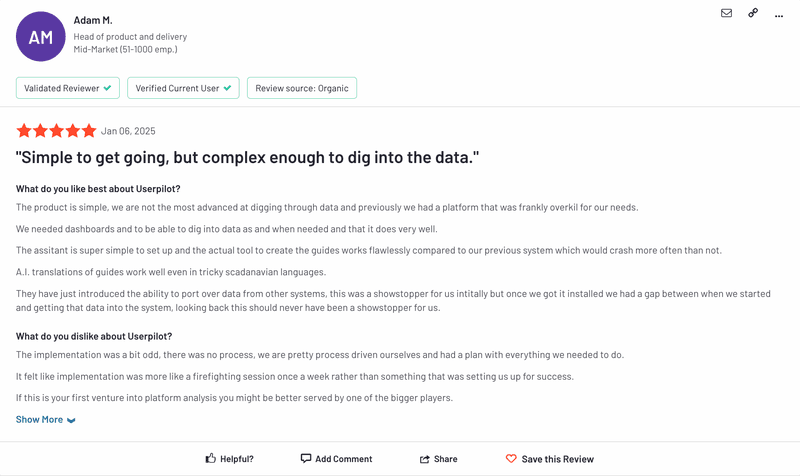
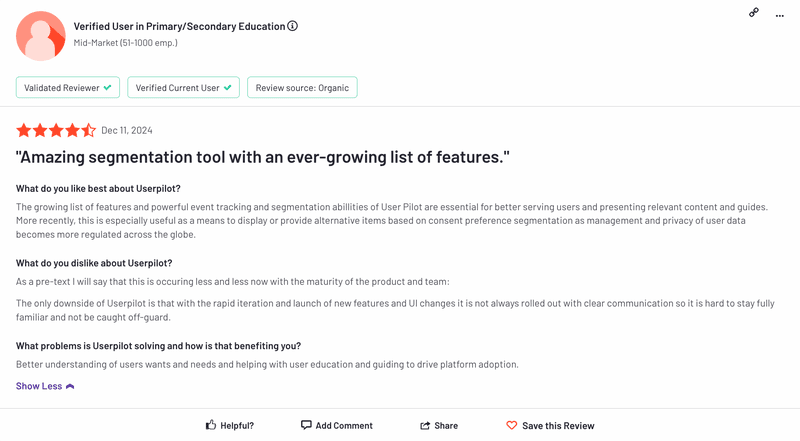
Userpilot is highly rated at 4.6 out of 5 on G2, with customers appreciating our intuitive product analytics.
“The behavior-based triggers and analytics helped us to improve our user experience easily. It is super easy to use.”
Meanwhile, another shared how our no-code feature helps their team:
“Userpilot helps us solve the challenge of delivering personalized onboarding experiences without requiring coding expertise.”

‹
›
Userpilot customer reviews. Source: G2.
Userpilot’s product analytics have helped companies like Zoezi make more informed product decisions.
The team at Zoezi, a SaaS platform for gyms and fitness studios, found it hard to understand exactly how users interacted with their product. They relied on limited feedback from a few customers and struggled to get insights from their help center.
With Userpilot’s analytics, Zoezi started tracking metrics like page visits and product usage. This allowed them to identify underused features, design better onboarding flows, and provide in-app support.
As a result, they focused their development efforts based on real user behavior and allocated resources more efficiently. They also improved communication with their users through in-app updates and release notes.
This is what Isa Olsson, UX researcher at Zoezi, had to say about using Userpilot:
“We were in a pretty bad state before Userpilot because we didn’t even know what pages people visited. Now we can just look at the pages tab and understand that people don’t use this stuff, so let’s not focus on that.”
How Zoezi Improved User Experience and Gained Valuable Insights With Userpilot
Learn how Zoezi used Userpilot analytics to gain product usage insights and inform prioritization decisions. See how they improved in-app communication!

Want to see Userpilot product analytics in action?
Hopefully, this gives you a clearer picture of whether Userpilot is the right fit for your product analytics needs. As always, the best choice comes down to your priorities and what fits your goals best.
If you’re curious to know more, book a Userpilot demo to see its features in action and how it can support your team.