Userpilot for User Analytics: Features, Pricing, and Review (original) (raw)
Looking for an effective user analytics tool and wondering if Userpilot is the best option for your SaaS company?
With numerous Userpilot alternatives, it can be challenging to make a final decision.
In this article, we’ll delve into precisely that – helping you determine whether Userpilot is the ideal choice for your user analytics needs. We’ll explore its features, pricing, and offer a comprehensive review to aid in your decision-making process.
What is Userpilot?
Userpilot is a product growth platform that drives user activation, feature adoption, and expansion revenue. It also helps product teams collect user feedback, streamline onboarding, and gather actionable insights from analytics.
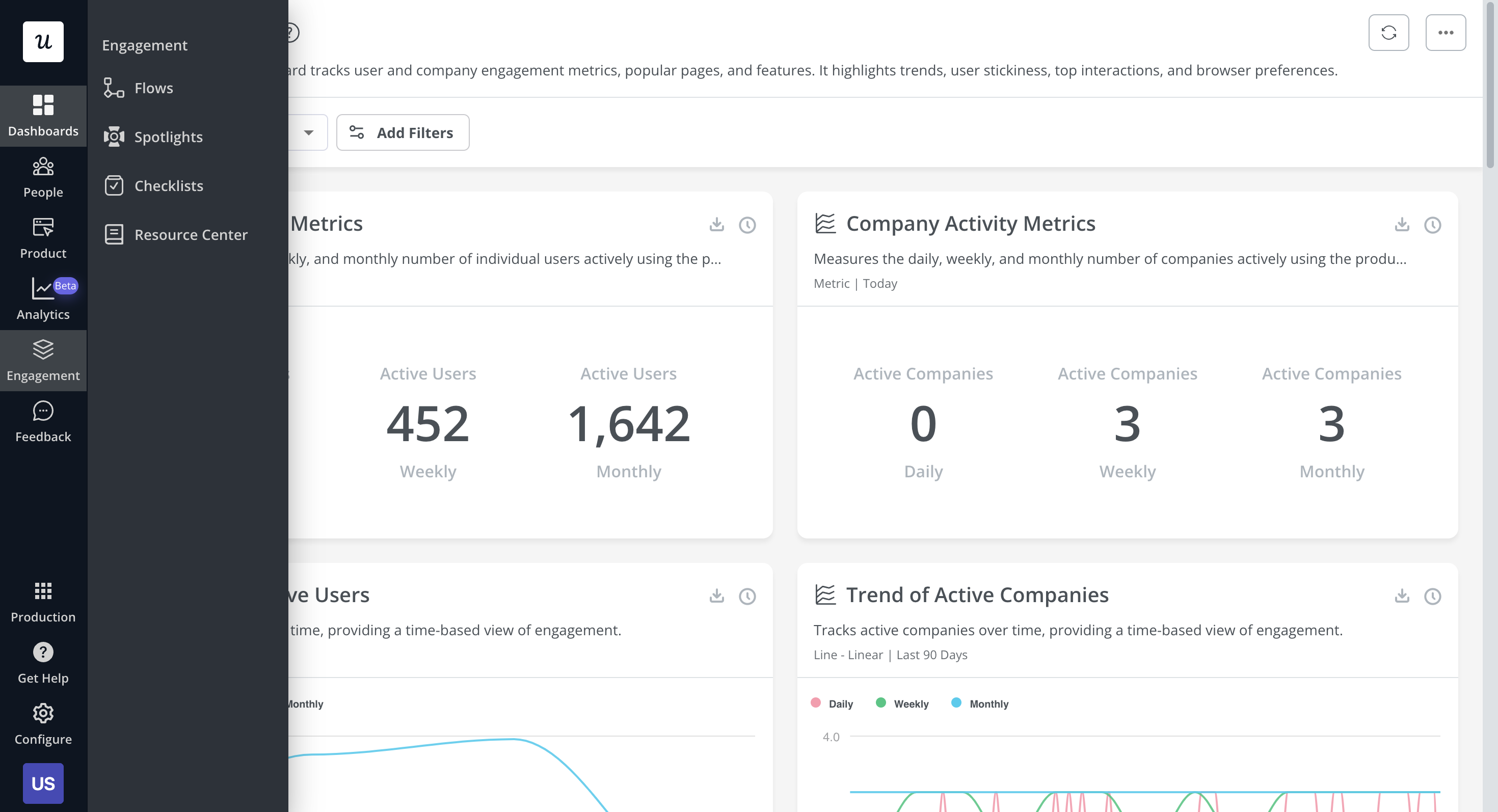
With Userpilot, you’ll be able to track both product usage and user behavior to get a holistic view of how customers use your product — which will guide future development, improve the user experience, and inform your growth efforts.
Are You Getting the Full Picture from Your User Analytics?
Tracking data is easy. Getting actionable insights that drive growth is hard. Take this quick assessment to see if your current strategy matches the capabilities of Userpilot user analytics.
How do you currently track user interactions like clicks and hovers?
When you identify a user segment that is “at risk” of churning, what happens next?
Do you combine qualitative feedback with your quantitative usage data?
Turn Insights Into Action
Don’t just watch your metrics. Userpilot user analytics empowers you to track behavior without code and instantly trigger in-app experiences to improve those metrics.
Must have features of user analytics tools
Choosing the right user analytics tool is important for understanding your customers’ behavior and optimizing their journey. Here’s what you should look for:
- Product usage insights: For an in-depth understanding of user experiences, ensure your tool captures in-app behaviors and tracks progression across various user journey touchpoints. Specifically, look for features like custom events, feature tagging, heatmaps, and session recordings.
- User segmentation: Select tools that allow segmentation by factors like jobs to be done, demographics, or in-app actions, and then enable you to visualize their behavior for identifying common themes.
- Feature engagement: The chosen tool should show trends in feature engagement and adoption. This will help identify popular features and ones you’re better off sunsetting.
- Funnel analysis: So you can visualize the users’ journey through your product. By identifying where users get stuck or leave, you can strategize how to streamline their path to completion.
- A/B testing: For comparing different product flows to determine what works best. This helps in making informed decisions based on real user responses.
Userpilot features for user analytics
User analytics lets you track and analyze the behavior of users within your product. Userpilot lets you filter through customers from a unified dashboard, extract insights from specific segments or time periods, and create custom segments for all users who meet certain conditions. Here’s an overview of Userpilot’s analytics features:
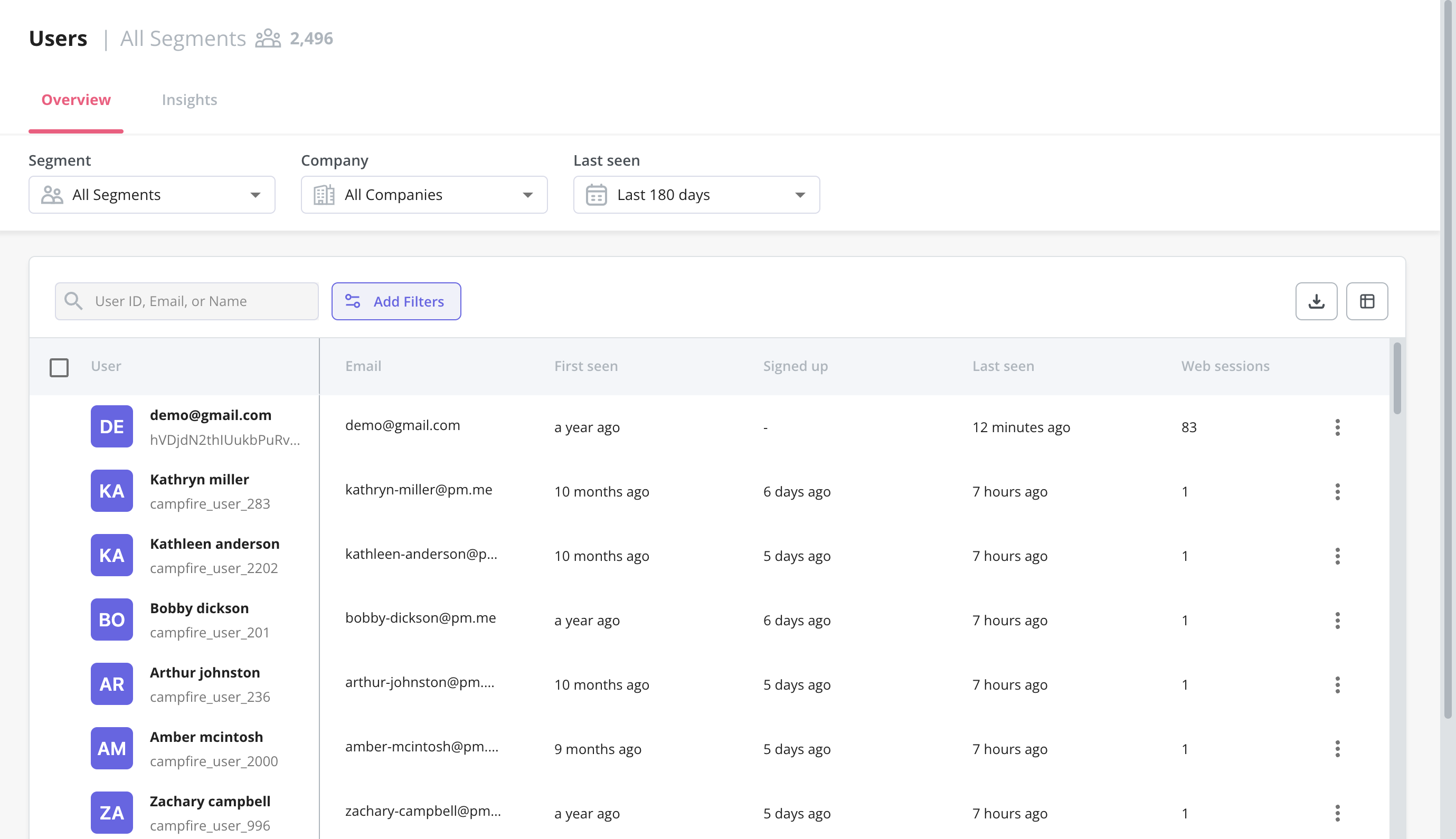
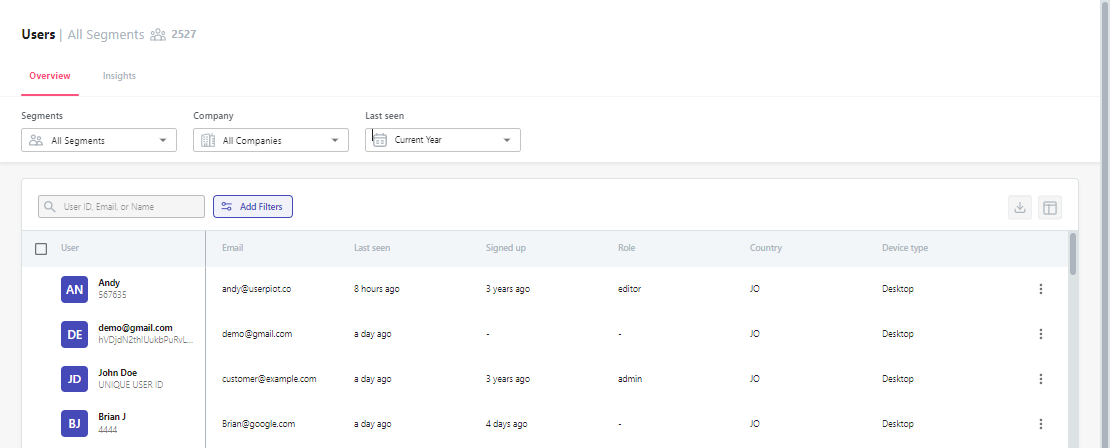
- Users dashboard: Userpilot’s users dashboard gives you an overview of all user data in one place. You’ll be able to filter by segments, which companies users are from, or when they were last seen active. You can also export data in bulk as a CSV or perform actions on individual users.
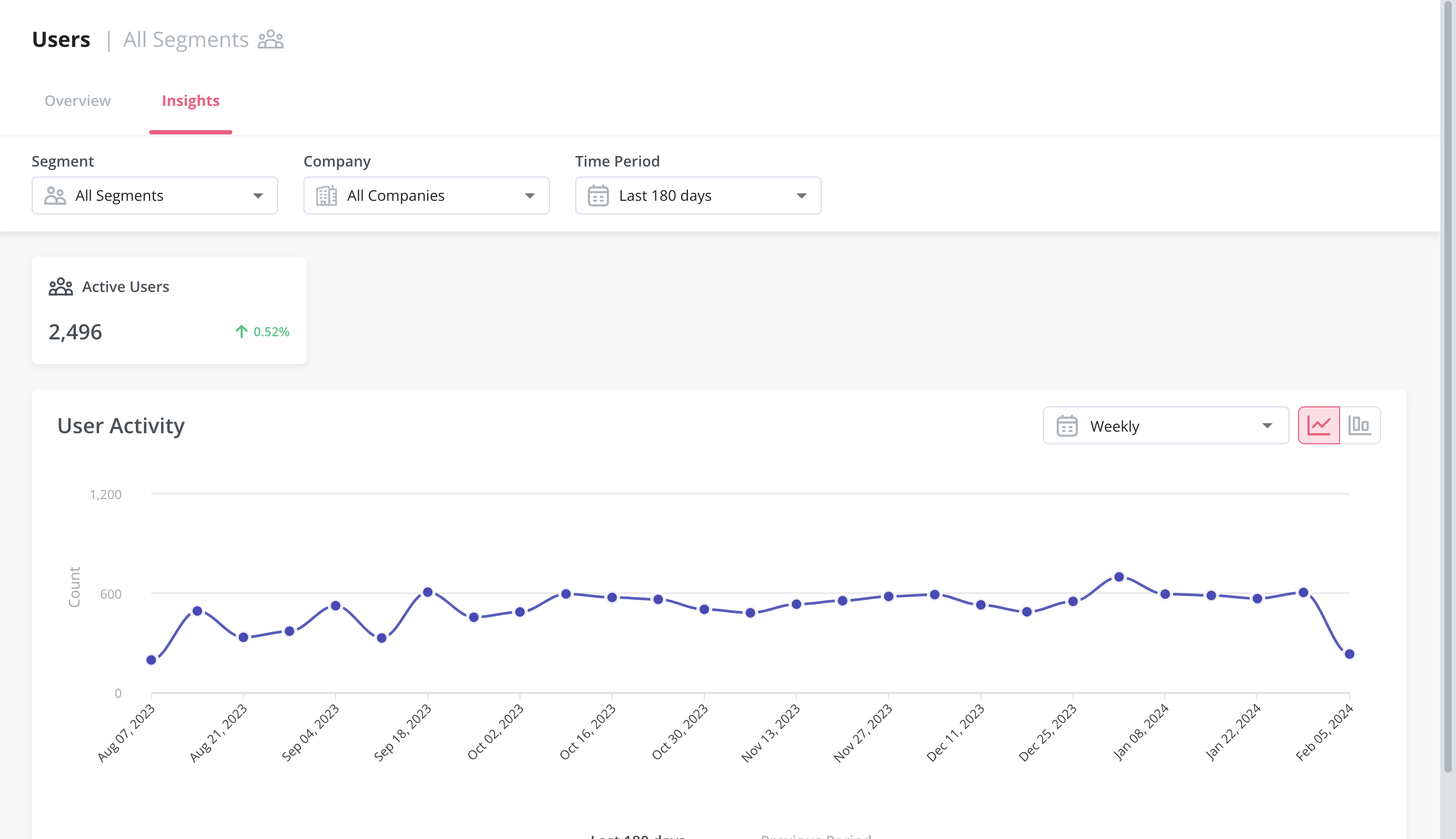
- Audience insights: Much like the overview dashboard, the Insights section lets you filter metrics by segment, company, and time period. You’ll be able to choose between a daily, weekly, or monthly view and then compare data between the current and previous time periods.
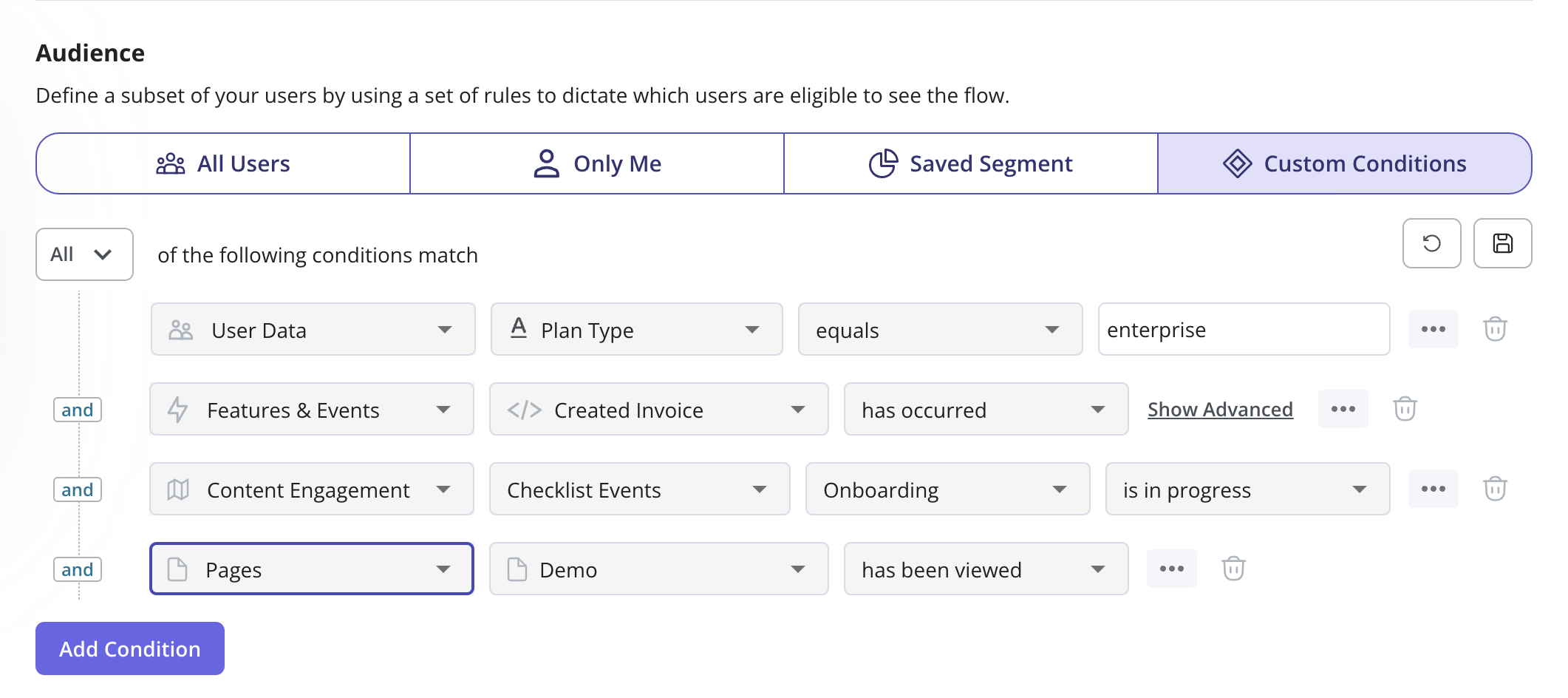
- Conditional segmentation: Practical use cases for user analytics include creating segments for all users that meet certain conditions. For instance, you could reach out to companies in a certain country when creating a new flow or target customers who have tried certain features.
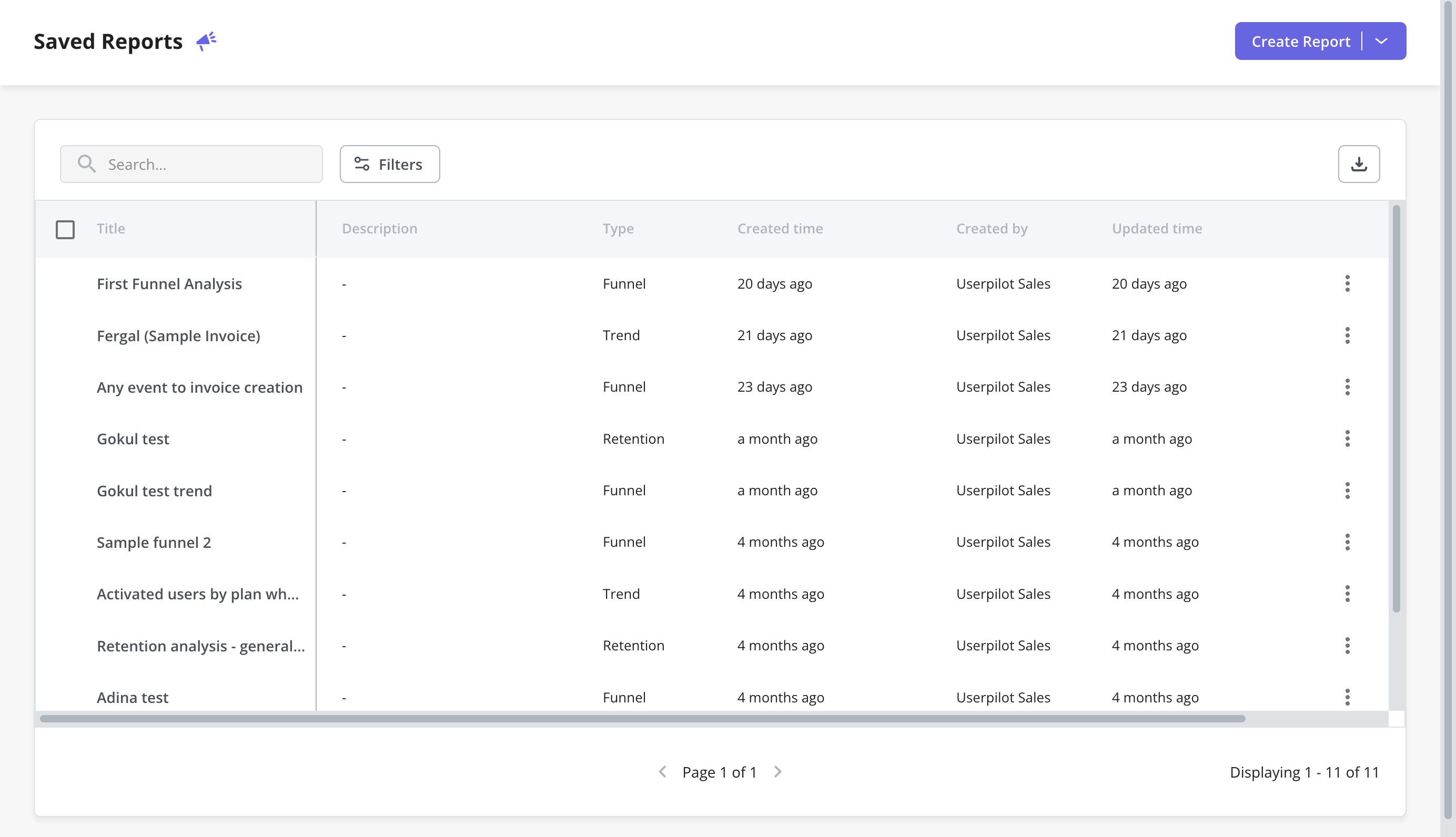
- Saved reports: With Userpilot, you can create funnels, trends, retention tables, and path reports. The saved reports dashboard lets you view, edit, duplicate, or delete any trend and funnel reports you’ve created. You’ll also be able to sort by report type, filter by the teammate who created the report, or export in bulk if you need a CSV of your user analytics.
- Dashboards: Once you log in to Userpilot, you will see a collection of dashboards that collects all your key product metrics like product usage, user activation, feature engagement, etc. These dashboards are automatically available without you having to set anything up.
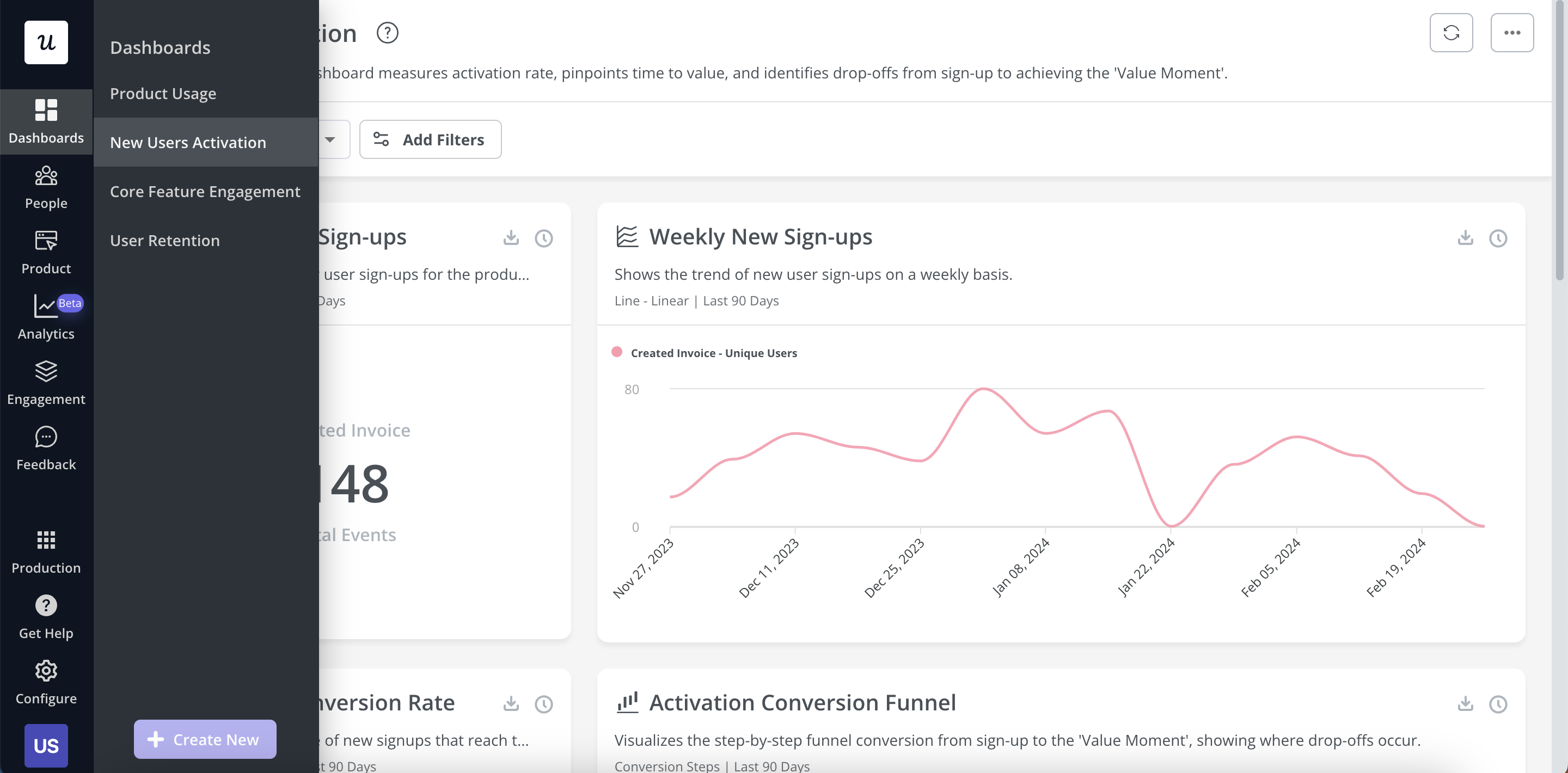
Types of analytics dashboards available in Userpilot currently.
Userpilot’s user segmentation analysis
User segmentation is a key part of building a contextual onboarding experience for new customers. Userpilot lets you segment your customers when they meet specific conditions, filter through analytics using user attributes, and trigger flows for users in different segments.
Here are some of Userpilot’s customer segmentation capabilities:
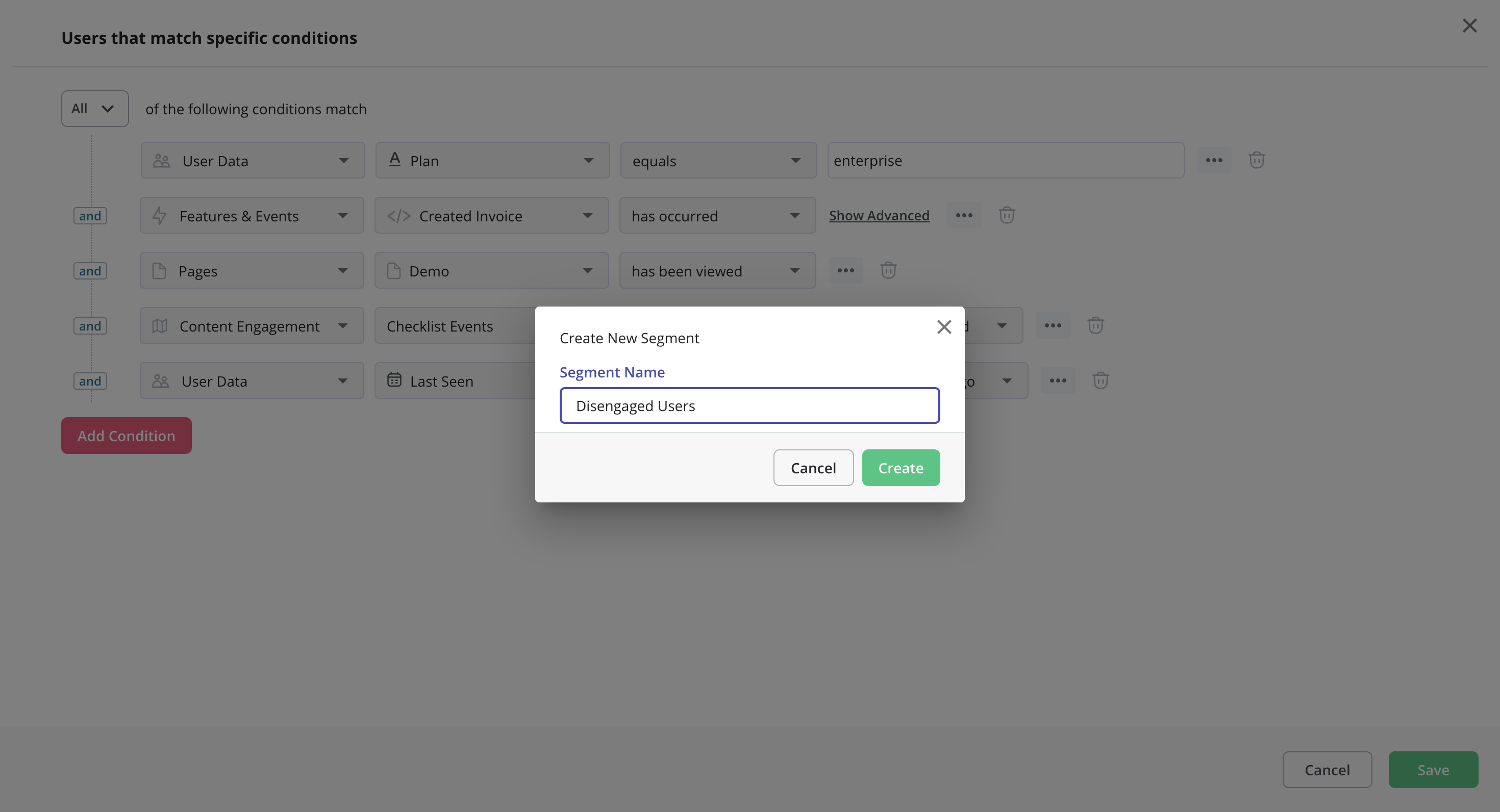
- Conditional Segments: Userpilot lets you build segments for users who match conditions on what device/browser/OS they’re using, which country they live in, what their NPS score is, and any custom events they’ve performed. You can then use these segments as filters/triggers.
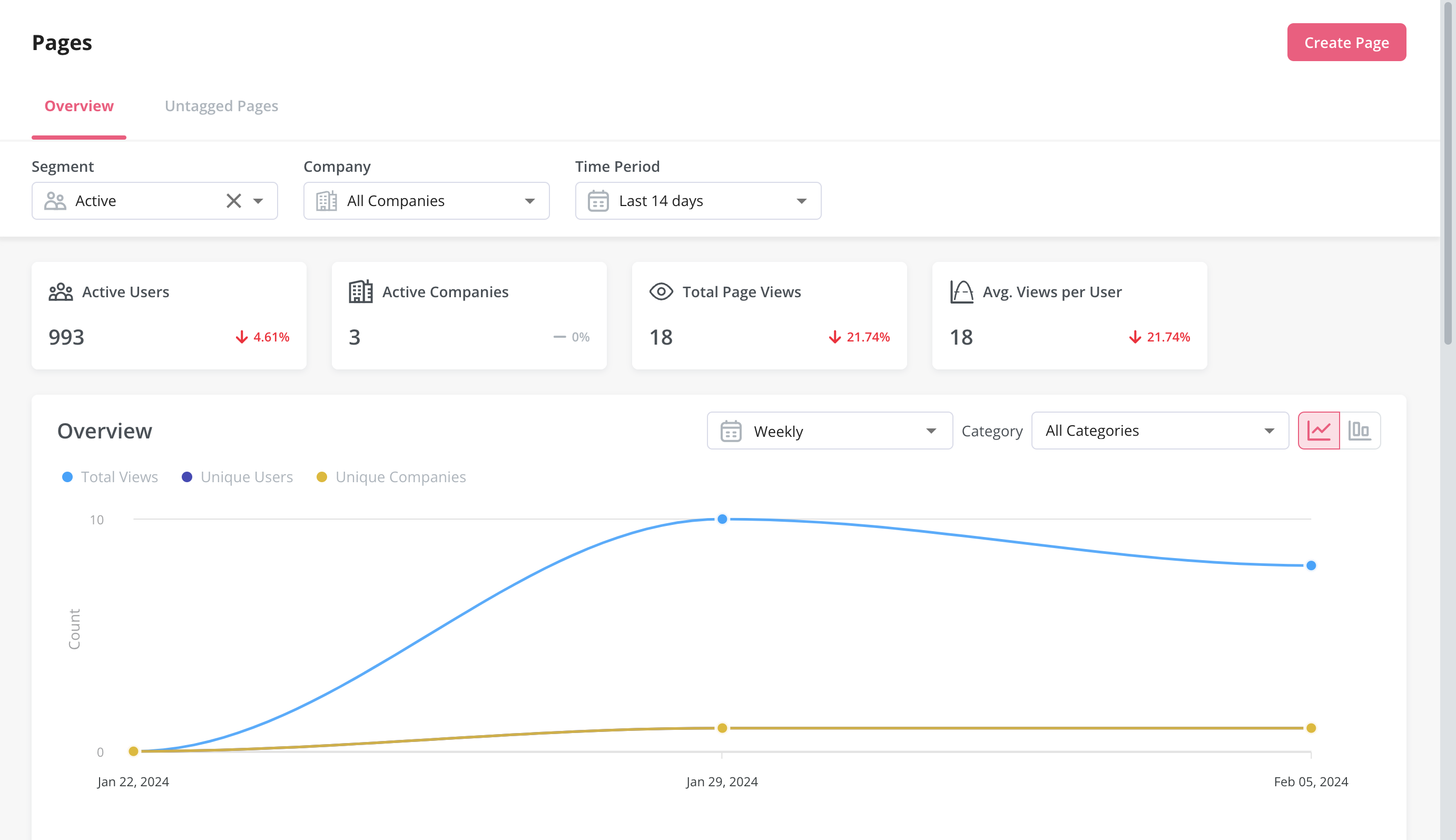
- Analytics Filters: The product analytics and user insights dashboards on Userpilot can be set to only show data from certain user segments or companies. This makes it possible to identify actionable insights from specific user cohorts and benchmark performance between segments.
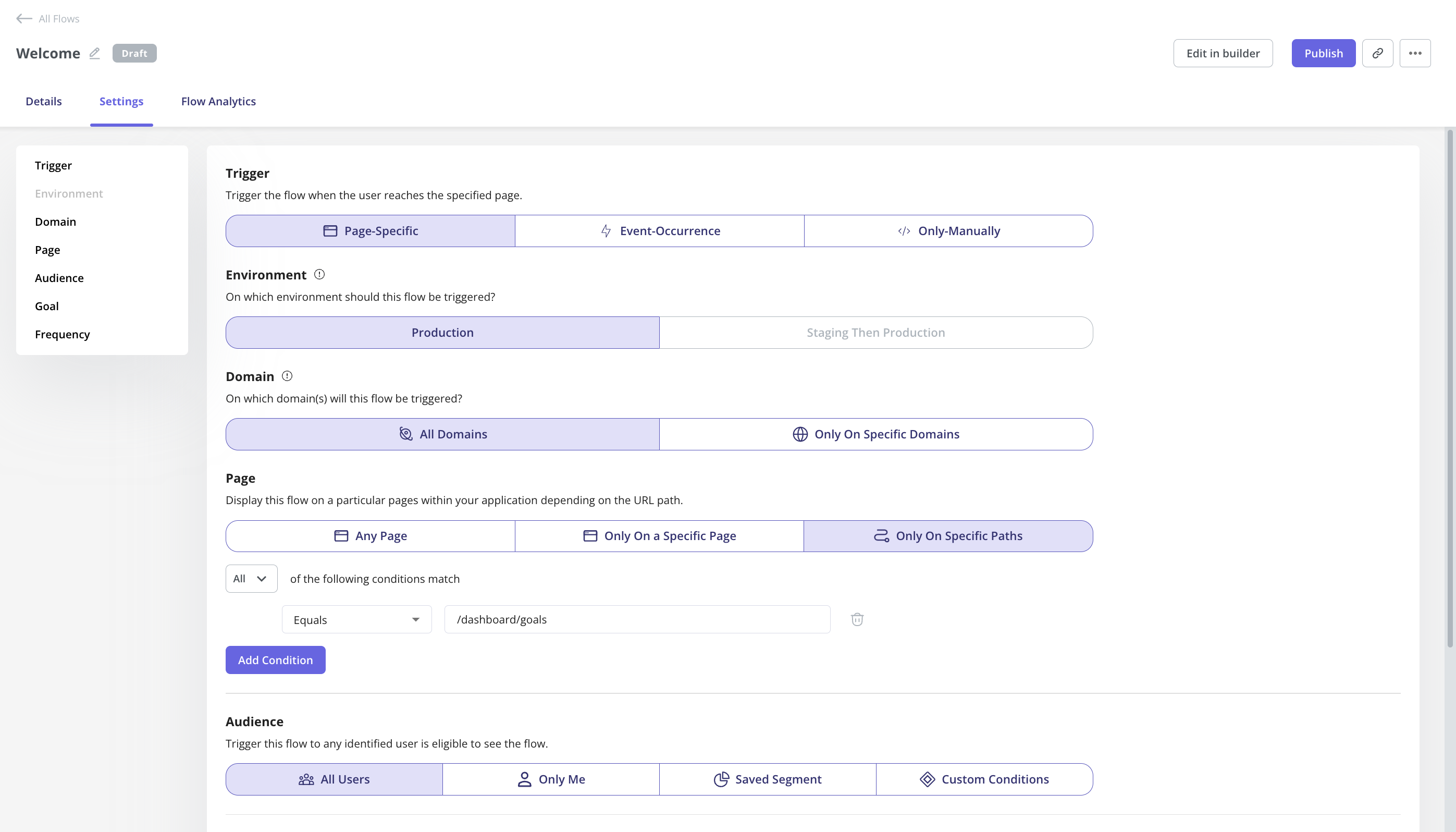
- Flow Triggers: Userpilot audience settings make it possible to target in-app flows to certain user segments or only show flows to users who meet specific conditions. You could also add event-based or page-specific triggers to show relevant flows with contextual timing.
Userpilot’s survey analytics
Survey analytics are an essential part of extracting actionable insights from user feedback. Userpilot’s advanced analytics capabilities extend to any surveys you build with it. You’ll be able to see granular analytics for surveys, sort by audience or time period, and view NPS data separately.
Here’s an overview of the Userpilot features you can use during survey data analysis:
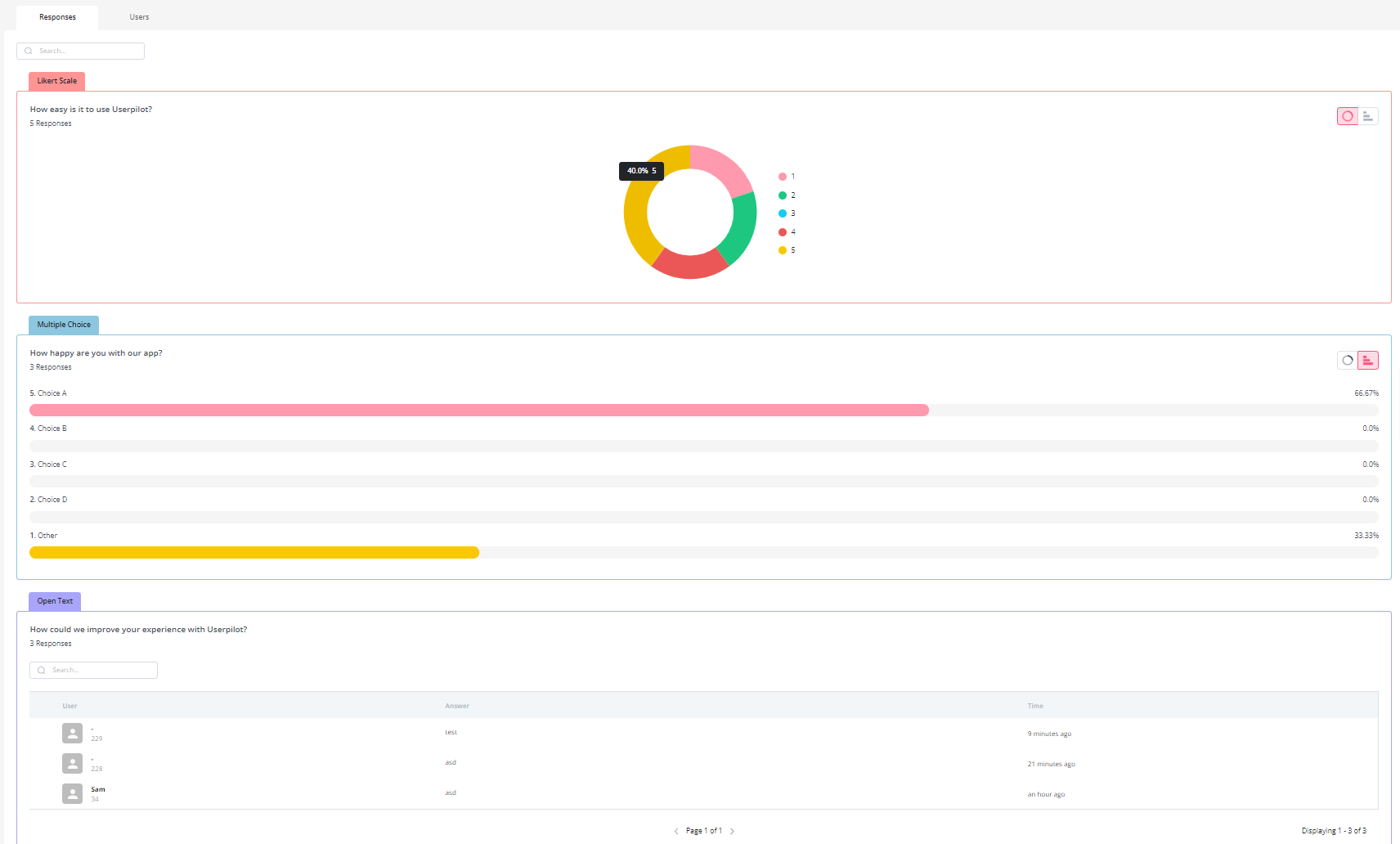
- Granular analytics: Each survey you create has its own analytics tab where you’ll be able to see which percentage of respondents chose a particular option, view the most popular choices, and review qualitative responses of users. You can also sort by segment, company, or time period.
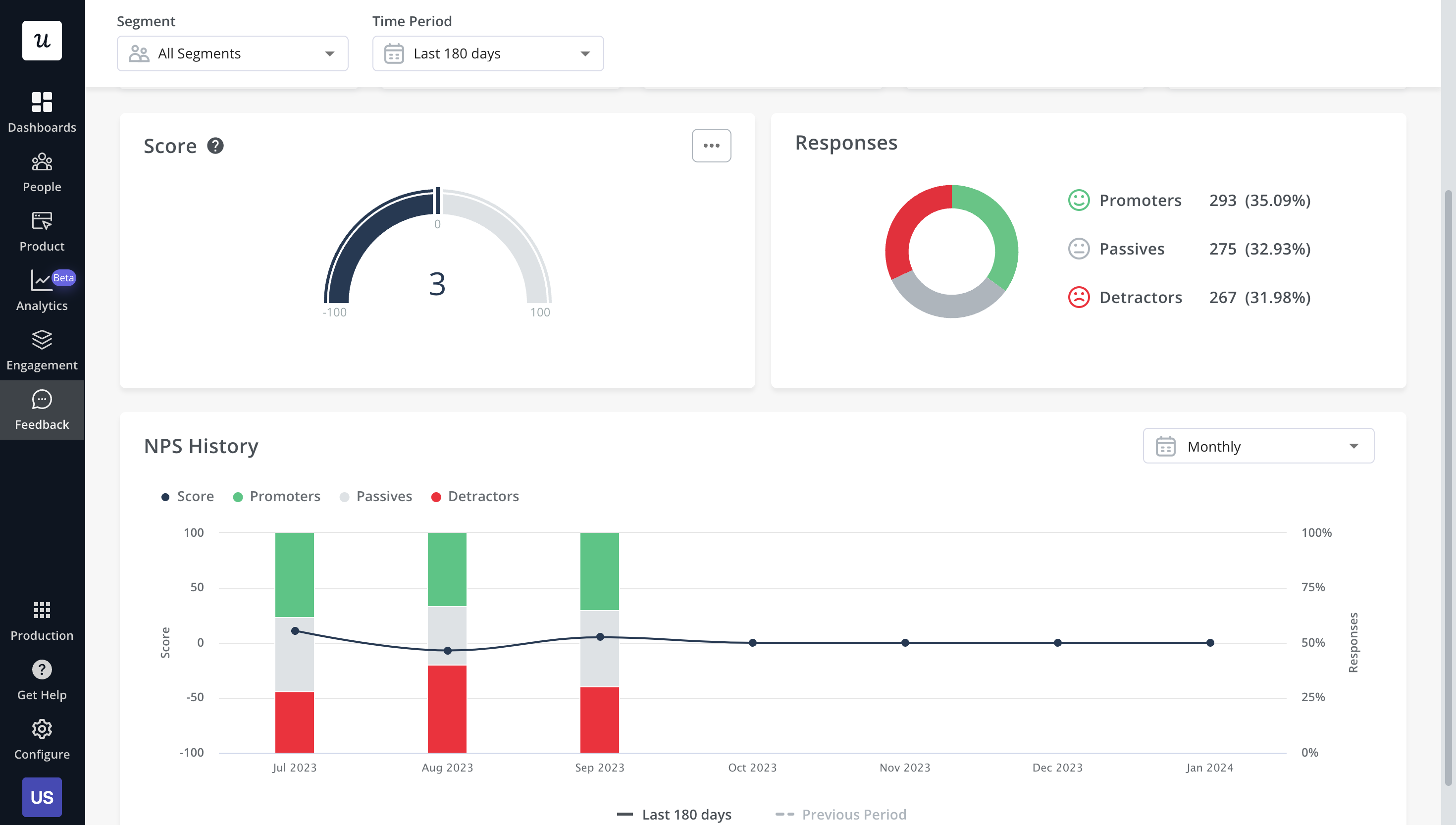
- NPS dashboard: The dedicated NPS dashboard compiles survey responses to show you all relevant Net Promoter Score data in one place. This includes total views, NPS score, total responses, overall response rate, the number of qualitative responses, and how NPS is trending over time.
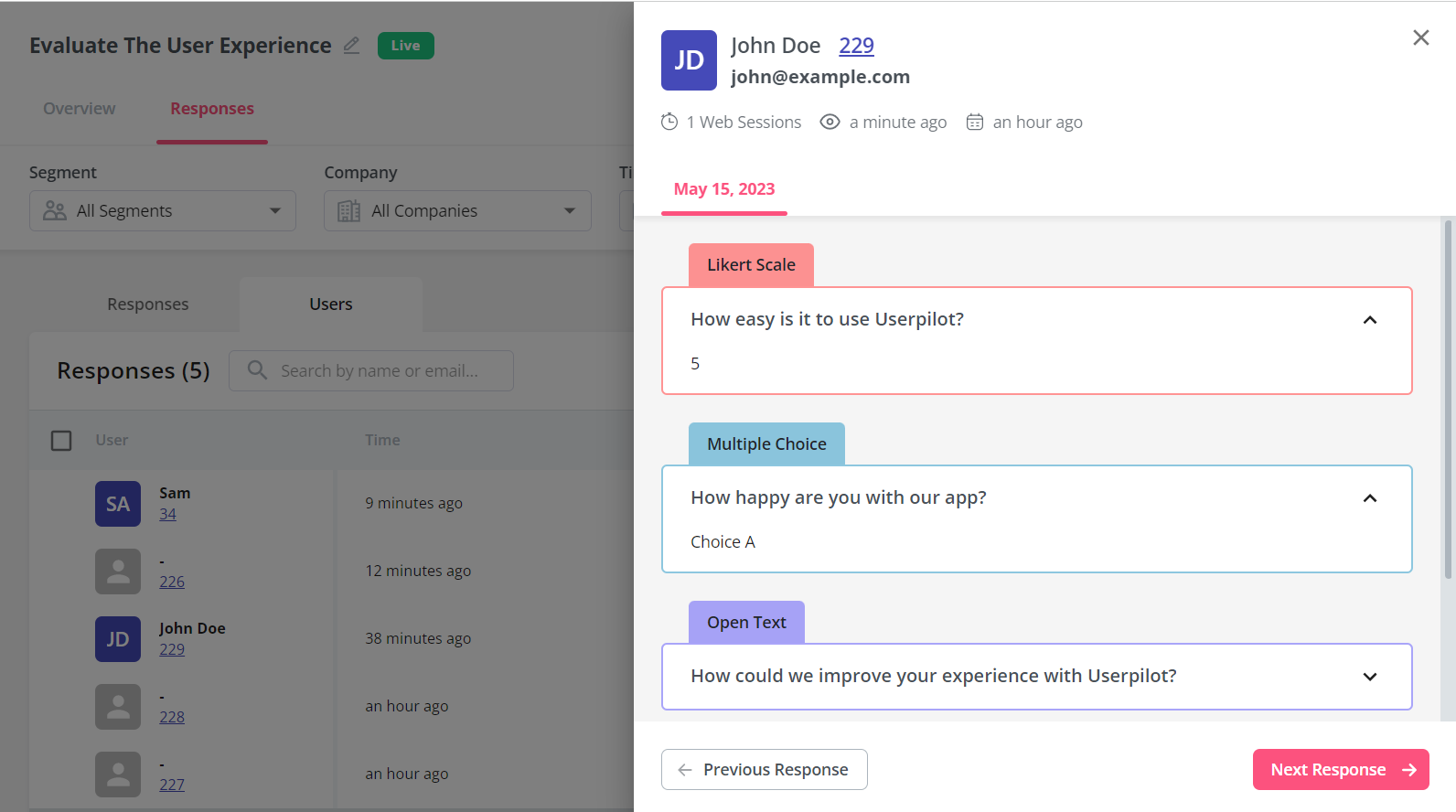
- User responses: Userpilot lets you review the responses of each individual user so you can see how sentiment differs on a customer-to-customer basis. This makes it easier to schedule follow-up interviews or implement suggestions made by users with the highest lifetime value (LTV).
Userpilot’s user journey mapping
User journey mapping helps you visualize all the interactions between users and your product as they try to achieve a particular goal. Userpilot’s detailed user analytics and funnel/trend reports help you track customers as they progress through different stages of their journey.
Here are the Userpilot features you can use for user journey mapping:
- User analytics: The Users dashboard provides detailed analytics of your entire customer base. You’ll be able to sort by segment, company, or time period and add multiple filters to help you narrow results. You can also perform bulk actions and export user data in a CSV format.
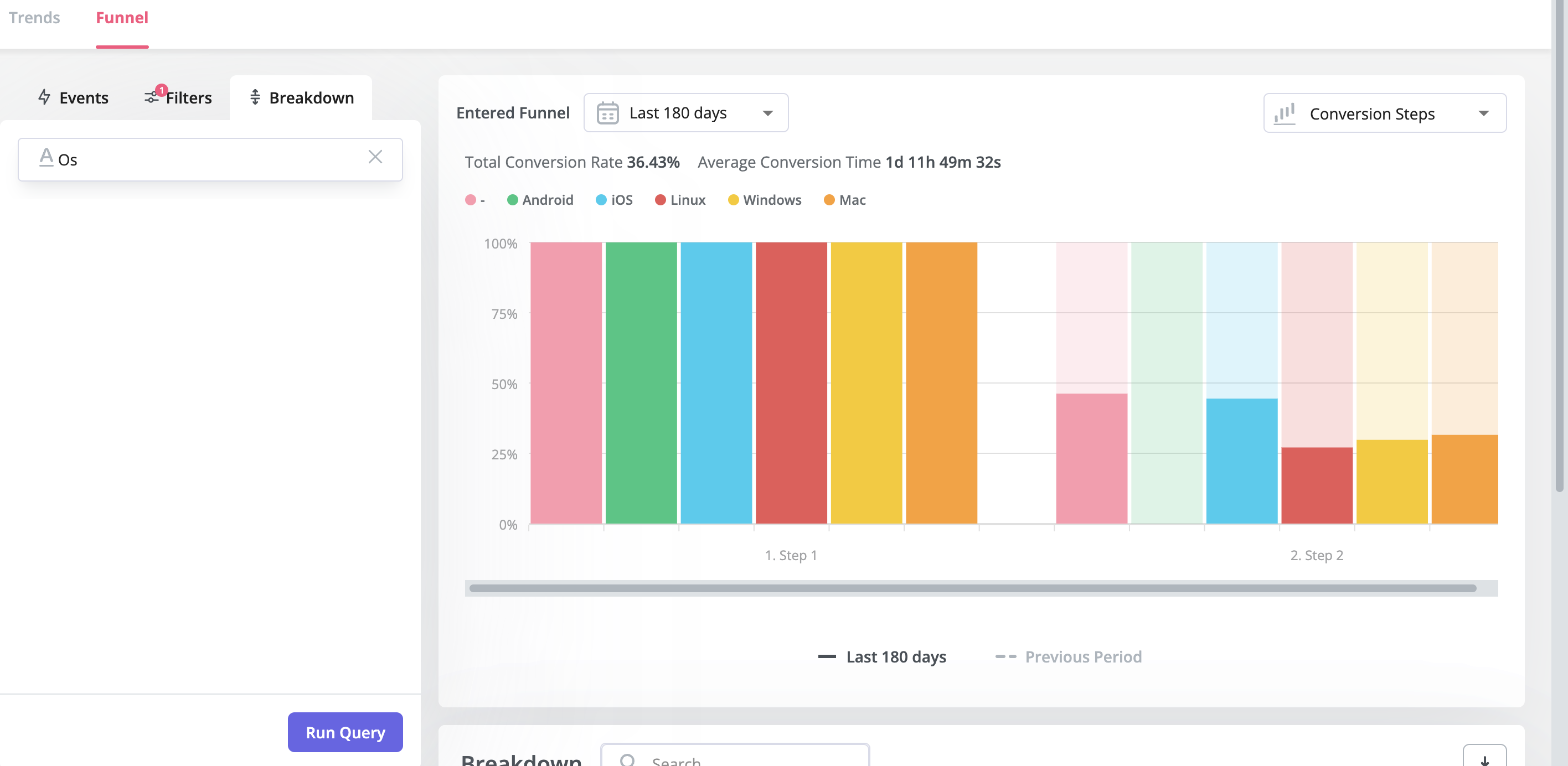
- Funnel reports: These reports help you visualize the user journey map by showing which stage, page, or action most users get stuck on. You’ll also be able to view breakdowns so you can see how the user journey changes depending on which OS, browser, or device type a user is on.
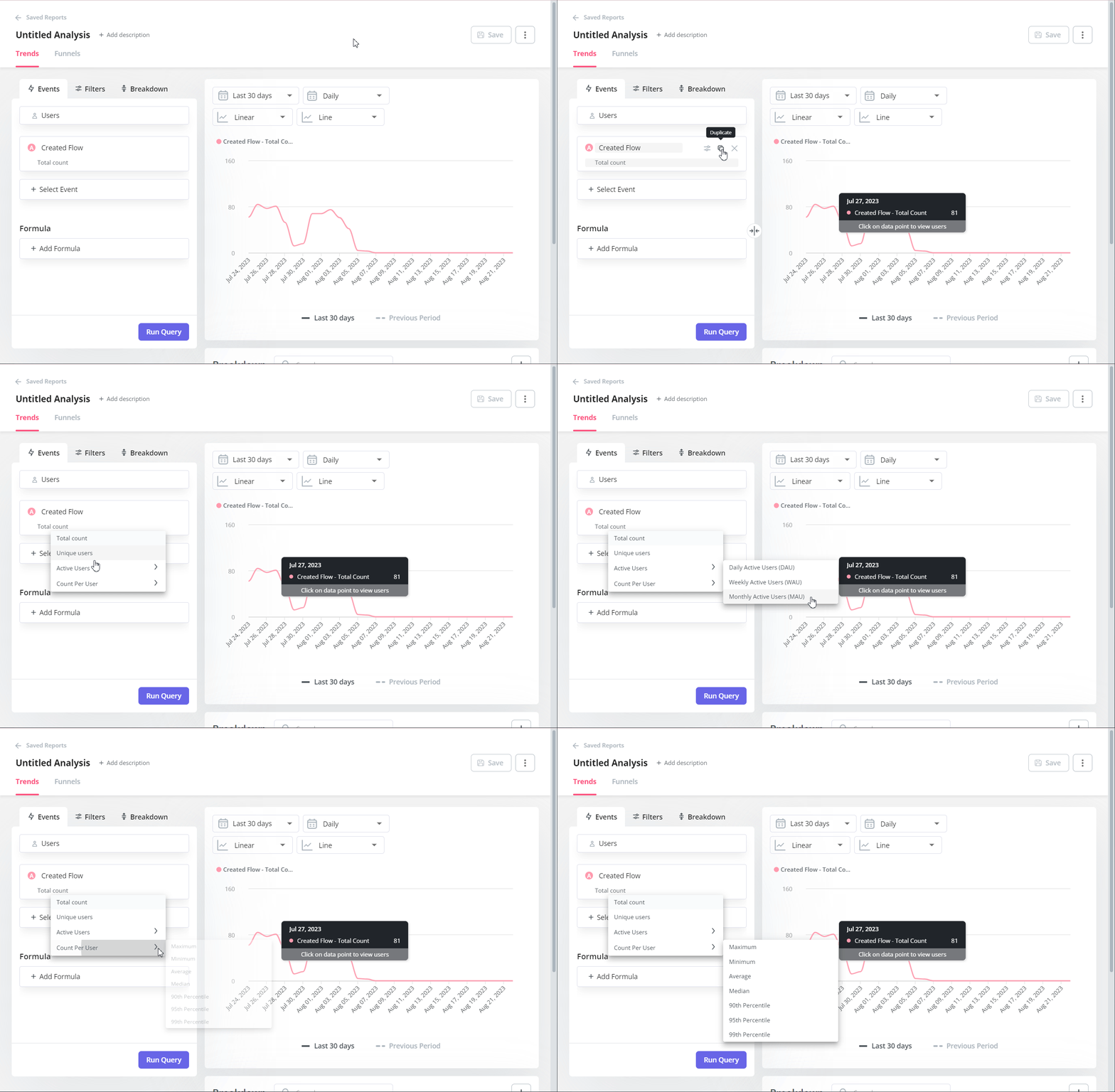
- Trend reports: Userpilot’s trend reports offer behavioral insights such as how often users perform a specific action, the number of unique users who take that action, and where in the user journey these actions occur. You can also create custom metrics and build your own charts.
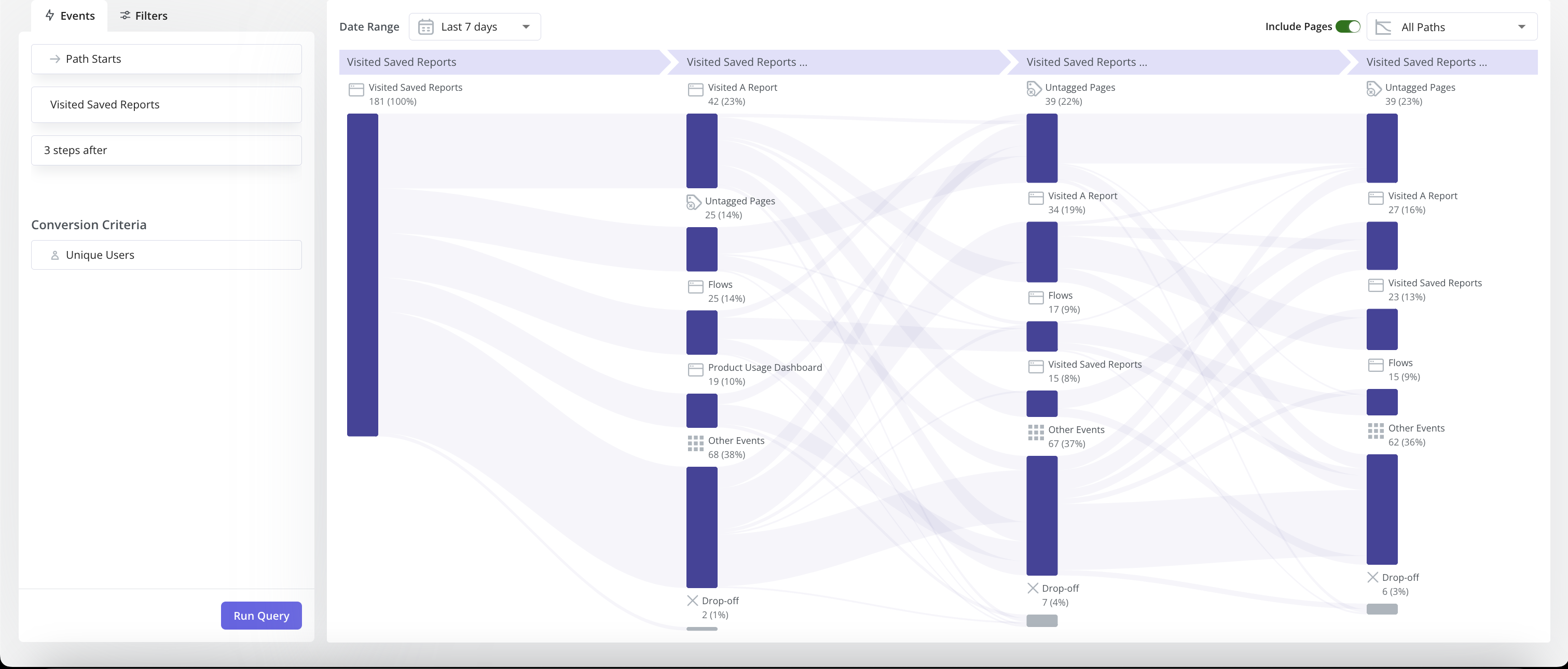
- Path reports: You can generate and access path reports directly within the reporting builder in Userpilot, alongside funnels, trends, and retention reports. With Paths, you have a better understanding of user flows and journeys – how customers interact with your products, navigate the features, etc.
Userpilot’s behavioral analytics
Behavioral analytics make it possible to monitor user activity, group data into cohorts, and extract relevant metrics/insights. Userpilot lets you tag features to see how users interact with them, compare goals by cohort, and create trend reports that track behavioral patterns over time.
Here are some Userpilot features you can use for user behavior tracking:
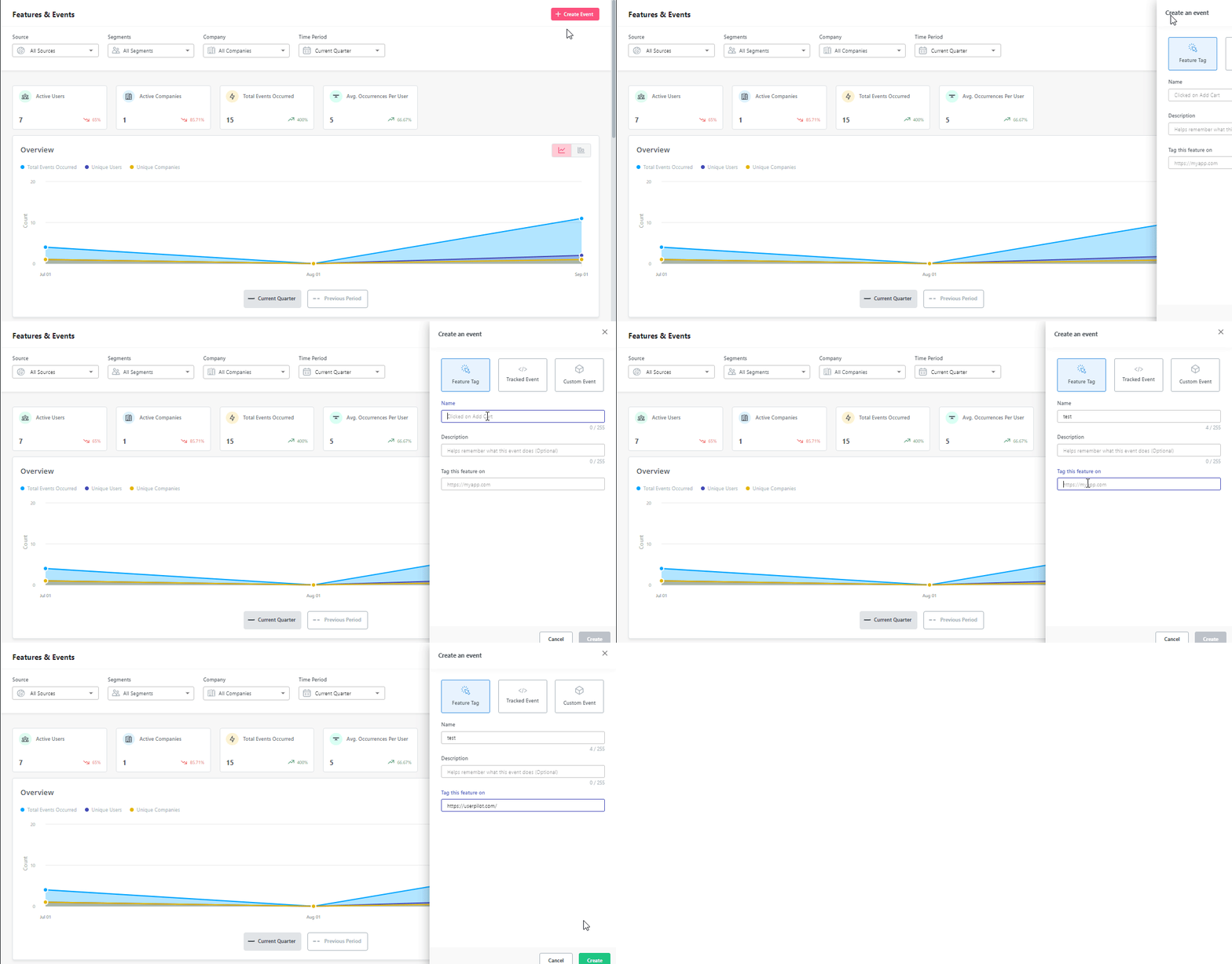
- No-Code Feature Tagging: Userpilot’s click-to-track feature tagger lets you mark features, buttons, and elements with the Chrome extension. You’ll be able to track user interactions such as clicks, hovers, or inputs to get an accurate behavioral view for specific features.
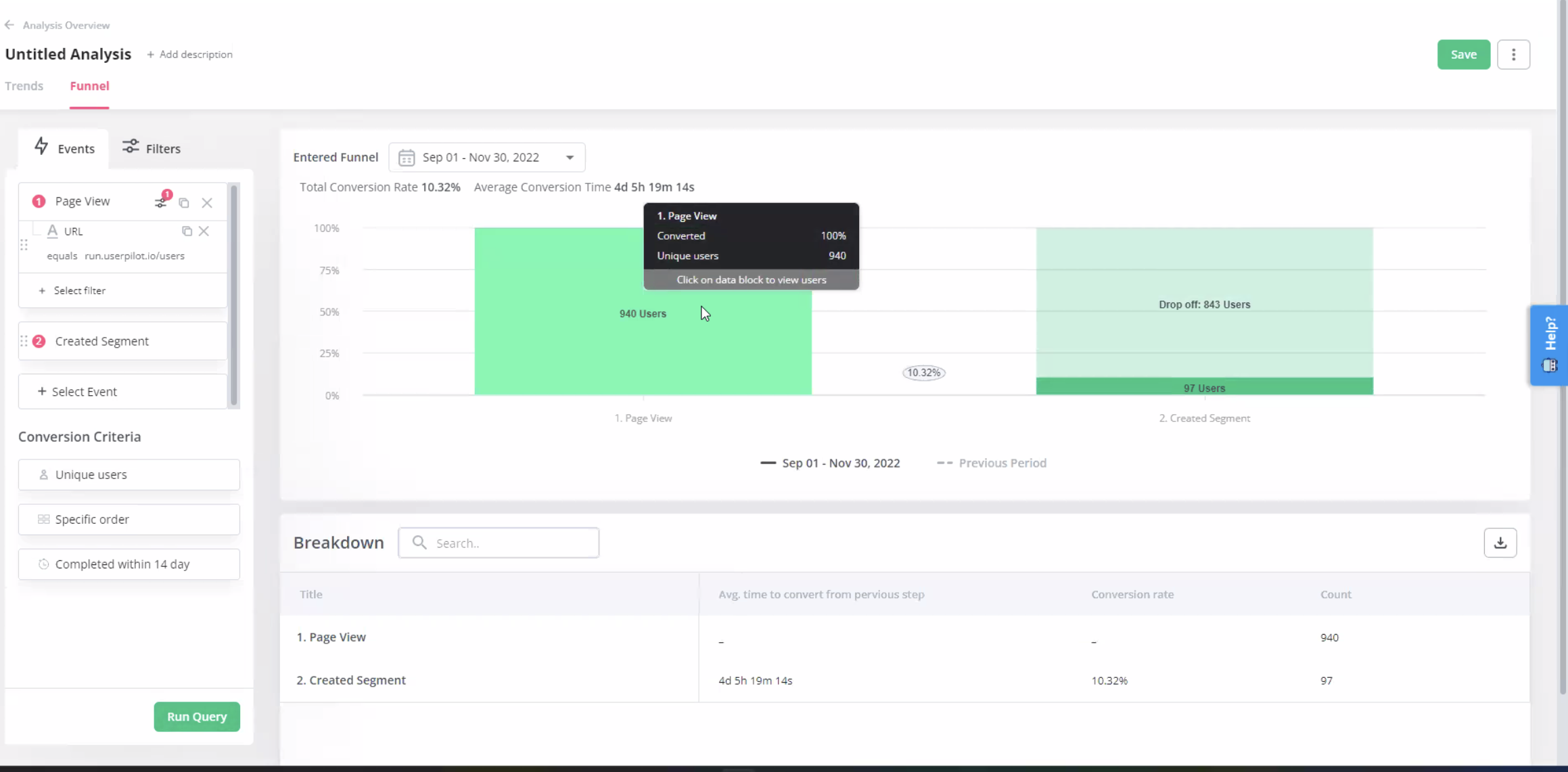
- Funnel Reports: Funnel reports show you the total number of users that enter a funnel and the percentage of users that complete each step. This can help you track behavioral paths and see which stages most users get stuck on.
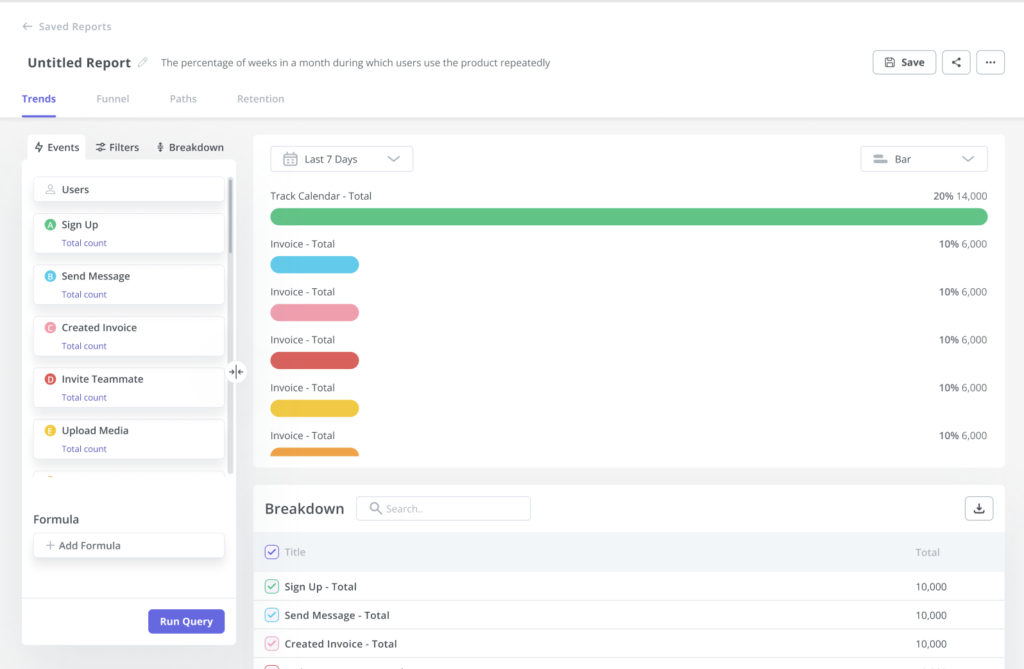
- Trends Reports: Generating trends reports will help you visualize the occurrence of key events over time and break down these analytics by device, browser, operating system, country, signup date, or even individual user IDs and email addresses to see granular behavioral analytics.
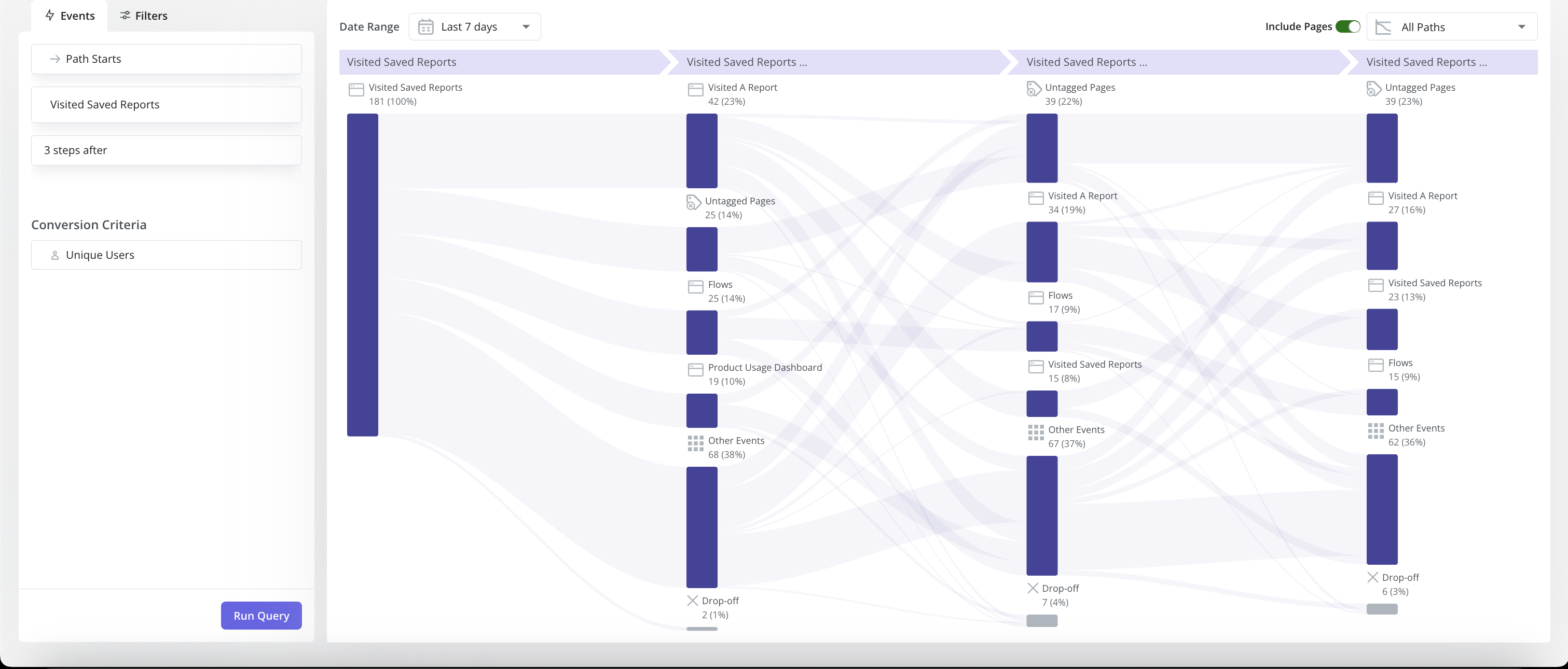
- Path Reports: Path analysis is useful for understanding common user behavior patterns, gauging user interactions with UI, monitoring if users follow recommended workflows, and identifying points of drop-offs and areas for improvement. With collected events, you can easily set up Path analysis in Userpilot without coding.
What are the pros and cons of Userpilot?
Userpilot’s pros
As a full-suite digital adoption platform, Userpilot has all the features you need to onboard users, track analytics, and gather feedback from customers without writing a single line of code. Here are a few pros of using Userpilot as your product growth solution:
- No-code builder: Userpilot’s Chrome extension lets you build flows, add UI elements, and tag features without writing a single line of code.
- UI patterns: There are plenty of UI patterns to choose from when using Userpilot, such as hotspots, tooltips, banners, slideouts, modals, and more!
- Startup-friendly: Userpilot’s entry-level plan gives you access to all available UI patterns so you can hit the ground running.
- Walkthroughs and flows: Build engaging interactive walkthroughs and personalized onboarding flows that target specific segments of your user base.
- Self-service support: Build an in-app resource center to help users solve problems, customize its appearance to align it with your brand, and insert various types of content (videos, flows, or chatbots) to keep your customers satisfied.
- A/B testing: Userpilot’s built-in A/B testing capabilities will help you split-test flows, iterate on the best-performing variants, and continually optimize based on user behavior.
- Feedback collection: Userpilot has built-in NPS surveys with its own unified analytics dashboard and response tagging to help you retarget users. There are other survey types to choose from and you can even create your own custom survey.
- Survey templates: There are 14 survey templates to choose from so you can gather feedback on specific features or run customer satisfaction benchmarking surveys like CSAT and CES.
- Advanced analytics: Userpilot lets you analyze product usage data, monitor engagement on all in-app flows, and use the data to create user segments that are based on behaviors instead of demographics.
- Event tracking: Userpilot’s no-code event tracking lets you tag UI interactions (hovers, clicks, or form fills) and group them into a custom event that reflects feature usage.
- Third-party integrations: Userpilot has built-in integrations with tools like Amplitude, Mixpanel, Kissmetrics, Segment, Heap, HubSpot, Intercom, Google Analytics, and Google Tag Manager so you can share data between all the solutions in your tech stack.
Userpilot’s cons
Of course, no tool is perfect and there are a few cons to consider before choosing Userpilot as your user onboarding or product growth solution:
- Employee onboarding: Currently, Userpilot only supports in-app customer onboarding.
- Freemium plan: There’s no freemium Userpilot plan so those bootstrapping their startup and need sub-$100 solutions should consider more affordable onboarding platforms like UserGuiding or Product Fruits.
What do users say about Userpilot?
Most users laud Userpilot for its versatile feature set, ease of use, and responsive support team:
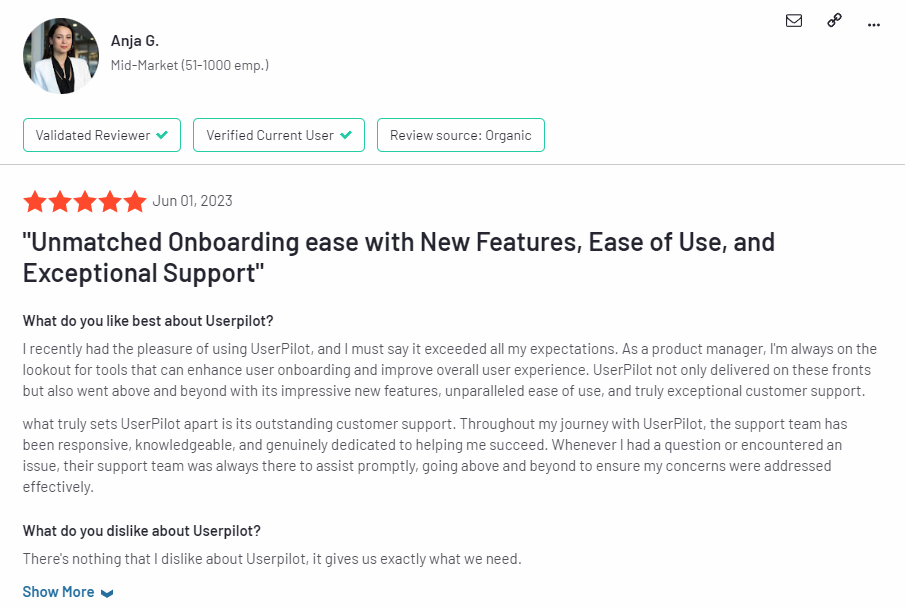
I recently had the pleasure of using Userpilot, and I must say it exceeded all my expectations. As a product manager, I’m always on the lookout for tools that can enhance user onboarding and improve overall user experience. Userpilot not only delivered on these fronts but also went above and beyond with its impressive new features, unparalleled ease of use, and truly exceptional customer support.
What truly sets Userpilot apart is its outstanding customer support. Throughout my journey with Userpilot, the support team has been responsive, knowledgeable, and genuinely dedicated to helping me succeed. Whenever I had a question or encountered an issue, their support team was always there to assist promptly, going above and beyond to ensure my concerns were addressed effectively.
Source: G2.
Of course, other users are also kind enough to share constructive criticism regarding specific features like event tracking filters:
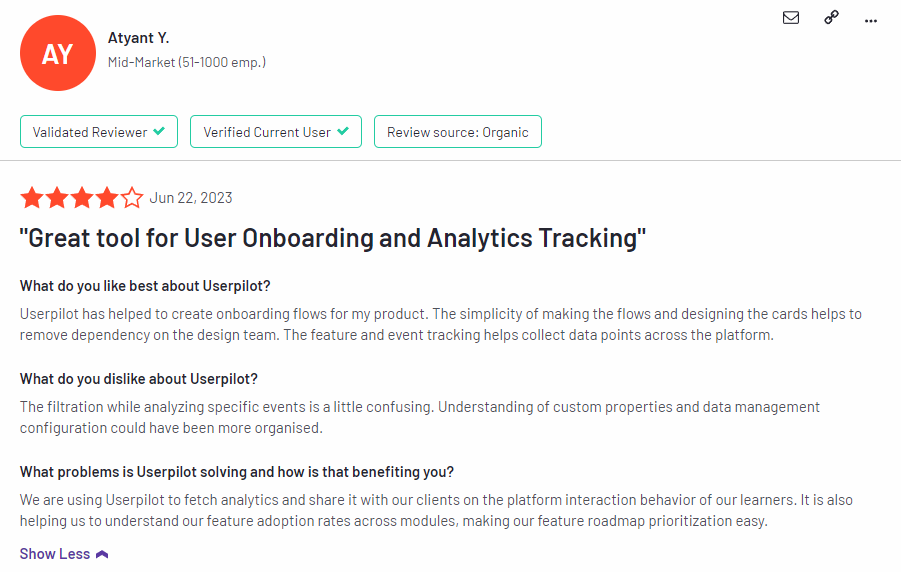
“The filtration while analyzing specific events is a little confusing. Understanding of custom properties and data management configuration could have been more organised.”
Source: G2.
Userpilot’s pricing
Userpilot offers flexible pricing based on your monthly active users (MAUs). Plans start at $299 per month for smaller teams and scale as your user base grows.
Below are the pricing tiers you can choose from:
- The Starter plan begins at $299/month (billed annually) for up to 2,000 monthly active users. It includes in-app user engagement, usage trend analysis, NPS surveys, and essential product analytics—ideal for mid-market SaaS teams getting started.
- The Growth plan offers custom pricing and adds advanced analytics, retroactive event auto-capture, in-app surveys, session replay, and more. It’s the most popular choice for growing teams that need deeper insights and scale.
- The Enterprise plan offers custom pricing and includes everything in Growth, plus bulk data handling, custom roles and permissions, SOC 2 Type 2 compliance, and enterprise-level support.

Not sure which plan is right for you? Book a demo to talk with the team and find the best fit for your needs.
Conclusion
There you have it.
It should be easier now to make an informed decision whether Userpilot is your go-to option for user analytics. Ultimately, the best choice will depend on your product and current needs.
Book a Userpilot demo today to experience firsthand how it can enhance your user experience and drive product growth!