Jelly's blog (original) (raw)
Jelly's bloghttps://vdwaa.nl/2025-08-04T17:00:00+02:00I'm a software engineer at Red Hat and an Arch Linux Developer...Expanding battery charge control support in Linux2025-08-04T17:00:00+02:002025-08-04T17:00:00+02:00Jelle van der Waa (jelle@vdwaa.nl)tag:vdwaa.nl,2025-08-04:/charge-types-api-upower.html
Since GNOME 48, users can now preserve their battery health directly from GNOME Settings. Currently, this feature only works on laptops that support both start and end charge thresholds, such as ThinkPads. Ideally, we’d like to support every laptop with any form of charge threshold control but that isn't …
Since GNOME 48, users can now preserve their battery health directly from GNOME Settings. Currently, this feature only works on laptops that support both start and end charge thresholds, such as ThinkPads. Ideally, we’d like to support every laptop with any form of charge threshold control but that isn't always discoverable for UPower.
In a UPower issue discussing broader laptop support, the creator of the GNOME Battery Health Charging extension provided an excellent summary of the various kernel APIs used for battery preservation. These approaches can be grouped as follows:
- Charge start/end threshold can be set
- Fixed end threshold (ie. 80/100)
- Boolean toggle with a custom sysfs entry (ie. conservation_mode (ideapad))
- Customizable end threshold (ie. 60-100)
The first option is already handled by UPower, and while looking at the options my colleague Hans de Goede mentioned that Dell laptops can only set a custom start/end threshold when the charge_type property of the battery is set to Custom. The charge_type property also has a Long Life option which fits our the "boolean toggle" and 80/100 fixed end threshold so this seems like a good candidate for UPower to use to enable battery conservation mode. However the charge_type property does not advertise what properties it supports, so userspace has to try to write to it and handle a possible -EINVAL.
Discussing this with Hans de Goede let to a new charge_types property to be added to the kernel. Reading this new property shows the supported and selected value(s):
Fast [Standard] "Long Life" The patch series landed in 6.14 and Dell was the first laptop to support this new property. To expand support to other laptops I would have to get my hands dirty but not before reading up on the new power supply extension API by Thomas Weißschuh. This new API makes it quite trivial to add charge_behaviour, charge_control_* and charge_types properties to a x86 platform driver.
With that knowledge these custom API's can be converted to charge_types:
- /sys/bus/platform/devices/VPC2004:*/conservation_mode
- /sys/devices/platform/samsung/battery_life_extender
- /sys/devices/platform/lg-laptop/battery_care_limit
- Panasonic's
eco_mode
Acquiring an test Lenovo ideapad laptop was easy and only cost me € 45, using the new charge_types API in a power_supply extension required a small patch. After that landed in 6.16, the ideapad platform driver was converted to the new charge_types API in this patch. In my local hackerspace I found someone to test the Samsung conversion patch and submitted it for review. The Ideapad/Samsung patches are merged in Linux 6.17.
If anyone reading this has a device (LG/Panasonic) which has not yet been ported to charge_types and is happy to test kernel patches feel free to reach out to me via email. Older laptops with an eco_mode such as the MSI Wind U100 (2008) and Sony vaio's with battery_care_limit should probably not be ported as they are quite old and 32 bit. Additionally in the future the out of tree Acer wmi battery driver will hopefully be upstreamed now that the kernel has a charge_types API to support this driver.
For UPower support, my colleague Kate Hsuan has been extending upower to support battery charge conservation support on Dell laptops. And support for setting charge_types to Long Life when a user wants to preserve battery health in this merge request.
All of this work should enable more laptops to be able to enable battery charge conservation in GNOME settings.
Reproducible Arch images with mkosi2024-08-31T14:00:00+02:002024-08-31T14:00:00+02:00Jelle van der Waa (jelle@vdwaa.nl)tag:vdwaa.nl,2024-08-31:/mkosi-reproducible-arch-images.htmlIn the previous article I investigated how to create a reproducible image but ended up with only managing to create two identical image directories. In this article we'll end up with a fully bit-by-bit reproducible filesystem image!
Some things have changed since the last post, mkosi now no longer creates …
In the previous article I investigated how to create a reproducible image but ended up with only managing to create two identical image directories. In this article we'll end up with a fully bit-by-bit reproducible filesystem image!
Some things have changed since the last post, mkosi now no longer creates a random-seed which was unreproducible and aux-cache is now removed by default from the initrd. With those changes lets focus on making a reproducible filesystem, the idea was to create a btrfs image so lets try to make one reproducible:
export SOURCE_DATE_EPOCH=0 fallocate -l 500M test1.img fallocate -l 500M test2.img mkfs.btrfs -U 588114f7-e142-40a1-8b99-30db4519183e test1.img mkfs.btrfs -U 588114f7-e142-40a1-8b99-30db4519183e test2.img md5sum test1.img test2.img f4a8f407d97d56c4baf8fef3fa762bf3 test1.img d6fb6681b3b66f88fa16cd9894072e4a test2.img So that's not great, doing some research seems to conclude that mkfs.btrfs, can't easily be made reproducible. I've hacked up support for SOURCE_DATE_EPOCH but even after that I'm left with ~ 3000 lines of binary diff.
The default filesystem for mkosi for an Arch image is ext4, so maybe we can make that reproducible instead? Turns out that ext4 supports SOURCE_DATE_EPOCH so we can execute similar steps to create an ext4 image:
export SOURCE_DATE_EPOCH=0 fallocate -l 500M test1.img fallocate -l 500M test2.img mkfs.ext4 -U 588114f7-e142-40a1-8b99-30db4519183e test1.img mkfs.ext4 -U 588114f7-e142-40a1-8b99-30db4519183e test2.img md5sum test1.img test2.img 9eb56e5c4286b83fe44f504ec457a71a test1.img d7d7faf681300c2d13e3921d53a088a0 test2.img Still not reproducible, luckily ext4 has a tool to dump filesystem information dump2efs.
dump.f2fs test1.img > dump1 dump.f2fs test2.img > dump2 Then diffoscope the results:
-Directory Hash Seed: 00f9d12b-b9f8-4eea-a632-ba4e05dd4b43 +Directory Hash Seed: 36d61985-866a-4e1e-ade7-66e013e1b6a1 Journal backup: inode blocks Checksum type: crc32c -Checksum: 0xb5aa1d24 +Checksum: 0x36da2897 That sounds promising, turns out with -E hash_seed=a24031c1-fc68-453d-80fa-00ad057a5780 we have a reproducible filesystem! As of writing it unclear to me if setting this value the same for multiple images has an negative effect.
With this information let's build a mkosi image:
mkosi --debug -d arch -p systemd --seed 0e9a6fe0-68f6-408c-bbeb-136054d20445 --source-date-epoch 1662046009 -m https://archive.archlinux.org/repos/2024/06/30/ --force -o foo --env-file env --remove-files var/cache/ldconfig/aux-cache --environment=SYSTEMD_LOG_LEVEL=debug With as env file env
SYSTEMD_REPART_MKFS_OPTIONS_EXT4=-E hash_seed=a24031c1-fc68-453d-80fa-00ad057a5780 -U 6de632fe-7638-44c4-917c-ecf4170af3b4 This was fully reproducible, but adding -p linux made it unreproducible again. By adding the kernel as installed package mkosi sets up an EFI partition and installs a bootloader. So our next challenge is getting the FAT partition reproducible.
I created two fat filesystems with the same steps as I had done for btrfs and ext4 which turned out unreproducible. Luckily dosfstools master already contains a commit which makes mkfs.vfat respect SOURCE_DATE_EPOCH. After patching the Arch package, the build image was still not reproducible. Interestingly the EFI and loader directory in the FAT partition had recent timestamps instead of SOURCE_DATE_EPOCH's value. (losetup --find --show -P image.raw</code>isusefultoreadonlymounttheEFIpartitionwithouthavingtoddouttheEFIpartition)</p><p><code>mkosi</code>createspartitionsandfilesystemswith<code>systemd−repart</code>,soI′vehadtoreaduphowitcreatesaFATpartition.Backinthedaycreatingafilesystemimagerequiredyouto<code>mkfs.image.raw</code> is useful to readonly mount the EFI partition without having to dd out the EFI partition)</p> <p><code>mkosi</code> creates partitions and filesystems with <code>systemd-repart</code>, so I've had to read up how it creates a FAT partition. Back in the day creating a filesystem image required you to <code>mkfs.image.raw</code>isusefultoreadonlymounttheEFIpartitionwithouthavingtoddouttheEFIpartition)</p><p><code>mkosi</code>createspartitionsandfilesystemswith<code>systemd−repart</code>,soI′vehadtoreaduphowitcreatesaFATpartition.Backinthedaycreatingafilesystemimagerequiredyouto<code>mkfs.fs a filesystem image and mount the image to put content on it. Mounting requires root privileges and more importantly changes the disk metadata on mount (last access time etc.) For filesystems which support it systemd-repart uses a --rootdir (btrfs) option or a similar option to create a filesystem and initialise data on it in one go. For FAT this doesn't exist so instead systemd-repart uses mkfs.vfat and then copies the data over with mcopy (from mtools).
systemd-repart works with ini file with the filesystem definitions for creation the default for the esp partition is.
[Partition] Type=esp Format=vfat CopyFiles=/boot:/ CopyFiles=/efi:/ SizeMinBytes={"1G" if bios else "512M"} SizeMaxBytes={"1G" if bios else "512M"} Modifying the default ini file by commenting out CopyFiles=/efi:/ made the image reproducible! So my first theory was that copying two directories with mcopy somehow was unreproducible. After a week of on and off debugging it turns out, this wasn't the issue at all. Replacing mcopy with a simple shell script uncovered that the passed directories (boot/efi) timestamps are recent and not SOURCE_DATE_EPOCH=0!
After uncovering this issue, Daan quickly wrote a pull request to keep directory timestamps intact. After building a patched systemd-repart we have a reproducible image! I'm super excited to see this all work out, and will be investigating if there are more filesystems which can be made reproducible such as f2fs, xfs etc.
If you want to see a full overview of the mkosi configuration used, see this Github repository.
Investigating creating reproducible images with mkosi2024-08-18T14:00:00+02:002024-08-18T14:00:00+02:00Jelle van der Waa (jelle@vdwaa.nl)tag:vdwaa.nl,2024-08-18:/mkosi-reproducible-images.htmlI've blogged before about creating vagrant images using mkosi as part of an investigation to move image creation to mkosi but also as I will be giving a talk at All Systems Go about Arch Linux images mkosi and reproducibility.
With reproducible images in this article I mean that anyone …
I've blogged before about creating vagrant images using mkosi as part of an investigation to move image creation to mkosi but also as I will be giving a talk at All Systems Go about Arch Linux images mkosi and reproducibility.
With reproducible images in this article I mean that anyone would be able to re-recreate the official Arch cloud image bit-by-bit identical on their own machine as per reproducible builds definition.
Arch Linux packages are already 90% reproducible currently, for our image artificats we haven't investigated making them reproducible as of yet.
Edgelesssys and Foxboron already investigated and did some work on creating reproducible mkosi images. Mkosi also already supports some essential parts to make an image reproducible:
- SourceDateEpoch configuration / cli setting - clamps all files to the given timestamp
- Mirror configuration / cli setting - A way to pin the repository to a fixed version (Arch Linux provides archived fixed in time repositories)
- Seed configuration / cli setting - Overrides the seed that systemd-repart uses when building an image (Allows creating reproducible UUID's)
So with that knowledge, let's build two minimal images:
mkosi --distribution arch --package systemd -o bar \ --mirror https://archive.archlinux.org/repos/2024/06/30/ \ --source-date-epoch 1662046009 \ --seed 0e9a6fe0-68f6-408c-bbeb-136054d20445 mkosi --distribution arch --package systemd -o foo \ --mirror https://archive.archlinux.org/repos/2024/06/30/ \ --source-date-epoch 1662046009 \ --seed 0e9a6fe0-68f6-408c-bbeb-136054d20445 This creates an ext4 image with just systemd, but its not reproducible which we can find out by hashing the created images:
e3e9c0b1b4a91d39da96e4378eb423c9 mkosi.output/foo.raw 6b257b2db8bdf29bf67aa75f534b86b6 mkosi.output/bar.raw Running diffoscope (a diff on steroids) on this takes a long time and OOM'd the process, let's simplify our approach by first outputting the contents to a directory instead of an image, so we end up running:
mkosi --distribution arch --package systemd -o foo \ --mirror https://archive.archlinux.org/repos/2024/06/30/ \ --source-date-epoch 1662046009 \ --seed 0e9a6fe0-68f6-408c-bbeb-136054d20445 \ --format directory After re-running this we can now run diffoscope on the created directories mkosi.output/{foo,bar}:
sudo diffoscope --html-dir output mkosi.output/foo mkosi.output/bar The files in the directory are owned by root so sudo is required to read and diff them.
When diffoscope is done we can view the results in a browser using xdg-open output/index.html. Two things show up as unreproducible:
var/lib/pacman/local/acl-2.3.2-1/desc
20 %INSTALLDATE% 20 %INSTALLDATE% 21 1723974712 21 1723974743 This is the pacman local database, where Arch Linux's package manager saves the installed packages state. Simply looking at the C code it is easy to spot the reproducibility issue:
lib/libalpm/add.c
/* make an install date (in UTC) */ newpkg->installdate = time(NULL); A new timestamp is created, when the package is installed. Making pacman respect SOURCE_DATE_EPOCH when installing was rather easily done in this merge request.
The other issue is var/cache/ldconfig/aux-cache, a binary file which differs. This comes from glibc and is a cache used by the run-time linker. We can simply leave this out of our build image.
So with a custom patched pacman and hacking up mkosi to remove var/cache/ldconfig/aux-cache we can continue our journey but now with a more realistic scenario.
mkosi --distribution arch -o foo \ --package systemd \ --package grub \ --package base \ --package openssh \ --package sudo \ --package reflector \ --package btrfs-progs \ --package udev \ --mirror https://archive.archlinux.org/repos/2024/06/30/ \ --source-date-epoch 1662046009 \ --seed 0e9a6fe0-68f6-408c-bbeb-136054d20445 \ --format directory This creates a directory with the packages which will also be on the cloud image, running diffoscope now takes a bit longer as the directory is 1G and diffoscope analyses with a single process.
The only leftover difference is efi/loader/random-seed, which is a random seed file from systemd-boot. The file is documented on freedesktop.org and on systemd.io.
There does not seem to be an option as of now to support creating a deterministic seed, mkosi supports hooking into the build process at any point of time so this file could be overwritten after bootctl install to be the same for all images.
One leftover aspect of creating a reproducible image is the filesystem, raw image and partition table. I hope to tackle this in a future post.
Building vagrant images with mkosi2024-07-27T14:50:00+02:002024-07-27T14:50:00+02:00Jelle van der Waa (jelle@vdwaa.nl)tag:vdwaa.nl,2024-07-27:/mkosi-vagrant-images.htmlLast FOSDEM, there where some talks around mkosi using it for kernel hacking and systemd integration tests. These talks got me interested in mkosi, a systemd project for building OS images. After chatting some more with the maintainers, I considered the idea of moving the arch-boxes project to mkosi. (note …
Last FOSDEM, there where some talks around mkosi using it for kernel hacking and systemd integration tests. These talks got me interested in mkosi, a systemd project for building OS images. After chatting some more with the maintainers, I considered the idea of moving the arch-boxes project to mkosi. (note: it has not been decided yet on whether to move the project to mkosi yet) Arch-boxes is an Arch Linux project which creates official vagrant and cloud images for Arch Linux, using bash scripts to create these images and requiring root privileges. This made me wonder, can I create Vagrant images for Arch Linux with mkosi.
In short mkosi does not require root privileges for building, has configuration file support with profiles and does most of the heavy lifting.
What is Vagrant?
Vagrant was a popular way to setup a development virtual machine for projects, all you had to do is provide a Vagrantfile and vagrant up would setup a development VM and for example mount your code into the VM via sshfs allowing for a "reproducible" development environment.
The image you use in your Vagrantfile is called a box in Vagrant's terminology and are hosted by the Vagrant project.
Vagrant also supports the concept of providers, these are the backends on which the box would run, the default being VirtualBox, alternatives are Hyper-V, libvirt and more.
Format
Usually the Vagrant boxes are made using packer, but other tools such as kiwi, osbuild (only libvirt provider) also support creating these boxes. The alternative tools usually only support a subset of the providers packer supports. In the Linux community VirtualBox and libvirt are usually the most popular ones. At least this is what Arch Linux and Fedora supports.
The base box format is described in a very short summary what needs to be in the image: * Package manager * Enough disk space to do interesting things * A vagrant user with SSH pubkey and password-less sudo * SSH server enabled and running * Provider specific tools (for example VirtualBox guest tools)
The image format is provider dependant and is described for VirtualBox and libvirt.
mkosi
We start things off by creating a base mkosi.conf, which defines the packages we require for both the libvirt and VirtualBox provider:
[Distribution] Distribution=arch [Content] Packages= systemd udev linux base grub openssh sudo btrfs-progs reflector Hostname=archlinux Locale=C.UTF-8 Timezone=UTC Keymap=us Bootable=yes Bootloader=grub BiosBootloader=grub KernelCommandLine=net.ifnames=0 The image that mkosi creates runs systemd-firstboot by default, to avoid the first boot to prompt interactively for details we pre-configure the hostname, locale, etc.
By default only an UEFI bootable image is created, as BIOS boot is required we inform mkosi to set this up for us.
Partitioning
As described in the vagrant box format, a user should have enough disk space to do interesting things, by default mkosi makes a small ext4 image. We want to provide a 20G disk and use btrfs by default, if we want to change the partitioning in mkosi we have to define everything in a directory called mkosi.repart:
00-esp.conf
[Partition] Type=esp Format=vfat CopyFiles=/boot:/ CopyFiles=/efi:/ SizeMinBytes=512M SizeMaxBytes=512M 05-bios.conf
[Partition] # UUID of the grub BIOS boot partition which grubs needs on GPT to # embed itself into. Type=21686148-6449-6e6f-744e-656564454649 SizeMinBytes=1M SizeMaxBytes=1M 10-root.conf
[Partition] Type=root Format=btrfs CopyFiles=/ SizeMinBytes=20G SizeMaxBytes=20G User creation / ssh
Vagrant images require a vagrant user with sudo (password-less) and a vagrant specific pubkey to be able to log in to the box. There are no user creation helpers, but there are various steps of the build process where you can execute your own scripts. For user creation we use the post package installation hook:
mkosi.postinst.chroot
useradd --create-home --user-group vagrant --password "$(openssl passwd -6 vagrant)" install --directory --owner=vagrant --group=vagrant --mode=0700 $DESTDIR/home/vagrant/.ssh install --owner=vagrant --group=vagrant --mode=600 authorized_keys ${DESTDIR}/home/vagrant/.ssh/authorized_keys Creating a sudo config file for the vagrant user is as easy as dropping a file into mkosi.extra:
mkosi.extra/etc/sudoers.d/vagrant
Defaults:vagrant !requiretty vagrant ALL=(ALL) NOPASSWD: ALL Services
By default the vagrant box needs to run sshd, on Arch Linux services are not started automatically but this can be easily done with a systemd-preset file:
mkosi.extra/etc/systemd/system-preset/10-base-image.preset
enable sshd.service Profiles
We have now full-filled all the steps required for a vagrant box except the provider specific tooling, for this we will use mkosi profile support. For every profile we create a directory in mkosi.profiles.
VirtualBox
For the VirtualBox image the guest utils needs to be installed and a special service running for more advanced (for example shared clipboard, folders). We can append the base packages in the profile specific mkosi.conf:
mkosi.conf
[Output] ImageId=Arch-Linux-x86_64-virtualbox [Content] Packages= virtualbox-guest-utils-nox Enabling the vboxservice is adding another systemd-preset file:
mkosi.extra/etc/systemd/system-preset/15-virtualbox.preset
enable vboxservice.service Libvirt
Libvirt does not require any specific packages to be installed or services enabled, we only configure the ImageId to differ from VirtualBox:
mkosi.conf
[Output] Format=disk ImageId=Arch-Linux-x86_64 Image
By default mkosi outputs a raw image, Vagrant boxes require something different depending on the provider. To allow a user to easily customize the build image mkosi offers a mkosi.postoutput script to be run.
Libvirt
The box format is described in the official provider docs. We need to provide a tarball containing:
- Vagrantfile
- box.img (as qcow2)
- metadata.json
mkosi.postoutput
#!/bin/bash IMAGE_NAME="Arch-Linux-x86_64-libvirt-latest.box" cp "${SRCDIR}/Vagrantfile.libvirt" "${OUTPUTDIR}/Vagrantfile" qemu-img convert -f raw "${OUTPUTDIR}/${IMAGE_ID}.raw" -O qcow2 "${OUTPUTDIR}/box.img" # Calculate the disk size for metadata.json, this size needs to be in Gb and without a fraction so round this up. DISK_SIZE=$(qemu-img info --output=json "${OUTPUTDIR}/box.img" | jq '."virtual-size" / 1024 / 1024 / 1024 + 0.5 | round') echo '{"format":"qcow2","provider":"libvirt","virtual_size":'"${DISK_SIZE}"'}' > "${OUTPUTDIR}/metadata.json" tar -C "${OUTPUTDIR}" -czf "${OUTPUTDIR}/${IMAGE_NAME}" Vagrantfile metadata.json box.img In this script the OUTPUTDIR is the staging directory used to store artifacts generated during the build, from the SRCDIR we copy the static libivrt specific Vagrantfile, convert the created image to qcow2 and name it box.img. The most "tricky" part is generating the metadata.json file which needs to know the size of the image, specifying the wrong size can lead booting without a root partition or a non-bootable image.
The last step creates the tar archive which can be imported using vagrant box add archvirt /path/to/file.box.
VirtualBox
The VirtualBox format is similar, it requires a tar archive with:
- Vagrantfile
- metadata.json
- packer-virtualbox.vmdk (vm image as vmdk)
- box.ovf file (Open Virtualization Format)
mkosi.postout
#!/bin/bash IMAGE_NAME="Arch-Linux-x86_64-virtualbox-latest.box" cp "${SRCDIR}/Vagrantfile.virtualbox" "${OUTPUTDIR}/Vagrantfile" echo '{"provider":"virtualbox"}' > "${OUTPUTDIR}/metadata.json" qemu-img convert -f raw -O vmdk "${OUTPUTDIR}/${IMAGE_ID}.raw" "${OUTPUTDIR}/packer-virtualbox.vmdk" sed -e "s/MACHINE_UUID/$(uuidgen)/" \ -e "s/DISK_UUID/$(uuidgen)/" \ -e "s/DISK_CAPACITY/$(qemu-img info --output=json "${OUTPUTDIR}/packer-virtualbox.vmdk" | jq '."virtual-size"')/" \ -e "s/UNIX/$(date +%s)/" \ -e "s/MAC_ADDRESS/080027AF9290/" \ box.ovf > "${OUTPUTDIR}/box.ovf" tar -C "${OUTPUTDIR}" -czf "${OUTPUTDIR}/${IMAGE_NAME}" Vagrantfile metadata.json packer-virtualbox.vmdk box.ovf Similar to the libvirt script, we copy the Vagrantfile, create a metadata.json file and convert the created image to a vmdk image. The last step is rather hackily creating the required ovf file from a known template.
The xml part can use some improvements, although other projects also simply replace a XML template, it is worth investigating if xmlstarlet for example is a better way to format and validate the created xml file.
Conclusion
It was quite easy to create a Vagrant image with mkosi, most of the discovery work was already done in arch-boxes so all that was left was moving it over to mkosi configuration and figuring out the post installation and image conversion scripts.
Next up will be converting the cloud images to mkosi. You can find all the files mentioned in this post in the following GitHub repository.
GNOME battery charge control2024-01-28T12:00:00+01:002024-01-28T12:00:00+01:00Jelle van der Waa (jelle@vdwaa.nl)tag:vdwaa.nl,2024-01-28:/gnome-upower-charge-thresholds.htmlAs someone who has to use a laptop for work, I keep my laptop plugged in 8 hours or more a day, 7 days a week. The laptop's battery during these days would discharge and charge, slowly degrading the battery because only the last ~ 20% would be charged and discharged …
As someone who has to use a laptop for work, I keep my laptop plugged in 8 hours or more a day, 7 days a week. The laptop's battery during these days would discharge and charge, slowly degrading the battery because only the last ~ 20% would be charged and discharged. To remedy this issue some devices now have charge thresholds where a user or firmware can configure a charge limit to stop the battery from getting constantly charged.
The most commonly found solution is to set a stop charge limit at 80% of the battery capacity. (Green part is never charged)
Another approach is to set a start and stop charge threshold where the battery charges till for example 80% but will only start when below 60%. The 60-80% region marks a "charge free zone". This is ideal for users who keep their laptop plugged in 24/7.
The Linux kernel supports these kinds of charge thresholds via a sysfs interface /sys/class/power_supply/BAT*/charge_control_{start,end}_threshold depending on hardware and driver support. Users can set their own charge control thresholds by echoing a value between 0-100 to the sysfs entry via for example a systemd unit or using a tool such as TLP.
That is usable for power users who know what thresholds to set and who also remember to turn it off when you for travel for a longer period of time and want to make full use of your battery. As a GNOME user however I would like to have a visual indication that my battery is being charge limited and an easy switch to turn this on and off.
GNOME obtains devices battery information in the shell and GNOME settings via UPower, a daemon which runs in the background and exposes device information from sysfs to DBus. UPower is also used by other popular DE's such as Cinnamon, Phosh, Mate, Lxqt, Xfce and Deepin.
My merge request for UPower implements detecting if a battery supports charge limits (start and stop) and allows for enabling set limits via a DBus method on the battery object. The limits are configurable via hwdb as UPower sets known good values 60-80% by default, users and vendors can override these limits with a simple hwdb rule.
For GNOME's settings, this merge request implements the UI design from Allan Day as can be seen below. (note: the label still needs some changes)
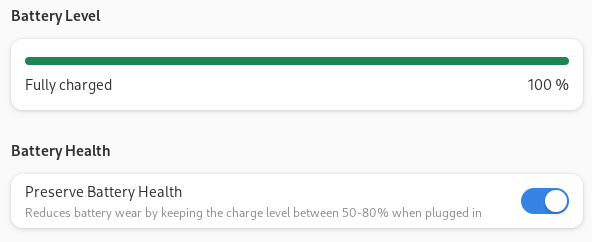
For those interested, I will be giving a presentation at FOSDEM in the Kernel devroom with more technical details. In the future I plan to work on a visual indicator in the GNOME Shell when charge limiting is enabled, implementing battery calibration and exposing charge thresholds on the Framework laptop.
Phosh now available on Arch Linux2023-09-10T13:37:00+02:002023-09-10T13:37:00+02:00Jelle van der Waa (jelle@vdwaa.nl)tag:vdwaa.nl,2023-09-10:/arch-linux-phosh-package.htmlHaving a full Linux mobile or tablet device has always interested me, to have an alternative to Android and use Arch Linux everywhere. Realistically I won't be able to give up Android on my phone, but what about tablet's?
Phosh was developed to be a graphical user interface for mobile …
Having a full Linux mobile or tablet device has always interested me, to have an alternative to Android and use Arch Linux everywhere. Realistically I won't be able to give up Android on my phone, but what about tablet's?
Phosh was developed to be a graphical user interface for mobile and touch based devices. If you are a Linux enthusiast you've probably heard about Purism and the Librem phone which uses Phosh. However it is also great on tablet's such as the Surface Go 2, the x86 tablet I use to test the Arch phosh package and the other required packages (OSD screen keyboard squeekboard, feedbackd).
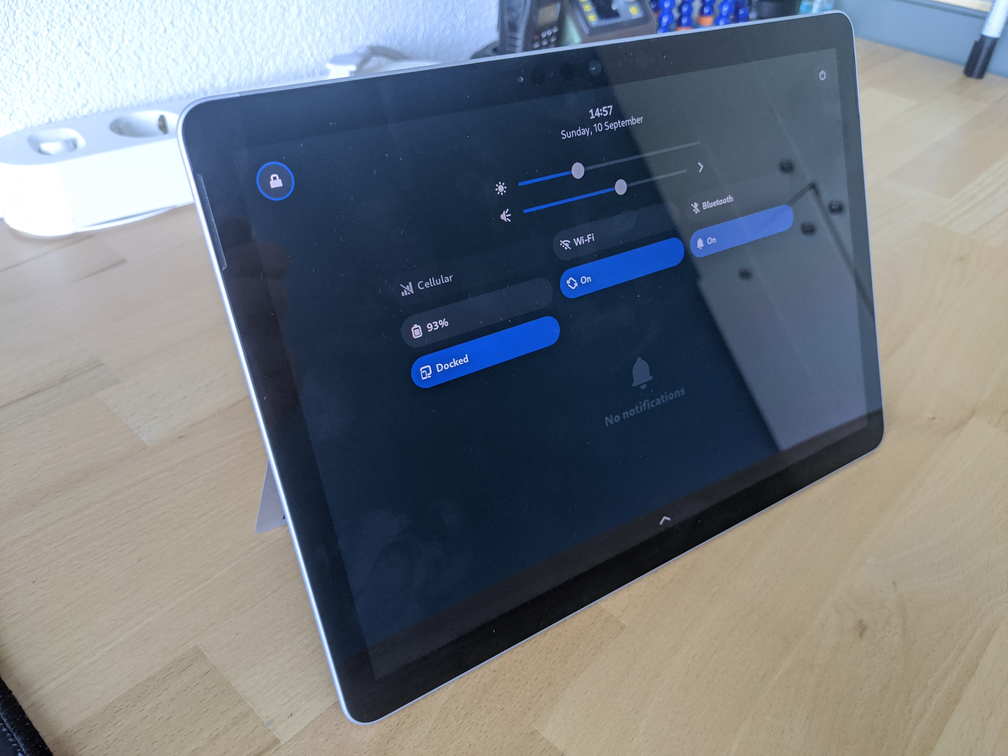
After installing the phosh package you should be able to select it via your login manager (GDM was tested and works). And as a follow up feedbackd (haptic feedback daemon) profiles and phosh-mobile-settings will be packaged when I find time for it.
With the GNOME announcement to make GNOME shell work better on mobile, it will be interesting to see how Linux on mobile progresses and how it will compare to Phosh.
Notes/Task organisation2022-06-07T18:37:00+02:002022-06-07T18:37:00+02:00Jelle van der Waa (jelle@vdwaa.nl)tag:vdwaa.nl,2022-06-07:/notes-tasks-setup.htmlTo keep myself more organised I've done some investigations into setting up notes. My requirements are:
- Simple to set up
- Easy to get started
- Syncing capabilities (between laptop/desktop)
- A way to generate HTML out of notes
- Markdown for notes
Outline was recommended to me by a friend as an …
To keep myself more organised I've done some investigations into setting up notes. My requirements are:
- Simple to set up
- Easy to get started
- Syncing capabilities (between laptop/desktop)
- A way to generate HTML out of notes
- Markdown for notes
Outline was recommended to me by a friend as an online mobile friendly note taking application. It is sadly not possible to self host it with local authentication instead of Google/Slack
Joplin is another candidate, it offers no syncing so that has to be done separate and the main application is not packaged in Arch Linux nor does it seem to be appealing to do as it's a electron based application.
So after some quick research, I decided to go for something simple and try vimwiki. https://github.com/vimwiki/vimwiki
Network-bound disk encryption on Arch Linux2022-06-05T13:37:00+02:002022-06-05T13:37:00+02:00Jelle van der Waa (jelle@vdwaa.nl)tag:vdwaa.nl,2022-06-05:/arch-clevis-tang.htmlWhile in a discussion with my coworkers, a coworker brought up that they wanted to have automatic LUKS disk decryption on their desktop while it was at home. Normally they would use a passphrase to decrypt the LUKS volume but would prefer automatic decryption. There are multiple ways to achieve …
While in a discussion with my coworkers, a coworker brought up that they wanted to have automatic LUKS disk decryption on their desktop while it was at home. Normally they would use a passphrase to decrypt the LUKS volume but would prefer automatic decryption. There are multiple ways to achieve this with TPM2 or Tang.
A Trusted Platform Module (TPM) is a secure processor which contains the secrets required to decrypt the LUKS volume when certain conditions are met (secure boot not disabled, CMOS not reset and others..).
Tang is a network service which runs in your network and on boot is used to decrypt your LUKS volume automatically.
I currently encrypt my desktop for the scenario that my desktop is stolen, in that case it's powered off and encrypted. As it's most likely that someone would steal the whole desktop using a TPM didn't make sense and Tang seems to be a good solution. It is highly unlikely that someone will replicate my home setup when stealing my desktop it is even more unlikely that they will try to decrypt the data. So I decided to go with Tang.
First off you will need a server and install tang there, by default it runs on port 80. If this does not suite your setup you can override it using systemctl edit tangd.socket:
[Socket] ListenStream= ListenStream=6666 Then enable it with systemctl enable --now tangd.socket, now you'll want to check if you can fetch tang's key:
tang-show-keys 6666 On your desktop you'll need to install clevis and libpwquality. To verify the tang service works run the following commands:
echo "Hello World..." | clevis encrypt tang '{ "url": "http://tang.local"}' > secret.jwe This command will ask you to verify tang's key and this should correspond to the output of tang-show-keys.
To verify that the tang server can be used to decrypt the secret run:
clevis decrypt < secret.jwe To let tang decrypt your desktop automatically, on boot in initramfs clevis needs to contact the tang server and call clevis to decrypt your LUKS volume. Ideally if no network is available your normal LUKS passphrase prompt is shown.
As of now mkinitcpio has no official support for clevis yet, thanks to the excellent work of diabonas there is now a pull request open support it. To have network when in initramfs the net hook can be used from mkinitcpio-nfs-utils, to set this all up:
Adding tang to the LUKS Slot
clevis luks bind -d /dev/vda2 tang '{"url": "http://tang.local"}' Now to configure the initramfs install mkinitcpio-nfs-utils and then copy the snippet below to /etc/initcpio/hooks/clevis:
#!/usr/bin/ash run_hook() { IFS=: read cryptdev cryptname cryptoptions <<EOF $cryptdevice EOF if resolved=$(resolve_device "${cryptdev}" ${rootdelay}); then clevis luks unlock -d "$resolved" -n "$cryptname" fi } And create /etc/initcpio/install/clevis
#!/bin/bash build() { local mod add_module "dm-crypt" add_module "dm-integrity" if [[ $CRYPTO_MODULES ]]; then for mod in $CRYPTO_MODULES; do add_module "$mod" done else add_all_modules "/crypto/" fi add_binary "cryptsetup" map add_udev_rule \ '10-dm.rules' \ '13-dm-disk.rules' \ '95-dm-notify.rules' \ '/usr/lib/initcpio/udev/11-dm-initramfs.rules' # cryptsetup calls pthread_create(), which dlopen()s libgcc_s.so.1 add_binary "/usr/lib/libgcc_s.so.1" add_binary "clevis" add_binary "clevis-decrypt" add_binary "clevis-decrypt-sss" add_binary "clevis-decrypt-tang" add_binary "clevis-decrypt-tpm2" add_binary "clevis-luks-common-functions" add_binary "clevis-luks-unlock" add_binary "bash" add_binary "curl" add_binary "grep" add_binary "jose" [ -f "/usr/bin/luksmeta" ] && add_binary "luksmeta" if [ -f "/usr/bin/tpm2" ]; then add_checked_modules '/tpm/' add_binary "tpm2_createprimary" add_binary "tpm2_unseal" add_binary "tpm2_load" add_binary "tpm2_flushcontext" add_binary "/usr/lib/libtss2-tcti-device.so.0" fi add_runscript } For networking to work the net hook needs to know how your network interface should be configured. The configuration happens through kernel parameters, note that it uses the kenrel's interface naming so it's eth0 not enps0 or something similiar for more information see the wiki.
I use dhcp and have one interface so my kernel parameter is:
ip=:::::eth0:dhcp Note: there is no timeout by default configured in the net hook, so if your machine can't connect to the network it won't fall back to the encrypt hook. So I recommend editing /usr/lib/initcpio/hooks/net and changing the ipconfig invocation to:
ipconfig -t 30 "ip=${ip}" This means ipconfig will stop trying to try to connect after 30 seconds.
Now all that's left is to configure your mkinitcpio HOOKS, I prepend net clevis before encrypt so it shows up as following:
HOOKS=(base udev autodetect keyboard modconf block net clevis encrypt filesystems btrfs fsck) Now re-generate your mkinitcpio hook:
mkinitcpio -p linux Now rebooting should automatically decrypt your LUKS volume. Once again a huge thanks to diabonas for writing the clevis hook and helping out with setting it up.
Replacing Youtube with Kodi plugin2022-05-26T23:00:00+02:002022-05-26T23:00:00+02:00Jelle van der Waa (jelle@vdwaa.nl)tag:vdwaa.nl,2022-05-26:/kodi-youtube-rss.htmlAs Google announced Gsuite is no longer free and I moved to GrapheneOs to de-google further, the last frequently used Google application I use is Youtube. For a long time Youtube has support for RSS feeds for channels although they are not publicly visible. I usually watch videos in my …
As Google announced Gsuite is no longer free and I moved to GrapheneOs to de-google further, the last frequently used Google application I use is Youtube. For a long time Youtube has support for RSS feeds for channels although they are not publicly visible. I usually watch videos in my living room and use Kodi to play YouTube videos via it's YouTube addon. With Kodi's android app it's easy to cast videos to my TV, but I wanted to get rid of having a YouTube app on my phone.
Having previously written a Kodi addon for FOSDEM videos, writing one which parses RSS feeds and displays YouTube channels was a nice evening project. The only challenge was figuring out how to play YouTube videos listed via my addon with Kodi's YouTube addon. As it turns out Kodi can call other addons with parameters via plugin://plugin.video.youtube/play/?video_id=$id. Having created an addon with hardcoded entries, the next step was exporting my subscriptions:
- Go to Google takeout
- Select YouTube and YouTube Music for export
- Click next step and export the data
The export contains playlists, history, subscriptions and more. The subscriptions are in a csv file which I converted to a JSON object with a simple Python script.
#!/usr/bin/python import csv import json with open('./subscriptions.csv') as fp: subscriptions = {} for line in csv.reader(fp): if not line: continue if line[0] == 'Channel Id': continue subscriptions[line[-1]] = line[0] json.dump(subscriptions, open('./subscriptions.json', mode='w'), indent=4) The result is my Youtube RSS addon. I probably won't try to push this to the Kodi Addon Repository, as in my experience the addon then requires further polishing for which I have no time or interest for at the moment.
Note that this addon crashes with a recent Python on Arch Linux due to a bug in Python subinterpeters downgrading to 3.10.0-1 is the current workaround.
In looking to moving my phone to LineageOS, I've started thinking about moving my mail, contacts and calendar data to my own server. After researching solutions for a while, I decided to try out xandikos. A simple Python carddav/caldav server intended for a single user with a basic feature …
In looking to moving my phone to LineageOS, I've started thinking about moving my mail, contacts and calendar data to my own server. After researching solutions for a while, I decided to try out xandikos. A simple Python carddav/caldav server intended for a single user with a basic feature sit and Git backend.
Setup
For my setup I have chosen to use my existing nginx setup (for SSL/auth) and uwsgi for running xandikos. On Arch Linux you'll need uwsgi, uwsgi-plugin-python and xandikos installed. Then a xandikos user has to be created as the package provides none:
useradd xandikos -d /var/lib/xandikos Create a uwsgi configuration file named: /etc/uwsgi/xandikos.ini
[uwsgi] socket = /run/uwsgi/xandikos.sock chmod-socket=660 uid = xandikos gid = http master = true cheaper = 0 processes = 1 plugin = python module = xandikos.wsgi:app umask = 022 env = XANDIKOSPATH=/var/lib/xandikos/collections env = CURRENT_USER_PRINCIPAL=/user/ env = AUTOCREATE=defaults Then simply enable it with systemctl enable --now uwsgi@xandikos
For nginx you'll need this location snippet:
location / { include uwsgi_params; uwsgi_pass unix:/run/uwsgi/xandikos.sock; } This should set up xandikos running with uwsgi and a reverse proxy for SSL / authentication and using a unix socket.
Authentication
For authentication I have chosen to use client certificate authentication with the reasoning that it's probably more secure then username/password authentication and easy to deploy.
I use step-cli for creating certificates as it's a lot more user friendly then using just openssl. For authentication you'll need to create a new CA and a client certificate.
step-cli certificate create --profile root-ca "client auth CA" root_ca.crt root_ca.key step-cli certificate create caldav.vdwaa.nl caldav.vdwaa.nl.crt caldav.vdwaa.nl.key \ --profile leaf \ --ca ./root_ca.crt --ca-key ./root_ca.key --bundle --no-password --insecure --not-after "$(date --date "next year" -Iseconds)" In your nginx configuration:
ssl_client_certificate /etc/nginx/rot_ca.crt; ssl_verify_client on; Generate a pcks#12 container for importing the client certificates in caldav/carddav clients:
step-cli certificate p12 caldav.vdwaa.nl.crt caldav.vdwaa.nl.key --ca root_ca.crt Note that there are some caveats with client certificate authentication, as the certificate expires in a year and needs to be revoked using a CRL which requires additional configuration in nginx.
Clients
For setting up caldav/carddav on my phone I use davx5, to get it up and running you'll need to import your certificates in android. Go to Settings => Encryption & credentials => click User credentials to import your pkcs#12 container.
In thunderbird it's similar, you will need to import the pkcs#12 container for thunderbird to do client certificate authentication. In thunderbird you add the calendar by only specifying the location as https://caldav.vdwaa.nl/user/calendars/calendar/, the username field can be left empty.
Migrating Google data
To migrate Google contacts to my own carddav server, I configured the contacts provider in davx5 and then in Google contacts settings: Export => Export to .vcf file and then Import => .vcf file => select the davx5 address book.
The same can probably be done for Google calendar but I haven't tested it.
For Holiday calendars which are usually shown in Google calendar, I've used Apple's public calendar ics files for example for the Netherlands.
Arch Reproducible Progress July 20212021-08-01T22:37:00+02:002021-08-01T22:37:00+02:00Jelle van der Waa (jelle@vdwaa.nl)tag:vdwaa.nl,2021-08-01:/arch-repro-july-2021.htmlAt the end of July, I had some days off and some more time to focus on some unreproducible packages in Arch Linux and get some of the issues resolved. This post goes through the resolved issues by category.
gzipped man pages
By default if a manpage is compressed with …
At the end of July, I had some days off and some more time to focus on some unreproducible packages in Arch Linux and get some of the issues resolved. This post goes through the resolved issues by category.
gzipped man pages
By default if a manpage is compressed with gzip the timestamp is embedded, which makes rebuilding the package unreproducible. By passing -n flag to gzip the gzip archive does not record the timestamp, preferably we should not have to change the build system of upstream for every package. Arch Linux uses makepkg for building packages which already compresses man pages with the -9 -n -f flags for gzip. So it packages like hyperfine can be fixed by making makepkg take care of it, profile-cleaner no longer gzip's man pages and qiv allowed the packager to set the compression program for man pages.
These fixes where a small subset of the tons of packages left which do compress man pages with a recorded timestamp which needs fixing.
Embedded build date
Various projects embed the build date in their binaries, which makes it unreproducible, for skaffold and percona-toolkit a PR has been opened upstream to support SOURCE_DATE_EPOCH. For aqbanking the PKGBUILD now passes a date which if SOURCE_DATE_EPOCH is set is reproducible.
Embedded hostname
The package inn records the hostname which is different per host, the PKGBUILD now sets the hostname to archlinux for every build.
Miscellaneous issues
adapta-gtk-theme was unreproducible as the old packages was build with a pacman version which incorrectly recorded the size of the package and required a simple rebuild to become reproducible.
ctemplate was another package which could be fixed by a rebuild, the package was appending the Perl path which was an issue in Arch Linux as the profile.d script never checked if the path was already in PATH and kept appending it forever.
deepin-clone has the following unreproducible file, which from a short glance looks like a simple ordering issue.
│ ├── usr/share/polkit-1/actions/com.deepin.pkexec.deepin-clone.policy │ │┄ Ordering differences only │ │ <annotate key="org.freedesktop.policykit.exec.allow_gui">true</annotate> │ │ - <description xml:lang="zh_TW">Deepin 時光機需要在區塊裝置做些動作,例如寫、讀、取得資訊等等。</description> │ │ - <message xml:lang="zh_TW">執行 Deepin 時光機需要身份驗證</message> │ │ - <description xml:lang="zh_CN">深度备份还原工具需要对块设备进行读写和获取信息等操作</description> │ │ - <message xml:lang="zh_CN">使用深度备份还原工具需要认证</message> │ │ - <description xml:lang="uk">Deepin Clone потрібно виконувати операції на блочному пристрої, наприклад, писати і читати, отримувати інформацію тощо.</description> │ │ - <message xml:lang="uk">Для запуску Deepin Clone потрібна аутентифікація</message> │ │ - <description xml:lang="tr">Deepin Klon, blok aygıtı üzerinde yazma ve okuma, bilgi alma ve benzeri işlemleri yapmak zorundadır.</description> │ │ - <message xml:lang="tr">Deepin Klon uygulamasını çalıştırmak için kimlik doğrulaması gerekli</message> │ │ - <description xml:lang="sr">Дипин Клонирање извршава операције на блок уређајима, као што су уписивање и читање, прикупљање података итд.</description> │ │ - <message xml:lang="sr">Аутентификација је неопходна за покретање Дипин Клонирања</message> │ │ - <description xml:lang="sl">Klonirnik Deepin mora na napravini datoteki izvajati nekatere operacije, kot so zapisovanje, branje, pridobivanje informacij itd.</description> │ │ + <description xml:lang="zh_TW">Deepin 時光機需要在區塊裝置做些動作,例如寫、讀、取得資訊等等。</description> │ │ + <message xml:lang="zh_TW">執行 Deepin 時光機需要身份驗證</message> After looking at the CMakeLists.txt build recipe file, the policy file is generated using deepin-policy-ts-convert, the script reads translations files, records it in a dictionary and then generates a policy file. To reliably test a potential fix, I made a reproducer script:
#!/bin/sh ~/projects/deepin-gettext-tools/src/policy_ts_convert.py ts2policy com.deepin.pkexec.deepin-clone.policy.tmp ./translations test ~/projects/deepin-gettext-tools/src/policy_ts_convert.py ts2policy com.deepin.pkexec.deepin-clone.policy.tmp ./translations test2 diffoscope test test2 However this does not reproduce the issue, most likely due to running the script on the same filesystem and the rebuilders uses ext4 and the buildsystem most likely btrfs. Luckily the reproducible builds project has a tool to create non-deterministic directories using disorderfs.
disorderfs --sort-dirents=yes --reverse-dirents=no translations translationssorted disorderfs --sort-dirents=yes --reverse-dirents=yes translations translationsdisorderd After adjusting the reproducer script we now get a diff from diffoscope. The deepin-policy-ts-convert script reads the translations files using glob which is not deterministic as it relies on readdir and then creates a Python dictionary which it iterates over. Iterating over the dictionary is deterministic but it is not always filled in the same order, so adding a simple sorted on tr_dict before iterating over it makes this process the output xml file reproducible.
In total eleven packages where fixed and Arch Linux still has 1654 unreproducible packages left in it's repositories.
Vim setup 20212021-07-22T18:37:00+02:002021-07-22T18:37:00+02:00Jelle van der Waa (jelle@vdwaa.nl)tag:vdwaa.nl,2021-07-22:/vim-setup-2021.htmlFeeling inspired by watching togglebit's Rust/Vim setup and having some spare time due to my summer vacation I started re-investigating my Vim setup. For my setup I was looking for the following features/areas to improve:
- Git integration
- Debugging projects in vim
- Language server features, completion, go to …
Feeling inspired by watching togglebit's Rust/Vim setup and having some spare time due to my summer vacation I started re-investigating my Vim setup. For my setup I was looking for the following features/areas to improve:
- Git integration
- Debugging projects in vim
- Language server features, completion, go to definition, etc.
- Searching through files/git repository/file system
Git integration
For Git integration I already used vim-futigive and vim-gitgutter. These still serve their purposes well, combined with a few handy keyboard shortcuts. So for git integration nothing really has changed.
Debugging
In the past I used vim-vdebug in combination with PHP's xdebug, while learning Rust I was curious to see if having debugger integration would help me learn and understand Rust better. Following togglebit's blog post on debugging Rust in vim, I've mostly copied his rust.vim setup.
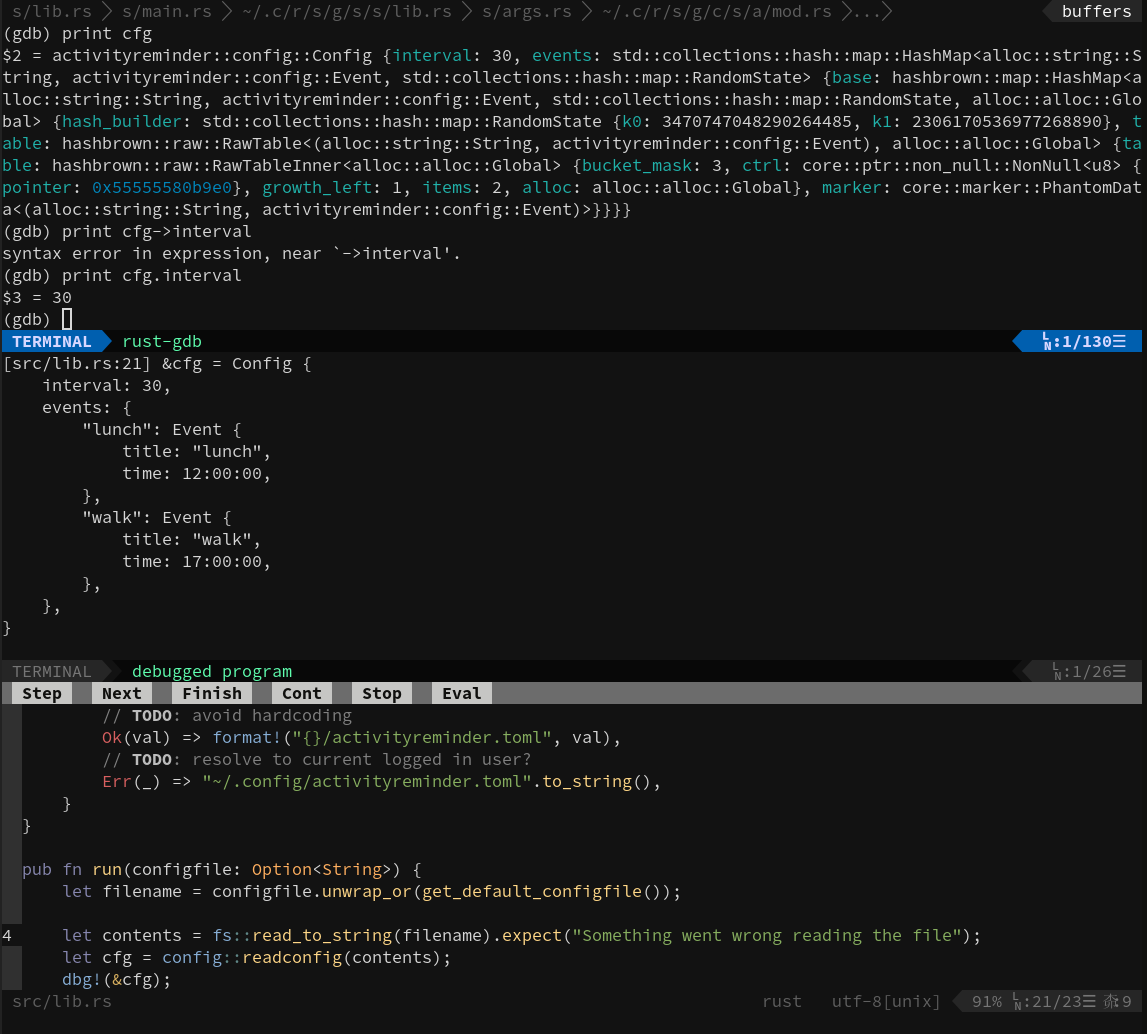
This provides an easy way to launch a debugger instance using :call RunDebugger() which spawns a rust-gdb session in one window and another window for terminal output. Using termdebug's :Break a breakpoint can be set and other Gdb related actions. In my rust.vim I've set up the following keybinding to start a debug session nmap <F5> :call RunDebugger()<CR>.
Language Server
What I was really missing in the my editor was language features such as, go to definition, auto completion and displaying function information. I've tried vim-lsp and coc.vim but both seemed to require more effort and required me to switch away from ale.vim. Luckily it turns out ale.vim already supports language servers. For rust this worked out of the box, however I can recommend using rust-anaylzer. For Python python-language-server used to be the default but is now replaced with python-lsp-server which is not yet packaged in Arch Linux. For JavaScript everything works out of the box after installing typescript which provides the tsserver language server.
The following keybindings where added to my vimrc:
nmap gd :ALEGoToDefinition<CR> nmap gr :ALEFindReferences<CR> nmap gR :ALERename<CR> nmap K :ALEHover<CR> Further more adding rust.vim and togglebit's rust.vim adds the option to configure some useful keybindings for running :Cargo check, :Cargo run in a new Vim terminal pane.
Search
One of my biggest annoyances was finding things easily from vim, which was mostly solved by installing fzf.vim and the fzf package. With :Files the files in the current working directory are shown and can be filtered, for files tracked in git :GFiles. To find things in files I've added a keybinding for :Ag and installed the_Silver_searcher, the fzf plugin offers more functionality such as listing and searching through ultisnip snippets.
Conclusion
I'm fairly content with my new Vim setup, slowly becoming more efficient, building up muscle memory and started writing some vimscript for more automation. For example to bump pkgrel's easily in PKGBUILD's. There are some other plugins I have installed such as nerdtree and vim-surround and hardly use as I'm not that familiar with them yet. Lastly, I've started reading the help files of my plugins and already discovered some nice new tips / features.
For monitoring the Arch Linux infrastructure we've moved on from Zabbix to Prometheus as it fits more into our infrastructure is code goal. This required some research into how we could achieve the same monitoring with Prometheus. Our Zabbix setup monitored Host, MySQL, Borg and Arch Linux related metrics. For …
For monitoring the Arch Linux infrastructure we've moved on from Zabbix to Prometheus as it fits more into our infrastructure is code goal. This required some research into how we could achieve the same monitoring with Prometheus. Our Zabbix setup monitored Host, MySQL, Borg and Arch Linux related metrics. For host metrics node_exporter is an excellent solution and mysqld_exporter exists for MySQL. Our Arch Linux where custom Zabbix metrics, which where the number of out date packages and the number of vulnerable installed packages, the Borg metrics is the last backup date of a machine.
For the Borg/Arch Linux metrics there are two options, create a custom exporter which has to be exposed over the network and periodically polled by Prometheus or use node_exporter's textcollector feature. The textcollector feature of node_exporter works by reading additional metrics from a textfile in a given directory, these metrics are then added to the node_exporter metrics.
The textcollector approach suits as well, as we can rely on some shell scripting and systemd for scheduling to provide metrics. To obtain our Arch metrics all we need to run is:
checkupdates | wc -l arch-audit | wc -l To make the node_exporter collect the metric we want, we need to pass --collector.textfile.directory=/var/lib/node_exporter and generate a file which looks as following in that directory (readable by the node_exporter user):
# HELP pacman_updates_pending number of pending updates from pacman # TYPE pacman_updates_pending gauge pacman_updates_pending 14 # HELP pacman_security_updates_pending number of pending updates from pacman # TYPE pacman_security_updates_pending gauge pacman_security_updates_pending 1 This file is in the Prometheus format which is now being standardized as the OpenMetrics specification.
Bringing this all together is a simple bash script which generates the expected output format and dumps it in a pacman.prom file in the user provided directory. This is periodically re-generated with the use of a systemd service and timer. With these metrics we generate alerts for when a server has vulnerable packages installed or has more then 50 outdated packages by these Prometheus rules.
As more modern tools output JSON it's even easier to make a custom textcollector with the help of jq, this allowed us to for example monitor btrfs for errors and rebuilderd. For fun and profit Arch now also monitors the repository sizes using a simple bash script.
In conclusion, node_exporter's textcollector feature makes it fun and easy to monitor additional metrics with Prometheus such as the Arch Linux Archive size :)

A lot has happened since the last reproducible builds summit in Marrakesh 2019, this blog post is a summary of the progress made in 2020 of everything related to getting reproducible builds in Arch Linux.
archlinux-repro
Also known as repro this tool allows one to rebuild a package and check …
A lot has happened since the last reproducible builds summit in Marrakesh 2019, this blog post is a summary of the progress made in 2020 of everything related to getting reproducible builds in Arch Linux.
archlinux-repro
Also known as repro this tool allows one to rebuild a package and check if it is reproducible by providing a build package such as $foo.pkg.tar.zst. It then set's up a build root, downloads PKGBUILD and sources and rebuilds the package checking if it's reproducible afterwards. During the year the tool has improved a lot to being able to rebuild all the packages in our repository without any known side effects at the moment. Notable changes are:
- Adding an option to skip running tests, as they are not required to determine reproducibility.
- Support a shared cache directory. multiple repro instances can share the same cache of packages.
- Keyring related fixes.
Rebuilderd
During the Reproducible Builds Summit in Marrakesh, kpcyrd started working on rebuilderd. A new tool to rebuild and verify repository packages (distribution agnostic), the rebuilderd daemon syncs repository state from a distribution mirror and queue's packages to be rebuild. Rebuilderd-worker's query the rebuilderd daemon for packages to build and report back to rebuilderd if the build was successful.
rebuilderd had it's first release on 13 April 2020 and during the year has seen 13 releases with some notable improvements:
- Storing diffoscope and log output.
- Re-scheduling failed builds with a delay.
- API enhancements for example a new endpoint
/api/v0/dashboardfor getting instance statistics. - Automatic aborting builds after 24 hours.
Infrastructure
A week after the first release of rebuilderd and packaging in the Arch Linux [community] repository, a rebuilderd instance was setup on 23 April. Soon after a simple React website was created which shows an overview of the reproducibility statistics and per package status, the source can be found in the rebuilderd-website repository.
The setup has matured during the year with the creation of ansible roles for rebuilderd and rebuilderd-worker, a prometheus exporter to monitor the queue length, statuses and online workers, and a Grafana dashboard. Kape has sponsored Arch Linux dedicated servers, one of the servers (AMD EPYC 7702P) now hosts multiple rebuilderd-workers for rebuilding our packages and three other servers as Archive mirrors in America, Asia and Europe.
The TU/Developer dashboard provided by archweb displays unreproducible packages for the logged in packager and can now opt-in warn packagers if a package has become 'unreproducible' via an email notification.
Packaging
To get more reproducible packages, packages have to be patched/adjusted to become reproducible. Various packages have been fixed in our repository, some notable fixes are:
- A Perl PATH being appended multiple times during build, made Haskell packages unreproducible. This was fixed after a filesystem update and a change in the Perl package.
- Various Python packages has now set
PYTHONHASHSEEDto allow Python pyc files to generate reproducible. - Removing .doctrees directories from packages which are not required as they are build cache files generated by sphinx and unreproducible.
- Removal of using go get in packages as it often is unreproducible as dependencies are not pinned.
Grafana Loki on Arch Linux
Grafana's has started a new project called loki as a prometheus for logs solution. For Arch Linux's infrastructure we where thinking about introducing logging altering for our services. Which sparked my curiosity into Loki as it looked like a simple, easy solution after watching the …
Grafana Loki on Arch Linux
Grafana's has started a new project called loki as a prometheus for logs solution. For Arch Linux's infrastructure we where thinking about introducing logging altering for our services. Which sparked my curiosity into Loki as it looked like a simple, easy solution after watching the two year old FOSDEM talk. The alternatives such as ELK seemed to complicated for Arch's relatively simple infrastructure of a couple VPS and dedicated servers at Hetzner.
E-ink home display2019-07-22T21:37:00+02:002019-07-22T21:37:00+02:00Jelle van der Waa (jelle@vdwaa.nl)tag:vdwaa.nl,2019-07-22:/eink-home-display.htmlI've always wanted an e-ink status display in my living room to view the weather forecast, news and public transport information. Previously I've used a SHA2017 Badge with the following app which showed a weather forecast for the following four days. So I've decided to scale up to a nice …
I've always wanted an e-ink status display in my living room to view the weather forecast, news and public transport information. Previously I've used a SHA2017 Badge with the following app which showed a weather forecast for the following four days. So I've decided to scale up to a nice 7.5" e-ink screen which I can hang on the wall. To control the e-ink screen I've taken an Raspberry Pi Zero W since it's easier to develop with then an ESP32. To hold the e-ink screen I've gotten an Ikea RRIBBA which perfectly fits the e-ink screen and leaves enough space to fit an e-ink SPI controller and a RaspberryPi.

When I started playing around with drawing images on the e-ink screen with the official Waveshare Python driver, I noticed a blank and an image update took around 50 seconds with 100% cpu. This is too slow for a status display so I started profiling with a simple test program. The Python profiler concluded that writebytes was called for the most of the time, which is a function of the python SPIDev module. It does a write call to the SPI device for every pixel individually which was the first issue to tackle. A newer version of this driver included the 'writebytes2' function which can write a Python iterable at once, this led to a significant improvement in this commit.
Waveshare also sells e-ink panels with a third color which lead to unrequited looping since my panel is black and white. The example code first clears the panel, then generates a buffer and writes it to the device simply generating the buffer up front saved a small amount of "panel updating" time. The code to generate the buffer was also optimized.
After all these changes the panel updates with a Raspberry Pi Zero W in ~ 10 seconds and a tiny bit faster on a Raspberry Pi 3 in ~ 8 seconds. The driver code can be viewed here. Now all that was left is to write my own status page for my living room. The e-ink panel fetches my local weather, public transport and Dutch news the code which drives the display below can be read here. The final display can be viewed below, the frame hangs on a nail with a barrel jack connector for a 5V power supply.

In the future I would like to include a graph of the predicted rain for the following hour since cycling in the rain isn't always fun :-)
Reproducing Arch [core] repository packages2019-06-27T18:37:00+02:002019-06-27T18:37:00+02:00Jelle van der Waa (jelle@vdwaa.nl)tag:vdwaa.nl,2019-06-27:/reproducing-core-packages-2019-06.htmlAs Arch Linux we are working on reproducible builds for a while and have a continuous test framework rebuilding package updated in our repositories. This test does an asp checkout of a package and builds it twice in a schroot, we do not try to reproduce actual repository packages yet …
As Arch Linux we are working on reproducible builds for a while and have a continuous test framework rebuilding package updated in our repositories. This test does an asp checkout of a package and builds it twice in a schroot, we do not try to reproduce actual repository packages yet. In the end this is however what we want to achieve, giving users the ability to verify a repository package by rebuilding it on their own hardware.
repro was created to achieve this goal, it creates a build chroot with the packages installed during build (from the .BUILDINFO file), sets SOURCE_DATE_EPOCH accordingly, fetches the correct PKGBUILD and then builds the package. This tool however does not run in a CI environment yet, so a bash script was hacked together to build all our [core] (232) packages one by one leading to 0% reproducibility with the following issues:
- makepkg options differed, these options are recorded in BUILDINFO but not set yet by repro.
- Packages where not reproducible (108 due to makepkg recording false sizes in .PKGINFO).
- PKGBUILD fetching logic failed (21 packages).
- Failed to download source files due to DNS issues (popt, libpipeline, acl, mlocate).
- Packages did not build due to OOM and other issues (lib32-gcc-libs, gcc-obj, gcc-libs, gcc-go, gcc-fortran, gcc, fakeroot).
- asp failed to get package due unknown reasons (libusb).
- Packages not reproducible (s-nail, amd-ucode, syslinux, texinfo, tzdata, patch, .. and more).
- libpcap GPG verification failed.
- Builds with different packages installed leading to a different BUILDINFO due to an issue in repro (unknown).
Logs of the process can be found here.
This shows that still a lot has still to be done for reproducible Arch Linux, in the next pacman release the size issue should be resolved. Which will lead to at least some reproducible packages! Repro has to be improved and non reproducible packages sorted out. In a few months I intend to retry reproducing [core] packages and have at least > 0% reproducibility!
Mini DebConf Hamburg 20192019-06-20T13:37:00+02:002019-06-20T13:37:00+02:00Jelle van der Waa (jelle@vdwaa.nl)tag:vdwaa.nl,2019-06-20:/mini-debconf-hamburg-2019.htmlThe reproducible builds project was invited to join the mini DebConf Hamburg sprints and conference part. I attended with the intention to get together to work on Arch Linux reproducible test setup improvements, reproducing more packages and comparing results.
The first improvement was adding JSON status output for Arch Linux …
The reproducible builds project was invited to join the mini DebConf Hamburg sprints and conference part. I attended with the intention to get together to work on Arch Linux reproducible test setup improvements, reproducing more packages and comparing results.
The first improvement was adding JSON status output for Arch Linux and coincidently also OpenSUSE and in the future Alpine the commit can be viewed here. The result was deployed and the Arch Linux JSON results are live.
The next day, I investigated why Arch Linux's kernel is not reproducible. The packaging requires a few changes for partial reproducibility:
export KBUILD_BUILD_HOST="arch" export KBUILD_BUILD_TIMESTAMP=$(date -d@"$SOURCE_DATE_EPOCH" +%Y-%m-%d) One of the remaining issue is CONFIG_MODULE_SIG_ALL which signs all kernel modules to allow loading of only signed kernel modules. If there is no private key specified a key will be generated which is always non-reproducible. A solution for this problem hasn't been found, as providing a key in the repository might also be non-optimal. Apart from this issue, the vmlinuz-linux image is also non-reproducible which needs to be further investigated.
Further packages where investigated which currently do not reproduce in our test framework.
-
s-nail due to recording of MAKEFLAGS which is under investigation for fixing.
-
keyutils was fixed for embedding the build date in it's binary with this patch
-
nspr has been made reproducible in Arch Linux with the following change.
Plans where made to extend the reproducible builds test framework for Arch Linux and start reproducing real repository packages on the test framework. Pacman was also packaged for Debian inclusion so that it's easier to bootstrap Arch containers/chroots from a Debian install.
A big thanks to all the organizers of mini DebConf Hamburg for organizing the event!
Arch signoff2019-04-02T21:37:00+02:002019-04-02T21:37:00+02:00Jelle van der Waa (jelle@vdwaa.nl)tag:vdwaa.nl,2019-04-02:/arch-signoff.htmlArch sign off tool
Since some time Arch has been letting users become testers which can sign off packages in [testing] repository's. The idea behind allowing users and not only the Arch team sign off packages as known good is that packages can be moved earlier or bugs and issues …
Arch sign off tool
Since some time Arch has been letting users become testers which can sign off packages in [testing] repository's. The idea behind allowing users and not only the Arch team sign off packages as known good is that packages can be moved earlier or bugs and issues found earlier. To sign off a package you need to login into Arch Linux's website and go to the sign off page to sign off a package. Haavard created a tool to be able to sign off packages from the command line which makes it easier to sign off by doing it interatively.
This tool has now been adopted by Arch as the official sign off tool and has been packaged in the extra repository. Issues can be reported here.
If you want to become an Arch Linux tester, feel free to apply here. A special thanks goes out to the current testing team and haavard for creating this awesome tool!
Arch Linux @ Reproducible Build Summit Paris2018-12-13T23:37:00+01:002018-12-13T23:37:00+01:00Jelle van der Waa (jelle@vdwaa.nl)tag:vdwaa.nl,2018-12-13:/arch-reproducible-build-summit-18.htmlWrite up of the reproducible summit
Three members of the Arch Linux team attended the Reproducible Build Summit 2018 in Paris this week to work together with the reproducible ecosystem to work on reproducible build issues. The other participants where from a lot of different projects and companies such as …
Write up of the reproducible summit
Three members of the Arch Linux team attended the Reproducible Build Summit 2018 in Paris this week to work together with the reproducible ecosystem to work on reproducible build issues. The other participants where from a lot of different projects and companies such as Debian, NixOS, Guix, Alpine, openSUSE, OpenWrt, Google, Microsoft and many more. The summit was organized by letting attendees work with a small subset of the attendees on issues which they are interested in and trying to find solutions and discuss ideas. At the end of the day there time for hacking together on solutions. The event was very open and there was a lot of collaboration between projects which have different goals!
The Arch Team has worked on the following topics:
- Packaging & updating more reproducible build tools in our repos, disorderfs was updated to the latest version and disorderfs was updated after a pytest fix from Chris Lamb for diffoscope. Reprotest, the tool to test if something is reproducible has been added to [community].
- A note has been made that we should investigate if the Arch ISO is reproducible. At least one possible issue is that squashfs images are not reproducible and Arch should consider switching to squashfskit which creates reproducible squashfs images.
- Discussed adding a JSON endpoint for fetching the reproducible build status of Arch Linux packages on tests.reproducible-builds.org.
- Sharing reproducible build issues cross distros.
- Discussed how to rebuild Arch Linux packages and test if they are reproducible.
- Discussed how to verify before installing a package if a package is reproducible.
- Debian's Kernel is reproducible, but Arch's isn't. We started investigating why ours isn't reproducible, as one goal is to get [core] reproducible as first repo.
- Investigate PGO (profile guided optimisation) reproducibility issues for Firefox and Python.
And much more! It has left us with a lot of "homework" to continue making Arch Linux more reproducible!
A huge thanks to the organizers and sponsors of the Reproducible build summit!
Arch Linux ARM on the Allwinner NanoPi A642018-12-09T13:37:00+01:002018-12-09T13:37:00+01:00Jelle van der Waa (jelle@vdwaa.nl)tag:vdwaa.nl,2018-12-09:/nanopi-a64-arch.htmlArch Linux ARM on a NanoPi A64
I've obtained two NanoPi A64's a long while ago and recently thought of setting them up as a HA cluster as an exercise. Since setting it up with real hardware is a lot more fun then with VM's or containers. And I wanted …
Arch Linux ARM on a NanoPi A64
I've obtained two NanoPi A64's a long while ago and recently thought of setting them up as a HA cluster as an exercise. Since setting it up with real hardware is a lot more fun then with VM's or containers. And I wanted to try out aarch64 and see how well that fares on mainline Linux.
The first part of setting it up created the partitions and rootfs on the sd card. For this I've just followed the "Generic AArch64 Installation". The more challenging part was setting up U-boot, clone it and follow the 64 bit board instructions. All that is required now is to install a boot.scr file in /boot on the sdcard, download the boot.cmd file and create a boot.scr with mkimage from uboot-tools with mkimage -C none -A arm64 -T script -d boot.cmd boot.scr.
That should get the NanoPi A64 booting, note that 4.20 is required for the ethernet controller to work, luckily Arch Linux ARM offers an linux-rc package since as of writing this article 4.20 is still not released yet.
Arch User Magazine2018-08-03T13:37:00+02:002018-08-03T13:37:00+02:00Jelle van der Waa (jelle@vdwaa.nl)tag:vdwaa.nl,2018-08-03:/arch-user-magazine.htmlA blast from the past, the Arch User Magazine
It's almost 10 years ago that Ghost1227 created the Arch User Magazine and this week I got reminded about it's existence. I found that the original domain where the magazine was hosted was no longer owned by Ghost1227, but by using …
A blast from the past, the Arch User Magazine
It's almost 10 years ago that Ghost1227 created the Arch User Magazine and this week I got reminded about it's existence. I found that the original domain where the magazine was hosted was no longer owned by Ghost1227, but by using the way back machine I was able to retrieve two of the three editions of the magazine.
The original forum thread about the first magazine can be found here and the first and second magazine. There should be a third edition, but I couldn't find it via the way back machine.
Enjoy reading this part of Arch history and I hope someone recreates the user magazine!
Arch monthly July2018-08-01T17:00:00+02:002018-08-01T17:00:00+02:00Jelle van der Waa (jelle@vdwaa.nl)tag:vdwaa.nl,2018-08-01:/arch-monthly-july.htmlArchweb updates
The Arch Linux website has been updated and it's search functionality was expanded to make it able to find the 'archlinux-keyring' by searching for 'archlinux keyring'. This was contributed by an external!. Another small visual improvement was made by removing some empty spaces in provides.
AURpublish
AURpublish was …
Archweb updates
The Arch Linux website has been updated and it's search functionality was expanded to make it able to find the 'archlinux-keyring' by searching for 'archlinux keyring'. This was contributed by an external!. Another small visual improvement was made by removing some empty spaces in provides.
AURpublish
AURpublish was added to [community] by eschwartz, a tool to manage your AUR packages.
Dropping luxrender packages
Lukas proposed dropping luxrays, luxrender and luxblend25 packages from [community]. The proposal went through without opposition and embree2 was also dropped in the process.
Python 3.7 in [testing]
Python 3.7 finally landed in [testing] after a painful rebuild period with many packages requiring fixes due to the async keyword or C ABI/Compiler changes.
Enforcing 2FA on Github
This does not impact Arch, but the Github repo used for the development of the Arch security Tracker, website and some mirroring now enforces 2FA in light of the recent Gentoo Github repo incident
Removal of openjdk 9, phasing out Java 7
Anthraxx removed openjdk 9 from the repos since it is EOL and nothing depends on it. Java 7 will be phased out as well soon.
New TU
Filipe Laíns has been accepted as a new TU, read his proposal and results here.
New TU applicant
A new application has arrived, voting is currently underway.
Acroread package compromised
The acroread package was compromised by a user who took over the orphan package and uploaded a new version with
aurweb 4.7.0
A new version of the AUR is deployed with new features and bugfixes.
Linux package source moved
Linux package source moved to github along with changes in the PKGBUILD.
Pacman 5.1.1 release
Pacman 5.1.1 was released containing several bugfixes.
Arch Linux at FrOSCon2018-07-10T21:37:00+02:002018-07-10T21:37:00+02:00Jelle van der Waa (jelle@vdwaa.nl)tag:vdwaa.nl,2018-07-10:/arch-linux-froscon.htmlYet another shoutout for FrOSCon, which will be held 25th and 26th of August. Arch Linux will have a devroom with talks so far about Linux Pro Audio and our general Infrastructure / Reproducible build.
Thanks to Stickermule there will be Arch Linux sticker to hand out. 
Archive cleanup
The Arch Archive has been cleaned up, the discussion started in this mail thread. The archive server was running out of space and therefore needed some cleaning, all packages which are not required for reproducible builds where removed (and where from 2013/2014/2015). Packages from these years …
Archive cleanup
The Arch Archive has been cleaned up, the discussion started in this mail thread. The archive server was running out of space and therefore needed some cleaning, all packages which are not required for reproducible builds where removed (and where from 2013/2014/2015). Packages from these years should also be available at the internet archive.
FrOSCon
There will be an Arch Linux Devroom on the Sunday of FrOSCon with talks and the possibility to meet members of the team.
Python2 modules cleanup
A proposal has been send out to remove 'orphan' python2 modules. As a start of phasing out python2 packages.
Package guidelines improvements
Foxboron proposed improving the package guidelines.
Core/extra cleanup
Core and extra has been cleaned up a bit, removed packages where pcmciautils, speedtouch and zd1211-firmware.
AUR package compromised
As expected from the AUR, anyone can upload a package or adopt one and change it. This happened to acroread on Sunday and some other packages, always review packages you build from the AUR before building.
Arch monthly May2018-06-02T21:37:00+02:002018-06-02T21:37:00+02:00Jelle van der Waa (jelle@vdwaa.nl)tag:vdwaa.nl,2018-06-02:/arch-monthly-may.htmlPacman release
Finally! A new pacman release, this version adds some critical bits for reproducible builds and the pacman repository has been shed of misc tools which are now in pacman-contrib. More details in the changelog and on reddit
BUILDINFO Rebuild
For reproducible builds, every package in the repository build …
Pacman release
Finally! A new pacman release, this version adds some critical bits for reproducible builds and the pacman repository has been shed of misc tools which are now in pacman-contrib. More details in the changelog and on reddit
BUILDINFO Rebuild
For reproducible builds, every package in the repository build on a users system should create exactly the same package as the repository package. To be able to achieve this the packages which where installed in build chroot are recorded in a BUILDINFO file (man BUILDINFO) which is added in the .pkg.tar.xz package. BUILDINFO files where added a while ago in pacman, but not every package contains them yet! Interestingly enough even a rolling release distro contains packages from 2013, these are now being rebuild! This also ties in to the cleanup of archive.archlinux.org, since the archive server is almost full and the 2013/2014/2015 directories will be removed. If you have a good network connection and want to mirror the archive, reach out!
pkgconf replaces pkg-config
As can be read on the mailing list, pkgconf has now replaced pkg-config.
GCC 8 in [core]
The latest version of GCC 8 lands in [core], this enables more warnings by default so older packages might fail to build if they enable -Werror.
Arch monthly January2018-02-06T13:37:00+01:002018-02-06T13:37:00+01:00Jelle van der Waa (jelle@vdwaa.nl)tag:vdwaa.nl,2018-02-06:/arch-monthly-january.htmlArch Linux @ FOSDEM
Arch Linux Trusted Users, Developers and members of the Security team have been at FOSDEM. Next year there will be more stickers hopefully and maybe a talk, but it was great to meet some Arch users in real life, discuss and even hack on the Security Tracker …
Arch Linux @ FOSDEM
Arch Linux Trusted Users, Developers and members of the Security team have been at FOSDEM. Next year there will be more stickers hopefully and maybe a talk, but it was great to meet some Arch users in real life, discuss and even hack on the Security Tracker.
TU Application: Ivy Foster
A new TU applied, you can read the sponsorship here.
New DevOps member Phillip Smith
A new member joined the sysadmin/devops team. This is the team which maintains the Arch infrastructure such as the forums, AUR and wiki.
Arch monthly December2018-01-01T13:37:00+01:002018-01-01T13:37:00+01:00Jelle van der Waa (jelle@vdwaa.nl)tag:vdwaa.nl,2018-01-01:/arch-monthly-december.htmlArch Linux @ 34C3
Arch Linux Trusted Users, Developers and members of the Security team have been at 34C3 and even held a small meetup. There was also an #archlinux.de assembly where people from the irc channel could meet each other. Seeing how much interest there was this year, it …
Arch Linux @ 34C3
Arch Linux Trusted Users, Developers and members of the Security team have been at 34C3 and even held a small meetup. There was also an #archlinux.de assembly where people from the irc channel could meet each other. Seeing how much interest there was this year, it might be worth it to host a self organized session or assembly with more stickers \o/
Fosdem 2018
Arch Linux Trusted Users and Developers will be at Fosdem 2018 in February. We don't have a booth or developer room but you can probably find us by looking for Arch stickers or hoodies :-)
2017 Repository cleanup
The repository's will be cleaned of orphan packages, which will be moved to the AUR, where they can be picked up and taken care of.
AUR 4.6.0 Release
A new version of aurweb has been released on December third. It brings markdown support for comments and more Trusted User specific changes.
Happy 2018!
I wish everyone a happy 2018 and keep on rolling :)
Arch monthly November2017-12-08T12:11:00+01:002017-12-08T12:11:00+01:00Jelle van der Waa (jelle@vdwaa.nl)tag:vdwaa.nl,2017-12-08:/arch-monthly-november.htmlNew TU Andrew Crerar
Andrew Crerar applied to become a Trusted User and was accepted! Congratulations! His intentions is to move firefox-develop from the AUR to [community]
77% Reproducible packages
Currently 77% of the packages are reproducible, note that we do not vary everything yet in the two builds. For …
New TU Andrew Crerar
Andrew Crerar applied to become a Trusted User and was accepted! Congratulations! His intentions is to move firefox-develop from the AUR to [community]
77% Reproducible packages
Currently 77% of the packages are reproducible, note that we do not vary everything yet in the two builds. For example filesystem, build patch and other options can be varied.
Pro-audio mailing list
For audio enthusiasts there is a new mailing list to discuss audio packaging, development and usage etc..
GCC and GCC-multilib merged
Now that 32 bit support is dropped, the normal GCC package has gained support to build multilib packages, simplifying packaging.
Mime-types replaced with mailcap
Mime-types is now replaced by mailcap in this change.
Arch Linux at 34C3
A few Arch Linux Developers and Trusted users will be at 34C3 in Leipzig, if you are there, meet us there! A certain Arch user was recruited after talks at congress!
Analysis of AUR and Official Arch Repository data
Brian Caffey has made some a analysis of the AUR and the Arch repositories.
Reproducible Arch Linux?!2017-11-26T13:37:00+01:002017-11-26T13:37:00+01:00Jelle van der Waa (jelle@vdwaa.nl)tag:vdwaa.nl,2017-11-26:/reproducible-arch-linux.htmlThe reproducible build initiative has been started a long time ago by Debian and has been grown to include more projects. Arch is now also in the process of getting reproducible build support, thanks to the of hard work of Anthraxx, Sangy, and many more volunteers. In pacman git patches …
The reproducible build initiative has been started a long time ago by Debian and has been grown to include more projects. Arch is now also in the process of getting reproducible build support, thanks to the of hard work of Anthraxx, Sangy, and many more volunteers. In pacman git patches where landed to support reproducible builds which will be included in a hopefully soon next stable release! Meanwhile with help of the reproducible-builds.org rebuild infrastructure rebuilds have been started!
Currently 77% of the 17% tested packages are reproducible as can be found here. This page is fed by the work done by two Jenkins builders, which currently build the whole Arch repository.
The builder builds the package twice in different environments and then uses diffoscope to find differences in packages. Usually the differences are due to timestamps :-). Now that we have some results of rebuilds, we can start fixing our packages. The work I did so far:
-
Fixing 404 sources of our packages, some of the source failures where due to ftp://kernel.org being used and not https://www.kernel.org.
This has been fixed in SVN. Also old pypi links needed to be fixed
-
One package's .install file contained a killall statement, I'm not sure why but it shouldn't be required so it was eradicated
-
Integrity mismatch, so upstream did a ninja re-release, annoying but fixed
-
Imagemagick's convert sets some metadata in the resized png's which makes reproducible builds fail. Since it does not adhere to SOURCE_DATE_EPOCH.
-
Missing checkdepends on pytest-runner, which is automatically downloaded by the build tools but that failed in the reproducible build. Some simply adding the depdency to checkdepends fixed it.
As you can see, only one of the bullet points was really an reproducible build issue the others where packaging issues. So I can conclude that reproducible builds will increase the packaging quality in the Arch repository. Having the packages in our repository always build-able will also help the Arch Linux 32 project.
The Arch reproducible project still needs a lot of work, to make it possible to verify a package build as a user against the repository package.
P.S.: If you are at 34C3 this year and interested, visit the reproducible build assembly.
Arch monthly October2017-11-11T11:11:00+01:002017-11-11T11:11:00+01:00Jelle van der Waa (jelle@vdwaa.nl)tag:vdwaa.nl,2017-11-11:/arch-monthly-october.htmlThis is the second edition of Arch monthly, mostly due to the lack of time to work on Arch weekly. So let's start with the roundup of last month.
New TU David Runge
David Runge applied to become a Trusted User and was accepted! He mentioned to have a huge …
This is the second edition of Arch monthly, mostly due to the lack of time to work on Arch weekly. So let's start with the roundup of last month.
New TU David Runge
David Runge applied to become a Trusted User and was accepted! He mentioned to have a huge interest in pro-audio, so hopefully there will be improvements made in that area!
Farewell 32 bit
After nine months of deprecation period, 32 bit is now unsupported on Arch Linux. For people with 32 bit hardware there is the Arch Linux 32 project which intends to keep 32 bit support going.
AUR Changes Affecting Your Privacy
The next aurweb release, which will be released on 2017-12-03, includes a public interface to obtain a list of user names of all registered users. This means that, starting on 2017-12-03, your user name will be visible to the general public. The user name is the account name you specified when registering, and it is the only information included in this list. See this link for more information.
#archlinux-testing irc channel
An irc channel has been created for coordination between Arch Linux testers. See more about becoming an official tester here.
Arch monthly September2017-10-02T22:00:00+02:002017-10-02T22:00:00+02:00Jelle van der Waa (jelle@vdwaa.nl)tag:vdwaa.nl,2017-10-02:/arch-monthly-september.htmlThis is the first edition of Arch monthly, mostly due to the lack of time to work on Arch weekly. So let's start with the roundup of last month.
Two new Trusted Users
Alad and Foxboron joined the Trusted Users team! Congrats!
Archweb signoff helper
This has been around for …
This is the first edition of Arch monthly, mostly due to the lack of time to work on Arch weekly. So let's start with the roundup of last month.
Two new Trusted Users
Alad and Foxboron joined the Trusted Users team! Congrats!
Archweb signoff helper
This has been around for a while, but Foxboron created this great tool to signoff packages in [testing] simply from the cli. If you are an official tester try it out!
Arch Classroom - Python for beginners
Pulec organizes a classroom about Python for beginners on Wednesday, October 04, 2017 at 16:00 UTC in the channel #archlinux-classroom on the freenode network. See this post for more details.
Eli Schwartz is our new bugwrangler
Eli Schwartz joins as bugwrangler by helping out assigning and investigation new bugs.
Arch-meson wrapper
If you package packages which uses meson as a build tool then the arch-meson is useful since it sets defaults for Arch.
Arch manpages website
A new website popped up which hosts Arch manual pages.
Arch weekly #22017-05-26T11:00:00+02:002017-05-26T11:00:00+02:00Jelle van der Waa (jelle@vdwaa.nl)tag:vdwaa.nl,2017-05-26:/arch-weekly-2.htmlThis is the second edition of Arch weekly, a small weekly post about the news in the Arch Linux community.
Official docker image for Arch Linux!
After reporting about the Arch-boxes project last week. Pierres created the Arch Linux organization on Docker and created a base image. The docker build …
This is the second edition of Arch weekly, a small weekly post about the news in the Arch Linux community.
Official docker image for Arch Linux!
After reporting about the Arch-boxes project last week. Pierres created the Arch Linux organization on Docker and created a base image. The docker build script can be found here. Now you can easily run Arch in docker with a base (regularly updated) image!
docker run -ti archlinux/base /bin/bash pyalpm 0.8.1 release
A bugfix release for pyalpm, has been made it fixes one memory leak, removes some unused code and contains some build fixes.
Archweb upgrade
Archweb has been upgraded to 1.8 LTS, previously it was running on 1.7 which is no longer supported. If you encounter any issues on https://archlinux.org please report them on the bugtracker.
MariaDB upgrade important news
There are plans to update MariaDB to 10.2.6, this will change the library soname from libmysqlclient.so to libmariadb.so and some dependency changes, more details are in the link.
New Trusted User foxxx0
Thore Bödecker joins the TU team, you can read his application here.
Discussion about improving the overall experience of contributors
Bartłomiej has started a discussion on arch-dev-public about improving and getting more external contributors involved in Arch Linux. Not only could existing Arch projects such as pyalpm, archweb and namcap use more contributors for development of new features and fixing bugs. Arch could also use more contributors for new projects and ideas such as rebuild automation and the maintenance of our infrastructure. For those wondering what the infrastructure is about, Arch has a few dedicated servers for the forums, building packages, etc. all these servers are managed with ansible with the playbooks in git
Security updates of the week
The following packages received security updates:
- lynius - arbitrary file overwrite - ASA-201705-20
- fop - xml external entity injection - ASA-201705-19
- libplist - multiple issues - ASA-201705-18
- lxc - insufficient validation - ASA-201705-17
- openvpn - denial of service - ASA-201705-16
This is the first edition of Arch weekly, a small weekly post about the news in the Arch Linux community. Hopefully this will be a recurring weekly blog post!
linux-hardened appears in [community]
After the disappearance of linux-grsec from the repos due to the Grsecurity project not providing the required …
This is the first edition of Arch weekly, a small weekly post about the news in the Arch Linux community. Hopefully this will be a recurring weekly blog post!
linux-hardened appears in [community]
After the disappearance of linux-grsec from the repos due to the Grsecurity project not providing the required patches. Daniel Micay provides an alternative linux-hardened in [community]. The package is based on the following Linux fork which contains more security patches than in the Linux mainline kernel and enables more security configuration options by default such as SLAB_FREELIST_RANDOM.
More information can be found on the wiki of the project.
Arch-boxes project
An effort has been made by Shibumi to provide official Arch Linux docker, vagrant (and maybe ec2) images. Currently there is a virtualbox and qemu/libvirt option. View the project here.
Qt 4 now depends on OpenSSL 1.1
Even after the enormous OpenSSL 1.1 rebuild, not every package in the repository uses OpenSSL 1.1 yet. Qt 4 currently in [extra] uses OpenSSL 1.1 with 27 packages left in the repository which depend on openssl-1.0. Other OpenSSL 1.0 depending packages are now being rebuilt to stay compatible with Debian Stable and non-free software. See this bug report for more information.
Boost 1.64 rebuild
Currently a rebuild is underway, will land in [testing] soon (tm).
[pacman-dev] Repository management discussion
Allan started a discussion on improving the current repository management tooling in pacman. Feedback and patches are welcome :)
GCC 7.1 hits [testing]
GCC 7.1 has landed in [testing], please test it and reports issues!
Security updates of the week
There are quite a lot of security advisories, you can view them here.
Spotify music box2016-12-05T20:00:00+01:002016-12-05T20:00:00+01:00Jelle van der Waa (jelle@vdwaa.nl)tag:vdwaa.nl,2016-12-05:/spotify-music-box.htmlFor some time I've wanted to play Spotify music on my stereo installation, except it doesn't have bluetooth. I do own a nice aarch64 amlogic S905X based media center which runs LibreELEC, except libspotify which I normally use in combination with mopdiy. Libspotify (a binary blob from Spotify(tm)) however …
For some time I've wanted to play Spotify music on my stereo installation, except it doesn't have bluetooth. I do own a nice aarch64 amlogic S905X based media center which runs LibreELEC, except libspotify which I normally use in combination with mopdiy. Libspotify (a binary blob from Spotify(tm)) however does not support aarc64.
So I decided to use one of my spare ARM boards, the nanopi NEO it has USB for the DAC and ethernet for streaming music and it's supported in mailine (ethernet however requires patches) and librespot. Librespot is a service which enables my phone (or any other official spotify-client running device) to play music on the ARM board running librespot. All what was required was compiling librespot (rust program) for ARMv7.
Arch Linux ARM does not offer rust as binary package, so you'd have to use rustup and run the nightly channel because the default rust channel segfaults.
curl -sSf https://static.rust-lang.org/rustup.sh | sh -s -- --channel=nightly Compiling on an ARM board with 512 MB ram and no swap is currently not do-able with rust even with 'cargo build -j1'. So I switched to a beefier board (orange pi pc) with 1GB ram which is luckily enough to compile libreelec.
pacman -S protobuf portaudiocargo build --release -j1 After it was compiled, install the cargo binary with 'cargo install' and copied the systemd unit from the AUR package. So far librespot works as expected and hasn't crashed while running for a week.
Later I intend to integrate the nanopi and dac in a nice case with a power button to poweroff/poweron the nanopi.
Git credential helper pass2016-10-14T13:17:00+02:002016-10-14T13:17:00+02:00Jelle van der Waa (jelle@vdwaa.nl)tag:vdwaa.nl,2016-10-14:/git-credential-helper-pass.htmlAt work we use Git with https auth, which sadly means I can't use ssh keys. Since I don't want to enter my password every time I pull or push changes to the server, I wanted to use my password manager to handle this for me.
Git has pluggable credential …
At work we use Git with https auth, which sadly means I can't use ssh keys. Since I don't want to enter my password every time I pull or push changes to the server, I wanted to use my password manager to handle this for me.
Git has pluggable credential helper support for gnome-keyring and netrc, adding pass support turned to be quite easy.
Create a script called "pass-git.sh" and put the following contents in it where 'gitpassword' is your password entry.
#!/bin/bash echo "password="$(pass show gitpassword) In your git directory which uses https auth execute the following command to setup the script as a credential helper.
git config credential.helper ~/bin/pass-git.sh Voila, that's all that's it.
5 euro USB logic analyzer review2016-09-26T23:00:00+02:002016-09-26T23:00:00+02:00Jelle van der Waa (jelle@vdwaa.nl)tag:vdwaa.nl,2016-09-26:/5-euro-usb-logic-analyzer-review.htmlI've found this cheap 5 euro USB logic analyzer via cnx.com and bought it from aliexpress.
It turned out to be quite easy to get the analyzer working on Arch Linux, the following packages need to be installed:
pacman -S pulseview The firmware for the device is only available …
I've found this cheap 5 euro USB logic analyzer via cnx.com and bought it from aliexpress.
It turned out to be quite easy to get the analyzer working on Arch Linux, the following packages need to be installed:
pacman -S pulseview The firmware for the device is only available in the AUR.
cower -dd sigrok-firmware-fx2lafwcd sigrok-firmware-fx2lafw && makepkg -si To be able to use the logic analyzer in pulseview without running it as root, requires an udev rule to be setup. Since libsigrok does not provide this udev rule, which might be considered as a packaging bug of Arch Linux.
wget http://pkgbuild.com/\~jelle/60-libsigrok.rules# As root / sudocp 60-libsigrok.rules /usr/lib/udev/rules.d/udevadm control --reload To test the logic analyzer I soldered a simple board which 'taps' the serial communication from the nanopi neo to my laptop. After connecting the ground and RX, TX from the board to the logic analyzer I started pulseview. Then select the saleae logic (or a different name) as device and press run while making some noise in the program connected to the tty device (for example screen).

In pulseview some peaks should show up, it might help to increase the sample size (for example to 1M).
Configuring pulseview to decode UART data is as easy as selecting the UART option from the GUI.

Select the connected RX/TX corresponding to how you hooked up them up to the logic analyzer, the baud rate, data bits etc. might be different in your setup.

And voila, pulseview decodes the UART data into a readable ascii representation.

Summary
This is the first logic analyzer I've ever used and so far it has exceeded my expectations. It was easy to get pulseview working, all the software which is required is fully open source. The analyzer should be able to analyze I2C, SPI and UART, limited up to 24 MHz. So far worth the 5 euro :-)
FriendlyARM NanoPi NEO review2016-08-21T18:00:00+02:002016-08-21T18:00:00+02:00Jelle van der Waa (jelle@vdwaa.nl)tag:vdwaa.nl,2016-08-21:/friendlyarm-nanopi-neo-review.htmlThe NanoPI NEO is a little 8 dollar ARM device with an interesting form factor and specifications.
- 512/256 MB ram (single slot)
- Cortex-A7 Quad-Core
- USB 2.0
- 100 Mbps ethernet
- 40 x 40 mm board size
- SD card slot

Mainline support
FriendlyARM provides an UbuntuCore image, but of course …
The NanoPI NEO is a little 8 dollar ARM device with an interesting form factor and specifications.
- 512/256 MB ram (single slot)
- Cortex-A7 Quad-Core
- USB 2.0
- 100 Mbps ethernet
- 40 x 40 mm board size
- SD card slot
Mainline support
FriendlyARM provides an UbuntuCore image, but of course I want to run Arch Linux ARM on it.
To use Arch Linux ARM on the NanoPI you will have to compile your own kernel and u-boot, I've used the armv7 tarball from archlinuxarm.org. The mainline kernel does not support the board yet, so a posted DTS file is required on top of the mainline kernel. This will provide a kernel without ethernet support, ethernet support can be added by compiling this Linux tree which hopefully lands in 4.9 or later. The DTS file has to be edited to add ethernet support, just append the following underneath the usbphy node.
&emac { phy-handle = <&int_mii_phy>; phy-mode = "mii"; allwinner,leds-active-low; status = "okay"; }; After setting up the correct .dtb and zImage for the kernel, u-boot has to be compiled. U-boot master contains support for the nanopi_neo and has to be compiled as following.
make -j8 ARCH=arm CROSS_COMPILE=arm-none-eabi- nanopi_neo_defconfig make -j8 ARCH=arm CROSS_COMPILE=arm-none-eabi- Power usage
The board connected with an ethernet cable uses 5V and \~ 0.10 A which means 5 * 0.10 / 1000 = 0.0005 kWh. Running the nanopi NEO a year will costs 0.0005 * 24 * 365 = 4.38. The dutch price per kWh is \~ 0.22 cents, so 4,38 * 0.22 cents = 1 euro!
Heating issues
The board seems to have some power issues reported on the sunxi wiki, so it's recommended to use a heatsink.
Summary
Overal it looks like a fun, low powered board which can be useful for example running small services: mqtt, taskd server, a webcam server or collecting sensor data using the gpio pins.
BananaPi with Arch Linux ARM and a mainline kernel2015-12-30T20:37:00+01:002015-12-30T20:37:00+01:00Jelle van der Waa (jelle@vdwaa.nl)tag:vdwaa.nl,2015-12-30:/bananapi-with-arch-linux-arm-and-a-mainline-kernel.htmlI posted a guide on getting Arch Linux ARM on the BananaPi last week. Now I was eager to get a mainline kernel working on the BananaPi for some ARM hacking and testing of new patches. In this post I'll describe the steps required to get a mainline kernel booted …
I posted a guide on getting Arch Linux ARM on the BananaPi last week. Now I was eager to get a mainline kernel working on the BananaPi for some ARM hacking and testing of new patches. In this post I'll describe the steps required to get a mainline kernel booted next to the "normal" kernel.
Compiling mainline kernel
I am using Hans de Goede's branch here, since he has some patches for USB OTG support for the BananP in there. But the normal mainline kernel should work with similiar steps
git clone https://github.com/jwrdegoede/linux-sunxi.git cd linux-sunxi git checkout -B sunxi-wip origin/sunxi-wip wget https://fedorapeople.org/\~jwrdegoede/kernel-driver-programming/kernel-config mv kernel-config .config # CROSS_COMPILE may differ per distro. arm-linux-gnu- probably works for the other distro's. make -j4 ARCH=arm CROSS_COMPILE=arm-none-eabi- oldconfig make -j4 ARCH=arm CROSS_COMPILE=arm-none-eabi- dtbs make -j4 ARCH=arm CROSS_COMPILE=arm-none-eabi- zImage Now that we have a kernel compiled, mount the sdcard.
mount /dev/sdX1 mnt cp /path/to/linux-sunxi/arch/arm/boot/zImage mnt/boot/zImagemainline mkdir mnt/boot/dtbsmainline cp /path/to/linux-sunxi/arch/arm/boot/dts/*.dtb mnt/boot/dtbsmainline/ umount /dev/sdX1 sync Now that we have copied the mainline kernel and dts files to the sdcard, it still won't boot it. Since the boot.scr is specified to look dts/* and zImage. So we will need to copy a new scr file. (note that you cannot edit the scr file on the sdcard) You can either generate a new scr file or create on yourself!
mount /dev/sdX1 mnt wget http://pkgbuild.com/\~jelle/bananapi/boot-mainline.scr -O mnt/boot/boot.scr umount /dev/sdX1 sync Or generate a new scr file, which sounds more fun.
pacman -S uboot-tools wget http://pkgbuild.com/\~jelle/bananapi/boot.cmd mkimage -A arm -O linux -T script -C none -a 0 -e 0 -n "BananPI boot script" -d boot.cmd boot.scr mount /dev/sdX1 mnt cp boot.scr mnt/boot/boot.scr umount /dev/sdX1 sync I haven't figured out what the boot.scr exactly does or if there is a way to specify which kernel to boot with one boot.scr file.
So expect some more posts while I explore more about U-boot and ARM :-)
Logrotate Weechat logs2015-12-27T20:45:00+01:002015-12-27T20:45:00+01:00Jelle van der Waa (jelle@vdwaa.nl)tag:vdwaa.nl,2015-12-27:/logrotate-weechat-logs.htmlToday I noticed my Weechat logs have grown a lot! \~/.weechat/logs has grown to 360M. Obviously I need some sort of automation to take care of these logs, enter logrotate. Luckily Earnestly showed me how to use logrotate on it's own some time ago. So all I what was …
Today I noticed my Weechat logs have grown a lot! \~/.weechat/logs has grown to 360M. Obviously I need some sort of automation to take care of these logs, enter logrotate. Luckily Earnestly showed me how to use logrotate on it's own some time ago. So all I what was needed was a logrotate config file (similiar to /etc/logrotate.d/*) and a systemd user service file.
First off the \~/.local/share/logrotate.d/irc.
# weechat logrorate file compress missingok notifempty copytruncate "~/.weechat/logs/**log" {} The systemd service file located in \~/.config/systemd/user/weechat-rotate.service.
[Unit] Description=Logrotate weechat's logs [Service] Type=simple ExecStart=/usr/bin/logrotate -s %t/logrotate.state %h/.local/share/logrotate.d/irc -v [Install] WantedBy=default.target Logrotate will run when Systemd reaches default.target, more info about default.target can be found here. You could also use a Systemd timer to schedule the logrotate weekly or monthly.
To view log output use journalctl.
journalctl --user -f -u weechat-rotate Since some time the Banana Pi is supported in the Linux kernel and U-Boot.
Arch Linux ARM does not support the board yet, but it is possible to get it working with an upstream U-Boot.
SD card Image
First we to create an SD card image, since the BananaPi is …
Since some time the Banana Pi is supported in the Linux kernel and U-Boot.
Arch Linux ARM does not support the board yet, but it is possible to get it working with an upstream U-Boot.
SD card Image
First we to create an SD card image, since the BananaPi is also ARMv7 we can use the Cubieboard 2 installation instructions
Follow the steps until step 6, "Install the U-Boot bootloader". We will have to compile our own u-boot for the board.
U-Boot
The next step is creating a u-boot image. Make sure you have the following packages installed on Arch Linux.
- git
- arm-none-eabi-gcc # ARM cross compiler
Now follow the following steps.
git clone git://git.denx.de/u-boot.gitcd u-bootmake -j4 ARCH=arm CROSS_COMPILE=arm-none-eabi- Bananapi_defconfig make -j4 ARCH=arm CROSS_COMPILE=arm-none-eabi- If everything went fine you should have an U-Boot image: u-boot-sunxi-with-spl.bin. Now dd the image to your sdcard, where /dev/sdX is your sdcard.
sudo dd if=u-boot-sunxi-with-spl.bin of=/dev/sdX bs=1024 seek=8 Flush buffers
sync Now mount the sdcard again.
mount /dev/sdX1 mntwget http://pkgbuild.com/\~jelle/bananapi/boot.scr -O mnt/boot/boot.scrumount /dev/sdX1sync Booting & Serial
Instructions on getting serial working are on the sunxi wiki.
Openstack Bandit Jenkins integration2015-05-28T20:00:00+02:002015-05-28T20:00:00+02:00Jelle van der Waa (jelle@vdwaa.nl)tag:vdwaa.nl,2015-05-28:/openstack-bandit-jenkins-integration.htmlSome time ago I stumbled on Bandit, while I was doing research at work for an automated security linter. Bandit is a tool designed to find common security issues in Python code, which actually found some issues in our code. I was eager to set this up in our Jenkins …
Some time ago I stumbled on Bandit, while I was doing research at work for an automated security linter. Bandit is a tool designed to find common security issues in Python code, which actually found some issues in our code. I was eager to set this up in our Jenkins enviroment when I discovered that Bandit does not support the specific XML output which Jenkins requires (Xunit output to be precise). After a few nights of hacking, the following commit added XML output to Bandit.
Here is a short tutorial on setting up Bandit in Jenkins.
Setup
Install Bandit using the instructions in the README, note that you will need the Git version for XML output support.
Now create a new Jenkins job and setup a source code management to fetch your code, then add a new build step like the image below. Where for example app is the directory which contains your code.

Now add a 'post-build action' to parse the XML output from Bandit and publish the results.

Once this is finished, you can trigger and build and you should see tests results as for example shown below.

When you click on a failed tests it shows more details about the possible issue.

Creating plugins for the Zarafa Dagent and Spooler has been quiet complicated since it requires a lot of low-level MAPI knowledge. Since a year ago, we have been focussing on our new high-level Python API called Python-Zarafa, so it made sense to be able to use our preferred API in …
Creating plugins for the Zarafa Dagent and Spooler has been quiet complicated since it requires a lot of low-level MAPI knowledge. Since a year ago, we have been focussing on our new high-level Python API called Python-Zarafa, so it made sense to be able to use our preferred API in Spooler and Dagent plugins.
The current version on Github made this functionality possible, with a few changes you can now use Python-Zarafa objects such as the Store, Folder and Item in your plugin.
import Zarafa class MyPlugin(IMapiDAgentPlugin): def PostConverting(self, session, addrbook, store, folder, message): server = Zarafa.Server(mapisession=session) if store: store = Zarafa.Store(server, mapiobj=store) if folder: folder = Zarafa.Folder(store, mapiobj=folder) item = Zarafa.Item(mapiobj=message) # My plugin logic The example censorship plugin can now be rewritten to the following code.
import os import re from plugintemplates import IMapiDAgentPlugin import Zarafa CENSOR = '*censored*' class CensorShip(IMapiDAgentPlugin): def PostConverting(self, session, addrbook, store, folder, message): server = Zarafa.Server(mapisession=session) if store: store = Zarafa.Store(server, mapiobj=store) if folder: folder = Zarafa.Folder(store, mapiobj=folder) item = Zarafa.Item(mapiobj=message) body = item.body.text if os.path.isfile('/etc/Zarafa/censorship.txt'): badwords = [line.strip() for line in file('/etc/Zarafa/censorship.txt')] body = re.compile('|'.join(map(re.escape, badwords)), re.I).sub(CENSOR, body) self.logger.logDebug('%d badword(s) in body' % len(badwords)) # Also saves body item.body = body else: self.logger.logError("!--- censorship.txt file not found") Hopefully this will make it easier to develop dagent/spooler plugins.
python-zarafa monthly update Januari2015-01-30T00:00:00+01:002015-01-30T00:00:00+01:00Jelle van der Waa (jelle@vdwaa.nl)tag:vdwaa.nl,2015-01-30:/python-zarafa-monthly-update-januari.htmlIt's a new year, so it's also time for a new update about python-zarafa. The last update was in October and a lot of new improvements and features have been added. In this article I'll walk through the new features and improvements. A detailed git changelog can be found at …
It's a new year, so it's also time for a new update about python-zarafa. The last update was in October and a lot of new improvements and features have been added. In this article I'll walk through the new features and improvements. A detailed git changelog can be found at the end of the article.
Scripts
We added a lot of new example scripts to the Github repository.
- zarafa-tracer - a script which monitors a MAPI folder for changes and displays the changes in a diff-like format.
- import_ics - import .ics files (calendar)
- urwap - MAPI curses console mail client
- rule.py - client side rules
- set-out-of-office.py - example script to show how to use the new OutofOffice functionality
OutofOffice
Python-zarafa now has support for setting and getting Outofoffice information.
>>> bob = zarafa.Server().user('bob') >>> bob.outofoffice.update(enabled=True, message='I am out of office', subject='Out of office') >>> print 'enabled: %s, message: %s, subject: %s' % (bob.outofoffice.enabled, bob.outofoffice.message, bob.outofoffice.subject) enabled: True, message: I am out of office, subject: Out of office # It is also possible to set indiviual properties >>> bob.outofoffice.enabled = False >>> bob.outofoffice.subject = 'Hi, I am out of office till 30 October.' Quota
Another new feature is Quota support, there was already support for reading Quota information in python-zarafa but now there is partial support for setting user Quota's. Setting Quota's is still work in progress, so expect that it might contain some bugs and feel free to report them to our Github tracker!
>>> bob = zarafa.Server().user('bob') >>> print zarafa._bytes_to_human(bob.quota.hard_limit) 100 mb >>> bob.quota.hard_limit = zarafa._human_to_bytes('200 mb') >>> print zarafa._bytes_to_human(bob.quota.hard_limit) 200 mb Creating and sending an email
This is probably the most interesting feature for python-zarafa, the ability to create an new mail item and sending it.
>>> mail = bob.outbox.create_item(subject='new mail', to='bob@zarafa.local', body='This is my plaintext body') >>> print 'subject=%s, to=%s, body=%s' % (mail.subject, mail.to[0], mail.body.text) subject=new mail, to=Address(bob@zarafa.local), body=This is my plaintext body >>> mail.send() >>> print list(bob.inbox.items()) [Item(new mail)] This is also a work in progess feature, since not all of the extra properties can be set yet (importance, etc.) .It should be enough to send an weekly email with for example quota information of all users.
Various fixes
We have done a lot of fixes and further polishing of the API, here is a short list of the interesting improvements
- Add support for the creationg of a server-wide store
- Add folder.empty() which empties a folder
- Added support for more shortcuts; user.tasks, user.journal, user.contacts
- Export folder to maildir with a specific path
Feel free to create a feature request or bugreport in our Github bug tracker.
Git shortlog
268d034 8 hours ago : Add description for rule.py and send.pyn-zarafa] 7a37b71 8 hours ago : Add two new example scripts 5fd46e9 2 days ago : Add simple MAPI console client 8770159 3 days ago : Make the link for documentation bigger 268d034 8 hours ago : Add description for rule.py and send.py 7a37b71 8 hours ago : Add two new example scripts 5fd46e9 2 days ago : Add simple MAPI console client 8770159 3 days ago : Make the link for documentation bigger 4d4265c 3 days ago : Fix readme 8135740 6 days ago : describe quota stuff 2101902 7 days ago : Item.to: support 'name <email>' syntax 0db90b8 8 days ago : When a folder has no PR_DISPLAY_NAME check if it is the root folder else return an empty string 6461287 8 days ago : ignore orig files from patch 261c5ac 10 days ago : fix indent df682da 10 days ago : update Quota cached values in def update f0a443e 13 days ago : - Rename Quota._update to Quota.update so you can easily update all quota information e2b94e7 2 weeks ago : Only support one archiverserver 653ea3c 2 weeks ago : rename Folder.empty(subfolder) arg to recurse for uniformity 3f7f861 2 weeks ago : Cleanup Property class: -self.mapiobj should probably point to SPropValue -overload __lt__ so sorted(props) works.. bit overkill perhaps -reduce arguments which can be easily deduced by Property.__init__ from SPropValue -avoid some local variables e939d4c 2 weeks ago : Remove old comment 90eae11 3 weeks ago : Add support for setting Quota limits bb12a2a 3 weeks ago : simplify updating outofoffice 0827a19 3 weeks ago : Example to show how to set Out of Office with python-zarafa dff11c4 3 weeks ago : Simplify User.__init__ check, update docstrings ad3796f 3 weeks ago : In zarafa.Server().users() arguments are switched cb27fc3 3 weeks ago : Create a general _update() function for out of office information, to enable a one line update for oof info 72ada05 3 weeks ago : fix duplicated enties f47b463 3 weeks ago : Add ability to set/read out of office settings of a uses #6 938ad50 3 weeks ago : Add basic item (de)serialization using pickle c325e99 3 weeks ago : Add User.outofoffice 507ace3 4 weeks ago : apparently TBL_ALL_COLUMNS does not work for all tables.. so fall-back to flags=0 4bb5792 4 weeks ago : Add shortcut for getting user: zarafa.User(name) bd05e17 5 weeks ago : Add unicode support to create_folder, add folder.get_folder, add folder.folder(create=True) flag to create non existing folders add folder.folder(name/entryid, recurse=False) to do a non-recursive search) dc454c9 5 weeks ago : "Ham" folder to exist in root of mail store. 9365478 5 weeks ago : Add several changes including the ability to change a folders name. 7918523 5 weeks ago : Store.tasks, property is set on root folder not store 05f55b4 5 weeks ago : Add store.journal and store.notes 3199b93 6 weeks ago : Merge pull request #16 from m42e/learnham fdf2c22 6 weeks ago : Make configurable and autocreate folder 627478e 2 months ago : Added possibility to learn ham cb27120 6 weeks ago : Merge pull request #12 from Faldon/master 25480b8 6 weeks ago : Made mandatory email property in create_user optional and provide a 'best guess' if not passed 7b568fd 7 weeks ago : Added mandatory email property on creating user. Added method for modifying/updating a user. Added constant INACTIVE_USER for inactive mailusers. 84f6169 7 weeks ago : Add definition for PS_INTERNET_HEADERS 7014793 7 weeks ago : Add support for the creation of a server-wide public store c8777f4 7 weeks ago : open table with MAPI_UNICODE fb77282 8 weeks ago : Fix recipienttable, since we don't pass MAPI_UNICODE b8390da 8 weeks ago : Add optional dep vobject to readme 72d7dbf 9 weeks ago : Add delimiter for path 6353c4e 9 weeks ago : Return None instead of an except in user.archive_servers() f939e20 9 weeks ago : search folders have no hierachy table, so no subfolders 1f403f5 9 weeks ago : fix import on some RHEL distros a1704bc 9 weeks ago : Merge branch 'master' of github.com:zarafagroupware/python-zarafa cd354e2 9 weeks ago : - Add folder.parent - Refactor folder.root option by using a try/except 3e7f903 10 weeks ago : Give maildir a path option 612c381 10 weeks ago : fix trailing whitespaces 330b464 10 weeks ago : use MAPI_UNICODE due to changes in python-mapi a31f2ca 10 weeks ago : make Server.stores() return the public store da5bb36 2 months ago : Use PR_SOURCEKEY to create the mapping so we do not an expensive lookup e858500 3 months ago : Add import_ics script e13bee2 3 months ago : Add z-tracer.py 7c2d0dc 3 months ago : Print folder names if move fails. 6496548 3 months ago : Fix order in which True is set. af4ad91 3 months ago : Fix code styling 7a61122 3 months ago : Add new fix-ipm-subtree.py script, use at your own risk!!! e332739 3 months ago : Have Store>Folder look at system folders fcb4ad4 3 months ago : Add core updates 2f419af 3 months ago : Update python-zarafa core, add script remove-calendar-items.py This is a short tutorial on how to write a simple WebApp plugin, the plugin will add a widget to the WebApp's mail settings tab. The widget will allow a user to remove email addresses and domains from the safesenders list in the users WebApp settings.
manifest.xml
We start …
This is a short tutorial on how to write a simple WebApp plugin, the plugin will add a widget to the WebApp's mail settings tab. The widget will allow a user to remove email addresses and domains from the safesenders list in the users WebApp settings.
manifest.xml
We start of looking at the manifest.xml file, the file contains the following information for your plugin:
- version
- name
- title
- author
- authorURL
- description
The xml file.
<?xml version="1.0"?> <!DOCTYPE plugin SYSTEM "manifest.dtd"> <plugin version="2"> <info> <version>1.1</version> <name>myplugin</name> <title>My plugins title</title> <author>Jelle van der Waa</author> <authorURL>http://www.vdwaa.nl</authorURL> <description>What this plugin does!</description> </info> </plugin> Apart from this information it also tells the WebApp which JavaScript and CSS files it should load. We start looking at the defining which JavaScript files to load, the JavaScript files can be loaded in three different modes, source, debug, release.
Source is used when you develop the plugin, release is the file which is loaded when you have issued an ant deploy and ant deploy-plugins. Usually these deploy commands are run when building an webapp package for your distro.
<components> <component> <files> <client> <clientfile load="release">js/safesenders.js</clientfile> <clientfile load="debug">js/safesenders-debug.js</clientfile> <clientfile load="source">js/SafeSenders.js</clientfile> </client> </files> </component> </components> CSS files are defined as following.
<components> <component> <files> <client> </client> <resources> <resourcefile load="release">resources/css/myplugin.css</resourcefile> <resourcefile load="source">resources/css/myplugin-styles.css</resourcefile> </resources> </files> </component> </components> We will not discuss loading PHP files, since this plugin only requires JavaScript functionality.
build.xml
The build.xml file should be copied from another plugin directory. This file is required by ant to build and deploy the plugin.
JavaScript files
Now that we discussed the manifest and build file we need to create a js directory and create the file js/SafeSenders.js, since the other files are generated by ant. In the js/SafeSenders.js file we will copy paste the following code.
Ext.namespace('Zarafa.plugins.safesenders'); /** * @class Zarafa.plugins.safesenders.SafeSenders * @extends Zarafa.core.Plugin * * Plugin makes it possible to remove recipients and domains from your safesender list */ Zarafa.plugins.safesenders.SafeSenders = Ext.extend(Zarafa.core.Plugin, { /** * @protected */ initPlugin : function() { Zarafa.plugins.safesenders.SafeSenders.superclass.initPlugin.apply(this, arguments); } }); Zarafa.onReady(function() { container.registerPlugin(new Zarafa.core.PluginMetaData({ name : 'safesenders', displayName : _('Safesender settingswidget Plugin'), pluginConstructor : Zarafa.plugins.safesenders.SafeSenders })); }); The code above, does the following things. It declares a namespace for the plugin, creates the plugin class (SafeSenders) and when the WebApp "is ready" it registers the plugin so that it appears in Settings -> Plugins. According to the documentation Zarafa.onReady() is described as: Adds a listener to be notified when Zarafa is ready. This will be somewhere during Ext.onReady, when Zarafa has initialized the bare essentials. When the event is fired, the Zarafa.core.Container will be available, and plugins are allowed to register.
Now that the plugin is registered, we can make use of insertion points in the WebApp to extend the WebApp's functionality. Insertion points are described in the WebApp Developers Manual, basically you can insert your own functionalitiy, buttons, widgets in the WebApp. Note that you can enable the 'developer plugin' to view all the insertion points in the WebApp.
For this plugin we want to add a widget to the mail settings tab. There is an insertion point called 'context.settings.category.mail' which allows us to add a widget.
If we take a look at the class Zarafa.mail.settings.SettingsMailCategory, it allows us to add a new widget. The widget should extend the same class as for example Zarafa.mail.settings.SettingsComposeWidget.
Ext.applyIf(config, { title : _('Mail'), categoryIndex : 1, iconCls : 'zarafa-settings-category-mail', items : [{ xtype : 'zarafa.settingsmailwidget' },{ xtype : 'zarafa.settingscomposewidget' },{ xtype : 'zarafa.settingsincomingmailwidget' },{ xtype : 'zarafa.settingssignatureswidget' }, container.populateInsertionPoint('context.settings.category.mail', this) ] }); We now create the directory js/settings and create the file js/settings/SettingsSafeSendersWidget.js.
Ext.namespace('Zarafa.plugins.safesenders'); /** * @class Zarafa.plugins.safesenders.SettingsSafeSendersWidget * @extends Zarafa.settings.ui.SettingsWidget * @xtype safesenders.settingssafesenderswidget * * The {@link Zarafa.settings.ui.SettingsWidget widget} for configuring * safesenders in the {@link Zarafa.mail.settings.SettingsMailCategory mail category} */ Zarafa.plugins.safesenders.SettingsSafesendersWidget = Ext.extend(Zarafa.settings.ui.SettingsWidget, { /** * @constructor * @param {Object} config Configuration object */ constructor : function(config) { config = config || {}; Ext.applyIf(config, { height : 400, title : _('Safe senders'), xtype : 'safesenders.settingssafesenderswidget', layout : 'column', items : [] }); Zarafa.plugins.safesenders.SettingsSafesendersWidget.superclass.constructor.call(this, config); }, /** * Called by the {@link Zarafa.settings.ui.SettingsCategory Category} when * it has been called with {@link zarafa.settings.ui.SettingsCategory#update}. * This is used to load the latest version of the settings from the * {@link Zarafa.settings.SettingsModel} into the UI of this category. * @param {Zarafa.settings.SettingsModel} settingsModel The settings to load */ update : function(settingsModel) { this.model = settingsModel; }, /** * Called by the {@link Zarafa.settings.ui.SettingsCategory Category} when * it has been called with {@link zarafa.settings.ui.SettingsCategory#updateSettings}. * This is used to update the settings from the UI into the {@link Zarafa.settings.SettingsModel settings model}. * @param {Zarafa.settings.SettingsModel} settingsModel The settings to update */ updateSettings : function(settingsModel) { settingsModel.beginEdit(); settingsModel.endEdit(); } }); Ext.reg('safesenders.settingssafesenderswidget', Zarafa.plugins.safesenders.SettingsSafesendersWidget); This file will implement the widget which will remove an “email address or domain” from the safe senders list, which we will not handle in this post. The last thing we will add is registering the SettingsSafesendersWidget in the insertion point in js/SafeSenders.js by adding the following code in initPlugin after the Zarafa.plugins.safesenders.SafeSenders.superclass.initPlugin.apply.
this.registerInsertionPoint('context.settings.category.mail', this.safeSendersWidget, this); And adding the function safeSendersWidget in js/SafeSenders.js:
/** * Insert safesenders widget into the mail category * @return {settingssafesenderswidget} */ safeSendersWidget: function() { return [{ xtype : 'safesenders.settingssafesenderswidget' }]; } We have now implemented a bare widget in the WebApp's mail settings, which doesn't do anything yet. I won't discuss the rest of the implementation, but you can find the full source here.
More advanced information can be found in the Webapp Developer manual and WebApp API Overview.