12 Proven Internal Linking Best Practices and Strategies to Boost SEO Performance | Clearscope (original) (raw)
Ready to uncover an often-overlooked secret weapon for SEO?
Let me introduce you to the power of healthy internal linking best practices.
Imagine your website is like a city—each page is a building, and the links between them are the roads that guide visitors (and search engines) around to all the different pages.
Whether you’re organizing product pages on an e-commerce site or diving deep into optimizing for long-tail keywords in a blog post, internal linking is the well-planned infrastructure that makes everything flow smoothly.
But it’s not just about dropping text links wherever you can—there’s a strategy to it!
Jonas Sickler and Angela Skane of Terakeet joined the Clearscope webinar to discuss internal linking. Jonas kicked it off by comparing internal links to the wires in a house. Backlinks supply the home with power and internal links distribute it. Throughout the talk, Angela and Jonas share how internal linking is good for the reader and for SEO.
From using contextual links to boost your SEO visibility, to ensuring your crawl budget isn’t wasted on low-priority pages, internal linking is a game of balance.
And there are tools that make this work incredibly easier.
Speaking of tools, there are no affiliate links or ads in this article, and I’m not here to pitch any courses or templates.
I will, however, show you how to use Clearscope to monitor your internal links and send more “link juice” to your high-authority pages—which will also optimizing your site architecture for better rankings and can grow your SEO Value.
But even if you’re not a Clearscope user, you’ll find solid guidance in this article.
If you’re a beginner just getting started, understanding the types of internal links—from nofollow tags to footer links—can transform your sitemap into a well-oiled SEO machine.
But we’re not going to talk about the basics here.
If you’re curious about what internal links are and why they’re an important part of high-quality SEO practices, check out Internal linking: What it is and why it matters.
You should be using internal linking best practices throughout your site—here’s why
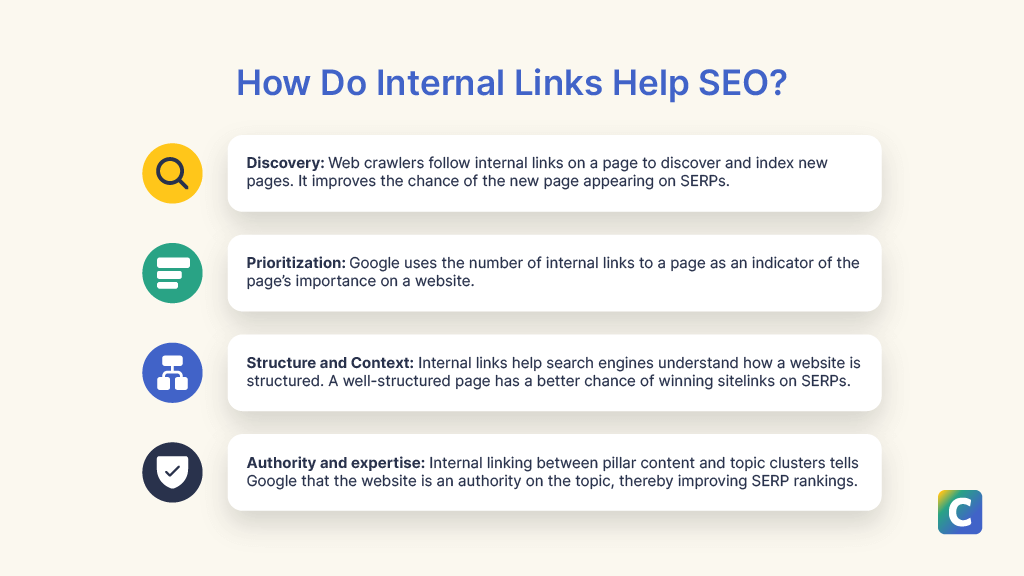
How internal linking helps your SEO.
Internal links help search engine crawlers, like Googlebot, understand the structure of a website and discover new content and its relationship to the rest of the website.
Internal links can also create a great user experience (UX), which can impact your search engine optimization (SEO) success and visibility on on search engine result pages (SERPs).
Internal linking best practices play a crucial role in healthy SEO practices in four key ways.
- Discovery: Let’s say you’ve published a new blog post on competitive content analysis. Since it's a new post, search engines haven’t indexed it yet. Internal linking is a way to speed up indexing. So, if you add an internal link to this new article from a top-performing blog post on content pruning, Google might follow the link to discover your competitive content analysis post.
- Prioritization: In a Google webinar, John Mueller noted that internal links help Google find your most important pages. Google uses internal linking as an indicator of the importance of a page on a website.
- Structure and context: Internal links help search engines understand how your website is structured. In addition to the overview of the entire website structure, the link also helps search engines understand the context of new pages.
- Authority and expertise: A website with good interlinking between pillar content and topic clusters might convince Google that the website has extensive, authoritative information — a positive signal of a website’s quality.
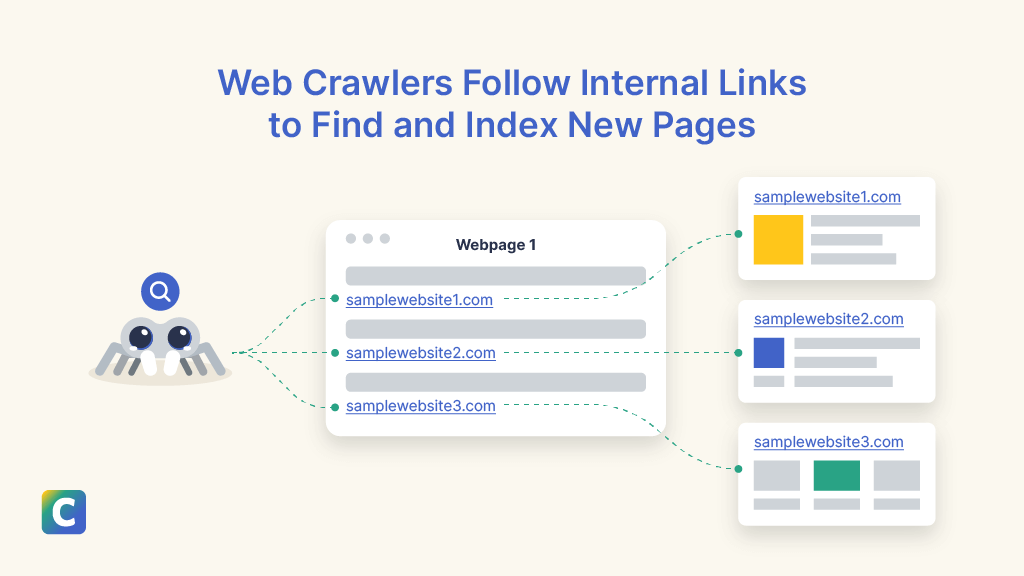
How internal linking helps Google index new pages faster.
Internal linking strategies to boost your SEO
Intentionally linked pages across your site can offer powerful results with minimal additional effort on your team’s part.
Let’s look at some of the best strategies for signaling relevant content and passing link value across your site.
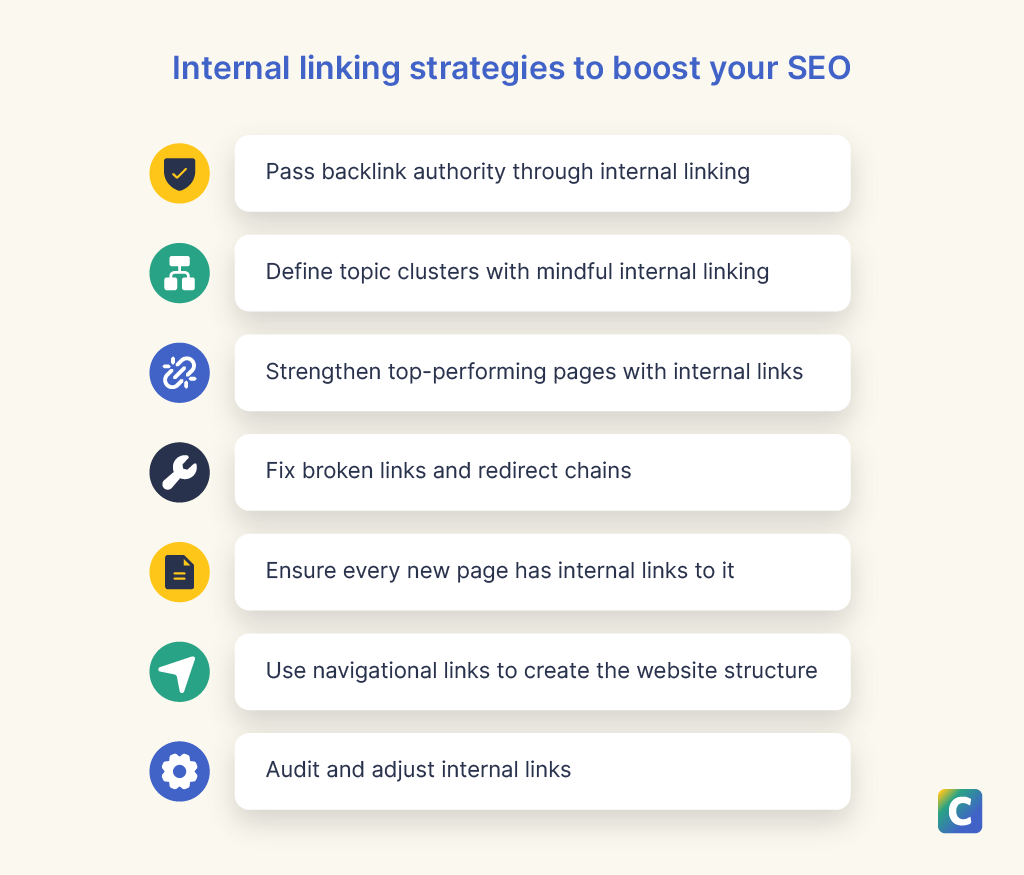
Internal linking strategies to boost SEO.
- Passing backlink authority
- Defining topic clusters
- Strengthening top-performing pages
- Fixing broken links
- Ensuring new pages can be found
- Using navigational links for smarter site structure
Pass backlink authority through internal linking
When a webpage links to another, it passes a part of its authority to the destination page. This is true for internal and external links.
Let’s say you have a relatively new page with no external websites linking to it or internal links—basically, for now it’s living in a silo (also called an orphan page).
You can boost it by having some of your top-performing pages link to it. This link equity sharing should be an essential part of your internal link-building strategy.
However, for this to work, you must link pages that are relevant pages, or contextually related.
First, make a list of your top-performing pages. You can quickly get this information from Google Search Console.
Then, explore the linking opportunities from these pages to new or low-performing pages with related content.

With Clearscope, site owners and strategists can get instant insight into internal linking opportunities with recommendations across your content library for exact match anchor text.
Define topic clusters with mindful internal linking
Internal linking is an easy way to create a neatly structured topic cluster.
You'll likely have a comprehensive article in your topic cluster that touches on many ideas, and each of these ideas is expanded into a cluster page.
Creating topic clusters through internal linking has many benefits, including:
- Helping search engines understand your content.
- Making it easy for your visitors to find information.
- Passing the authority of pillar pages to all the cluster pages.
When a search engine understands the context better, it may lead to a better ranking.
Well-structured clusters show search engines how extensively you cover each topic. This helps establish your website as an authority on a keyword or a topic.
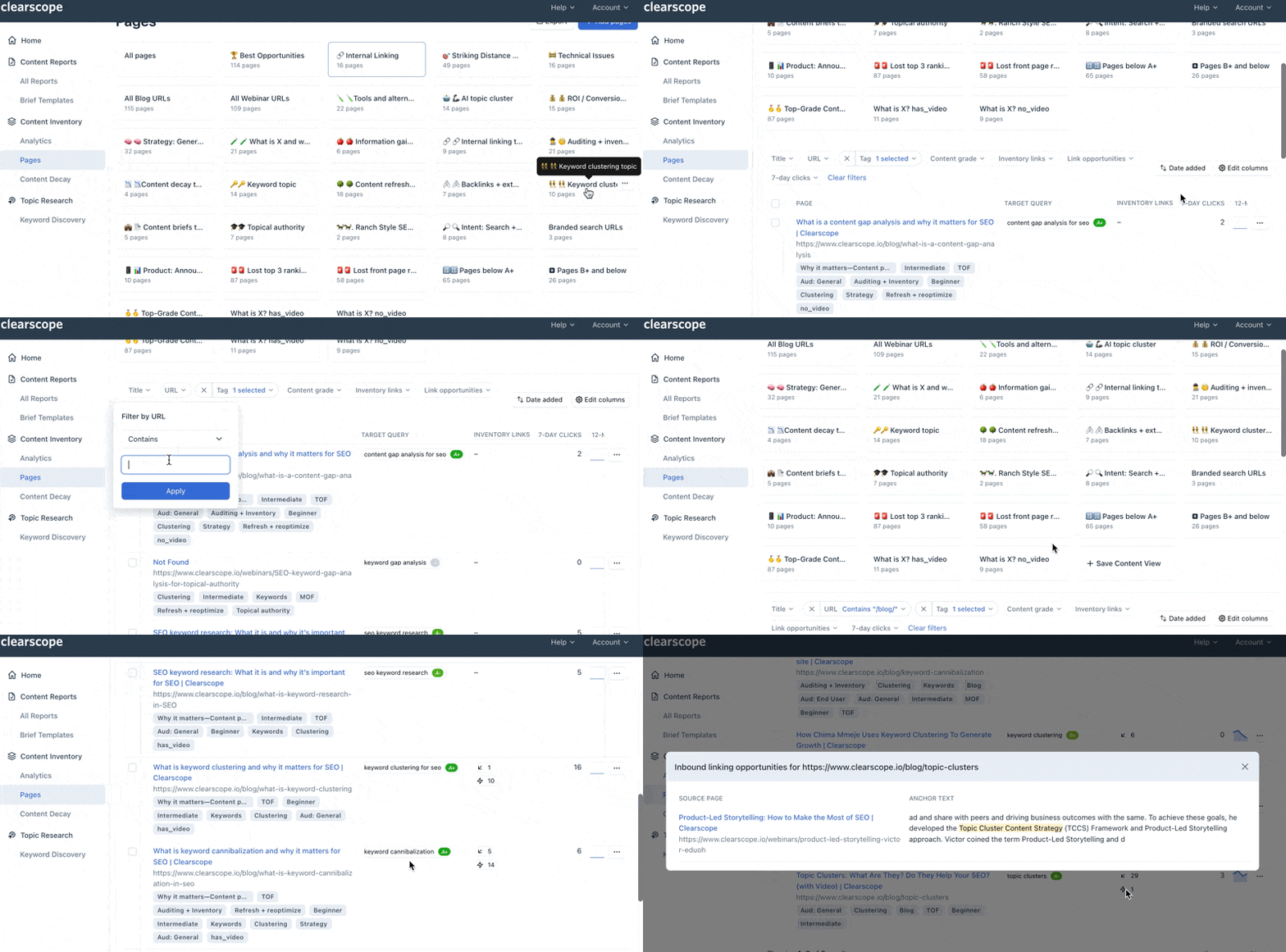
Clearscope users can segment their content marketing efforts by Content Views, where you can build views into your content by topic, call to action type, search intent, audience, and more. Then, you can easily make sure these related pages are internally linked together.
Strengthen top-performing pages with internal links
Internal linking can also strengthen your top pages.
For example, say you have an article that ranks number four on SERPs. Adding a few internal links to the article on some of your other authoritative pages might bump it up to a higher spot.
Keep in mind, your website might have many pages with similar content. So, when you link internally, there could be many possible candidates for the target page.
At the risk of sounding obvious, make sure to pick the page that will give the best SEO results.
Fix broken links and redirect chains
Broken links are internal links to webpages that don’t exist.
An internal link to a webpage might be broken if that page was removed or access-restricted. A link could also be broken if the destination URL is modified.
Fixing broken links should be an essential part of your internal linking strategy for two reasons:
- Improve UX: Website visitors click on an internal link to learn more about a subject or to perform an action. For example, they might click a CTA link to download an ebook. A broken link leads visitors to a dead end, and the visitor might leave the website dissatisfied.
- Maintain your SEO performance: Google considers UX as a ranking factor. Users might quickly leave when they encounter broken links, increasing the bounce rate. Bad UX and a high bounce rate might prompt search engines to push a website down the SERPs.
- Redirect chains are equally bad. Let’s say you do a content refresh and redirect article A to a new URL, article B. You might have internal links from many pages leading to article A. So, readers who click those links will be redirected to article B. This creates a bad UX and confuses search engines. You should identify redirect chains and link to the destination URL directly.

Clearscope simplifies your visibility into technical issues across your content library, so you know what you need to do next to fix the problem.
Ensure every new page has internal links
A webpage with no internal links leading to it is known as an orphan page. Your users might never reach that page, and search engines won’t be able to index it quickly.
So, whenever you create a new page, ensure at least some internal links lead to it. On my team, we like to include notes about where to link the page in the SEO content brief.
Use navigational links to create the website structure
Navigational links are great for creating a neat website hierarchy.
Smart internal linking in your main navigation menu and beyond can create an easy-to-understand site structure that impresses search engines... and makes things easier for people to find.
Google says a strong link architecture helps it understand your website better. A good internal linking structure may also win you additional sitelinks in SERPs.
For example, if you search for “Clearscope” on Google, the first result is a link to the Clearscope homepage, along with sitelinks to the main landing pages.
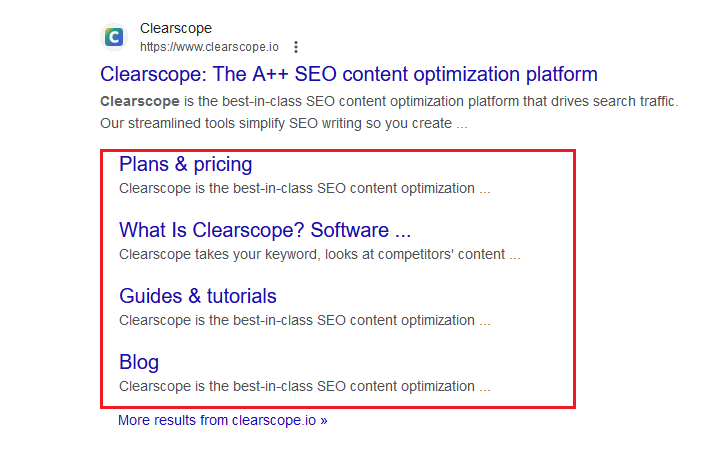
Example of how Google picks up sitelinks from a well-structured website.
Navigational links are also useful for organizing topic clusters.
Here are a few things you can do with navigational links:
- Create a sidebar to direct visitors to related content.
- Add a “related articles” or “read more” section at the end of an article.
- Create a category page that appears in your navigational menu that displays its cluster pages.
Internal linking SEO best practices
Now that you know the basic internal link-building strategies, let’s look at a few best practices.
- Audit and adjust internal links as part of regular re-optimization practices
- Don’t over do it on internal links
- Optimize the anchor text (details on how to do that below)
- Avoid weird formatting or adding UTMs
- Control crawl depth
- Internal vs. external link treatment
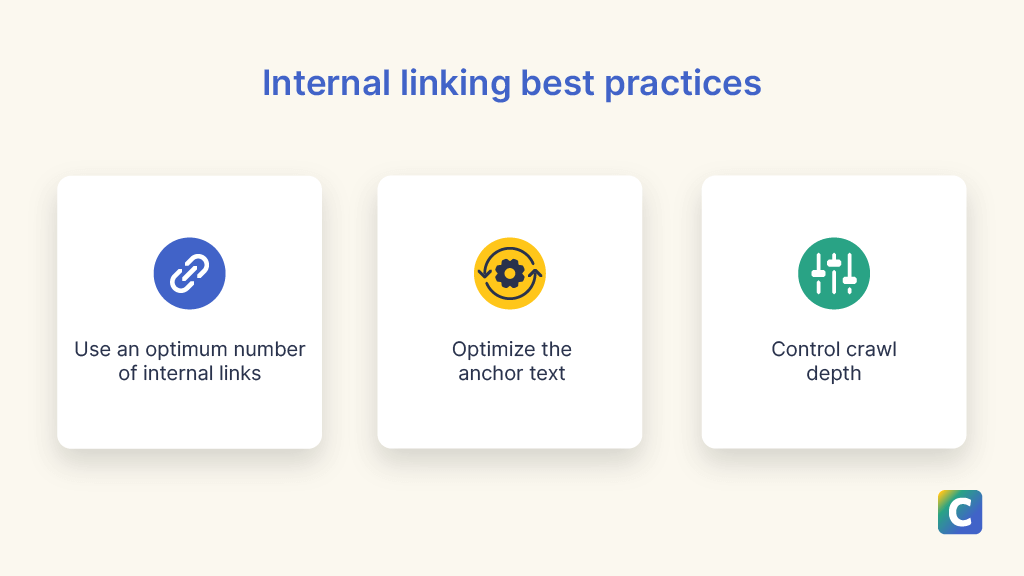
Internal linking SEO best practices.
Audit and adjust internal links
Internal linking is not a one-time job. You should keep auditing your internal links and making adjustments.
Add these tasks to your link auditing checklist:
- Add more links to pillar and child pages as you expand topic clusters.
- Interlink new cluster pages when they’re contextually related.
- Update links on old articles to point to new articles.
- Add links to new content to avoid orphan pages.
Use an optimum number of internal links
You already know that keyword stuffing is old news, and it can actually be harmful to your site.
It’s the same thing with internal linking.
Internal links help you define a website structure and link related articles. However, you shouldn’t overdo it.
There are no hard and fast rules about the optimum number of links. It may vary depending on the page. For example, a pillar page may have more internal links than a cluster or subtopic page.
Ethan Smith, CEO of Graphite, a top SEO and growth marketing agency, suggests that 10-20 internal links are optimal.
And Clearscope’s internal link opportunity feature can help you keep track of those counts.

Optimize the anchor text
Anchor text is essential for SEO since it tells search engine crawlers what the destination content is about.
Jonas Sickler, digital marketing analyst at Terakeet, shared an interesting perspective in a Clearscope webinar on internal links. In his Clearscope webinar, Sickler explained that the anchor text and the paragraph around the internal link inform search engines about the content on the target page.
Although using anchor text that exactly matches the target keyword in the destination article can lead to a penalty in the case of external links, Sickler said this isn’t the case for internal links.
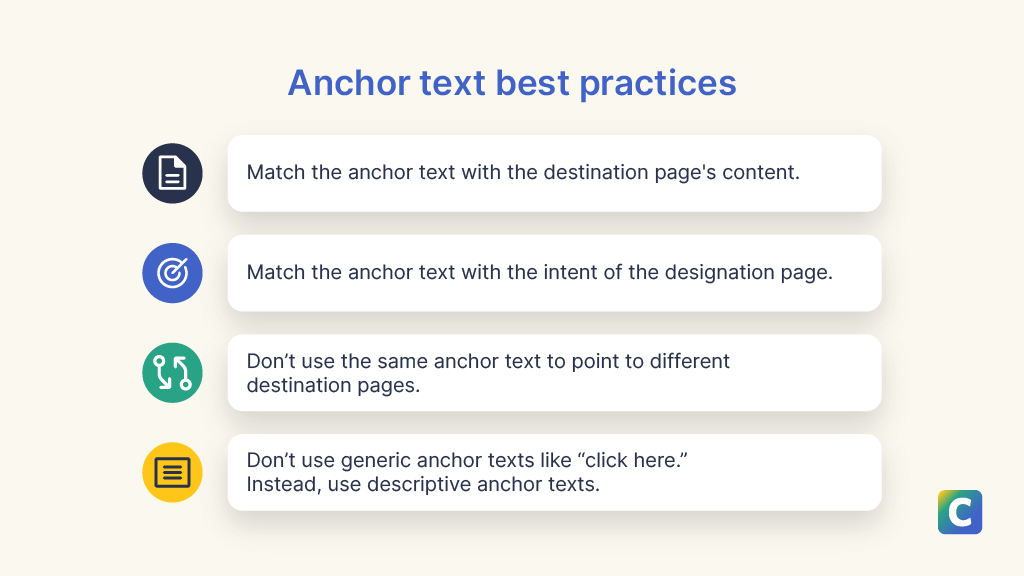
Anchor text best practices.
Let’s look at a few good practices for anchor text:
- Destination’s content: The anchor text should match the content of the destination page. For example, don’t use “the SEO strategy” as your anchor text if the link leads to an article about Pagerank. While Pagerank is an essential part of SEO, readers and search engines would expect the target article to talk about SEO strategies in general.
- Destination’s intent: The anchor text should also match the destination article’s intent. If the anchor text has the words “how-to guide,” the reader will expect a step-by-step guide on the destination page. Visitors might feel cheated if the destination is a “pros and cons” article.
- Unique wording: Using the same anchor text to link to completely different articles or pages might confuse search engines about the context of the target articles. For example, using using the generic text of [social media] to link to a guide on your site about best social media marketing practices and a separate article on using social media strategies to support SEO could be a misstep!
- Descriptive phrasing: It’s not a good idea to use generic phrases like “click here” as the anchor text. The anchor text should describe the content of the destination page.
In a 2024 analysis by Cyrus Shepard of ZyppySEO that took place after crucial algorithm updates, Cyrus reported that losing sites in his study were more likely to have a higher likelihood of anchor text variations compared to winning sites.
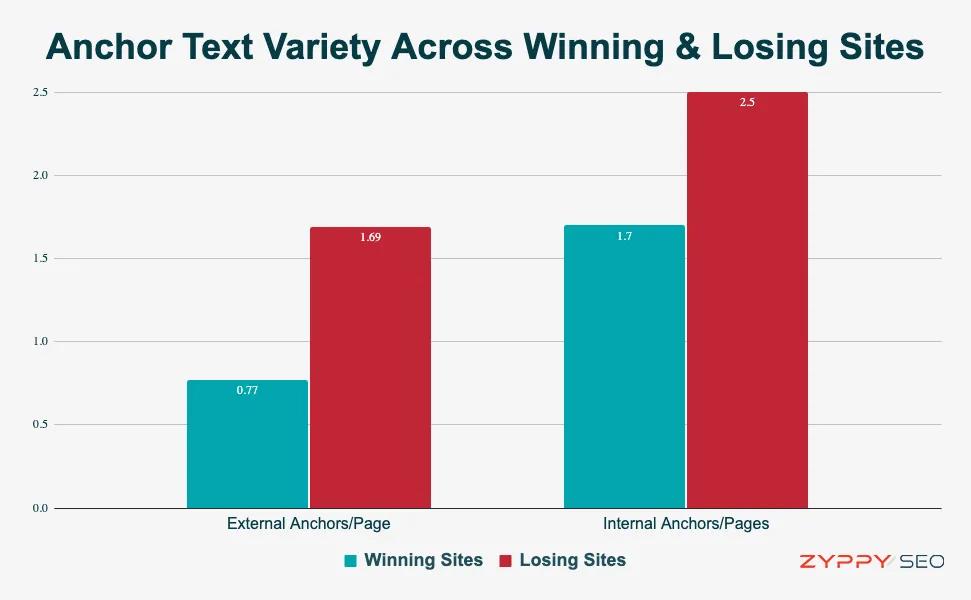 Anchor text variety across winning and losing sites. (Source: Cyrus Shepard of ZyppySEO)
Anchor text variety, once considered a best practice by many SEO practitioners, seems to correlate with traffic drops after recent Google updates—at least, according to Cyrus’s in-depth analysis.
Sites that used diverse anchor text for internal and external links, such as varying phrases to link the same page, tended to perform worse in the study.
In the past, SEO practitioners have held the believe that anchor text variety is a good thing, but the results from Cyrus’s analysis show that this practice may need some closer study and scrutinization—and that Google may now be penalizing over-optimized anchor text practices.
The safest way to play? Pay attention to effective internal linking practices and choose descriptive anchor text cautiously and intentionally—and only link to related posts that are actually helpful for humans who want to learn more about the topic.
A important note on anchor links as jump links
Anchor links (or jump links) link one part of a webpage to another part of the same page. Links on a table of contents are examples of anchor links.
Anchor links help readers quickly refer to another part of the article. They’re also useful when you want to internally link to a specific section of an article.
On-page anchor links help search engines understand the most important parts of a page. They can be a helpful user experience (UX) practice that increases the navigability of a single page.
Another bonus? Google often picks up these anchor links and presents them as sitelinks in SERPs. Sitelinks are shortcuts to an article that appear along with search engine results.
For example, from Clearscope’s article “Topic Clusters: What Are They? Do They Help Your SEO? (with Video),” Google picked up two anchor links and presented them as sitelinks on the SERPs for “topic clusters.”
Since Google presents sitelinks that match the search intent, users probably will click on these links.
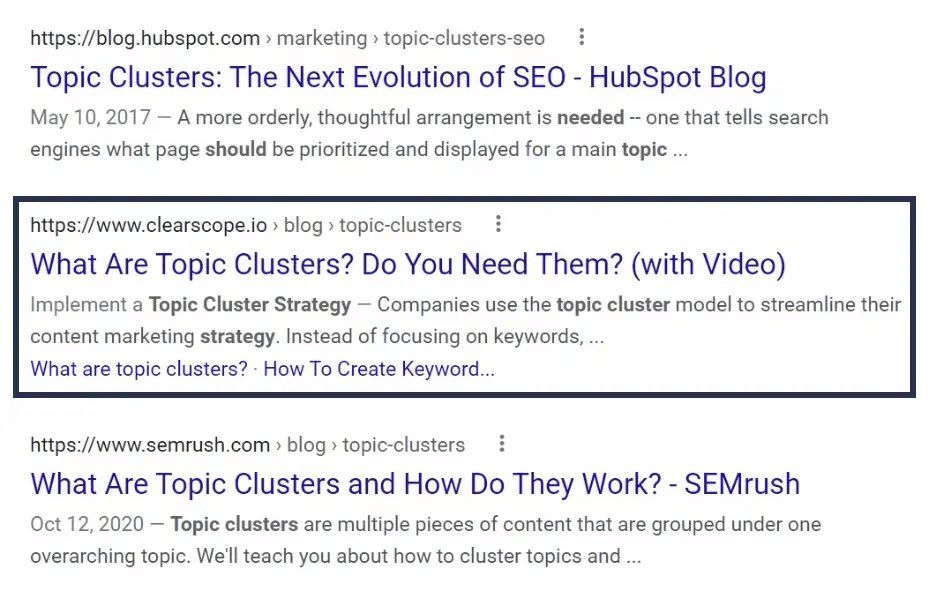
An example of how sitelinks appear on Google SERPs (image source)
Avoid using extraneous formatting
Websites often format their links with markers like urchin tracking modules (UTM) to distinguish between the sources of incoming traffic to a webpage.
For example, here’s the URL of Ahrefs’ article on “Why Social Signals Matter for SEO”:

URL for Ahrefs’ social signals article.
If Ahrefs advertises this article on Facebook, it might add UTM parameters to this URL to identify how many people visited this article through Facebook. The link might look like:

URL for Ahrefs’ social signals article with UTM parameters.
While this formatting is a good idea for external links to your website, you don’t want to do it for your internal links.
According to Daniel Waisberg, a search advocate at Google, that will distort your performance data.
Control crawl depth
Crawl depth (click depth) is the number of clicks it takes to reach a specific page from your homepage.
Plan your internal linking strategies to ensure your pages aren’t buried within your website. This helps you with improving UX and SEO.
In a Google webinar, John Mueller explains that if a page is several clicks away from important pages, like the homepage, Google might assume the content isn’t that critical.
But if the page is one or two clicks away from the homepage, Google considers it an important page, and this can add weight to the page’s SEO ranking.
Setting up topic clusters with the appropriate internal linking between them will help you avoid buried pages. You should also avoid linking to pages that redirect to another page — redirects increase crawl depth.
Internal linking vs external linking: Should they be treated differently in your strategy?
Both internal and external links are hyperlinks that lead the reader to another piece of content.
Although their text formatting is the same, they’re very different.
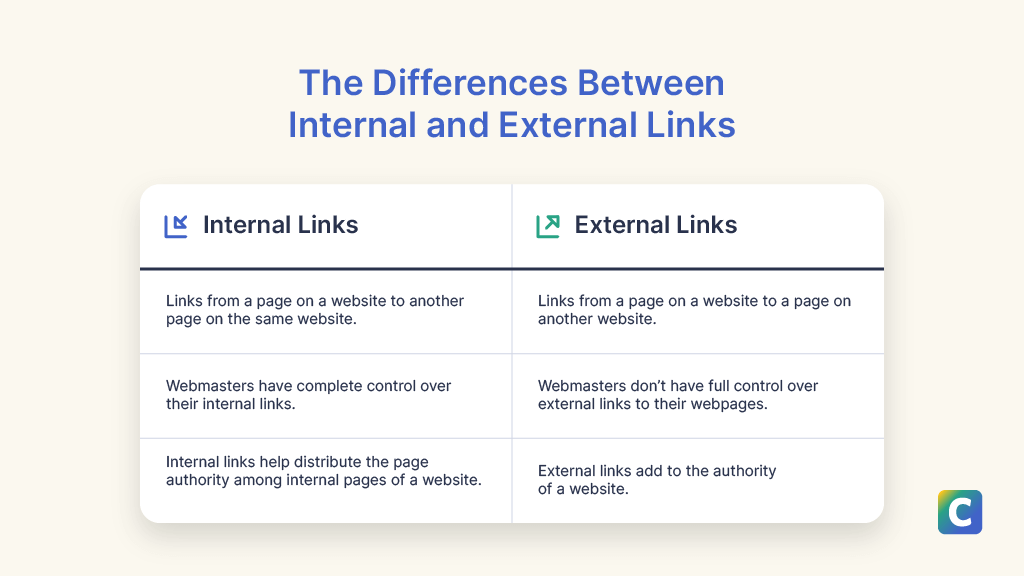
Differences between internal and external links.
While internal links lead visitors to other pages on your website, external links (backlinks) lead the visitor to a page on another website.
Webmasters (or you as an SEO practitioner) have complete control over their internal links.
You can decide which pages of your website should link to each other. And if you really want to, you can label external links as nofollow on your internal pages, but that practice isn’t as rigid or widespread as it once was.
However, you can’t control inbound links (or external links) leading to your webpages—or what anchor text is used for those links.
The best you can do is to tell Google to ignore backlinks from certain spammy websites (disavow links) to avoid any site penalties.
You can do this with Google Search Console, and traditional SEO and keyword research tools like Semrush or Screaming Frog can help you locate possibly spammy links.
But, if you want streamlined management of your internal links in your content library, you need to try Clearscope.
Contributing authors and updates
The original version of this article was published September 5, 2023. It was revised on October 15, 2024, to include updated education on current best practices by the Clearscope team.