22 ERP systems and software examples (original) (raw)
Key takeaways
- ERP software manages financial activities, accounting, bookkeeping, project management, and supply chain operations.
- They create a single source of truth for employees and executives.
- Businesses should assess ERP providers' capabilities, implementation models, integration needs, and total cost of ownership before choosing a system.
Popular ERP systems: Quick review
- Oracle NetSuite: Cloud enterprise resource planning platform that unifies finance, supply chain, commerce, and human resources (HR) with real-time dashboards and strong scalability.
- Intuit QuickBooks: Accounting-focused system for invoicing, expense tracking, payroll, and inventory with broad accountant familiarity.
- Sage Intacct: Finance-first ERP with multi-dimensional reporting, automated accounts payable (AP), and strong integrations such as Salesforce.
- SAP Business One: ERP for small and medium businesses covering finance, customer relationship management (CRM), inventory, and sales with mobile access and custom reporting.
- Xero: Small-business ERP for billing, bank feeds, project management, and inventory with an extensive app marketplace.
- Zoho Finance Plus: Unified suite for invoicing, accounting, order management, and payments integrated with Zoho’s CRM and productivity tools.
- FreshBooks: Cloud-based accounting software for invoicing, time tracking, expense management, and basic reporting for service-oriented teams.
- Microsoft Dynamics 365: Modular cloud applications for finance, supply chain, sales, and customer service integrated with Microsoft 365.
- SAP ERP: Enterprise suite for finance, HR, manufacturing, and supply chain with strong analytics and compliance features.
- Deltek: Project-based ERP for architecture and engineering firms with project accounting, resource management, and business intelligence (BI) tools.
- Multiview ERP: Financial ERP with dynamic reporting, multi-entity visibility, and automated workflow approvals.
- Acumatica Cloud: Midmarket cloud ERP for finance, distribution, manufacturing, and construction with open integrations.
- Oracle ERP Cloud: Comprehensive suite for finance, procurement, projects, and automation with embedded analytics.
- Syspro: ERP for manufacturing and distribution with planning, quality control, inventory management, and shop-floor visibility.
- TallyPrime: Business management platform for accounting, inventory, taxation, and cash management with hundreds of built-in reports.
- Epicor: ERP for small and medium businesses covering financials, supply chain, logistics, and manufacturing with service management tools.
- Odoo: Open-source suite spanning ERP, CRM, eCommerce, and more with modular apps and deep customization options.
- Extensiv: Fulfillment and warehouse operations platform with network optimization and integrations across more than 150 marketplaces.
- Cetec ERP: Web-native manufacturing ERP that includes material requirements planning (MRP), CRM, and quality management system (QMS) features designed for small and mid-sized businesses.
- DELMIAWorks: Manufacturing ERP and manufacturing execution system (MES) with shop-floor monitoring, quality management, and supply chain tools.
- IFS: Enterprise ERP delivered through IFS Cloud for projects, assets, manufacturing, and service, enhanced with industrial artificial intelligence (AI).
- Infor: Industry-specific cloud ERP with embedded AI, machine learning, analytics, and preconfigured processes across sectors.
What do ERP systems do?
Enterprise resource planning systems are integrated software solutions that handle every data-driven process in a company from financial management and accounting to human resources and supply chain management.
ERP systems store data in a central hub accessible to ensure all business departments have the correct information to make decisions. They’re often used with Financial Planning & Analysis (FP&A) software, which combines the historical data of your ERP with the forward-looking data of your plans, budgets, and forecasts.
While ERP systems can vary, they provide these five essential business functions:
1. Accounting and finance
ERP systems centralize financial data for streamlined tracking, management, and input. This saves time, minimizes input errors, and utilizes automated data consolidation, centralized formulas, and key performance indicators for generating comprehensive financial reports.
These reports offer insights into a company’s financial health and guide resource allocation decisions.
2. Commerce
ERP platforms provide omnichannel solutions that unify online, in-store, and back-office commerce activities. By using automated inventory updates, order tracking, and accounting, companies can easily manage the different facets of their business.
Some ERP systems even offer customer relationship management tools. These CRM capabilities manage customer data, contact information, accounts, and service requests. It can also help automate marketing, sales, and customer service processes.
3. Human resource management
ERP systems support human resource teams by consolidating employee data. They help HR automate manual workflows, reduce errors, and improve collaboration. By tracking employee data like contact information, job roles, and salary information, ERP systems ensure smarter business decisions in a fraction of the time.
4. Supply chain
Supply chain management includes inventory, warehouse, vendor, and order management. ERP systems support all of these functions by:
Effective demand forecasting and lean inventory
An ERP solution in SCM improves demand forecasting accuracy and reduces inventory costs during large-batch production processes. A lean inventory is essential to successfully address just-in-time production methods. You can keep your supply chain flexible while reducing the overall cost of production.
Reduce production bottlenecks
ERPs for supply chains enable easy collaboration between internal processes and external suppliers.
Transparency through the business
A consolidated view of the supply chain with ERP enables business executives to make more informed decisions.
5. Manufacturing industry
Companies can also use ERP systems to help manage production schedules, track inventory levels, and control quality. ERP software is a centralized resource for inventory tracking, data analysis, and replenishment strategy.
6. Sales and distribution
ERP systems bring sales and distribution under one roof, handling everything from order entry to delivery. They cut down on manual steps, track shipments as they move, and give sales teams a clear view of what’s in stock. Customers get accurate delivery times, and businesses avoid costly errors.
The same system ties sales directly to finance and inventory. Managers see which products sell best, adjust pricing quickly, and forecast demand using up-to-date numbers instead of guesswork.
7. Procurement
Procurement modules in ERP systems make it easier to handle vendor relationships and purchase orders. Teams can create requests, route them for approval, and track spending without jumping between tools. The result is fewer delays and less risk of duplicate orders.
Since procurement connects directly to inventory and finance, the system can trigger a new order when stock runs low. Companies spend smarter, stay within budget, and keep supply levels steady.
Types of ERP software
ERP software can be categorized into on-premise and cloud-based systems.
- On-Premise ERP: These systems are installed locally on a company's hardware and servers. They offer greater control and customization but require significant upfront investment and ongoing maintenance.
- Cloud-Based ERP: These systems are hosted on the vendor's servers and accessed via the internet. They are known for lower upfront costs, automatic updates, and scalability, making them a popular choice for many businesses today.
- Hybrid ERP: This combines on-premise infrastructure with cloud-based applications. Companies keep critical systems in-house for control while using the cloud for flexibility and scalability. This model works well for businesses that want gradual migration or need to meet strict compliance requirements without giving up the benefits of cloud software.
- Industry-specific ERP: These systems are tailored to the unique needs of sectors such as manufacturing, healthcare, retail, or construction. They include specialized modules and workflows, like compliance tools for healthcare or project management features for construction. Businesses gain a faster implementation and more relevant functionality compared to generic ERP platforms.
- Web-based ERP: This runs entirely through a browser without requiring local installations. Users can log in from any device with an internet connection, making these systems lightweight and accessible. Automatic updates, ease of deployment, and lower IT overhead make web-based ERP a strong choice for smaller organizations or distributed teams.
ERP systems vs. financial software
ERP systems cover a wide range of business functions, including finance, supply chain, operations, and HR. Financial management software focuses only on accounting and bookkeeping tasks such as ledgers, payables, receivables, and reporting.
A company that uses financial software alone may track money accurately but lacks visibility into inventory, procurement, or production. ERP integrates these areas with finance, giving leaders a complete picture of business performance and helping them make more informed decisions.
ERP software benefits
ERP systems offer a multitude of benefits that can significantly enhance business operations.
Cost savings
Cost savings with ERP systems are achieved through:
- Streamlined processes: Automating tasks like data entry, reporting, and inventory management reduces operational inefficiencies and minimizes manual intervention, cutting labor costs and enhancing productivity.
- Better resource management: Real-time visibility across finance, procurement, manufacturing, and sales enables optimized resource allocation, prevents inventory overstocking or understocking, and reduces carrying costs. Accurate financial forecasting and demand planning align production schedules with customer demand, minimizing waste and excess inventory holding costs.
- Reduced IT costs: Centralized data storage and standardized processes in ERP systems consolidate IT systems, lowering maintenance, licensing, and upgrade expenses for long-term savings.
Increased productivity
ERP systems significantly enhance productivity in several ways. Firstly, they automate routine tasks such as data entry, report generation, and transaction processing. For example, instead of manually entering sales data into multiple spreadsheets, an ERP system can automatically capture and update this information in real time. This automation frees up employees to focus on more strategic tasks.
By integrating various business processes into a single system, ERPs streamline workflows and reduce the time spent on task switching. For instance, a procurement manager can approve purchase orders, check inventory levels, and manage supplier relationships all within the same platform, which accelerates the overall procurement process.
Easy collaboration
With a centralized database, ERP systems facilitate better collaboration among departments. Teams share information seamlessly and work together more effectively.
For instance, during the budgeting process, finance, operations, and marketing teams collaborate on the same data set, ensuring consistency and reducing the need for redundant data reconciliation.
Regulatory compliance
ERP systems streamline regulatory compliance across industries by automating data management, ensuring accurate information.
For instance, a food manufacturing company adheres to food safety regulations using an ERP system to control production processes, track raw material origins and suppliers, and ensures quality standards and allergen labeling. In case of a food safety recall, the ERP swiftly traces affected batches for prompt removal from distribution.
Additionally, the ERP automates compliance report generation, detailing production practices, quality control, and sanitation measures required by regulatory bodies.
Automation opportunities
ERP systems can automate tasks that would otherwise need human intervention, such as updating records or sending confirmations. This not only saves businesses time and money but also reduces manual work and human errors.
For example, automating order processing streamlines operations and improves customer satisfaction through reduced order fulfillment times.
How does ERP software work?
ERP software runs on modules that focus on specific business areas such as finance, HR, supply chain, or procurement. All modules connect to a central database, which means information entered in one part of the system updates across the entire platform. This shared data structure keeps records consistent, reduces duplication, and improves collaboration between departments.
Companies can choose the modules that fit their current needs and add more as they grow. Modern ERP systems also extend beyond core functions, connecting with tools like CRM platforms, e-commerce software, or industry-specific applications. Integration methods such as APIs or iPaaS make it possible to link ERP with existing systems, giving businesses a complete and unified view of their operations.
Key features of ERP systems to look for
Choosing the right ERP system goes beyond vendor reputation or price. The most effective systems share a core set of features that help companies centralize data, streamline processes, and adapt as business needs change. Here are key features of ERP systems to look for:
Real-time data processing
ERP systems process data as it’s created, not hours or days later. Finance teams see updated cash positions, operations track inventory as it moves, and managers view accurate performance metrics at any moment.
This immediate visibility reduces errors, shortens decision cycles, and helps leaders react faster to market changes. Businesses that rely on time-sensitive data, such as manufacturing or retail, gain the most from this capability.
Reporting and analytics
ERP systems generate reports from data across finance, operations, supply chain, and HR. These reports highlight patterns, track performance, and flag issues before they become bigger problems. Executives use dashboards and charts to understand business conditions at a glance. This visibility supports faster and more informed decisions across all departments.
Analytics also help companies identify savings opportunities, optimize processes, and improve forecasting. When built into ERP, these tools eliminate the need for separate reporting systems.
Data visualization
ERP systems turn raw data into charts, graphs, and dashboards that are easier to interpret than spreadsheets. Leaders can quickly spot trends, compare performance, and measure progress against goals. Visual tools reduce the time needed to analyze complex reports. Teams across finance, operations, and sales can act on insights faster when information is presented in clear visual formats.
Strong visualization also supports collaboration, since employees from different departments can review the same data and align decisions. This keeps everyone working from a single, accurate picture of the business.
UI/UX
A well-designed interface makes ERP software easier to adopt across the company. Employees spend less time learning the system and more time using it to complete tasks. Simple navigation and intuitive layouts reduce errors in data entry and speed up everyday workflows. This design focus is especially important in large organizations where users range from finance teams to shop floor operators.
Modern ERP platforms also optimize for mobile access, so managers and staff can review dashboards or approve requests on the go. A strong UI/UX improves both efficiency and user satisfaction.
Integrations
Integration options are one of the most important aspects to look for when choosing an ERP. Finance, sales, HR, supply chain, and operations all pull from the same system, so information stays consistent everywhere. If the ERP does not connect with your current software, you may need to replace those tools entirely or build manual integrations, which can be costly and time-consuming.
When data updates in one area, it reflects instantly across the platform. This eliminates manual data transfers, reduces errors, and ensures teams always work with accurate numbers.
Connected systems also support complete workflows like order-to-cash or procure-to-pay. The flow of data across departments helps decisions happen faster and keeps processes running without interruption.
Scalability and automation
ERP systems automate repetitive tasks such as invoicing, payroll, and order processing. Removing manual steps saves time and reduces the chance of errors. Automation ensures that routine work happens on schedule without constant oversight, allowing teams to focus on analysis and problem-solving instead of manual data entry.
A scalable ERP system grows with the business instead of holding it back. Companies can start with a few modules and add more as operations expand. The system handles higher transaction volumes, new business units, and more complex processes without disruption, preventing costly replacements as the company scales. Cloud-based ERPs often provide the best scalability, offering resources that adjust automatically as demand changes so organizations stay agile.
Customer support
Customer support gives businesses the resources they need to set up and maintain their ERP system effectively. Implementation support helps teams configure modules, migrate data, and train employees so the system launches without major delays or errors. This feature reduces the risk of failed rollouts and ensures the ERP delivers value from day one.
Ongoing customer support keeps operations steady after implementation. Vendors provide help desks, live chat, and troubleshooting tools that resolve issues quickly and prevent downtime. Training programs and regular updates help teams adopt new features, making sure the ERP system continues to meet business needs as it evolves.
Best ERP system examples
Every ERP system offers unique features and capabilities tailored to different business needs. Here's a closer look at some of the best ERP solutions:
1. Oracle NetSuite

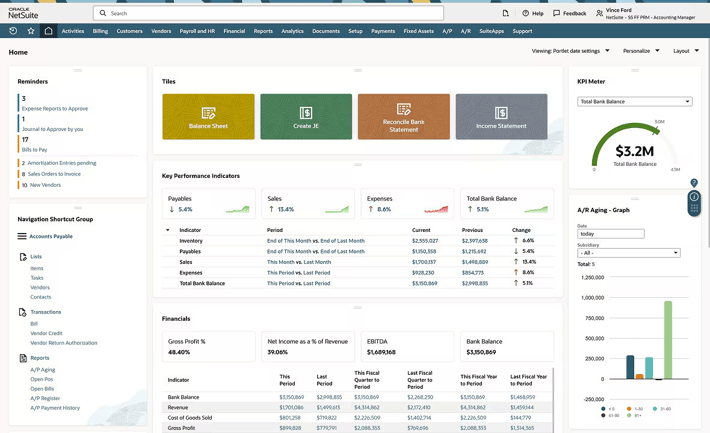
NetSuite is a cloud-based ERP software, with over 30,000 companies using its services.
With deep expertise in cloud ERP development, NetSuite automates crucial processes and provides real-time insights into financial, operational, and corporate performance. It offers a customizable platform with enterprise-grade applications for business management, including analytics, reporting, and global infrastructure.
NetSuite stands out as one of Cube's top integrations, allowing seamless integration of NetSuite data into working spreadsheets with Cube's FP&A software add-on, greatly enhancing customer satisfaction.
Features
- Integrate finance, supply chain, manufacturing, HR, and ecommerce into one platform to monitor operations without switching between different software.
- Support scalability and upgrades with NetSuite’s multi-tenant, vendor-managed cloud infrastructure.
- Generate reports and access role-based dashboards for informed decision-making.
- Customize using SuiteCloud apps and tools to meet unique business processes and structures.
Pricing
- Automates financial processes and improves accuracy across accounting tasks.
- Provides real-time visibility into operational and financial performance.
- Supports management of multiple subsidiaries, business units, and legal entities.
- Unifies accounting, inventory, orders, projects, production, supply chain, and warehouse operations in one platform.
Cons
- “I find building custom reports in NetSuite to be a bit difficult. I wish they would make this feature more user-friendly so that electing self-service is more of an option than hiring a NetSuite administrator or using their support team.” User review
- “NetSuite has complex integrations, which demand extensive technical support. This leads to additional implementation expenses.” User review
- “I think there could be some more customization aspects to reports.” User reviews
Pricing
Organizations interested in NetSuite's software must request custom quotes since the company does not provide pricing information on its website.
2. Intuit QuickBooks

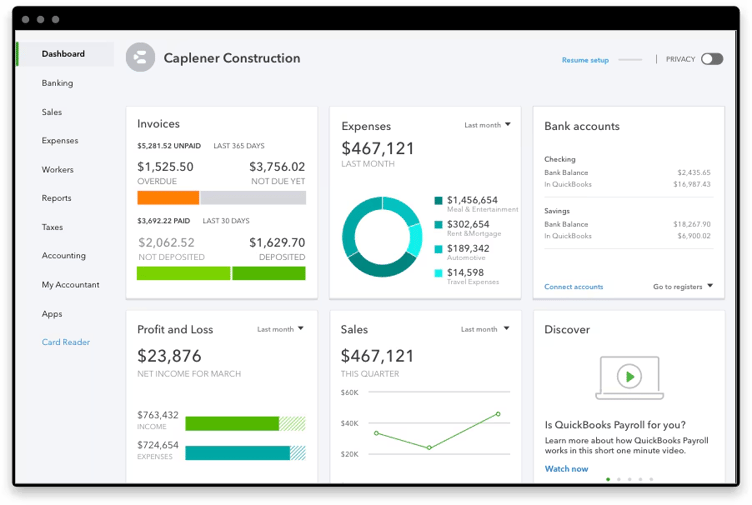
QuickBooks by Intuit simplifies payroll, inventory, taxes, time-tracking, and invoicing. Track expenses, cash flow, reports, and receipts—all in one place. It’s an ideal choice for outsourcing accounting, supported by widespread accountant familiarity.
QuickBooks operates natively (QuickBooks Desktop) or via browser (QuickBooks Online), with seamless API integration for data imports and consolidations within Cube's unified platform.
Features
- Benefit from specialized tools and reports designed for your business type and industry with tailored editions.
- Keep all vendor, inventory, pricing, and customer information in one place for quick access, streamlined workflows, and informed decision-making.
- Track items across warehouses down to specific bins or pallets with the Advanced Inventory tool, which allows multi-level categorization.
- Manage sales orders and inventory across locations from a single dashboard.
Pros
- Tracks income and expenses on one platform.
- Generates invoices, estimates, and payment reminders for customers.
- Connects directly to bank accounts for automatic transaction updates.
- Supports GST, VAT, and multi-currency requirements.
Cons
- “I think one dislike would be the two-factor authentication that I have to do almost every single time. It may be a hassle, but it's also there for safety reasons.” User review
- “Occasional glitches – Sometimes the platform can be a little buggy or slow.” User review
- “While I really appreciate the overall functionality of Intuit QuickBooks, it can get a bit complicated at some point, for which the user needs to get train beforehand. Also, the price can be a bit of concern for a solo user, e.g.,an Ecommerce businessman.” User review
Pricing
- Simple start: $19/month
- Essentials: $28/month
- Plus: $40/month
- Advanced: $76/month
Read our NetSuite vs Quickbooks Review.
3. Sage Intacct

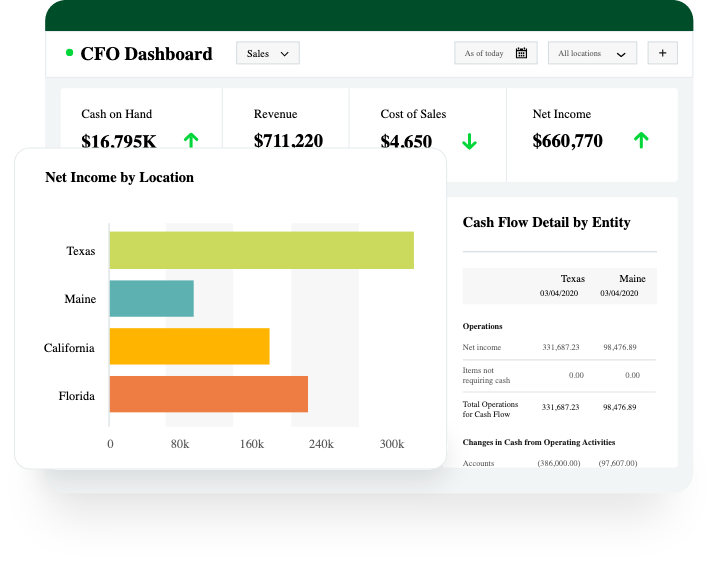
Sage Intacct is an ERP system that enhances financial and inventory management with real-time, multi-dimensional reporting. It automates accounting tasks for increased efficiency and productivity. Sage also supports HR and payroll operations.
Integrating Sage Intacct's general ledger data with Cube's planning and analysis capabilities gives finance professionals a comprehensive view of past, present, and future business performance.
Features
- Generate invoices automatically and manage the entire billing process with rules-based systems.
- Customize real-time reports and interactive dashboards.
- Streamline accounts payable workflows with automated tools.
- Monitor inventory quantities and order fulfillment across multiple locations.
- Calculate sales taxes in real-time during order processing.
Pros
- Automates core accounting processes with AI-powered workflows.
- Provides multi-dimensional reporting and real-time financial visibility.
- Supports payroll and HR management within the same platform.
- Integrates with Salesforce and other applications through robust APIs.
Cons
- “Sage Intacct can feel like more than some teams bargained for—it’s pricier than simpler tools, and you often need help setting it up and learning the ropes.” User review
- “The software can be slow at times, especially when handling large data sets or running complex reports. I noticed that new updates occasionally introduce bugs or issues, which can disrupt our workflows. The user interface (UI) feels outdated in my opinion compared to more modern platforms, and there’s room for improvement.” User review
- “Adding or expanding modules can be a bit confusing. The process isn’t always as clear or streamlined as the rest of the system, which can slow things down when trying to scale or add new functionality.” User review
Pricing
The platform doesn’t provide pricing online and encourages potential customers to contact them for custom pricing.
4. SAP Business One
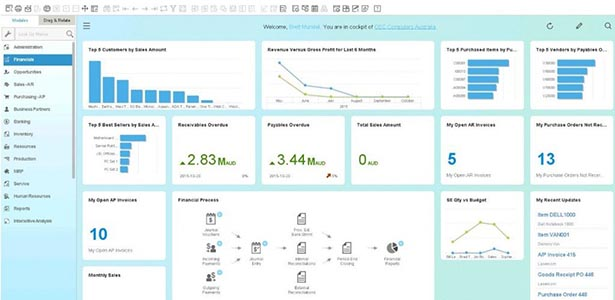
SAP Business One is an ERP software aimed at small and medium businesses, offering various financial, CRM, inventory, and sales features. SAP Business One also gives companies real-time visibility into their business operations to improve financial planning and forecasting.
SAP works best for businesses that use other SAP products and are familiar with data science languages and integration.
Features
- Streamline financial tools to automate essential accounting tasks like journal entries and receivables/payables.
- Generate custom financial reports for planning and audits.
- Manage the entire sales process and customer lifecycle.
- Centralize and manage critical customer data in one location.
- Automate procurement with requisition requests, purchase orders, and returns management.
- Create interactive dashboards and reports for essential business metrics.
- Manage leads, and customer accounts, view inventory, and place orders from iOS or Android devices.
Pros
- Integrates accounting, purchasing, inventory, sales, and customer relationships into one ERP platform.
- Provides real-time analytics and reporting for data-driven decision-making.
- Supports integration with SAP HANA for advanced data processing and performance.
- Delivers built-in business intelligence to monitor operations and uncover insights.
Cons
- “It is an ERP that requires licensing; it does not configure automatically and requires a consultant.” User review
- “It is very costly, it is also extremely complicated and not very user-friendly in the sense of UI design and UX.” User review
- “Not user-friendly for non-accountants and a lot of codes to learn.” User review
Pricing: Pricing isn't available on its website.
5. Xero
.png?width=150&height=75&name=xero-logo%20(1).png)
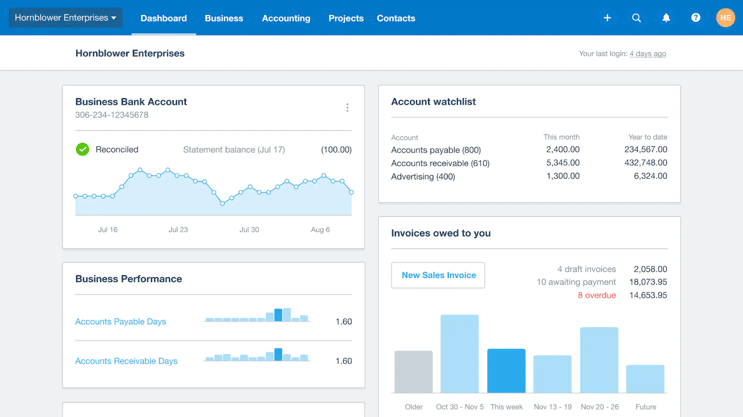
Xero is an ERP tool for small businesses, accountants, and bookkeepers. Real-time tracking and reporting give you accurate and updated information to use when collaborating with your team. You can connect your bank account through the Xero application for seamless transactions. Pay bills, claim expenses, accept payments, and track projects all through its simple dashboard.
Features
- Track and pay bills with clear visibility of accounts payable and cash flow.
- Manage and reimburse expenses using Xero’s comprehensive expense management tools.
- Plan, budget, quote, and invoice projects using Xero’s job tracking tools.
- Centralize customer and supplier information, including sales, invoices, and payment histories.
- Control stock, streamline invoicing, and order processes with Xero’s inventory software.
- Track your finances daily, including bank balances, invoices, and bills, from a centralized dashboard.
Pros
- Processes invoices, bills, and expenses within a single accounting platform.
- Connects directly to bank accounts for automatic reconciliation.
- Supports inventory management and payroll alongside core accounting.
- Provides app integrations through the Xero App Store to extend functionality.
Cons
- “Making changes to invoices isn't very smooth, and I often find the customization options unreliable. Another thing I'd value is a proper email log, so I can clearly see which automated messages Xero has already sent to my clients.” User review
- “There is a slight learning curve during setup, and some of the reporting features could be more customizable. Occasionally, bank feeds take a bit longer to sync than expected. None of these are dealbreakers, but improvements here would make an already strong platform even better.” User review
- “Customizing invoices is kinda painful and not as reliable as I wish it to be. I'd also really like to have an email trail, so I can tell what automated emails my clients are receiving from Xero.” User review
Pricing
- Early: $20/month
- Growing: $47/month
- Established: $80/month
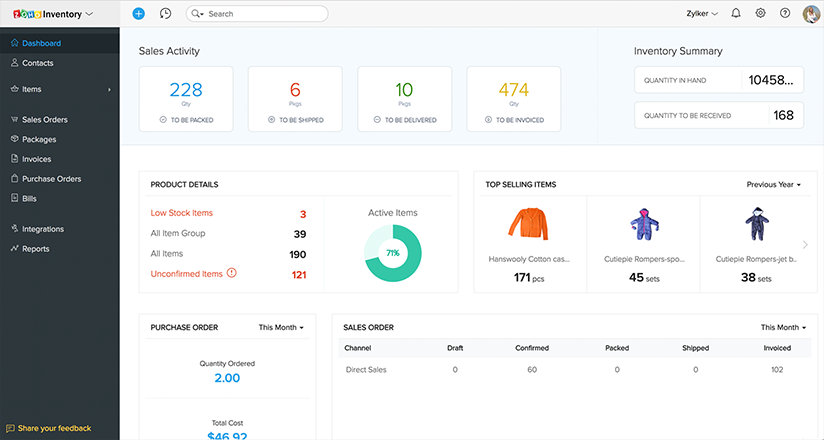
6. Zoho Finance Plus

Zoho Finance Plus brings together Zoho’s finance and CRM tools in one comprehensive platform. This unified suite integrates invoicing, order management, accounting, and more, enhancing efficiency and simplifying processes.
Features
- Create professional invoices with customizable templates, send automatic payment reminders, accept online payments, and manage projects with time tracking using Zoho Invoice.
- Manage receivables and payables, import bank feeds automatically, ensure compliance with sales tax, VAT, and GST, and maintain control over cash flow using Zoho Books.
- Simplify order management from purchasing to stock tracking and order fulfillment, add more selling channels to boost sales, manage multiple warehouses, and speed up order fulfillment.
- Create personalized, branded payment pages to accept one-time and recurring payments, and embed payment pages on your website or share via email and social media.
Pros
- Unifies invoicing, accounting, order management, inventory, and expenses on a single platform.
- Connects data across all finance apps to keep records consistent and up to date.
- Supports quote-to-cash workflows by linking sales, fulfillment, invoicing, and payments.
- Manages recurring billing and subscriptions alongside traditional accounting.
Cons
- “I would like to see even greater flexibility on the reporting side. The current customisation is good, but does not allow me to integrate the fields I need to present to our accounting team. Granted, I just may not be aware of how this can be done, so I am open to suggestions.” User review
- “I would have to use it for a longer period before I can speak on it. However, one thing I would suggest is having unlimited scan receipts for newcomers to potentially progress through certain intervals more quickly during setup. However, that might just apply to the version of the product I am using.” User review
- “The support team is a bit slower, and they are usually hesitant to take suggestions on product improvement. They work like a typical call centre.” User review
Pricing
- Monthly subscription: $249/organization/month
- Annual subscription: $199/organization/month
7. FreshBooks
.png?width=150&height=44&name=freshbooks-logo-1%20(1).png)
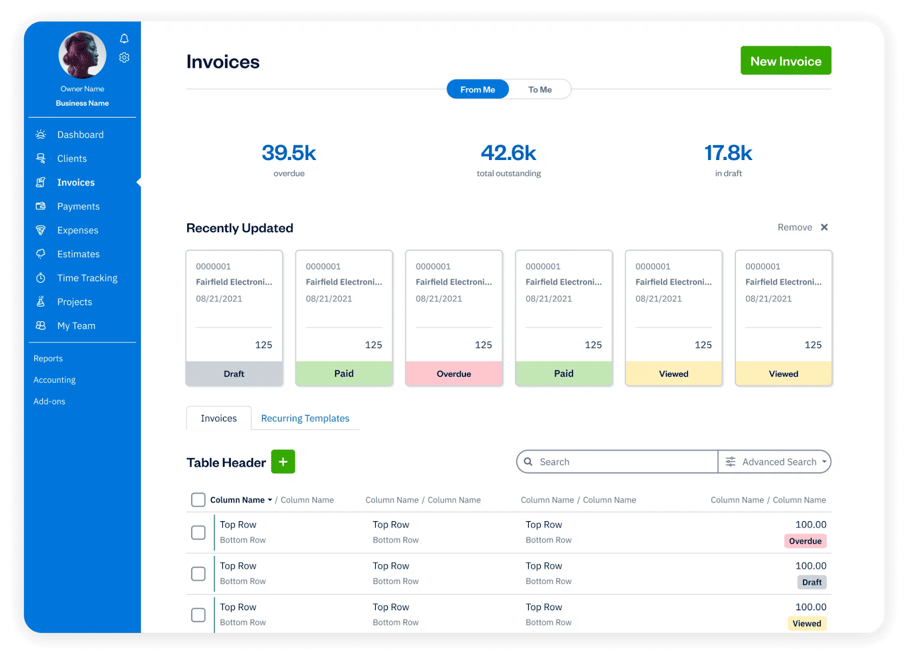
FreshBooks is a cloud-based accounting software that provides businesses with tools to automate invoicing, bookkeeping, and time-tracking. It’s a great ERP option for freelancers, professionals, accountants, and employees.
The software offers clients payment options and accepts card payments. It also allows you to send automated late payment reminders to clients.
Features
- Bill and receive payments with invoicing, payments, and time-tracking features.
- Prepare financial reports, track expenses and receipts, and manage the books in one platform.
- Stay connected to clients, track projects and proposals, and send estimates right from the software.
- Integrate with other apps to streamline your tech stack.
Pros
- Generates professional invoices with time and expense tracking.
- Supports online payments, recurring billing, and late payment reminders.
- Tracks expenses through receipt scanning, bank imports, and automated categorization.
- Provides double-entry accounting tools and financial reporting.
Cons
- “FreshBooks works on any device, but I've noticed that I can't perform the same operations efficiently on my cell phone because the tools aren't the same for me. I feel it's more of a personal issue than the app itself, because it's a matter of habit, but I haven't been able to adapt to the mobile app.” User review
- “FreshBooks doesn't recognize the expenses I add manually, so when it syncs to my bank, I have to go through and delete expenses it imports because I've already entered them manually. Otherwise, I get confused by duplicate expenses, and the accounting gets very messed up.” User review
- “It has limited reporting options, for example, if you want some advanced options, or a breakdown of taxes, it takes extra efforts, also to make it sync with external payment gateways is slow.” User review
Pricing
- Lite: $21.00/month
- Plus: $38.00/month
- Premium: $65/month
- Custom pricing available
8. Microsoft Dynamics 365

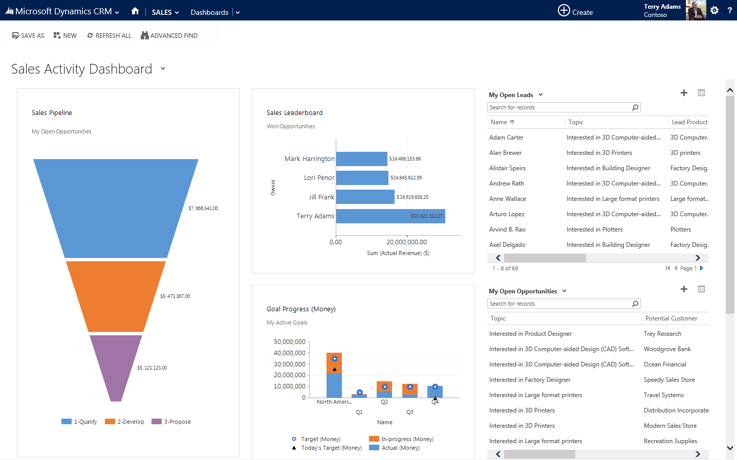
Microsoft Dynamics 365 is a cloud-based ERP system helping businesses manage their finances, operations, sales, and customer relationships. It’s made up of 14 different applications, so users pick and choose which apps they need for their business. These include Dynamics 365 Commerce, Dynamics 365 Project Operations, Dynamics 365 Finance, and others. It also integrates with other Microsoft applications like Excel and Outlook.
Features
- Track cash flow and detect trends with advanced forecasting tools.
- Leverage self-service analytics to make informed decisions with unified data from Dynamics 365 apps and other sources.
- Integrate data from Dynamics 365, Microsoft 365, and partner applications for a single source of intelligent information.
- Automate tasks and prioritize financial work with a solution integrated with Microsoft 365, featuring role-based workspaces.
- Comply with local tax regulations using a flexible tax-determination matrix and configurable tax-calculation formula designer.
- Ensure global compliance across 51 countries/regions and 67 languages, and rely on Microsoft AppSource solutions for over 200 regions.
Pros
- Integrates CRM and ERP applications on a single platform.
- Provides AI-powered tools for sales, finance, service, and supply chain operations.
- Connects teams, processes, and data to improve collaboration and decision-making.
- Supports industry-specific extensions through partner apps and add-ons.
Cons
- “There’s a bit of a learning curve, especially for those not used to CRM systems. Some parts of the setup and customization felt a bit technical, and we needed some outside help to get everything the way we wanted. Also, the licensing costs can add up if you're adding advanced features.” User review
- “Wide range of features and tools might overwhelm new users and require extensive training to fully utilize.” User review
- “The user interface can feel a bit clunky at times.” User review
Pricing
The pricing for Dynamics 365 is a la carte, and each application incurs a separate charge. Some apps, like the Dynamics 365 Human Resources Self Service app are available for as low as 4/user/month,whileotherapps(Dynamics365CustomerInsights)runashighas4/user/month, while other apps (Dynamics 365 Customer Insights) run as high as 4/user/month,whileotherapps(Dynamics365CustomerInsights)runashighas1,700/tenant/month. Most apps offer a free trial to start.
9. SAP ERP

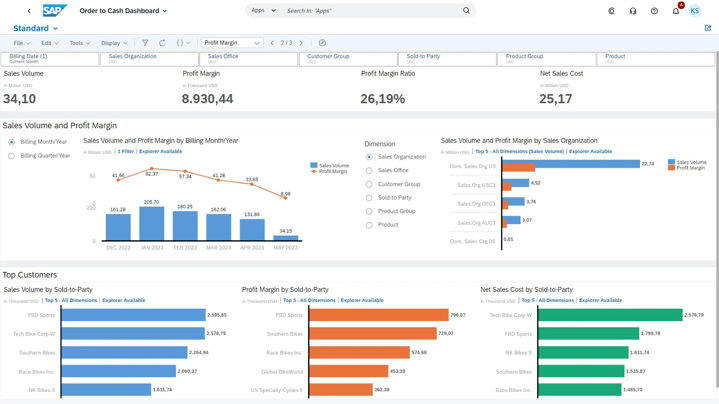
SAP ERP was initially called System Analysis Program Development (Systemanalyse Programmentwicklung in German). SAP ERP is a suite of applications that helps organizations manage their finances, human resources, manufacturing, sales, and customer service processes.
It’s used by millions of businesses worldwide and is known for its comprehensive functionality and scalability.
Features
- Enhance operational efficiency by planning, scheduling, and executing asset maintenance with integrated workflows.
- Streamline accounting and financial close processes while optimizing treasury and financial risk management.
- Boost production planning and facilitate smooth manufacturing processes.
- Improve project oversight and execution and streamline product lifecycle management.
Pros
- Streamlines finance, HR, supply chain, sales, procurement, and manufacturing processes in one system.
- Provides real-time visibility into financial data and operational performance.
- Automates reporting and compliance tasks across departments.
- Supports forecasting and predictive analytics for proactive decision-making.
Cons
- “Sometimes the system times out or crashes with no notice.” User review
- “SAP can bug sometimes, deleting our text records, and can be slow; however, that is understandable once you realize the amount of data it stores within the database.” User review
- “The most frequently citer drawbacks are its complexity and a steep learning curve. Many users find the user interface less intuitive than the newer CRM platform, and initial adaptation or adjustment requires considerable time, training, or extra advice.” User review
Pricing: Pricing isn't available on its website
10. Deltek

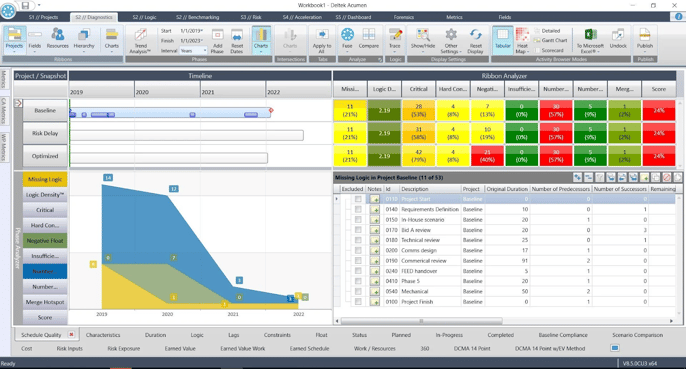
Deltek is a project-based ERP system designed for architecture and engineering firms. It includes tools for project management, accounting, and business intelligence. This ERP delivers software and information solutions that enable project intelligence, management, and collaboration.
Deltek also offers an industry-specific CRM system called Vision.
Features
- Streamline projects, people, and finance management from end-to-end in a single cloud-based solution.
- Access the software from anywhere through the Deltek Cloud, ensuring security and scalability to manage a remote workforce effectively.
- Monitor KPIs to identify areas for enhancing efficiency and boosting profitability.
- Develop interactive dashboards for each user to track progress toward operational and growth objectives.
- Manage multiple companies, currencies, and languages on one platform.
Pros
- Provides ERP solutions built specifically for project-based industries.
- Supports all stages of the project lifecycle from business development to delivery.
- Integrates finance, resource management, and project planning in one system.
- Delivers AI-powered tools to automate tasks and generate insights.
Cons
- “Reporting system unintuitive, especially when customizing templates or extracting specific data.” User review
- “Some settings and features are not intuitive, requiring significant time to learn and navigate the platform effectively.” User review
Pricing: Pricing isn't available on its website.
11. Multiview ERP
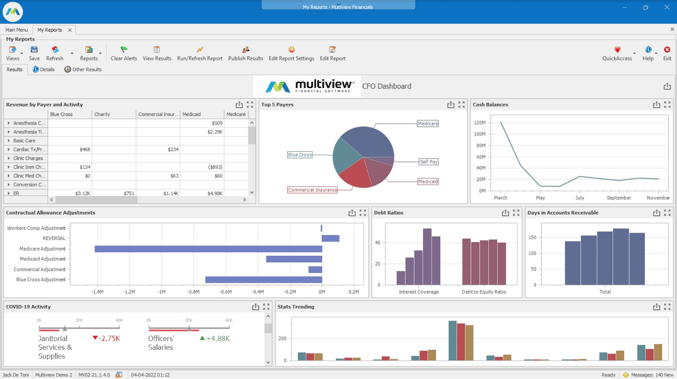
Multiview ERP unifies information into a central database to create a complete view of a business's operations. It offers a team of client support specialists on top of its powerful, data-centric financial ERP software. This software helps break down data silos, automate accounting processes, and provide more access to information through industry-leading dynamic reporting solutions.
Features
- Achieve multi-entity financial visibility and automate accounting tasks with real-time integration.
- Optimize payment processes, automate transactions, and ensure proper authorizations seamlessly.
- Create custom reports and dashboards.
- Improve efficiency with automated invoice approvals and workflow visibility.
- Streamline inventory and procurement with requisition management, tracking, barcoding, and centralized purchasing.
Pros
- Integrates general ledger, accounts payable, accounts receivable, and budgeting in one platform.
- Provides business intelligence, reporting, and dashboards for real-time financial visibility.
- Automates workflows for invoice approvals, reminders, and transaction oversight.
- Supports fixed asset tracking and depreciation management across the asset lifecycle.
Cons
- “We recently moved to the Cloud version, and I have been disappointed in the slowness of logging on. Also, transferring files to and from the Cloud version is painful, with too many steps required. But my understanding is that these issues have been resolved in version 23. We use the budgeting module, and that has just now been released for version 23, so we will be upgrading soon.” User review
- “Some areas have too many steps to perform one function.” User review
- “Multiview ERP is generally considered a robust financial tool, but it might not be the most budget-friendly option for small or mid-sized businesses.” User review
Pricing: Pricing isn’t available on its website.
12. Acumatica Cloud

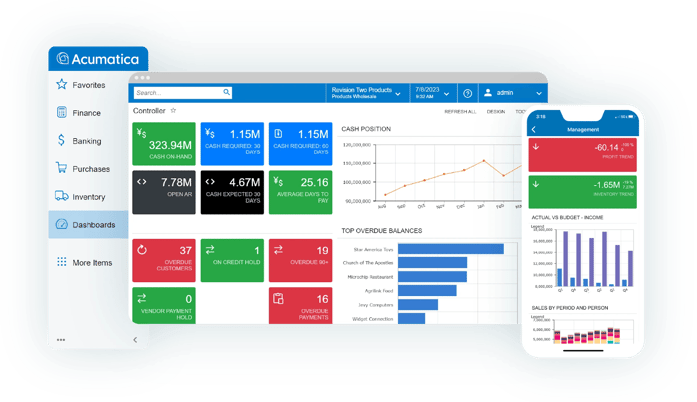
Acumatica Cloud is a cloud ERP system offering financial support, project management, procurement, and inventory management. It also hosts a variety of add-ons including customer relationship management (CRM) and human resources (HR) modules.
Acumatica Cloud provides an integrated ecommerce platform that includes analytic and payment processing capabilities.
Features
- Integrate your eCommerce platforms like Amazon, BigCommerce, and Shopify with Acumatica’s financials and inventory systems.
- Leverage cloud-based ERP for construction firms, providing business intelligence and enhanced visibility for success.
- Gain real-time insights and full control over production and financials to boost efficiency and growth.
- Optimize inventory processes with flexible item management, traceability, and efficient replenishment.
- Enhance warehouse operations by reducing errors, automating tasks, and boosting productivity.
Pros
- Delivers a true cloud ERP platform built for midmarket businesses.
- Provides financial, distribution, manufacturing, construction, and retail management in one system.
- Integrates with existing tools and applications through an open marketplace.
- Supports real-time collaboration with cross-module workflows.
Cons
- “As with any ERP system, Acumatica is an investment, and being that they are quickly growing and releasing new features, having too many customizations can lead to an arduous version upgrade process.” User review
- “The only module I’ve found to be somewhat less intuitive is the Inventory module. While I don’t use it daily in my role, I’ve noticed it can be a bit tricky to navigate at times. That said, it still performs reliably and offers solid functionality. I’m confident that with a bit more hands-on experience, I’ll be able to master it fully.” User review
- “With some modules, you need two to be added to your profile to get the one solution needed.” User review
Pricing
Acumatica’s pricing depends on the number of applications needed, the number of users, and the type of deployment. For specific pricing details, contact them for a pricing review.
13. Oracle ERP Cloud
.jpeg?width=150&height=88&name=Oracle_Cloud_logo-600x350%20(1).jpeg)
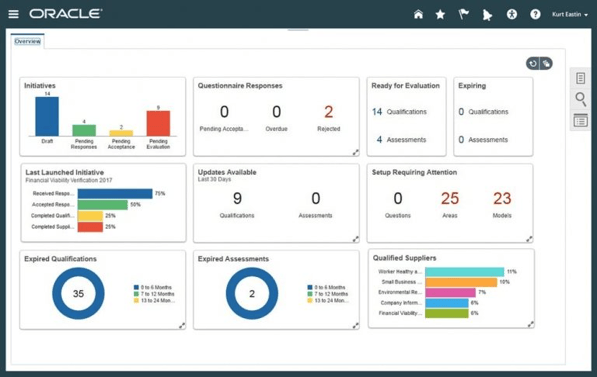
Oracle ERP Cloud is a comprehensive ERP system offering financial management, human resources management, manufacturing planning, and supply chain management. Oracle ERP Cloud simplifies everyday tasks, allowing you to ask simple questions like: “What tasks are due today?” It’s also scalable and backed by Oracle's world-class support team.
Features
- Streamline accounting and enhance financial oversight with comprehensive, centralized financial processes.
- Manage the lifecycle of purchase orders from capture to payment, integrating data across departments for seamless order fulfillment.
- Plan, execute, and monitor projects with features for detailed planning, cost control, risk management, and your best budgeting.
- Automate routine business processes, reducing manual effort and human error.
Pros
- Automates finance, procurement, project management, and compliance workflows with embedded AI.
- Provides real-time analytics, forecasting, and KPI tracking through Oracle ERP Analytics.
- Delivers integrated modules for financial management, supply chain, and enterprise performance management.
- Supports continuous compliance with automated risk monitoring and audit controls.
Cons
- “Limited integration with the other software and limited automation function.” User review
- “Support can be a bit of pain on the cloud; having no access to the backend forces complete reliance on Oracle. Support is not geared to handle customer-specific scenarios on many occasions.” User review
- “The Hub has limited customization options, which means it doesn't allow for extensive customization of its core features. Additionally, data migration from the existing system sometimes encounters errors when transferring historical data.” User review
Pricing: Pricing isn't stated on its website.
14. Syspro
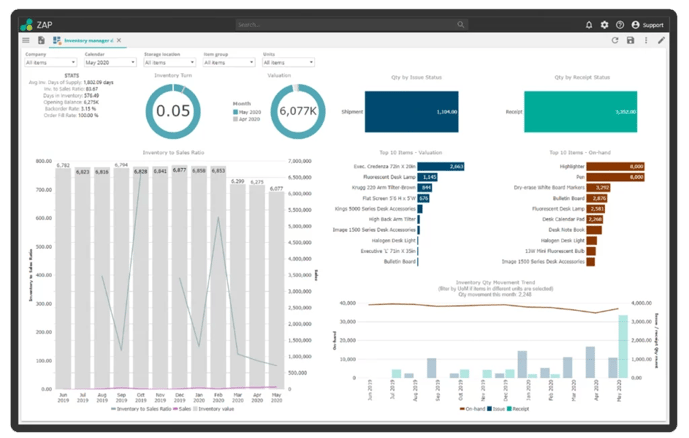
Syspro focuses on the unique challenges of the manufacturing and distribution industries. The software was created by industry specialists who understand the unique needs of manufacturers. They aim to provide robust solutions and tools to manage and support business processes.
Features
- Plan and schedule production activities to optimize resources and meet delivery deadlines.
- Streamline and manage the flow of materials and information across the supply chain.
- Monitor and control manufacturing processes to ensure quality and efficiency.
- Oversee and coordinate all aspects of manufacturing operations to maximize productivity.
- Manage inventory levels, locations, and movements to minimize costs and ensure availability.
- Monitor and control manufacturing costs to improve profitability and financial performance.
Pros
- Integrates financial, warehouse, and inventory management across the supply chain.
- Provides industry-specific solutions for manufacturing and distribution sectors.
- Supports multiple deployment options including cloud, on-premise, and hybrid.
- Offers advanced features such as AI, IoT, mobile ERP, and embedded analytics.
Cons
- “I think we can make it more fast and UI can improve, looks outdated.” User review
- “It seems like there are a lot of add-ons. If you would like the system to do something, you have to pay extra, or get other systems.” User review
- “Clunky software that will fight you unless your business flow matches what they think it should be. Not great support via official channels.” User review
Pricing: Pricing isn't stated on its website
15. TallyPrime

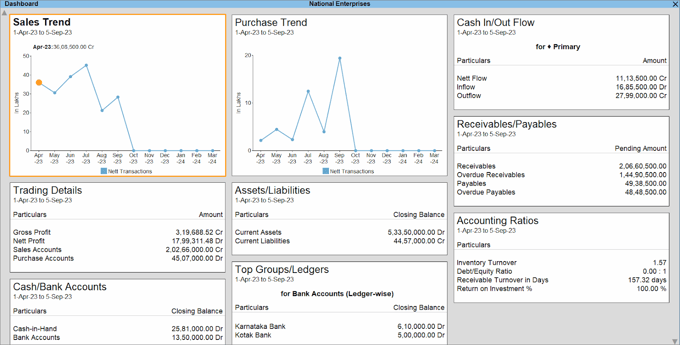
TallyPrime is an extensive business management software that enables businesses to streamline invoicing, cost accounting, inventory, banking, cash and credit management taxation, and payroll using a single software. TallyPrime automates all critical business processes quickly, efficiently, and with better control over your business. You can reduce complexities to focus on business growth.
Features
- Create and record invoices with optimized components, configurable settings, and multiple billing modes tailored to your business needs.
- Manage inventory with features like godown management, multiple stock valuation methods, batch and expiry tracking, job costing, and inventory reports.
- Access over 400 business reports in intuitive visual formats.
- Optimize cash flows by enhancing efficiencies in accounts receivable, accounts payable, and inventory management with insightful reports to monitor cash flow.
Pros
- Integrates accounting, invoicing, banking, inventory, and compliance in one platform.
- Provides connected GST solutions with direct filing, e-invoicing, and e-way bill generation.
- Delivers personalized business reports with dashboards and analytics tools.
- Supports cash and credit management alongside day-to-day bookkeeping.
Cons
- “While TallyPrime excels in core accounting, its biggest drawback is that it still feels like a 'desktop-first' product in a world that’s rapidly moving to cloud and API integrations. The lack of seamless multi-user collaboration, limited automation, and complex setup for remote access make it feel dated for modern, tech-driven teams. Also, its rigid data structure and dependence on customization (TDL) for even simple UI tweaks can be a barrier for non-technical users who expect plug-and-play solutions.” User review
- “TallyPrime has expensive cloud hosting, which limits people from deploying it. The hosting costs make the subscription fees quite high.” User review
- “Interface is not good, it looks like very old style. Remote access is not seamless. Limited automation and customisation available.” User review
Pricing
- 3-month license: $99
- 6-month license: $189
- 12-month license: $369
- Lifetime license: $855
- 3-month license: $297
- 6-month license: $567
- 12-month license: $1,107
- Multi-use lifetime license: $2,565
16. Epicor
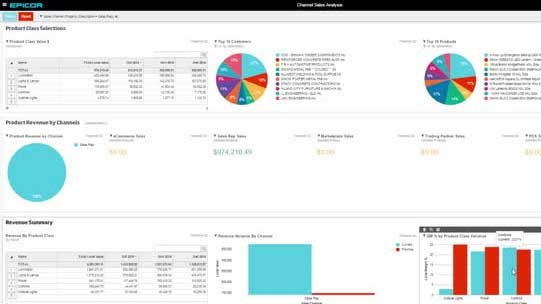
Epicor iScala is a comprehensive ERP system that helps organizations manage all aspects of their business, from financials and operations to sales and customer service. It offers a wide range of features and functionality and works for SMBs.
Features
- Manage accounts payable, accounts receivable, view financial statements, and other core functions within the Financial Ledger component.
- Enhance operational effectiveness with comprehensive service management and supply chain capabilities.
- Simplify and streamline logistics, warehouse management, sales, and purchase processes for daily operations.
- Leverage efficiencies and fuel growth by optimizing business processes to meet global competition and complex supply chain challenges.
- Optimize manufacturing processes with tailored modules.
- Manage and report on asset purchasing, consumption, location, responsibility, and disposal.
Pros
- Manages accounts payable, accounts receivable, and general ledger within a unified financial module.
- Supports multi-company and multi-currency operations for cross-border business needs.
- Streamlines supply chain, logistics, warehouse, sales, and purchasing processes.
- Provides service management tools to enhance operational effectiveness.
Cons
- “Downloading accounting reports is easy, but it is difficult to read the data in Excel, where we need to visualize data for the business. So I need to spend additional time to bring in the Row/Column format for further workings.” User review
- “Payslip option is not available. Whenever a salary has to be processed, whole users have to be logged out. Basic reports and customized reports option are missing.” User review
Pricing: Pricing isn't listed on its website
17. Odoo

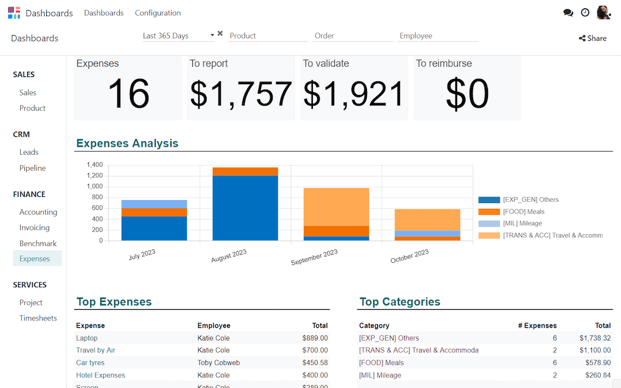
Odoo is a versatile suite of open-source business applications designed to meet various company needs, from ERP and CRM to eCommerce and CMS. Available both as a downloadable on-premise solution and a cloud-based service, Odoo aims to help businesses grow by providing a comprehensive suite of tools.
With 30 core applications and a community contributing over 16,000 additional apps, Odoo serves millions of users worldwide, ranging from small startups to large enterprises.
Features
- Manage finances with comprehensive accounting tools.
- Plan projects and resources with advanced planning features.
- Combine financial information from different entities for a unified view.
- Simplify the billing process with automated invoicing.
- Control stock levels and warehouse operations efficiently with warehouse and inventory management tools.
- Manage manufacturing processes with the MRP system.
- Optimize field service operations with dedicated tools.
- Automate marketing campaigns, including email and social media.
- Integrate online sales with other business processes.
- Maintain and enhance customer relationships with the CRM system.
Pros
- Provides a unified suite of apps covering accounting, CRM, sales, inventory, HR, and more.
- Enables seamless integration across business functions through one platform.
- Supports both community (free) and enterprise editions with open-source flexibility.
- Delivers customization through Odoo Studio for workflows, screens, and reports.
Cons
- “It comes with a learning curve, especially for non-technical users. Some modules lack the depth or polish of specialized standalone tools, and performance can degrade when handling large datasets without proper optimization. Additionally, the pricing structure can get expensive if you need multiple enterprise-level apps, and technical support often requires a paid subscription or third-party consultants.” User review
- “What I don't like about Odoo is that sometimes some things don't work as they should or feel incomplete. There are features that could be easier to use. I've also noticed that some updates bring new bugs or change things without much notice.” User review
Pricing
- Odoo community: free
- Odoo standard: $24.90/user/month
- Odoo custom: $37.40/user/month
18. Extensiv

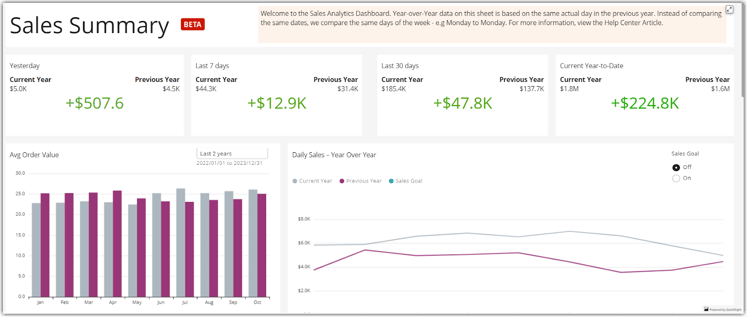
Extensiv is a fulfillment technology company dedicated to transforming warehouse and fulfillment operations to meet the demands of modern commerce and consumer expectations.
Their software platform supports brands and third-party logistics providers (3PLs) by enabling the creation of advanced fulfillment networks that optimize inventory placement, enhance distribution intelligence, reduce costs, and speed up delivery.
Features
- Unify information for better visibility, deeper insights, and improved forecasting.
- Use advanced algorithms to optimize distribution processes.
- Integrate with over 150 shopping channels.
- Integrate with existing systems to prevent disruptive migrations.
- Automate inventory management and replenishment.
Pros
- Provides cloud-based access to streamline operations and reduce manual errors.
- Integrates with partner systems and marketplaces through an open ecosystem.
- Enables scalability to support growth in logistics and fulfillment services.
- Offers real-time visibility across supply chain and warehouse operations.
Cons
- “I can see that it has a lot of limitations like the app was created but not really having any main overhaul at all, we cannot also integrate any other service our own. No one click to integrate other apps. It all needs to be done by a developer and its not clear which ones are able to be integrated to our end.” User review
- “I ship globally. I have to assign for each product a value for customs and I cannot change it which can be a big problem in order to give accurate values for customs purposes. I would not recommend this software for international orders. It is fine for warehousing purposes. I use their system everyday.” User review
Pricing
- Merchant: $39/month
- EDI merchant: $99/month
- 3PL (integrations only): $99/month
- Master account: $199/month
19. Cetec ERP

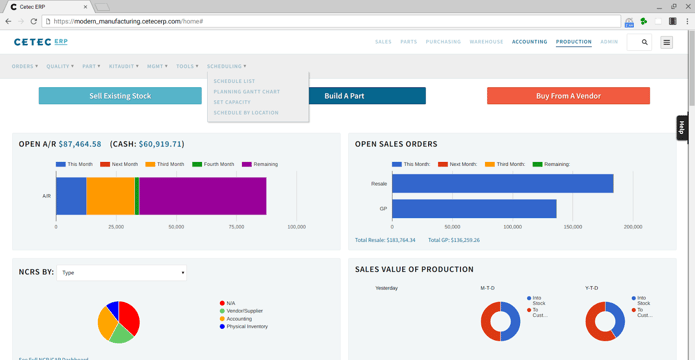
Cetec ERP is a web-based, SaaS manufacturing ERP platform designed to simplify and modernize ERP adoption for small and mid-sized businesses. It provides an all-in-one system that integrates ERP, MRP, CRM, and QMS into a single browser-based solution. Cetec ERP delivers enterprise-grade functionality without the traditional complexity and costs of legacy ERP systems.
Features
- Manage customer relationships and sales pipelines with integrated CRM tools.
- Estimate quotes and calculate job costs with built-in BOM and pricing functionality.
- Control inventory across high-volume and dimensional environments with detailed tracking.
- Use mobile warehousing tools with barcode scanning and tablets to improve throughput.
Pros
- Supports complex manufacturing and regulatory environments with built-in compliance tools.
- Provides transparent, affordable SaaS pricing with all modules included.
- Eliminates IT overhead with fully web-native deployment and updates.
- Enables mobile warehousing and shop floor access via tablets and scanners.
Cons
- “Some of the downsides are the costs of making changes to automate your system how you want. Lack of knowledge by some of their team members, some training that isn't there.” User review
- “It lacks adequate customizability. The browser based interface is not intuitive, and to be marginally efficient requires opening so many tabs that it slows down some computers. The organization of the menus and most of the content seems convoluted. In terms of documentation control, it is more or less completely lacking, leaving it to be controlled largely manually, which really is no control at all.” User review
Pricing
- Lifeplan: $50/user/month
- Standard plan: 50/user/monthplus50/user/month plus 50/user/monthplus650/company/month
- Enterprise plan: 50/user/monthplus50/user/month plus 50/user/monthplus3200/company/month
20. DELMIAWorks
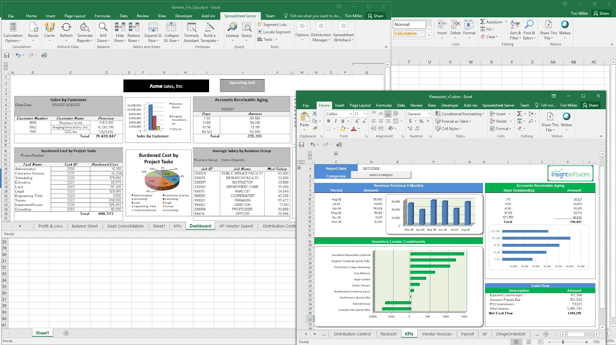
DELMIAWorks is an end-to-end manufacturing ERP and MES solution built with a “shop floor first” approach. Designed for small and midsize manufacturers, it integrates core functions like production monitoring, supply chain, quality management, and financials into a single system. By eliminating the need for multiple third-party add-ons, DELMIAWorks provides manufacturers with real-time visibility and control across their entire operations.
Features
- Monitor shop floor performance with real-time production data.
- Manage procurement, inventory, and warehouse operations with end-to-end supply chain tools.
- Automate compliance and reduce defects with integrated quality management.
- Plan and schedule jobs with tools that adapt to changing demand.
Pros
- Provides real-time shop floor visibility to improve decision-making.
- Supports small and midsize manufacturers with enterprise-level functionality.
- Connects production data directly to financial results for accurate forecasting.
- Scales with business growth across multiple facilities and environments.
Cons
- “Horrible reporting - we've been told the reports are meant for "viewing" only and not for export, but even their canned reports can't be read/"viewed" because the formatting is absolute GARBAGE (I wish I was allowed to post a screenshot). They said that if we want to change the canned reports, it will cost us more.” User review
- “System tends to get slow while on cloud and if many users uses at the same time. Also lot of money needs to be spent even for simple custom reports.” User review
Pricing: Pricing isn’t listed on its website
21. IFS

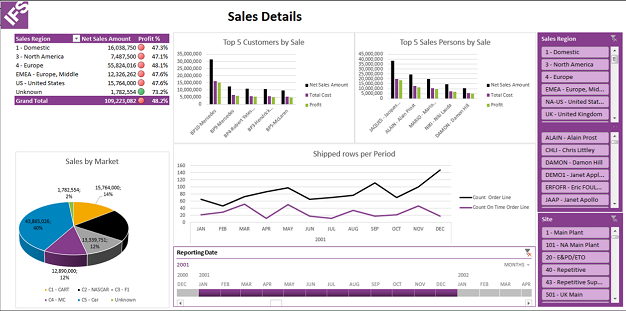
IFS ERP, delivered through the IFS Cloud platform, provides a centralized solution that unifies business operations across finance, supply chain, manufacturing, projects, procurement, and HR. Built with deep industry expertise, IFS ERP helps organizations streamline workflows, adapt quickly to market changes, and drive measurable efficiency gains. With built-in Industrial AI, the platform supports automation, predictive insights, and intelligent decision-making for asset- and service-intensive industries.
Features
- Manage end-to-end manufacturing processes with industry-specific ERP capabilities.
- Optimize supply chain operations with real-time visibility into procurement and logistics.
- Track and manage projects across their full lifecycle with integrated tools.
- Unify finance functions for accurate reporting, forecasting, and compliance.
Pros
- Provides a clear, unified view of people, processes, and assets for better control.
- Supports scalability and adaptability to align with evolving business needs.
Cons
- “A bit complicated to use, difficult to make configurations.” User review
- “IFS documentation can sometimes be lacking. I think improving this will only give customers a wider understanding of what the product has to offer.” User review
- “I can't think of too many downsides about IFS. However, most of the support is headquartered out of Sri Lanka and sometimes the time difference for US based companies can be challenging when coordinating upgrades/updates. However, those incidents are far and few between and not a detriment in any regard.” User review
Pricing
22. Infor

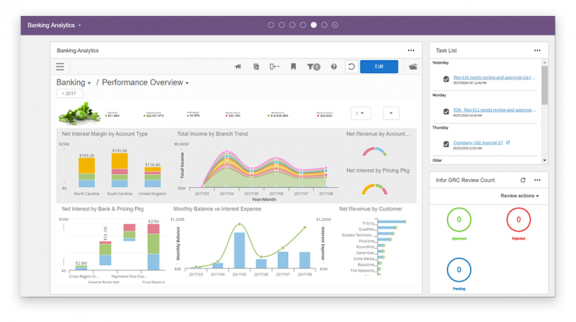
Infor ERP is a cloud-based, industry-specific enterprise resource planning platform built to streamline operations and accelerate digital transformation. Designed with embedded AI, machine learning, and automation, it provides organizations across industries, such as healthcare, aerospace, automotive, manufacturing, and the public sector, with tailored workflows, real-time insights, and preconfigured processes.
Features
- Manage core financial processes with built-in accounting and reporting tools.
- Streamline supply chain operations with AI-driven planning and warehouse management.
- Automate procurement and manufacturing processes with industry-specific workflows.
- Gain real-time insights through analytics, data lakes, and AI-powered dashboards.
Pros
- Combines AI, machine learning, and advanced analytics for actionable insights.
- Supports fast implementation with prebuilt processes and role-based content.
- Offers scalability and security with the Infor OS platform as the technology backbone.
Cons
- “Being browser-based means most of the functionality must be programmed, and doesn't allow for much user flexibility (with respect to client-side processes)” User review
- “Sometimes this product is very glitchy. And sometimes working on it becomes a little bit confusing. This product can't handle that much server load” User review
Pricing: Pricing isn’t available on its website
What are the differences between ERP systems and FP&A software?
ERP systems integrate core business processes into one comprehensive system, streamlining operations across departments such as finance, HR, supply chain, manufacturing, services, and procurement. Their main aim is to automate day-to-day operations.
In contrast, FP&A software is tailored for financial planning, budgeting, forecasting, and analysis within finance departments. It offers advanced financial modeling, analysis, and reporting capabilities to support strategic financial decisions and performance evaluation.
When to use ERP software
Businesses should use ERP software when they need to centralize data and processes, enhance operational efficiency, and improve decision-making.
ERP systems are essential for supporting growth and scalability, ensuring regulatory compliance, and boosting customer satisfaction.
They help manage complex supply chains, facilitate cross-department collaboration, and reduce costs through process automation and improved efficiency.
When to use FP&A software
FP&A software is essential for businesses needing specialized tools for financial planning, analysis, forecasting and budgeting.
The software streamlines budgeting processes, aligning budgets with strategic goals and allowing real-time performance monitoring. It offers deep financial analysis capabilities, facilitating comprehensive insights into financial health and performance.
FP&A software supports collaboration across teams, enhances reporting with customizable tools, and manages complex financial data from multiple sources, making it ideal for businesses aiming to strengthen financial management and decision-making processes.

How to implement an ERP system
Implementing an ERP system is a major project that requires careful planning, collaboration, and execution. Done right, it can streamline processes, improve efficiency, and provide valuable insights across the organization. Below is a step-by-step guide to help you through the process.
1. Assess current systems
Start by auditing your existing systems and workflows to identify inefficiencies, bottlenecks, and gaps. Review finance, inventory, supply chain, sales, and CRM processes to see where an ERP can add the most value. Pay attention to data quality, reporting, IT infrastructure, and user adoption challenges.
2. Define the scope and goals
Establish what the ERP system needs to achieve. Decide which functions will be automated, which data will be integrated, and what KPIs you want to track. Set clear goals such as improving reporting accuracy, reducing manual tasks, or supporting future scalability. This will create a roadmap for the project and ensure stakeholder alignment.
3. Choose the right ERP software
Evaluate ERP vendors based on your business needs, industry requirements, and growth plans. Consider functional fit, integration with existing tools, reporting capabilities, scalability, vendor reputation, and total cost of ownership. Also weigh how easy the system is to implement and what level of support the vendor provides during rollout. An ERP that is simpler and more affordable to deploy helps businesses realize value faster and avoid costly delays.
4. Configure the ERP system
Once selected, work with your ERP vendor or implementation partner to configure the system so it matches your business processes. Set up your chart of accounts, cost centers, and user roles. Customize modules such as finance, supply chain, or CRM, and integrate with other systems like e-commerce or legacy databases. The goal is to align the ERP with your workflows, not the other way around.
5. Prepare and migrate data
Clean, validate, and format existing data before transferring it into the new ERP. Create a migration plan that includes data audits, transfer methods, test runs, and backup procedures. Establish governance policies to ensure ongoing accuracy and security. Data migration is often the most time-consuming step, so plan carefully.
6. Test the ERP system
Conduct thorough testing to confirm functionality and data accuracy. Run end-to-end process tests, check automation workflows, and verify integrations. Include user acceptance testing (UAT) so employees can validate that the system supports their daily work. Resolve any issues before full deployment.
7. Train employees
Provide hands-on training tailored to different user groups. Offer a mix of online courses, in-person sessions, and quick-reference guides. Focus on key tasks like data entry, reporting, and troubleshooting. A well-trained team ensures smoother adoption and reduces resistance to change.
8. Launch the system
Roll out the ERP in phases or all at once, depending on your organization’s size and complexity. Monitor system performance, verify data accuracy, and ensure workflows are functioning as expected. Keep IT and support staff available during the initial rollout to quickly resolve any issues.
9. Provide ongoing maintenance and support
After launch, establish a routine for updates, performance monitoring, and troubleshooting. Document standard operating procedures, maintain regular system health checks, and schedule periodic reviews with users. Support should come from both your internal team and the ERP vendor, since vendor resources provide critical updates, patches, and expertise that go beyond what internal staff can manage alone. Continuous support and improvement will help your ERP system remain aligned with evolving business needs.
Optimize your ERP system for scalable success
ERP systems are essential for businesses of all sizes, integrating and streamlining core processes like finance, HR, and supply chain management. By centralizing data and automating operations, ERP enhances efficiency, cuts costs, and bolsters decision-making.
Moreover, ERP systems support growth, scalability, and regulatory compliance, improving customer satisfaction through streamlined service delivery. In today's competitive landscape, agility and data-driven insights are crucial.
Whichever ERP system you choose, integrating with Cube provides comprehensive planning and analysis capabilities that optimize performance and drive sustainable business success.