Spring Data JPA @Id Annotation (original) (raw)
Last Updated : 9 Apr, 2026
The @Id annotation is used to define the primary key of a JPA entity, uniquely identifying each record in the database. It works with @GeneratedValue to automatically generate IDs.
- Marks a field as the primary key
- Ensures each entity instance is uniquely identifiable
- Works with @GeneratedValue for auto ID generation
Syntax
import jakarta.persistence.*;
@Entity
public class ExampleEntity {@Id
@GeneratedValue(strategy = GenerationType.IDENTITY)
private Long id;
}
Here:
- @Id identifies the field as the primary key in the database table.
- It can be applied to primitive or wrapper types (int, long, Integer, Long, etc.).
- It is mandatory in every entity class managed by JPA.
- Usually combined with @GeneratedValue to auto-generate IDs.
Common @GeneratedValue Strategies
- **GenerationType.IDENTITY: Uses the database’s identity column for auto-increment. Common in MySQL.
- **GenerationType.SEQUENCE: Uses a database sequence to generate IDs. Common in PostgreSQL and Oracle.
- **GenerationType.TABLE: Uses a separate table to maintain and generate unique identifiers.
- **GenerationType.AUTO: Lets JPA automatically select the generation strategy based on the underlying database.
Steps to Implement @Id Annotation
We’ll now create a simple Spring Boot application to demonstrate how the @Id annotation works with Spring Data JPA and MySQL.
Step 1: Create a New Spring Boot Project
Go to Spring Initializr and configure the project as follows:
- **Project: Maven
- **Language: Java
- **Spring Boot Version: 3.x (latest stable)
- **Dependencies: Spring Web, Spring Data JPA, MySQL Driver
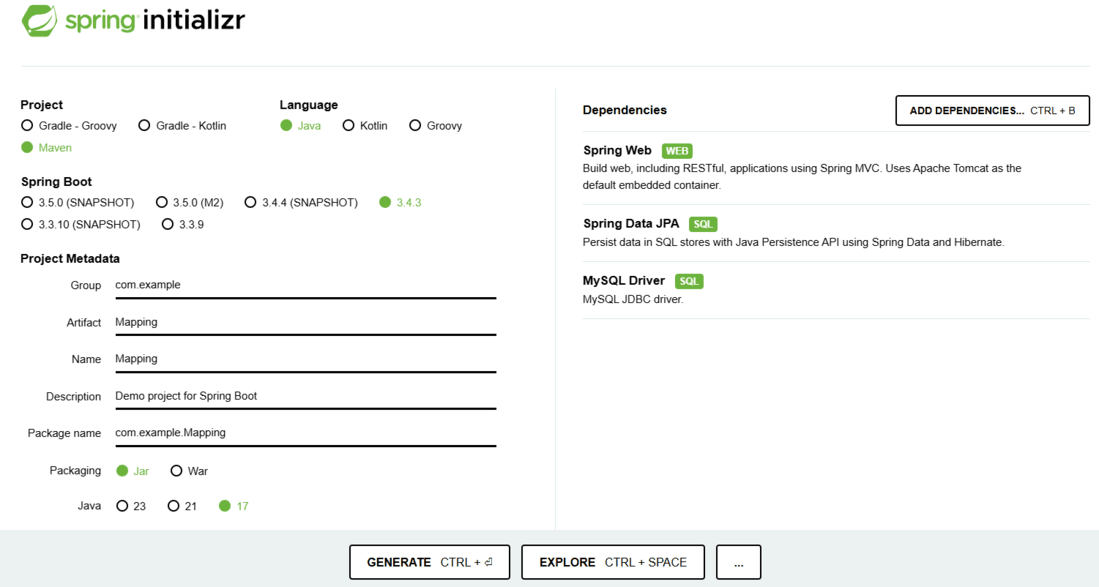
spring initializr
Click Generate, download the ZIP file, and import it into your IDE (e.g., IntelliJ IDEA or Eclipse).
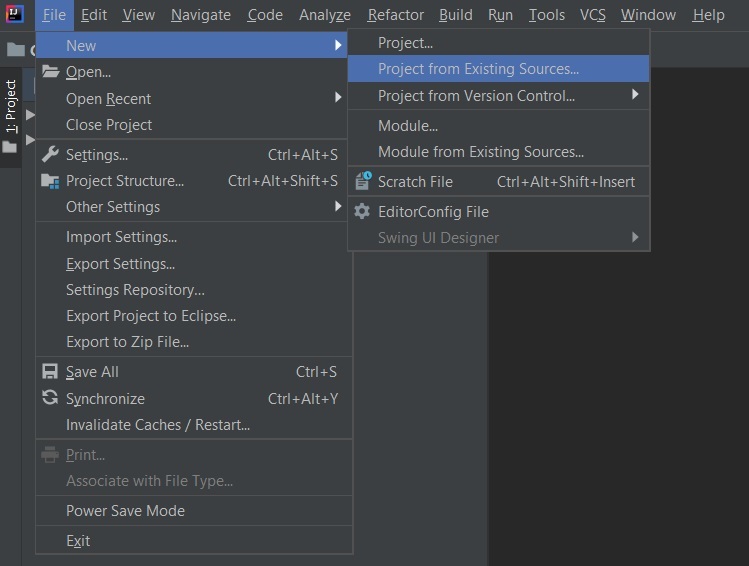
Step 2: Configure the Database Connection
Add the following properties in src/main/resources/application.properties:
spring.datasource.url=jdbc:mysql://localhost:3306/mapping
spring.datasource.username=root
spring.datasource.password=yourpassword
spring.datasource.driver-class-name=com.mysql.cj.jdbc.Driverspring.jpa.hibernate.ddl-auto=update
spring.jpa.database-platform=org.hibernate.dialect.MySQLDialect
spring.jpa.show-sql=true
- **ddl-auto=update: Automatically updates the schema when entities change.
- **show-sql=true: Logs SQL queries executed by Hibernate.
Step 3: Create the Entity Class
Create a new file named StudentInformation.java under src/main/java/com/example/mapping/.
Java `
package com.example.mapping;
import jakarta.persistence.*;
@Entity @Table(name = "Student") public class StudentInformation {
@Id
@GeneratedValue(strategy = GenerationType.IDENTITY)
private int rollno;

private String name;

public StudentInformation() {}

public StudentInformation(int rollno, String name) {
    this.rollno = rollno;
    this.name = name;
}

public int getRollno() { return rollno; }
public void setRollno(int rollno) { this.rollno = rollno; }

public String getName() { return name; }
public void setName(String name) { this.name = name; }
}
`
**Explanation:
- @Entity marks the class as a persistent entity.
- @Table(name = "Student") maps it to the Student table in MySQL.
- @Id marks rollno as the primary key.
- @GeneratedValue(strategy = GenerationType.IDENTITY) allows MySQL to auto-generate roll numbers.
**Note: Without @Id, Hibernate cannot map the entity properly to a table row.
Step 4: Create the Repository Interface
Create StudentRepository.java in the same package:
Java `
package com.example.mapping;
import org.springframework.data.jpa.repository.JpaRepository; import org.springframework.stereotype.Repository;
@Repository public interface StudentRepository extends JpaRepository<StudentInformation, Integer> { }
`
**Explanation:
- JpaRepository provides CRUD and query methods without needing boilerplate code.
- The first parameter is the entity type (StudentInformation), and the second is the primary key type (Integer).
Step 5: Main Application Class
No changes in main application class.
Java `
package com.example.mapping;
import org.springframework.boot.SpringApplication; import org.springframework.boot.autoconfigure.SpringBootApplication;
@SpringBootApplication public class MappingApplication { public static void main(String[] args) { SpringApplication.run(MappingApplication.class, args); } }
`
**Explanation:
- @SpringBootApplication is a combination of @Configuration, @EnableAutoConfiguration, and @ComponentScan.
- It marks the main entry point of the Spring Boot application.
Running the Application
**Console Output:
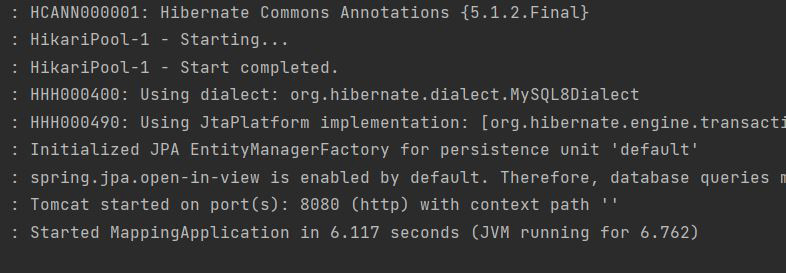
Console Output
Verifying the Table in MySQL
1. Start the MySQL server.
2. Log in using the terminal:
mysql -u root -p
3. Switch to the database:
USE mapping;
4. List tables:
SHOW TABLES;
5. View table structure:
DESCRIBE Student;
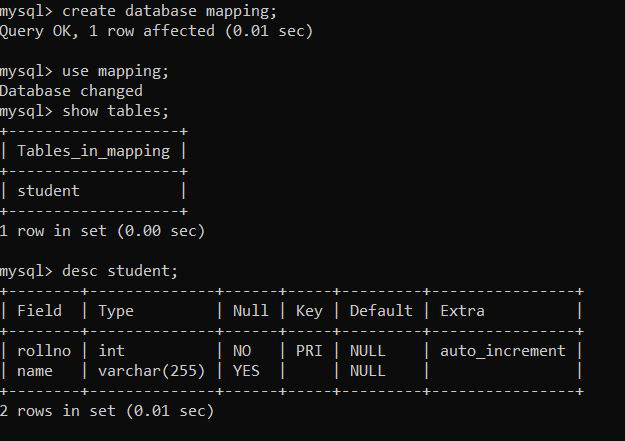
Output