Spring Security at Method Level (original) (raw)
Last Updated : 25 May, 2026
Spring Security provides security features for Java applications by handling authentication and authorization. Along with securing URLs and endpoints, Spring Security also supports method-level security to protect specific methods directly.
- Provides role-based access control on specific methods.
- Protects service-layer business logic from unauthorized access.
- Uses annotations for declarative and cleaner security configuration.
Why Method-Level Security
- **Granular Control: Restrict access to specific methods instead of the entire application or URL.
- **Business Logic Protection: Even if someone bypasses the web layer, the service methods remain protected.
- **Role-Based Access: Easily define role-based restrictions at the method level.
- **Separation of Concerns: Security logic is applied declaratively without polluting business logic.
Enabling Method-Level Security
In Spring Security, method-level security is enabled using the @EnableMethodSecurity annotation instead of the deprecated @EnableGlobalMethodSecurity.
Java `
@Configuration @EnableMethodSecurity public class SecurityConfig { // Other security configurations }
`
Common Annotations for Method Security
Spring Security provides annotations to restrict access to methods based on roles and conditions:
1. @Secured
The @Secured annotation restricts method access based on user roles.
- Allows access only to users having specific roles.
- Simpler than SpEL-based authorization expressions. Java `
@Service public class ReportService {
@Secured("ROLE_MANAGER")
public String generateReport() {
    return "Report generated!";
}
}
`
Only users with the role ROLE_MANAGER can access generateReport().
The @PreAuthorize annotation checks authorization before method execution.
- Uses Spring Expression Language (SpEL) for flexible conditions.
- Security validation happens before method execution. Java `
@Service public class AccountService {
@PreAuthorize("hasRole('ADMIN')")
public String deleteAccount(Long id) {
    return "Account " + id + " deleted!";
}
}
`
Only users with the role ROLE_ADMIN can execute the deleteAccount() method.
3. @PostAuthorize
The @PostAuthorize annotation applies authorization after method execution.
- Validates returned objects after method execution.
- Useful for filtering sensitive returned data. Java `
@Service public class AccountService {
@PostAuthorize("returnObject.owner == authentication.name")
public Account getAccountDetails(Long id) {
    // fetch account
    return new Account(id, "john_doe");
}
}
`
Only the owner of the account can access the returned Account object.
4. @RolesAllowed
The @RolesAllowed annotation is part of JSR-250 standard security.
- Allows multiple roles for accessing methods.
- Requires jsr250Enabled = true in @EnableMethodSecurity. Java `
@Service public class UserService {
@RolesAllowed({"ROLE_ADMIN", "ROLE_USER"})
public String viewProfile() {
    return "Profile details shown!";
}
}
`
Both ROLE_ADMIN and ROLE_USER can access viewProfile().
Step-by-Step Implementation of Spring Security at Method Level
Step 1: Create a Spring Boot Project
Create a project via Spring Initializr or directly in IntelliJ IDEA / STS.
**Project Details:
- **Project: Maven Project
- **Spring Boot Version: 3.3.x
- **Dependencies: Spring Web, Spring Security
**pom.xml:
Java `
4.0.0
<groupId>com.example</groupId>
<artifactId>spring-security-method-level</artifactId>
<version>0.0.1-SNAPSHOT</version>
<name>Spring Security Method Level</name>
<description>Demo project for Spring Security method-level security</description>

<!-- Spring Boot Parent -->
<parent>
    <groupId>org.springframework.boot</groupId>
    <artifactId>spring-boot-starter-parent</artifactId>
    <version>3.3.3</version>
    <relativePath/> <!-- lookup parent from repository -->
</parent>

<properties>
    <java.version>17</java.version>
</properties>

<dependencies>
    <dependency>
        <groupId>org.springframework.boot</groupId>
        <artifactId>spring-boot-starter-web</artifactId>
    </dependency>
    <dependency>
        <groupId>org.springframework.boot</groupId>
        <artifactId>spring-boot-starter-security</artifactId>
    </dependency>
</dependencies>

<build>
    <plugins>
        <plugin>
            <groupId>org.apache.maven.plugins</groupId>
            <artifactId>maven-compiler-plugin</artifactId>
            <version>3.11.0</version>
            <configuration>
                <release>17</release>
            </configuration>
        </plugin>
        <plugin>
            <groupId>org.springframework.boot</groupId>
            <artifactId>spring-boot-maven-plugin</artifactId>
        </plugin>
    </plugins>
</build>
`
Step 2: Enable Method-Level Security
Create a configuration class that is annoted with @Configuration and @EnableMethodSecurity.
- Activates method-level security annotations.
- Allows role-based restrictions on methods. Java `
package com.example.security.config;
import org.springframework.context.annotation.Bean; import org.springframework.context.annotation.Configuration; import org.springframework.security.config.annotation.method.configuration.EnableMethodSecurity; import org.springframework.security.config.annotation.web.builders.HttpSecurity; import org.springframework.security.core.userdetails.User; import org.springframework.security.core.userdetails.UserDetailsService; import org.springframework.security.provisioning.InMemoryUserDetailsManager; import org.springframework.security.crypto.bcrypt.BCryptPasswordEncoder; import org.springframework.security.crypto.password.PasswordEncoder; import org.springframework.security.web.SecurityFilterChain;
@Configuration @EnableMethodSecurity // Enable method-level security public class SecurityConfig {
@Bean
public SecurityFilterChain securityFilterChain(HttpSecurity http) throws Exception {
    http
        .csrf().disable()
        .authorizeHttpRequests(auth -> auth.anyRequest().authenticated())
        .httpBasic(); // Using HTTP Basic authentication
    return http.build();
}

@Bean
public UserDetailsService userDetailsService() {
    var userDetailsManager = new InMemoryUserDetailsManager();
    var user = User.withUsername("user")
            .password(passwordEncoder().encode("user123"))
            .roles("USER")
            .build();

    var admin = User.withUsername("admin")
            .password(passwordEncoder().encode("admin123"))
            .roles("ADMIN")
            .build();

    userDetailsManager.createUser(user);
    userDetailsManager.createUser(admin);

    return userDetailsManager;
}

@Bean
public PasswordEncoder passwordEncoder() {
    return new BCryptPasswordEncoder();
}
}
`
Step 3: Create a Service with Method-Level Security
Use @PreAuthorize to restrict access to methods based on roles.
- Service methods are secured using annotations.
- Only authorized roles can execute methods. Java `
package com.example.security.service;
import org.springframework.security.access.prepost.PreAuthorize; import org.springframework.stereotype.Service;
@Service public class UserService {
@PreAuthorize("hasRole('USER') or hasRole('ADMIN')")
public String getUserData() {
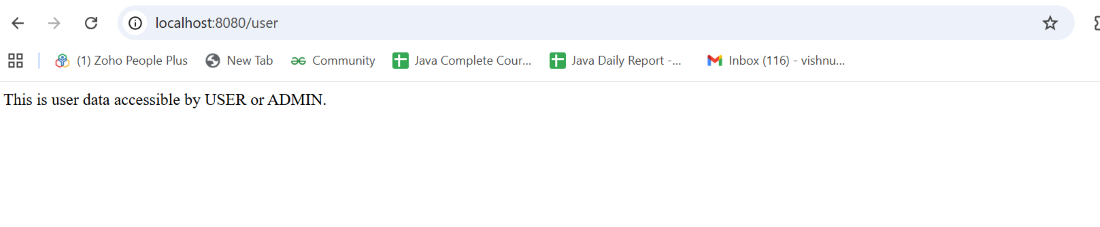
    return "This is user data accessible by USER or ADMIN.";
}

@PreAuthorize("hasRole('ADMIN')")
public String getAdminData() {
    return "This is admin data accessible only by ADMIN.";
}
}
`
Step 4: Create a Controller
Create a controller class for testing endpoint.
- Controller handles HTTP requests.
- Endpoints call secured service methods. Java `
package com.example.security.controller;
import com.example.security.service.UserService; import org.springframework.web.bind.annotation.GetMapping; import org.springframework.web.bind.annotation.RestController;
@RestController public class UserController {
private final UserService userService;

public UserController(UserService userService) {
    this.userService = userService;
}

@GetMapping("/user")
public String userAccess() {
    return userService.getUserData();
}

@GetMapping("/admin")
public String adminAccess() {
    return userService.getAdminData();
}
}
`
Step 5: Run and Test
Run the Spring Boot application.
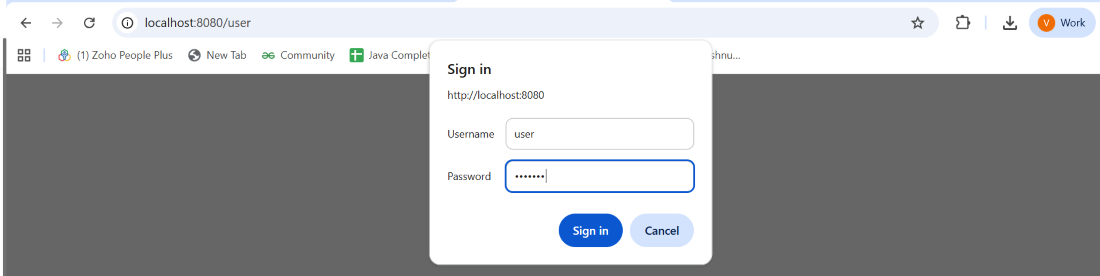
Access endpoints with Basic Auth
**Test 1:
- **Username: user
- **Password: user123
user
**Output:
output
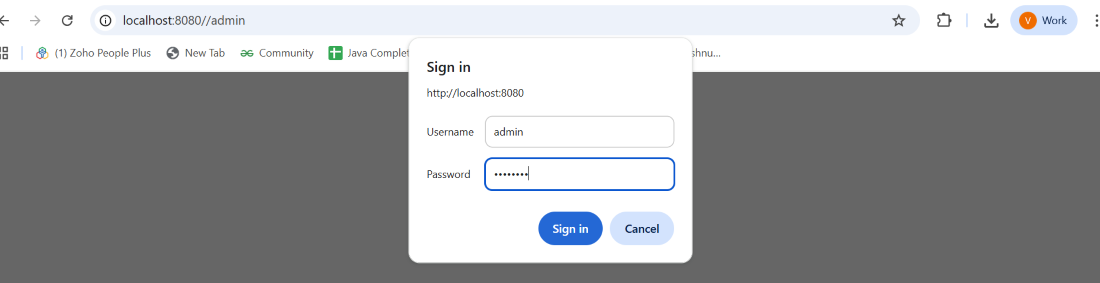
**Test 2:
- **Username: admin
- **Password: admin123
admin
**Output:

output