Spring Security CORS (original) (raw)
Last Updated : 6 Jun, 2026
CORS (Cross-Origin Resource Sharing) is a browser security mechanism that controls how web applications request resources from different domains. It allows servers to define which origins are permitted, ensuring secure cross-origin communication. In Spring Security, CORS helps manage and protect such interactions.
- Configured in Spring Security to allow specific origins, methods, and headers.
- Uses HTTP headers to enable secure communication across origins.
Working of CORS
- A client application sends a request to a server hosted on a different origin.
- The browser detects that the request is a cross-origin request.
- For complex requests, the browser first sends a preflight (OPTIONS) request.
- The server checks whether the origin, method, and headers are allowed.
- The server responds with the appropriate CORS headers.
- The browser verifies the CORS response from the server.
- If permission is granted, the browser sends the actual request.
- The server processes the request and returns the response.
- The browser either allows the response to be accessed by the application or blocks it if CORS rules are violated.
CORS headers can be used to control how resources on the web page can be requested from another domain. They play a crucial role in defining and enforcing the security policies that determine which cross-origin requests are allowed or denied.
1. Access-Control-Allow-Origin
- Defines which origins are allowed to access the resource and controls cross-origin access.
- Allows either all domains (*) or restricts access to a specific origin.
**Example:
Access-Control-Allow-Origin: *
or
Access-Control-Allow-Origin: http://example.com/
2. Access-Control-Allow-Methods
- Specifies which HTTP methods are permitted when accessing the resource.
- Restricts operations like GET, POST, PUT, DELETE.
**Example:
Access-Control-Allow-Methods: GET, POST, PUT, DELETE, OPTIONS
- Defines which headers can be included in cross-origin requests.
- Controls custom headers like Authorization and Content-Type.
**Example:
Access-Control-Allow-Headers: Content-Type, Authorization
4. Access-Control-Allow-Credentials
- Indicates whether credentials like cookies or authentication data can be sent.
- Enables secure requests that require authentication.
**Example:
Access-Control-Allow-Credentials: true
- Specifies which response headers are accessible to the client.
- Allows access to selected custom response headers.
**Example:
Access-Control-Expose-Headers: Content-Length, X-Kuma-Revision
6. Access-Control-Max-Age
- Defines how long the preflight request result can be cached.
- Reduces repeated preflight requests and improves performance.
**Example:
Access-Control-Max-Age: 3600
- Indicates which headers will be used in the actual request (sent in preflight).
- Helps the server validate allowed headers before processing.
**Example:
Access-Control-Request-Headers: Content-Type, Authorization
Implementation of Spring Security - CORS
This project demonstrates how to implement Cross-Origin Resource Sharing (CORS) in a Spring Boot application with Spring Security. The goal is to configure CORS headers to control which domains can access the application's resources while ensuring security.
Step 1: Create the Spring boot project
Create the new Spring Boot project using Spring Initializr and add the required dependencies,
- Spring Web
- Spring Security
- Lombok
- Spring DevTools
**pom.xml
XML `
4.0.0 org.springframework.boot spring-boot-starter-parent 3.3.0 org.example spring-security-cors 0.0.1-SNAPSHOT spring-security-cors spring-security-cors <java.version>17</java.version> org.springframework.boot spring-boot-starter-security org.springframework.boot spring-boot-starter-web
    <dependency>
        <groupId>org.springframework.boot</groupId>
        <artifactId>spring-boot-devtools</artifactId>
        <scope>runtime</scope>
        <optional>true</optional>
    </dependency>
    <dependency>
        <groupId>org.projectlombok</groupId>
        <artifactId>lombok</artifactId>
        <optional>true</optional>
    </dependency>
    <dependency>
        <groupId>org.springframework.boot</groupId>
        <artifactId>spring-boot-starter-test</artifactId>
        <scope>test</scope>
    </dependency>
    <dependency>
        <groupId>org.springframework.security</groupId>
        <artifactId>spring-security-test</artifactId>
        <scope>test</scope>
    </dependency>
</dependencies>

<build>
    <plugins>
        <plugin>
            <groupId>org.springframework.boot</groupId>
            <artifactId>spring-boot-maven-plugin</artifactId>
            <configuration>
                <excludes>
                    <exclude>
                        <groupId>org.projectlombok</groupId>
                        <artifactId>lombok</artifactId>
                    </exclude>
                </excludes>
            </configuration>
        </plugin>
    </plugins>
</build>
`
Once the project is created then the file structure will resemble the image below.

directory
Step 2: Configure the application properties
Open the application.properties file and add the configuration for the spring security username and password of the application in the project.
spring.application.name=spring-security-cors
spring.security.user.name=user
spring.security.user.password=password
Step 3: Configure Spring Security and CORS
Create SecurityConfig.java.
Java `
package org.example.springsecuritycors;
import org.springframework.context.annotation.Bean; import org.springframework.context.annotation.Configuration; import org.springframework.security.config.annotation.web.builders.HttpSecurity; import org.springframework.security.web.SecurityFilterChain; import org.springframework.web.cors.CorsConfiguration; import org.springframework.web.cors.UrlBasedCorsConfigurationSource; import org.springframework.web.filter.CorsFilter;
@Configuration public class SecurityConfig {
@Bean
public SecurityFilterChain securityFilterChain(HttpSecurity http) throws Exception {
    http.cors().and().csrf().disable()
            .authorizeRequests()
            .anyRequest().authenticated()
            .and()
            .formLogin();

    return http.build();
}

@Bean
public CorsFilter corsFilter() {
    UrlBasedCorsConfigurationSource source = new UrlBasedCorsConfigurationSource();
    CorsConfiguration config = new CorsConfiguration();
    config.setAllowCredentials(true);
    config.addAllowedOrigin("http://localhost:8080");
    config.addAllowedHeader("*");
    config.addAllowedMethod("*");
    source.registerCorsConfiguration("/**", config);
    return new CorsFilter(source);
}
}
`
Spring security can be implemented the integrate the CORS configuration with the Spring Security using the SecurityFilterChain of the Spring application.
- **addMapping("/**"): It can applies the CORS configuration to all the endpoints of the application.
- **allowedOrigins("http://example.com/"): It can allows the requests only from http://example.com/ of the application.
- **allowedMethods("GET", "POST","PUT", "DELETE"): It can allows these http methods only of the Spring application.
- **allowedHeaders("*"): It can allows all the headers of the application.
- **allowCredentials(true): It can allows the cookies and other credentials to be included.
- **maxAge(3600): It can sets the maximum age of the CORS preflight request cache of the application.
Step 4: Create the Controller class
- Create the HomeController class that will create the secure REST API of the spring project.
- The /hello endpoint is protected by Spring Security because anyRequest().authenticated() was configured. Java `
package org.example.springsecuritycors;
import org.springframework.web.bind.annotation.GetMapping; import org.springframework.web.bind.annotation.RestController;
@RestController public class HelloController {
@GetMapping("/hello")
public String hello() {
    return "Hello, CORS!";
}
}
`
Step 5: Main Class
No changes are required in the main class of the project.
Java `
package org.example.springsecuritycors;
import org.springframework.boot.SpringApplication; import org.springframework.boot.autoconfigure.SpringBootApplication;
@SpringBootApplication public class SpringSecurityCorsApplication {
public static void main(String[] args) {
    SpringApplication.run(SpringSecurityCorsApplication.class, args);
}
}
`
Step 6: Run the Application
Now, we will run the application and then it will start at port 8080.
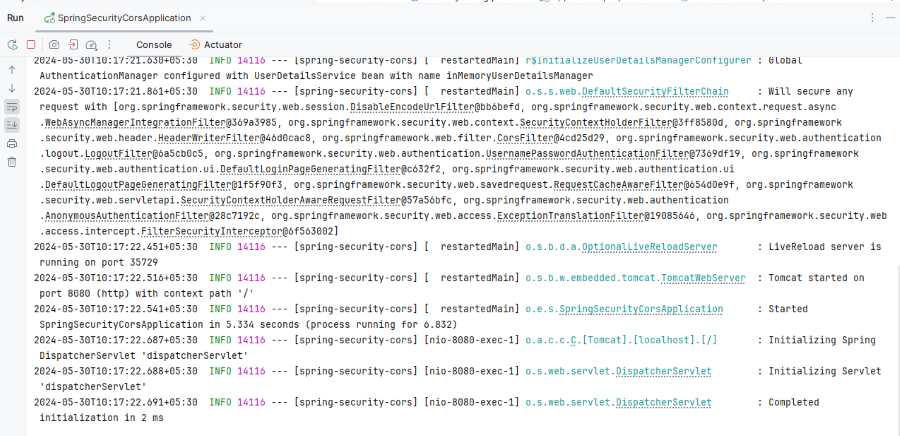
**login Endpoint:

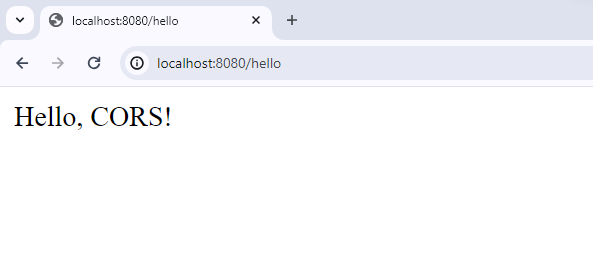
**Endpoint Testing:
Step 7: Testing the Cross-Origin Request
- We can use the tool like the front-end application hosted on the http://example.com/ to make the GET request to the http://localhost:8080/hello.
- It ensures the request is successful and the response is "Hello, CORS!".