Spring Security Remember Me (original) (raw)
Last Updated : 5 Jun, 2026
The Remember Me feature in Spring Security allows users to remain authenticated even after closing and reopening the browser. It works by storing authentication information in a cookie and validating it on subsequent visits. This improves user experience by eliminating the need to log in repeatedly while maintaining secure authentication mechanisms.
- Allows users to stay logged in across browser sessions.
- Uses cookies to store authentication information.
- Supports both token-based and database-backed persistent authentication.
Ways to Implement Remember Me
Spring Security provides two approaches for implementing Remember Me authentication:
1. Hash-Based Token Approach
- Stores a token inside a browser cookie.
- Token is generated using username, password, expiration time, and a secret key.
- Does not require database storage.
2. Persistent Token Approach
- Stores generated tokens in a database.
- Uses a persistent_logins table for token management.
- More secure because tokens can be invalidated individually.
Step-by-Step Implementation
We are taking the Persistent Token Approach in which a database or other persistent storage mechanism is used, and it is helpful to store the generated tokens.
Step 1: Create a Spring Boot Application
- create a Spring Boot application then we need to import our project to the IDE (STS or IntelliJ IDEA)
- Create packages and classes
**Project Structure:
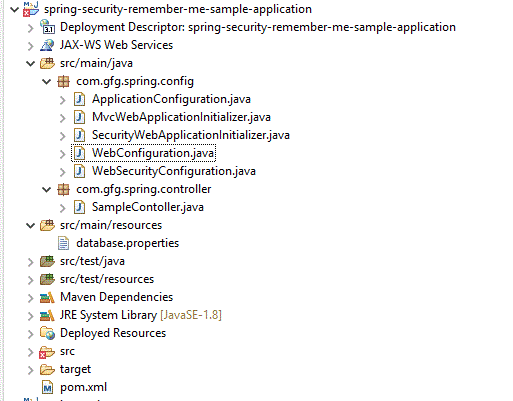
Add the following dependencies:
- Spring Boot Starter Web
- Spring Boot Starter Security
- Spring JDBC
- MySQL Connector
- JSP and Servlet dependencies
This is a maven-driven project
XML `
4.0.0 com.gfg.springsecurity spring-security-remember-me-sample-application 0.0.1-SNAPSHOT spring-security-remember-me-sample-application war <maven.compiler.source>17</maven.compiler.source> <maven.compiler.target>17</maven.compiler.target> false org.springframework.boot spring-boot-starter-web 3.2.2 org.springframework.boot spring-boot-starter-security 3.2.2 org.springframework.security spring-security-web 6.2.2 org.springframework.security spring-security-config 6.2.2 org.springframework spring-jdbc 6.1.2 jakarta.servlet jakarta.servlet-api 6.0.0 provided jakarta.servlet.jsp jakarta.servlet.jsp-api 3.0.0 provided org.glassfish.web jakarta.servlet.jsp.jstl 2.0.0 org.apache.commons commons-dbcp2 2.9.0 com.mysql mysql-connector-j 8.2.0 org.eclipse.jetty jetty-maven-plugin 11.0.17 org.apache.maven.plugins maven-war-plugin 3.4.0
`
Step 2: Database Configuration
Create a MySQL database and required tables. Add these tables:
- **users : Stores usernames and passwords.
- **authorities :Stores user roles.
- **persistent_logins : Stores remember-me tokens.
CREATE TABLE users(
username VARCHAR(50) PRIMARY KEY,
password VARCHAR(100) NOT NULL,
enabled BOOLEAN NOT NULL
);
CREATE TABLE authorities(
username VARCHAR(50),
authority VARCHAR(50)
);
CREATE TABLE persistent_logins(
username VARCHAR(50) NOT NULL,
series VARCHAR(64) PRIMARY KEY,
token VARCHAR(64) NOT NULL,
last_used TIMESTAMP NOT NULL
);
Step 3: Insert Sample Data
Let us insert a few data into the users and authorities table for testing purposes
-- Let us create a user with admin and password as password@123
-- While storing into the database let us store as encoded password with BCryptPasswordEncoder
-- For password@123, it will be 2a2a2a10$USD5XrNWIpf2sLnGJ62/v.hTtSIY1vdeF7v8Y4YaNJhTftbX1HBwi
insert into users(username,password,enabled)
values('admin','$2a$10$hbxecwitQQ.dDT4JOFzQAulNySFwEpaFLw38jda6Td.Y/cOiRzDFu',true);
insert into authorities(username,authority)
values('admin','ROLE_ADMIN');
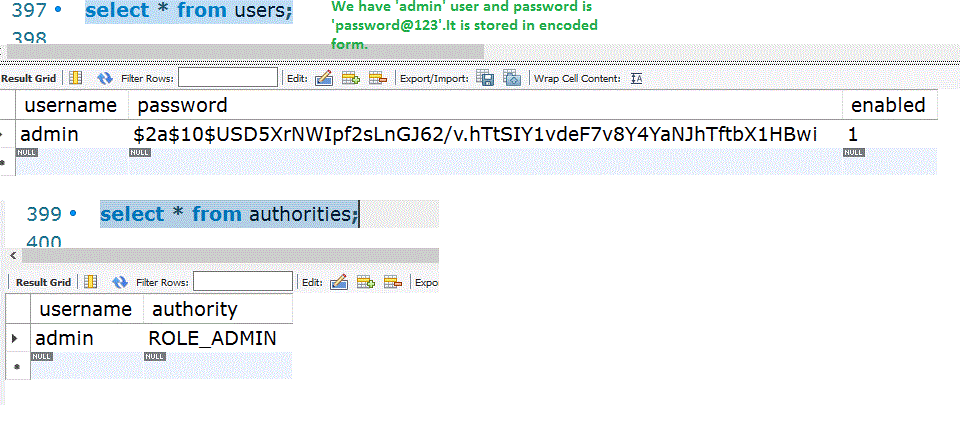
To get the encoded password, by using a sample code, we can get it:
Java `
import org.springframework.boot.SpringApplication; import org.springframework.boot.autoconfigure.SpringBootApplication; import org.springframework.security.crypto.bcrypt.BCryptPasswordEncoder;
//..... BCryptPasswordEncoder passwordEncoder = new BCryptPasswordEncoder(); // Specify the required password here String password = "password@123"; String encodedPassword = passwordEncoder.encode(password); //---
`
Step 4: Configure Database Connectivity
Create a database.properties file.
- Connects Spring Boot to MySQL.
- Provides credentials and connection details.
spring.datasource.url=jdbc:mysql://localhost:3306/your_database?useSSL=false&allowPublicKeyRetrieval=true&serverTimezone=UTC
spring.datasource.username=root
spring.datasource.password=yourpassword
spring.datasource.driver-class-name=com.mysql.cj.jdbc.Driver
Step 5: Create Application Configuration
Create a configuration class to define the DataSource bean.
- Establishes database connectivity.
- Makes the DataSource available throughout the application.
**ApplicationConfiguration.java:
Java `
import javax.sql.DataSource;
import org.apache.commons.dbcp2.BasicDataSource; import org.springframework.beans.factory.annotation.Autowired; import org.springframework.context.annotation.Bean; import org.springframework.context.annotation.Configuration; import org.springframework.context.annotation.PropertySource; import org.springframework.core.env.Environment;
@Configuration @PropertySource("classpath:database.properties") public class ApplicationConfiguration {
@Autowired private Environment environment;
@Bean public DataSource getDataSource() { BasicDataSource basicDataSource = new BasicDataSource(); basicDataSource.setDriverClassName(environment.getProperty("mysql.driver")); basicDataSource.setUrl(environment.getProperty("mysql.jdbcUrl")); basicDataSource.setUsername(environment.getProperty("mysql.username")); basicDataSource.setPassword(environment.getProperty("mysql.password")); return basicDataSource; } }
`
Step 6: Spring Security Configuration
Create a security configuration class and enable Remember Me functionality.
- Configure authentication and authorization.
- Enable form login.
- Enable Remember Me support.
**WebSecurityConfiguration.java:
Java `
import jakarta.sql.DataSource; import org.springframework.context.annotation.Bean; import org.springframework.context.annotation.Configuration; import org.springframework.security.config.annotation.authentication.configuration.AuthenticationManagerConfigurer; import org.springframework.security.config.annotation.web.builders.HttpSecurity; import org.springframework.security.core.userdetails.User; import org.springframework.security.core.userdetails.UserDetails; import org.springframework.security.core.userdetails.UserDetailsService; import org.springframework.security.provisioning.InMemoryUserDetailsManager; import org.springframework.security.crypto.bcrypt.BCryptPasswordEncoder; import org.springframework.security.crypto.password.PasswordEncoder; import org.springframework.security.web.SecurityFilterChain; import org.springframework.security.web.authentication.rememberme.JdbcTokenRepositoryImpl; import org.springframework.security.web.authentication.rememberme.PersistentTokenRepository;
@Configuration public class WebSecurityConfiguration {
private final DataSource dataSource;
public WebSecurityConfiguration(DataSource dataSource) { this.dataSource = dataSource; }
@Bean public SecurityFilterChain securityFilterChain(HttpSecurity http) throws Exception { http.authorizeHttpRequests(auth -> auth .requestMatchers("/login**").permitAll() .anyRequest().hasAnyRole("ADMIN", "USER") ) .formLogin(form -> form .loginPage("/login") .loginProcessingUrl("/loginAction") .permitAll() ) .logout(logout -> logout.logoutSuccessUrl("/login").permitAll()) .rememberMe(rememberMe -> rememberMe .rememberMeParameter("remember-me") .tokenRepository(persistentTokenRepository(dataSource)) ) .csrf(csrf -> csrf.disable());
return http.build();}
@Bean public UserDetailsService userDetailsService() { UserDetails user = User.withUsername("user") .password(passwordEncoder().encode("password")) .roles("USER") .build(); return new InMemoryUserDetailsManager(user); }
@Bean public PasswordEncoder passwordEncoder() { return new BCryptPasswordEncoder(); }
@Bean public PersistentTokenRepository persistentTokenRepository(DataSource dataSource) { JdbcTokenRepositoryImpl repo = new JdbcTokenRepositoryImpl(); repo.setDataSource(dataSource); return repo; }
}
`
**Note: The encoded password must be stored in the database.
Step 7: Spring MVC Configuration
Configure JSP view resolution.
- Maps logical view names to JSP files.
- Handles navigation between views.
**WebConfiguration.java:
Java `
import org.springframework.context.annotation.ComponentScan; import org.springframework.context.annotation.Configuration; import org.springframework.web.servlet.config.annotation.EnableWebMvc; import org.springframework.web.servlet.config.annotation.ViewControllerRegistry; import org.springframework.web.servlet.config.annotation.ViewResolverRegistry; import org.springframework.web.servlet.config.annotation.WebMvcConfigurer;
@Configuration @EnableWebMvc @ComponentScan(basePackages = { "com.gfg.spring.controller" }) public class WebConfiguration implements WebMvcConfigurer {
@Override public void configureViewResolvers(ViewResolverRegistry registry) { registry.jsp().prefix("/WEB-INF/views/").suffix(".jsp"); }
@Override public void addViewControllers(ViewControllerRegistry registry) { registry.addViewController("/login").setViewName("login"); } }
`
Step 8: Configure Servlet Initialization
Create an initializer class to load Spring configurations.
- Loads database configuration.
- Loads Spring Security configuration.
**MvcWebApplicationInitializer.java:
Java `
import org.springframework.web.servlet.support.AbstractAnnotationConfigDispatcherServletInitializer;
public class MvcWebApplicationInitializer extends AbstractAnnotationConfigDispatcherServletInitializer {
// Load database and spring security configuration @Override protected Class<?>[] getRootConfigClasses() { return new Class[] { ApplicationConfiguration.class, WebSecurityConfiguration.class }; }
// Load spring web configuration @Override protected Class<?>[] getServletConfigClasses() { return new Class[] { WebConfiguration.class }; }
@Override protected String[] getServletMappings() { return new String[] { "/" }; }
}
`
Step 9: Create Controller
The controller class to handle requests and display messages.
**SampleContoller.java:
Java `
import java.security.Principal; import org.springframework.stereotype.Controller; import org.springframework.ui.Model; import org.springframework.web.bind.annotation.GetMapping;
@Controller public class SampleContoller { @GetMapping("/") public String index(Model model, Principal principal) { model.addAttribute("message", "Welcome! You are logged by using " + principal.getName() + " username"); return "index"; } }
`
Step 10: Create JSP Views
**login.jsp:
- Username field
- Password field
- Remember Me checkbox
- Login button HTML `
<%@ page language="java" contentType="text/html; charset=ISO-8859-1" pageEncoding="ISO-8859-1"%> <%@taglib uri="http://www.springframework.org/tags" prefix="spring"%>
Spring SecuritySpring Security - Remember Me Example
Sample Login Form
| Username | |
| Password | |
| Remember me on this Computer | |
| Login |
`
**index.jsp- Displays:
- Welcome message
- Logged-in username
- Logout button HTML `
<%@ page language="java" contentType="text/html; charset=ISO-8859-1" pageEncoding="ISO-8859-1"%>
Spring SecuritySpring Security - Remember Me Example
${message}
`
Step 11: Build and Run the Application
As this is the maven project, first let us build the application from the command prompt as follows:
mvn clean install
**Output:
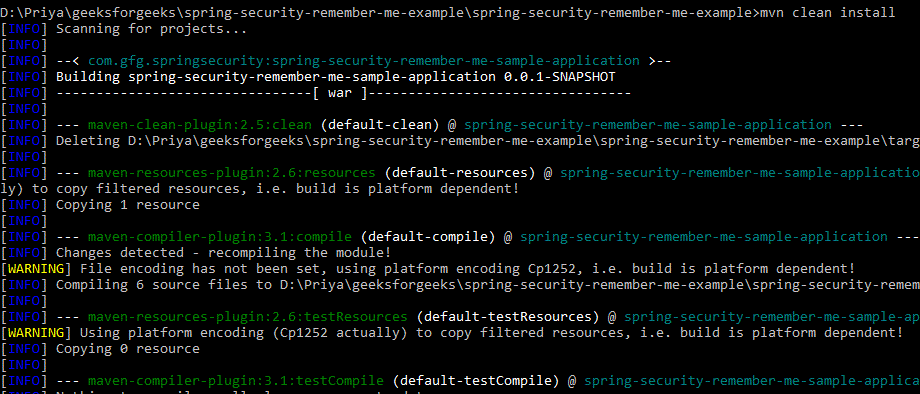
Run the application by using below command:
mvn jetty:run
**Output:
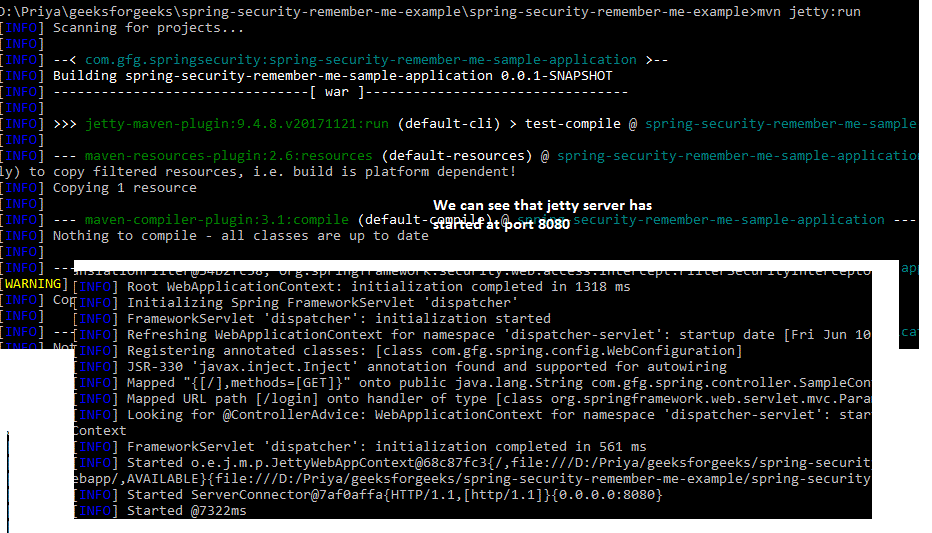
Step 12: Test the Remember-Me Feature
Let us test now by hitting -> **http://localhost:8080/
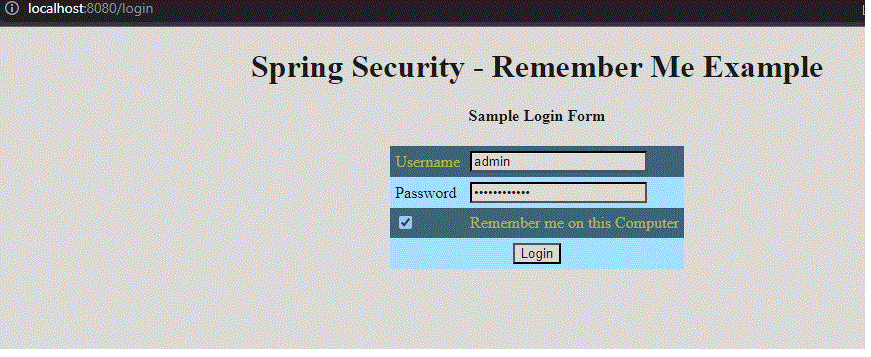
admin/password@123 has to be given as credentials. As it is the user available in the user's table and that password is kept in an encoded way. As the remember me option is selected, in the database, we can see an entry under 'persistent_logins'

At the same time, we can check the same under cookies as well. As the chrome browser is used, let us check that via chrome browser settings options
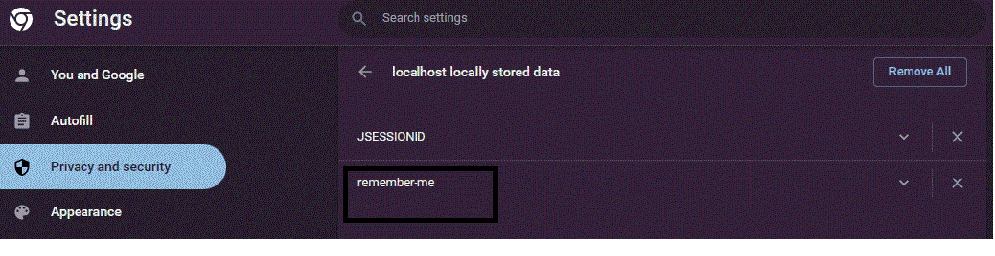
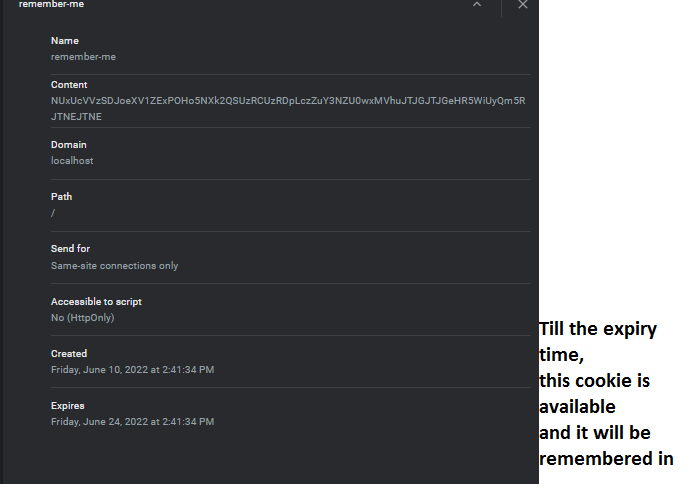
When the Remember Me option is selected, Spring Security stores authentication information in a cookie and saves a token in the database. As long as the cookie remains valid and is not deleted, users can close and reopen the browser and still be automatically logged in without entering their credentials again.
Advantages of Remember Me
- Improves user experience by reducing repeated logins.
- Enables automatic authentication across browser sessions.
- Supports secure token-based authentication.
- Persistent token approach provides better security.
- Useful for e-commerce, banking dashboards, and enterprise applications.